

Google Autocomplete Scraper: Keyword Suggestions
Pricing
from $0.03 / 1,000 saved suggestions
Google Autocomplete Scraper: Keyword Suggestions
Google Autocomplete suggestions for keyword research: find the phrases and questions people type for your seed keywords, by language and country. Expand with letters, question words or deeper levels and export each suggestion with its query and position.
Pricing
from $0.03 / 1,000 saved suggestions
Rating
0.0
(0)
Developer

Cliqto Media
Maintained by CommunityActor stats
0
Bookmarked
2
Total users
2
Monthly active users
11 days ago
Last modified
Security
Limited permissionsShare
Find keyword ideas and the questions people type into Google: enter seed keywords and get live Google Autocomplete suggestions for your language and country. Use them to plan articles, product pages and SEO keyword lists. Each saved row shows the suggestion, the Google query that returned it and its position in that response.
No Google account, API key or proxy is needed. A one-keyword run takes a few seconds and costs about $0.002: $0.001 per start + $0.05 per 1,000 saved suggestions (lower on higher Apify plans). Google can return an empty list. Requests can also fail or stop at a limit; check RUN_SUMMARY to see the reason.
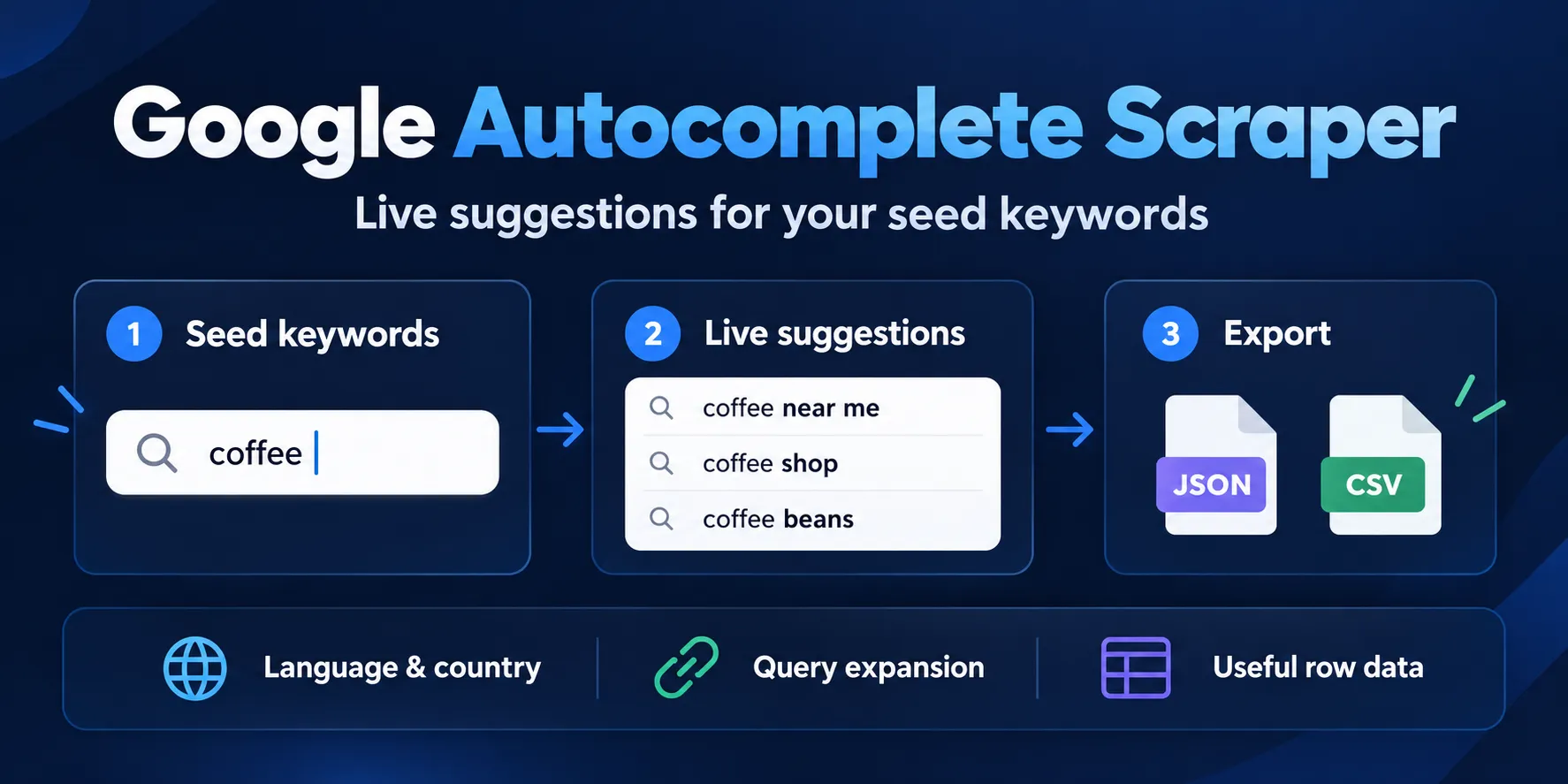
Table of contents
- What it does
- How it works
- Quick start
- Use cases
- Input
- Output
- Pricing
- Limits
- API, export and integrations
- Troubleshooting
- FAQ
- Related Actors
- Support
What it does
The Actor sends direct HTTPS requests to Google's public Autocomplete endpoint. No Google login, Google API key, browser or proxy setup is needed. This endpoint is not an official bulk API and may change.
Choose exact to send each seed as entered after space cleanup. You can also add letters, numbers or question prefixes. The Actor saves unique suggestions and keeps the first query that returned each one. Set maxDepth to 2 or 3 to search the returned suggestions again and collect long-tail phrases. Use languages and countries to search several locales in one run. Each row also shows how many of your queries returned it (surfaceCount).
Good fit
- Find phrases to review when you plan an article or product page.
- Compare suggestion lists for the same seed with different language and country preferences.
- Export suggestions with their seed and query for your own search interface research.
How it works
- You enter seed keywords and choose a language, a country and how to expand each seed (as is, with letters, numbers or question words).
- The Actor builds a bounded list of queries and asks Google Autocomplete for suggestions for each one. It does not open a browser. With
maxDepth2 or 3, each saved suggestion becomes a new query, one level at a time. - It removes duplicates and saves each unique suggestion as one Dataset row with its seed, query and position. A
RUN_SUMMARYrecord explains empty responses, errors and limits.
Quick start
-
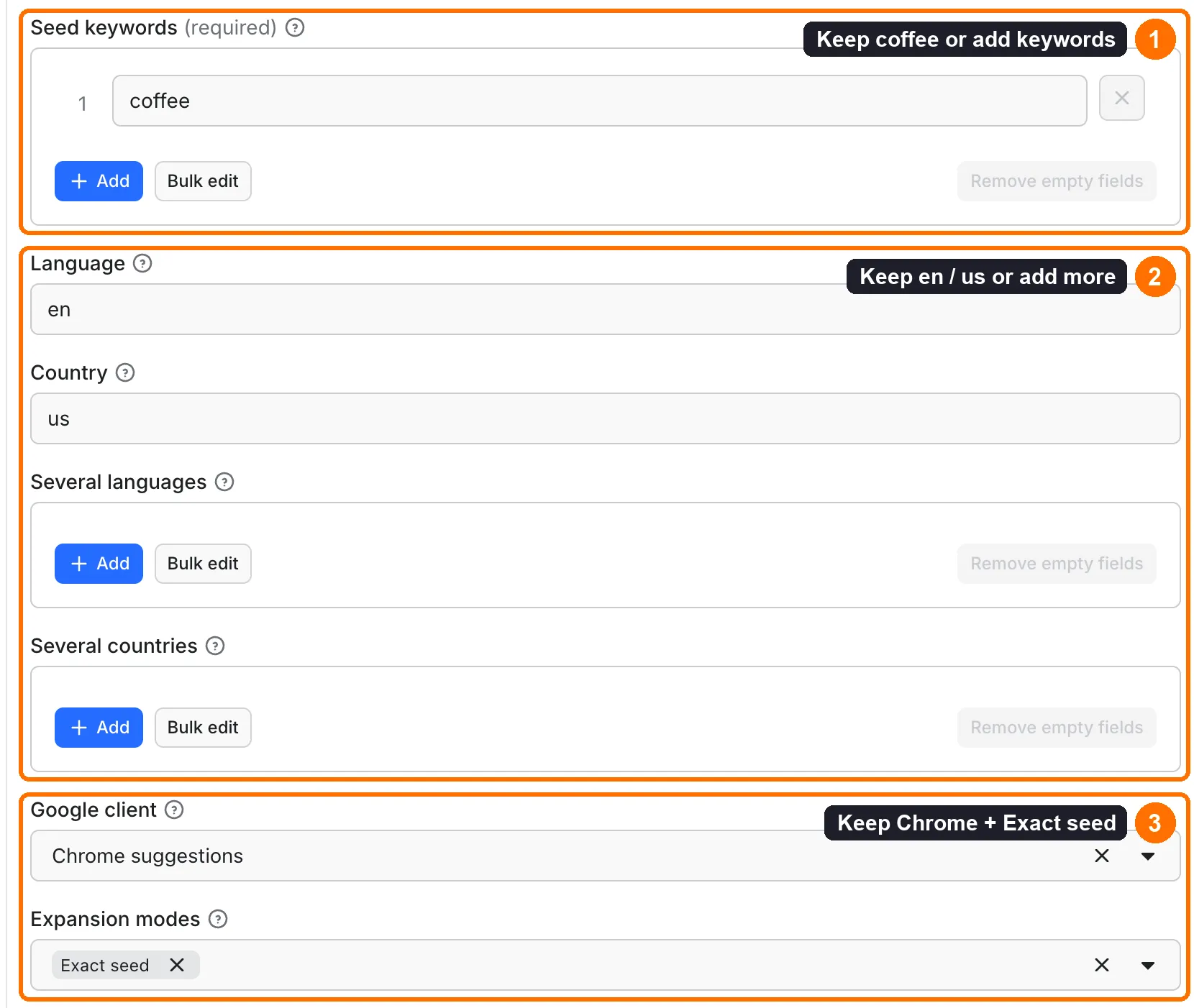
Open the Input tab. Keep the prefilled seed
coffeeor add your ownkeywords(box 1 in the picture). -
Keep
language: "en"andcountry: "us", or add up to 5 values tolanguagesandcountriesto compare markets (box 2). -
Keep
client: "chrome"andexpansionModes: ["exact"](box 3). Keep the prefillmaxResults: 100for the demo. Set a maximum cost per run in Apify if you need a platform charge cap. -
Click Start.
-
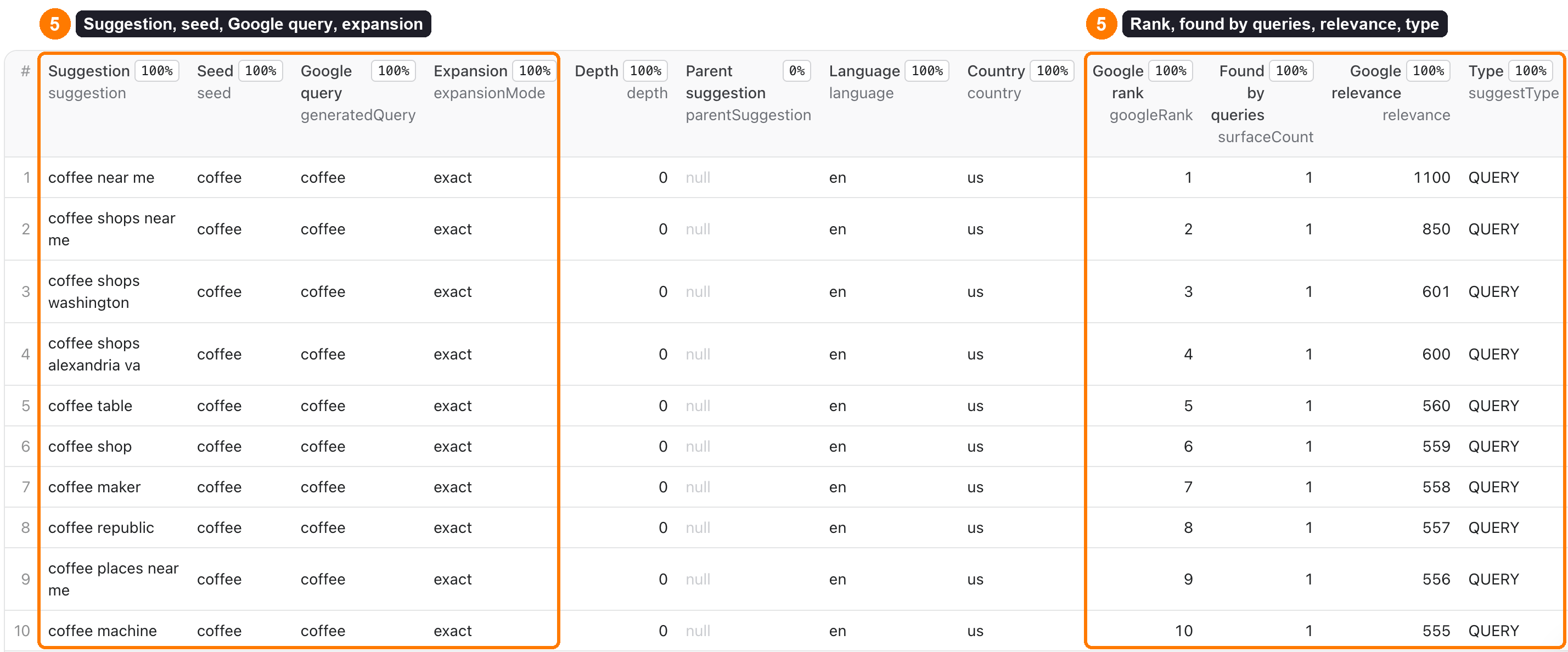
Open Output → Suggestions or the default Dataset. Check
suggestion,seed,generatedQueryandexpansionMode, thengoogleRank,surfaceCount(Found by queries),relevanceandsuggestType(box 5). Open Run summary for empty responses, errors and limits.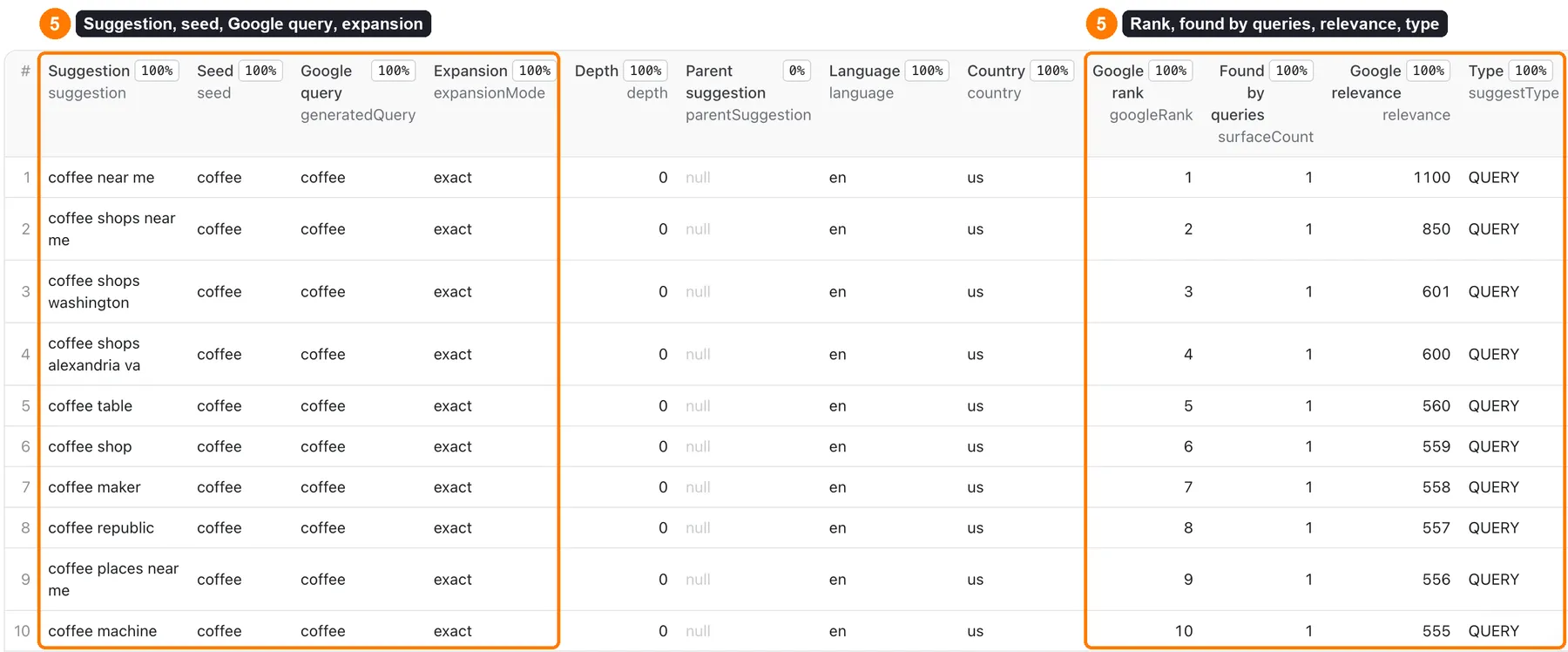
The form prefill is a demo. The runtime maxResults default is 500. An API input {} has no demo seed and fails validation. Console may restore your previously saved input; check it before starting.
Use cases
| Job | Settings | Fields to use | Next step |
|---|---|---|---|
| Keyword research for SEO | keywords, expansionModes: ["exact", "alphabet"] | suggestion, googleRank, surfaceCount, relevance | Sort by surfaceCount to see the phrases Google offers most often, then check volume in your SEO tool. |
| Find questions for blog posts and FAQs | expansionModes: ["exact", "questions"] | suggestion, generatedQuery, expansionToken | Turn the questions into article headings or FAQ entries. |
| Long-tail keyword ideas | maxDepth: 2 or 3 | suggestion, depth, parentSuggestion | Group phrases by the suggestion they grew from. |
| Compare searches by country and language | languages: ["en", "de"], countries: ["us", "de"] in one run | seed, language, country, googleRank, fetchedAt | Compare locales side by side; differences are not search-volume measurements. |
| Track how suggestions for your brand change | Schedule the same keywords | suggestion, googleRank, fetchedAt | Compare exports from different dates. |
Input
All input fields
There are no nested input objects. All fields except keywords are optional.
| Field | Type | Runtime default | New form prefill | Allowed values and effect |
|---|---|---|---|---|
keywords | array of strings; required | None | ["coffee"] | 1–100 seeds, each up to 120 Unicode characters. Trim spaces and join repeated whitespace. Keep punctuation and Unicode. |
language | string | "en" | "en" | Lowercase language code such as en, fr, ru, ja, pt-br. Two or three letters with an optional 2–8 character subtag. Sent as hl. |
country | string | "us" | "us" | Two-letter code such as us, gb, fr, ru, jp. Lowercased and sent as gl. |
languages | array of strings | None | None | Optional, up to 5 language codes. When set, it replaces language. Each seed is searched for every languages × countries pair. |
countries | array of strings | None | None | Optional, up to 5 two-letter codes. When set, it replaces country. Sent as gl; it does not change IP location. |
client | string | "chrome" | "chrome" | chrome or firefox. Lists and metadata can differ. No browser is launched. |
expansionModes | array of strings | ["exact"] | ["exact"] | At least one of exact, alphabet, numbers, questions. Repeated modes are used once. |
questionPrefixes | array of strings | ["how", "what", "where", "why", "when", "which"] | None | 1–20 nonempty prefixes, each up to 40 characters. Trimmed and lowercased. Used by questions. Validation still applies when that mode is off. |
maxGeneratedQueries | integer | 50 | 50 | 1–500 planned Google queries. Retries are extra HTTP attempts. |
maxDepth | integer | 1 | 1 | 1–3. 1: suggestions for your queries only. 2: also search each saved suggestion. 3: one more level. All levels share maxGeneratedQueries and maxResults. |
maxResults | integer | 500 | 100 | 1–5,000 saved unique rows. Stops additional row writes at the cap. |
maxRowsPerSeed | integer | 0 | None | 0–5,000. Stop saving new rows for one seed after this many, counted over all its languages and countries, in query order (not the strongest first); other seeds continue. 0 = no per-seed limit. Reported once per seed in outcomes; it does not change the run status. |
maxSuggestionsPerQuery | integer | 0 | None | 0–15. Keep only the first N suggestions of each Google response. 0 keeps all (Google sends up to about 10–15). |
maxConcurrency | integer | 4 | 4 | 1–8 simultaneous requests. Does not change row order. |
requestTimeoutMillis | integer | 8,000 | None | 1,000–30,000 ms per request attempt, also bounded by the remaining source deadline. |
maxRetries | integer | 1 | None | 0–2 retries for network, timeout and transient server errors. Blocks, redirects, rate limits and invalid payloads are not retried. |
maxResponseBytes | integer | 65,536 | None | 1,024–262,144 bytes per response. An oversized response is a technical failure. |
maxRunTimeSeconds | integer | 240 | None | 5–300 seconds for source work. A shorter platform deadline also applies, with time reserved for saving output. A larger platform timeout does not extend this input limit. |
includeRawMetadata | boolean | true | None | Keep Google metadata when available. false saves {} in metadata. |
maxChargeUsd | number | None | None | Form range: 0.00005–1.50 USD. Optional estimate cap for saved suggestion events. It does not cap platform usage or source requests. |
For older API callers, seedKeywords remains an alias when keywords is absent. Runtime also accepts a comma- or newline-separated string for either seed field. The form uses an array. API numeric settings also accept numeric strings. Unknown extra keys have no runtime effect; the form schema disallows them.
Missing seeds, an empty array, a batch over 100 entries, non-string seeds or invalid settings produce a failed summary before any Google request. Empty-after-trimming or overlong seeds are recorded individually as invalid_input. Valid seeds in that batch can still run; invalid-only batches save no suggestion rows. Blank language/country/client values use their defaults. Optional numeric null values use their defaults.
Interacting settings
| Setting | Behavior |
|---|---|
| Expansion | exact: the seed; alphabet: seed + space + a–z; numbers: seed + space + 0–9; questions: prefix + space + seed. Queries over 150 characters are skipped and reported. |
| Query cap | Seeds take turns: the first query of every seed, then the second of every seed, and so on; within a seed, modes follow the selected order. Each query is planned for every language and country pair before the next query. Keep at most maxGeneratedQueries, so a small cap still reaches every seed. A query-plan limit gives stopped, even if all retained requests succeed. |
| Depth | Level 0 is your planned queries. Each new suggestion saved at one level is sent as an exact query at the next level, in save order. A query already sent for the same seed is not sent again. Deeper levels use what is left of maxGeneratedQueries, shared between seeds in turn (one query per seed per round), so every seed gets deeper queries before the budget runs out. Within one seed, deeper queries follow save order, so with several locales and a small budget the first locale can get more of them; when it runs out, the summary is stopped. A row or charge cap ends recursion. A suggestion longer than 150 characters is not sent as a next-level query; it is skipped, reported in outcomes and does not change the run status. |
| Row / charge cap | Requests are fetched before rows are saved. A low maxResults or maxChargeUsd does not reduce that query plan. Keep the query cap small too. |
| Several languages / countries | Every pair is a separate set of requests, so 2 languages × 2 countries uses 4 times the queries of one locale. All pairs share maxGeneratedQueries. Rows are kept per locale. |
| Duplicate seeds or expansion paths | Dedupe suggestions within the same normalized seed, language, country, client and surface. Keep the first query's provenance; later queries that return the same suggestion add to surfacedByQueries, surfaceCount and bestGoogleRank of that row at no extra charge. Repeats are still counted after maxResults or maxChargeUsd stops saving new rows. The same suggestion under another seed can be a separate row. |
| Request completion | Save rows in query-plan order, then Google response order. Concurrent completion order does not change grouping. |
Example: three seed keywords
This input produced the output example below in a live Cloud run:
The observed run saved 30 rows. That count is an example, not a promise for another run. Each row's seed and generatedQuery identify its input.
Example: bounded question expansion
This plans coffee, how coffee and what coffee. It does not expand their results again. More queries can add source work and saved-row charges.
Output
Dataset fields
Each row is a saved useful suggestion. Error and empty outcomes are in RUN_SUMMARY, not extra Dataset rows. The runtime emits all fields below.
| Field | Type | Meaning / empty values |
|---|---|---|
id | string | Synthetic sug_ ID from normalized suggestion and first saved query/context. Google supplies no suggestion ID. Stable for the same text and path; a different first path can change it. |
suggestion | string | Google suggestion text after JSON decoding. No HTML extraction, translation or scoring is applied. |
normalizedSuggestion | string | Trimmed text with joined whitespace and lowercase letters, used for dedupe. |
seed | string | Accepted seed after whitespace cleanup. |
normalizedSeed | string | Seed used for planning; same whitespace cleanup, not lowercased. |
generatedQuery | string | Exact query sent to Google. |
expansionMode | string | exact, alphabet, numbers or questions. |
expansionToken | string or null | Added letter, number or question prefix. null for exact. |
depth | integer | 0 for your planned queries, 1–2 for recursive levels (maxDepth 2–3). |
parentSuggestion | string or null | Suggestion that was searched to get this row; equals generatedQuery on recursive levels. null at depth 0. |
language | string | Requested hl; not detected result language. |
country | string | Requested gl; not a measured user or IP location. |
client | string | chrome or firefox. |
surface | string | Always web. |
googleRank | integer | One-based position in this query's suggestion response. It is not a website search ranking. Dedupe can leave gaps. |
bestGoogleRank | integer | Best (lowest) position of this suggestion across all queries that returned it. |
surfaceCount | integer | Number of different queries of this seed and locale whose response contained this suggestion. Higher means Google offers it more often; it is not search volume. |
surfacedByQueries | array of strings | Those queries, first one first, up to 20. |
relevance | number or null | Google relevance score from the chrome response (suggestrelevance). Undocumented, compare only within one response. null for firefox. |
suggestType | string or null | Google suggestion type such as QUERY (suggesttype). null for firefox. |
sourceUrl | string | Fixed Google HTTPS origin and parameters. q is <redacted>; use generatedQuery for your query provenance. |
sourceRequestId | string | Synthetic req_ ID for seed index, query and context. Moving a seed in the input can change it. |
fetchedAt | ISO UTC string | Time the row was assembled after source work; not the time a suggestion was first created by Google. |
metadata | object | Per-suggestion google: metadata with the prefix removed. Keys/values can change; missing values can be null. {} when unavailable or disabled. Relevance/type/subtype values are undocumented, not search volume. |
duplicateOf | string or null | null in current output. Duplicate rows are skipped. |
Output surfaces and run summary
| Surface | What it contains |
|---|---|
| Default Dataset | Full suggestion rows. The Suggestions view shows selected columns. Use the full Dataset API/export for all fields. |
Output → suggestions | A generated link to the Dataset Suggestions view. |
Output → runSummary | A generated link to the KVS RUN_SUMMARY JSON record. |
KVS INPUT | The input saved for the run. |
KVS RUN_SUMMARY | Final input, status, limits, counters, timing, event estimate and non-row outcomes. |
The output schema generates the two links. The Actor does not write a separate OUTPUT record. An absent OUTPUT record is expected.
RUN_SUMMARY has these fields:
| Field / group | Contents |
|---|---|
schemaVersion, status, verdict | Version 1, status succeeded / partial / stopped / failed, and a short explanation. |
startedAt, finishedAt, durationMs, input | ISO UTC times, milliseconds and normalized input fields listed above. |
limits | Booleans: maxGeneratedQueriesReached, maxResultsReached, maxChargeReached, maxRunTimeReached. Query-length skips share the generated-query limit flag. |
counts | receivedSeeds, validSeeds, invalidInputs, generatedQueriesPlanned, generatedQueriesSkipped, attemptedRequests, savedSuggestions, duplicatesSkipped, emptyResponses, technicalFailures, retries, bytesDownloaded. Logical requests and retries are separate; bytes include retry response bodies. |
performance | timeToFirstUsefulRowMs is time to the first assembled row after fetching the plan, not first persisted output. Source latency: p50SourceLatencyMs, p95SourceLatencyMs; usefulSuggestionsPerMinute uses core duration. Values can be null when no row/request exists. |
pricing | Suggestion-event fields: eventName, pricePerSuggestionUsd, chargeableEvents, row-only estimatedChargeUsd, maxChargeUsd (number or null), chargingApplied (boolean). When the standard start event is active, platformStart reports its automatic estimate and estimatedTotalChargeUsd includes start plus rows. These are estimates, not a customer invoice. |
source | host, transport, client, language and country (first values), languages, countries (all values), parserVersion. |
outcomes | Non-row outcomes with kind, message, and optional seed, generatedQuery, sourceRequestId, count, statusCode. Optional fields can be absent. Your queries are kept here for your own run analysis. |
warnings | Completeness, affiliation and charging notices. |
Output example
This is one full row from a Cloud run with languages: ["en", "de"], countries: ["us", "de"] and expansionModes: ["exact", "alphabet"]. Two queries returned it, so surfaceCount is 2. Suggestions and their positions may change.
Empty, partial and failed output
succeeded: all retained planned requests completed. An empty Dataset withemptyResponses > 0can be a valid result.partial: some seeds or source requests failed. Useful rows from other queries remain available.stopped: a query, length, row, charge or time limit prevented further work or writes. Already fetched requests remain in the counters.failed: invalid-only input, resource error, technical failure or internal error prevented useful output. Checkoutcomes.
The Apify run status and RUN_SUMMARY.status are separate. A completed process can be SUCCEEDED while the summary reports failed or stopped. Check the Dataset and the summary.
Pricing
The price is $0.001 per Actor start + $0.00005 per saved unique suggestion: $0.05 per 1,000 rows. Higher Apify plans pay less per row:
| Apify plan | Price per saved suggestion | Per 1,000 rows |
|---|---|---|
| Free | $0.00005 | $0.050 |
| Bronze | $0.000045 | $0.045 |
| Silver | $0.00004 | $0.040 |
| Gold and higher | $0.000035 | $0.035 |
Apify charges the standard start event automatically. The start fee scales with run memory: one start event per GB, minimum one. With the default 256 MB, and anywhere in this Actor's 256–1,024 MB range, that is one start event ($0.001). Empty and invalid-only runs still have the start charge. Duplicates, invalid seeds, empty lists and failed requests have no suggestion-event charge. Partial runs pay the start charge plus only the rows saved before completion or a cap. You do not pay platform usage separately.
Cost examples at the Free plan price:
| Scenario | Saved suggestion events | Actor event charge |
|---|---|---|
| Three-seed exact run with 30 rows | 30 | $0.00250 |
| Example one-seed run with 15 saved rows | 15 | $0.00175 |
| Valid empty or invalid-only run | 0 | $0.00100 |
| Partial/limited run with 2 saved rows | 2 | $0.00110 |
| 1,000 saved rows in one run | 1,000 | $0.05100 |
| Maximum 5,000 saved rows in one run | 5,000 | $0.25100 |
coffee with maxDepth: 3 and 500 queries (about 2,800 rows) | 2,783 | $0.14015 |
These amounts include one start and the saved suggestion events. Check Console's cost details for the applied price and plan rules.
For a cap on total Actor charges, use Apify's maximum cost per run (maxTotalChargeUsd in API calls); the minimum is $0.00105 for one start and one suggestion. maxChargeUsd is a separate estimate for suggestion events only, excluding the start; it uses the per-row price of your Apify plan. RUN_SUMMARY.pricing.estimatedChargeUsd preserves that row-only meaning; when the start event is active, platformStart and estimatedTotalChargeUsd show the additional start estimate and total. These estimates are not a customer invoice. Neither limit guarantees every planned query will run or every returned suggestion will be saved.
Limits
- Returns Google Search suggestions only. No search results, website rankings, search volume, CPC, Google Ads data or AI-generated keywords. No YouTube, Amazon, Places or Maps. Recursion goes at most 3 levels deep.
- Suggestions change with time, location, language and Google's filters. Country and language are request preferences: they do not set the request's IP location or guarantee a language for every result. Google explains how Autocomplete works.
- No complete keyword list and no SEO ranking prediction. The Google endpoint is public but not an official bulk API and may change.
- Hard limits: 100 seeds, 120 characters per seed, 150 per generated query, 500 planned queries, 5,000 saved rows, concurrency 8, two retries and 262,144 bytes per response.
- Default memory is 256 MB; 256–1,024 MB is supported. A larger platform timeout keeps the internal source limit unchanged.
- No output-text filter and no stateful unchanged/delta mode.
API, export and integrations
- API: use the Actor's API tab to start a run with the same input fields and read its default Dataset after it finishes. Keep your Apify API token in a private credential store, not in shared links or input examples.
- Export: JSON or CSV from Console. Use
suggestion,seedandgeneratedQueryas the next step's text fields. Keepid, locale andfetchedAtwhen comparing snapshots. - Scheduling: Apify can schedule runs. Each run creates a fresh snapshot; this Actor does not keep a change baseline, so repeated runs can return and charge the same current suggestions. No schedule is enabled by using this Actor.
Use with AI agents (MCP)
- MCP server with only this Actor:
https://mcp.apify.com?tools=cliqtomedia/google-autocomplete-scraper. - Smallest useful input:
{"keywords": ["coffee"], "language": "en", "country": "us"}. - For long-tail phrases add
"maxDepth": 2(or 3) and raisemaxGeneratedQueriesandmaxResults; one seed at depth 3 can return about 2,800 rows. - Several locales in one run:
"languages": ["en", "de"], "countries": ["us", "de"]. Keep a keyword list short withmaxRowsPerSeed. - Key output fields:
suggestion(the suggested phrase),seed(your keyword),generatedQuery(the exact query sent),googleRank(position in that response),surfaceCount(how many queries returned it),depth,parentSuggestionandRUN_SUMMARY.status(succeeded,partial,stoppedorfailed). - A one-keyword exact run usually finishes in a few seconds with about 15 rows and costs about $0.002. Respect the hard limits above; keep
maxGeneratedQueriessmall when you need few requests.
Troubleshooting
| Symptom | What to check | Safe next action |
|---|---|---|
| Empty Dataset | status, emptyResponses, technicalFailures, outcomes | Try a clear public seed only when the summary confirms a valid empty response. |
invalid_input | Seed count/length and allowed settings | Correct the input; do not add a login or token. |
blocked_or_consent, rate_limited | Access denial, HTML or redirects | Stop repeated runs. Retry later with a small query plan and lower concurrency. |
malformed_response | Unexpected JSON, suggestion types or a different echoed query | Share the run ID with support. Do not treat it as an empty suggestion list. |
retry_exhausted | Timeout/network/server failure after bounded attempts | Use fewer queries or lower concurrency; check the summary before retrying. |
response_too_large | Response size exceeded maxResponseBytes | Check for source drift; increase the byte cap only within the documented range. |
stopped with useful rows | limits and outcomes | Export the rows already saved. Increase only the specific limit you need. |
resource_error | Memory outside 256–1,024 MB | Choose supported memory. This is separate from invalid input. |
| Different suggestions on repeat | Time, locale, client and query paths | Compare snapshots, not a promised permanent keyword set. |
FAQ
Do I need a Google account or Google API key?
No. An Apify account is needed to run the Actor. No Google credentials are used.
Are these search volumes or Google Search rankings?
No. googleRank is a position inside an Autocomplete response. Metadata does not provide verified search volume, CPC or competition.
Can I use non-English keywords?
Yes. Unicode is kept, including Cyrillic and accented text. Set the requested language and country. Google can still return suggestions in another language.
Are country results exact local results?
No. country and countries send gl; they do not change IP location, so two countries can return the same list. Results can also depend on Google's current behavior.
Will a repeat run have the same IDs and order?
The same saved text and first query/context have the same synthetic ID. Query-plan grouping is deterministic. Google's suggestion text and order can change, and a different first expansion path can change an ID.
Why did a low row limit still make several requests?
The Actor fetches its bounded query plan before saving rows. Lower maxGeneratedQueries when you also need fewer source requests.
Do empty runs cost nothing?
No. The $0.001 start event still applies. There is no suggestion event when no useful row is saved. Check the actual cost breakdown in Console.
Can it expand suggestions recursively?
Yes. Set maxDepth to 2 or 3. Each saved suggestion is searched again, and new rows show depth and parentSuggestion. Raise maxGeneratedQueries and maxResults for deeper runs: every level shares those limits.
Can it monitor changes?
It can export repeated snapshots, but it has no built-in delta state or unchanged-result filter. Compare exported snapshots in your own workflow.
Related Actors
- Google Search Results Scraper — check which pages rank in Google for the suggestions you found.
- Google Trends Scraper — compare interest over time and by region for your best phrases.
- DuckDuckGo & Bing Search Scraper — see results for the same phrases outside Google.
- Google Ads Transparency Scraper — see which advertisers run ads on topics from your keyword list.
Support
Open an issue in this Actor's Apify Issues tab. Include the run ID, selected mode, non-sensitive input settings and the relevant RUN_SUMMARY outcome. Remove private keywords if needed. Never share API tokens, cookies, account or billing details.
This project is not affiliated with, endorsed by, or sponsored by Google. The Google name identifies the source.


