
Weather Forecast & Alerts Export (NWS + MET Norway)
Pricing
from $1.40 / 1,000 location forecasts
Weather Forecast & Alerts Export (NWS + MET Norway)
Hourly or daily weather forecasts for up to 10 coordinates from the US National Weather Service and MET Norway, plus active NWS weather alerts for US points. UTC and local times, units, provider and update time on every row.
Pricing
from $1.40 / 1,000 location forecasts
Rating
0.0
(0)
Developer

Cliqto Media
Maintained by CommunityActor stats
0
Bookmarked
2
Total users
1
Monthly active users
5 days ago
Last modified
Categories
Security
Limited permissionsShare
Get hourly or daily weather forecasts for up to 10 coordinates in one table: US points come from the US National Weather Service (NWS), all other points from MET Norway, and active NWS weather alerts for US points come as separate rows. No API key or login. A typical run with 3 locations finishes in about 5 seconds and costs $0.008.
Use it when you need forecasts for several places (offices, warehouses, event venues, travel stops) in one Dataset, with the provider, model, units, UTC and local time and the source update time on every row.
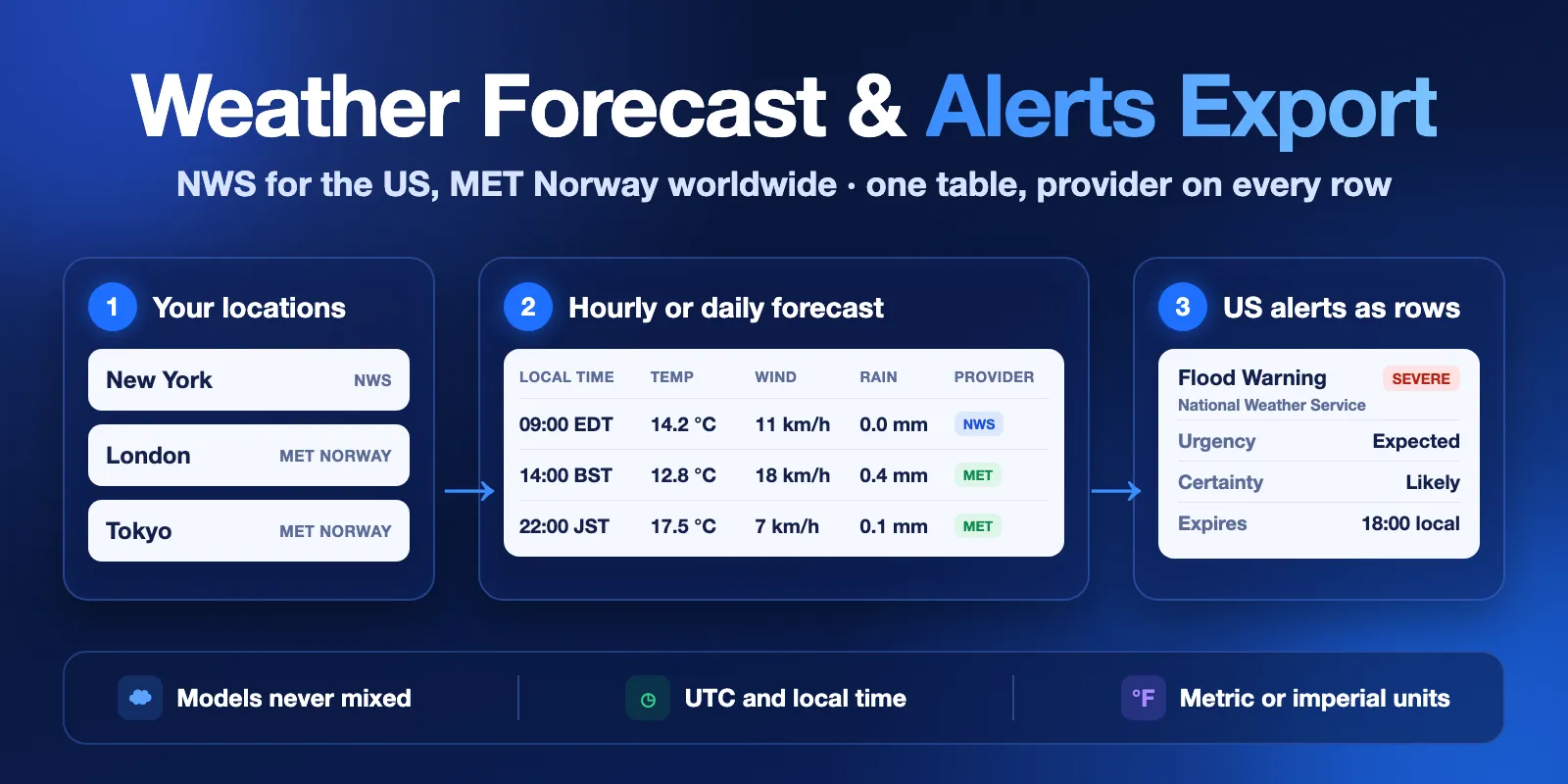
Table of contents
- What it does
- Quick start
- Use cases
- Input
- Output
- Pricing and limits
- API, export and integrations
- Troubleshooting
- FAQ
- Data sources and licences
- Support
What it does
You give a list of locations (name, latitude, longitude). For each location the Actor:
- chooses one provider: NWS (api.weather.gov) for the United States and its territories, MET Norway Locationforecast 2.0 (api.met.no) for the rest of the world;
- returns hourly rows (1–48 hours) or daily rows (1–7 days) in metric or imperial units;
- for US points, returns each active NWS alert (for example a Flood Warning) as a separate row.
One location always uses one provider. The Actor never mixes two models in one location and never fills gaps from another source. All values are forecasts, not observations.
Good fit
- A dashboard or report that needs the next 24–48 hours for several sites.
- A travel or event plan: daily min/max temperature, rain and wind for 7 days.
- A US operations check: “is there an active NWS warning at this site right now?”
- An AI agent that needs a small, typed forecast table for a few coordinates.
Not a fit / limits
- No current conditions, observations or historical weather.
- Not more than 10 locations per run and 48 hours / 7 days ahead.
- Alerts only for US points (NWS). For other points
alertsStatusisnot_available. - This is not an emergency warning service. Always follow official local warnings.
Quick start
- Open the Input tab. The form already has New York, London and Tokyo.
- Keep Hourly, 24 hours and Include NWS alerts.
- Click Start.
- Open the Forecast table view of the Dataset. You get 72 forecast rows: 24 hours × 3 locations (plus alert rows if New York has active alerts). New York rows say
provider: "nws", London and Tokyo rows sayprovider: "met-norway".
Expected result: one row per location and hour, plus one row per active NWS alert for New York (often none).
Use cases
| Buyer job | Input path | Output entity | Key fields | Next integration |
|---|---|---|---|---|
| Next-day weather for several offices | locations, granularity: hourly, hours: 24 | hourly forecast row | forecastTimeLocal, temperature, precipitationAmount, windSpeed | Google Sheets, BI dashboard |
| 7-day plan for travel stops | granularity: daily, days: 7 | daily forecast row | date, temperatureMin, temperatureMax, summary | travel itinerary, email |
| Warning check for US sites | US locations, includeAlerts: true | alert row | event, severity, urgency, expires, areaDesc | Slack or email via webhook |
| Forecast table for an AI agent | 1–3 locations | forecast row | provider, model, units, forecastTimeUtc | MCP tool call |
Input
Input fields
| Field | Plain name | Type | Required | Default / prefill | Allowed values | Effect | Example | Recommendation |
|---|---|---|---|---|---|---|---|---|
locations | Locations | array | yes | prefill: New York, London, Tokyo | 1–10 items; { "name", "lat", "lon" } or "lat,lon"; lat −90…90, lon −180…180 | which points get a forecast | [{"name":"Denver","lat":39.7392,"lon":-104.9903}] | Give each point a name: it is copied to every row |
provider | Provider | string | no | auto | auto, nws, met | auto = NWS in the US, MET Norway elsewhere | "met" | Keep auto. nws outside the US gives not_supported, not a forecast |
granularity | Hourly or daily | string | no | hourly | hourly, daily | row type | "daily" | Daily for plans, hourly for operations |
hours | Hours ahead | integer | no | 24 | 1–48 | hourly rows per location | 48 | Only used when granularity is hourly |
days | Days ahead | integer | no | 7 | 1–7 | daily rows per location | 3 | Only used when granularity is daily |
includeAlerts | Include NWS alerts | boolean | no | true | true / false | active NWS alerts for US points | false | Turn off if you only need forecasts |
units | Units | string | no | metric | metric (°C, mm, km/h), imperial (°F, in, mph) | units of all numbers | "imperial" | The units object on every row says what you got |
useCache | Use cache | boolean | no | true | true / false | reuses still-fresh provider answers (by the provider's own expiry time) | false | Keep true. MET Norway asks clients to cache |
Empty input ({}) is invalid: locations is required. In the Console form the prefill is already filled in.
Two locations with the same coordinates (rounded to 4 decimals) are processed and charged once; the run summary has a warning.
Interacting settings
| When | Input A | Input B | Effective behavior |
|---|---|---|---|
| Point outside the US | provider: nws | any location | location_error row with status: not_supported, no charge |
| Point in the ocean near the US | provider: auto | ocean coordinates | NWS has no grid there, so MET Norway is used |
| Daily rows | granularity: daily | hours | hours is ignored; days is used |
| Non-US point | includeAlerts: true | MET Norway location | no alert lookup; alertsStatus: not_available |
Input examples
Three cities, next 24 hours (the prefill)
Expected output: 72 forecast rows, plus alert rows if New York has active alerts. Cost: $0.008 plus $0.0005 per alert row.
US sites, 7 days, imperial units
Expected output: 14 daily rows with temperatureMin / temperatureMax in °F, wind in mph, precipitation in inches.
Output
All rows go to one Dataset. The rowType field tells you what a row is:
forecast— one hour or one day for one location;alert— one active NWS alert for one US location;location_error— a location that got no forecast, with the reason.
The Dataset has two views: Forecast table and Alert columns. Views choose columns, not rows: both show every row, and the first column rowType tells you the row kind. To get only one kind, filter by rowType. The key-value store has ALERTS (only the alert rows, as one JSON array) and RUN_SUMMARY (status, counts, warnings and sources).
Output fields — forecast rows
| Field | Meaning | Type | Can be empty? | Example / enum |
|---|---|---|---|---|
rowType | row type | string | no | forecast |
locationName, latitude, longitude | the location from your input | string, number | name can be the coordinates | New York, 40.7128, −74.006 |
provider | data source for this location | string | no | nws, met-norway |
model | forecast product | string | no | NWS gridpoint forecast OKX/33,42 |
timeZone | IANA time zone of the point | string | rarely | America/New_York |
granularity | hourly or daily | string | no | hourly |
date | local date of the row | string | no | 2026-10-12 |
forecastTimeUtc, forecastTimeLocal | start of the hour or day covered | string (ISO 8601) | no | 2026-10-12T12:00:00Z, 2026-10-12T08:00:00-04:00 |
periodEndUtc | end of the period | string | no | 2026-10-12T13:00:00Z |
summary | short weather text (MET daily: around midday) | string | yes | Mostly Cloudy |
symbolCode | MET Norway weather symbol | string | yes (NWS: null) | cloudy |
temperature | air temperature (hourly) | number | yes; daily: null | 16.1 |
temperatureMin, temperatureMax | daily min / max | number | hourly: null | 15, 17.3 |
apparentTemperature | “feels like”, only when the provider gives it | number | yes; daily: null | 16.1 |
dewPoint, relativeHumidity | dew point, humidity % | number | yes | 13.9, 87 |
precipitationAmount | precipitation for the provider period | number | yes | 0 |
precipitationPeriodStartUtc, precipitationPeriodEndUtc | the period precipitationAmount covers | string | yes | NWS: 6-hour period |
precipitationProbability | chance of precipitation % | number | yes | 3 |
windSpeed, windGust, windDirection, windDirectionCardinal | wind | number, string | yes | 24.1, 31.5, 10, N |
cloudCover | cloud cover % | number | yes | 72 |
detailedForecast | NWS text forecast (daily) | string | yes | Partly sunny, with a high near 68. |
coverageHours | forecast hours that went into the row | number | no | 1 (hourly), up to 24 (daily; MET Norway days far ahead use 6-hour steps and can show 18–23) |
alertsStatus | alert lookup result | string | no | checked, not_requested, not_available, error |
activeAlertCount | number of active NWS alerts | number | yes (not checked = null) | 0 |
units | unit of each quantity | object | no | {"temperature":"°C","precipitation":"mm","windSpeed":"km/h",…} |
sourceUpdatedAt | when the provider last updated this forecast | string | yes | 2026-10-12T10:26:40+00:00 |
fetchedAt | when this Actor got the data | string | no | 2026-10-12T12:03:30.873Z |
sourceUrl | provider URL for this data | string | no | https://api.weather.gov/gridpoints/OKX/33,42 |
attribution | required credit for the source | string | no | Data from MET Norway (api.met.no) … |
null means the provider did not give this value. 0 means the provider gave zero. They are different.
NWS hourly precipitation comes in 6-hour periods. Every hourly row in the period repeats the period value and shows the period in precipitationPeriodStartUtc / precipitationPeriodEndUtc. Do not sum NWS hourly rows.
Daily output starts today when at least 6 forecast hours of today remain, otherwise tomorrow. A daily row for today covers only the rest of the day (coverageHours can be less than 24).
For MET Norway daily rows, summary and symbolCode describe the weather around midday, not the whole day. Use precipitationAmount, temperatureMin and temperatureMax for the full day.
Output fields — alert rows
| Field | Meaning | Type | Example |
|---|---|---|---|
alertId | NWS alert ID | string | urn:oid:2.49.0.1.840.0… |
event, headline | alert type and headline | string | Flash Flood Warning |
severity, certainty, urgency | CAP fields | string | Severe, Likely, Immediate |
status, messageType, category, response | CAP fields | string | Actual, Alert, Met, Avoid |
areaDesc, senderName | area and NWS office | string | Coconino, AZ, NWS Flagstaff AZ |
sent, effective, onset, expires, ends | times (ISO 8601, local offset) | string, can be null | 2026-10-12T11:15:00-07:00 |
description, instruction | full NWS text | string, can be null |
Alert rows also have locationName, latitude, longitude, provider, sourceUrl, sourceUpdatedAt (= sent), fetchedAt and attribution.
Output entities and surfaces
| Situation | Where | What you see |
|---|---|---|
| Normal location | Dataset, view Forecast table | forecast rows |
| Active US alert | KVS ALERTS (only alerts); Dataset rows with rowType: alert (view Alert columns) | alert rows |
| No active alerts | forecast rows | alertsStatus: checked, activeAlertCount: 0; no alert rows |
Location not covered (provider: nws outside the US) | Dataset (status, errorMessage columns in Forecast table) | location_error row, status: not_supported; run status NO_RESULTS if no location is covered |
| Source error | Dataset, RUN_SUMMARY | location_error row, status: error; run status PARTIAL or ERROR |
Output example (hourly, NWS)
Trimmed: temperatureMin, temperatureMax and detailedForecast are null in this row.
Output example (location error)
Run statuses
RUN_SUMMARY.status and the run status message use these values:
COMPLETE— every location has a forecast;PARTIAL— some locations failed or are incomplete (seelocation_errorrows);NO_RESULTS— no errors, but no location is covered by the chosen provider;CAPPED— the run stopped at your maximum charge;ERROR— every location failed, or a technical error; the run fails;INVALID_INPUT— the input is wrong; the run fails before any request.
Pricing and limits
Pricing unit
This Actor uses pay-per-event pricing. You pay for:
| Event | When | Price |
|---|---|---|
| Actor start | once per run (per 1 GB of memory; default 256 MB = 1 start) | $0.002 |
| Location forecast | once per location that got forecast rows | $0.002 (lower on Bronze, Silver and Gold plans) |
| Alert row | once per NWS alert row | $0.0005 |
Platform usage is included. You do not pay for a location with not_supported or error, or for duplicate locations. A run where no location is covered costs only the start. A run with invalid input fails before any request and costs only the start.
Cost examples
| Scenario | Input | Events | Price (Free plan) |
|---|---|---|---|
| One location, 24 hours | 1 location | start + 1 location | $0.004 |
| Prefill | 3 locations, hourly 24 | start + 3 locations | $0.008 |
| Maximum | 10 locations, hourly 48 | start + 10 locations | $0.022 |
| 7-day plan | 10 locations, daily 7 | start + 10 locations | $0.022 |
| Not covered | provider: nws, London | start only | $0.002 |
Add $0.0005 for each alert row. If you set a maximum charge for the run, the Actor stops before it goes over the limit and the status is CAPPED.
Limits
- 1–10 locations per run; hourly 1–48 hours, daily 1–7 days.
- Tested: 10 locations × 48 hours (480 rows) in about 8 seconds with 256 MB.
- Source requests stop after 240 seconds, so a run fits in the default 300-second timeout.
API, export and integrations
- API: start the Actor with the same JSON input through the Apify API and read the default Dataset.
- Export: download the Dataset as JSON, CSV, Excel or XML. Use the Forecast table view and filter
rowType = forecastfor forecast rows only, or read theALERTSrecord for alerts only. - Scheduling: create an Apify schedule (for example every morning at 06:00) to get a fresh forecast.
- Webhooks: send the run result to Slack, email or your app when the run succeeds.
Use with AI agents (MCP)
- MCP server with only this Actor:
https://mcp.apify.com?tools=cliqtomedia/weather-forecast-alerts-export. - Smallest useful input:
{"locations":[{"name":"Denver","lat":39.7392,"lon":-104.9903}],"hours":12}. - Key fields:
forecastTimeLocal,temperature,precipitationAmount,windSpeed,provider,units. - A call with 1–3 locations takes about 3–6 seconds and costs $0.004–$0.008.
- Limits: 10 locations, 48 hours or 7 days, alerts only for US points.
Troubleshooting
London (or any non-US point) has no forecast
Symptom: a location_error row with status: not_supported.
Reason: you set provider to nws. NWS covers only the US.
Action: use provider: auto or met.
A US point uses MET Norway
Symptom: provider: met-norway for a point near the US.
Reason: the point is in the ocean or outside the NWS grid, and provider is auto.
Action: check the coordinates. Use provider: nws if you want an error instead of MET Norway.
No alert rows
Check alertsStatus on the forecast rows. checked with activeAlertCount: 0 means NWS had no active alerts for the point. not_available means the point is not in the US. error means the alert request failed; the forecast is still valid.
The run failed with “Invalid input”
Read the status message. It names the wrong field, for example locations[0].lat must be between -90 and 90.
FAQ
Does the Actor store anything in my account between runs?
Yes, when useCache is on: a named key-value store weather-forecast-alerts-cache keeps provider answers so repeat runs make fewer requests. Old entries are not used after 2 days. You can delete this store at any time, or set useCache: false.
Do I need an API key?
No. Both sources are free public APIs without a key.
How fresh is the data?
Every row has sourceUpdatedAt (when the provider updated the forecast) and fetchedAt. With useCache: true the Actor reuses a provider answer only until the provider's own expiry time. Alerts are always requested fresh.
Why do two locations have different models?
US points use NWS and other points use MET Norway. The provider and model fields tell you which one. One location never mixes models.
Is this an official warning service?
No. Alert rows copy active NWS alerts for information. They can be late or missing. Always follow official local warnings.
Data sources and licences
- MET Norway — Data from MET Norway (api.met.no), licensed under NLOD 2.0 and CC BY 4.0. This Actor converts units and aggregates daily values.
- US National Weather Service — weather.gov data is public domain. This Actor is not an NWS product and is not endorsed by NWS.
Every row has an attribution field. Keep it when you publish the data.
Support
For a bug, a question or a feature request, open an issue on the Issues tab of this Actor. Include the run ID and the input (coordinates are fine). Never send API tokens or private data.


