
Naver Shopping Scraper: Korea Products & Prices
Pricing
from $1.30 / 1,000 products
Naver Shopping Scraper: Korea Products & Prices
Search Naver Shopping (Korea) by keyword and get products with price, lowest price, seller count, mall, brand, reviews, rating, category IDs, ad flag and links. Price range filter, sorting, up to 1,000 products per keyword. No login.
Pricing
from $1.30 / 1,000 products
Rating
0.0
(0)
Developer

Cliqto Media
Maintained by CommunityActor stats
1
Bookmarked
3
Total users
2
Monthly active users
7 days ago
Last modified
Categories
Share
Search Naver Shopping (네이버 쇼핑), Korea's largest shopping search, by keyword and get one row per product with price, lowest price, seller count, mall, brand, reviews, rating, ad flag and links.
Use it for Korean price research, competitor and brand tracking, or product lists. The smallest run is one keyword: 무선 이어폰 gives 20 products in about 15 seconds. No login, no cookies, no API key.
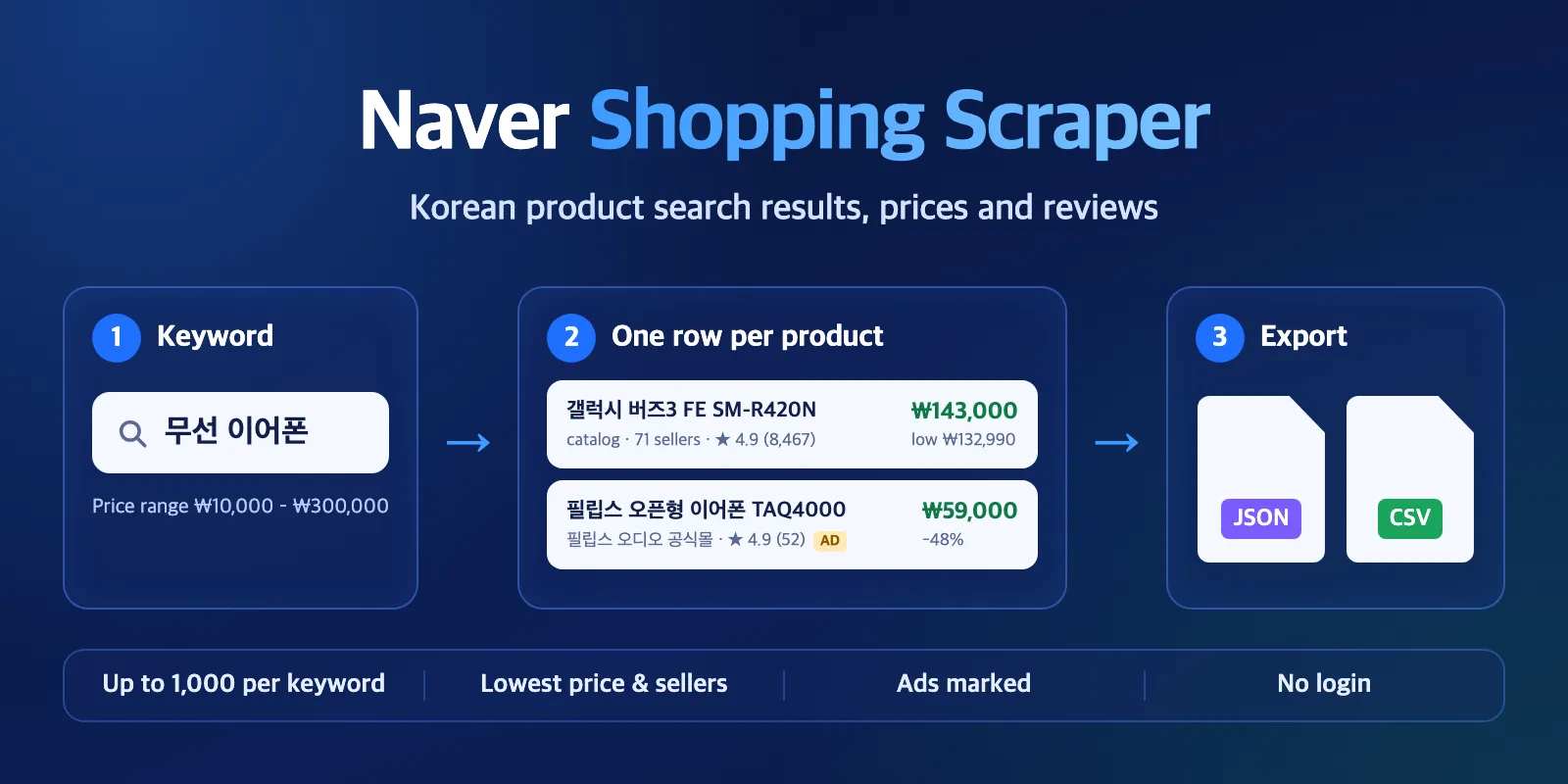
Table of contents
- What it does
- Quick start
- Use cases
- Input
- Output
- Pricing and limits
- API, export and integrations
- Troubleshooting
- FAQ
- Related Actors
- Support
What it does
The Actor opens the public Naver Shopping search results for each keyword, the same list a shopper sees on a phone. It reads every product card and saves one clean row per product. It can go deeper than the first page: up to 1,000 products per keyword.
- Catalog cards (price comparison pages) give the shown price, the lowest price and the number of sellers.
- Single-seller cards give the price, the list price before discount, the discount, the mall name and the purchase count.
- Sponsored listings are kept and marked with
isAd: true. You can turn them off. - Each row has the keyword, its position, the source and the time we read it.
Good fit
- Check the market price of a product in Korea, with the lowest price across sellers.
- Watch which brands, malls and ads show up for your keywords.
- Build a product list for a category keyword with reviews and ratings.
Not a fit / limits
- Search results only. Product detail pages (options, stock, full review text, seller lists) are not included.
- Naver's ranking is personal and changes during the day. Two runs can show a different order.
- This is not a drop-in replacement for scrapers that expand each catalog into all its sellers.
Quick start
- Open the Input tab.
- Add one keyword to Search keywords (
queries), for example무선 이어폰. Korean keywords give the best results. - Keep Products per keyword (
maxItems) at 20 for a first test. - Click Start.
- Open the Products view in the Output tab.
Expected result: 20 product rows for the keyword, each with title, price, reviewCount and url.
Use cases
| Buyer job | Input path | Output entity | Key fields | Next step |
|---|---|---|---|---|
| Price check for a product | queries + minPrice/maxPrice | product | price, lowPrice, sellerCount, mall | Export to a sheet, convert KRW |
| Brand and ad watch | queries, includeAds: true | product | brand, maker, isAd, position | Schedule a daily run |
| Category product list | queries, maxItems: 1000 | product | title, reviewCount, rating, categoryId | Load the dataset by API |
Input
Input fields
| Field | Plain name | Type | Required | Default / prefill | Allowed values | Effect | Example | Recommendation |
|---|---|---|---|---|---|---|---|---|
queries | Search keywords | array of strings | yes | prefill ["무선 이어폰"] | 1–20 keywords, each up to 100 characters | One search per keyword | ["선풍기", "립스틱"] | Use Korean words. Duplicates are run once. |
maxItems | Products per keyword | integer | no | default 50, prefill 20 | 1–1,000 | Stops each keyword after this many products | 300 | More products means more requests and a longer run. |
minPrice | Minimum price | integer (KRW) | no | empty | 0–1,000,000,000 | Naver filters by price | 10000 | Use with maxPrice to skip accessories. |
maxPrice | Maximum price | integer (KRW) | no | empty | 0–1,000,000,000 | Naver filters by price | 300000 | Must be ≥ minPrice. |
sort | Sort | string | no | relevance | relevance, price_asc, price_desc, review_count, rating | Orders the collected products | price_asc | See the note below. |
includeAds | Include sponsored listings | boolean | no | true | true / false | false drops ad cards | false | Keep true for ad research. |
addBrandNames | Add brand and maker | boolean | no | true | true / false | Fills brand and maker from Naver's filters | true | Turn off for slightly faster runs. |
Empty queries or a wrong range stops the run at once with a clear message and no charge for products.
Interacting settings
| When | Input A | Input B | Effective behavior | Cost/result effect |
|---|---|---|---|---|
Sort is not relevance | sort | maxItems | The Actor first collects maxItems products in Naver's order, then sorts them. price_asc gives the cheapest of those products, not the cheapest on all of Naver. | None |
| Ads are off | includeAds: false | maxItems | Ad cards are skipped and organic products fill the list. | Same price per product |
| Price range is set | minPrice / maxPrice | queries | Naver applies the range before the list is read. | Fewer products if the range is narrow |
Input examples
Price check with a price range
Expected behavior: one search, sponsored cards removed, prices between ₩10,000 and ₩300,000.
Expected output: up to 100 product rows with price, lowPrice, sellerCount, mall.
Several keywords, deep lists
Expected behavior: 900 rows in about 45 seconds (measured).
Output
Output example
A real row for 무선 이어폰 (some fields trimmed):
Empty values are null, never 0. A 0 means a real zero (for example, free delivery).
Output fields
| Field | Meaning | Type | Can be empty? | Example / enum |
|---|---|---|---|---|
recordType | Row type | string | no | product, query |
status | Row quality | string | no | complete, partial (some fields missing); query rows: not_found, error |
query | Your keyword | string | no | 무선 이어폰 |
position | Place in the result list, starting at 1 | integer | no | 8 |
productId | Naver product ID (nvMid), stable | string | no | 56796984706 |
title | Product name, HTML removed | string | no | 필립스 ENC 블루투스 무선 오픈형 이어폰 TAQ4000 |
price | Price the shopper sees first, KRW | number | yes | 59000 |
originalPrice | Price before discount | number | yes | 115000 |
discountRate | Discount in % | number | yes | 48 |
lowPrice | Lowest price shown by Naver; for catalogs, across sellers | number | yes | 132990 |
currency | Always KRW | string | no | KRW |
listingType | Catalog (price comparison) or one seller | string | no | catalog, single_seller |
sellerCount | Sellers in the catalog; 1 for single-seller cards | integer | yes | 71 |
mall | Store name (single-seller cards) | string | yes | 필립스 오디오 공식몰 |
brand / maker | Brand or manufacturer, from Naver's filters | string | yes | 삼성전자 |
categoryId / categoryIds | Naver category IDs, leaf and path | string / array | yes | 50002327 |
reviewCount | Number of reviews (catalogs: total across sellers) | integer | yes | 8467 |
rating | Average rating 0–5 | number | yes | 4.9 |
purchaseCount | Purchases shown by Naver (single-seller only) | integer | yes | 1200 |
wishlistCount | Wishlist (찜) count | integer | yes | 340 |
deliveryFee | Delivery fee, KRW; 0 = free | integer | yes | 0 |
isAd | Sponsored listing | boolean | no | true |
isSmartStore / isBrandStore / isOverseas | Store flags | boolean | yes | true |
smartStoreProductId | Smart Store product number | string | yes | 11223344556 |
url / mobileUrl | Product or catalog link | string | yes | https://search.shopping.naver.com/catalog/... |
image | Main image | string | yes | https://shopping-phinf.pstatic.net/... |
missingFields | Which key fields were missing | array | no | ["mall"] |
source | Where the row came from | string | no | naver_shopping_mobile_search |
sourceUrl | Search page for the keyword (without your filters) | string | no | https://m.search.naver.com/... |
fetchedAt | When we read it (UTC) | string | no | 2026-10-14T12:35:23.121Z |
message / errorCode | Query rows only: what happened | string | yes | Naver Shopping has no products for this keyword and filters |
Output entities and surfaces
| Situation | Where | Result shape | What to do |
|---|---|---|---|
| Normal product | Dataset, view Products | one product row per product | Export or use by API |
| Keyword with no products | Dataset | one free query row, status: not_found | Check the spelling or the price range |
| Keyword failed (block, timeout) | Dataset + RUN_SUMMARY | one free query row, status: error, errorCode | Run that keyword again later |
| Run summary | Key-value store RUN_SUMMARY | status, counts, per-keyword depth, warnings | Check status and message |
RUN_SUMMARY → status tells you the result: COMPLETE, NO_RESULTS, PARTIAL or CAPPED (your spending limit was reached). When a run stops early (PARTIAL or CAPPED), the run status message in Console also says why.
Pricing and limits
Pricing unit
Pay per event. You pay for each product row saved, plus a small start fee per run. not_found and error rows are free. Platform usage is included: you do not pay for compute.
| Event | Free plan | Bronze | Silver | Gold and higher |
|---|---|---|---|---|
| Product (one row) | $0.0015 | $0.0014 | $0.00135 | $0.0013 |
| Run start | $0.004 | $0.004 | $0.004 | $0.004 |
A run with no products (all keywords not found, or a price range with no matches) costs only the start fee, $0.004. A partial run pays only for the rows it saved.
Cost examples (Free plan)
| Scenario | Input scope | Products | Cost |
|---|---|---|---|
| First test | 1 keyword × 20 | 20 | $0.034 |
| Normal | 3 keywords × 300 | 900 | $1.354 |
| Large | 5 keywords × 1,000 | 5,000 | $7.504 |
| No results | 20 unknown keywords | 0 | $0.004 |
If you set a maximum cost per run, the Actor stops before it goes over, keeps the rows it saved and ends with status CAPPED.
Limits
- Up to 20 keywords and 1,000 products per keyword per run.
- Speed: about 1,000 products in 20 seconds. Each keyword takes at least 3–15 seconds, even for a few products, because brand names need extra requests (20 keywords × 1 product took about 3 minutes). Set
addBrandNamestofalsefor faster small runs. 20 keywords × 1,000 products took 350 seconds. The default timeout is 300 seconds, so for more than about 15,000 products set a longer timeout (for example 600 seconds) in the run options. If time runs out, the run keeps what it saved, ends asPARTIALand lists the keywords it did not start. - A few keywords show a short list on Naver (for example hotel or travel words). Then you may get fewer products than
maxItems.
API, export and integrations
- Export: download the dataset as JSON, CSV, Excel or HTML from the Output tab.
- API: start runs and read the dataset with the Apify API or the Apify client.
- Scheduling: run the same keywords every day with Apify schedules and compare
priceandpositionover time. - No-code: connect the dataset to Google Sheets, Make or Zapier through Apify integrations.
Use with AI agents (MCP)
- MCP server URL with only this Actor:
https://mcp.apify.com?tools=cliqtomedia/naver-shopping-scraper - Smallest useful input:
- Key output fields:
title(product name),priceandlowPrice(KRW),reviewCountandrating,isAd,url. - A 20-product call takes about 15 seconds and costs $0.034 on the Free plan. Keep to 20 keywords and 1,000 products per keyword.
Troubleshooting
I got fewer products than maxItems
Symptom: the keyword has fewer rows than you asked for.
Likely reason: Naver shows a short list for this keyword or price range.
Check: RUN_SUMMARY → the keyword's depth, and the price range.
Action: widen the price range or use a broader keyword.
The run ended as PARTIAL with "reached the run time limit"
Symptom: some keywords are missing and the message says to give the run more time. Likely reason: many keywords × 1,000 products need more than the 300-second default. Action: set the run timeout to 600 seconds, or split the keywords over several runs.
A keyword has a row with status: error
Symptom: one query row with errorCode such as RATE_LIMITED or SOURCE_UNAVAILABLE.
Likely reason: Naver did not answer in time or blocked the request. This is not an empty result.
Action: run that keyword again later. Error rows are free.
The run status is FAILED
Symptom: the run is red and the message says how many products were saved.
Likely reason: Naver stopped answering during the run, so some or all keywords failed.
Check: the dataset still has the products saved before the failure, and you pay only for those rows (plus the start fee). RUN_SUMMARY lists which keywords failed.
Action: run the failed keywords again later.
brand and maker are empty
Likely reason: for some keywords (for example fashion), Naver shows no brand filter, so there is nothing to read. Action: none needed; the rest of the row is complete.
FAQ
Do I need a Naver account or API key?
No. The Actor reads public search pages. No login, no cookies.
Why is a catalog price sometimes very low?
For catalog cards, Naver shows the lowest offer across all sellers. Sometimes that offer is a rental, a used item or an accessory (we saw rentals at ₩1). The Actor keeps Naver's number as shown; check sellerCount and listingType, or set minPrice.
Is the data the same as on Naver?
Yes, it is the order and prices that Naver's mobile search shows at fetchedAt. Naver personalises ranking and updates prices all the time, so runs at different times can differ. Reviews on catalog cards are Naver's total across sellers.
Can I use the data?
The Actor reads public pages. Naver's terms and robots.txt limit automated access, and you are responsible for how you use the data. If you need an official channel, Naver offers a Shopping Search API with your own developer key and a daily quota. This Actor is independent and not affiliated with Naver.
Related Actors
- Historical Exchange Rates & Currency Converter — convert KRW prices to USD or EUR for a date.
- Google Autocomplete Scraper — find more keyword ideas to search.
Support
Use the Issues tab of this Actor. Add the run ID, your keywords and the status or errorCode you saw. Do not send API tokens or private data.


