

Yad2 Scraper: Israel Real Estate & Cars Listings
Pricing
from $1.19 / 1,000 listings
Yad2 Scraper: Israel Real Estate & Cars Listings
Scrape Yad2 listings in Israel: apartments for rent or sale, commercial property, cars, motorcycles and scooters. Filter by city, price, rooms or year, and get prices, sizes, photos and English city names for market research.
Pricing
from $1.19 / 1,000 listings
Rating
0.0
(0)
Developer

Cliqto Media
Maintained by CommunityActor stats
0
Bookmarked
2
Total users
1
Monthly active users
a day ago
Last modified
Categories
Features
Share
Yad2 Scraper collects listings from Yad2, Israel's largest classifieds site: apartments for rent or for sale, commercial property, cars, motorcycles and scooters, with price, size, rooms, photos and dates.
Use it to study rents and prices in Israeli cities, follow the used-car market or feed listings into a spreadsheet. No Yad2 account or API key is needed. The smallest run is one city and 20 listings: it finishes in under a minute and costs about $0.04.
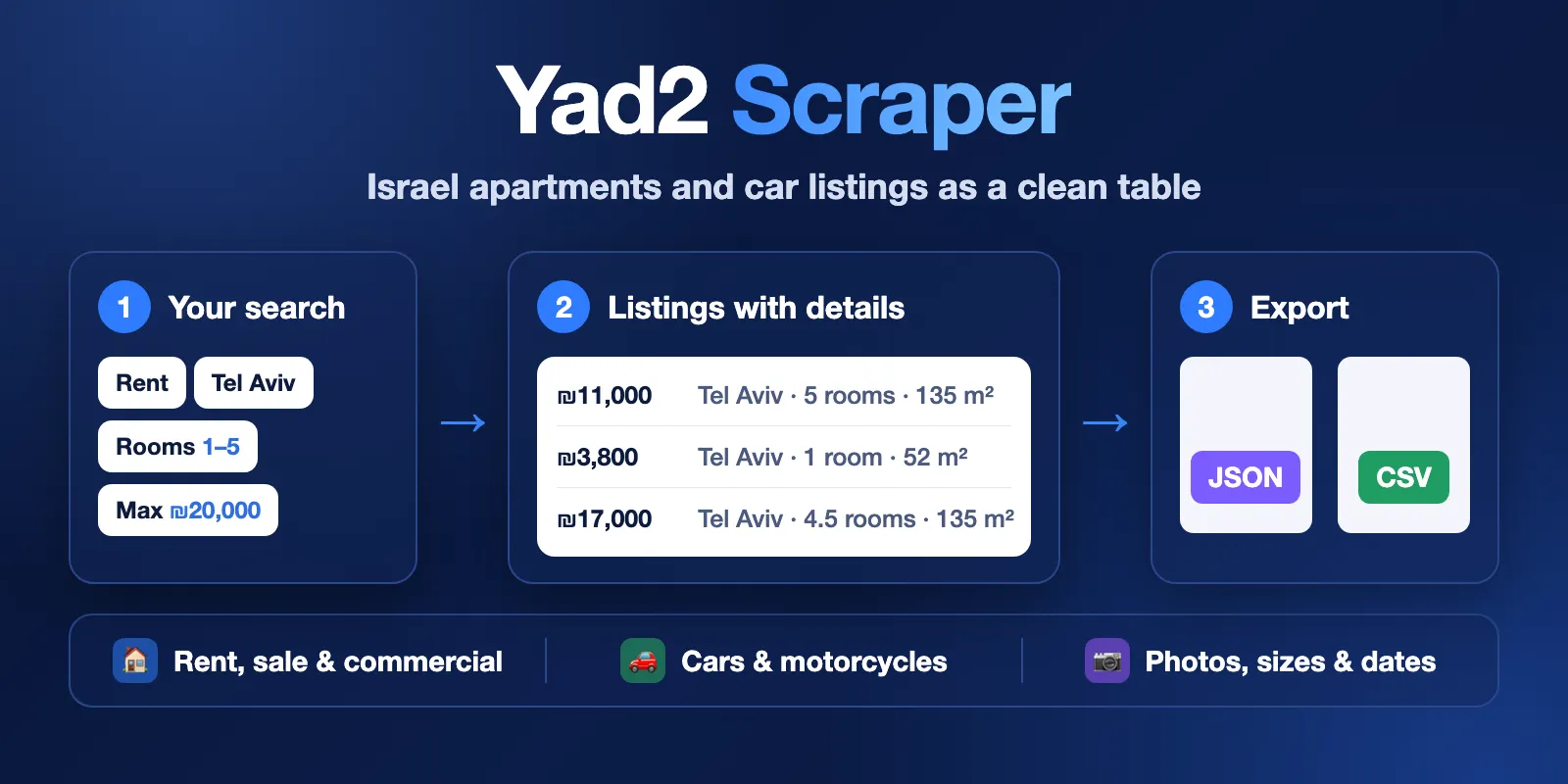
Table of contents
- What it does
- How it works
- Quick start
- Use cases
- Input
- Output
- Pricing
- Limits
- API, export and integrations
- Troubleshooting
- FAQ
- Support
What it does
The Actor searches Yad2 the way a visitor does: you pick a category and cities, add filters, and it saves one row for each listing. Each row has the price in shekels, the city in English and Hebrew, and the size, rooms and floor for property, or the year, mileage and owner number for vehicles. With listing details (on by default) a row also gets the description, all photos, features such as parking or a safe room, coordinates and the publish date.
It does not collect phone numbers or names of private sellers, and it removes phone numbers and e-mails from descriptions. It does not log in to Yad2.
Good fit
- Compare rents or asking prices by city, neighborhood, rooms and size.
- Track dealer prices of used cars by year, mileage, manufacturer and model.
- Build a list of new rentals in one city every day with a schedule.
- Get Yad2 data in English city names for a report or a dashboard.
How it works
- You choose a category (rent, for sale, commercial, cars, motorcycles or scooters), cities and filters.
- The Actor reads Yad2 search pages for each city, skips listings that do not match your filters and, if you want details, opens each listing.
- It saves the listings in the Dataset and writes a short run summary (how many were found, saved and skipped, and why the run stopped) to the Key-value store.
Price and area filters are sent to Yad2. Neighborhood names, manufacturer and model names, and the parking, elevator, balcony and safe-room checks are matched after download, so such a run may read more pages to find enough listings.
Quick start
-
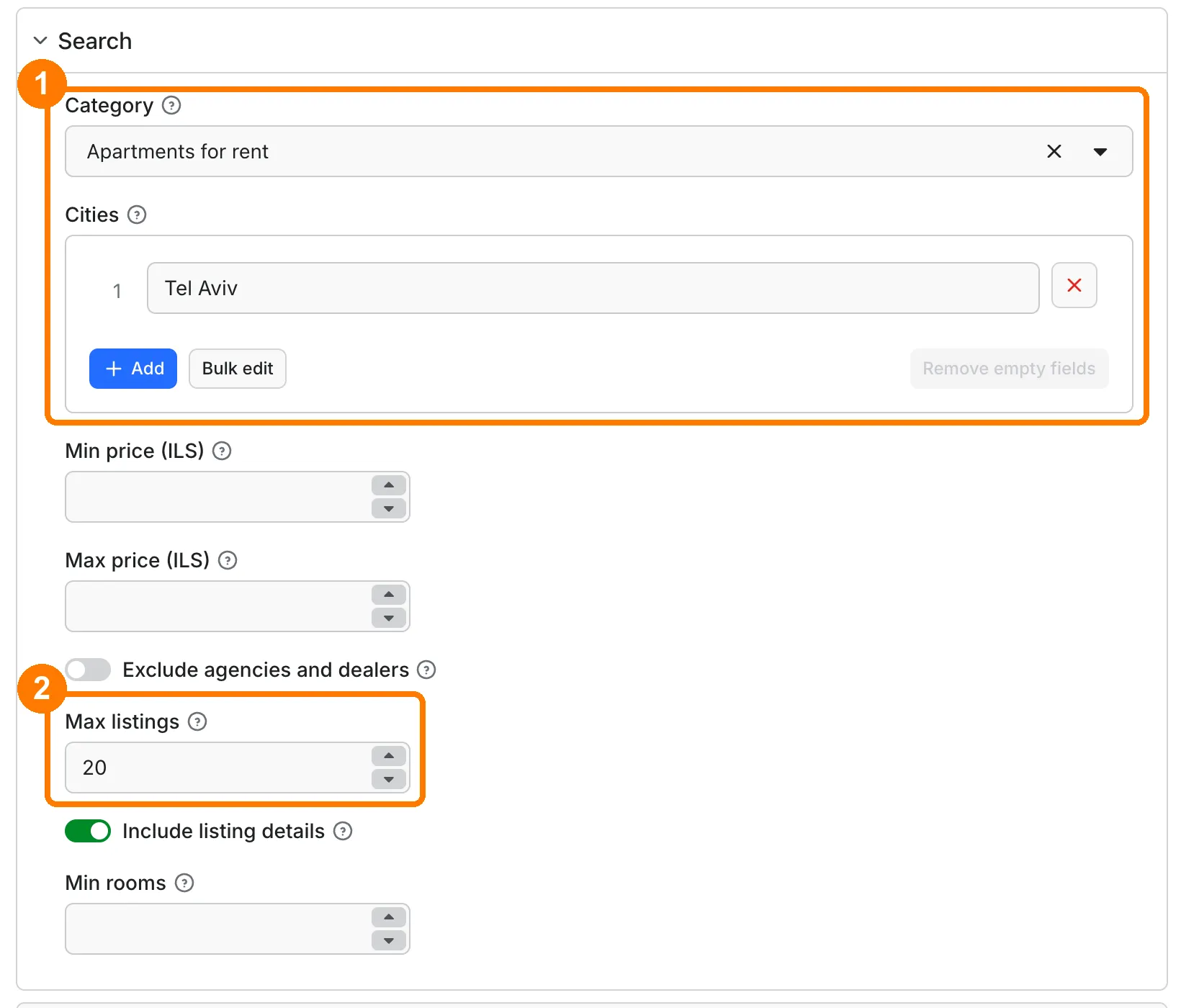
Open the Input tab. Category is Apartments for rent and Cities is Tel Aviv (box 1 in the picture).
-
Add more cities if you want, in English, in Hebrew or as a Yad2 city id.
-
Keep Max listings at 20 for a first run (box 2).
-
Click Start.
-
When the run finishes, open the Output tab and check the price, rooms, squareMeters and url columns.
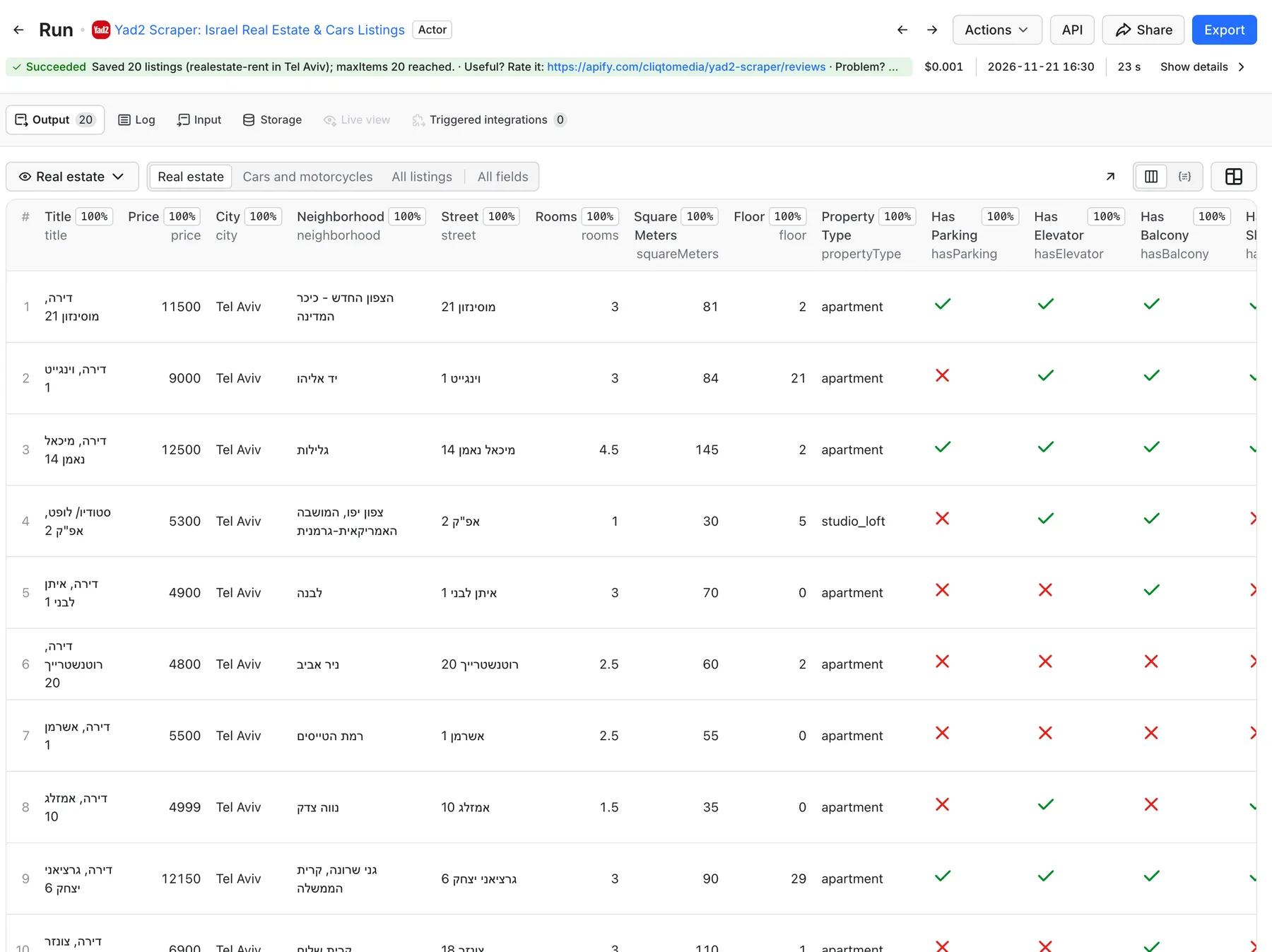
Expected result: 20 Tel Aviv rentals with price, rooms, size, floor, photos and a link to each listing.
Use cases
| Buyer job | Input path | Output entity | Key fields | Next integration |
|---|---|---|---|---|
| Compare rents in a few cities | category: realestate-rent, cities, minRooms | Rental listing | price, city, rooms, squareMeters, neighborhood | Excel or Google Sheets export |
| Watch homes for sale in a price range | category: realestate-forsale, minPrice, maxPrice | Sale listing | price, rooms, floor, publishedAt, url | Daily schedule, Slack or Notion summary |
| Study used-car dealer prices | category: cars, minYear, maxMileage, manufacturer | Car listing | price, year, mileage, hand, model | CSV for analysis |
| Find private landlords only | category: realestate-rent, excludeAgencies: true | Rental listing | adType, price, url | Dataset API |
| Map listings | includeDetails: true | Listing with details | latitude, longitude, price, rooms | GIS or map tool |
Input
Input fields
All fields are optional. An empty form searches apartments for rent in all of Israel and saves up to 100 listings.
| Field | Plain name | Type | Default / prefill | Allowed values | Effect |
|---|---|---|---|---|---|
category | Category | text | realestate-rent | realestate-rent, realestate-forsale, realestate-commercial, cars, motorcycles, scooters | What to search |
cities | Cities | list of text | prefill ["Tel Aviv"]; empty = all of Israel | English or Hebrew city name, or Yad2 city id; up to 20 | Cities to search. For vehicles the whole district of the city is searched |
minPrice, maxPrice | Price range | number | none | shekels, 0 or more | Listings without a price are skipped when a price filter is set |
excludeAgencies | Private only | yes/no | no | Skips agencies, dealers and commercial advertisers | |
maxItems | Max listings | number | 100; prefill 20 | 1–10000 | Most listings to save in the run, across all cities |
includeDetails | Listing details | yes/no | yes | Adds description, all photos, features, coordinates and dates; one extra request per listing | |
minRooms, maxRooms | Rooms | number | none | 1–12, half rooms allowed | Real estate only |
minSquareMeters, maxSquareMeters | Size | number | none | m² | Real estate only |
minFloor, maxFloor | Floor | number | none | −2 to 200 | Real estate only |
neighborhood | Neighborhoods | list of text | none | Hebrew name or part of it, or Yad2 id; up to 20 | Real estate only; names are matched after download |
requireParking, requireElevator, requireBalcony, requireShelter | Must have | yes/no | no | Real estate only; checked in listing details | |
minYear, maxYear | Model year | number | none | 1950 to next year | Vehicles only |
maxMileage | Mileage | number | none | km | Vehicles only |
maxHand | Owners | number | none | 0 (new) to 10 | Vehicles only |
manufacturer, model | Make and model | text | none | part of the name in English or Hebrew | Vehicles only; matched after download |
proxyConfiguration | Proxy | proxy | Apify Proxy | Usually leave as is: the Actor switches to an Israeli residential proxy by itself when Yad2 blocks it | |
deliveryConnector, deliveryTarget | Send results to | connector, text | none | Optional Slack or Notion summary after the run |
The same listing found in two cities is saved once. A city the Actor does not recognize is listed in the run summary and the other cities still run.
Interacting settings
| When | Input A | Input B | Effective behavior | Cost/result effect |
|---|---|---|---|---|
| Several cities | cities | maxItems | The limit is shared: each city gets an equal part, and unused room goes to the next city | One run, one limit |
| English make or model | manufacturer / model | includeDetails: false | English names are only on the listing page, so details are loaded anyway | One extra request per listing |
| Must-have checks | requireParking etc. | includeDetails: false | The check uses the search page data only, which is less precise | Fewer requests |
| Real estate filters on vehicles | minRooms etc. | category: cars | Ignored, with a warning in the log | None |
Input examples
Rentals in Tel Aviv (prefill)
Expected behavior: one search page of Tel Aviv rentals, each listing opened for details. Expected output: 20 rows with price, rooms, squareMeters, floor and url. Limit or cost note: 20 listings, one search page and the start fee.
Used Toyota cars from 2018
Expected behavior: cars in all of Israel from model year 2018 with up to 120,000 km, filtered to Toyota. Expected output: up to 200 rows with price, year, mileage, hand and model.
Output
Output fields
| Field | Meaning | Type | Can be empty? | Example |
|---|---|---|---|---|
itemId | Yad2 listing code | text | no | realw399 |
category | Search category | text | no | realestate-rent |
url | Link to the listing | text | no | https://www.yad2.co.il/item/realw399 |
title | Property type and address, or make, model and year | text | no | דירה, יגור 10 |
price | Asking price in shekels | number | yes, when "call for price" | 9000 |
currency | Currency | text | no | ILS |
city, cityHebrew | City in English and Hebrew | text | yes | Tel Aviv, תל אביב יפו |
neighborhood, street | Neighborhood and street in Hebrew | text | yes; real estate only | יד אליהו |
rooms, squareMeters, floor | Rooms, size in m², floor | number | yes; real estate only | 5, 95, 2 |
propertyType | Property type | text | yes | apartment |
year, mileage, hand | Model year, km, owner number | number, text | yes; vehicles only | 2019, 85000, second |
manufacturer, model, subModel, gearbox, engineType, color | Vehicle data in Hebrew | text | yes; vehicles only | |
adType, agencyName | Private or agency; agency or dealer name | text | agencyName only for agencies | private |
coverImage, images | First photo and all photos | text, list | yes, when no photos | |
description | Listing text, phone numbers and e-mails removed | text | yes; only with details | |
features, hasParking, hasElevator, hasBalcony, hasShelter | What the property has, from the seller's checklist on Yad2 | list, yes/no | yes; real estate with details | ["balcony","elevator"], true |
latitude, longitude | Location | number | yes; real estate only | |
publishedAt, updatedAt | First published and last updated, Israel local time | text | yes; only with details | 2026-11-13T15:28:41 |
status | complete, or partial when details could not be loaded | text | no | complete |
scrapedAt | When the row was collected (UTC) | text | no |
Output entities and surfaces
| Situation | Where | Result shape | User action |
|---|---|---|---|
| Normal listing | Dataset | One row per listing | Open the Output tab or export |
| No listings match | Dataset empty; RUN_SUMMARY in the Key-value store | Summary with status: NO_RESULTS and the reason | Widen the filters or check the city name |
| Details failed for a listing | Dataset | Row with status: partial and search page fields only | Use as is or run again later |
| Yad2 blocks or fails | Run log and RUN_SUMMARY | Rows saved so far stay; summary says why the run stopped | Run again later |
Output example
This example is trimmed and contains one listing from the prefill run. null means Yad2 does not give the value for this listing or this category (for example, year for an apartment).
Send results to Slack or Notion
Pick your connector in the optional deliveryConnector field. After the run saves its data, the Actor posts a short summary (up to 25 rows and a link to the full dataset) there. Put a Notion page link or a Slack channel ID in deliveryTarget: in Notion every run is added on top of that one page, so your workspace does not fill up with new pages. Without a page link, Notion delivery is skipped and the log says so. A delivery error never fails the run and costs nothing extra. Connect a service once in Apify Console → MCP connectors.
Pricing
Pricing unit
You pay per event. There are three events:
| Event | When it is charged | Free plan | Bronze | Silver | Gold and up |
|---|---|---|---|---|---|
| Listing | Each saved listing | $1.70 / 1000 | $1.53 / 1000 | $1.36 / 1000 | $1.19 / 1000 |
| Search page | Each Yad2 search page the Actor reads (up to about 40 listings) | $0.001 | $0.001 | $0.001 | $0.001 |
| Actor start | Once per run, per GB of run memory | $0.0005 | $0.0005 | $0.0005 | $0.0005 |
Listing details are included in the listing price. Platform usage (compute and proxy) is paid by us, not by you.
A run with no matching listings is not free: it pays the start fee and the search pages it read. A filter that is matched after download (neighborhood names, make and model, must-have checks) can read many pages before it finds listings, and each page is charged. A failed search page is not charged. Listings that were not saved are not charged. Your Maximum cost per run in Apify stops the run before it reads a page or saves a listing it cannot pay for.
Cost examples
| Scenario | Input scope | Events | Charge on the Free plan | Stop/cap behavior |
|---|---|---|---|---|
| First run | 20 rentals in Tel Aviv | 20 listings, 1 page, 1 start | about $0.036 | Stops at 20 listings |
| No matches | a price filter nothing matches | 1 page, 1 start | $0.0015 | Ends with NO_RESULTS |
| Larger run | 1000 cars in all of Israel | 1000 listings, about 25 pages, 1 start | about $1.73 | Stops at 1000 listings |
Limits
- Up to 10000 listings and 20 cities per run.
- Cars come from Yad2 dealers only: Yad2 does not show private car listings in its search results. Motorcycles and scooters include private sellers. With
excludeAgenciesthe cars category returns no listings. - Seller phone numbers and private seller names are never collected.
- Neighborhood, manufacturer and model names in the output are in Hebrew, as on Yad2; city names come in English and Hebrew.
- English city names cover about 75 main cities. In a search without cities, small towns and villages have
city: nulland the Hebrew name incityHebrew. - Parking, elevator, balcony and safe room come from the checklist the seller fills in on Yad2. If the seller mentions them only in the description, the flag stays
false. - If Apify moves a long run to another server, the run continues from the last saved page instead of starting over.
- Yad2 products (second-hand goods) and new-building projects are not supported.
- The Actor reads public Yad2 search results. It does not log in and cannot see listings hidden from visitors.
- With the default 300-second run timeout a run saves about 1500–2000 listings with details. For more, raise the timeout in Run options, or turn off listing details. A test run saved 10000 car listings with details in about 39 minutes, so set the timeout to about 3000 seconds for the maximum.
- If you set Max items in Run options, the run stops at that number even when
maxItemsin the input is higher. - Search by filters only: Yad2 page URLs (start URLs) are not accepted as input.
- Each Yad2 request waits up to 30 seconds and is retried up to 3 times. The run stops 15 seconds before its timeout so that the summary is saved.
API, export and integrations
- API: start a run with the input JSON from the examples and read the Dataset items endpoint for the rows.
- Export: download the Dataset as JSON, CSV, Excel, XML or HTML from the Output tab.
- Scheduling: create a schedule in Apify Console to collect new listings every day.
- Webhooks / no-code: use an Apify webhook or the Make, Zapier or n8n integrations to send the Dataset to the next tool when a run succeeds.
- Slack or Notion: set
deliveryConnectoranddeliveryTargetto get a short summary after each run.
Use with AI agents (MCP)
- MCP server URL with only this Actor:
https://mcp.apify.com?tools=cliqtomedia/yad2-scraper. - Smallest useful input:
{"category": "realestate-rent", "cities": ["Tel Aviv"], "maxItems": 20}. - Key output fields:
price(shekels),city(English name),roomsandsquareMeters(property size),yearandmileage(vehicles),url(listing link). - A 20-listing run takes under a minute and costs about $0.036 on the Free plan. Runs stop at
maxItems(up to 10000).
Troubleshooting
The run saved no listings
Symptom: the Dataset is empty and the run summary says NO_RESULTS.
Likely reason: the filters are too narrow, or the city name was not recognized.
Check: open RUN_SUMMARY in the Key-value store; it lists unrecognized cities and how many listings were skipped by filters.
Action: write the city in English or Hebrew as Yad2 shows it, or widen the price or room range.
Some rows have status: partial
Symptom: a few rows have no description, photos or dates. Likely reason: the listing page did not load (for example, the listing was removed during the run). Check: the run log lists the first few listings that failed. Action: the rest of the row is correct; run again later to get the details.
The run stopped before Max listings
Symptom: fewer rows than maxItems and a run summary that says the run timed out, hit the cost limit or Yad2 blocked it.
Likely reason: the run timeout, your maximum cost per run, or a Yad2 block.
Check: stopReason in RUN_SUMMARY.
Action: raise the timeout or the cost limit, or run again later. Rows saved before the stop are kept.
The run failed
Symptom: the run status is FAILED.
Likely reason: invalid input (for example, minimum price above maximum price); Yad2 kept blocking or did not answer; the run timed out before it saved any listing; or Yad2 changed its page format (SOURCE_SCHEMA_CHANGED in RUN_SUMMARY).
Check: the status message and errorCode in RUN_SUMMARY.
Action: fix the input as the message says, raise the timeout, or run again later. If Yad2 changed its format, report it in the Issues tab.
FAQ
Do I need a Yad2 account or a proxy?
No. The Actor reads public search results without login. The default Apify Proxy setting is enough: when Yad2 blocks a request, the Actor switches to an Israeli residential proxy by itself.
Why is a run with no results charged?
The Actor reads Yad2 search pages to find out that nothing matches. You pay the start fee and $0.001 for each search page read, not for listings.
How fresh is the data?
Each run reads Yad2 at that moment. publishedAt and updatedAt show when the seller posted and last changed the listing. Removed listings disappear from the next run.
Can I get the data in English?
City names are in English and Hebrew. Titles, neighborhoods, streets and descriptions are in Hebrew, as the seller wrote them.
Support
For a bug, question or feature request, open the Actor's Issues tab on Apify. Include the run ID, your input and the error text from the log. Never send tokens, cookies or billing data.
⭐ Found it useful? Rate this Actor. Something wrong? Report a problem — we fix reported problems.


