
TikTok Data Extractor avatar
TikTok Data Extractor

Pricing

from $2.00 / 1,000 results

Go to Apify Store
TikTok Data Extractor

TikTok Data Extractor

Extract data about videos, users, and channels based on hashtags or scrape full user profiles including posts, total likes, name, nickname, numbers of comments, shares, followers, following, and more.

Pricing

from $2.00 / 1,000 results

Rating

4.7

(52)

Developer

Clockworks

Clockworks

Maintained by Apify

Actor stats

703

Bookmarked

35K

Total users

1.2K

Monthly active users

3.7 days

Issues response

a day ago

Last modified

Share

What does TikTok Data Extractor do?

This TikTok Data Extractor allows you to extract data about videos from the TikTok social media site. It gives you detailed TikTok information in structured formats such as Excel, XML, HTML, JSON, and CSV, which you can use in your own reports, spreadsheets, and applications. TikTok Data Extractor allows you to scrape:

  • Results from a TikTok hashtag search
  • Number of comments and shares, followers and following, total likes
  • Individual posts and full user profiles - by using a URL for a specific profile or video
  • Information about posts from keyword search queries
  • Download scraped videos directly
  • Export scraped data in multiple formats: JSON, CSV, Excel, or HTML
  • Export via SDKs (Python & Node.js), use API Endpoints, webhooks, or integrate with workflows

What data can you get with TikTok Data Extractor?

TikTok Data Extractor can gather any kind of data from the social media app, such as:

👤 Profile name❤️ Likes🔁 Shares
▶️ Plays🔗 Video URL🌐 Profile URL
📝 Video description💬 Video subtitles🈹 Text language
📜 Bio🏷️ Hashtags used📢 Ad post?
📌 Pinned post?💰 Sponsored?📍 Location of creation

How to scrape TikTok with TikTok Data Extractor

If you've never done any web scraping before, don’t worry. TikTok Data Scraper is easy to use. Here’s how:

  1. Create a free Apify account using your email.
  2. Open TikTok Data Extractor.
  3. Add one or more hashtags to scrape TikTok followers, videos and creators.
  4. Click the “Start” button and wait for the data to be extracted.
  5. Download your data in JSON, XML, CSV, Excel, or HTML.

If you feel like you’d enjoy more comprehensive explanation, try this step-by-step guide or simply watch a quick video tutorial on YouTube:

Input

To start scraping TikTok, fill in the input form. TikTok Data Extractor recognizes the following input parameters:

  • hashtags - scrapes TikTok for hashtags
  • profiles - scrapes TikTok profiles
  • search - scrapes specific keywords and extract videos and profiles that contain it
  • video URLs - scrapes specific TikTok videos

Here’s a screenshot of scraping #funny from TikTok.
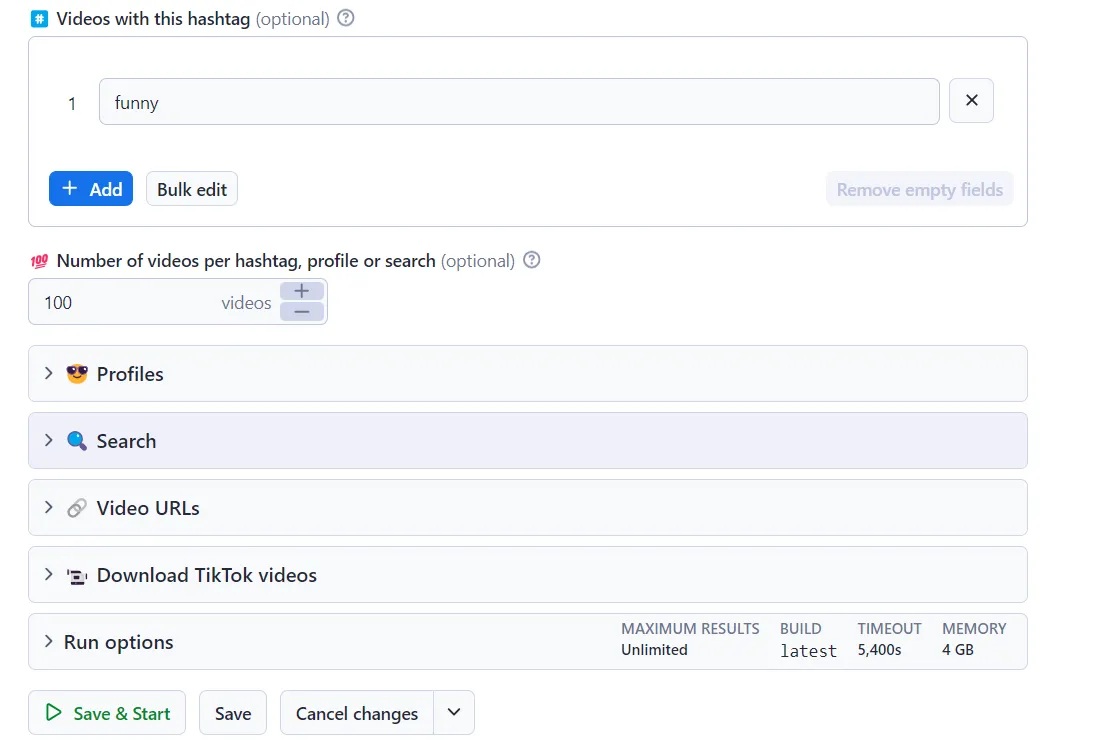
TikTok Data Extractor input

And here’s the same, just in JSON.

{
"hashtags": [
"funny"
],
"resultsPerPage": 100,
"shouldDownloadCovers": false,
"shouldDownloadSlideshowImages": false,
"shouldDownloadSubtitles": false,
"shouldDownloadVideos": false
}

Output

You get the output from TikTok Data Extractor stored in a tab. Here's an example of some of the output from the previous #funny Actor run.

TikTok Data Extractor output

By clicking on the green Export button, you can download the dataset in XML, CSV, Excel, HTML, or JSON.

Scraped TikTok hashtags

{
"authorMeta.avatar": "<https://p16-sign-sg.tiktokcdn.com/aweme/720x720/tos-alisg-avt-0068/bc3a20fbab0d67915fa082152d96449e.jpeg?lk3s=a5d48078&nonce=12322&refresh_token=3045197dca8797ac15f26bd1d8d2c859&x-expires=1723143600&x-signature=bnKkJ%2FGVCg7v%2BDqd%2B5val9VDd0U%3D&shp=a5d48078&shcp=b59d6b55>",
"authorMeta.name": "tom.cashman",
"text": "Breaking up via Wordle #wordle #fyp #foryou #foryoupage #fy #breakups",
"diggCount": 465100,
"shareCount": 8397,
"playCount": 3500000,
"commentCount": 1072,
"videoMeta.duration": 26,
"musicMeta.musicName": "original sound",
"musicMeta.musicAuthor": "cashman.tom",
"musicMeta.musicOriginal": true,
"createTimeISO": "2022-01-27T03:45:41.000Z",
"webVideoUrl": "<https://www.tiktok.com/@tom.cashman/video/7057727079848103169>"
}

Scraped TikTok Profiles

[
{
"authorMeta.avatar": "https://p16-common-sign.tiktokcdn-us.com/tos-useast2a-avt-0068-euttp/e755d298d36b3175a2ca87d603b5dc2d~tplv-tiktokx-cropcenter:720:720.jpeg?dr=9640&refresh_token=ad1b4c7e&x-expires=1764493200&x-signature=PCx9if1hscJ1KXJVZUio%2B2BLlS0%3D&t=4d5b0474&ps=13740610&shp=a5d48078&shcp=81f88b70&idc=useast5",
"authorMeta.name": "khaby.lame",
"text": "Here’s my new vase, I hope you like it #learnfromkhaby #comedy ",
"diggCount": 58500,
"shareCount": 949,
"playCount": 801800,
"commentCount": 1391,
"videoMeta.duration": 33,
"musicMeta.musicName": "original sound",
"musicMeta.musicAuthor": "Khabane lame",
"musicMeta.musicOriginal": true,
"createTimeISO": "2025-11-26T16:06:05.000Z",
"webVideoUrl": "https://www.tiktok.com/@khaby.lame/video/7577066025573813526"
}
]

Scraped TikTok search queries

[
{
"authorMeta.avatar": "https://p16-sign-sg.tiktokcdn.com/tos-alisg-avt-0068/f1f2fefde64a184a4969b9355f388de4~tplv-tiktokx-cropcenter:720:720.jpeg?dr=10399&refresh_token=f08a3504&x-expires=1764493200&x-signature=kwAkYDhDusD2bozDp3WhhdDQ07Q%3D&t=4d5b0474&ps=13740610&shp=a5d48078&shcp=81f88b70&idc=no1a",
"authorMeta.name": "afu0831",
"text": "#粉丝一千万 #cat #funny #foryou #fyp ",
"diggCount": 1478,
"shareCount": 857,
"playCount": 116400,
"commentCount": 49,
"videoMeta.duration": 5,
"musicMeta.musicName": "suara asli - Kang Guru",
"musicMeta.musicAuthor": "Kang Guru",
"musicMeta.musicOriginal": true,
"createTimeISO": "2025-11-27T16:44:18.000Z",
"webVideoUrl": "https://www.tiktok.com/@afu0831/video/7577446618987777281"
},
{
"authorMeta.avatar": "https://p16-sign-va.tiktokcdn.com/tos-maliva-avt-0068/2a47aafe313f23dfb9444ed868788506~tplv-tiktokx-cropcenter:720:720.jpeg?dr=10399&refresh_token=396464a3&x-expires=1764493200&x-signature=09bdU9SBF7Tb0qa0Cnvixz8xtfE%3D&t=4d5b0474&ps=13740610&shp=a5d48078&shcp=81f88b70&idc=no1a",
"authorMeta.name": "done15222",
"text": "wait wait 😂 funny moments 😂 #funnymoments #funnyvideos #funnytiktok #funny ",
"diggCount": 16800,
"shareCount": 4961,
"playCount": 625800,
"commentCount": 679,
"videoMeta.duration": 10,
"musicMeta.musicName": "laugh",
"musicMeta.musicAuthor": "بو حسن",
"musicMeta.musicOriginal": true,
"createTimeISO": "2025-11-26T12:14:12.000Z",
"webVideoUrl": "https://www.tiktok.com/@done15222/video/7577006237489827127"
},
{
"authorMeta.avatar": "https://p16-sign-sg.tiktokcdn.com/tos-alisg-avt-0068/f1f2fefde64a184a4969b9355f388de4~tplv-tiktokx-cropcenter:720:720.jpeg?dr=10399&refresh_token=f08a3504&x-expires=1764493200&x-signature=kwAkYDhDusD2bozDp3WhhdDQ07Q%3D&t=4d5b0474&ps=13740610&shp=a5d48078&shcp=81f88b70&idc=no1a",
"authorMeta.name": "afu0831",
"text": "#粉丝一千万 #cat #funny #foryou #fyp ",
"diggCount": 353,
"shareCount": 145,
"playCount": 18200,
"commentCount": 48,
"videoMeta.duration": 15,
"musicMeta.musicName": "Originalton",
"musicMeta.musicAuthor": "funnyvideos",
"musicMeta.musicOriginal": true,
"createTimeISO": "2025-11-28T01:08:02.000Z",
"webVideoUrl": "https://www.tiktok.com/@afu0831/video/7577576300840258833"
}
]

Scraped TikTok Video URLs

[
{
"url": "https://www.tiktok.com/@shaiie_foeva/video/7533731959172861206",
"error": "Post not found or private."
},
{
"id": "7553309587378539831",
"text": "Unexpected prank#funny#prank#foryou#funnyvideo#fyp ",
"textLanguage": "en",
"createTime": 1758641970,
"createTimeISO": "2025-09-23T15:39:30.000Z",
"isAd": false,
"authorMeta": {
"id": "7522438923319657527",
"name": "chunniuc",
"profileUrl": "https://www.tiktok.com/@chunniuc",
"nickName": "chunniuc",
"verified": false,
"signature": "",
"bioLink": null,
"originalAvatarUrl": "https://p19-common-sign.tiktokcdn-us.com/tos-useast5-avt-0068-tx/f9090639eaf88d6d19302acc0f3c2c90~tplv-tiktokx-cropcenter:720:720.jpeg?dr=9640&refresh_token=f915efaa&x-expires=1765533600&x-signature=Etgb%2Fp8BjOZDW1N8Nh1qtrbFCuw%3D&t=4d5b0474&ps=13740610&shp=a5d48078&shcp=81f88b70&idc=useast8",
"avatar": "https://p19-common-sign.tiktokcdn-us.com/tos-useast5-avt-0068-tx/f9090639eaf88d6d19302acc0f3c2c90~tplv-tiktokx-cropcenter:720:720.jpeg?dr=9640&refresh_token=f915efaa&x-expires=1765533600&x-signature=Etgb%2Fp8BjOZDW1N8Nh1qtrbFCuw%3D&t=4d5b0474&ps=13740610&shp=a5d48078&shcp=81f88b70&idc=useast8",
"privateAccount": false,
"followDatasetUrl": null,
"following": 2,
"friends": 0,
"fans": 508700,
"heart": 6400000,
"video": 40,
"digg": 13
},
"musicMeta": {
"musicName": "original sound",
"musicAuthor": "chunniuc",
"musicOriginal": true,
"playUrl": "https://v16-webapp-prime.us.tiktok.com/video/tos/useast5/tos-useast5-v-27dcd7-tx/o4vroDM8eQB1goCaIhDUBipSSSizJ0BiNBXQfF/?a=1988&bti=ODszNWYuMDE6&ch=0&cr=0&dr=0&er=0&lr=default&cd=0%7C0%7C0%7C0&br=250&bt=125&ft=GcAInInz7ThwX-MPXq8Zmo&mime_type=audio_mpeg&qs=6&rc=OmZpNjs0OTU7NWlpaGk3Z0BpMzQ2ZHY5cmdlNjMzZzU8NEAxMTI1Ni4tNjAxYTRiY15hYSM2XmE1MmRjcjZhLS1kMS9zcw%3D%3D&btag=e00090000&expire=1765385182&l=20251210104511BBB68D0351632A021252&ply_type=3&policy=3&signature=f1b0279540256080ab35149fced9013f&tk=0",
"coverMediumUrl": "https://p19-common-sign.tiktokcdn-us.com/tos-useast5-avt-0068-tx/f9090639eaf88d6d19302acc0f3c2c90~tplv-tiktokx-cropcenter:720:720.jpeg?dr=9640&refresh_token=f915efaa&x-expires=1765533600&x-signature=Etgb%2Fp8BjOZDW1N8Nh1qtrbFCuw%3D&t=4d5b0474&ps=13740610&shp=a5d48078&shcp=81f88b70&idc=useast8",
"originalCoverMediumUrl": "https://p19-common-sign.tiktokcdn-us.com/tos-useast5-avt-0068-tx/f9090639eaf88d6d19302acc0f3c2c90~tplv-tiktokx-cropcenter:720:720.jpeg?dr=9640&refresh_token=f915efaa&x-expires=1765533600&x-signature=Etgb%2Fp8BjOZDW1N8Nh1qtrbFCuw%3D&t=4d5b0474&ps=13740610&shp=a5d48078&shcp=81f88b70&idc=useast8",
"musicId": "7553309743813643063"
},
"webVideoUrl": "https://www.tiktok.com/@chunniuc/video/7553309587378539831",
"mediaUrls": [],
"videoMeta": {
"height": 768,
"width": 576,
"duration": 70,
"coverUrl": "https://p16-common-sign.tiktokcdn-us.com/tos-useast5-p-0068-tx/o8fTvrPPDQbzUS97AyFESxR2jBfioQDQEvg8E0~tplv-tiktokx-origin.image?dr=9636&x-expires=1765533600&x-signature=EAfGHi%2FFtspgSd69yc24x6V%2Fq2E%3D&t=4d5b0474&ps=13740610&shp=81f88b70&shcp=43f4a2f9&idc=useast8",
"originalCoverUrl": "https://p16-common-sign.tiktokcdn-us.com/tos-useast5-p-0068-tx/o8fTvrPPDQbzUS97AyFESxR2jBfioQDQEvg8E0~tplv-tiktokx-origin.image?dr=9636&x-expires=1765533600&x-signature=EAfGHi%2FFtspgSd69yc24x6V%2Fq2E%3D&t=4d5b0474&ps=13740610&shp=81f88b70&shcp=43f4a2f9&idc=useast8",
"definition": "540p",
"format": "mp4"
},
"diggCount": 1500000,
"shareCount": 94900,
"playCount": 147200000,
"collectCount": 102300,
"commentCount": 17300,
"mentions": [],
"detailedMentions": [],
"hashtags": [
{
"id": "5424",
"name": "funny",
"title": "What's so #Funny?",
"cover": ""
},
{
"id": "9122",
"name": "prank",
"title": "",
"cover": ""
},
{
"id": "42164",
"name": "foryou",
"title": "",
"cover": ""
},
{
"id": "56948",
"name": "funnyvideo",
"title": "",
"cover": ""
},
{
"id": "229207",
"name": "fyp",
"title": "",
"cover": ""
}
],
"effectStickers": [],
"isSlideshow": false,
"isPinned": false,
"searchQuery": "funny"
}
]

How can I use the data extracted from TikTok with TikTok Data Extractor?

  • 💙 Boost brand awareness or spread the message about social issues and causes.
  • 📈 Forecast upcoming trends and influences on social media across the new generation.
  • 🔬 Get data for research and social listening experiments.
  • ⭐ Get authentic reviews and back up sentiment analysis with real data.
  • 🪧Plan commercial campaigns on TikTok or other social media platforms.
  • 📚 Simplify market research for hashtag challenges and marketing campaigns.
  • 📋 Get a list of perfect-fit marketing leads.

Get in-depth information about how can TikTok Data Extractor help you and how to use it in this webinar we held.

Scrape any TikTok data you need with dedicated scrapers

You can use the dedicated scrapers below if you want to scrape specific TikTok data. Each of them is built particularly for the relevant TikTok data scraping case, be it hashtags, search results, profiles, or all data at once. Feel free to browse them:

🎹 Tiktok Scraper📹 Tiktok Video Scraper🧛 TikTok Profile Scraper
🎙 TikTok Comments Scraper🛍 Tiktok Hashtag Analytics Scraper#️⃣ TikTok Hashtag Scraper
🔍TikTok Discover Scraper 🎙 TikTok Explore Scraper

We also have put together a few AI agents that will help you extract data from social media and turn it into actionable information:

Frequently asked questions

How much does TikTok Data Extractor cost?

TikTok Data Extractor uses the pay-per-result (PPR) pricing model, so your costs can be easily calculated: it will cost you $5 to scrape 1,000 results, so $0.005 per item. Apify provides you with $5 free usage credits every month on the Apify free plan, so you can get 1,000 results from TikTok Data Extractor for free.

If you need to extract data regularly, we recommend you get an Apify subscription. Not only do you get a greater amount of prepaid credits, you get a discount on your usage costs, as well. Check out the pricing tab for more details.

Can I use integrations with TikTok Data Extractor?

You can integrate TikTok Data Extractor with almost any cloud service or web app. We offer integrations with Make, Zapier, Slack, Airbyte, GitHub, Google Sheets, Google Drive, and plenty more.

Alternatively, you could use webhooks to carry out an action whenever an event occurs, such as getting a notification whenever TikTok Data Extractor successfully finishes a run.

Can I use TikTok Data Extractor with the Apify API?

The Apify API gives you programmatic access to the Apify platform. The API is organized around RESTful HTTP endpoints that enable you to manage, schedule, and run Apify Actors. The API also lets you access any datasets, monitor Actor performance, fetch results, create and update versions, and more.

To access the API using Node.js, use the apify-client NPM package. To access the API using Python, use the apify-client PyPI package.

Click on the API tab for code examples, or check out the Apify API reference docs for all the details.

Can I use TikTok Data Extractor through an MCP Server?

With Apify API, you can use almost any Actor in conjunction with an MCP server. You can connect to the MCP server using clients like ClaudeDesktop and LibreChat, or even build your own. Read all about how you can set up Apify Actors with MCP.

For TikTok Data Extractor, go to the MCP tab and then go through the following steps:

  1. Start a Server-Sent Events (SSE) session to receive a sessionId
  2. Send API messages using that sessionId to trigger the scraper
  3. The message starts the TikTok Data Extractor with the provided input
  4. The response should be: Accepted

Our scrapers do not extract any private user data, such as email addresses, gender, or location. They only extract what the user has chosen to share publicly.

However, you should be aware that your results could contain personal data. Personal data is protected by the GDPR in the European Union and by other regulations around the world. You should not scrape personal data unless you have a legitimate reason to do so. If you're unsure whether your reason is legitimate, consult your lawyers. You can also read our blog post on the legality of web scraping.

Your feedback

We’re always working on improving the performance of our Actors. If you have any technical feedback for TikTok Data Extractor or found a bug, please create an issue in the Issues tab.