

TikTok User Search Scraper
Pricing
from $2.50 / 1,000 profiles
TikTok User Search Scraper
Extract data about users based on TikTok user search. You'll get full user profiles, including name, nickname, signature, number of followers, number of videos, bio link, and author’s ID.
Pricing
from $2.50 / 1,000 profiles
Rating
4.6
(13)
Developer

Clockworks
Maintained by ApifyActor stats
39
Bookmarked
5.2K
Total users
485
Monthly active users
2 days ago
Last modified
Categories
Share
What is TikTok User Search Scraper?
TikTok User Search Scraper is an easy-to-use scraping tool that helps you with scraping TikTok users you search for with a search query. Using this tool, you will be able to scrape:
- user’s name,
- nickname,
- signature,
- number of followers,
- number of videos,
- bio link,
- author’s ID,
- and much more.
How to scrape TikTok with TikTok User Search Scraper?
TikTok User Search Scraper is designed to be user-friendly, offering a smooth start for those who have never extracted data from TikTok before. Here’s how you can use this web scraper:
- Create a free Apify account using your email.
- Open TikTok User Search Scraper.
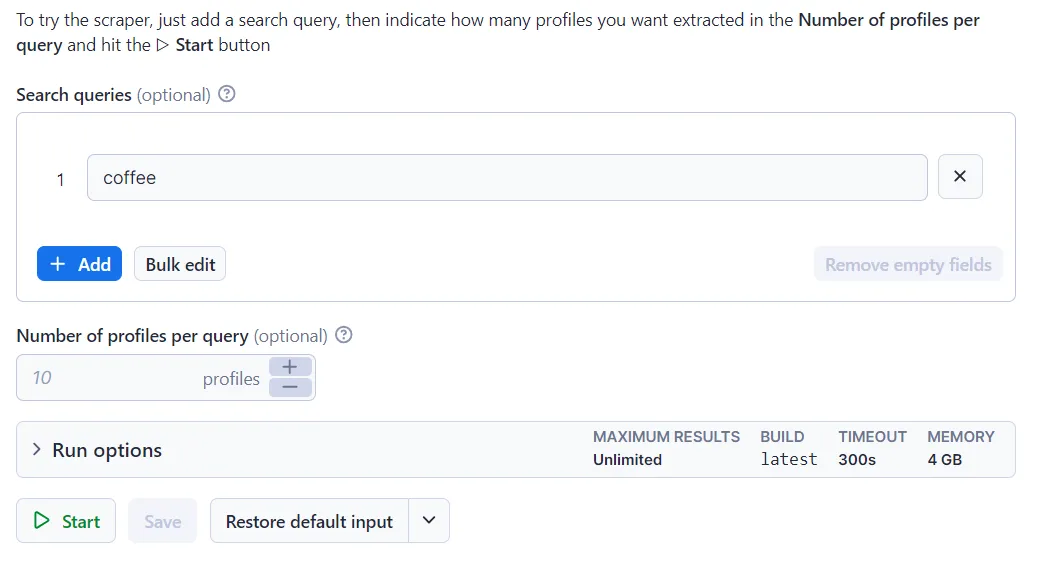
- Type in your search query.
- Click the “Start” button and wait for the data to be extracted.
- Download your data in JSON, XML, CSV, Excel, or HTML.
If you want more guidance on how to use TikTok User Search Scraper, this video tutorial shows you how to do it in just a few minutes.
🔼 Input sample
The input for TikTok User Search Scraper should be one or multiple TikTok search queries. See the example below:
🔽 Output sample
The scraped TikTok user search data will be shown as a dataset which you can find in the Output tab:
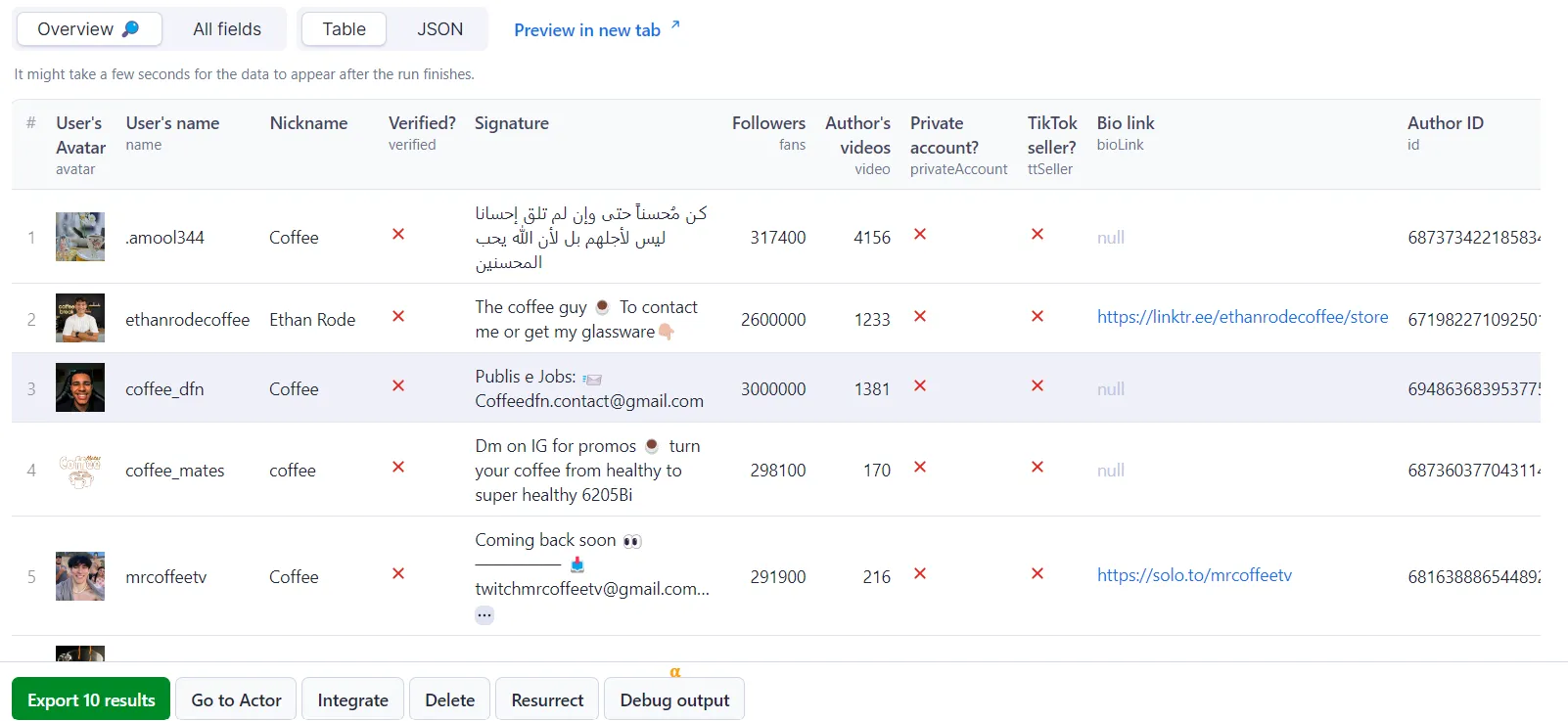
You can preview all the fields and choose in which format to download the data you’ve extracted: JSON, CSV, Excel, HTML table, or XML. Here below is the same dataset in JSON:
How can I use the data extracted with TikTok User Search Scraper?
The data extracted from TikTok User Search Scraper can be used for a variety of purposes, including:
🔍 Influencer discovery: Search any niche keyword and get creators with their follower counts, verification status, and bios, so you can find the right TikTok influencers without scrolling the app.
🌱 Micro-influencer shortlisting: Filter results by the fans count to surface smaller creators with engaged audiences, often a cheaper way to reach a niche than working with large accounts.
📇 Lead generation: Every profile comes with its bio text and bioLink, so you can pull websites and contact links straight into a TikTok lead generation pipeline.
🛒 TikTok Shop seller research: The ttSeller flag shows which creators sell through TikTok Shop, so you can map the sellers in a category before approaching them.
📊 Niche and audience research: Compare follower and video counts across everyone active in a category to see who actually has reach, useful for behavioral and market research.
🔗 Input for deeper scraping: Feed the usernames from your search results into TikTok Profile Scraper or TikTok Followers Scraper to go deeper on the accounts worth watching.
Integrate TikTok User Search Scraper and automate your workflow
TikTok User Search Scraper can be connected with almost any cloud service or web app thanks to integrations on the Apify platform. These include:
Alternatively, you can use webhooks to carry out an action whenever an event occurs, e.g. get a notification whenever TikTok User Search Scraper successfully finishes a run.
Scrape any TikTok data you need with dedicated scrapers
Your feedback
We’re always working on improving the performance of our Actors. So if you’ve got any technical feedback for TikTok User Search Scraper or simply found a bug, please create an issue on the Actor’s Issues tab in Apify Console.
❓FAQ
How much does it cost to use TikTok User Search Scraper?
TikTok User Search Scraper uses the pay-per-result pricing model, so your costs can be easily calculated: it will cost you $6 to scrape 1,000 results on the Free plan, so $0.006 per item. Apify provides you with $5 free usage credits every month on the Apify Free plan, so you can get over 800 results from TikTok User Search Scraper for free. Discounts per result apply on paid plans, so you pay less as you scale. Check the full pricing for every plan.
How can I use TikTok User Search scraper with the Apify API?
The Apify API gives you programmatic access to the Apify platform. The API is organized around RESTful HTTP endpoints that enable you to manage, schedule, and run Apify actors. The API also lets you access any datasets, monitor actor performance, fetch results, create and update versions, and more.
To access the API using Node.js, use the apify-client NPM package. To access the API using Python, use the apify-client PyPI package.
Check out the Apify API reference docs for full details or click on the TikTok User Search Scraper API tab for code examples.
Is it legal to scrape TikTok with TikTok User Search Scraper?
Our TikTok scrapers, TikTok User Search Scraper included, are ethical and do not extract any private user data, such as email addresses, gender, or location. They can only extract what the user has chosen to share publicly. However, you should be aware that your results might contain personal data.
Personal data is protected by GDPR in the European Union and other laws and regulations around the world. You should not scrape personal data unless you have a legitimate reason to do so. If you’re unsure whether your reason is legitimate, consult your lawyers. You can also read our blog post on the legality of web scraping and ethical scraping.
Error items
When the scraper cannot retrieve data for a given search query, it pushes an error item to the dataset instead of silently skipping it. Normal output items are never affected; you can tell them apart by the presence of an errorCode field.
Error item structure
Error codes reference
errorCode | Meaning |
|---|---|
SEARCH_QUERY_PROFILE_NOT_FOUND | No profiles found for the search query |
INVALID_INPUT | Actor failed due to bad configuration (run is also terminated) |


![TikTok User Search Scraper - Find Creators [NO LOGIN] ✅ avatar](https://images.apifyusercontent.com/xQN1VJN2CrdTx_ww-l8Mdp0h4WEd5eETlcN_nftk4Wc/rs:fill:76:76/cb:1/aHR0cHM6Ly9hcGlmeS1pbWFnZS11cGxvYWRzLXByb2QuczMudXMtZWFzdC0xLmFtYXpvbmF3cy5jb20vc0NDU2R3bm1LTUoxUTJzVG4tYWN0b3ItR3BOSzFGUEtBakpmYjFFVGctam5mZjh4UUMzNC1jYW52YS10aWstdG9rLWxvZ28tTUFHek5nb0lIancucG5n.webp)


