

Markdown RAG Chunker: Document Text Splitter
Pricing
from $0.60 / 1,000 chunks
Markdown RAG Chunker: Document Text Splitter
RAG chunking for PDFs, Word, PowerPoint, Excel, EPUB and web pages. A header-aware text splitter keeps each chunk inside one section, caps it at 512 tokens by default, and adds its header path, source, stable ID and exact token count. Ready to embed into Pinecone, Qdrant or pgvector.
Pricing
from $0.60 / 1,000 chunks
Rating
0.0
(0)
Developer

CodePoetry
Maintained by CommunityActor stats
0
Bookmarked
7
Total users
0
Monthly active users
3 days ago
Last modified
Categories
Share
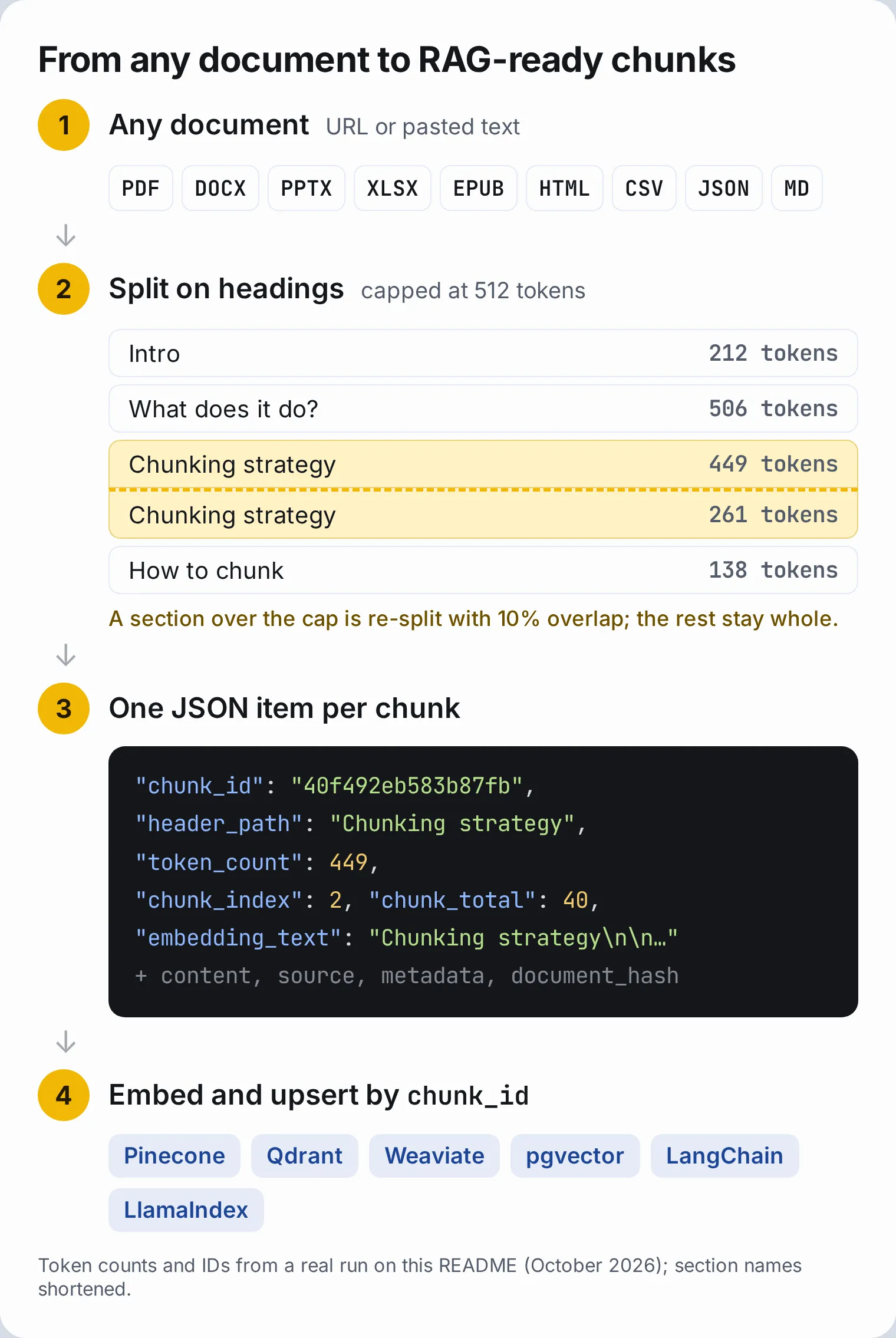
Markdown RAG Chunker splits PDFs, web pages, Word, PowerPoint, Excel and EPUB files into header-aware chunks for RAG. Each chunk stays inside one section of the document, is capped at 512 tokens by default, and comes with its header path, source URL, position, a stable source-scoped ID, an exact token count and a ready-to-embed embedding_text, for Pinecone, Qdrant, Weaviate, pgvector or any vector store.
Try it in Apify Console. The form is prefilled with this Actor's own README, so your first run is one click; then paste your document's URL.
Open source (MIT): github.com/yel-hadd/markdown-rag-chunker. Issues and pull requests welcome.
What does Markdown RAG Chunker do?
- Converts 12 formats to Markdown with Microsoft's markitdown: PDF, HTML, DOCX, PPTX, XLSX, XLS, EPUB, CSV, JSON, XML, Markdown and plain text. The server's content type and charset are passed to the converter, so CSV becomes a table and Latin-1 pages keep their accents.
- Splits on the document's own headings:
#,##and###by default, any levels up to######if you choose. A chunk about authentication keeps{"Header 1": "API Reference", "Header 2": "Authentication"}in itsmetadata. - Caps oversized sections at 512 real tokens (configurable, measured with tiktoken
cl100k_baseoro200k_base). Long sections are re-split on paragraph, line, sentence and word boundaries, including Chinese and Japanese sentence ends, with 10% overlap; sections under the cap stay whole. - Adds
embedding_text: the header path and the content joined by a blank line. Anthropic's contextual retrieval study found that prepending document context to each chunk cut retrieval failures by 35%;embedding_textis a lightweight version that needs no LLM call. - Gives every chunk a source-scoped
chunk_id: identical sections in two documents never collide, untouched sections keep their ID when another part of the document changes (for URLs, or pasted text with asource_id), and repeated sections inside a document get distinct IDs. - Carries provenance on every chunk:
source,document_hash,chunk_index,chunk_totalandheader_path, for citations, ordering and deleting a document's old chunks. - Counts tokens exactly (
token_count), so non-English text no longer blows past your embedding model's limit. - Downloads like a real browser with curl_cffi and a genuine Chrome TLS fingerprint, with optional Apify Proxy or your own proxy. Files up to 25 MB.
- Skips unchanged documents on scheduled runs: an unchanged file is not even re-converted, and the run costs only the $0.001 start fee.
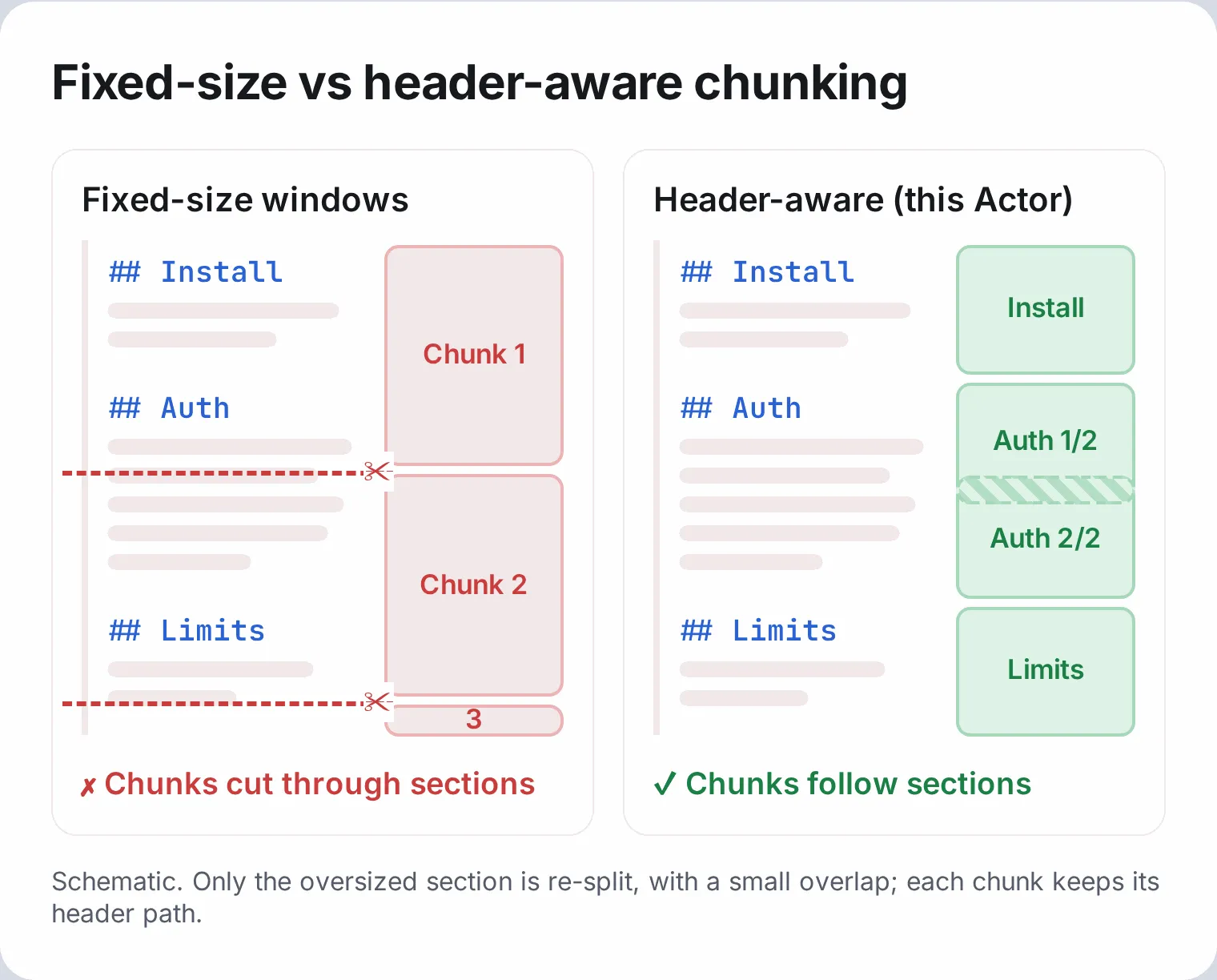
Best chunking strategy for RAG: header-aware splitting
Split on the document's headings first, then cap only the sections that are too long, in tokens. LangChain's documentation recommends this two-step pattern for Markdown, and retrieval benchmarks reward its result: chunks of a few hundred tokens that follow the author's structure and carry their context.
- Structure keeps meaning together. Pinecone's chunking strategies guide (Schwaber-Cohen and Patel, 2025) says splitting Markdown by its headings gives "more semantically coherent chunks", while fixed-size chunking can "ignore critical structure within documents".
- A few hundred tokens retrieves well. In Chroma's chunking evaluation (Smith and Troynikov, July 2024), recursive splitting at 400 tokens reached 89.5% recall with
text-embedding-3-large, while 800-token chunks with 400-token overlap scored the lowest precision and IoU of every configuration tested. NVIDIA's 2025 chunking study recommends 256 to 512 tokens for diverse document collections and factoid queries, and 1,024 for analytical ones. Voyage AI's contextualized chunk embeddings default to 512-token chunks. - Bigger context windows don't change this. Current embedding models accept 8K to 128K tokens, but the benchmarks above find retrieval still peaks at a few hundred tokens per chunk. Context helps when it is attached to each chunk, which is what
embedding_textandheader_pathdo. - Measure in tokens, not characters. The usual "4 characters per token" rule holds for English but not for other scripts: with OpenAI's
cl100k_base, a 1,600-character Chinese chunk is about 1,900 tokens. This Actor counts real tokens, so every language gets the same cap. - Overlap is not free. The same study found that removing overlap from 400-token chunks slightly raised recall (89.5% vs 88.1%), because overlap repeats text. This Actor uses a small 10% overlap, and only inside sections that need re-splitting.
- The header path travels with the chunk.
metadataholds every parent heading, so you can filter by section or prepend the path before embedding. - It is the documented LangChain pattern. LangChain's Markdown splitter docs: "Within each markdown group we can then apply any text splitter we want, such as RecursiveCharacterTextSplitter, which allows for further control of the chunk size."
| Fixed-size windows | Recursive only | Header-aware + size cap (this Actor) | |
|---|---|---|---|
| Respects section boundaries | No | Partly (paragraphs) | Yes |
| Header context per chunk | No | No | Yes, in metadata |
| Predictable chunk size | Yes | Yes | Yes, capped at 512 real tokens by default |
| Short sections kept whole | No | No | Yes |
How to chunk a document for RAG
- Paste a document URL into Document URL, or paste Markdown into Markdown text.
- Keep the defaults for most documents: split on
#,##,###and cap chunks at 512 tokens. - If the site blocks direct downloads, turn on Use Apify Proxy.
- Press Start. Each chunk is one dataset item; run totals are under Run Metrics.
- For scheduled pipelines, turn on Skip if unchanged.
Then embed each item's embedding_text and store chunk_id, source, header_path and metadata next to the vector.
How much does RAG chunking cost?
This Actor uses pay-per-event pricing. You pay for the chunks you get, at the same rate for every input format, plus a small fee per run.
- $0.80 per 1,000 chunks on the FREE and BRONZE plans (lower on higher plans, see the Pricing tab)
- $0.001 per run at the default 1 GB memory (one start event per GB if you choose more memory for very large PDFs)
- Compute, storage and proxy traffic are included in these prices
- A run skipped by Skip if unchanged pushes no chunks and costs only the $0.001 run fee
- The
OUTPUTrun metrics are free - You can set a maximum charge per run in Apify; the Actor stops delivering chunks at that limit and reports it in
OUTPUT
| Input | Chunks (approx.) | Cost (approx.) |
|---|---|---|
| 1-page Markdown snippet | 3 | $0.0034 |
| 10-page HTML article | 15 | $0.013 |
| 40-page PDF | 60 | $0.049 |
| 200-page technical manual | 300 | $0.241 |
Input
The prefilled input form:
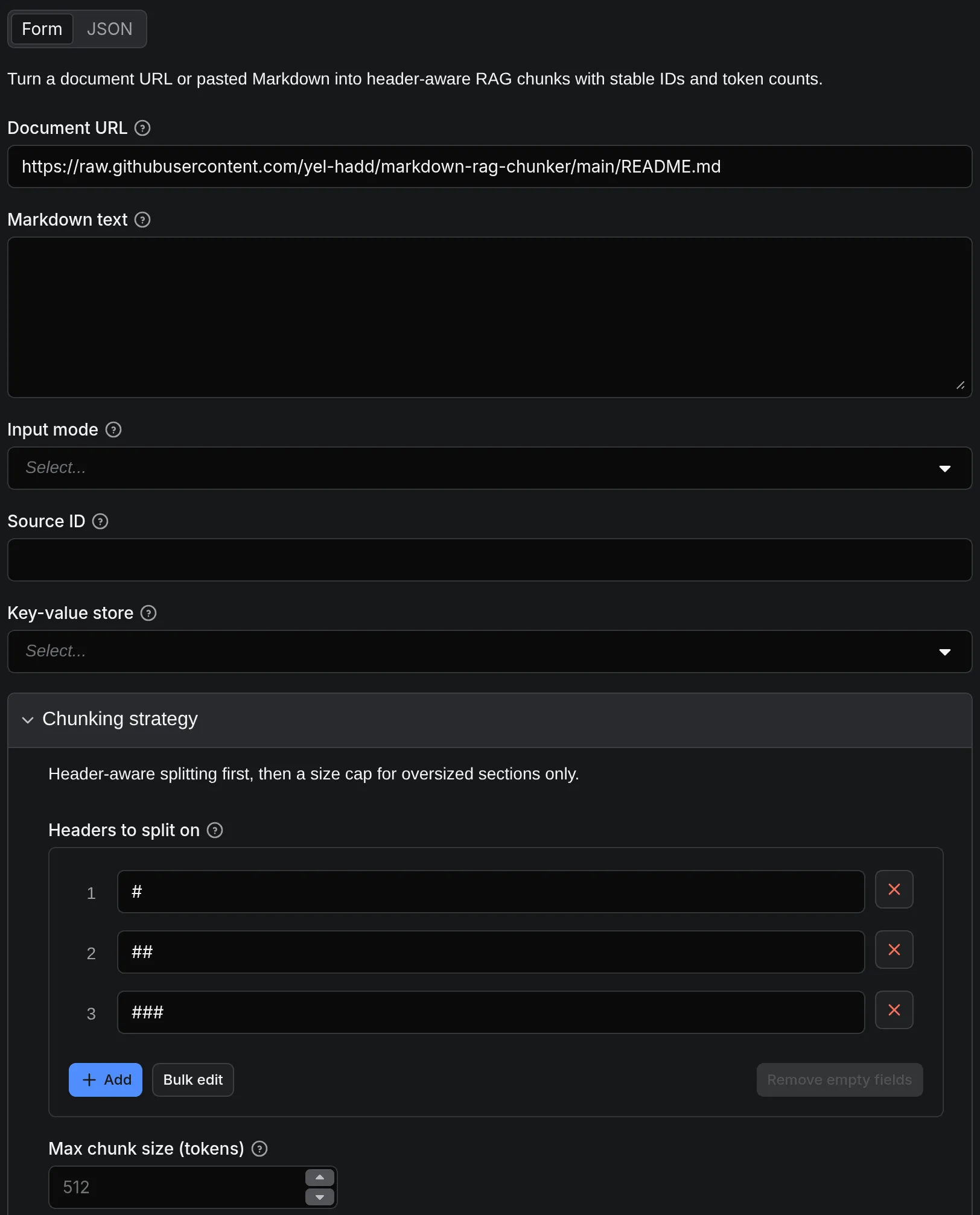
The same input as JSON:
Send markdown_file (a URL) or markdown_text (Markdown); each run chunks one document. The Actor detects which one you used; set input_mode to file or text only if you send both. Every field is described under the Input tab.
| Setting | Default | When to change it |
|---|---|---|
max_chunk_tokens | 512 | 256 for FAQ-style lookups, 1024 for long analytical answers; must fit your embedding model's input limit |
tokenizer | cl100k_base | o200k_base for GPT-4o-era token counts |
max_chunk_chars | not set | Set it to cap by characters instead of tokens |
headers_to_split_on | #, ##, ### | Add #### for very deep documents |
strip_headers | on | Off to keep header lines inside content |
skip_if_unchanged | off | On for scheduled pipelines |
source_id | the URL | Set it when you paste text (e.g. a crawled page's URL) so IDs and Skip if unchanged follow the document |
cache_namespace | empty | Set per pipeline (e.g. dev, prod) when several chunk the same document |
max_input_chars | 2,000,000 | Up to 5,000,000 for very long documents |
max_chunks | 5,000 | Lower it as a budget guard, especially for AI agents |
Output
Each chunk is one dataset item. The Chunks view after running that input (October 2026: 40 chunks in 10 seconds):
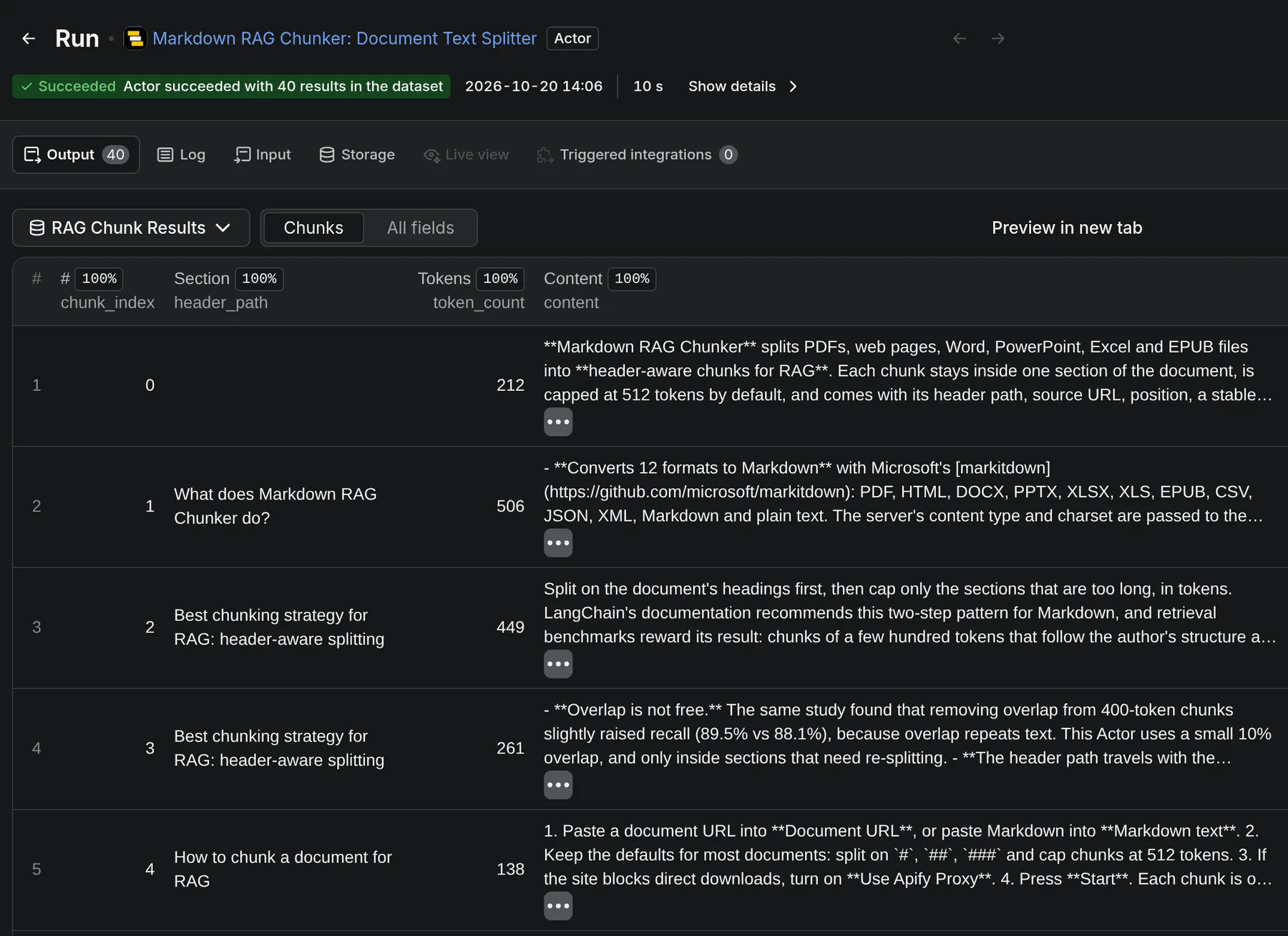
One chunk from the same run (content shortened):
Its OUTPUT record (Run Metrics in the Console):
A failed run writes {"failed": true, "error": "..."} to OUTPUT, so pipelines can read the reason without parsing logs.
| Field | Where | Description |
|---|---|---|
content | dataset item | Chunk text, for display and citations |
embedding_text | dataset item | header_path + blank line + content (just content before the first heading); embed this |
metadata | dataset item | Headers as Header 1, Header 2, … (LangChain format) |
header_path | dataset item | Section path, e.g. Guide > Install > Windows; empty before the first heading |
chunk_id | dataset item | Stable 16-character ID, scoped to the source; use as the upsert key |
chunk_index / chunk_total | dataset item | 0-based position in the document and the number of chunks |
source | dataset item | source_id, the URL, or kvs://<store>/<key>; null for pasted text without source_id |
document_hash | dataset item and OUTPUT | Fingerprint of the converted document; changes when the document changes |
char_count | dataset item | Character length of content |
token_count | dataset item | Exact token count of content with the chosen tokenizer |
input_mode / input_chars | OUTPUT | file or text, and the converted document's length in characters |
input_file_type | OUTPUT | Source MIME type, e.g. application/pdf |
chunk_count / elapsed_ms | OUTPUT | Chunks delivered in this run, and processing time |
unchanged / cached_chunk_count | OUTPUT | Set when Skip if unchanged skipped the run |
charge_limit_reached | OUTPUT | true if your maximum charge per run stopped delivery early |
How do I load chunks into a vector database?
Embed embedding_text, keep content for display, and upsert by chunk_id. To keep an index in sync, after each run delete the chunks whose source matches and whose document_hash differs from the new one.
Qdrant
Point IDs must be UUIDs or integers, so derive one from chunk_id:
Pinecone
No code needed: Apify's Pinecone Integration and Qdrant Integration Actors can load a dataset into your index and compute the embeddings for you.
pgvector (Postgres)
LangChain
Use the API from Python, JavaScript or curl
Python
JavaScript
curl
Ready-to-paste code for every client, including MCP for AI agents, is on the API tab.
Supported input formats
| Category | Formats |
|---|---|
| Web pages | HTML (paste any page URL) |
| Markdown and text | .md, .txt |
.pdf (text-based; scanned PDFs need OCR first) | |
| Office | .docx, .pptx, .xlsx, .xls |
| Data | .csv, .json, .xml |
| Books | .epub |
Files are downloaded from an http(s):// URL, up to 25 MB. To read a text record from an Apify key-value store, use kvs://KEY and select the store in the Key-value store field; the run gets read-only access to that store.
Proxies
Downloads go direct by default. In file mode you can also use:
- Use Apify Proxy (datacenter), for sites that block direct requests or rate-limit you
- Custom proxy URL, your own
http://user:pass@host:8080,https://host:8080orsocks5://host:1080, stored encrypted
Proxy traffic is included in the price, and the two options are mutually exclusive.
Markdown RAG Chunker vs Firecrawl and fixed-size splitters
| Markdown RAG Chunker | Firecrawl | Fixed-size splitters | |
|---|---|---|---|
| Pricing | $0.80 per 1,000 chunks + $0.001 per run | Monthly subscription + credits | Free (you run it) |
| Formats | PDF, HTML, DOCX, PPTX, XLSX, EPUB, CSV, JSON, XML, MD | Web pages, PDF | Whatever you wire up |
| Splitting | Header-aware with a size cap; header path in metadata | Markdown output, chunking left to you | Fixed windows that ignore structure |
| Stable IDs for vector upserts | Built in | No | You build them |
| JS-rendered sites and site crawls | No (pair with Website Content Crawler) | Yes | No |
| Runs on | Apify (scheduling, API, MCP, storage included) | Firecrawl platform or self-hosted | Your infrastructure |
If you need JavaScript rendering and full-site crawls in one product, Firecrawl fits. If you already have documents or Markdown and want deterministic, header-aware chunks with stable IDs, or you want to chunk Website Content Crawler output on Apify, use this Actor.
Who is it for?
- AI engineers building RAG chatbots, semantic search or support assistants over documents
- Agent builders who need large reference documents in budget-sized pieces, also through MCP
- Data teams running scheduled ingestion pipelines that should only re-embed what changed
It is not the right tool for:
- Scanned PDFs or images of text: there is no OCR, so run OCR first
- JavaScript-rendered sites or whole-site crawls: use Website Content Crawler, then chunk its output here
- Splitting a PDF into pages or files: this Actor splits text into chunks for embedding
Use cases
- RAG over documentation: split product docs and changelogs into retrievable sections
- Knowledge bases: load internal PDFs and Word documents into a vector store with stable IDs
- Support search: chunk help-center articles for semantic search
- Crawler post-processing: run after Website Content Crawler to turn crawled pages into chunks
Related Actors
- Website Content Crawler: crawl whole sites to Markdown, then chunk the output here
- RAG Web Browser: search the web and fetch pages as Markdown for LLMs
FAQ
What chunk size should I use for RAG?
Start with the default 512 tokens. Chroma (2024) and NVIDIA (2025) found a few hundred tokens per chunk retrieves best: about 256 for short factual lookups, 512 for mixed collections, and 1,024 for long analytical answers. Keep the cap below your embedding model's input limit. Sections shorter than the cap are never split.
Which embedding models does it work with?
Any. The output is plain text and JSON. The default 512-token cap fits every current model, including OpenAI text-embedding-3 (8,192-token input), Voyage 4 (32,000), Cohere Embed v4 (128,000), Gemini Embedding 2 (8,192), Jina v5, Qwen3-Embedding and BGE-M3. Tokenizers differ by roughly 10 to 25%, and embedding_text adds the header path, so for models with a 512-token input limit (some older or smaller open models) set max_chunk_tokens to about 400. For Gemini Embedding 2 and EmbeddingGemma, which document a title: … | text: … format, use header_path as the title. For Voyage's contextualized embeddings, group chunks by source and order them by chunk_index.
How do I keep my vector index in sync when documents change?
Run with Skip if unchanged on a schedule. When a document changes, upsert the new chunks by chunk_id, then delete the chunks with the same source and a different document_hash. For pasted text, pass a stable source_id so this works. Sections that didn't change keep their chunk_id.
How do I chunk a PDF for a vector database?
Paste the PDF URL into Document URL and run the Actor. The PDF is converted to Markdown, split by its headings, and each chunk gets a deterministic chunk_id to use as the upsert key in Pinecone, Qdrant, Weaviate or pgvector. Text-based PDFs work directly; scanned PDFs need OCR first.
How do I convert a web page to Markdown chunks?
Paste the page URL into Document URL. The page is downloaded with a real Chrome TLS fingerprint, converted from HTML to Markdown, and split by its headings.
How do I split Markdown by headers like LangChain's MarkdownHeaderTextSplitter?
Paste the Markdown into Markdown text (or its URL into Document URL) and set Headers to split on. The Actor runs LangChain's MarkdownHeaderTextSplitter itself, so metadata uses the same Header 1, Header 2 keys, then re-splits only the sections over the token cap with RecursiveCharacterTextSplitter.
Does it work on scanned PDFs or JavaScript-heavy sites?
No. PDFs must contain a text layer; a scanned PDF fails with an error that suggests OCR. Pages are downloaded without running JavaScript, so for single-page apps and full-site crawls, run Website Content Crawler first and pass its Markdown here.
Why are some chunks smaller than the cap?
The cap is a maximum. A section shorter than the cap stays whole so it is never cut mid-thought; only longer sections are re-split.
Does it work with LangChain or LlamaIndex?
Yes. Splitting uses LangChain's text splitters, and each item maps onto a LangChain Document (see the snippet above) or a LlamaIndex Node. Apify also has LlamaIndex and LangChain integrations.
Why is my dataset empty after a run?
If Skip if unchanged is on and the document and chunking settings match the previous run, nothing is pushed and OUTPUT shows unchanged: true with the earlier chunk_count. That run costs only the $0.001 start fee. Turn the option off to push the chunks again.
What happens when I reach my maximum charge per run?
The Actor delivers chunks up to your limit, then stops. OUTPUT shows charge_limit_reached: true and the number of chunks delivered, and the run is not cached, so the next run processes the document again.
Can I chunk a document stored in Apify?
Yes. Set Document URL to kvs://KEY and pick the store in Key-value store. The record must be plain text or Markdown.
How accurate is token_count?
It is exact for the chosen tokenizer (cl100k_base by default, the tokenizer of OpenAI's text-embedding-3 models). Other providers' tokenizers differ by roughly 10 to 25%, so leave some headroom below their input limits.
Can I chunk many documents at once?
Each run chunks one document. Start one run per document, in parallel through the API or from a scheduled task; runs are independent, so they scale with your Apify plan.
Support
Report bugs or request features in the Issues tab or on GitHub.
What's new
v1.3 (October 2026)
- Token-based chunk size: oversized sections are capped at 512 real tokens by default (tiktoken
cl100k_baseoro200k_base), so every language gets the same cap;max_chunk_charsstill caps by characters if you prefer - Ready-to-embed context:
embedding_text(header path + content), plusheader_path,source,document_hash,chunk_indexandchunk_totalon every chunk - Source-scoped chunk IDs: identical sections in different documents no longer share a
chunk_id - Exact
token_countinstead of a 4-characters-per-token estimate - Defaults that match the docs: API calls split on
#,##,###, and documents up to 2,000,000 characters are accepted cache_namespacekeeps Skip if unchanged state separate for dev and prod pipelines- Clearer errors: blocked downloads suggest a proxy, empty PDFs mention OCR, invalid input names the field, and failed runs write an Output record
- Input mode detected automatically from
markdown_textormarkdown_file, so API calls with only Markdown text just work - More accurate conversion: the server's content type and charset reach the converter (CSV becomes a table, Latin-1 pages keep their accents), and the page URL enables markitdown's Wikipedia-aware converter
- Faster change detection: an unchanged remote file is no longer re-converted
- Files up to 25 MB, streamed with a hard size limit instead of a text-based estimate that rejected image-heavy PDFs
- Apify storage input fixed:
kvs://KEYnow reads from a store you select - Unique IDs for repeated sections and honest Output when your maximum charge per run stops delivery
- Clean section names: permalink anchors and links that crawlers leave in headings (
## Usage[](https://site/#usage)) are reduced to their text inmetadata,header_pathandembedding_text - Simple, all-inclusive pricing: $0.80 per 1,000 chunks plus $0.001 per run
v1.2
- Change detection: every run returns a
document_hash, and Skip if unchanged skips re-pushing unchanged documents. Changed chunking settings always re-process - Prefilled input form for faster setup in Apify Console
v1.1
- One dataset item per chunk, so billing matches the per-chunk price exactly
- Run metrics moved to the
OUTPUTrecord - Chrome-fingerprinted downloads with curl_cffi, plus Apify Proxy or your own proxy
v1.0
- Initial release: multi-format conversion, header-aware splitting, deterministic chunk IDs, token estimates


