

Twitter Scraper – Tweet Scraper / X Scraper / X.com Scraper
Pricing
from $0.27 / 1,000 post scrapeds
Twitter Scraper – Tweet Scraper / X Scraper / X.com Scraper
Ultra-fast Twitter Scraper & X.com Tweet Extractor. Scrape tweets, user profiles, replies, media, and search with advanced filters. Extract views, bookmarks, likes, hashtags, and author analytics. Official Pay-Per-Event pricing ($0.30/1,000 tweets) with free guest mode and zero compute costs.
Pricing
from $0.27 / 1,000 post scrapeds
Rating
0.0
(0)
Developer

CodeScraper
Maintained by CommunityActor stats
0
Bookmarked
2
Total users
1
Monthly active users
a month ago
Last modified
Categories
Features
Share
🐦 Tweeter Scraper — Fast Tweet & X Data Extractor (Search, Profiles, Threads & Media)
Extract real-time tweets, author analytics, engagement metrics, media attachments, and complete conversation threads from X (formerly Twitter) at scale. Designed for speed, reliability, and cost-efficiency, Tweeter Scraper extracts data via direct API ingestion and server-side rendering (SSR), bypassing brittle browser automation while preserving data integrity.
Whether you need tweets for AI model training, brand monitoring, financial sentiment analysis, influencer discovery, or competitor benchmarking, Tweeter Scraper delivers fully structured, deduplicated JSON, CSV, and Excel datasets with zero compute surcharges.
💰 Transparent Pay-Per-Event Pricing
This Actor uses Apify's Pay-Per-Event monetization model with Platform Usage (Compute & Proxies) 100% INCLUDED. You never pay for expensive hourly server compute or bandwidth — you only pay for the exact volume of work performed.
Official Pricing Table
| Event / Resource | Free Tier (No discount) | Starter (Bronze) | Scale (Silver) | Business (Gold) | Description |
|---|---|---|---|---|---|
| Post Scraped | $0.30 / 1,000 ($0.00030) | $0.29 / 1,000 ($0.00029) | $0.28 / 1,000 ($0.00028) | $0.27 / 1,000 ($0.00027) | Charged only when a complete X/Twitter post with full metrics & author analytics is scraped. |
| Result (Dataset Record) | $0.20 / 1,000 ($0.00020) | $0.20 / 1,000 ($0.00020) | $0.20 / 1,000 ($0.00020) | $0.20 / 1,000 ($0.00020) | Charged per post record delivered and stored in your Apify dataset. |
| Actor Start | $0.0005 / run | $0.0005 / run | $0.0005 / run | $0.0005 / run | Flat micro-charge to initialize the Actor container per crawl run. |
| Platform Usage (Compute & Proxies) | FREE ($0.00) | FREE ($0.00) | FREE ($0.00) | FREE ($0.00) | Cloud compute, memory, and automated rotating proxy infrastructure are included at no extra cost. |
🧮 Real-World Cost Examples
You only pay for verified posts collected and saved to your dataset. Failed queries or empty searches cost $0.00.
🔹 500 Posts Run (e.g. Quick Brand or Handle Check)
- Actor Start: $0.0005
- Results (Dataset Records): 500 posts × $0.0002 = $0.100
- Posts Scraped: 500 posts × $0.0003 = $0.150
- Compute & Proxies: FREE ($0.00)
- 💵 Total Cost: $0.25 (Starter: $0.245 | Scale: $0.240 | Business: $0.235)
🔹 1,000 Posts Run (e.g. Weekly Hashtag or Influencer Audit)
- Actor Start: $0.0005
- Results (Dataset Records): 1,000 posts × $0.0002 = $0.200
- Posts Scraped: 1,000 posts × $0.0003 = $0.300
- Compute & Proxies: FREE ($0.00)
- 💵 Total Cost: $0.50 (Only 5¢ per 100 tweets! Starter: $0.49 | Scale: $0.48 | Business: $0.47)
🔹 5,000 Posts Run (e.g. Sentiment & Topic Deep Dive)
- Actor Start: $0.0005
- Results (Dataset Records): 5,000 posts × $0.0002 = $1.000
- Posts Scraped: 5,000 posts × $0.0003 = $1.500
- Compute & Proxies: FREE ($0.00)
- 💵 Total Cost: $2.50 (Starter: $2.45 | Scale: $2.40 | Business: $2.35)
🔹 10,000 Posts Run (e.g. Large-Scale AI / LLM Training Dataset)
- Actor Start: $0.0005
- Results (Dataset Records): 10,000 posts × $0.0002 = $2.000
- Posts Scraped: 10,000 posts × $0.0003 = $3.000
- Compute & Proxies: FREE ($0.00)
- 💵 Total Cost: $5.00 (Starter: $4.90 | Scale: $4.80 | Business: $4.70)
🔹 0 Posts Found (e.g. Inactive Account or Invalid Query)
- Actor Start: $0.0005
- Results (Dataset Records): 0 posts × $0.0002 = $0.000
- Posts Scraped: 0 posts × $0.0003 = $0.000
- 💵 Total Cost: $0.0005 (You never pay for posts that do not exist!)
✨ Why Choose Tweeter Scraper?
| Capability | 🐦 Tweeter Scraper | Conventional Browser Scrapers | Official X API v2 |
|---|---|---|---|
| Cost per 10K Posts | $5.00 flat | $15.00 – $40.00 (heavy compute) | $100.00+ (Basic tier) |
| Compute & Bandwidth Fees | 100% Free (Included in PPE) | Expensive ($0.30–$0.60/hr) | Monthly subscription |
| Extraction Speed | 50 – 80 posts/second | 2 – 5 posts/second | Rate limited |
| Bookmark & View Counts | ✅ Full view & bookmark metrics | ❌ Often missing | ⚠️ Partial |
| Author Profile Analytics | ✅ Follower ratio, age, verification | ⚠️ Minimal | ⚠️ Requires extra calls |
| Web SSR Fallback | ✅ Extracts pre-rendered HTML if API gated | ❌ Fails completely | ❌ None |
| Multi-Account Cookie Pool | ✅ Automatic zero-downtime swapping | ❌ Manual re-auth | ❌ Single app key |
| Zero-Login Free Guest Mode | ✅ Works out of the box | ❌ Usually requires login | ❌ Impossible |
| Real-Time Data Streaming | ✅ Pushed per page batch | ❌ All-or-nothing risk | ⚠️ Manual batching |
🎯 Target Data & Supported Sources
Extract data flexibly using any combination of targets:
- 🔎 Keyword & Hashtag Search: Run any X search query (e.g.
artificial intelligence,#MachineLearning,crypto filter:verified). - 👤 User Profiles: Scrape timelines for any creator, company, or politician (e.g.
elonmusk,NASA,OpenAI). - 💬 Conversation Threads & Replies: Provide tweet URLs or conversation IDs to extract complete threaded discussions with replies.
- 📋 Twitter / X Lists: Extract all recent tweets published across curated public lists.
- 🎚️ Dedicated Profile Tabs: Dedicated toggles to isolate Only Replies (
/with_replies), Only Reposts, or Only Media. - 🧙 Smart Query Builder: Combine date ranges (
since:/until:), language filters (lang:en), minimum likes (min_faves:), and geocodes without typing raw query syntax.
🔓 Guest Mode vs. Cookie Mode
Tweeter Scraper works 100% free without any login or cookies for most standard tasks. However, Twitter/X applies different server-side access tiers to unauthenticated visitors depending on the account type:
Twitter's 3-Tier Access Architecture
| Tier | Account Category | Examples | Free Guest Mode Capabilities |
|---|---|---|---|
| Tier 1 | Established accounts created before ~2024 | @NASA, @BBC, @Google | ✅ Full deep pagination — hundreds to thousands of posts with zero credentials. |
| Tier 2 | Mega-celebrity & high-traffic accounts | @elonmusk | ⚠️ ~99 highlight posts — Twitter's server caps guest pagination for extreme-traffic profiles. |
| Tier 3 | Newer or smaller accounts (created after ~2024, unverified) | Newer creators, personal blogs | ⚠️ 3–5 preview posts — Twitter's API returns zero timeline entries to guests; our scraper automatically activates Web SSR extraction to recover all pre-rendered preview posts. |
[!NOTE] Why do newer profiles return 3–5 posts in Guest Mode? Twitter's backend servers gate newer account timelines behind authentication. For Tier 3 accounts, the GraphQL
UserTweetsendpoint returnsTimelineTerminateTimelinewith 0 records for logged-out visitors. Adding your cookies instantly turns on Cookie Mode and unlocks complete pagination across 100% of accounts!
Guest Mode vs. Cookie Mode Comparison
| Feature | Free Guest Mode | Cookie Mode (Unlocked) |
|---|---|---|
| Established Profiles (Tier 1) | ✅ Full Pagination | ✅ Full Pagination |
| Individual Tweet URLs | ✅ Full Data & Metrics | ✅ Full Data & Metrics |
| Conversation Reply Threads | ✅ Full Thread Ingestion | ✅ Full Thread Ingestion |
| Public Twitter Lists | ✅ Full Pagination | ✅ Full Pagination |
| Newer Profiles (Tier 3) | ⚠️ 3–5 Preview Posts (SSR) | ✅ Full Deep Pagination |
| Global Keyword & Hashtag Search | ❌ Gated by X | ✅ Complete Search Engine |
| Dedicated User Replies Tab | ❌ Gated by X | ✅ Complete /with_replies feed |
| Dedicated User Media Tab | ❌ Gated by X | ✅ Complete /media feed |
🍪 How to Get Your Twitter / X Cookies (Step-by-Step Guide)
You only need two values: auth_token and ct0. Both methods take less than 60 seconds:
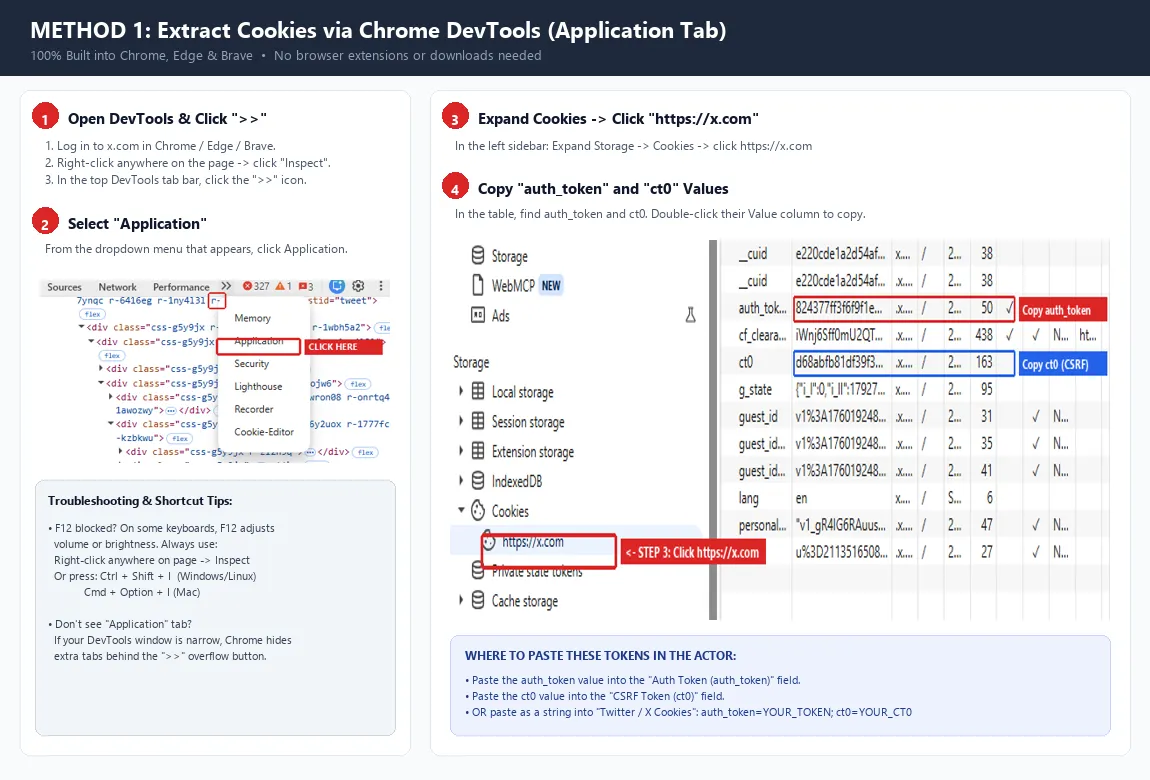
Method 1: Built-in Chrome DevTools (Application Tab — No Extensions Needed)
Works out of the box in Google Chrome, Microsoft Edge, and Brave Browser:
- Log In: Open x.com in your browser and log into your account.
- Open Inspect: Right-click anywhere on the page and select Inspect (or press
Ctrl+Shift+Ion Windows/Linux orCmd+Option+Ion Mac). (Note: On many laptops, pressingF12controls screen brightness or volume. Right-clicking → Inspect always works!) - Open Application Tab: In the top DevTools tab bar, click
>>(overflow menu) to reveal hidden tabs, then click Application. - Navigate to Cookies: In the left sidebar: Expand Storage → Cookies → click
https://x.com. - Copy Tokens: In the table, find:
auth_token: Double-click itsValueto copy (40-character hex string).ct0: Double-click itsValueto copy (CSRF token string).
Method 2: Using the Free Cookie-Editor Chrome Extension (Fastest — 1 Click)
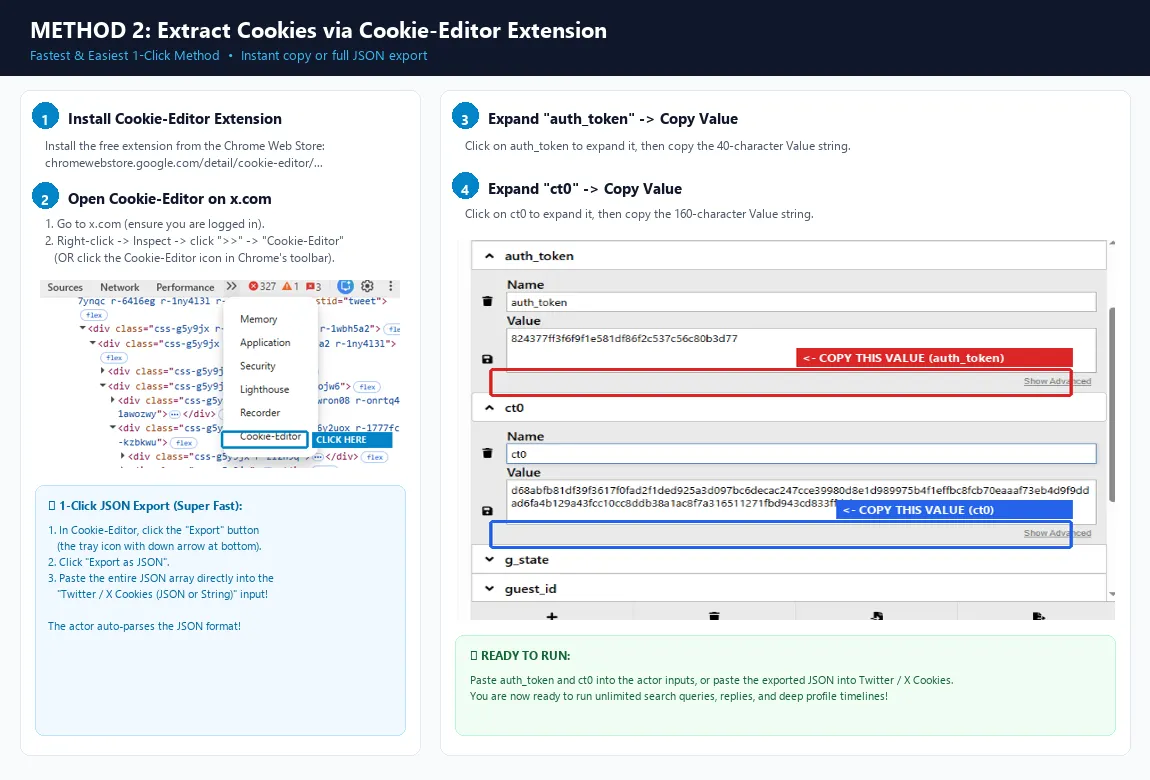
If you prefer a 1-click visual interface or want to export cookies as a clean JSON array:
- Install Extension: Add the free Cookie-Editor Extension from Chrome Web Store.
- Open on X.com: Navigate to x.com while logged in.
- Open Cookie-Editor:
- Click the Cookie-Editor icon in your browser's extensions toolbar, OR
- Right-click anywhere → Inspect → click
>>in the DevTools bar → select Cookie-Editor.
- Copy Tokens or Export JSON:
- Option A (Individual Tokens): Click on
auth_tokento expand and copy theValue. Do the same forct0. - Option B (1-Click JSON Export): Click the Export button at the bottom of Cookie-Editor → choose Export as JSON → paste the entire JSON array directly into the Twitter / X Cookies (JSON or String) field in the actor!
- Option A (Individual Tokens): Click on
⚙️ Input Configuration
Configure your extraction run using the input parameters below. All parameters are optional, but you must provide at least one source (URL, username, query, or thread ID).
Input Parameters Table
| Field | Type | Description | Default |
|---|---|---|---|
sourceUrls | Array | List of X/Twitter URLs to extract data from (Post, Profile, Search, or List URLs). | [] |
userHandles | Array | Specific X/Twitter handles to scrape posts from (without the @ symbol, e.g. elonmusk). | [] |
queryTexts | Array | Search queries supporting Twitter advanced search syntax (e.g. from:NASA since:2024-01-01). | [] |
threadIds | Array | Tweet conversation IDs to scrape full reply threads from. | [] |
twitterCookies | String | Paste exported cookies (JSON array from Cookie-Editor, or auth_token=...; ct0=...). | "" |
authToken | String | Individual auth_token cookie value (overrides twitterCookies if provided). | "" |
ct0 | String | Individual ct0 CSRF token value (used in combination with authToken). | "" |
resultLimit | Integer | Maximum number of posts to extract. Leave empty or enter 0 for unlimited. | 1000 |
sortOrder | String | Sort order: "Recent" (newest first), "Popular" (top engagement), "Recent + Popular", "Media". | "Recent" |
onlyReplies | Boolean | When enabled, extracts only reply posts (comments made to other tweets). | false |
onlyReposts | Boolean | When enabled, extracts only reposted / retweeted content. | false |
onlyMedia | Boolean | When enabled, extracts only tweets that contain attached photos, videos, or GIFs. | false |
contentLanguage | String | Filter posts by ISO 639-1 language code (e.g. "en", "es", "ja", "fr", "de"). | "" |
verifiedAccountsOnly | Boolean | When enabled, restricts extraction strictly to verified accounts. | false |
premiumSubscribersOnly | Boolean | When enabled, restricts extraction strictly to X Premium (Twitter Blue) subscribers. | false |
containsImages | Boolean | Restrict to posts that include at least one photo. | false |
containsVideos | Boolean | Restrict to posts that include at least one video attachment. | false |
containsLinks | Boolean | Restrict to posts that contain outbound external URLs. | false |
containsPolls | Boolean | Restrict to posts that include interactive voting polls. | false |
quotedPostsOnly | Boolean | Restrict to quote tweets. | false |
excludeReposts | Boolean | Filter out reposted / retweeted posts from results. | false |
excludeReplies | Boolean | Filter out reply tweets from results. | false |
postedBy | String | Query Builder: Filter posts created by this author handle (without @). | "" |
replyingTo | String | Query Builder: Filter posts created in reply to this user handle (without @). | "" |
mentionsUser | String | Query Builder: Filter posts that tag or mention this user handle (without @). | "" |
minLikes | Integer | Minimum number of likes (favorites) required per post. | 0 |
minReposts | Integer | Minimum number of reposts (retweets) required per post. | 0 |
minReplies | Integer | Minimum number of replies required per post. | 0 |
minBookmarks | Integer | Minimum number of bookmarks required per post. | 0 |
minViews | Integer | Minimum number of views (impressions) required per post. | 0 |
minAuthorFollowers | Integer | Minimum author follower count required. | 0 |
fromDate | String | Filter posts published on or after this date (YYYY-MM-DD). | "" |
toDate | String | Filter posts published on or before this date (YYYY-MM-DD). | "" |
nearLocation | String | Filter posts geotagged near a city or location (e.g. "New York"). | "" |
locationRadius | String | Search radius around the geotargeted location (e.g. "15mi" or "25km"). | "" |
geoCoordinates | String | Geographic bounding coordinates in format latitude,longitude,radius. | "" |
placeId | String | Filter posts tagged with a specific official X Place ID. | "" |
includeUserAnalytics | Boolean | Include enriched author analytics (follower ratio, account age in days). | true |
extractHashtags | Boolean | Extract all hashtags into a dedicated, cleaned array field. | true |
extractMentions | Boolean | Extract all mentioned usernames into a dedicated array field. | true |
extractMediaUrls | Boolean | Extract direct CDN media URLs (photos, videos, GIFs) into an array. | true |
extractReplies | Boolean | When scraping specific posts, automatically fetch all reply threads. | false |
includeQueryInOutput | Boolean | Adds the query or source target that located the post into each record. | false |
outputTransformFunction | String | Custom JavaScript function to reshape or filter output objects before saving. | "" |
proxyConfiguration | Object | Proxy configuration. Defaults to automatic Apify Datacenter Proxy rotation. | {"useApifyProxy": true} |
Input JSON Examples
1. Keyword & Hashtag Search with Quality Filters
2. Clean Profile Scraping (No Cookies Needed for Established Accounts)
3. Deep Profile Ingestion with Media & Replies
4. Visual Query Builder with Date & Geo Targeting
📊 Sample Output
Every post extracted is structured into a clean, normalized schema. Below is a complete real-world output example demonstrating all enriched fields, author metrics, media attachments, quotes, polls, and cards:
📋 Output Fields Defined
| Output Field | JSON Type | Description |
|---|---|---|
entityType | string | Always "post". Distinguishes record types in unified data pipelines. |
postId | string | Unique X/Twitter tweet snowflake ID string. |
postUrl | string | Modern canonical link to the tweet (https://x.com/{handle}/status/{id}). |
legacyPostUrl | string | Legacy domain URL (https://twitter.com/{handle}/status/{id}). |
authorHandle | string | Username of the post author (without @). |
authorDisplayName | string | Display name of the author as shown on their profile. |
fullText | string | Complete, unclipped body text of the post including emojis, links, and tags. |
truncatedText | string | Initial teaser text if the post exceeds traditional character limits. |
likesCount | number | Total number of likes (favorites) received. |
repostsCount | number | Total number of reposts (retweets) received. |
repliesCount | number | Total number of direct replies. |
quotesCount | number | Total number of quote tweets generated from this post. |
bookmarksCount | number | Total times this post has been saved/bookmarked by users. |
viewsCount | number | Total public view/impression count as tracked by X. |
publishedAt | string | ISO 8601 UTC timestamp of when the tweet was published. |
contentLanguage | string | BCP 47 / ISO 639-1 language tag detected by X (e.g. "en", "es"). |
sourcePlatform | string | Client used to publish the tweet (e.g. "X for Web", "X for iPhone"). |
isRepost | boolean | true if the post is a retweet of another author's content. |
isReplyPost | boolean | true if this tweet was created in response to another tweet. |
isQuotePost | boolean | true if this tweet quotes and embeds another post. |
isThreadPost | boolean | true if this tweet is part of a multi-post author thread. |
threadIndex | number | Sequential position within an author's thread (1, 2, 3...). |
sensitiveContent | boolean | true if flagged by X's safety classification systems. |
hashtags | array | Normalized array of all hashtags appearing in the post text. |
mentionedUsers | array | Normalized array of all user handles mentioned (@handle). |
externalLinks | array | Expanded destination URLs for all links embedded in the tweet. |
mediaAttachments | array | Array of media objects with direct CDN links, dimensions, and types. |
poll | object | Voting choices, vote counts, percentages, and status for interactive polls. |
card | object | Rich link preview metadata (title, summary, domain, thumbnail URL). |
quotedPost | object | Reference data for quoted tweets (author handle, tweet ID, text). |
article | object | Long-form X Article content, headlines, and block typography. |
author | object | Nested profile analytics (followers, following ratio, account age in days). |
engagementRate | number | Calculated engagement percentage ((likes+reposts+replies+quotes+bookmarks)/views)*100. |
extractedAt | string | ISO 8601 UTC timestamp when the scraper processed this record. |
searchQuery | string | Search query or source URL that located this record. |
placeInfo | object | Official geolocation and city metadata if geotagged. |
💼 Real-World Use Cases
- 🤖 AI & LLM Training Datasets: Harvest millions of conversational, high-signal conversational exchanges and developer code snippets.
- 📈 Financial & Market Sentiment: Gauge retail and institutional sentiment shifts on equities, commodities, and crypto in real time.
- 🏢 Brand Protection & Crisis Monitoring: Track customer dissatisfaction, viral complaints, and brand mentions before issues escalate.
- 🌟 Influencer Discovery & Creator Vetting: Evaluate true audience reach using authentic view-to-follower ratios and bookmark engagement.
- 📰 Journalism & Breaking News Discovery: Monitor official government releases, eyewitness dispatches, and emergency bulletins.
- 🕵️ Competitor Intelligence: Track competitor product announcements, customer feedback, marketing positioning, and viral campaigns.
🛡️ Enterprise Rate-Limit & Anti-Ban Architecture
Tweeter Scraper includes a resilient 5-tier architecture built to withstand Twitter's rate-limiting and anti-scraping defenses:
- 🔄 Automatic Apify Datacenter Proxy Rotation: Every request and retry routes through Apify's rotating proxy pool, preventing IP-level burst restrictions.
- ⏱️ Precise
x-rate-limit-resetSynchronization: The scraper monitors Twitter's response headers (x-rate-limit-remainingandx-rate-limit-reset). If an account quota is reached, it dynamically sleeps until the exact reset second instead of terminating with an error. - 👥 Multi-Account Cookie Pool (Zero Downtime): Supply multiple accounts in
authToken(separated by commas) or viatwitterCookies. When Account #1 exhausts its window, the scraper instantly switches to Account #2 with zero downtime. - 🎲 Adaptive Jittered Pacing (AIMD): Smart pacing ($1,200\text{ms} - 1,800\text{ms}$) with Gaussian jitter simulates organic browsing behavior and avoids anti-bot traps.
- 💾 Real-Time Dataset Streaming: Extracted posts are streamed directly into your Apify Dataset batch-by-batch. If you ever stop or abort a crawl early, every single post collected up to that moment is safely preserved.
❓ Frequently Asked Questions (FAQ)
Do I need to buy expensive residential proxies to use this Actor?
No. Apify Datacenter Proxies are already built-in and included at $0.00 extra cost. You do not need to configure external proxy services.
Can I scrape X/Twitter without providing cookies or logging in?
Yes. For established accounts (e.g. @NASA, @BBC, @OpenAI), single post links, public Twitter lists, and conversation threads, Free Guest Mode works out of the box with zero credentials.
Why do newer accounts return only 3 to 5 preview posts without cookies?
Twitter's backend enforces a server-side restriction for accounts created recently: unauthenticated visitors are only served a short preview timeline. Our scraper uses Web SSR fallback to extract all pre-rendered preview posts. To paginate through the full historical timeline of newer profiles, simply provide your cookies.
Are my Twitter cookies safe?
Yes. Your cookies are transmitted exclusively to Twitter's official endpoints over encrypted HTTPS connections. They are never stored, logged, or shared with third parties. For extra peace of mind, we recommend using a secondary or dedicated crawling account.
How does Pay-Per-Event pricing benefit me over traditional scrapers?
Traditional scrapers charge for every second their browser container runs — meaning if a proxy gets stuck or a search returns 0 results, you still pay for server runtime. With Pay-Per-Event, you only pay for actual posts delivered to your dataset ($0.30 per 1,000 posts). If a search returns 0 results, you pay $0.00.
Can I export data into Excel, CSV, or connect it to an API webhook?
Yes. Apify provides 1-click downloads in Excel (XLSX), CSV, JSON, and XML. You can also connect the dataset directly to Google Sheets, Zapier, Make, or custom REST API webhooks.
🏷️ Tags & Categories
twitter-scraper, x-scraper, tweet-extractor, social-media-mining, lead-generation, sentiment-analysis, tweet-data, x-com, market-research, brand-monitoring, ai-training-data
👨💻 Support & Inquiries
Developed and maintained with ❤️ by codescraper.
Need assistance, custom feature integrations, or enterprise volume handling?
- Email: codescraper011@gmail.com
- Author Profile: Apify Store - codescraper


