

Blaze Cannabis Menu Scraper - Dispensary Products & Deals
Pricing
from $0.80 / 1,000 results
Blaze Cannabis Menu Scraper - Dispensary Products & Deals
Scrape cannabis dispensary menus powered by BLAZE (Tymber): products, prices, THC and CBD, brands, strains, stock, effects, deals, rewards and store details. Paste a dispensary menu page URL, filter by category or brand. Cache returns only new or updated products.
Pricing
from $0.80 / 1,000 results
Rating
0.0
(0)
Developer

ActorFlow
Maintained by CommunityActor stats
0
Bookmarked
2
Total users
1
Monthly active users
5 days ago
Last modified
Categories
Features
Share
Blaze Cannabis Menu Scraper - Dispensary Products, Prices & Deals
Scrape cannabis dispensary menus powered by BLAZE (formerly Tymber): paste the online menu page of a dispensary, for example norcalholistics.org/shopnow or cannagram.com/menu, and press Start. Every product comes out with price, sale price, THC and CBD, brand, category, strain type, stock, images and effects, together with the dispensary address and license. Also scrape the store's deals and loyalty rewards. Export as JSON, CSV or Excel, or call the scraper as an API.
Target website: Blaze online menus, e.g. cannagram.com/menu
✨ Features of this Blaze dispensary menu scraper
- Product menu extraction - name, SKU, brand, category, tags, price per size, THC, CBD, terpenes, flower type, strain, units in stock, description and images.
- Deals and rewards extraction - promotions with discount, days of the week, promo codes and the products they cover, plus loyalty rewards with the points needed.
- Store details extraction - address, license number, phone, website, time zone, pickup and delivery availability and weekly hours.
- Pagination support - walks through the whole menu, hundreds of products per dispensary.
- Category and brand filtering - keep only Flower, Edibles, Vape or one brand such as STIIIZY.
- In-stock and on-sale filtering - skip sold out products or keep discounted ones only.
- Proxy support - optional proxy field for your own proxy.
- Cache deduplication - skips products saved in earlier runs, so scheduled runs return only new or updated products.
- No browser required - runs are fast and cheap.
🚀 How to scrape Blaze dispensary menus in 5 steps
- Sign up for a free Apify account - includes $5 monthly credit.
- Open the actor page and click Try for free.
- Fill in the Input fields (a dispensary menu page URL or a store ID is required).
- Click Start and wait for the run to complete.
- Download results from the Output tab in JSON, CSV, or Excel format.
You can also run this actor via the Apify API or integrate it directly into your workflows using Zapier, Make, or n8n.
💰 Pricing for the Blaze menu scraper
This actor uses pay-per-result billing based on the compute units a run consumes.
- New Apify accounts include $5 of free monthly credit.
- It reads the menu data directly instead of driving a browser, so it costs significantly less to run than browser-based scrapers.
🖼️ Blaze menu scraper input screenshot
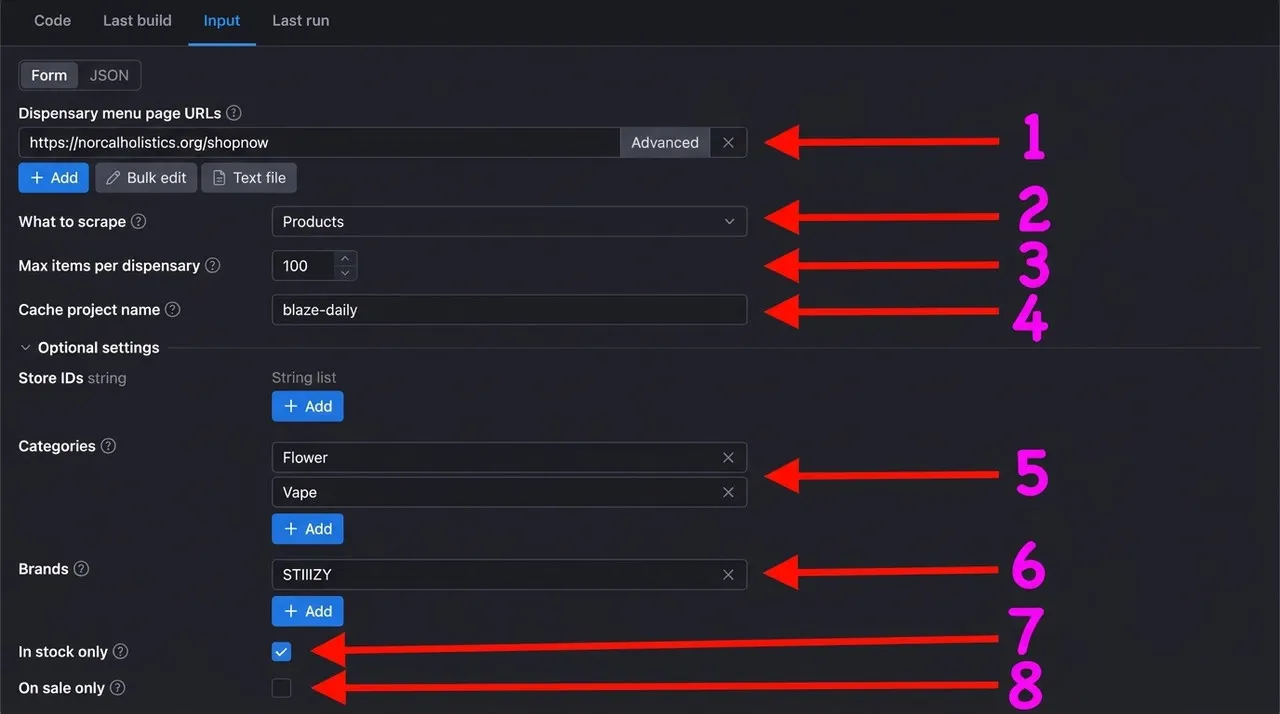
- Dispensary menu page URLs - menu pages of BLAZE-powered dispensaries.
- What to scrape - products, deals and rewards, or store details.
- Max items per dispensary - the limit for each dispensary.
- Cache project name - set a name to get only new or updated products on later runs.
- Categories - only these product categories.
- Brands - only these brands.
- In stock only - skips sold-out products.
- On sale only - keeps discounted products only.
🔧 Blaze menu scraper input configuration
| Field | Type | Required | Default | Description |
|---|---|---|---|---|
Dispensary menu page URLs (startUrls) | array | ✅ (or store IDs) | https://norcalholistics.org/shopnow | Online menu pages of dispensaries that use the BLAZE menu, e.g. https://cannagram.com/menu. |
Store IDs (storeIds) | array | - | - | Store IDs (UUIDs) if you already have them. |
What to scrape (mode) | string | - | products | products, deals (promotions and rewards) or stores (dispensary details). |
Max items per dispensary (maxItems) | integer | - | 5 | Maximum products or deals saved for each menu page URL and each store ID. |
Categories (categories) | array | - | - | Products only. Keep only these categories, e.g. Flower, Edibles, Vape. |
Brands (brands) | array | - | - | Products only. Keep only these brands. |
In stock only (inStockOnly) | boolean | - | false | Products only. Skip out of stock or inactive products. |
On sale only (onSaleOnly) | boolean | - | false | Products only. Keep only discounted products. |
Also save deals and rewards (includeDeals) | boolean | - | false | Products only. Adds promotion and reward records; they do not count towards Max items. |
Include pickup and delivery hours (includeHours) | boolean | - | false | Stores only. Adds the weekly hours. |
Cache project name (cacheProjectName) | string | - | - | Products only. Same name on each run returns only new or updated products. |
Proxy configuration (proxyConfiguration) | object | - | no proxy | Optional proxy settings. |
Supported URL types:
- The online menu page of any dispensary that uses the BLAZE menu, such as
https://norcalholistics.org/shopnoworhttps://cannagram.com/menu. - Pages hosted by Tymber (
*.tymber.io) work as well.
📦 Blaze menu scraper output data
The output is a flat JSON dataset with a recordType on every row (product, promotion, reward or store) and the dispensary joined into each row. Fields: recordType, storeId, storeName, storeAddress, storeCity, storeState, storeZip, storeCountry, storeLicense, storePhone, storeEmail, storeWebsite, storeMenuUrl, storeTimezone, productId, name, sku, externalId, productType, url, category, brand, brandLogo, brandDescription, tags, price, salePrice, onSale, discount, currency, pricesBySize, weightPrices, sizeAmount, sizeUnit, sizeText, cannabisWeight, thc, thcUnit, cbd, cbdUnit, minThc, maxThc, minCbd, maxCbd, composition, terpenoids, flowerType, strain, inventory, inStock, isActive, hiddenFromMenu, description, image, images, flavours, effects, effectsNotes, recommendedFor, experienceLevel, updatedAt, dealId, dealType, discountType, discountAmount, daysOfWeek, startDate, endDate, promoCodes, disclaimer, pointsRequired, productIds, pickupEnabled, deliveryEnabled, lastMenuSync, posSystem, logo, pickupHours, deliveryHours, changeType, scrapedFrom. Missing values are null. Prices are in currency units (30.00, not cents).
The dataset has 3 views:
- Products - product, brand, category, price, sale price, THC and stock.
- Deals - promotions and rewards with discount, days and promo codes.
- Stores - dispensary address, license, phone, menu page and pickup or delivery availability.
Output at a glance:
| Product | Brand | Category | Price | Sale price | THC | In stock |
|---|---|---|---|---|---|---|
| Biskanté (S) 3.5g Premium Indoor Flower | Alien Labs | Flower | 55.00 | 50.00 | 26.84% | Yes |
| Chocolate Thai-Dye (S) 3.5g Premium Indoor Flower | Flawless | Flower | 42.00 | 36.00 | 25.29% | Yes |
| Thermonuclear Lemons (S) 3.5g Premium Indoor Flower | Flawless | Flower | 42.00 | 36.00 | 26.40% | Yes |
| Notorious (H) 3.5g Premium Indoor Flower | High Grade Farms | Flower | 42.00 | 42.00 | 34.45% | Yes |
| Scotty's Mom (I) 3.5g Indoor Flower | HOTBOX | Flower | 32.00 | - | 26.71% | Yes |
Sample output (raw JSON):
(The deal, store and cache fields that are null on a product row are left out of this sample; they are present in the real output.)
🔁 Scrape only new Blaze menu products with cache deduplication
Use the cache deduplication to get only new or updated dispensary products on every scheduled run. Set the same Cache project name on each run: products already saved under that name and unchanged (same update time, price and stock) are skipped, are not charged and do not count towards Max items. New products get changeType: "new", changed ones changeType: "updated". Different names keep separate caches. Tip: combine it with an Apify Schedule, for example once a day, to track new drops and price changes.
🐍 How to scrape Blaze dispensary menus with Python, JavaScript or the API
Run the actor programmatically with the official Apify clients. Replace <YOUR_API_TOKEN> with the token from your Apify Console.
Python (pip install apify-client):
JavaScript (npm install apify-client):
cURL - start a run and wait for the dataset:
💡 What you can use Blaze dispensary menu data for
- Cannabis price monitoring and competitor price comparison between dispensaries
- Tracking new product drops, restocks and sold out items
- Brand and distributor analysis: where a brand is sold, at what price and with what potency
- Deal and promotion tracking across dispensaries and weekdays
- Building dispensary directories, deal finders and market reports
Cannabis brands, dispensary operators, market analysts, delivery and aggregator apps and data teams in the legal cannabis industry typically use this data.
⚠️ Limitations of the Blaze menu scraper
- Only BLAZE menus - the scraper reads dispensaries that use the BLAZE online menu. Menus from other platforms are not supported.
- Inactive stores - stores that are switched off or demo stores return no data.
- Missing details - email, THC, CBD or effects are empty (
null) when the dispensary does not publish them. - Menu order - products come in menu id order, not in the order the dispensary shows them.
❓ Blaze menu scraper FAQ
Can I scrape Blaze dispensary menus legally?
The actor only collects data that dispensaries already publish on their public online menu: no login, paywall or private content is accessed. Scraping publicly available data is generally considered lawful (see hiQ Labs v. LinkedIn), but you are responsible for complying with the terms of the sites and applicable laws such as GDPR and CCPA.
What data does the Blaze menu scraper return?
For each product: name, SKU, brand, category, tags, price and sale price per size, THC and CBD, strain type, stock, images and effects, plus the dispensary name, address, license and phone. Switch on deals to also get promotions and loyalty rewards, or use store mode for dispensary details and weekly hours.
How many products can I scrape from one dispensary menu?
Max items per dispensary limits the products (or deals) saved for each menu page URL and each store ID, so one run can cover many dispensaries. Raise it to get the full menu; dispensaries typically list a few hundred to over a thousand products.
How do I find the menu page of a dispensary?
Open the dispensary website and click its shop or menu button; the address of that page, for example https://norcalholistics.org/shopnow, is what you paste into the URL field. Menus embedded in a page work as well as hosted ones.
How do I scrape Blaze menus with Python?
Use the Python example above with the apify-client package and iterate over the dataset items.
Can I run this Blaze scraper on a schedule?
Yes, use Apify Schedules. Add a cache project name to the input and each scheduled run applies deduplication: it returns only products that are new or changed since the previous run.
Is this the cheapest Blaze menu scraper on Apify?
Probably yes: the cache deduplication skips products already saved in earlier runs, so repeated runs are not charged for duplicates.
What output formats are supported?
JSON, CSV, Excel, XML and RSS, either from the Output tab or through the Apify API.
🔗 Relevant actors for Blaze dispensary menus
| Scraper | Description |
|---|---|
| 🌿 Dutchie Dispensary & Menu Scraper | Scrape Dutchie cannabis dispensaries and menus: products by size, prices and THC. |
| 🌿 Treez Menu Scraper | Scrape Treez dispensary menus: products, prices, THC, lab results and deals. |
| 🌿 Flowhub Dispensary Menu Scraper | Scrape Flowhub dispensary menus: products, prices, THC, terpenes, deals and chains. |
| 🌿 Leafly Scraper | Scrape Leafly dispensaries, menus, strains, brands and reviews. |
🔗 Other actors you may find useful
| Scraper | Description |
|---|---|
| 🛒 AliExpress Products Scraper | Scrape AliExpress search results and product pages with prices and details. |
| 🚗 Arabam.com Car Listings Scraper | Scrape car listings from arabam.com: price, year, mileage and brand. |
| 🗺️ Yandex Maps Places Scraper | Scrape Yandex Maps businesses by search and location with emails and phones. |
| 🏠 HousingAnywhere Property Scraper | Scrape rental listings from HousingAnywhere with price and city. |
| 📢 Avito Listings Scraper | Scrape classified listings from avito.ru: real estate, cars and goods. |
💬 Support & contact
If you encounter any issues or have questions, please open an issue.
You can also find more of our actors on the Actor Flow page.


