

Dutchie Dispensary & Menu Scraper - Cannabis Prices
Pricing
from $1.00 / 1,000 results
Dutchie Dispensary & Menu Scraper - Cannabis Prices
Scrape Dutchie (dutchie.com) cannabis dispensaries and menus: products by size, recreational and medical prices, specials, THC and CBD, stock, hours and location. Search by city, zip or state. Cache returns only new or changed products. Export JSON, CSV or Excel.
Pricing
from $1.00 / 1,000 results
Rating
0.0
(0)
Developer

ActorFlow
Maintained by CommunityActor stats
0
Bookmarked
2
Total users
1
Monthly active users
11 hours ago
Last modified
Categories
Security
Limited permissionsShare
Dutchie (dutchie.com) Dispensary & Menu Scraper - Cannabis Prices
Scrape cannabis dispensaries and menus from Dutchie (dutchie.com): every product by size with recreational and medical prices, live specials, THC and CBD, stock, brand and category, plus the store's address, phone, hours and coordinates. Paste a dispensary menu link, or search by city, zip code, coordinates or whole state, and press Start. Export JSON, CSV or Excel, or call it as an API.
Target website: dutchie.com
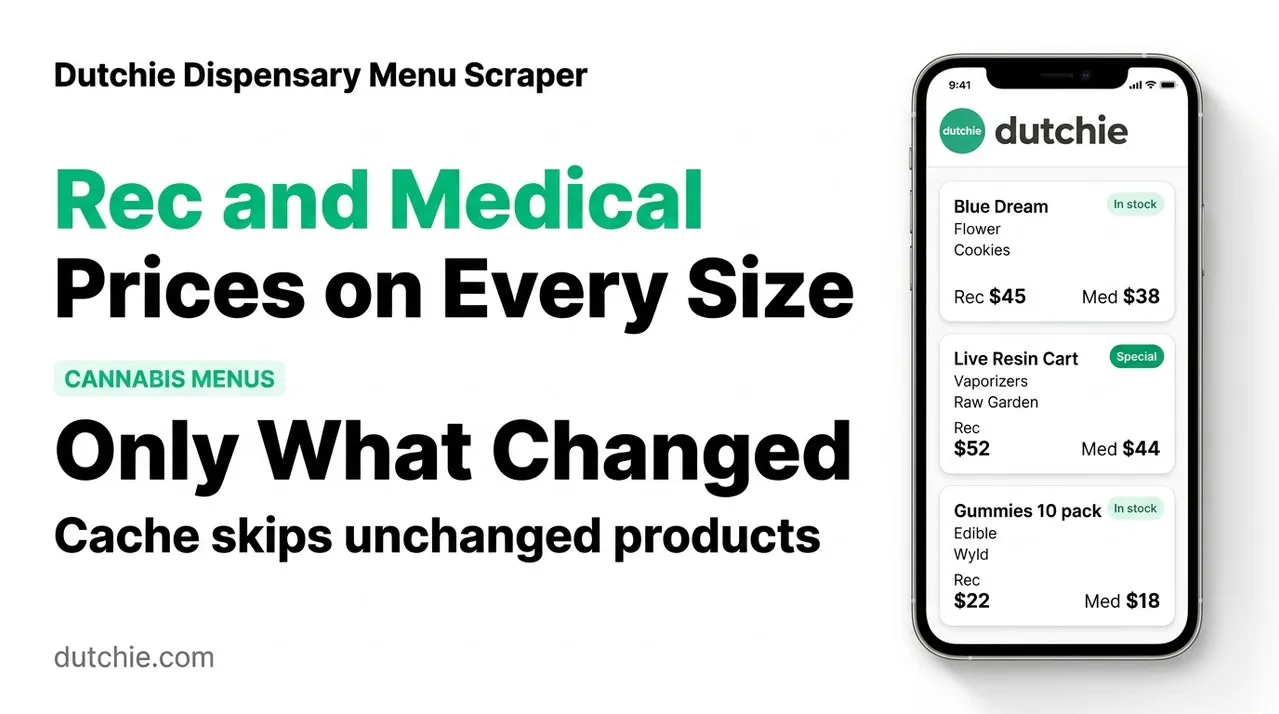
✨ Features of this Dutchie dispensary and menu scraper
- Full menu extraction — one row per product size with brand, category, subcategory, strain type, THC, CBD, terpenes, cannabinoids, effects, images and an optional description.
- Recreational and medical prices — both prices are saved on every row, and you choose which menu is the shelf price.
- Specials and sales — live special names, kinds and dates, the sale price, and a specials-only filter.
- Stock — units available for each size and an in-stock flag.
- Find dispensaries — search by city and state, by zip or postal code with a radius, by coordinates, or cover a whole state or province in one run.
- Dispensary details — name, address, phone, chain, time zone, coordinates, pickup and delivery hours, and order options repeated on every product row. A dispensary-only mode saves just the store details without opening any menu.
- Brand, store name and review filters — keep only chosen brands or stores whose name contains a word, and add customer reviews (author, rating, text, effects) to reviewed products.
- Pagination support — whole menus of thousands of products are read page by page.
- Category and menu filters — keep only Flower, Pre-Rolls, Edibles and so on, and choose the recreational or medical menu.
- Cache, only new or changed products — repeat runs return only products with a new price, special or stock.
- Closed and test stores skipped — location searches keep real, open stores unless you ask for the rest.
- No browser required — plain data requests make runs fast and light.
🚀 How to scrape Dutchie menus in 5 steps
- Sign up for a free Apify account — includes $5 monthly credit.
- Open the actor page and click Try for free.
- Paste one or more Dutchie dispensary links in Dispensary URLs, or add Search dispensaries by location.
- Click Start and wait for the run to complete.
- Download results from the Output tab in JSON, CSV, or Excel format.
You can also run this actor via the Apify API or integrate it directly into your workflows using Zapier, Make, or n8n.
💰 Pricing for the Dutchie scraper
This actor uses pay-per-result billing: you pay for the rows saved. A product with three sizes makes three rows.
- New Apify accounts include $5 of free monthly credit.
- The cache skips products that did not change, so scheduled runs cost less over time.
- It uses plain data requests instead of a browser, so it costs significantly less to run than browser-based scrapers.
🖼️ Dutchie scraper input screenshot
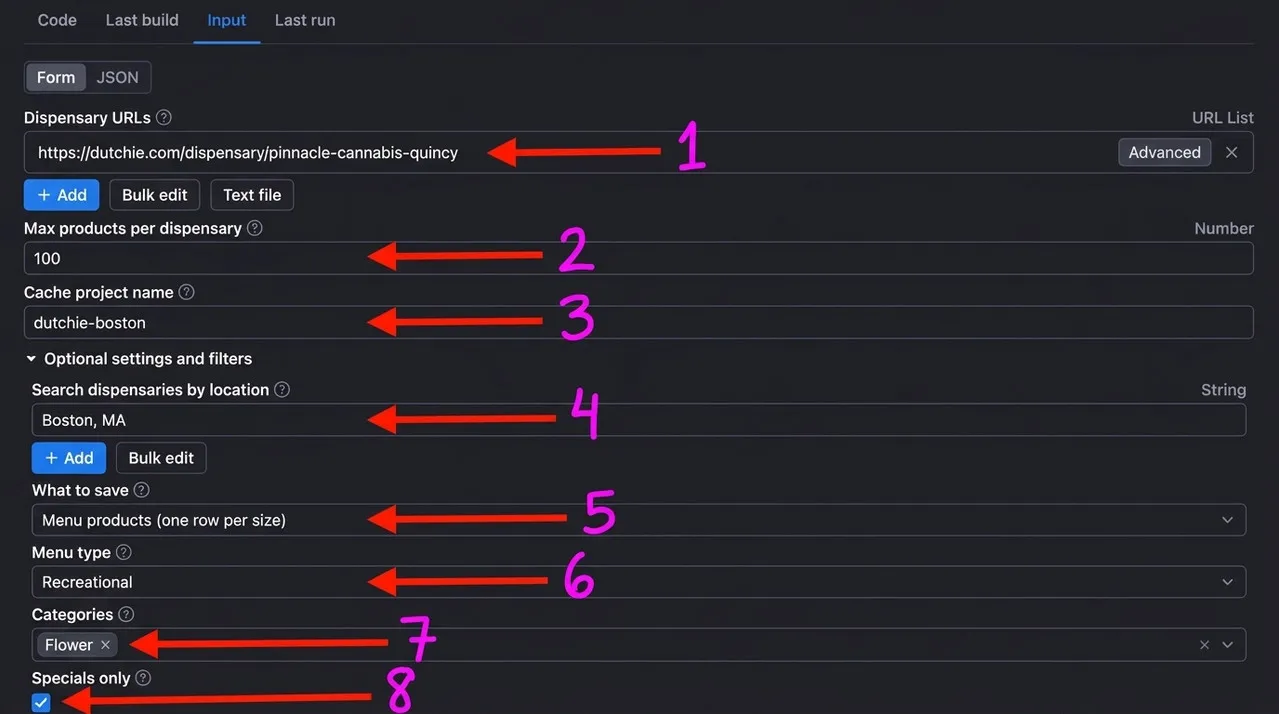
The numbers match the input fields below:
- Dispensary URLs: Dutchie menu links to scrape.
- Max products per dispensary: how many product rows are saved for each store.
- Cache project name: reuse the same name on each run to get only new or changed products.
- Search dispensaries by location: find stores by city, zip code, coordinates or state.
- What to save: menu products, or only the dispensary details.
- Menu type: which menu's price is the shelf price, recreational or medical.
- Categories: keep only the chosen menu categories.
- Specials only: keep only products with a live sale or special.
🔧 Dutchie scraper input configuration
The form starts with the dispensary links, the product limit and the cache name. Everything else is in the collapsible optional settings and filters.
| Field | Type | Required | Default | Description |
|---|---|---|---|---|
Dispensary URLs (startUrls) | array | — | example menu | Dutchie dispensary menu links, embedded menu links and product page links. |
Max products per dispensary (maxItems) | integer | — | 5 | Product rows saved for each dispensary. |
Cache project name (cacheProjectName) | string | — | — | Same name on each run to get only new or changed products. |
Search dispensaries by location (searchLocations) | array | — | — | One search per line: Boston, MA, a zip or postal code, 42.36,-71.06, or a state or province code such as CO. |
Search radius (radiusMiles) | integer | — | 25 | Miles around a zip code or coordinates, up to 150. |
Max dispensaries per search (maxDispensaries) | integer | — | 5 | Stores kept per location search, nearest first. |
What to save (outputMode) | string | — | products | Menu products (one row per size) or dispensary details only. |
Max rows in total (maxTotalItems) | integer | — | — | Optional cap for the whole run. |
Menu type (menuType) | string | — | rec | Recreational or medical menu for the shelf price. |
Categories (categories) | array | — | — | Keep only these categories. |
Specials only (offersOnly) | boolean | — | off | Keep only products with a live special or sale. |
Include product descriptions (includeDescriptions) | boolean | — | off | Adds the full product description to every row. |
Include closed and test stores (includeClosedStores) | boolean | — | off | Keep stores that are not open and test or demo stores in location searches. |
Store name contains (storeNames) | array | — | — | Keep only stores whose name contains one of these words, for example a chain name. |
Brands (brands) | array | — | — | Keep only products of these brands. |
Include product reviews (includeReviews) | boolean | — | off | Adds customer reviews to products that have them. |
Max reviews per product (maxReviewsPerProduct) | integer | — | 5 | Newest reviews kept per product. |
Supported URL types:
- Dispensary menu:
https://dutchie.com/dispensary/pinnacle-cannabis-quincy - Embedded menu:
https://dutchie.com/embedded-menu/<store-name> - Product page:
https://dutchie.com/dispensary/<store-name>/product/<product>
Search locations: Boston, MA searches that city, 02169 or 42.36,-71.06 search the radius around the point, and CO covers a whole state with overlapping searches. A store found by several searches is saved once.
📦 Dutchie scraper output data
Every record has the same keys (null when there is no value): recordType, dispensaryId, dispensaryName, dispensarySlug, dispensaryUrl, dispensaryAddress, city, state, zipcode, country, dispensaryPhone, latitude, longitude, timezone, chain, storeStatus, offersPickup, offersDelivery, recreational, medical, pickupHours, deliveryHours, dispensaryEmail, dispensaryDescription, logoImage, bannerImage, menuCategories, distanceMiles, dispensaryCreatedAt, productId, productName, productUrl, brand, category, subcategory, strainType, size, sizeLabel, menuType, price, specialPrice, recPrice, medPrice, recSpecialPrice, medSpecialPrice, currency, onSpecial, specials, thc, cbd, thcValue, cbdValue, totalTerpenes, terpenes, cannabinoids, effects, quantityAvailable, inStock, imageUrl, images, description, medicalOnly, recreationalOnly, rating, reviewCount, reviews, productCreatedAt, productUpdatedAt, changeType, scrapedAt. Product rows have recordType: product, dispensary-only rows have recordType: dispensary and leave the product fields empty.
There are 2 views: Menu products shows the product, brand, category, size, price, special price, THC, CBD and stock, and Dispensaries shows the store details.
Output at a glance:
| Product | Brand | Size | Price | Special | THC | Stock |
|---|---|---|---|---|---|---|
| Jointz Sports Balm RSO CBD | Jointz | 0.01g | 50 | 848.34mg | 21 | |
| Rosin Capsules 100mg | Harbor House Collective | .1g | 20 | 100mg | 10 | |
| Trop Cherry x Cherry Whip 1g Live Hash Rosin | Brown Bag | 1g | 47.5 | 81.24mg | 1 | |
| Yellow Zushi | DRO | 1/4oz | 49.99 | 34.99 | 10 | |
| Vanilla Berry Pie | DRO | 1/2oz | 65.99 | 46.19 | 3 |
Sample output (raw JSON):
🔁 Scrape only new or changed Dutchie products with the cache
Set the same Cache project name on every scheduled run. Products already saved under that name with the same price, special and stock are skipped, not charged and not counted towards the maximums, so each run returns only products that are new (changeType: "new") or whose price, special or stock changed (changeType: "updated"). Different names keep separate caches. Combine it with Apify Schedules to track a store's menu every day.
🐍 How to scrape Dutchie with Python, JavaScript or the API
Run the actor programmatically with the official Apify clients. Replace <YOUR_API_TOKEN> with the token from your Apify Console.
Python (pip install apify-client):
JavaScript (npm install apify-client):
cURL — start a run and wait for the dataset:
💡 What you can use Dutchie menu data for
- Price monitoring and price comparison across dispensaries in a city or state
- Tracking specials, sales and mix-and-match deals over time
- Brand and assortment analysis: which brands, strains and sizes each store carries
- Market research on recreational versus medical pricing and potency
- Building a dispensary directory or lead list with addresses, phones, hours and coordinates
Cannabis brands, retailers, analysts, marketplaces and data teams typically use this data for pricing, distribution and competitor research.
⚠️ Limitations of the Dutchie scraper
- Dutchie stores only — it reads menus that are hosted on Dutchie. Stores listed only on other platforms are not covered.
- Location search needs a place — a state is covered with overlapping searches, a zip code or coordinates use a radius of up to 150 miles, and a state name alone as text (for example
Colorado) is not understood: use the code (CO). - Hidden products — products the store hides because of low stock thresholds do not show on its menu and are not returned.
- Reviews — ratings, review counts and reviews are filled only for products that customers have reviewed. Reviewers appear as first name and last initial.
- No store license numbers — Dutchie does not publish license numbers on its menus, so they are not returned.
❓ Dutchie scraper FAQ
Can I scrape Dutchie legally?
The actor only collects menu and store data that is already publicly visible on dutchie.com, with no login or private content. Scraping publicly available data is generally considered lawful (see hiQ Labs v. LinkedIn), but you are responsible for complying with Dutchie's Terms of Service and the laws that apply to you, including cannabis advertising and privacy rules.
What data does the Dutchie scraper return?
One row per product size with the store details, brand, category, strain type, prices for both menus, specials, THC and CBD, terpenes, cannabinoids, effects, stock and images. Switch on Include product descriptions for the full description, or choose Dispensary details only to save just the stores.
How many products can I scrape from one dispensary?
Max products per dispensary limits the rows saved for each store, and Max rows in total can cap the whole run. Menus are read 100 products per page with no depth limit, so a store with thousands of products can be scraped in full by raising the limit.
How do I find all dispensaries in a city, zip code or state?
Add the place to Search dispensaries by location (Boston, MA, 02169, 42.36,-71.06 or CO) and raise Max dispensaries per search. Use Dispensary details only first if you want to list the stores before reading their menus.
How do I scrape Dutchie with Python?
Use the Python example above: start the actor with ApifyClient and iterate over the dataset items to get every row.
Can I run this Dutchie scraper on a schedule?
Yes. Use Apify Schedules and set the same Cache project name on each run, so every run saves only products that are new or whose price, special or stock changed.
What output formats are supported?
JSON, CSV, Excel, XML and RSS, either from the Output tab or through the Apify API.
Why do some products have no THC or strain type?
Stores publish potency and strain type only for products that have them, so accessories and apparel, for example, leave those fields null.
🔗 Relevant actors for Dutchie and price data
| Scraper | Description |
|---|---|
| 🍷 Total Wine Scraper | Scrape Total Wine & More wine, liquor and beer prices, sizes, ratings and stock. |
| 🇺🇸 Yellow Pages USA Scraper - Emails & Leads | Scrape US businesses with emails: name, phone, address and website. |
| 🛒 Google Shopping Scraper - Prices, Deals & Product Data | Scrape Google Shopping product listings, prices and deals for any search. |
| 🛍️ eBay Listings Scraper | Scrape eBay search results and item pages: title, price, condition and seller. |
🔗 Other actors you may find useful
| Scraper | Description |
|---|---|
| 🧴 Incidecoder Scraper | Scrapes skincare product pages with full ingredient lists. |
| ✈️ Kiwi.com Flight Scraper | Scrapes flight prices and schedules from Kiwi.com. |
| 🔎 WHOIS Domain Lookup Scraper | Bulk WHOIS lookups from URLs, bare domains or whois.com links. |
| 📄 Google Patents Scraper | Scrapes patent data from Google Patents by keyword or URL. |
| 💼 Dice Jobs Scraper | Scrapes tech job listings from Dice by keyword or URL. |
💬 Support & contact
If you encounter any issues or have questions, please open an issue.
You can also find more of our actors on the Actor Flow page.


