

HiringCafe Jobs Scraper - Search Jobs by Keyword or URL
Pricing
from $0.90 / 1,000 results
HiringCafe Jobs Scraper - Search Jobs by Keyword or URL
Scrapes job listings from HiringCafe (hiringcafe.com): title, company, location, salary, workplace type, seniority, requirements, full description and apply link. Search by keyword, search URL or job URL.
Pricing
from $0.90 / 1,000 results
Rating
0.0
(0)
Developer

ActorFlow
Maintained by CommunityActor stats
0
Bookmarked
2
Total users
1
Monthly active users
13 hours ago
Last modified
Categories
Share
Scrape job listings from HiringCafe (hiringcafe.com): title, company, location, salary, workplace type, seniority, requirements, full job description and apply link. Search by keyword, paste a HiringCafe search URL or a single job URL, press Start and export the results as JSON, CSV or Excel, or call the scraper as an API.
Target website: hiringcafe.com
✨ Features of this HiringCafe jobs scraper
- Job data extraction — structured job records with company, location, compensation, seniority, requirements summary, skills and the apply link.
- Full job descriptions — the complete description as HTML and plain text, switchable with one input toggle.
- Pagination support — keeps paging through results until your limit is reached.
- Proxy support — runs through Apify residential proxies.
- Incremental runs — set a cache project name and scheduled runs return only jobs you have not scraped before.
- Keyword and URL search — keywords, search URLs with filters already applied, and direct job URLs.
- Captcha bypass — the captcha check is handled by the scraper using an undetectable browser, and the session is reused between runs.
- No browser required — fast, low-cost runs.
🚀 How to scrape HiringCafe jobs in 5 steps
- Sign up for a free Apify account — includes $5 monthly credit.
- Open the actor page and click Try for free.
- Fill in the Input fields (a keyword, a search URL or a job URL is required).
- Click Start and wait for the run to complete.
- Download results from the Output tab in JSON, CSV, or Excel format.
You can also run this actor via the Apify API or integrate it directly into your workflows using Zapier, Make, or n8n.
💰 HiringCafe jobs scraper pricing
This actor uses pay-per-result billing: you pay per job saved to the dataset.
- New Apify accounts include $5 of free monthly credit.
- It does not run a browser, so it costs significantly less to run than browser-based scrapers.
🔧 HiringCafe jobs scraper input configuration
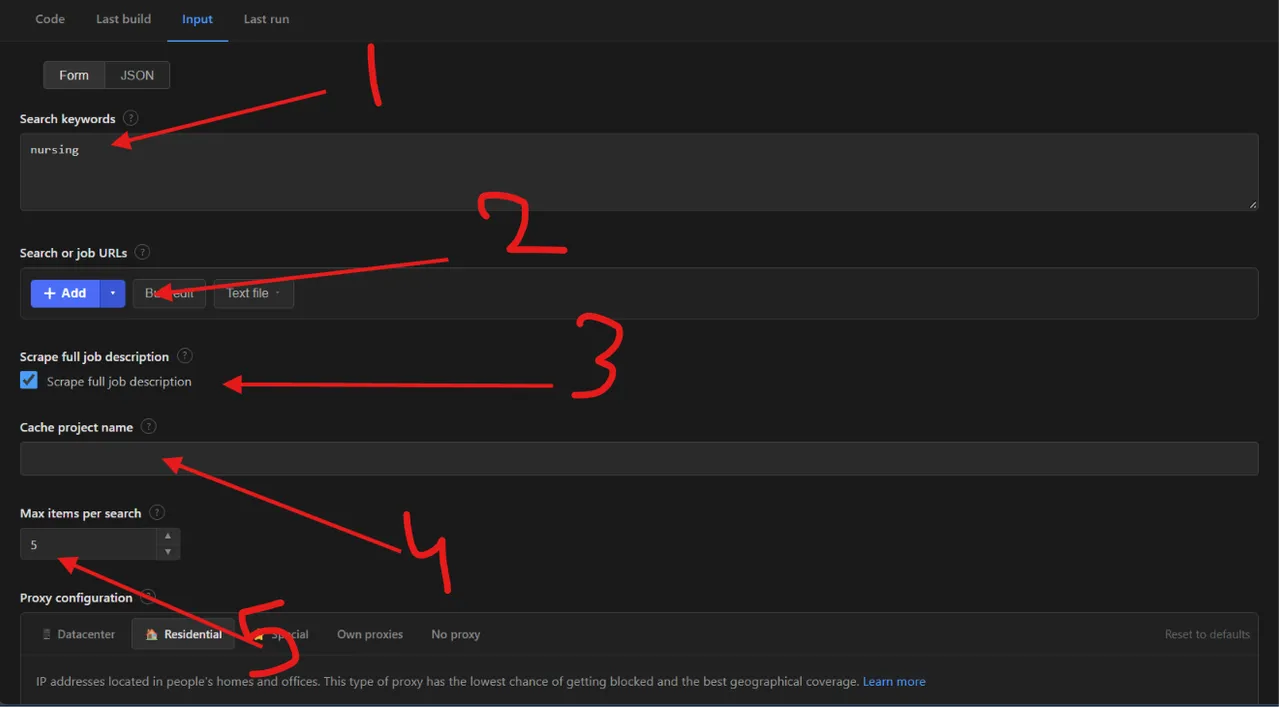
- Search keywords — one job title or skill per line, for example
nursing. Each keyword is searched separately. - Search or job URLs — paste HiringCafe search URLs (filters kept as they are) or single job URLs.
- Scrape full job description — keep it ticked to get the complete description for every job, or untick it for faster runs.
- Cache project name — use the same name on every scheduled run to get only new jobs.
- Max items per search — the maximum number of unique jobs saved for each keyword or search URL.
| Field | Type | Required | Default | Description |
|---|---|---|---|---|
| Search keywords | array | — | ["nursing"] | Job titles or skills to search for. Each keyword is searched separately. |
| Search or job URLs | array | — | — | HiringCafe search URLs (filters kept as they are) or single job URLs. |
| Cache project name | string | — | — | Reuse the same name on each run to get only new jobs. Already-seen jobs are skipped, not charged, and not counted in Max items. |
| Scrape full job description | boolean | — | true | Fetch the full description for every job. Job URLs always include it. |
| Max items per search | integer | — | 5 | Maximum unique jobs saved for each keyword or search URL. |
| Max concurrency | integer | — | 5 | How many requests run in parallel. |
| Proxy configuration | object | — | Apify residential, US | Residential proxies are needed for this website. |
Supported URL types:
- Search:
https://hiringcafe.com/classic?searchState=%7B%22searchQuery%22%3A%22nurse%22%7D - Job:
https://hiringcafe.com/viewjob/simplr___kidspeace___14389
📦 HiringCafe jobs scraper output data
Each record is a JSON object with the keys id, url, applyUrl, title, coreJobTitle, companyName, companyWebsite, companyTagline, companySectorAndIndustry, location, coordinates, workplaceType, commitment, seniorityLevel, roleType, jobCategory, salaryMin, salaryMax, salaryPeriod, salaryCurrency, postedAt, requirementsSummary, technicalTools, licensesOrCertifications, visaSponsorship, source, isExpired, descriptionHtml, description and scrapedAt, plus changeType (new) when a cache project name is set. There is one Overview view: a compact table with the most useful fields.
Output at a glance:
| Job | Company | Location | Type | Level |
|---|---|---|---|---|
| Typescript Engineer | Turing | Seattle, Washington, US | Remote | Mid Level |
| Nursing Technician - Nursing Secretary | Conehealth | Greensboro, North Carolina, US | Onsite | No Prior Experience |
Sample output (raw JSON):
🐍 How to scrape HiringCafe with Python, JavaScript or the API
Run the actor programmatically with the official Apify clients. Replace <YOUR_API_TOKEN> with the token from your Apify Console.
Python (pip install apify-client):
JavaScript (npm install apify-client):
cURL — start a run and wait for the dataset:
💡 What you can use HiringCafe job data for
- Building job boards and aggregators with fresh listings
- Tracking hiring demand for a skill, title or industry over time
- Salary and compensation benchmarking
- Lead generation from companies that are actively hiring
- Recruiting research on seniority, licences and remote or onsite mix
Recruiters, HR analysts, job-board operators and market researchers across technology, healthcare and many other industries typically use this data.
⚠️ Limitations of the HiringCafe jobs scraper
- Direct job URLs — the site returns only the description for a single job URL, so fields like company, location and salary stay
null. Use a keyword or search URL to get the full record. - Missing compensation — most listings do not publish a salary, so
salaryMinandsalaryMaxare oftennull.
❓ Frequently asked questions
Can I scrape HiringCafe legally?
The actor only collects job data that is already publicly visible on hiringcafe.com — no login, paywall or private content is accessed. Scraping publicly available data is generally considered lawful (see hiQ Labs v. LinkedIn), but you are responsible for complying with the site's Terms of Service and applicable laws such as GDPR and CCPA if personal data is involved.
What data does the HiringCafe scraper return?
Title, company, location, coordinates, workplace type, commitment, seniority, compensation, requirements summary, skills, licences, visa sponsorship and the apply link. With Scrape full job description on, you also get the description as HTML and plain text.
How many jobs can I scrape from one search?
maxItems limits unique jobs for each keyword or search URL, not for the whole run. Searches can match hundreds of thousands of jobs, so set a limit that fits your use.
Do I need a proxy to scrape hiringcafe.com?
Yes. The input defaults to Apify residential proxies in the US, which this website needs to run reliably.
How do I scrape HiringCafe with Python?
Use the Python example above: call the actor with apify-client and iterate over the dataset items.
Can I run this HiringCafe scraper on a schedule?
Yes, use Apify Schedules to run it daily or weekly. Set the same Cache project name on every run and each run returns only jobs not seen before, so you are not charged twice for the same job.
What output formats are supported?
JSON, CSV, Excel, XML and RSS, either from the Output tab or through the Apify API.
Why are salary fields empty for some jobs?
Employers on HiringCafe often do not publish compensation, so the actor returns null rather than guessing.
🔗 Other actors you may find useful
| Actor | Description |
|---|---|
| 💼 Dice Jobs Scraper | Scrapes tech job listings from Dice by keyword, search URL or job URL. |
| 📧 Decision Maker Email Finder | Finds founders, executives and department heads at any company website. |
| 🏢 BBB Business Info and Emails Scraper | Scrapes Better Business Bureau businesses: contacts, rating and reviews. |
| 📰 Google News AI Scraper | Searches Google News by keyword with optional full text and AI summaries. |
| 📊 Sentiment Analysis Using Jev | Classifies text as positive, negative, neutral or mixed, or into custom labels. |
💬 Support & contact
If you encounter any issues or have questions, please open an issue or reach out via the Apify Community Forum.
You can also find more of our actors on the Actor Flow page.


