

Mercari Japan Scraper - Listings, Prices & Sold Items
Pricing
from $1.00 / 1,000 results
Mercari Japan Scraper - Listings, Prices & Sold Items
Scrapes Mercari Japan (jp.mercari.com) listings: price in JPY, on-sale or sold status, condition, category, brand, photos, shipping, seller rating and description. Search by keyword with filters, or use search, item, shop product and seller profile URLs.
Pricing
from $1.00 / 1,000 results
Rating
0.0
(0)
Developer

ActorFlow
Maintained by CommunityActor stats
0
Bookmarked
2
Total users
1
Monthly active users
7 hours ago
Last modified
Categories
Share
Scrape listings from Mercari Japan (jp.mercari.com), Japan's largest flea-market app: name, price in yen, on-sale or sold status, condition, category path, brand, photos, shipping details, seller name and rating, likes, comments and the full description. Covers regular Mercari items and Mercari Shops products. Export the results as JSON, CSV or Excel, or call the actor as an API. Paste a Mercari search URL or type a keyword, press Start, and get clean Mercari Japan data.
Target website: jp.mercari.com
✨ Features of this Mercari Japan listings scraper
- Mercari listing extraction — id, name, price (JPY), status, condition, category, brand, size, thumbnail and photos, listing dates and seller ID from search results.
- Item details — optional description, condition name, full category path, shipping payer, method, origin prefecture and handling time, likes, comments, hashtags, seller name, rating and number of listings, and auction bids.
- Sold listings for price comps — scrape sold and in-trade items as well as items on sale.
- Keyword, price, category and condition filtering — exclude words, sort by newest, best match, price or likes, ascending or descending.
- Search, item, shop product and seller URLs — every filter of a jp.mercari.com search URL is kept; a seller profile URL returns all of that seller's listings.
- Pagination support — pages through search results (120 per page) until Max items is reached.
- Cache to avoid scraping the same items twice — with a cache project name, listings you already scraped in an earlier run are skipped and not charged, so scheduled runs return only new listings.
- Proxy support — optional Apify Proxy, off by default.
- No browser required — plain HTTP requests keep runs fast and cheap.
🚀 How to scrape Mercari Japan listings in 5 steps
- Sign up for a free Apify account — includes $5 monthly credit.
- Open the actor page and click Try for free.
- Fill in the Input fields (a Mercari URL or a search keyword is required).
- Click Start and wait for the run to complete.
- Download results from the Output tab in JSON, CSV, or Excel format.
You can also run this actor via the Apify API or integrate it directly into your workflows using Zapier, Make, or n8n.
💰 Mercari Japan scraper pricing
This actor uses pay-per-result billing: you pay for each listing saved to the dataset.
- New Apify accounts include $5 of free monthly credit.
- The actor uses plain HTTP requests, so it costs significantly less to run than browser-based scrapers.
- The proxy is disabled by default; leaving it off keeps runs cheapest.
- Listings skipped by the cache are not charged.
🔧 Mercari Japan scraper input configuration
| Field | Type | Required | Default | Description |
|---|---|---|---|---|
Mercari Japan URLs (startUrls) | array | — | jp.mercari.com/search?keyword=nintendo switch&status=on_sale (prefill) | Search, item, Mercari Shops product or seller profile URLs. |
Max items per search (maxItems) | integer | — | 5 | Maximum listings saved per search URL, seller or keyword. |
Cache project name (cacheProjectName) | string | — | — | Same name on every run returns only new listings; cached ones are skipped and not charged. Records get changeType: new. |
Search keywords (keywords) | array | — | — | Keywords in Japanese or English. Each keyword is a separate search with the filters below. |
Exclude keyword (excludeKeyword) | string | — | — | Skip listings containing this word. |
Status (status) | string | — | on_sale | on_sale, sold_out (sold or in trade) or all. Keyword searches only. |
Sort by (sort) | string | — | created_time | created_time, score (best match), price or num_likes. |
Order (order) | string | — | desc | desc or asc. |
Min price (JPY) (priceMin) | integer | — | — | Lowest price in yen. |
Max price (JPY) (priceMax) | integer | — | — | Highest price in yen. |
Category IDs (categoryIds) | array | — | — | Mercari category IDs (the category_id of a search URL). |
Item condition (conditionIds) | array | — | — | 1 New, 2 Like new, 3 No visible damage, 4 Some damage, 5 Damaged, 6 Bad condition. |
Scrape item details (scrapeDetails) | boolean | — | false | Adds description, shipping, likes, comments and seller info. One extra request per item. |
Proxy configuration (proxyConfiguration) | object | — | no proxy | Works without a proxy. |
Max concurrency (maxConcurrency) | integer | — | 5 | Parallel requests. |
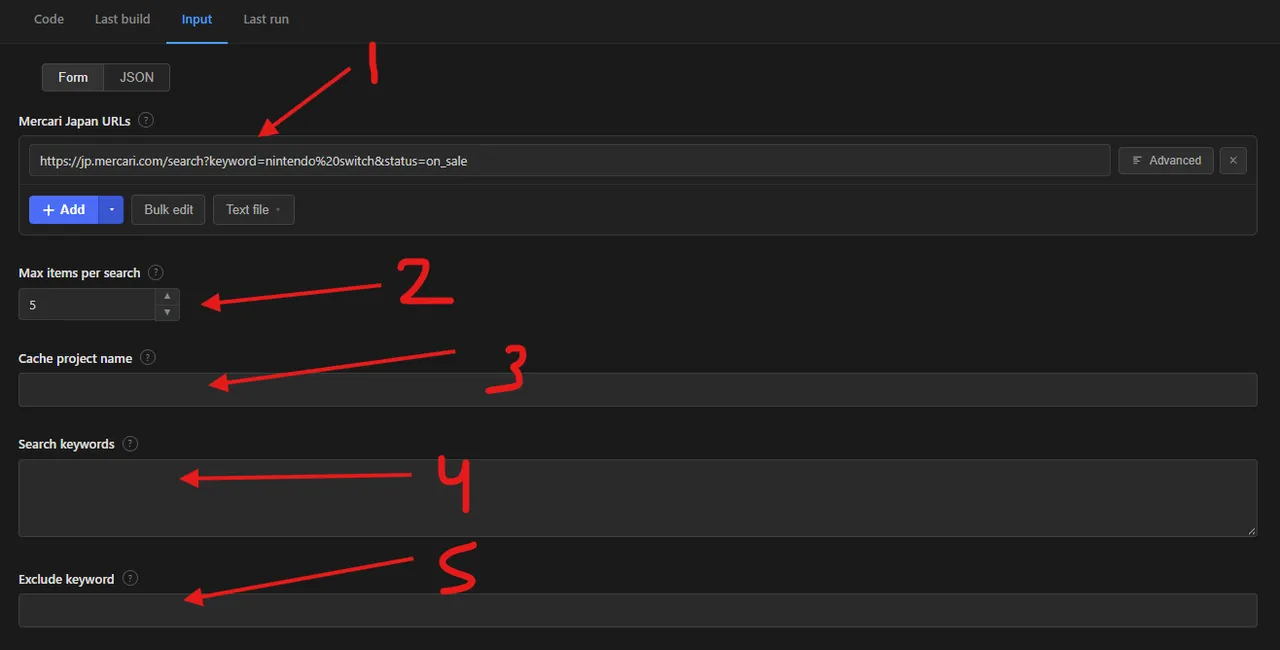
The numbered markers in the screenshot show the fields most runs use:
- Mercari Japan URLs: paste a search, item, Mercari Shops product or seller profile URL.
- Max items per search: how many listings to save for each URL, seller or keyword.
- Cache project name: optional; reuse the same name on every run so listings you already scraped are skipped.
- Search keywords: search without a URL; each keyword is a separate search, in Japanese or English.
- Exclude keyword: skip listings that contain this word.
In the Console, keywords and all other filters sit in the collapsible Search filters and more options section below the first three fields.
Supported URL types:
- Search:
https://jp.mercari.com/search?keyword=nintendo%20switch&status=sold_out&price_min=10000&category_id=702&sort=price&order=asc - Item:
https://jp.mercari.com/item/m28859083473 - Mercari Shops product:
https://jp.mercari.com/shops/product/2JYCRdLoYbxpFaxcy3gN4Y - Seller profile:
https://jp.mercari.com/user/profile/793162340
🔁 Scrape only new Mercari listings with the cache
Mercari listings are re-listed, repeated across searches and returned again by every scheduled run. Using the cache stops you scraping and paying for the same items across multiple runs.
- How to turn it on: set the same Cache project name (for example
switch-deals) on every run of the same search. - Skipped and not charged: listings already saved under that name are not saved again, not charged, and do not count towards Max items per search.
- Tagged as new: every saved record gets
changeType: "new". - Separate projects: use a different name per search, brand or seller to keep their histories apart.
- Best with schedules: combine it with Apify Schedules and a newest-first sort for a daily feed of fresh listings.
📦 Mercari Japan scraper output data
Each listing is one dataset item with the fields id, url, itemType, name, price, currency, status, conditionId, condition, categoryId, categoryName, categoryPath, brandId, brand, size, thumbnail, photos, description, numLikes, numComments, hashtags, shippingPayerId, shippingPayer, shippingMethodId, shippingMethod, shippingFromArea, shippingDuration, sellerId, sellerName, sellerRating, sellerNumRatings, sellerNumSellItems, sellerUrl, shopId, shopName, auctionDeadline, auctionHighestBid, auctionTotalBids, createdAt, updatedAt, scrapedAt, plus changeType when caching is on. Names and descriptive values are in Japanese, as on the site; prices are in Japanese yen. Detail-only fields are null unless Scrape item details is on. The dataset has 1 view, Overview, a table of photo, ID, name, price, status, condition, brand, category, seller, rating, type, listing date and page link.
Output at a glance:
| Name | Price (JPY) | Status | Condition | Category | Seller |
|---|---|---|---|---|---|
| Nintendo Switch 有機ELマリオレッド | 25,000 | on_sale | 目立った傷や汚れなし | 本体(有機ELモデル) | うり |
| Nintendo Switch レゴ マーベル スーパー・ヒーローズ 2 | 1,555 | on_sale | 目立った傷や汚れなし | ソフト(パッケージ版) | ふくろう。:°ஐ |
| 太鼓の達人 Nintendo Switchば〜じょん! | 1,800 | on_sale | 目立った傷や汚れなし | ソフト(パッケージ版) | py0nty |
| 新品 ソーラーライト ねこ ガーデンライト | 2,500 | on_sale | 新品、未使用 | その他 | じゅん358 |
| Collar×Malice Nintendo Switch ソフト | 6,111 | on_sale | 未使用に近い | ソフト(パッケージ版) | ひびくも/挨拶不要 |
Sample output (raw JSON):
🐍 How to scrape Mercari Japan with Python, JavaScript or the API
Run the actor programmatically with the official Apify clients. Replace <YOUR_API_TOKEN> with the token from your Apify Console.
Python (pip install apify-client):
JavaScript (npm install apify-client):
cURL — start a run and wait for the dataset:
💡 What you can use Mercari Japan listing data for
- Pricing resale and import inventory from real sold prices (price comps)
- Sourcing Japanese collectibles, trading cards, anime goods, games and fashion for export
- Monitoring new listings for a keyword with scheduled runs and the cache
- Tracking competitor sellers and Mercari Shops stores
- Market research on second-hand demand, price trends and brands in Japan
Resellers, proxy-buying services, collectors, e-commerce analysts and market researchers in retail, collectibles and cross-border trade typically use this data.
⚠️ Mercari Japan scraper limitations and known issues
- 15,000 results per search — Mercari stops at 15,000 results for one search; split large searches by price range or category.
- Japanese text — names, conditions, categories and shipping values are returned in Japanese, as Mercari shows them.
- Detail fields need Scrape item details — description, shipping names, likes, comments and seller name and rating are
nullwithout it. - Mercari Shops products — have no seller ID, likes or comments; the shop name, shop rating and review count are returned instead.
❓ Mercari Japan scraper FAQ
Can I scrape Mercari Japan legally?
The actor only collects listings that Mercari shows publicly to every visitor, without logging in or touching any account. Scraping publicly available data is generally considered lawful (see hiQ Labs v. LinkedIn), but you are responsible for complying with Mercari's Terms of Service and applicable laws such as Japan's APPI or GDPR if you process seller names.
What data does the Mercari Japan scraper return?
Every listing has its ID, name, price in yen, status, condition ID, category ID, brand, photos, dates and seller ID. Turn on Scrape item details to add the description, condition and category names, shipping details, likes, comments, hashtags, seller name and rating, and auction bids.
How many Mercari listings can I scrape from one search?
maxItems limits the number of listings per search URL, seller or keyword, not for the whole run. Mercari itself returns at most 15,000 results for one search, so split bigger searches by price range.
Do I need a proxy to scrape jp.mercari.com?
No. The actor works without a proxy by default, which keeps runs cheapest. Turn on Apify Proxy only if you get blocked.
How do I scrape Mercari Japan with Python?
Use the Python example above: call the actor with ApifyClient, then iterate over the dataset items of the finished run.
Can I run this Mercari scraper on a schedule?
Yes. Use Apify Schedules with a newest-first search. Set a Cache project name to get only new listings: items already saved under that name are skipped, not charged, and new ones get changeType: new. See the caching section above.
What formats can I export Mercari Japan data in?
JSON, CSV, Excel, XML and RSS, either from the Output tab or through the Apify API.
How do I get Mercari sold prices?
Set Status to Sold, or use a search URL with status=sold_out. Sold and in-trade listings are returned with their final listing price, which is what resellers use as price comps.
🔗 Other actors you may find useful
| Scraper | Description |
|---|---|
| 🛍️ Carousell Products Scraper | Marketplace listings from Carousell.sg by category, search or listing URL: title, price, seller rating, condition, photos and likes. |
| 🛒 Tokopedia Product Scraper | Indonesian marketplace products from Tokopedia: title, shop, price in IDR, stock, category and images, with cross-run deduplication. |
| 🏁 Cheapest Cars & Bids Scraper | The cheapest vehicle listings from Cars & Bids, to find the best-value auction deals. |
| 🥦 Woolworths Products Scraper | Australian grocery products: name, brand, price, unit price, package size, availability, ingredients and nutrition. |
| 🍷 Total Wine Scraper | Wine, liquor and beer prices, sizes, ratings, reviews, ABV, origin and taste profile from Total Wine & More. |
💬 Support & contact
If you encounter any issues or have questions, please open an issue or reach out via the Apify Community Forum.
You can also find more of our actors on the Actor Flow page.
🇯🇵 メルカリ スクレイパー:使い方(日本語)
このActorは メルカリ(jp.mercari.com) の出品情報を自動で取得します。商品名、価格(円)、販売状態(出品中・売り切れ)、商品の状態、カテゴリ、ブランド、写真、配送情報、出品者の評価、いいね数、コメント、商品説明まで取得でき、結果は JSON・CSV・Excel で保存するか、API から利用できます。メルカリShopsの商品にも対応しています。
使い方:
- Mercari Japan URLs に、メルカリの検索結果ページ、商品ページ、Shops商品ページ、または出品者プロフィールのURLを入力します。
- URLを使わない場合は、Search keywords に日本語または英語のキーワードを入力します(例:
ポケモンカード)。キーワードごとに別々に検索されます。 - Max items per search で、検索・出品者ごとの最大取得件数を指定します。
- 価格帯、カテゴリID、商品の状態、並び順、除外キーワードは、Search filters and more options を開いて設定します。
- Start を押して、完了後に Output タブから結果をダウンロードします。
売り切れ(SOLD)の価格を調べる: Status を sold_out にすると、売り切れ・取引中の商品も取得できます。実際に売れた価格は、せどり・転売の価格調査や相場確認に役立ちます。
キャッシュで同じ商品の重複取得を防ぐ: Cache project name に毎回同じ名前(例:switch-deals)を入力すると、過去の実行で取得済みの商品はスキップされ、課金もされません。定期実行(スケジュール)と組み合わせると、新着出品だけを効率よく取得できます。新しく保存された商品には changeType: "new" が付きます。
商品説明などの詳細: Scrape item details をオンにすると、商品説明、配送方法、発送元の地域、いいね数、コメント、ハッシュタグ、出品者名と評価が追加されます(商品ごとに1リクエスト増えます)。
注意事項:
- 商品名・状態・カテゴリなどの値は、サイトと同じく日本語で返されます。価格は日本円です。
- 1つの検索で取得できるのはメルカリの上限である最大15,000件です。大きな検索は価格帯やカテゴリで分けてください。
- このActorは、誰でも閲覧できる公開情報のみを取得します。ログインや非公開情報へのアクセスは行いません。利用にあたっては、メルカリの利用規約および個人情報保護法(APPI)などの関連法令を遵守してください。


