

🇩🇪 Yellow Pages Germany Scraper - Emails & Leads
Pricing
from $0.50 / 1,000 results
🇩🇪 Yellow Pages Germany Scraper - Emails & Leads
Scrape German businesses from Gelbe Seiten, the Yellow Pages of Germany (gelbeseiten.de), with emails: name, address, phone, website, rating and employee emails found on each business website. Search by trade and city or paste a URL. Export JSON, CSV or Excel.
Pricing
from $0.50 / 1,000 results
Rating
0.0
(0)
Developer

ActorFlow
Maintained by CommunityActor stats
0
Bookmarked
2
Total users
1
Monthly active users
a day ago
Last modified
Categories
Share
Scrape businesses from Gelbe Seiten (Yellow Pages Germany) (gelbeseiten.de): name, address, phone, website, rating, review count, coordinates, payment methods and last update. Export to JSON, CSV or Excel, or call it as an API. Paste a Gelbe Seiten search URL, or give search terms and locations, and press Start. Emails too: employee emails found on each business website (Gelbe Seiten does not publish email addresses on its pages).
Target website: Gelbe Seiten (Yellow Pages Germany) (gelbeseiten.de)
✨ Features of this Gelbe Seiten business scraper
- Email extraction — employee emails found on each business website (Gelbe Seiten does not publish email addresses on its pages).
- Business listing extraction — name, address, phone, website, rating, review count and category from any Gelbe Seiten search or category page.
- Pagination support — walks the result pages of each search until it has the number of businesses you asked for.
- Search terms and locations — give any number of terms and locations; every term is searched in every location.
- Business page details — optional: opens each business page for coordinates, payment methods and the last update date.
- Employee contacts (leads) — optional: finds employee names, roles, emails and LinkedIn links from each business's website.
- Cache, new and changed businesses only — use one cache name across scheduled runs and skip businesses you already have.
- Proxy support — runs without a proxy by default; switch on Apify Proxy for very large runs.
🚀 How to scrape Gelbe Seiten businesses in 5 steps
- Sign up for a free Apify account — includes $5 monthly credit.
- Open the actor page and click Try for free.
- Paste Gelbe Seiten search URLs, or fill in Search terms and Locations.
- Click Start and wait for the run to complete.
- Download results from the Output tab in JSON, CSV, or Excel format.
You can also run this actor via the Apify API or integrate it directly into your workflows using Zapier, Make, or n8n.
💰 Pricing for the Gelbe Seiten scraper
This actor uses pay-per-result billing based on the compute units a run consumes.
- New Apify accounts include $5 of free monthly credit.
- It reads the data straight from the directory's pages instead of driving a browser, so it costs significantly less to run than browser-based scrapers.
- Business pages (the Scrape business pages option) are charged separately, per business whose page is opened, on top of the result price. Runs with business pages off pay only the standard result price.
- Employee contacts are charged separately, and only when the lookup successfully returns a list of contacts: every business you are charged for comes with at least one contact. The charge is once per business, not per contact. Businesses with no website, or where no contacts are found, are not charged for it.
- Businesses skipped by the cache are not charged.
🖼️ Gelbe Seiten scraper input screenshot
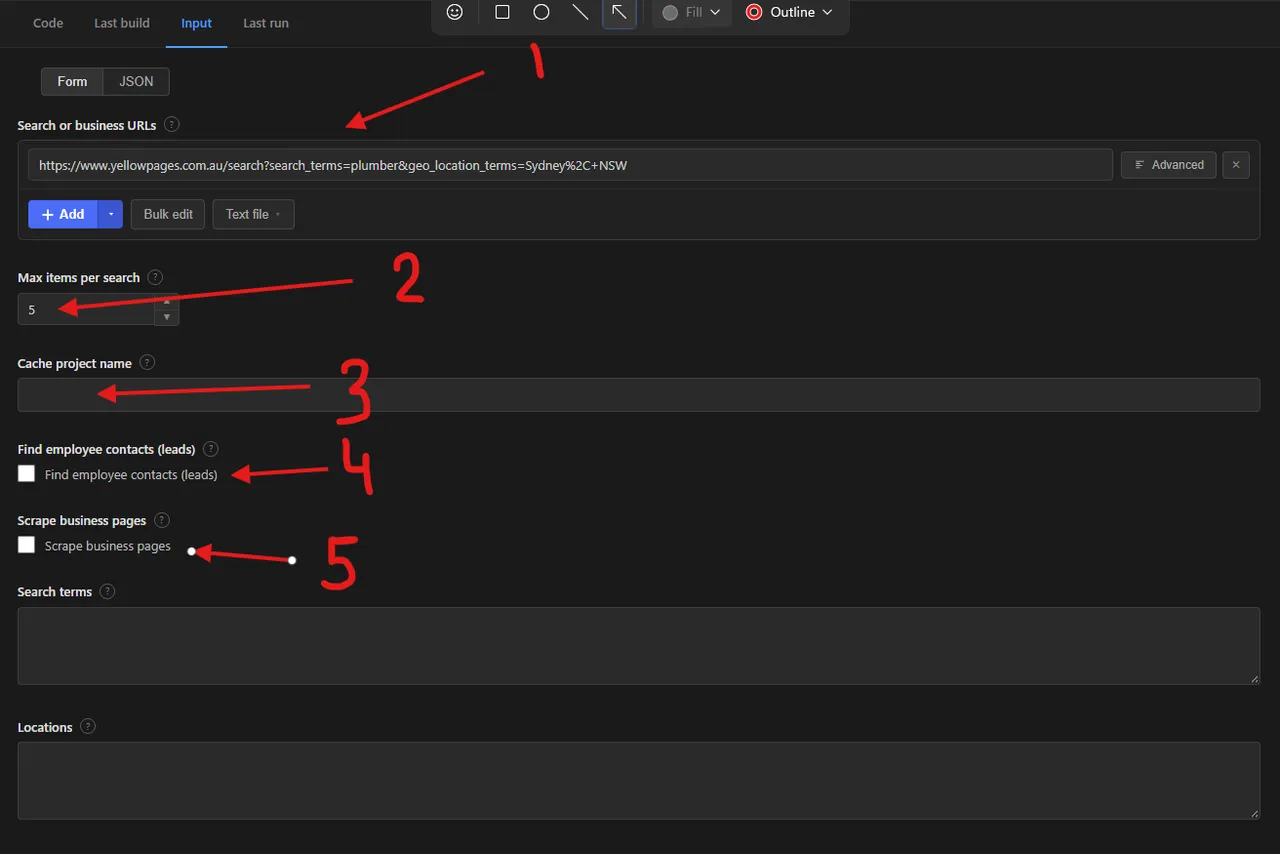
Numbered labels in the screenshot:
- Search or business URLs — the search result pages or business pages to scrape.
- Max items per search — how many businesses to save for each search.
- Cache project name — reuse the same name on scheduled runs to get only new and changed businesses.
- Find employee contacts (leads) — look up each business website for employee contacts (charged separately, only when contacts are found).
- Scrape business pages — open every business page for extra details (charged separately per business page).
Search terms and Locations (in the collapsible optional section) and the proxy settings sit below these fields.
🔧 Gelbe Seiten scraper input configuration
| Field | Type | Required | Default | Description |
|---|---|---|---|---|
Search or business URLs (startUrls) | array | — | example search (prefill) | Gelbe Seiten search result pages, category pages or single business pages, for example https://www.gelbeseiten.de/suche/klempner/berlin or https://www.gelbeseiten.de/branchen/klempner/berlin. Leave empty to use the search terms and locations below. |
Max items per search (maxItems) | integer | — | 5 | Maximum businesses saved for each search. A search can list a few hundred businesses; for more, use narrower searches (more search terms or locations). |
Cache project name (cacheProjectName) | string | — | — | Same name on each run = only new and changed businesses. |
Find employee contacts (enrichLeads) | boolean | — | false | Looks up each business's website for employee contacts and adds them as a leads array. Needs the business to have a website. Charged only when the lookup successfully returns a list of contacts (at least one per charged business): once per business, not per contact; nothing when none are found. |
Scrape business pages (scrapeDetails) | boolean | — | false | Open every business page for coordinates, payment methods and the last update date. Slower; off by default, because phone and website are already in the search results. Adds a separate charge per business page opened, on top of the normal result price. |
Search terms (searchTerms) | array | — | — | What to search for, in German, for example Klempner, Zahnarzt or Restaurant. Each term is searched in every location. |
Locations (locations) | array | — | — | Where to search, for example Berlin, Hamburg or München. Each location is searched for every search term. |
Proxy configuration (proxyConfiguration) | object | — | no proxy | Works without a proxy. For very large runs, switch on Apify Proxy. |
Supported URL types:
- Search:
https://www.gelbeseiten.de/suche/klempner/berlin - Category page:
https://www.gelbeseiten.de/branchen/klempner/berlin - Business page:
https://www.gelbeseiten.de/gsbiz/148dd531-17ab-4741-9a4a-a28782744a5f
📦 Gelbe Seiten scraper output data
The output is a dataset of business records with the fields businessId, name, url, phone, address, street, postalCode, city, district, distance, categories, website, rating, ratingCount, imageUrl, latitude, longitude, paymentMethods, lastUpdated, leads, changeType, searchUrl, scrapedAt. The dataset has 2 views:
- Overview — name, phone, address, category, website, rating and number of reviews.
- Contacts — name, phone, email, website and city of each business.
Output at a glance:
| Business | Phone | Address | Category | Website | Rating | Reviews |
|---|---|---|---|---|---|---|
| A + M Heizung-Sanitär GmbH | 0162 2 30 90 09 | Torstr. 105- 107, 10119 Berlin (Mitte) | Klempnereien | https://www.heizungsanitaer-berlin.de/ | — | — |
| Martens Olaf Bauklempnerei GmbH | 030 2 81 65 84 | Darßer Bogen 12, 13088 Berlin (Stadtrand | Klempnereien | http://www.dach-martens.de/ | — | — |
Sample output (raw JSON):
📧 How to find Gelbe Seiten business emails and employee contacts (email enrichment)
Switch on Find employee contacts and the actor looks up each business's website and adds a leads array with employee names, roles, departments, emails, phone numbers and LinkedIn links when they can be found. The leads field is always present on every record: it is an empty array when the business has no website or nothing was found. The contacts charge is applied only when the lookup successfully returns a list of contacts, so every charged business has at least one lead. It is charged once per business, not per contact, and never when leads is empty. The lookup runs once per business website.
| name | position | |
|---|---|---|
| Jane Example | jane@example.com | Owner |
| John Sample | john@example.com | Office manager |
🔁 Scrape only new Gelbe Seiten businesses with the cache
Set the same Cache project name on every scheduled run. Businesses already saved under that name and unchanged are skipped: they are not charged and do not count towards Max items per search. New businesses get changeType: "new" and businesses whose phone, address, website or rating changed get changeType: "updated". Each name keeps its own separate cache. Add the actor to an Apify Schedule to track new businesses in a category and area automatically.
🐍 How to scrape Gelbe Seiten with Python, JavaScript or the API
Run the actor programmatically with the official Apify clients. Replace <YOUR_API_TOKEN> with the token from your Apify Console.
Python (pip install apify-client):
JavaScript (npm install apify-client):
cURL — start a run and wait for the dataset:
💡 What you can use Gelbe Seiten business data for
- Lead generation: phone numbers, websites and emails of local businesses by category and area
- Sales prospecting with employee names, roles and emails from each company website
- Local market research and competitor mapping by category, city and rating
- Building and enriching CRM and mailing lists
- Monitoring new businesses and changes in a category with scheduled cached runs
Sales teams, marketing agencies, recruiters and market researchers typically use this data across services, trades, retail and hospitality.
⚠️ Limitations of the Gelbe Seiten scraper
- Result depth — one search lists a limited number of businesses; for more use more search terms and locations.
- German content — categories and search terms are in German.
- Emails — Gelbe Seiten does not publish email addresses in the page; use employee contacts for them.
- Ratings — ratings and counts are only present for businesses that have reviews.
- Login-required content — nothing behind a login is collected.
❓ Gelbe Seiten scraper FAQ
Can I scrape Gelbe Seiten (Yellow Pages Germany) legally?
The actor only collects data that is already publicly visible on Gelbe Seiten (Yellow Pages Germany) — no login, paywall or private content is accessed. Scraping publicly available data is generally considered lawful (see hiQ Labs v. LinkedIn), but you are responsible for complying with the site's Terms of Service and applicable laws such as GDPR or CCPA, since business listings can contain personal data such as names, phone numbers and emails.
What data does the Gelbe Seiten scraper return?
Each record has the business name, phone, address, categories, website, rating and more. With business pages on you also get coordinates, payment methods and the last update date. With employee contacts on, each record also has a leads array with employee names, roles and emails: employee emails found on each business website (Gelbe Seiten does not publish email addresses on its pages).
How many businesses can I scrape from one Gelbe Seiten search?
maxItems limits the businesses saved for each search URL, not the whole run. A search lists a limited number of businesses (a few hundred for a trade in one city); to collect more, use several search terms and locations.
Do I need a proxy to scrape gelbeseiten.de?
Not for normal runs: the input defaults to no proxy, which is cheapest. For very large runs, switch on Apify Proxy in the proxy field.
How do I find emails of businesses on Gelbe Seiten (Yellow Pages Germany)?
Switch on Find employee contacts: the actor looks up each business's website and adds employee names, roles and emails to a leads array. It is charged separately and only when the lookup successfully returns contacts: once per business, with at least one lead in every charged record, and nothing when leads is empty.
How do I scrape Gelbe Seiten with Python?
Use the Python example above: call the actor with the Apify client and iterate over the dataset items.
Can I run this Gelbe Seiten scraper on a schedule?
Yes. Use Apify Schedules to run it daily or weekly. Set a Cache project name and each run returns only new and changed businesses; businesses already seen and unchanged are skipped and not charged.
What output formats are supported?
JSON, CSV, Excel, XML and RSS, either from the Output tab or through the Apify API.
🔗 Other Yellow Pages scrapers by country
| Scraper | Description |
|---|---|
 🇺🇸 Yellow Pages USA Scraper - Emails & Leads 🇺🇸 Yellow Pages USA Scraper - Emails & Leads | US businesses from yellowpages.com: phones, websites, emails and contacts. |
 🇨🇦 Yellow Pages Canada Scraper - Emails & Leads 🇨🇦 Yellow Pages Canada Scraper - Emails & Leads | Canadian businesses from yellowpages.ca: phones, websites, hours and contacts. |
 🇬🇧 Yellow Pages UK Scraper - Emails & Leads 🇬🇧 Yellow Pages UK Scraper - Emails & Leads | UK businesses from Yell (yell.com): phones, websites, ratings and contacts. |
 🇫🇷 Yellow Pages France Scraper - Emails & Leads 🇫🇷 Yellow Pages France Scraper - Emails & Leads | French businesses from PagesJaunes: phones, websites, SIRET and contacts. |
 🇮🇹 Yellow Pages Italy Scraper - Emails & Leads 🇮🇹 Yellow Pages Italy Scraper - Emails & Leads | Italian businesses from Pagine Gialle: phones, websites, VAT and contacts. |
 🇦🇺 Yellow Pages Australia Scraper - Emails & Leads 🇦🇺 Yellow Pages Australia Scraper - Emails & Leads | Australian businesses from yellowpages.com.au: phones, emails, ABN and contacts. |
 🇪🇸 Páginas Amarillas Spain (Yellow Pages) Business Scraper 🇪🇸 Páginas Amarillas Spain (Yellow Pages) Business Scraper | Spanish businesses from Páginas Amarillas: name, phone, address and more. |
🔗 Relevant actors for business directories and leads
| Scraper | Description |
|---|---|
| 🏢 BBB Emails & Info Scraper | Scrapes Better Business Bureau businesses: name, phone, rating, accreditation and contacts. |
| ⚖️ Martindale Lawyers Scraper | Scrapes lawyer and law firm profiles from Martindale with optional contacts. |
| 📧 Decision Maker Email Finder | Finds decision makers and emails from company websites. |
| 💰 Signal NFX Investors Email Scraper | Scrapes VC and angel investor profiles from Signal by NFX. |
| 🇩🇪 German Imprint (Impressum) Scraper | Finds a German website's Impressum page and extracts decision makers and contacts. |
🔗 Other actors you may find useful
| Scraper | Description |
|---|---|
| 💼 XING Jobs Scraper | Scrape job listings from XING Jobs: title, company, location and employment type. |
| 🍷 Vivino Wine Scraper | Scrape wine data from Vivino: name, winery, vintage, region and rating. |
| 📈 Kalshi Markets Scraper | Scrape Kalshi prediction markets: yes/no prices, implied probability and volume. |
| ✈️ Kiwi.com Flight Scraper | Scrape flight prices and schedules from Kiwi.com, including airline and times. |
| 🛒 Craigslist Listings Scraper | Scrape Craigslist listings in any city and category: title, price and more. |
💬 Support & contact
If you encounter any issues or have questions, please open an issue or reach out via the Apify Community Forum.
You can also find more of our actors on the Actor Flow page.


