

Google Maps Local SEO Prospect Finder
Pricing
from $2.40 / 1,000 pospect results
Google Maps Local SEO Prospect Finder
Find local businesses from Google Maps and identify simple Local SEO prospect opportunities using clean business data and transparent non-AI scoring.
Pricing
from $2.40 / 1,000 pospect results
Rating
0.0
(0)
Developer

Delowar Munna
Maintained by CommunityActor stats
0
Bookmarked
4
Total users
0
Monthly active users
6 months ago
Last modified
Categories
Share
Find local businesses on Google Maps and rank them as Local SEO prospects using transparent non-AI scoring. Returns clean, flat, CSV-friendly lead data — built for SEO agencies, web designers, lead-generation teams, and local sales prospecting.
V1 deliberately avoids website crawling, email extraction, full review scraping, photos, and AI enrichment so the run stays fast and cheap. You only pay for unique prospect rows that pass your filters and are successfully written to the dataset.
✨ Why this scraper
- SEO-prospect focused — 25 flat fields tuned for outreach, plus a transparent
local_seo_scoreandreason_tagsper row. - Pay-Per-Event —
$per saved unique prospect row. Duplicates, filtered rows, and failed pushes are not charged. - No login, no cookies, no sessions — keyword + location, or any Google Maps search URL.
- CSV-friendly output — flat structure, no nested objects, drops cleanly into Sheets/Excel/CRMs.
- Transparent scoring — rule-based, explained below. No AI black box.
🚀 Quick start — sample inputs
Example 1 — discover prospects in a city
Example 2 — find no-website / low-review prospects across multiple cities
The
searchesfield uses Apify's Key/Value form editor — the Key column is the business keyword (e.g.dentists), the Value column is the location (e.g.Canberra ACT). Add one row per search.
📦 Output
The dataset has one view: Local SEO prospects — a 25-column flat table.
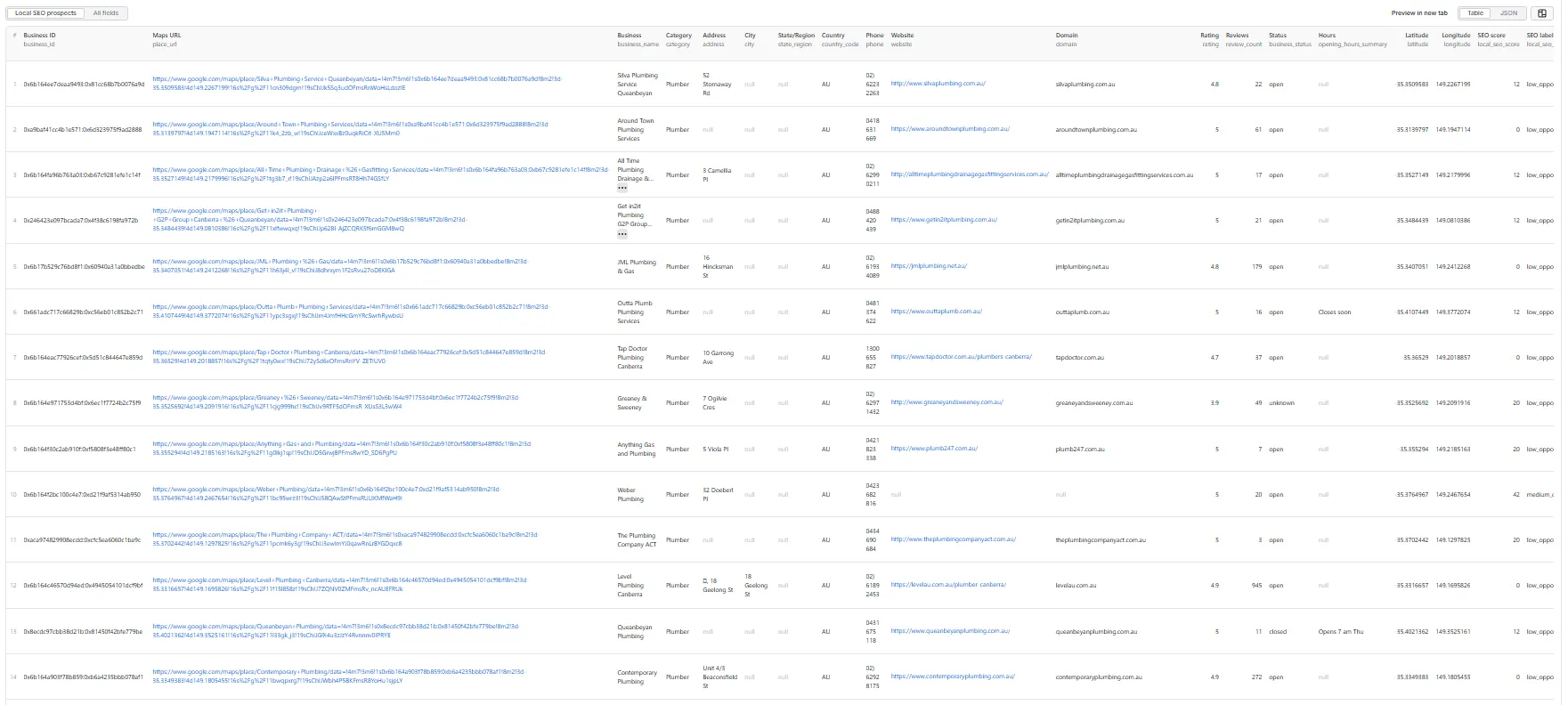
Sample record — Local SEO prospects
Output fields (25)
business_id, place_url, business_name, category, address, city, state_region, country_code, phone, website, domain, rating, review_count, business_status, opening_hours_summary, latitude, longitude, local_seo_score, local_seo_label, reason_tags, input_query, input_location, input_url, input_index, scraped_at.
🎯 Local SEO opportunity score
Transparent rule-based score (0–100) — higher means stronger prospect opportunity. Computed only from visible Google Maps fields. No AI, no enrichment, nothing hidden.
| Signal | Points |
|---|---|
| No website | +30 |
| Reviews 0–10 | +20 |
| Reviews 11–30 | +12 |
| Rating < 4.0 | +15 |
| Missing phone | +10 |
| Missing category | +10 |
| Unknown business status | +5 |
Labels: high_opportunity (70–100) · medium_opportunity (40–69) · low_opportunity (0–39).
reason_tags is a pipe-separated string (CSV-friendly), e.g. no_website|low_review_count|missing_phone.
💰 Pricing
Pay-Per-Event. The actor charges a single prospect-result event for each unique, filtered prospect row that is successfully written to the dataset. The actor honors the user-configured per-run spending cap (Apify eventChargeLimitReached) and stops cleanly when reached.
Not charged:
- Duplicates (de-duplicated by
business_id,place_url,domain+ name, name + address, etc.). - Rows filtered out by
businessStatus,websiteFilter,phoneFilter,minRating,maxRating,minReviews, ormaxReviews. - Rows missing a
business_nameor all ofplace_url/address/phone/website. - Failed dataset pushes.
- Anything after the per-run spending cap is reached.
📊 Run summary
After each run, a RUN-SUMMARY entry is written to the key-value store:
charged_events always equals results_saved.
🚦 Proxy policy
Use Apify Datacenter proxy or no proxy for normal runs — both work reliably for Google Maps search at this actor's conservative concurrency (max 3).
Apify Residential proxy is not supported. The actor will fail at startup if apifyProxyGroups includes RESIDENTIAL. Reason: in pay-per-event actors, residential bandwidth (~/GB) is billed to the developer, not the run user, so a single bandwidth-heavy run could exceed the per-result event revenue.
If you genuinely need residential routing, supply your own residential provider via the proxy editor's Custom proxy URLs field — that traffic goes through your provider, not Apify, and is unaffected:
⚙️ Filters
| Filter | Effect |
|---|---|
businessStatus | any / open / closed. |
websiteFilter | any / hasWebsite / noWebsite. |
phoneFilter | any / hasPhone / noPhone. |
minRating | Drop businesses below this star rating (0 disables). |
maxRating | Drop businesses above this star rating (5 disables). |
minReviews | Drop businesses with fewer reviews (0 disables). |
maxReviews | Drop businesses with more reviews (0 / unset disables). |
deduplicate | Drop duplicates across overlapping searches (recommended ON). |
Filters are applied after extraction and before dataset push or event charge.
🚧 Limitations (V1)
- Cards-only extraction: V1 reads each business directly from the search results panel and does not click into individual place detail panels. Phone, website, full opening hours, and
business_idonly appear when Google surfaces them on the card itself. - No website crawling, email extraction, or social link extraction.
- No full review text or sentiment.
- No photos, menus, prices, or popular times.
- No login/cookie/session-based scraping.
- Address parsing into
city/state_regionis best-effort; the fulladdressfield is the source of truth. - Per-search hard cap is 1,000 results; per-run hard cap is 5,000 results.
🛠️ Technical notes
- Stack: Node.js 22 · Apify SDK 3 · Crawlee · Puppeteer.
- Concurrency:
min=1,max=3(conservative to reduce blocking). - Memory: 1 GB min · 2 GB default · 4 GB max.
- Proxy: Apify Proxy enabled by default; custom configs accepted.
- Diagnostics: On the first failed render, the actor saves the page HTML and URL to the key-value store as
debug-no-feed-html/debug-zero-cards-html.


