

Instagram Stories & Highlights Scraper
Pricing
from $3.00 / 1,000 stories
Instagram Stories & Highlights Scraper
Scrape live Instagram stories and highlights from public accounts: photo and video URLs, post and expiry dates, link stickers, mentions, music, location and paid-partnership flags. Usernames, profile, story or highlight URLs in bulk. No login, no start fee.
Pricing
from $3.00 / 1,000 stories
Rating
0.0
(0)
Developer

Delowar Munna
Maintained by CommunityActor stats
0
Bookmarked
32
Total users
11
Monthly active users
14 days ago
Last modified
Categories
Features
Share
Scrape the live stories and highlights of public Instagram accounts by username, profile URL, story URL or highlight URL, all into one dataset with one row per story. Every row has the account, whether it is a live story or from a highlight (with the highlight's title), when it was posted and when it expires, the photo and video URLs, and when those media links stop working. Rows also carry the story's link stickers (the real target URL), mentions, music, location, a reshared post or reel, and the paid-partnership flag with sponsors.
Collect live stories, highlights, or both for each account; open as many highlights per account as you need; or paste highlight and story links directly. Filter by date and cap the stories per account.
No Instagram account, login, cookies, browser or proxy needed, and no start fee: you pay only for data delivered.
What you can scrape
| Input | Example | What you get |
|---|---|---|
| Accounts | nasa, @nasa or https://www.instagram.com/nasa/ | The account's live stories and the stories in its highlights (1 highlight by default, up to 100) |
| Highlight URLs | https://www.instagram.com/stories/highlights/18023864549864045/, a https://www.instagram.com/s/… share link, or the highlight ID | Every story in that highlight |
| Story URLs | https://www.instagram.com/stories/nasa/4025959321372004435/ | That one live story |
Mix all three in one run. An account given twice, or a highlight that is both in an account's list and pasted as a URL, is scraped once. One run takes up to 500 accounts and 1,000 highlight URLs; split bigger lists across runs.
Live stories last 24 hours. An account that posted nothing in the last day has no live stories: its highlights are where older stories stay.
Options
| Option | Default | What it does |
|---|---|---|
| Live stories | on | Each account's stories from the last 24 hours |
| Highlights | on | Stories from each account's highlights; the full list of each account's highlights is saved in the HIGHLIGHTS record |
| Highlights per account | 1 | How many highlights to open per account, in the order the profile shows them (up to 100). Each one returns all its stories |
| Max stories per account | no limit | Stop an account after this many stories |
| Posted since | none | Only stories posted on or after a date (2026-11-01) or within a period (7 days). Highlights with nothing that recent aren't opened |
Input examples
Two accounts' live stories and their first highlight, up to 12 stories each (the run behind the screenshots and samples below: 23 stories):
The live stories of several accounts, for a daily schedule:
All of an account's highlights (up to 20):
One highlight by its URL:
Run with defaults: nasa, its live stories and its first highlight: about 10 to 15 stories (13 when tested), from 3 requests.
How to find a highlight URL: open the profile on instagram.com, click a highlight circle, and copy the address bar
(…/stories/highlights/<number>/). The Share button in the Instagram app gives a https://www.instagram.com/s/…
link, which works too.
Output
One dataset; every row is a story. source is story for a live story and highlight for a story from a
highlight. Three views:
- Stories: account, type, highlight, posted and expiry dates, media type, image and video, when the media links expire, and the story URL.
- Links & campaigns: link stickers, mentions, paid partnership and sponsors, music, location, reshared post.
- Media: image, video and thumbnail URLs, size, duration, audio, and when the links expire.
Stories view
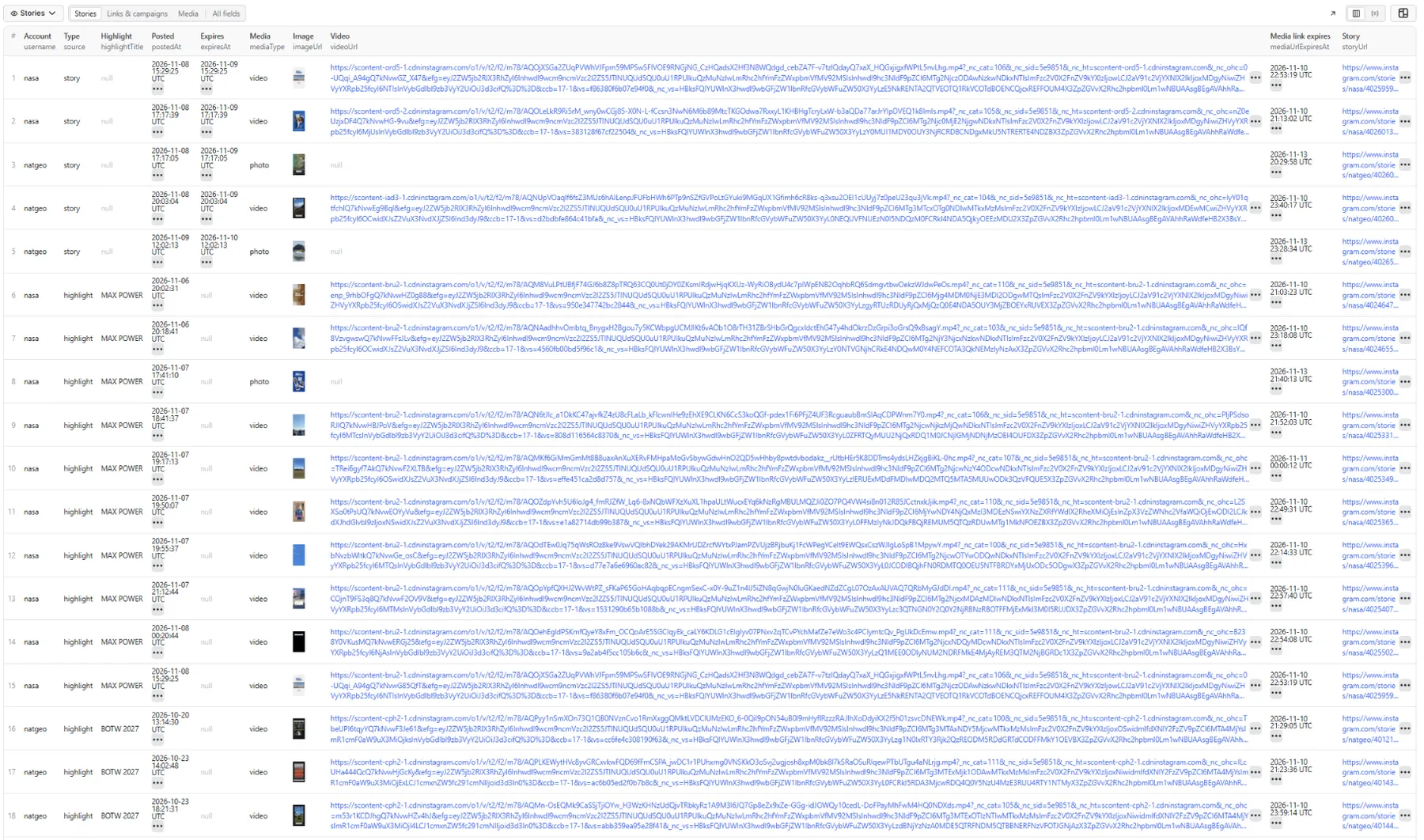
A story from a highlight (nasa's "MAX POWER"), with a location sticker:
Links & campaigns view
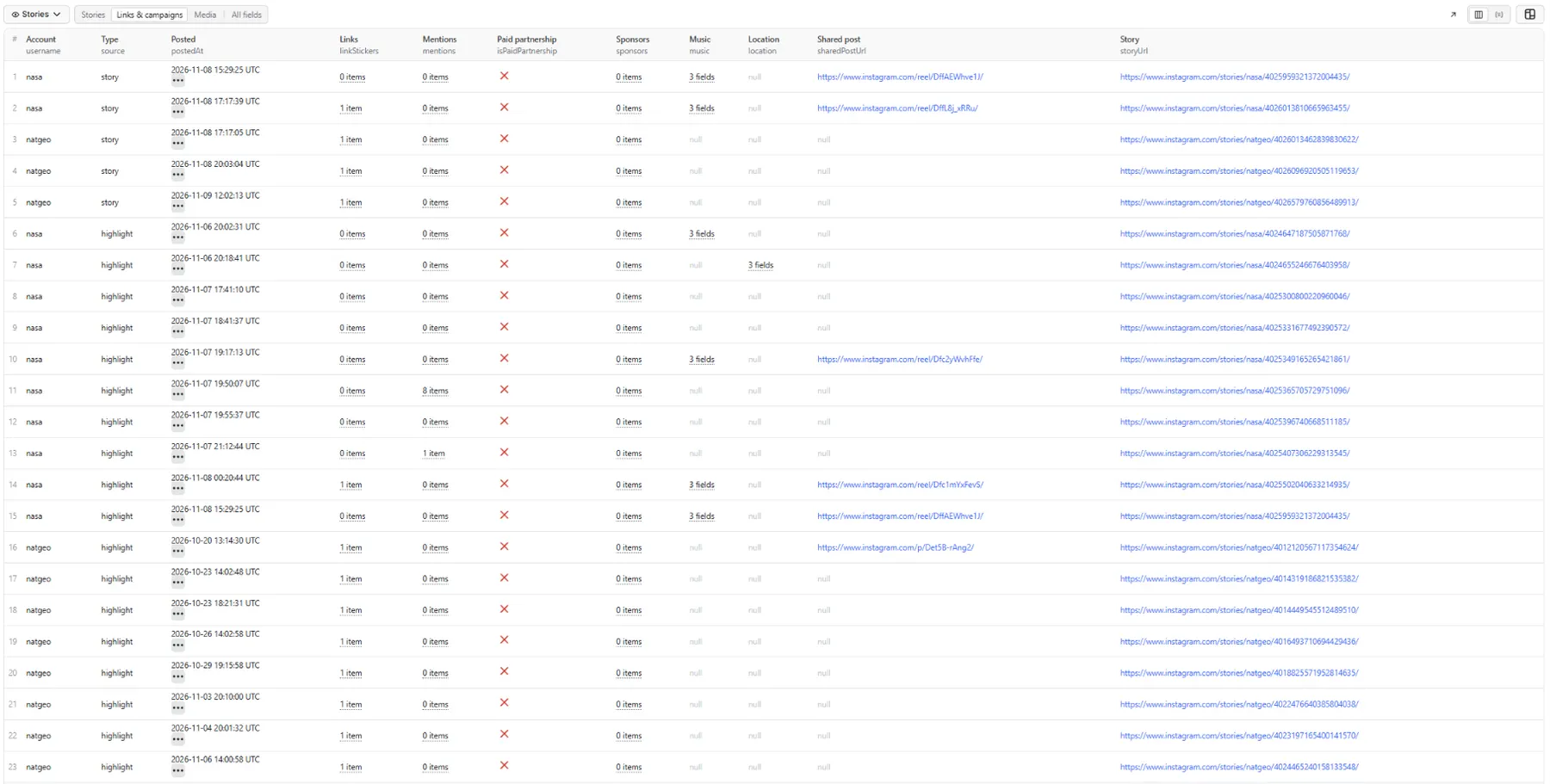
A live story with a link sticker (the real target, Instagram's redirect removed):
Media view
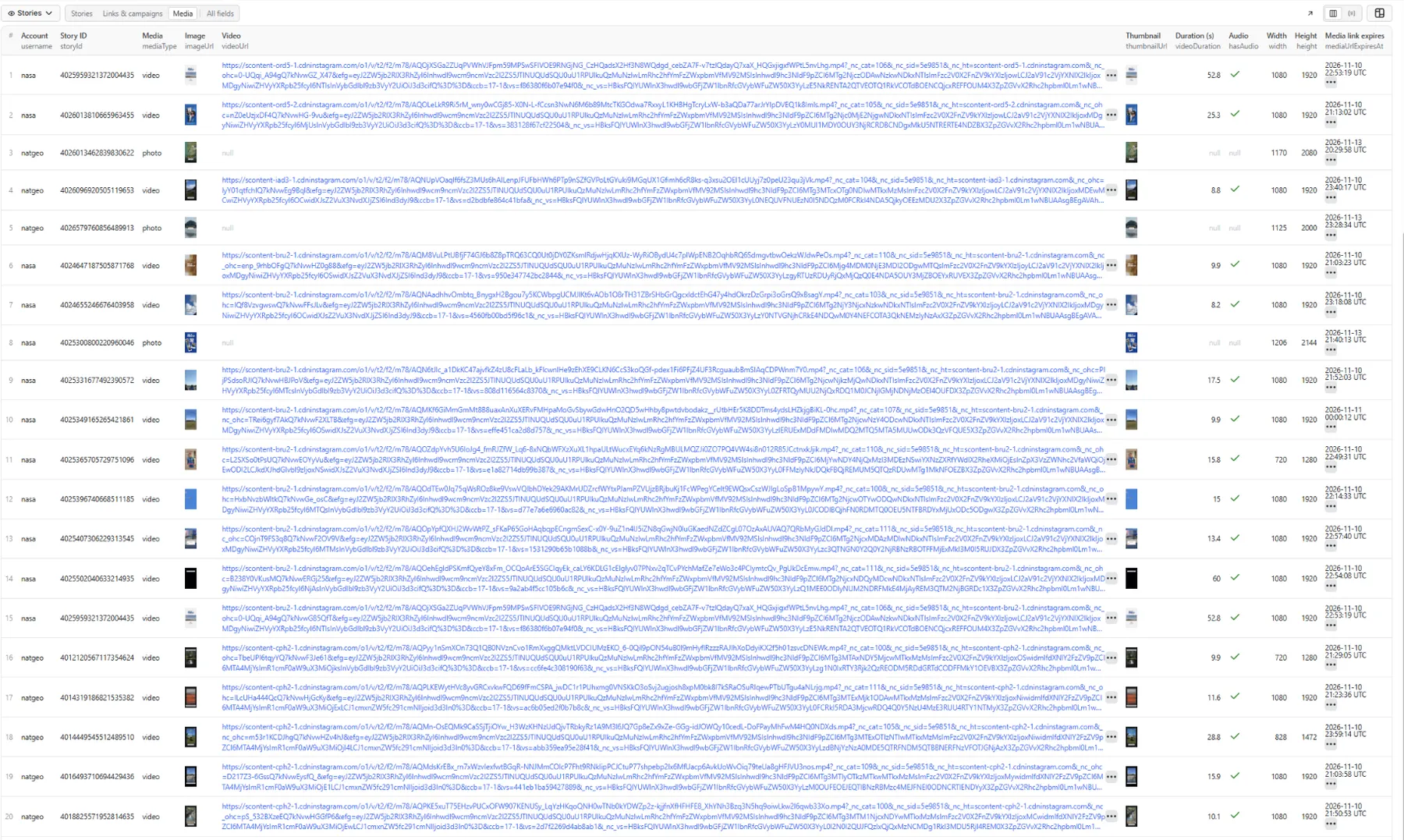
A live video story that reshares a reel, with its original audio:
Media URLs are shortened here (…); real rows carry the full signed links.
Story fields
| Field | Description |
|---|---|
storyId, shortcode | Instagram's story ID and code |
source | story (live) or highlight |
storyUrl | Link to the story on instagram.com |
username, fullName, userId, isVerified | The account that posted it |
highlightId, highlightTitle, highlightCoverUrl | The highlight the story came from (null for live stories) |
postedAt | When the story was posted (UTC) |
expiresAt | When a live story disappears (24 hours after posting); null for highlights |
mediaType | photo or video |
videoDuration, hasAudio | Videos only: length in seconds, whether it has sound |
imageUrl, videoUrl, thumbnailUrl | Largest available image, the video, and the preview image |
mediaUrlExpiresAt | When the media links above stop working (see below) |
width, height | Original size in pixels |
linkStickers | Link stickers: the real target url (Instagram's redirect and click ID removed), displayUrl, title |
mentions | Usernames mentioned or tagged in the story |
sharedPostUrl | The post or reel the story reshares, if any |
location | Location sticker: id, name, city |
music | title and artist of the song, or the original audio's title and creator (isOriginalAudio: true) |
isPaidPartnership, sponsors | The "Paid partnership" label and the sponsor usernames |
scrapedAt | When the row was collected |
Every row has the same fields; a field the story doesn't have is null or an empty list.
Media links expire
Instagram signs every photo and video link with an expiry time, which the Actor reads into mediaUrlExpiresAt.
In testing, links lasted from about 1 day (highlights and some videos) to about 4 days (live story photos).
Download the files you want to keep before that time, or run the Actor again for fresh links.
HIGHLIGHTS record
The run's key-value store has a HIGHLIGHTS record listing every highlight of each account (not only the ones opened):
ID, title, cover image, number of stories, created and updated dates. Run once with a small Highlights per account
to see the list, then open the ones you want by URL.
Inputs that couldn't be scraped
They are never dataset rows: each is logged, and listed with its reason in the RUN_SUMMARY record in the run's
key-value store (errors): an account that doesn't exist (user-not-found), a private account (private-account), a
highlight that doesn't exist (highlight-not-found), a story that is no longer live (story-expired), or a link that
isn't a profile, story or highlight. They are never charged. RUN_SUMMARY also has counts per account and request
statistics.
Pricing
Pay per event: you pay for each story delivered, live or from a highlight, plus once per account that was found and is public. The account event covers checking an account even when it has nothing live right now. Highlight URLs have no account charge. Accounts that don't exist or are private, expired stories, duplicates and stories older than your Posted since date are free, and there is no start fee. See the Pricing tab for current rates. This README deliberately doesn't quote figures.
If you set a spending limit on a run, the Actor stops when it is reached and keeps everything already paid for.
FAQ
Why does an account have no stories? It posted no story in the last 24 hours, or it is private. Its highlights may still have stories: turn on Highlights.
Can I get private accounts, close-friends stories or who viewed a story? No. The Actor collects only what Instagram shows publicly, without logging in.
Can I get old stories? Only the ones the account saved to its highlights. Instagram removes other stories after 24 hours, so schedule a daily run to keep a record of an account's live stories.
How long do the photo and video links work?
Until mediaUrlExpiresAt: about 1 to 4 days in testing. Download what you want to keep before then.
How do I collect every highlight of an account?
Set Highlights per account to 100. The HIGHLIGHTS record lists them all with their story counts.
Does it work with posts and reels?
No: this Actor is for stories and highlights. A post or reel link is listed as not-a-story-url and not charged.
Data and privacy
This Actor collects only what Instagram shows publicly to anyone, from public accounts. Stories are personal data and are meant to disappear: the Actor returns the account's public username, name and verified badge, and what the story itself shows; it doesn't return viewer data or contact details. You are responsible for having a lawful basis to process this data, for deleting it when you no longer need it, and for following the laws that apply to you, including the GDPR where relevant, and Instagram's terms.
This Actor is not affiliated with, endorsed by or sponsored by Instagram or Meta. Instagram is a trademark of Meta Platforms, Inc.


