

LinkedIn Work Email Finder & Verifier
Pricing
$40.00 / 1,000 work email founds
LinkedIn Work Email Finder & Verifier
LinkedIn profile in, work email out — with its verification status. Give it profile URLs, public IDs, a CSV or API records and get one CRM-ready row per input: best work email, honest verification signals, company context, your own external ID. No LinkedIn login, cookies or session required.
Pricing
$40.00 / 1,000 work email founds
Rating
0.0
(0)
Developer

Delowar Munna
Maintained by CommunityActor stats
0
Bookmarked
1
Total users
1
Monthly active users
2 months ago
Last modified
Categories
Share
LinkedIn profile in. Work email out — with its verification status.
Give this Actor a list of LinkedIn person profiles — URLs, public identifiers, a CSV, or structured API records — and get back one CRM-ready row per input, carrying the best professional email, the verification signals behind it, person and current-company context, and your own external ID, unchanged.
No LinkedIn cookies. No LinkedIn login. No session ID. No residential proxy. You never hand this Actor a credential of any kind.
Why choose this Actor
Most LinkedIn-to-email tools return a string and leave you to find out the hard way whether it bounces. This one tells you what was actually checked.
| This Actor | |
|---|---|
| One row per submitted input, always | ✅ including not-found, invalid and error rows |
| External ID round-trips unchanged | ✅ for CRM / n8n / Make / Zapier reconciliation |
| Explicit verification semantics | ✅ valid / risky / invalid / unknown / not_checked |
| Says which checks it actually ran | ✅ verificationMethod lists only performed methods |
| Catch-all never sold as verified | ✅ always risky, at any confidence score |
| Person + current-company context | ✅ title, employer, website, domain, industry, size |
| Company-domain match check | ✅ catches a plausible address at the wrong company |
| Clear not-found and error states | ✅ 11 documented result statuses, with retryable |
| Duplicate inputs never billed twice | ✅ one lookup and one charge per person |
| You pay only for addresses | ✅ found nothing? costs nothing. Every miss and error row is free |
| Every address labelled before you send | ✅ isVerified, verificationStatus, isCatchAll, emailIsGenerated on every row |
What "verified" means here
"Verified" means the address passed this Actor's validation policy and was classified as deliverable by the checks and provider actually used. Verification reduces bounce risk. It cannot guarantee future delivery.
No product can promise 100% accuracy, and this one does not.
What it does promise is that isVerified: true reflects an observation, never a
prediction. A confidence score is a forecast; a mailbox check is evidence. The two are
never conflated, and no score — however high — promotes an address to verified on its own.
Why catch-all domains come back risky
Many large employers run a mail gateway that accepts every recipient address. At such a domain nothing can prove a specific mailbox exists — and, worse, an email finder asked about a person who does not exist will happily return a well-formed address, because nothing can refute one. It looks identical to a real result apart from the score.
So a catch-all result is always reported as:
It is returned by default and labelled, and it is billed like any other delivered address — switch on every address is returned labelled, so you can triage them yourself.
The honest consequence: expect an empty email column for a meaningful share of people at large enterprises. That is the policy working, not the Actor failing.
Quick start
- Paste a few LinkedIn person profile URLs into LinkedIn profiles.
- Run.
- Open the Overview view, or export the Verified emails view to CSV.
That is the whole setup. Every other field has a sensible default.
Supported inputs
At least one of the three is required. They can be combined — every entry becomes its own result row, in the order you supplied them.
1. linkedinProfiles — one per line
Full URLs, URLs with tracking parameters, bare host URLs, and plain public identifiers all
work. They are normalized to https://www.linkedin.com/in/<public-identifier> before
anything else happens.
Person profiles only. Company, school, job, post and Sales Navigator URLs come back as
unsupported_url rows rather than being silently dropped.
2. csvFile — bulk, with your own IDs
Paste the CSV rows directly, or give a public https:// URL that returns CSV.
| Purpose | Canonical column | Also accepted |
|---|---|---|
| Profile | linkedin_url | linkedinUrl, linkedin, profile_url, url, profile |
| Your ID | external_id | externalId, id, crm_id, reference |
external_id is optional. A headerless single-column list of profile URLs also works, as
does a headerless two-column profile,id file.
3. records — structured, for API and automation callers
Example inputs
Minimal — a full URL and a bare public identifier, mixed freely
CSV with CRM IDs, risky candidates surfaced for triage
Structured, for a pipeline that only needs the address
Every row still carries the full field set — see below. To export a narrower set of columns, use a dataset view rather than a run setting.
Output fields
One row per submitted input record. Every row carries every field, on every run —
null, [] or false rather than a missing key. There is no setting that changes the
column set, deliberately: two runs of the same list always produce CSVs that concatenate,
and you can write row.companyDomain without guarding for its existence.
Want fewer columns in an export? Pick a dataset view (?view=overview,
?view=verifiedEmails, …) — that narrows the export without changing what is stored.
Input lineage
| Field | Type | |
|---|---|---|
inputIndex | integer | position in what you submitted |
inputValue | string | the value you submitted, verbatim |
externalId | string / null | your CRM ID, returned unchanged |
inputType | string | profile_url / public_identifier / profile_id / unsupported_url / unknown |
normalizedLinkedinUrl | string / null | canonical person URL |
publicIdentifier | string / null | the /in/<this> part |
isDuplicate | boolean | this person already appeared in this run |
duplicateOfInputIndex | integer / null | which row holds the original |
Person
profileFound, linkedinProfileId, firstName, lastName, fullName, headline,
profileImageUrl, location, country, countryCode, connectionsCount, followersCount.
Current company / role
jobTitle, companyName, companyLinkedinUrl, companyId, companyWebsite,
companyDomain, companyIndustry, companySize, companyLocation.
| Field | Type | |
|---|---|---|
emailFound | boolean | |
email | string / null | the chosen address |
emailType | work / personal / role / null | a role mailbox is never sold as a person's own |
emailDomain | string / null | |
emailMatchesCompanyDomain | boolean / null | sits on the employer's own mail domain |
emailSource | linkedin_public / enrichment / null | published on LinkedIn, or independently discovered |
candidateCount | integer | how many candidates were considered |
Verification
Present on every row. On a row with no address they read not_checked / unknown / null
rather than being absent.
| Field | Values |
|---|---|
isVerified | boolean — an observation, never a score threshold |
verificationStatus | valid / risky / invalid / unknown / not_checked |
deliverability | deliverable / risky / undeliverable / unknown |
confidenceScore | number / null — the provider's own score, not what decides isVerified |
verificationMethod | array of syntax, dns_mx, provider, smtp — only methods actually performed |
syntaxValid | boolean / null |
mxFound | boolean / null — null means the DNS lookup itself was inconclusive, which is not evidence of absence |
smtpChecked | boolean — true only when an SMTP conversation really happened |
smtpStatus | string / null |
isCatchAll | boolean / null — null means nobody told us, which is different from false |
isDisposable | boolean / null |
isRoleAddress | boolean / null |
verifiedAt | ISO 8601 / null |
Result and error
resultStatus, isPartial, errorType, errorMessage, retryable, attemptCount,
processingTimeMs, processedAt.
Sample output
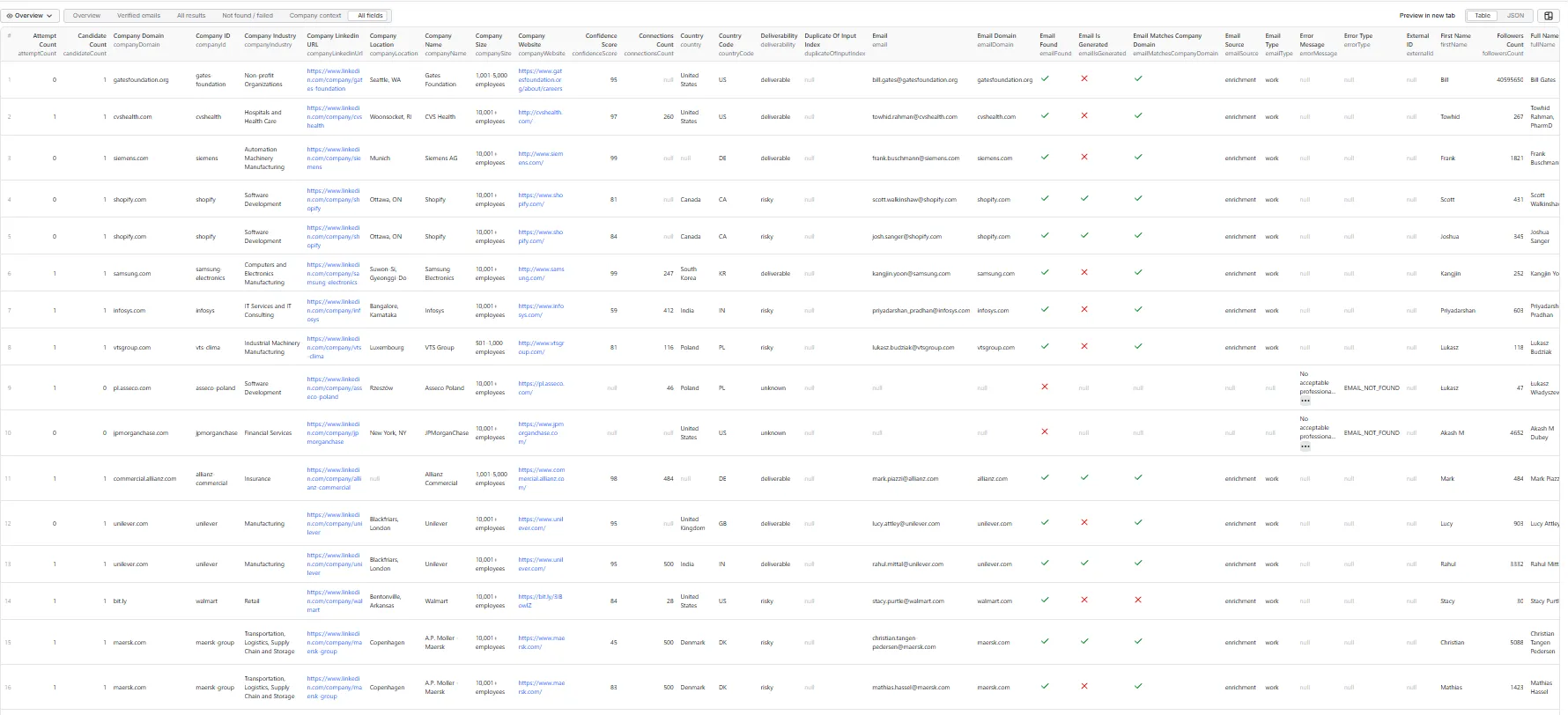
The dataset in the Console, All fields tab. The tabs along the top are the five views — Overview, Verified emails, All results, Not found / failed, Company context — plus All fields.
Three things in that screenshot are worth looking at, because they are the product rather than the decoration:
- The two
shopify.comrows score 81 and 84 and are stillrisky. Shopify runs a catch-all gateway, so the provider's confidence means nothing about whether the mailbox exists. A high score never promotes an address here. - The
EMAIL_NOT_FOUNDrows are still there, carrying the person and company context that was resolved before the email step came up empty. Nothing is dropped, and those rows are free. - Every column is present on every row. The field set does not vary between runs, so two exports of the same list concatenate.
Real rows from a real run — 12 LinkedIn profiles in, 12 rows out, nothing invented. Each block below is one record as it appears in the matching dataset view (the tabs above the results table). Every view is a column selection over the same rows; no view hides a row.
Overview
The default tab — the eight fields most people check first.
Verified emails
Leads with isVerified, emailType and resultStatus, so the rows you can actually send to sort
to the top of the table.
Not found / failed
Leads with the error fields. Read retryable before you re-run anything — it is the difference
between a person we could not find and a lookup that never completed:
A profile_not_found row means the opposite: the lookup finished and found nothing, so
retryable is false and re-running will not help. This row was not charged — nothing on this
tab ever is.
Company context
For enriching an account list rather than a person list.
All results — every field
All 58 fields, on every row, on every run. The record below is deliberately the awkward one: a catch-all domain, where the Actor found a well-formed address with a confidence score of 81 and still refused to call it verified.
Read that record from the bottom up and it explains the whole product. isCatchAll: true means
shopify.com accepts mail for any address you throw at it, so the provider's valid proves
nothing. verificationStatus is therefore risky, isVerified is false, and the score of 81 was
not allowed to promote it. You get the address, clearly labelled, and you are charged for it —
it is a delivered work address, and the label is how you decide whether to send. Billing is one
rule with no exceptions: an address on the row is a charge, once per person. What you are never
charged for is a row with no address on it.
Result statuses
| Status | Meaning | Retryable | Charged |
|---|---|---|---|
success | profile resolved and a work email returned | – | yes — an address on the row is a charge |
email_not_found | profile resolved, no acceptable candidate | no | no |
profile_not_found | the person could not be resolved — the lookup COMPLETED and found nothing | no | no |
invalid_input | the entry is not a LinkedIn identifier | no | no |
unsupported_url | a URL, but not a person profile | no | no |
verification_failed | verification could not complete | sometimes | no |
provider_rate_limited | upstream 429 / quota | yes | no |
provider_error | upstream failure | sometimes | no |
timeout | a lookup never completed — the profile or email source could not be reached | yes | no |
internal_error | unexpected Actor error | sometimes | no |
skipped_over_limit | beyond maxProfiles, or the run hit your spending limit first | yes | no |
isPartial: true means person and company context were obtained but the email step failed
— the row is still useful, and it is worth retrying.
A note on risky addresses, since there is no status for them. An unconfirmed or catch-all
address is not a separate result status — it comes back as success with
verificationStatus: "risky" and isVerified: false, and it is charged like any other delivered
address. Filter on verificationStatus, never on resultStatus, when you want only the confirmed
ones. Measured on a 52-profile run: 34 addresses delivered, 17 of them confirmed.
An earlier version of this table listed an email_risky_only status. It is unreachable in the
shipped Actor and has been removed from the table rather than left as a row that can never appear.
Pricing
You pay for one thing: a professional work email we actually hand you.
| Event | Fires when |
|---|---|
email_found | once per unique person for whom a work email is returned on a success row |
Every address comes labelled — isVerified, verificationStatus, isCatchAll,
confidenceScore, and verificationMethod listing the checks actually run. Filter on those
before you send. At a catch-all domain an email finder can return a plausible address for a
person who does not exist, which is why we mark it risky and never call it verified — see
What "verified" means here.
The label to watch: emailIsGenerated: true means the vendor built the address from a name and
a domain rather than finding it published anywhere. Paired with isVerified: false that is a
plausible guess, not a confirmed mailbox — most likely at a domain that accepts mail for anyone.
It is delivered, labelled and billed like any other address, so filter on emailIsGenerated
and isVerified together before you send. We never call one verified.
Never charged
- invalid input, unsupported URLs
- profile not found
- no email found
- verification that could not complete, where no address was returned
- provider errors, rate limits, timeouts
- every duplicate row for a person already charged once in this run
- inputs beyond your
maxProfileslimit - emails already published in public LinkedIn text (free, and labelled
emailSource: linkedin_public) - every row where no work address was returned at all
There is no setting that changes any of this. Every professional address we find is
returned and billed once. To work with only the confirmed ones, filter on verificationStatus
or export the Verified emails view — that narrows your export without changing what the run
found or what it cost.
There is no Actor-start fee, no rental, no monthly minimum, and no charge for a run that returns nothing.
Cost examples
A run's cost is number of work emails returned × the per-event price. Nothing else.
| You submit | Typical hit rate¹ | You are billed for |
|---|---|---|
| 100 profiles | ~60% | ~60 events |
| 1,000 profiles | ~60% | ~600 events |
| 10,000 profiles | ~60% | ~6,000 events |
Of those, roughly a third verify clean and the rest sit at catch-all domains, labelled risky.
Both are billed; only the label tells you which is which.
| 1,000 profiles, all at catch-all domains | 0% | 0 events |
¹ Illustrative only, and it varies a great deal with your list. Employer mix is the single
biggest factor: a list concentrated on large enterprises running catch-all mail gateways
will verify far less than a list of small and mid-size companies. Run 50 of your own
profiles first and read verifiedEmailRate in the run summary — that is your rate, not ours.
The live per-event price is on this Actor's Pricing tab. This README deliberately quotes no currency figures, so it cannot go stale.
Free plan limitations
| Apify Free plan | Any paid plan | |
|---|---|---|
| Unique profiles per run | 25 | up to 10,000 |
| Everything else | identical | identical |
Inputs beyond the free-plan cap still get a result row, marked skipped_over_limit, so
your list still reconciles one-to-one with what you submitted. Nothing is charged for them.
Why the limit exists: every person looked up costs this Actor a real third-party credit, and Apify pays developers nothing for Free-plan runs. Capping the count — rather than removing the feature — keeps the trial honest: you see real verified emails, on profiles you chose, with the full verification detail.
Use cases
- B2B sales / RevOps — enrich an existing LinkedIn lead list into a sendable one.
- Recruiting — get a professional contact route for a shortlist.
- Lead-gen agencies — bulk profile-to-email, with the client's IDs preserved.
- CRM hygiene — re-verify addresses you already hold and flag the risky ones.
- Developers — one deterministic API step in a larger pipeline.
API, n8n, Make, Zapier and webhooks
Call the Actor and read the dataset. Because there is exactly one row per input and every
row carries inputIndex and externalId, merging back needs no matching logic.
Then fetch just the verified rows:
The run summary — totals, verified rate, duration, billing counts — is stored separately in
the run's key-value store under RUN_SUMMARY, and is never mixed into your dataset
rows, so exports stay uniform.
If a run's Output panel says "No output returned." immediately after it finishes, give it a
moment and reload — the results are in the dataset either way, under Storage → Dataset or
at https://api.apify.com/v2/datasets/<DATASET_ID>/items.
Limits
- Normal use: 1–1,000 profiles per run.
- Hard cap: 10,000 unique profiles per run; 50,000 submitted records.
- Apify Free plan: 25 unique profiles per run (see above).
- Duplicate inputs do not consume your
maxProfilesallowance.
Not-found behaviour
Nothing ever silently disappears. Every submitted record gets a terminal row.
There is no setting that changes this. Invalid entries, unsupported URLs, duplicates and
profiles LinkedIn withheld all come back as rows with a resultStatus explaining
themselves, and none of them is charged. Your export always has exactly as many rows as
your import, in the same order.
Filter the rows you do not want on your side — resultStatus is the column, and the
Not found / failed view leads with it.
Troubleshooting
| Symptom | Cause | What to do |
|---|---|---|
Lots of profile_not_found | LinkedIn withheld those public pages and the backup source looked, and found nothing | Nothing you can configure fixes this — LinkedIn decides per profile, not per requester. Re-run later; the set shifts a little between runs. |
Lots of timeout or provider_error rows | our backup data source could not be reached, so those lookups never ran | This says nothing about whether those people exist. All are retryable: true — re-run just those rows. |
Lots of email_not_found with companyDomain: null | no employer could be resolved for those people | An email finder is given a name and a company domain. Without a domain nobody can find them, at any price. |
Lots of risky at one big employer | that employer runs a catch-all mail gateway, which accepts mail for any address | The addresses are real candidates, but nobody can confirm them. Filter on isCatchAll and treat them as lower-confidence leads. |
provider_rate_limited rows | upstream throttling | retryable: true — re-run just those rows. Nothing to configure: concurrency is fixed at a value that stays inside every provider's rate limit. |
Empty email column everywhere, verificationStatus: unknown | no email vendor is configured on this Actor | Contact support; this is a configuration fault on our side, not your input. |
| Output shorter than input | should be impossible — every input gets a row | Report the run ID. The run log ends with a COMPLETENESS line that checks exactly this. |
Fewer rows processed than submitted, skipped_over_limit | maxProfiles, the Free-plan cap, or your per-run spending limit | Raise the relevant limit and re-run. |
FAQ
Does this scrape emails directly from LinkedIn?
Not usually. LinkedIn is the professional identity input. If someone has published an
address in their own profile text, it is extracted for free and labelled
emailSource: linkedin_public. Otherwise the address is discovered through independent
business-data enrichment sources and labelled emailSource: enrichment.
Do I need LinkedIn cookies, a login, or a session ID? No. Never. This is a hard design constraint, not a default.
Do I need a residential proxy? No. Apify Datacenter proxy is the default and is what the Actor uses. Selecting Apify Residential has no effect — it was measured to block the identical set of profiles while costing bandwidth, so it is declined and the run says so. Your own Custom proxy URLs are always honoured in full, through your own provider account.
Are the emails guaranteed to deliver? No. Nobody can promise that. This Actor distinguishes verified, risky, invalid and unknown and tells you which checks it ran, which is the honest version of that promise.
Can I upload a CSV? Yes — paste the rows or give a public CSV URL.
Can I keep my CRM ID? Yes, via external_id. It round-trips unchanged.
Company URLs? No. Person profiles only; company URLs return unsupported_url.
Sales Navigator URLs? Not supported. Use the public person-profile URL.
Personal emails? No. This Actor is optimised for professional/work addresses.
What happens to duplicates? One lookup, one charge, and a row each — so your export still lines up with your import.
Compliance and privacy
This Actor is an independent data-enrichment tool and is not affiliated with, endorsed by, or sponsored by LinkedIn. It accepts public LinkedIn person-profile identifiers as input. Professional email discovery may use independent business-data and public-data enrichment sources; an email is not guaranteed for every profile.
- No LinkedIn credentials of any kind are requested, stored or used.
- Provider keys live in Apify secrets. They never appear in logs, errors or output.
- Raw provider responses are not emitted.
- Email data is not stored outside your own Apify run output.
You are responsible for ensuring your use of contact data complies with applicable laws and regulations (including GDPR, CAN-SPAM and equivalents), platform terms, and outreach requirements in the jurisdictions you operate in.
Changelog
1.0
- First public release.
- LinkedIn URL / public identifier / CSV / structured-record input, with external-ID passthrough.
- One row per submitted input, including duplicates, not-found and error rows.
- Work-email discovery with free extraction from public LinkedIn text before any paid lookup.
- Full verification block: syntax, MX, provider verdict, SMTP where actually performed.
- Catch-all always classified
risky, never sold as verified. - Per-address billing on
email_found: an address on the row is a charge, once per person, with no exception for grade or provenance. Rows with no address are free. - Five dataset views and a separate run summary.
Support
Open an issue on this Actor's Issues tab. Include the run ID — the run summary in the key-value store contains everything needed to diagnose a run, and no personal data beyond what you submitted.
What this Actor does NOT do
- ❌ Search LinkedIn for new people by keyword, title, company or location — it enriches profiles you name.
- ❌ Scrape Sales Navigator.
- ❌ Return full work history, education, skills or certifications.
- ❌ Find phone numbers.
- ❌ Find personal / private email addresses.
- ❌ Send email campaigns.
- ❌ Use LinkedIn cookies, logins, sessions or your LinkedIn account.
- ❌ Solve CAPTCHAs or access private/restricted LinkedIn data.
- ❌ Claim any address is guaranteed deliverable.


