

RedNote (Xiaohongshu) Scraper
Pricing
from $3.00 / 1,000 notes
RedNote (Xiaohongshu) Scraper
Scrape RedNote (Xiaohongshu, 小红书) notes by keyword, URL or creator: likes, saves, comments, shares, images and author, plus optional full detail, comments with replies and creator profiles. No login, no start fee.
Pricing
from $3.00 / 1,000 notes
Rating
0.0
(0)
Developer

Delowar Munna
Maintained by CommunityActor stats
0
Bookmarked
4
Total users
2
Monthly active users
18 days ago
Last modified
Categories
Features
Share

Scrape public RedNote (Xiaohongshu, 小红书) notes by keyword, note URL or creator, all into one dataset with one schema. Every note row has the title and text, likes, saves, comment and share counts, images (and the video for video notes), the post time, and the creator's name, RedNote ID and profile link.
Optional extras, each off by default and charged only when you turn it on:
- Note detail: the note's IP location (province or country), topics and hashtags, all images and the video.
- Comments: top-level comments per note, in the note's row (and in their own tab, one row per comment).
- Replies: replies to those comments, linked to their parent comment.
- Creator profiles: followers, following, notes posted, bio, IP location and verification.
No RedNote account, login, cookies or browser needed, and no start fee: you pay only for data delivered.
What you can scrape
| Input | Example | What you get |
|---|---|---|
| Keywords | 咖啡, coffee, 露营 | Search results, with sort (relevance, newest, most liked, most commented, most saved), note type and publish-time filters |
| Note URLs | https://www.xiaohongshu.com/explore/<id>, https://xhslink.com/… share links, share text, or note IDs | One row per note, always with full detail |
| Creators | https://www.xiaohongshu.com/user/profile/<id>, a user ID, or a RedNote ID (小红书号) | The creator's notes, newest first, with an optional oldest-date cut-off |
Mix them freely in one run. A note found by several sources is delivered (and charged) once. One run takes up to 50 keywords, 500 note URLs and 50 creators; split bigger lists across runs.
How many results
Max notes (whole run) is the total for the run, split evenly across your sources unless you set Max notes per source. Comments and replies don't count toward it; they have their own per-note and per-comment limits.
Run it with no input and it does a short demo: a search for "coffee" with 10 notes.
Input examples
Most-liked coffee notes from the last week
Comments and replies on specific notes
A creator's notes from the last 3 months, with their profile
Everything on: detail, creator profiles, comments and replies (the input behind the sample output below)
Keyword results with full detail (IP location and topics)
Output
One row per note. With Include comments on, each note row carries its comments (and replies) in a comments
list, so every row in the dataset is a note and every column means the same thing in every row.
The run's output has three tabs:
- Notes: one row per note.
- Notes with creator profiles: the creator columns (with Include creator profiles on).
- Comments and replies: one row per comment or reply, next to the note it belongs to.
Notes tab
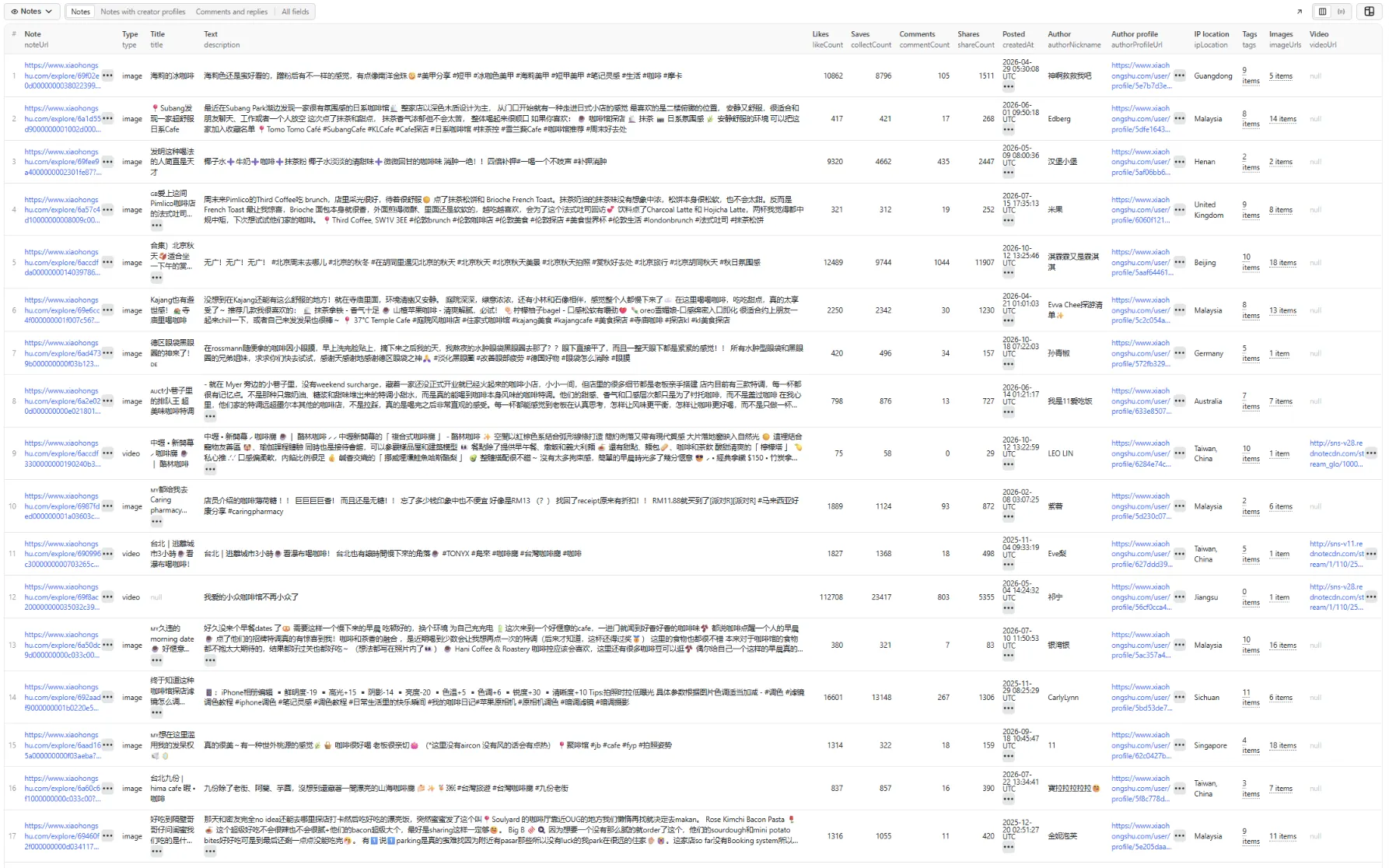
Sample note row
One row from the run above, with every extra on: note detail, the creator profile, and one comment with one of its replies. Image links, the second comment and the IDs and names of people are shortened or replaced here; the real output has them in full.
In the Comments and replies tab, each entry of comments becomes its own row next to the note's link and title.
Notes
| Field | Description |
|---|---|
noteId, noteUrl | The note and a link that opens it on the web |
type | image or video |
title, description | The note's title and text (topic markup cleaned to #topic) |
likeCount, collectCount, commentCount, shareCount | Likes, saves, comments and shares at the time of the run |
createdAt | When the note was posted |
imageUrls, videoUrl, durationSeconds | Media links (video fields on video notes) |
authorId, authorNickname, authorRedId, authorProfileUrl | The creator. On notes from a Creators input, authorRedId is filled when you gave the RedNote ID or turned on Include creator profiles (RedNote's creator listing doesn't include it) |
ipLocation, tags | With note detail only (otherwise null) |
hasDetail | Whether the row includes note detail |
author | The creator's profile, with Include creator profiles on |
source | Which input found the note: { type, value, position } |
comments | With Include comments on: the note's comments and replies (below) |
Comments and replies (in each note's comments list)
commentId, text, createdAt, likeCount, replyCount (top-level comments), isReply, parentCommentId
(replies), ipLocation, authorId, authorNickname, authorRedId. Top-level comments come first, each followed by
its replies.
ipLocation is filled only when RedNote shows a location on the comment, which it does for some comments and not
others (often not on comments from outside mainland China).
Inputs that couldn't be scraped
They are never dataset rows: each is logged, and listed with its reason in the RUN_SUMMARY record in the run's
key-value store (errors), along with counts by type and where the run stopped. They are never charged.
Pricing
Pay per event: you pay for each note delivered, plus each extra you turn on: note detail per note (always for notes given by URL), comments per comment or reply, and creator profiles once per creator per run. Inputs that couldn't be scraped and duplicates are free, and there is no start fee. See the Pricing tab for current rates. This README deliberately doesn't quote figures.
If you set a spending limit on a run, the Actor stops when it is reached and keeps everything already paid for.
FAQ
Why are ipLocation and tags empty?
RedNote's search and creator listings don't include them. Turn on Include note detail to fill them; notes given
by URL always have them.
What is a RedNote ID? The 小红书号 shown on a creator's profile. It can change; the user ID in the profile URL doesn't. Creator inputs work best as profile URLs.
Why doesn't the output have view counts? RedNote doesn't show them: the field is 0 on every note, so this Actor leaves it out rather than report a misleading 0.
Do the media links last? Image and video links are signed RedNote CDN links that expire after a while. Download what you need soon after the run.
Can I get comments without the notes' other data? Give the notes as URLs and turn on Include comments.
Data and privacy
This Actor collects only what RedNote shows publicly: no private accounts, messages, phone numbers or email addresses. Some fields are personal data (creator and commenter names, IDs, IP location). You are responsible for having a lawful basis to process them and for following the laws that apply to you, including China's Personal Information Protection Law (PIPL), the GDPR where relevant, and RedNote's terms.
This Actor is not affiliated with, endorsed by or sponsored by Xiaohongshu (RedNote).


