

X Community Notes Scraper
Pricing
from $2.00 / 1,000 community notes
X Community Notes Scraper
Search X (Twitter) Community Notes from X's official public data: by post URL, note ID, text, date, classification and helpfulness status. Note text, reasons, current status and snapshot provenance on every row.
Pricing
from $2.00 / 1,000 community notes
Rating
0.0
(0)
Developer

Delowar Munna
Maintained by CommunityActor stats
0
Bookmarked
2
Total users
1
Monthly active users
17 hours ago
Last modified
Categories
Features
Share
Search X (Twitter) Community Notes by post, note ID, text, date, classification and helpfulness status. Every row comes from X's official public Community Notes data, and says which daily snapshot it came from and how fresh that data is, so you can cite it.
No X account, login, cookies or API key needed. The Actor reads the data files X publishes for researchers and turns them into clean JSON, CSV or Excel.
What does X Community Notes Scraper do?
- 🔗 Look up the notes on specific posts. Paste post links and get every Community Note written on them.
- 🔎 Search note text. Find notes that mention a phrase, a name, a product or a topic.
- ✅ Filter by helpfulness status. Keep notes currently rated helpful (the ones X shows under posts), not helpful, or needing more ratings.
- 🏷️ Filter by classification and date. "Misinformed or potentially misleading" or "Not misleading", written between two dates.
- 🕰️ Pick a snapshot. Use the newest data, or a past snapshot date for reproducible research.
- 🧾 Provenance on every row. Snapshot date, source file, data lag in hours and collection time.
- 🧭 Status timeline. Current status and when it was set, the first decided status, locked status and the scoring model that decided it.
Who is it for?
Fact-checkers, journalists, trust-and-safety teams, researchers and academics who need repeatable, machine-readable Community Notes exports with a clear source.
How to use it
- Open the Actor and leave the defaults to get the 10 newest notes currently shown on X.
- Or add post URLs, note IDs or a text phrase, and set the filters you need.
- Click Start. Each run reads the full public dataset (over 3 million notes), so it takes about 1–3 minutes whatever you ask for.
- Download the results as JSON, CSV, Excel or HTML, or read them through the API.
Input
| Field | What it does |
|---|---|
postUrls | X/Twitter post links or post IDs. Returns the notes written on these posts. |
noteIds | Community Note IDs or note links (https://x.com/i/birdwatch/n/…). |
searchText | Case-insensitive phrase to find in the note text. |
helpfulnessStatuses | CURRENTLY_RATED_HELPFUL (default), CURRENTLY_RATED_NOT_HELPFUL, NEEDS_MORE_RATINGS. Send [] for every status. |
classifications | MISINFORMED_OR_POTENTIALLY_MISLEADING, NOT_MISLEADING. Empty = both. |
sinceDate / untilDate | Only notes created in this date range (UTC). |
maxResults | Maximum notes for the whole run (default 10). Newest notes come first. |
snapshotDate | Read a past daily snapshot instead of the newest one. |
skipIds | Note IDs you already have. Left out and not charged. |
Posts, note IDs and the text phrase are combined as a union: a note is returned if it matches any of them, then the filters apply. maxResults is one cap for the whole run and is never multiplied by the number of posts.
Example: rated notes from one week
This is the input behind the screenshots and sample output below: the 20 newest notes written in the last week of October whose status is helpful or not helpful.
Example: all notes on two posts, any status
Example: "not misleading" notes that mention a topic, this month
Output
One row per Community Note. Unknown values are null, never guessed. A full record from the run above:
Notes
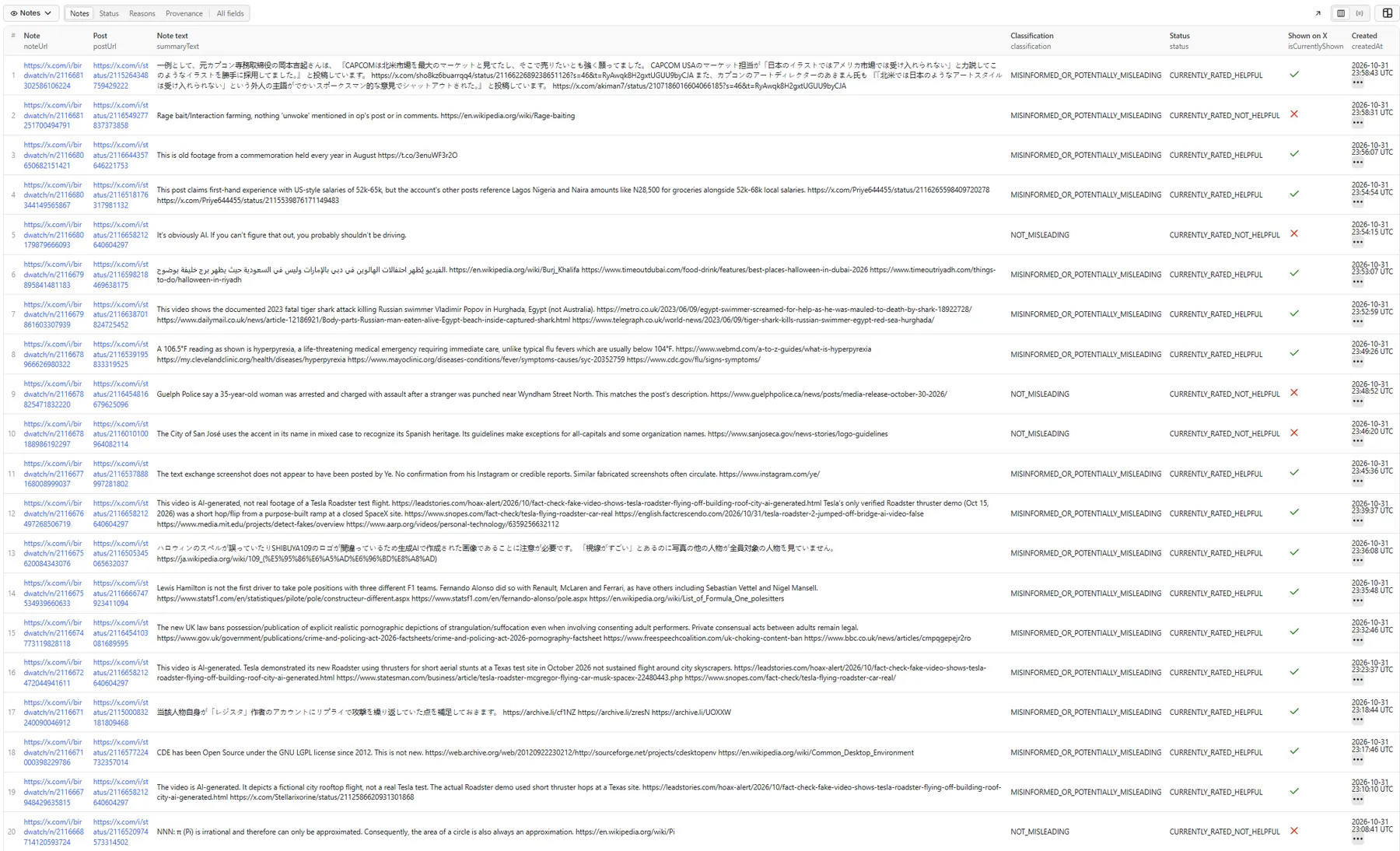
The note, the post it is on, its text, classification and whether X shows it.
Status
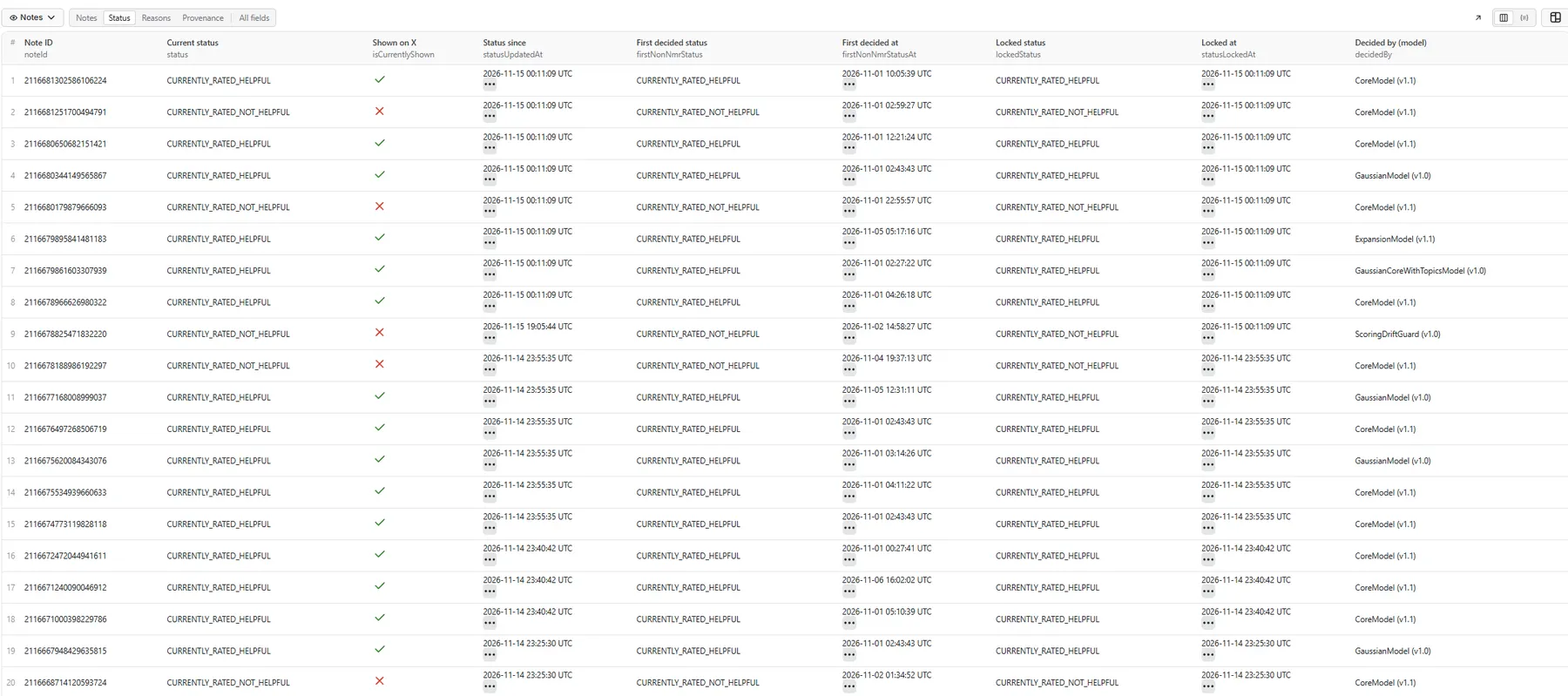
The status timeline: current status and when it was set, the first decided status, the locked status and the scoring model that decided it.
Reasons
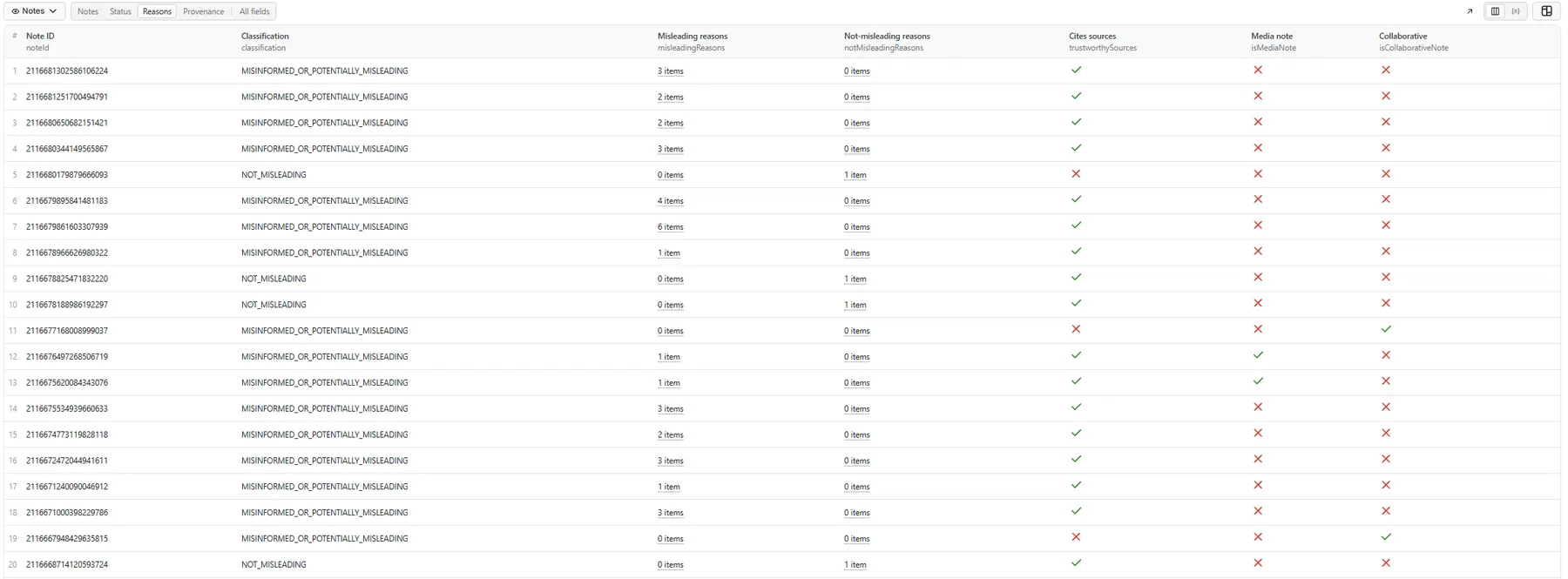
The reasons the note writer ticked, and whether the note cites sources, is about media, or was written collaboratively.
Provenance
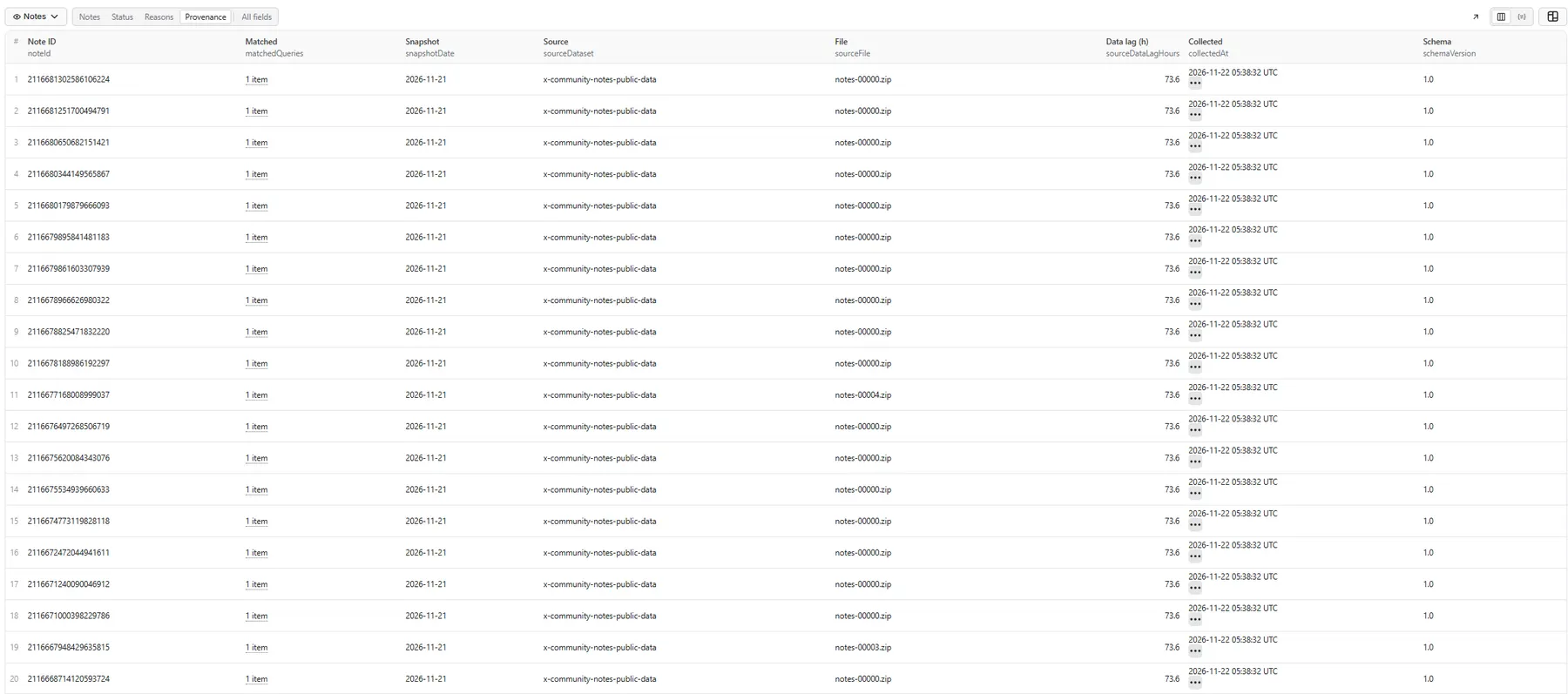
Which of your inputs matched, which public snapshot and file the row came from, and how old that data was.
Field reference
| Field | Meaning |
|---|---|
summaryText | The note text as published. |
classification | The note writer's call on the post. |
misleadingReasons / notMisleadingReasons | The reasons the writer ticked. |
trustworthySources | Whether the writer said the note cites trustworthy sources. |
status / isCurrentlyShown | Current helpfulness status. CURRENTLY_RATED_HELPFUL notes are the ones X shows under the post. |
statusUpdatedAt | When the current status was set. |
firstNonNmrStatus, lockedStatus, decidedBy | Status timeline from X's note status history. |
matchedQueries | Which of your inputs matched (post:…, note:…, text:…, or all). |
snapshotDate, sourceFile, sourceDataLagHours | Which public snapshot the row came from and how old its newest data was when collected. |
The dataset has four views: Notes, Status, Reasons and Provenance. A RUN_SUMMARY record in the key-value store lists the snapshot used, notes scanned, matched, filtered and saved, the data lag, failures and the stop reason.
Note author IDs are deliberately left out.
Pricing
Pay per event, in two parts:
- A small start fee per run. It's charged by Apify when the run starts, per GB of memory. It covers reading X's full public dataset, which every run does (over 3 million notes) whether it returns 1 note or 1,000.
- A fee per Community Note saved to the dataset.
Posts with no match, notes removed by your filters and skipped IDs aren't charged as notes. A run with invalid input stops within seconds and pays only the start fee. The Actor stops when it reaches your maximum charge per run.
To keep costs down, put many posts or note IDs in one run instead of starting one run per post. The default memory is the right size for normal runs.
This README deliberately doesn't quote figures. See the Pricing tab for the current rates.
Data freshness and limits
- The public data lags. X publishes one snapshot a day, and its newest notes are usually 2–3 days old when the file appears.
sourceDataLagHourson each row tells you how old. Notes written after the snapshot's cut-off are not in it yet. - Locked status comes later. X locks a note's status about two weeks after it is written, so
lockedStatusandstatusLockedAtarenullon newer notes. - Brand-new notes may have no status yet. They come back with
status: nullwhen you clear the status filter. - No match is not proof of absence. If a post returns nothing, it may have no notes, or its notes may be newer than the snapshot.
- Ratings are not included. X's per-rating files have been missing from recent public snapshots, so this Actor doesn't promise rating counts.
- Post text is not included. The public data links each note to a post ID and URL, not the post's content.
Monitor on a schedule
Run the Actor daily with helpfulnessStatuses: ["CURRENTLY_RATED_HELPFUL"] and a sinceDate, and pass the note IDs you already have in skipIds, so each run only charges for new notes.
API
It also works from the Apify JavaScript and Python clients, in schedules, with webhooks and through the Apify MCP server.
Troubleshooting
| Message | What to do |
|---|---|
Invalid input: … | Fix the field it names. No notes were charged, only the start fee. |
no Community Notes snapshot is published for <date> | Pick another snapshotDate, or leave it empty for the newest. |
| Run finished with 0 results | Loosen the filters. Check RUN_SUMMARY.failures for targets that matched nothing. |
Source and disclaimer
Data comes from X's public Community Notes data download (guide), fetched with plain HTTPS requests. This Actor is independent and is not affiliated with or endorsed by X Corp. Use the data in line with X's terms for the public data and the privacy laws that apply to you.


