

X Retweeters Scraper
Pricing
from $0.30 / 1,000 retweeter results
X Retweeters Scraper
Scrape who reposted public X (Twitter) posts: retweeter usernames, names, followers, following and bios, one row per retweeter. No login, no cookies. Pay only for retweeters saved.
Pricing
from $0.30 / 1,000 retweeter results
Rating
0.0
(0)
Developer

Delowar Munna
Maintained by CommunityActor stats
0
Bookmarked
2
Total users
1
Monthly active users
a day ago
Last modified
Categories
Features
Share
X Retweeters Scraper — Who Reposted a Post
See who reposted any public X (Twitter) post. You get one clean row per retweeter: username, display name, user ID, profile link, followers, following and bio, plus the post they reposted. Paste post URLs or IDs, set a limit, and export the rows to JSON, CSV or Excel.
No X login, no cookies, no browser and no proxy setup. You pay only for retweeters saved to your dataset.
✨ What it does
- 🔁 Retweeters of any public post: username, display name, user ID, profile URL, followers, following and bio.
- 📋 One post or a hundred: x.com, twitter.com, mobile and
/i/status/links all work, and so do bare numeric post IDs. Duplicates are fetched once. - ⚖️ A global limit that means what it says: Maximum results caps the whole run across all posts. Posts take turns, so one viral post can't use up the run.
- 🎯 Follower filter: keep only retweeters above a follower count, for influencer and audience research.
- ♻️ Repeat runs without paying twice: list retweeters you already have (IDs, @handles or profile URLs) and they're skipped and never charged.
- 🧾 A run summary you can trust: the
RUN_SUMMARYrecord shows how many rows were seen, saved, deduplicated, filtered and charged, how each post went, and why the run stopped.
Quote tweets are temporarily unavailable: the data source behind them isn't reliable enough yet. They'll come back as an option in this Actor. Replies aren't reposts; for those, use an X comments scraper.
🚀 Quick start
- Paste one or more X post URLs into Post URLs or IDs.
- Set Maximum results (default 10).
- Click Start. Rows appear in the dataset as they're collected.
Run it with the defaults and you get 10 retweeters of the example post.
Example inputs
Retweeters of two posts, 10 each. This is the input behind the output preview below:
Retweeters with at least 1,000 followers, skipping accounts you already have:
📥 Input
| Field | What it does |
|---|---|
tweetUrls | X post URLs or numeric post IDs (up to 100). |
maxItems | Maximum saved retweeters for the whole run (default 10). Never multiplied by the number of posts. |
minFollowers | Only retweeters with at least this many followers. Retweeters whose follower count X didn't return are kept. |
excludeUserIds | Retweeters to skip: user IDs, @handles or profile URLs. Never charged. |
maxPagesPerTweet | Safety limit on pages read per post (about 16–20 accounts a page; default 10). |
maxUpstreamCalls | Safety limit on data-provider requests per run. 0 = set automatically. |
failOnPartial | Mark the run as failed when a post couldn't be read in full. Saved rows are kept. |
debug | Saves the provider's first raw response per post to the key-value store, for troubleshooting. |
📤 Output
One row per retweeter. Unknown values are null, never guessed.
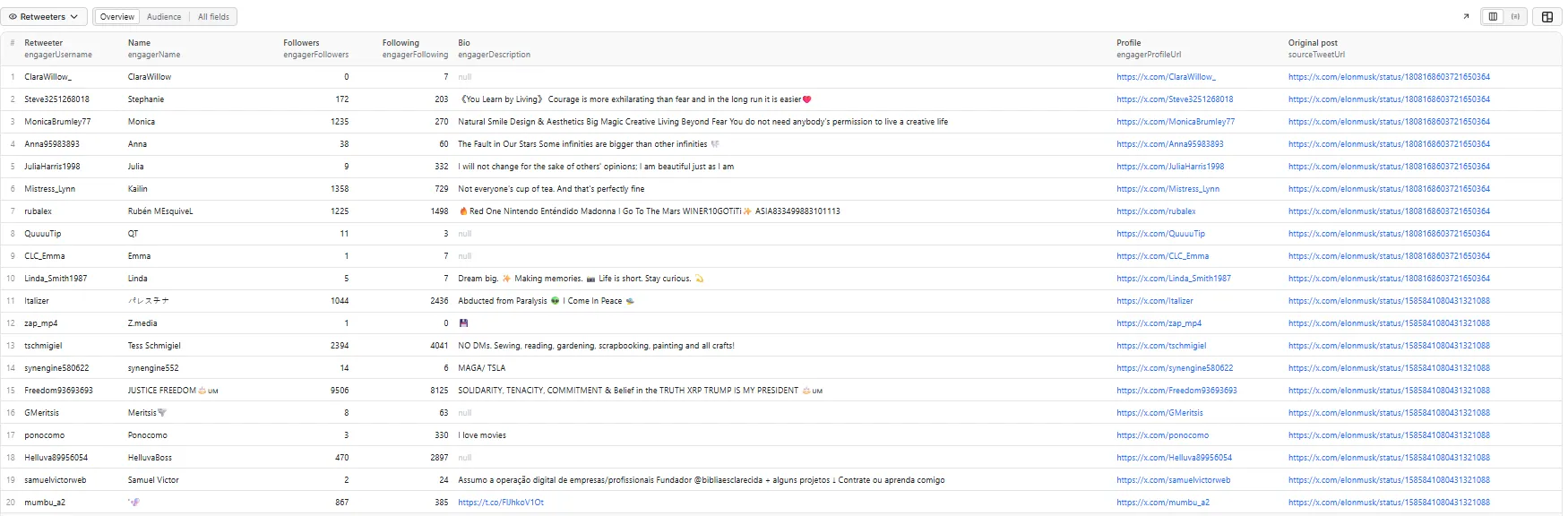
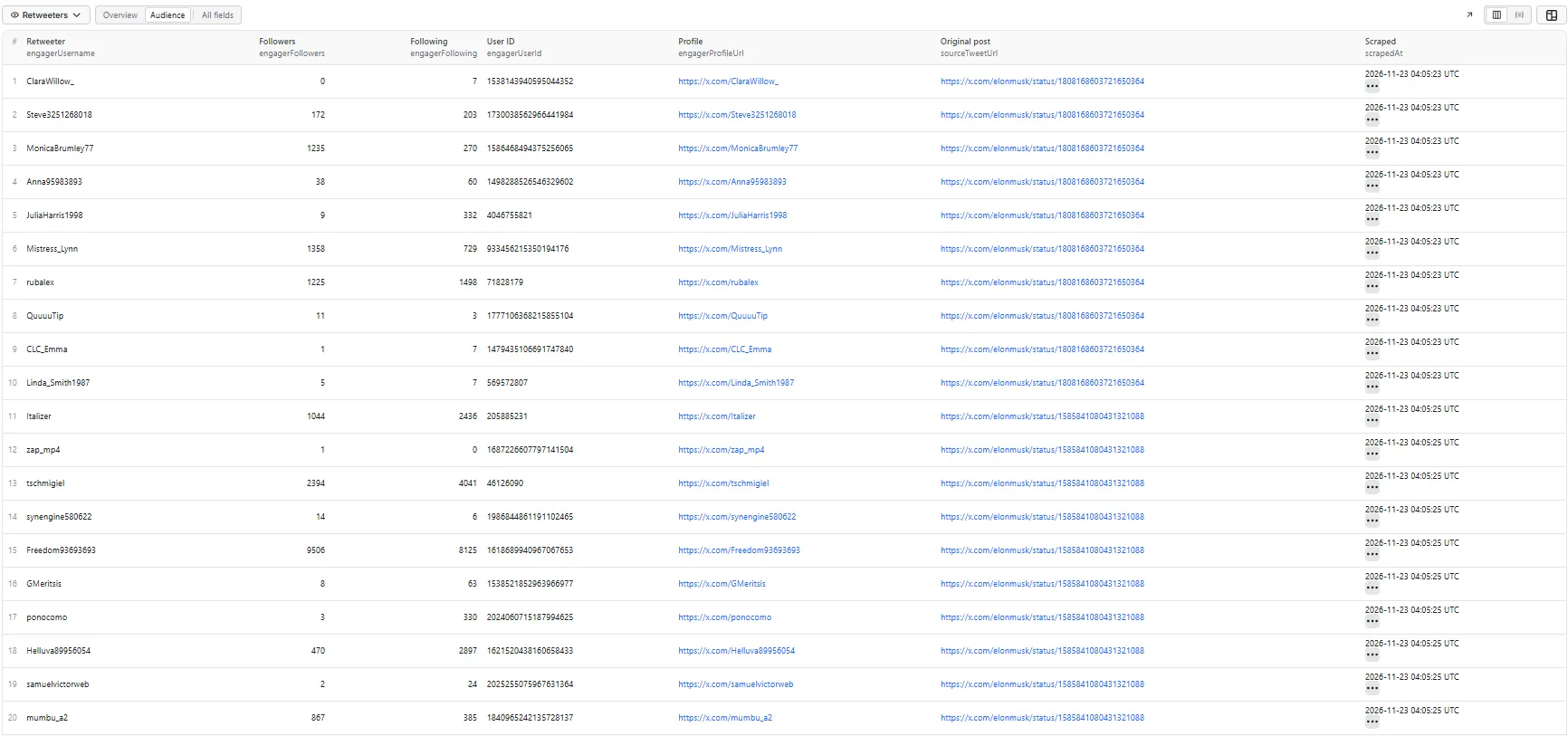
Output preview
Overview
Audience
Example record
A real row from the run behind the preview:
Fields
| Field | Description |
|---|---|
engagementId | Stable identity retweet:<post>:<user>. Use it to deduplicate across runs. |
engagementType | Always retweet for now. Kept so the output stays the same when quote tweets return. |
sourceTweetId, sourceTweetUrl, sourceTweetAuthorUsername | The post that was reposted. The author comes from the URL you gave; it's null for a bare post ID. |
engagerUserId, engagerUsername, engagerName, engagerProfileUrl | Who reposted. |
engagerFollowers, engagerFollowing | Audience size. |
engagerDescription | The account's bio; null when it's empty. |
sourceInput, inputIndex | The entry you gave and its position in your list. |
sourceProvider, collectedAt, scrapedAt, runId, schemaVersion | Lineage. |
X's repost list doesn't include a verified badge, location, join date or avatar, so those aren't in the output.
Dataset views
- Overview: retweeter, name, followers, following, bio and links.
- Audience: retweeter, followers, following, user ID and links, for sorting by reach.
💰 Pricing
Pay per result: one engagement-result event for each unique retweeter saved to your dataset (one account reposting one post). You're not charged for duplicates, rows dropped by your filter or skip list, posts that fail, or the run summary. A run that finds nothing costs nothing in events.
Your Apify maximum cost per run is respected: the run stops cleanly when it's reached.
See the Pricing tab for current rates. This README deliberately doesn't quote figures, so it can't go out of date.
📏 Coverage and limits
- Public posts only. Protected or deleted posts return nothing, and the run summary says so.
- Retweeter lists come from X. X doesn't guarantee it shows every reposter of a large post, so very long lists can end early. The run summary marks coverage as
unknown, nevercomplete. - No repost dates. X doesn't expose when an account reposted.
- Likes are private on X, so this Actor doesn't list who liked a post.
🗓️ Schedule and API
Run it on a schedule to track who picks up your posts, and pass the retweeters you already have in excludeUserIds so repeat runs only charge for new ones.
Rows export as JSON, CSV, Excel or XML, and work with Make, n8n, Zapier and other integrations.
🛟 Troubleshooting
| What you see | What to do |
|---|---|
| A post returns nothing | Check that the post is public, still online and has reposts. Protected and deleted posts can't be read. |
| The run stopped early | RUN_SUMMARY.stopReason says why: your result limit, your maximum cost per run, the page or request limit, or the run's timeout. |
| Follower filter kept accounts with no follower count | That's on purpose. An unknown count isn't treated as zero. |
⚖️ Privacy and disclaimer
This is an independent tool by Coregent. It isn't affiliated with, sponsored by or endorsed by X Corp. X and Twitter names are used only to identify the data source. It collects only publicly available information and never asks for an X password, cookies or session data. Use the data lawfully, follow applicable privacy laws and X's terms, and don't use it for harassment, spam or surveillance. Public availability isn't permission for unrestricted reuse.
💬 Support
Found a problem or need a field? Open an issue on the Actor's Issues tab. Include the run ID so we can look at the run summary.


