

X (Twitter) Followers Scraper
Pricing
from $0.25 / 1,000 relationship results
X (Twitter) Followers Scraper
Export the public followers and following lists of X (Twitter) accounts. One row per relationship with the account's handle, name, bio, location, website, follower counts and verification. No login, no cookies. Pay only for rows saved.
Pricing
from $0.25 / 1,000 relationship results
Rating
0.0
(0)
Developer

Delowar Munna
Maintained by CommunityActor stats
0
Bookmarked
2
Total users
1
Monthly active users
5 days ago
Last modified
Categories
Features
Share

Export the public followers and following lists of X (Twitter) accounts. Every relationship comes back as one flat row: which account it belongs to, which list, and the listed account's handle, name, follower count, verification, location and join date, plus bio, following, tweet and media counts on the following list (or on both lists with Include full profiles) and the website on the following list. Export to JSON, CSV, Excel or Google Sheets, or call it from the API, Make, Zapier, n8n or an AI agent.
- No login, no cookies, no X account. Public data only.
- Followers, following, or both for up to 100 accounts per run, by handle or profile URL.
- Fair limits. Accounts are read in turns, a page each, so one huge account can't use up your total limit.
- Full profiles when you need them. X's followers list is short on detail; turn on Include full profiles to add each follower's bio and counts.
- Audience filters: minimum and maximum followers, verified only, has a website, exclude protected accounts.
- Skip list for accounts you already have, so repeat runs only pay for new rows.
- Pay only for rows saved. Duplicates, rows your filters or skip list drop, failed accounts and empty runs are free.
- Clear status messages. Every run says how many rows it saved, which accounts failed and why, and why it stopped.
What can you do with it?
| Use case | What to enter | Typical setup |
|---|---|---|
| Influencer and creator discovery | A niche leader's handle, Followers | Minimum followers 1,000, maximum 100,000, export the Profiles view |
| Competitor audience research | Competitor handles, Followers | Compare who follows whom; the run summary counts accounts that follow several of them |
| Lead generation | Industry accounts, Following (who they follow) or Followers with full profiles | On the following list, only accounts with a website, then enrich the websites in your CRM |
| Partnership and PR mapping | A brand or journalist, Following | See whom they follow and engage with |
| Account audits | Your own handle, Both | Followers and following side by side, with counts and verification |
| Research datasets | A list of accounts, Both | Large one-off run, JSON into your network analysis |
How to use it
- Add one or more X accounts (handles such as
nasa) or Profile URLs. - Pick the List: Followers, Following or Both.
- Set Maximum results (total) and, for several accounts, Maximum results per account and list.
- Optionally turn on Include full profiles, or add filters or a skip list.
- Click Start, then download the results from the Output tab.
Run it with the defaults and it returns about 20 followers of NASA.
Accounts
Enter handles (nasa, @nasa) or profile URLs (https://x.com/nasa, twitter.com/nasa/followers). The same account entered twice runs once. Entries that aren't an X account (a tweet link, a search page, another website) are skipped and listed in the run log.
Protected accounts don't have public lists. They're reported in the status message without spending anything, and the run carries on. Accounts that don't exist or are suspended are reported the same way.
Followers, following or both
- Followers: accounts that follow the account you entered. Rows have
relation_type: "follower". - Following: accounts the account you entered follows. Rows have
relation_type: "following". - Both: both lists. Each list gets its own per-account limit.
What each list includes
X gives less detail in a followers list than in a following list:
| Field | Following list | Followers list | Followers list + Include full profiles |
|---|---|---|---|
| Handle, name, user ID, avatar, join date | ✓ | ✓ | ✓ |
| Follower count, verified, protected, location (when set) | ✓ | ✓ | ✓ |
| Bio, following, tweet and media counts | ✓ | — (null) | ✓ |
| Website (when set) | ✓ | — (null) | — (null): X gives no website for followers |
Include full profiles looks up each follower's full profile, one lookup per account. It's billed as a separate profile-enrichment event, once per account and only for rows that are saved. The following list already has these fields, so it needs no lookups. Every row has target_full_profile: true when the bio and counts were available, false when they weren't fetched.
Filters and skip list
| Option | What it keeps |
|---|---|
| Minimum followers / Maximum followers | Listed accounts within that follower range (0 = off) |
| Only verified accounts | Accounts with a verified badge |
| Only accounts with a website | Accounts that show a website on their profile. Following list only: X gives no website for followers, so the filter isn't applied to followers rows |
| Exclude protected accounts | Drops accounts whose tweets are protected |
| Skip these accounts | Leaves out user IDs, handles or profile URLs you list |
Filters work on each page after it's fetched. Rows they drop are never charged, but the pages still have to be read, so a strict filter makes a run take longer to reach your limit.
Input examples
Followers and following of two accounts, 5 per list, with full profiles (the run behind the sample output below):
Followers of one account, default size:
Followers and following of two accounts, 250 per list:
Mid-sized creators who follow a niche leader, with bios (full profiles on):
A repeat run that skips accounts collected before:
Output
One row per relationship.
| Field | Description |
|---|---|
recordType | Always relationship_result |
id | Stable row ID: account, list and listed user |
relation_type | follower or following |
source_username, source_user_id, source_input | The account you entered |
target_user_id, target_username, target_name, target_url | The listed account |
target_description | Its bio (see "What each list includes") |
target_location, target_website | As shown on its profile, when set (website: following list only) |
target_followers_count | Its follower count |
target_following_count, target_tweet_count, target_media_count | Its other counts (see "What each list includes") |
target_is_verified | Verified badge |
target_is_protected | Whether its tweets are protected |
target_created_at | When it joined X (ISO, UTC) |
target_avatar_url | Its profile picture |
target_full_profile | true when bio and counts were available for this row |
provider, collected_at | Data source and when the row was collected |
A value X doesn't provide is null, never a guess.
The Output tab has two views: Overview (who follows whom, with the key counts) and Profiles (the listed accounts' profile fields). Both views show the same dataset; they only pick different columns. The samples below are real rows from the first input example above, trimmed to each view's columns.
Overview
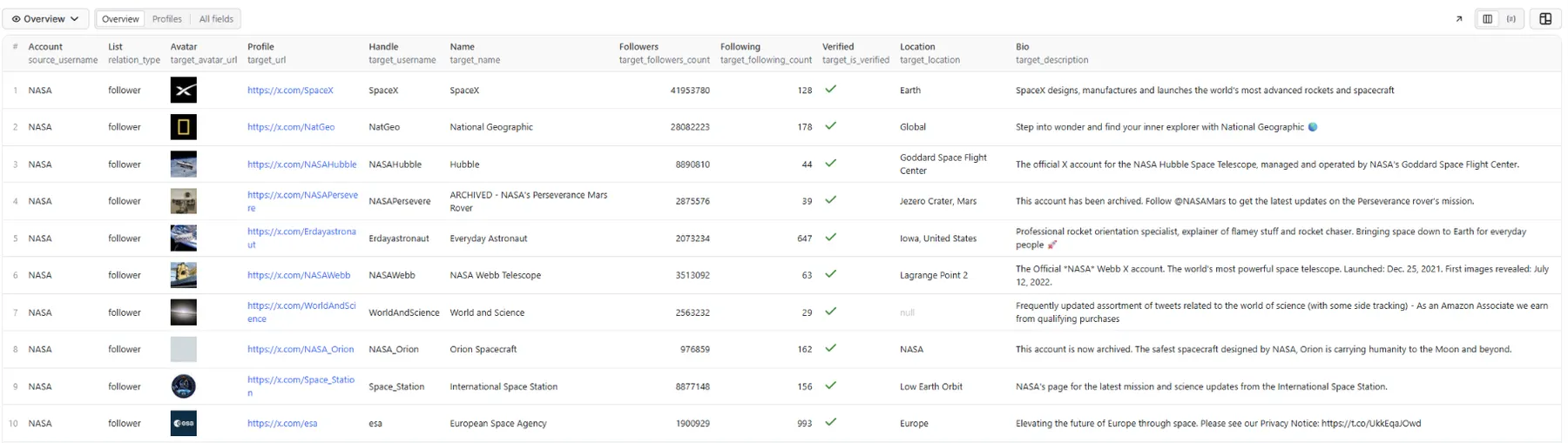
A follower of @NASA, with Include full profiles on:
Profiles
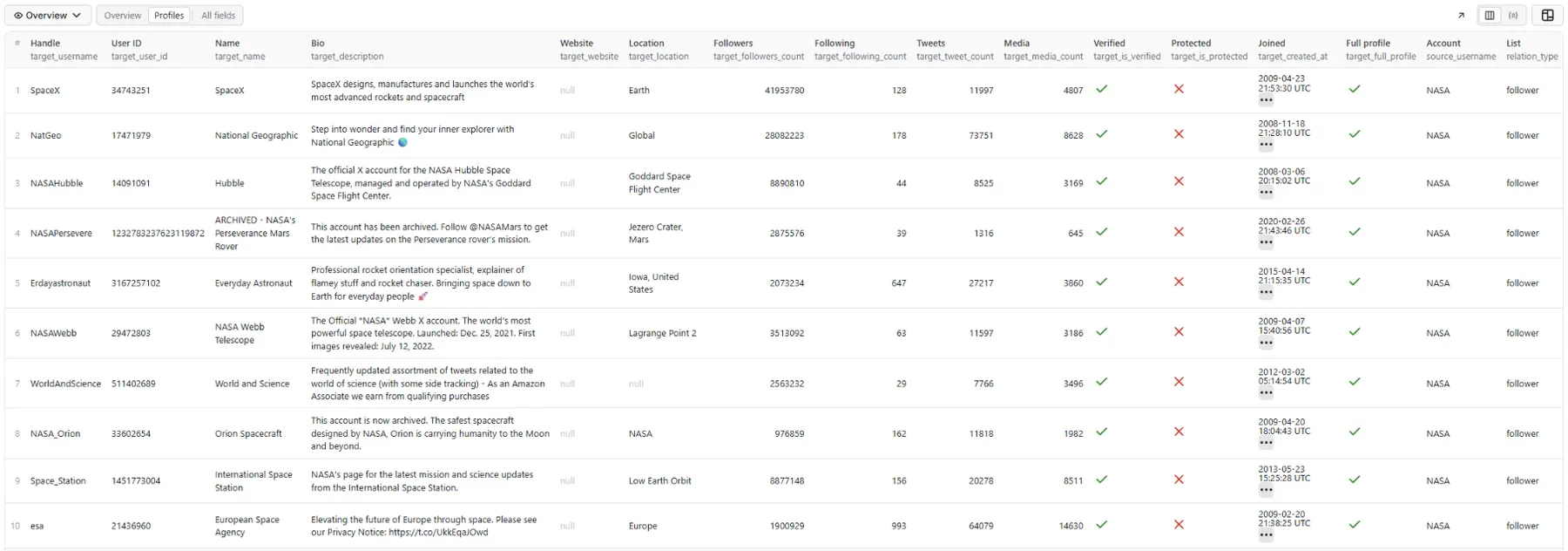
An account @SpaceX follows (following rows include the website):
A run summary is saved in the key-value store as RUN_SUMMARY: accounts, pages read, rows found and saved, duplicates, skipped and filtered rows, accounts that follow more than one of your accounts, and, for each account and list, its status, rows saved, the count shown on the account, and why it stopped.
Pricing
This Actor uses pay-per-event pricing: you pay one relationship-result event per unique row saved to the dataset. With Include full profiles on, you also pay one profile-enrichment event per follower whose full profile was looked up (once per account, saved rows only). Nothing else is charged:
- duplicate rows,
- rows dropped by your filters or skip list,
- accounts that fail, are protected or don't exist,
- the run summary, and runs that save nothing.
The prices are on the Actor's Pricing tab in the Apify Console, and it can differ by Apify plan. This README deliberately doesn't quote figures, so it never goes out of date. Set a maximum cost per run in the run options and the Actor stops saving before it would exceed it.
Limits and good to know
- Public data only. Protected accounts, private lists and anything that needs a login aren't available.
- Very long lists end early. X stops serving a list after a certain depth, so for accounts with millions of followers you get the most recent part of the list, not all of it. The status message and
RUN_SUMMARYsay when a list ended before the account's own count. - Order is X's order (usually most recent followers first).
- No follow dates. X doesn't show when someone followed an account, so there's no date filter.
- Counts change. Follower counts are a snapshot taken when the run happened.
- Timeouts. If a run gets close to its timeout, it stops by itself, keeps every row already saved and says so in the status message.
FAQ
Do I need an X account or API key? No.
Is scraping X legal? This Actor collects publicly available data only. You're responsible for how you use it: follow X's terms, data-protection laws such as GDPR, and don't collect personal data without a lawful reason. This is an independent tool, not affiliated with X Corp.
Can I get tweets too? Not in this Actor. For tweets by keyword, hashtag or profile, use our X Tweet Scraper.
Can I get only new followers each day? Put the accounts you already have in Skip these accounts (IDs or handles), and only new rows are saved and charged.
Can I use it from code or an AI agent? Yes. Call it through the Apify API, the Apify client libraries or the Apify MCP server, and read the dataset as JSON.
Feedback
Found a problem or need a field that's missing? Open an issue on the Actor's Issues tab and include the run link.


