

YouTube Channel Growth Tracker
Pricing
from $1.40 / 1,000 channel snapshots
YouTube Channel Growth Tracker
Track YouTube channel growth over time — subscribers, total views, video count, views per day, 24h/7d/30d/90d comparisons, growth acceleration, milestones, upload cadence and recent-video performance. Persistent history, no login, no API key.
Pricing
from $1.40 / 1,000 channel snapshots
Rating
0.0
(0)
Developer

Delowar Munna
Maintained by CommunityActor stats
0
Bookmarked
2
Total users
1
Monthly active users
11 days ago
Last modified
Categories
Features
Share
YouTube Channel Growth Tracker — Subscribers, Views, Uploads & Momentum Over Time
Track how YouTube channels change over time. Every run stores a snapshot of each channel and compares it with that channel's own history: subscriber, total-view and video-count changes, views per day, 24-hour / 7-day / 30-day / 90-day comparisons, growth acceleration, milestones, upload cadence and recent-video performance.
No YouTube login. No cookies. No API key of your own.
A channel scraper tells you "Subscribers: 84.9M". This Actor tells you (a real row for @markrober, second run, 39.7 hours after the baseline):
⚡ Quick start
- Add channels to YouTube channels —
@handles, channel URLs, channel IDs or video URLs. - Click Start. The first run creates a baseline for each channel.
- Schedule the Actor (daily is a good default) with the same Tracker key. From the second run on, every row carries growth deltas, velocity, trend and alerts.
How is this different from a YouTube Channel Scraper?
| Channel scraper | Channel Growth Tracker | |
|---|---|---|
| Answers | What are this channel's stats now? | How is this channel changing over time? |
| Current subscribers / views / videos | ✅ | ✅ |
| Persistent per-channel history across runs | ❌ | ✅ |
| Deltas vs previous run | sometimes | ✅ precision-aware |
| 24h / 7d / 30d / 90d comparisons | ❌ | ✅ |
| Views per day, subscribers per day | ❌ | ✅ |
| Growth acceleration / deceleration | ❌ | ✅ |
| Subscriber & view milestones | ❌ | ✅ |
| Upload cadence + new uploads since last run | ❌ | ✅ |
| Recent-video health (median views, engagement, Shorts share) | partial | ✅ tracked over time |
| Alerts for webhooks | ❌ | ✅ alertTriggered + alertReasons |
What you can do with it
- Competitor monitoring — a daily tracker of rival channels with 7/30-day growth.
- Creator & influencer vetting — is growth broad and steady, or one viral video?
- Agency reporting — one tracker key per client portfolio.
- Sponsorship research — views-to-subscribers ratio and recent median views.
- Breakout discovery — alerts when a channel grows faster than its own baseline.
- Milestone tracking — know the run a channel crosses 100K or 1M.
Input
Example 1 — minimal (first run creates baselines)
Example 2 — daily competitor tracker
Schedule it daily.
Example 3 — lightweight large-scale tracking
Channel counters only — the fastest and cheapest setup for hundreds of channels.
Example 4 — breakout channel watch with alerts
Example 5 — 20-channel watchlist (the input behind the screenshots and samples below)
Run once for the baselines, then again a day or more later with the same trackerKey.
Key input fields
| Field | Default | What it does |
|---|---|---|
channels | — | @handles, channel URLs (/@x, /channel/UC…, /c/…, /user/…), channel IDs, or video URLs (resolved to the uploader). Up to 1,000 per run. Duplicates are merged. |
mode | TRACK | TRACK — vs the previous snapshot plus the selected periods. COMPARE — vs the selected historical periods only. SNAPSHOT — current stats only, stored without growth analytics. |
trackerKey | default | Names the history this run reads and writes. Same key on every scheduled run; different keys keep separate histories. |
comparisonPeriods | PREVIOUS, 7_DAYS, 30_DAYS | Also 24_HOURS and 90_DAYS. |
includeRecentVideoMetrics | true | Analyze the latest uploads (median views, engagement, Shorts share). Billed as its own event. |
recentVideosToAnalyze | 10 | 1–50 latest uploads across the selected content types. |
contentTypes | VIDEOS, SHORTS | Also LIVE (past live streams). |
includeUploadTracking | true | Upload cadence + up to 5 new uploads since the last run. |
includeProfileMetadata | true | Description, keywords, avatar, banner, links, topics, verified badge. |
saveHistory | true | Store this observation. Off = a one-off check against existing history that leaves no trace. |
maxHistoryDays | 365 | Retention of the per-channel history used for comparisons. |
minimumSnapshotIntervalMinutes | 30 | A rerun inside this window with no change is not stored twice. |
growthAlertThresholdPct / growthAlertThresholdAbsolute / dropAlertThresholdPct | empty | Your own alert thresholds (see Can it trigger webhooks?). |
Output
One row = one channel × one observation. Primary metrics are flat columns, ready for spreadsheets and dashboards.
Dataset views
| View | Shows |
|---|---|
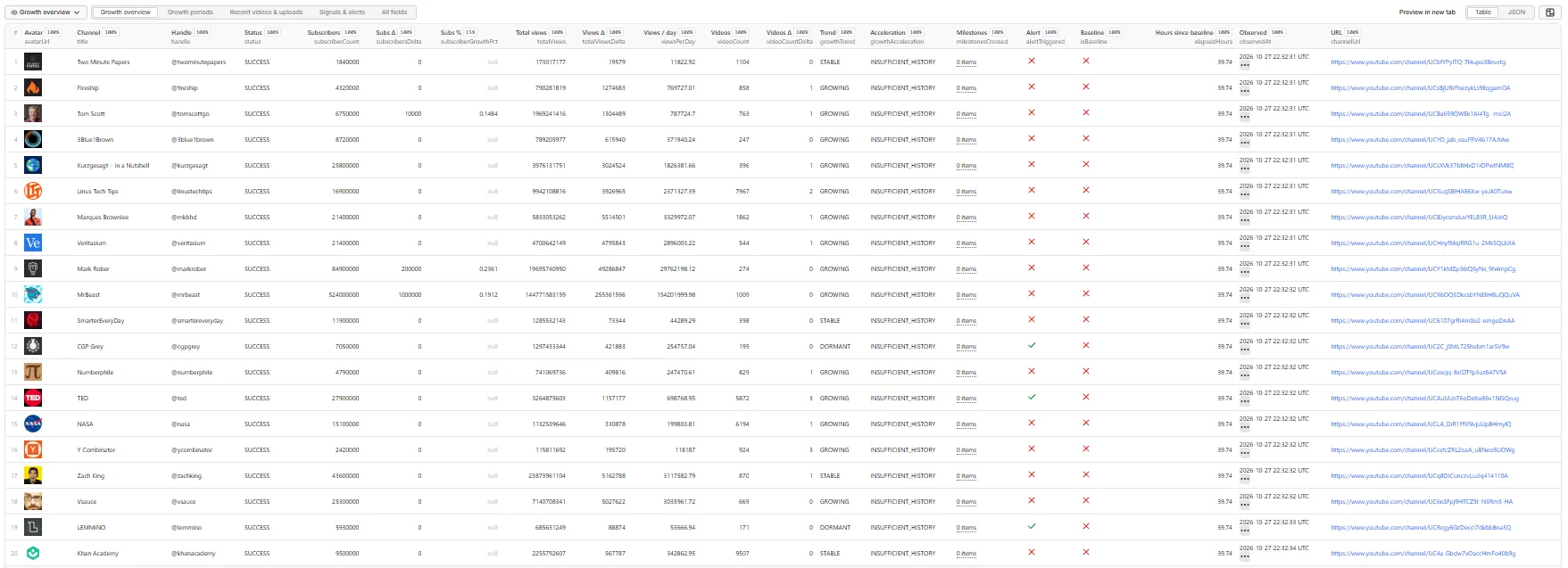
| Growth overview | Subscribers, views, videos and their deltas, views/day, trend, acceleration, milestones, alert flag |
| Growth periods | Velocity, precision, acceleration ratio and the per-period growthPeriods object |
| Recent videos & uploads | Median/average views, likes, comments, engagement, Shorts share, upload cadence, new uploads |
| Signals & alerts | alertReasons, signals, milestones, handle changes, status |
The screenshots and samples below come from the second run of Example 5 (20 channels, 39.7 hours after the baseline run). Acceleration still reads INSUFFICIENT_HISTORY there — it needs two week-long windows of history (see the FAQ).
Growth overview
Growth periods
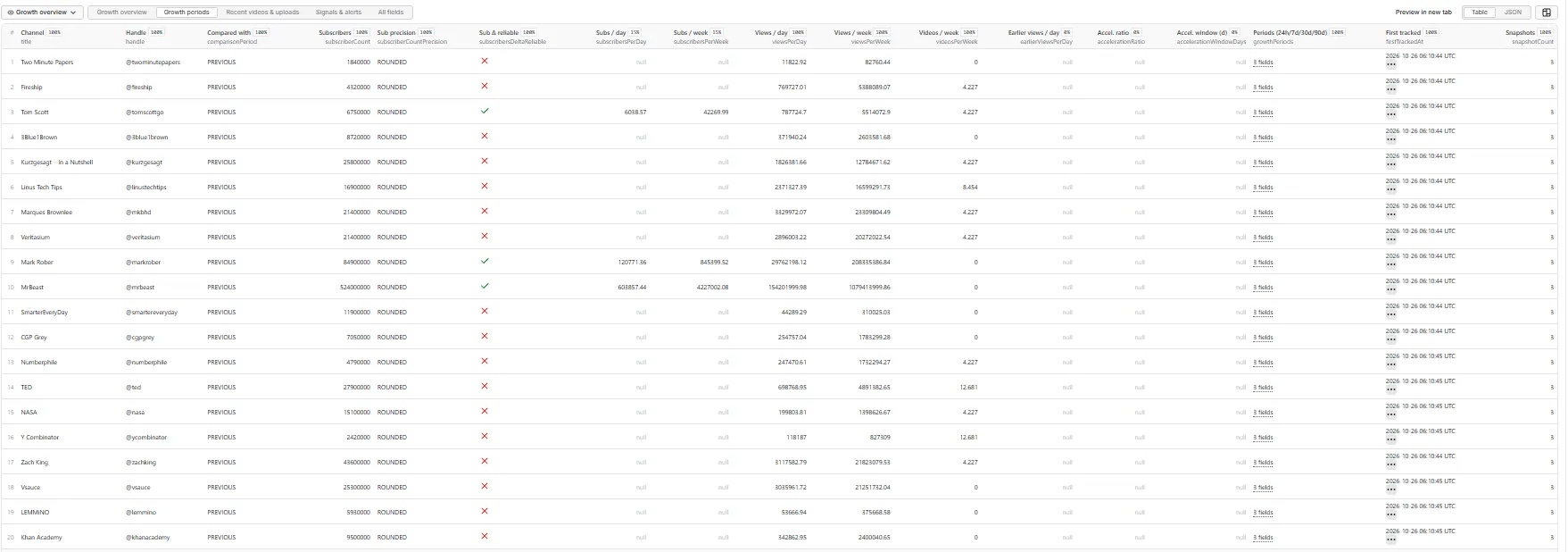
A rounded subscriber count that did not move past its rounding step (21.4M → 21.4M) is flagged unreliable and its growth % / per-day are withheld, while exact total views still give the daily rate:
day7 and day30 stay null until the history reaches back that far.
Recent videos & uploads
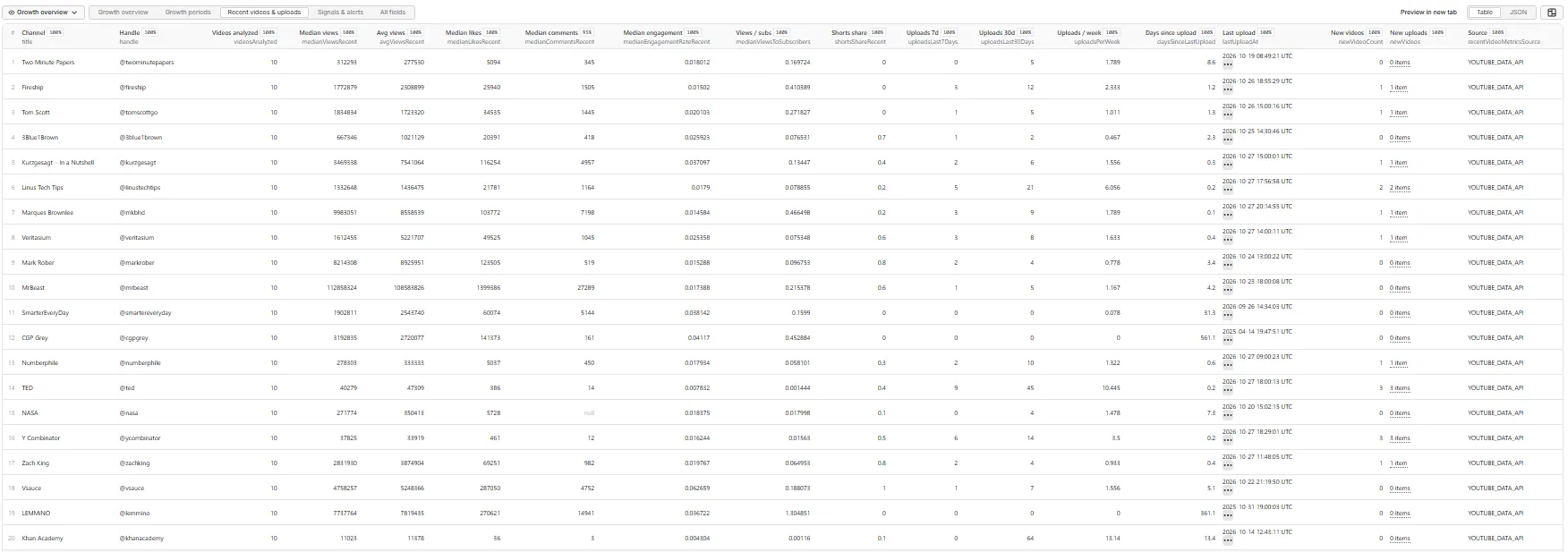
(recentVideos trimmed to 1 of 10 entries.)
Signals & alerts
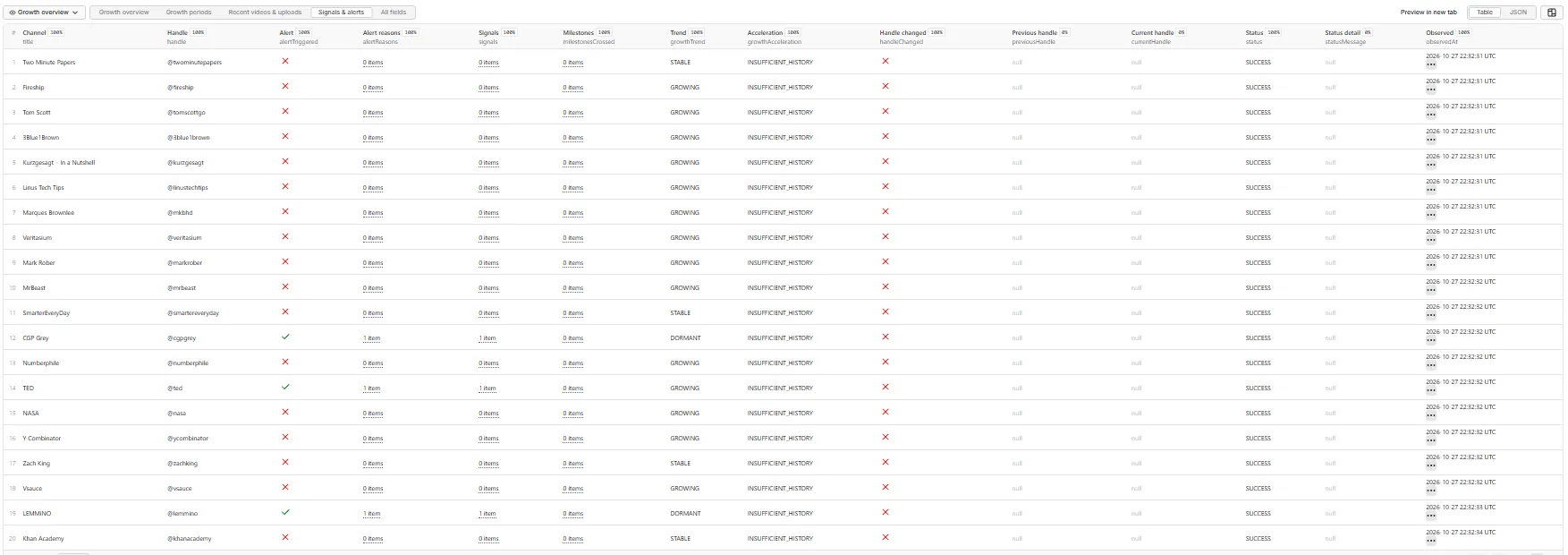
(Samples trimmed to each view's fields — every row also carries profile fields, previous values and source/status fields.)
Statuses
SUCCESS, BASELINE_CREATED, VIDEOS_UNAVAILABLE (channel tracked, recent videos failed), PARTIAL_CHANNEL (counters incomplete — not stored), CHANNEL_NOT_FOUND, CHANNEL_TERMINATED, CHANNEL_UNAVAILABLE, RATE_LIMITED, PROVIDER_ERROR, STATE_READ_ERROR, STATE_WRITE_ERROR. One failed channel never fails the run.
Run summary
Each run writes RUN_SUMMARY to its key-value store: channels requested / succeeded / failed, baselines created, channels compared, counts per trend (breakout, surging, growing, stable, declining, dormant), signal counts (subscriber surges, view surges, milestones, accelerating, dormant), alerts, precision coverage and per-channel failures.
FAQ
What happens on the first run?
Each channel gets a baseline: isBaseline: true, status BASELINE_CREATED, and every delta is null — never zero. Growth starts from the second run. Everything that needs no history is already filled in on the first run: current counters, profile, recent-video performance, upload cadence, and the CHANNEL_DORMANT signal for channels with no upload in 90+ days. History starts at your first baseline; the Actor cannot reconstruct growth from before you started tracking.
Which channel counters are tracked?
Subscribers (with precision), total channel views, and video count — plus, optionally, recent-video performance and upload cadence.
Are subscriber counts exact? Why are they sometimes rounded?
YouTube publishes subscriber counts rounded to three significant figures from 1,000 up (21.4M, 533K, 1.17K) — on the channel page and in its own API. Every row says how precise its count is in subscriberCountPrecision: ROUNDED, EXACT_IF_AVAILABLE (under 1,000), HIDDEN or UNKNOWN.
Growth respects that. If the change is smaller than the rounding step — 21.4M today and 21.4M yesterday — the row says subscribersDeltaReliable: false and withholds subscriberGrowthPct and subscribersPerDay instead of reporting zero growth. A change of exactly one step (2.42M → 2.43M) is a real gain, but it could be anything from a handful of subscribers to almost two steps, so over less than a week its % and per-day are withheld too — otherwise a channel that just crossed a rounding boundary would read as a surge. Longer periods (7 / 30 / 90 days) usually move past the rounding step and become reliable.
Why is total-view growth so useful?
Because total views are exact. totalViewsDelta and viewsPerDay show real day-to-day movement even when the subscriber count looks frozen, which is why trend and acceleration lean on views.
How is views/day calculated?
viewsPerDay = totalViewsDelta ÷ elapsed days between the baseline snapshot and now. subscribersPerDay uses the same formula (reliable deltas only); viewsPerWeek and subscribersPerWeek are ×7.
Can I compare 7 / 30 / 90-day growth?
Yes — select the periods in Comparison periods. Each is matched to the nearest stored snapshot within a tolerance (24h ±6h, 7d ±24h, 30d ±3d, 90d ±7d) and stays null until enough history exists. A daily schedule fills 7 days after a week, 90 days after three months.
Does it track recent-video performance? Shorts? Upload frequency?
Yes. With Analyze recent videos on, each row gets average and median views, likes, comments and engagement rate for the latest uploads, the views-to-subscribers ratio, and the Shorts / long-form / live mix (shortsShareRecent). RECENT_VIDEO_PERFORMANCE_UP / _DOWN compare medianViewsSettledRecent — the median views of sample videos at least 7 days old — so a brand-new upload with few views yet does not read as a slump; with fewer than 3 such videos (a channel uploading several times a day) those signals are not computed. With Track uploads on, rows get uploads in the last 7 and 30 days, uploads per week and month, days since the last upload, and up to 5 new uploads since the previous run. Medians matter: one viral video distorts the average, not the median.
Engagement rate is (likes + comments) ÷ views — a Coregent-derived ratio, not an official YouTube metric.
What happens if a channel changes its handle?
History is keyed on the permanent channel ID, not the handle, so it continues. The row gets handleChanged: true, previousHandle, currentHandle and the HANDLE_CHANGED signal.
Can channels with hidden subscriber counts be tracked?
Yes. subscriberCount is null with subscriberCountHidden: true, and total views, video count, recent-video performance and upload cadence are still tracked.
Does it need a YouTube login or API key?
No. No login, no cookies, no API key of your own.
How often should I schedule it?
Daily for most trackers, weekly for large, stable portfolios. Always reuse the same Tracker key. YouTube refreshes a channel's total views and video count about once a day, so running more often adds little: when the previous snapshot is under 20 hours old, the row shows the raw changes but leaves views/day and the other per-day columns empty (the row's statusMessage says so) rather than extrapolating a stale or lumped update. The trend is still filled in, because it is read over the longer stored history. Reruns within 30 minutes that find nothing changed are not stored twice.
Can it trigger webhooks?
Yes. Every row carries alertTriggered and alertReasons. Add an Apify webhook on run success (or an integration — Slack, email, Google Sheets, Make, Zapier, n8n), fetch the dataset and filter on alertTriggered = true.
Alert reasons: SUBSCRIBER_SURGE, VIEW_SURGE, ACCELERATING_GROWTH, CHANNEL_DORMANT, RECENT_VIDEO_PERFORMANCE_DOWN, HANDLE_CHANGED, every milestone crossed (CROSSED_100K, CROSSED_1M, CROSSED_1B_VIEWS …), and your own thresholds: GROWTH_THRESHOLD_PCT_EXCEEDED, GROWTH_THRESHOLD_ABSOLUTE_EXCEEDED, SUBSCRIBER_DROP_THRESHOLD_EXCEEDED.
How is history stored?
In storages on your own Apify account, which persist between runs:
- Key-value store
youtube-channel-growth-state— the latest state and snapshot history for each tracker key + channel, used for comparisons (trimmed tomaxHistoryDays). - Dataset
youtube-channel-growth-history— an append-only log of every stored observation, for your own exports and charts.
Different tracker keys never share state. A failed fetch never overwrites a good snapshot, and two overlapping scheduled runs are detected and merged rather than corrupting the delta chain (concurrentRunDetected).
What do BREAKOUT, SURGING and the other trends mean?
Coregent-derived classifications of the channel's stored history, checked in this order (first match wins):
| Trend | Meaning |
|---|---|
DORMANT | No upload in 90+ days and under 1 % monthly view growth |
INSUFFICIENT_HISTORY | Baseline, or less than 20 hours of stored history to read the trend over |
DECLINING | Reliable subscriber loss, a drop in total views, or views/day under half its earlier rate |
BREAKOUT | Views/day at least 3× the channel's own earlier rate, with ≥ 3 % monthly view growth |
SURGING | ≥ 5 % monthly view growth or ≥ 5 % monthly subscriber growth, or views/day ≥ 1.5× its earlier rate with ≥ 2 % monthly view growth |
GROWING | ≥ 0.5 % monthly view growth, or a reliable subscriber gain |
STABLE | Little material change |
"Monthly view growth" is total-view growth per 30 days measured over the latest week of history (or since tracking began, if that is shorter) — not just the gap since the previous run, which can hold zero or two of YouTube's daily refreshes. So viewsPerDay on a row and the trend can disagree slightly: the column is the latest gap, the trend is the steadier week.
"Earlier rate" (earlierViewsPerDay) is the channel's views/day across its stored history before the latest week, compared with its views/day over that latest week. Both sides need at least 7 days, so the pace-based rules (BREAKOUT, the 1.5× SURGING rule, the half-rate DECLINING rule) only apply from about day 14 of tracking; before that the trend uses monthly growth and subscriber changes.
growthAcceleration compares views/day over the latest 7 days with the 7 days before (or, on a sparser schedule, the interval since the previous snapshot with a comparable one before it): ACCELERATING at ≥ 1.2×, DECELERATING at ≤ 0.8×, otherwise STEADY. Each window must span at least 7 days: YouTube moves total views in daily steps, and over shorter windows that step alone would look like a speed-up or slow-down. So acceleration reads INSUFFICIENT_HISTORY for the first two weeks of tracking — on a daily schedule it fills from about day 14.
How does pricing work?
Pay per event — you pay only for results:
- Channel snapshot — one per channel successfully observed (baselines included). Channels that could not be found or fetched are free.
- Recent-video analytics — one per channel whose recent uploads were analyzed. Turn Analyze recent videos off and it is never charged.
Live per-event prices are on the Actor's Pricing tab in Apify Console. This README deliberately doesn't quote figures, so it can never disagree with the live price. The Actor respects the maximum charge you set for a run: once reached, it stops before observing further channels.
Can I use it through the API or MCP?
Yes — like any Apify Actor. Call it from the Apify API (POST /v2/acts/coregent~youtube-channel-growth-tracker/runs with the input JSON), from the Apify JavaScript / Python clients, or from AI agents through the Apify MCP server.
Limitations
- Unofficial. Not affiliated with, endorsed by or connected to YouTube or Google. Uses publicly accessible YouTube data.
- Subscriber counts are rounded by YouTube; small changes cannot be measured. Total views and video count give the more exact growth signal.
- Growth metrics are discrete observations between your runs — not an exact time of subscriber acquisition.
- History begins at your first baseline. No growth from before tracking started.
- Recent-video analytics depend on the public metrics YouTube shows. When YouTube limits access, recent-video stats fall back to the public channel tabs: views are then rounded, publish dates approximate, and likes/comments empty — rows say so in
recentVideoMetricsSource: "PUBLIC_APPROXIMATE". - Trend, acceleration, signals and engagement rate are Coregent-derived. The Actor does not provide official YouTube Analytics: no watch time, retention, impressions, CTR, revenue or audience demographics.
- Business emails are not extracted;
businessEmailAvailableonly says whether the channel offers one behind sign-in.
Support & feedback
Found a bug or need a feature? Open an issue on the Actor's Issues tab in Apify Console — we read every one.


