

Youtube Comment Scraper Pro
Pricing
from $1.20 / 1,000 results
Youtube Comment Scraper Pro
Powerful YouTube Comment Scraper for data collection, analytics, and automation. Extracts comments, replies, author info, engagement metrics, and full video metadata in structured JSON or CSV — fast, reliable, and scalable.
Pricing
from $1.20 / 1,000 results
Rating
0.0
(0)
Developer

Delowar Munna
Maintained by CommunityActor stats
1
Bookmarked
30
Total users
1
Monthly active users
2 months ago
Last modified
Categories
Share
YouTube Comment Scraper Pro is a powerful Apify Actor that lets you scrape YouTube comments at scale. Extract comments, replies, author details, engagement metrics, and full video metadata from any YouTube video — exported as structured JSON, CSV, or Excel. Fast, reliable, and built for data-driven teams who need YouTube comment data for analysis, research, and automation.
Why use YouTube Comment Scraper Pro?
- 30+ data fields per comment — comment text, author info, like counts, reply threads, video metadata, channel stats, and more
- Fast and reliable — ~30 seconds per video with deterministic multi-phase loading that produces consistent results across runs
- Scales to 10,000 comments per video — smart pagination combines DOM scrolling with YouTube's internal API continuation tokens
- Reply threading — optionally expand and collect all reply threads with accurate parent-child linking
- Built-in rate limiting protection — automatic retry with exponential backoff so your runs complete without interruption
- Flexible export — download results as JSON, CSV, Excel, HTML, or XML directly from the Apify Console
Use Cases
- Sentiment analysis — Collect thousands of YouTube comments to analyze audience sentiment about products, brands, or topics using NLP tools
- Competitor research — Monitor comments on competitor videos to understand audience pain points, feature requests, and brand perception
- Content strategy — Identify what viewers love (or hate) about specific video topics to inform your own content calendar
- Market research — Gather unfiltered consumer opinions at scale for product development and go-to-market decisions
- Academic research — Build datasets of public YouTube discourse for social science, linguistics, or media studies
- Community monitoring — Track comment activity on your own videos to detect trends, spam, or emerging issues
- Influencer vetting — Analyze comment quality and engagement authenticity before partnering with creators
Features
- Comprehensive comment extraction — scrapes main comments and their replies with accurate counts
- Deterministic loading — advanced multi-phase loading strategy ensures consistent results across runs
- Smart pagination — uses both DOM scrolling and YouTube's internal API continuation tokens
- Rich data output — extracts 30+ data fields including comment text, author info, engagement metrics, video metadata, and more
- Reply filtering — option to include or exclude comment replies
- Optimized performance — ~30 seconds per video with efficient loading strategies
- Smart timeout management — configurable per-video timeout with automatic progress monitoring and graceful degradation
- Robust error handling — comprehensive error handling, retry mechanisms with exponential backoff, and rate limit detection
- Language detection — automatically detects comment language (English, Chinese, Japanese, and more)
- Mention extraction — captures @mentions and #hashtags from comments
How much will it cost to scrape YouTube comments?
YouTube Comment Scraper Pro runs on the Apify platform, which gives you $5 of free usage per month on the Free plan.
Here are estimated costs based on typical usage:
| Scenario | Videos | Comments per video | Estimated time | Estimated cost |
|---|---|---|---|---|
| Quick test | 1 | 100 | ~30 seconds | Less than $0.01 |
| Small batch | 5 | 100 | ~3 minutes | ~$0.02 |
| Medium batch | 10 | 500 | ~15 minutes | ~$0.10 |
| Large batch | 50 | 1,000 | ~1.5 hours | ~$0.50 |
Costs depend on the Apify subscription plan, number of videos, comments per video, and whether replies are included. Enabling replies increases run time as the scraper expands reply threads. You can control costs by adjusting maxComments and maxTimePerVideo.
Tip: Start with a small test run (1 video, 100 comments) to estimate costs for your specific use case before scaling up.
Tutorial
Follow these steps to scrape YouTube comments:
- Go to YouTube Comment Scraper Pro on the Apify Store
- Click "Try for free" to open the Actor in the Apify Console
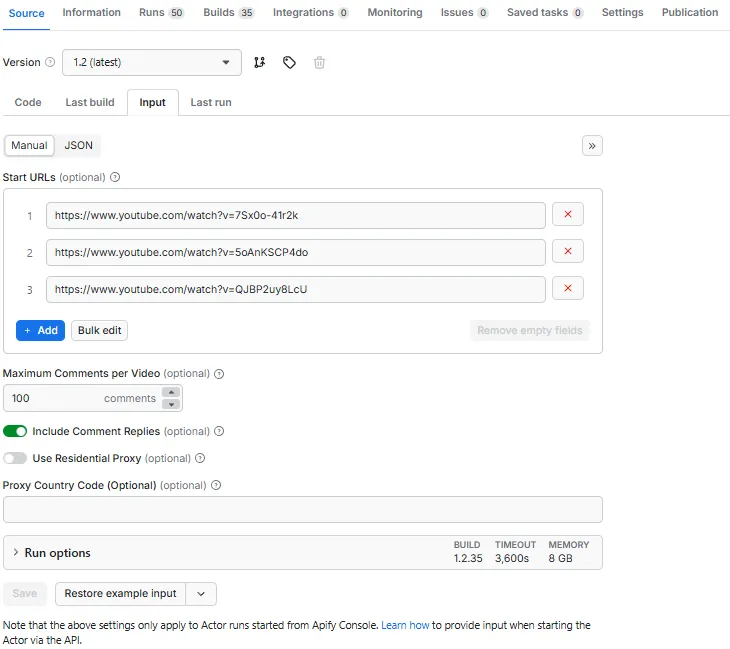
- Add YouTube video URLs — paste one or more video URLs into the Start URLs field using the "+ Add" button
- Set maximum comments — choose how many comments to collect per video (default: 100, max: 10,000)
- Toggle replies — enable or disable "Include Comment Replies" depending on whether you need reply threads
- Set timeout — optionally adjust "Max Time Per Video" (default: 180 seconds)
- Click "Start" to begin scraping
- View results — once finished, go to the Dataset tab to browse, filter, and export your data
You can also start runs via the Apify API for automated workflows.
Input Parameters
| Parameter | Type | Default | Description |
|---|---|---|---|
startUrls | Array | [] | YouTube video URLs to scrape (max 100 videos) |
maxComments | Integer | 100 | Maximum comments per video (1–10,000) |
includeReplies | Boolean | true | Include comment replies in results |
maxTimePerVideo | Integer | 180 | Maximum seconds per video (60–600). Returns partial results on timeout. |
commentSortAndFilter | String | "top" | Sorting order: "top" (Top comments) or "newest" (Newest first) |
newestDateFilter | String | "" | Date filter for Newest first mode. See options below. |
commentsPublishedAfter | String | "" | Custom date (YYYY-MM-DD). Only used when date filter is "custom". |
Newest first — date filter options
| Value | Description |
|---|---|
"" | None (no date filter) |
1 | Last 24 hours |
7 | Last 7 days |
30 | Last 30 days |
90 | Last 90 days |
custom | Custom date (use the commentsPublishedAfter datepicker) |
Note: Date filters only apply when "Newest first" is selected. When "Top comments" is selected, date filter settings are ignored. The scraper stops pagination early once older comments are consistently reached, saving runtime.
JSON input example
Newest comments from last 7 days
Newest comments after a custom date
Output
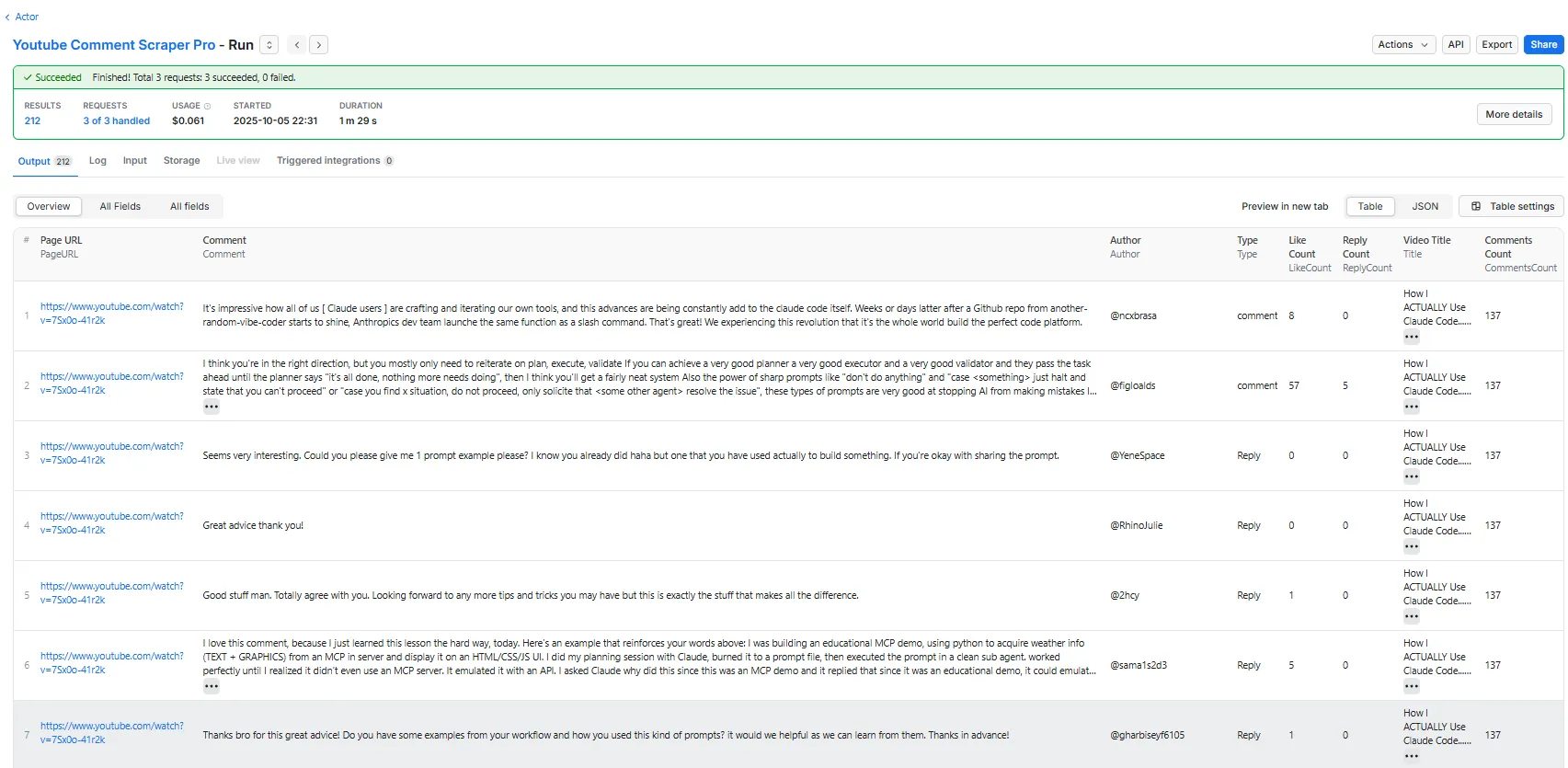
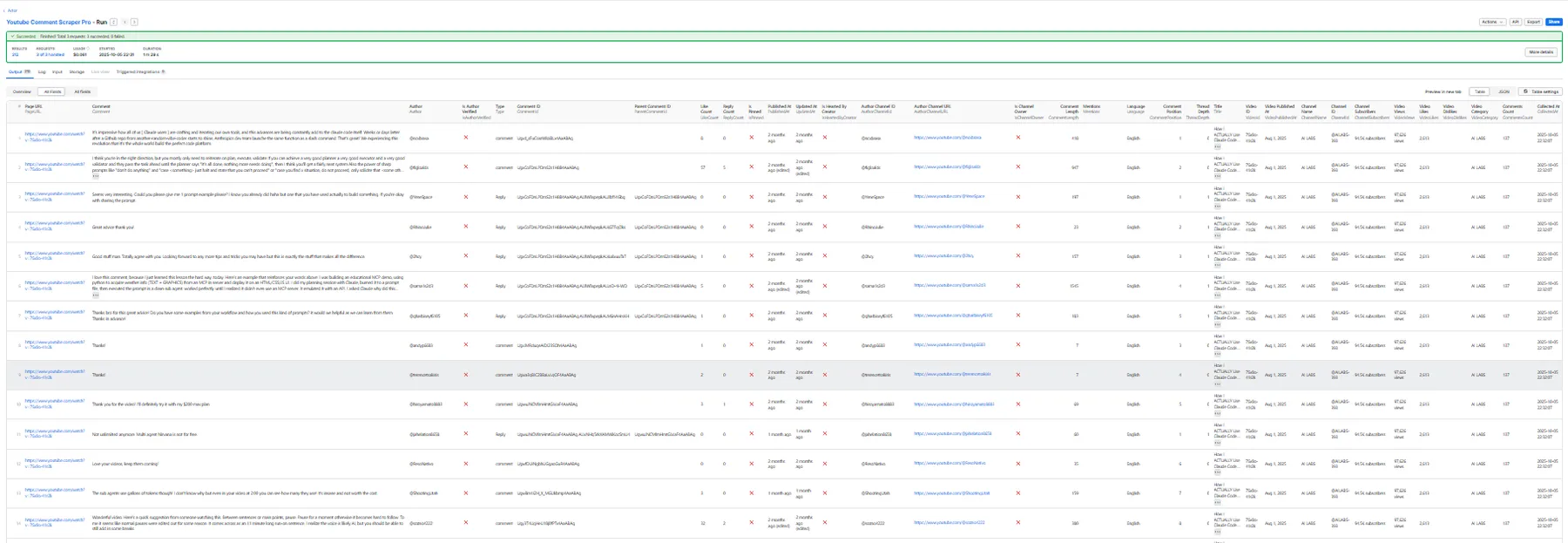
Each comment is returned with 30+ fields covering the comment itself, the author, and the source video. You can view results as Overview columns (key fields) or All columns (complete dataset).
Overview columns
The 8 most important fields for quick analysis:
All columns
The complete dataset with all 33 fields:
Export formats
Download results from the Apify Console in: JSON, CSV, Excel, HTML, or XML.
How It Works
YouTube Comment Scraper Pro uses a multi-phase loading strategy to reliably extract comments:
- Thread loading — loads the page and scrolls to populate comment threads in the DOM, dynamically targeting the configured
maxCommentscount - Reply expansion — if
includeRepliesis enabled, systematically clicks "View replies" buttons to expand reply threads - API continuation — extracts comments from the DOM, then uses YouTube's internal API with continuation tokens to fetch additional comments beyond what scrolling loads
The scraper processes videos sequentially with built-in rate limiting protection: 500ms delays between API requests, gradual scrolling, and automatic retry with exponential backoff (5s, 10s, 20s) if rate limits are detected.
Integrations
YouTube Comment Scraper Pro connects with the broader Apify ecosystem and external tools:
- Apify API — start runs, fetch results, and manage datasets programmatically using the Apify API or JavaScript/Python clients
- Webhooks — trigger actions automatically when a scraping run finishes (webhook docs)
- Zapier — connect YouTube comment data to 5,000+ apps with the Apify Zapier integration
- Make (Integromat) — build automated workflows that process scraped comments (Make integration)
- Google Sheets — export results directly to Google Sheets for collaborative analysis (Google Sheets integration)
- Slack / Email — set up notifications when scraping runs complete via webhooks or Zapier
- Custom pipelines — use the dataset API to feed comment data into your own databases, dashboards, or ML pipelines
Troubleshooting
Rate limiting (429 errors)
The scraper includes automatic retry with exponential backoff (5s, 10s, 20s delays). If errors persist, reduce the number of videos per run or increase maxTimePerVideo.
Missing comments
- Increase
maxCommentsif the video has more comments than your limit - Check that comments are enabled on the video
- Some comments may be filtered by YouTube (spam, deleted, or held for review)
Slow performance
- Expected speed: ~30 seconds per video for 100 comments
- Adjust
maxTimePerVideoto set a timeout (default: 180 seconds) - The scraper returns partial results if the timeout is reached
- Disable
includeRepliesif you only need top-level comments
Partial results
If maxTimePerVideo is reached, the scraper returns whatever was collected up to that point. Check run logs for timeout details. Total records may be less than maxComments × videoCount due to videos having fewer comments, disabled comments, or YouTube's spam filtering.
Resources and Support
Have questions or found a bug? Open an issue on GitHub or reach out through the Apify Discord community.


