

Youtube Comment Scraper Pro
Pricing
from $1.00 / 1,000 comment results
Youtube Comment Scraper Pro
Powerful YouTube Comment Scraper for data collection, analytics, and automation. Extracts comments, replies, author info, engagement metrics, and full video metadata in structured JSON or CSV — fast, reliable, and scalable.
Pricing
from $1.00 / 1,000 comment results
Rating
0.0
(0)
Developer

Delowar Munna
Maintained by CommunityActor stats
1
Bookmarked
34
Total users
2
Monthly active users
a month ago
Last modified
Categories
Share
YouTube Comment Scraper Pro is a powerful Apify Actor that lets you scrape YouTube comments at scale. Extract comments, replies, author details, engagement metrics, and full video metadata from any YouTube video — exported as structured JSON, CSV, or Excel. Fast, reliable, and built for data-driven teams who need YouTube comment data for analysis, research, and automation.
Why use YouTube Comment Scraper Pro?
- 34 data fields per comment — comment text, author info + avatar, like counts, reply threads, video metadata, channel stats, batch input index, and more
- Fast and reliable — powered by the official YouTube Data API (browserless); most runs return 100 comments in a few seconds with clean, consistent results
- Scales to 10,000 comments per video — efficient cursor pagination through the official API
- Scrape a whole channel — pass channel IDs,
@handles, channel URLs, or a video URL and auto-discover a creator's recent videos - Reply threading — collect reply threads with accurate parent-child linking
- Clean, typed output — integer counts, ISO 8601 timestamps, real
UC…channel IDs, and profile avatars — ready for Sheets, Excel, or BI tools - Flexible export — download results as JSON, CSV, Excel, HTML, or XML directly from the Apify Console
Use Cases
- Sentiment analysis — Collect thousands of YouTube comments to analyze audience sentiment about products, brands, or topics using NLP tools
- Competitor research — Monitor comments on competitor videos to understand audience pain points, feature requests, and brand perception
- Content strategy — Identify what viewers love (or hate) about specific video topics to inform your own content calendar
- Market research — Gather unfiltered consumer opinions at scale for product development and go-to-market decisions
- Academic research — Build datasets of public YouTube discourse for social science, linguistics, or media studies
- Community monitoring — Track comment activity on your own videos to detect trends, spam, or emerging issues
- Influencer vetting — Analyze comment quality and engagement authenticity before partnering with creators
Features
- Official YouTube Data API v3 — comments, replies, and full video/channel metadata are fetched directly from Google's official API: fast, reliable, and browserless (no page rendering)
- Automatic fallback — if the official API can't serve a video, the actor transparently falls back to a browser-based DOM + internal-API method
- Rich, typed data output — 34 clean fields: comment text, author info + avatar, engagement metrics, and full video/channel metadata
- Keyword & minimum-likes filters — include/exclude keywords and a minimum-likes threshold to collect only high-signal comments
- Smart pagination — efficient cursor pagination through the official API, up to 10,000 comments per video
- Reply filtering — option to include or exclude comment replies
- Keyword & minimum-likes filters — keep only comments containing your keywords (or excluding them) and above a like threshold; the actor scans deeper to fill your result cap with matches
- Channel-wide collection — give it a channel (ID /
@handle/ URL) or a video URL and it discovers up tomaxVideosPerChannelrecent uploads to scrape - Sorting & date filters — Top or Newest, with optional date filtering (last 24h / 7d / 30d / 90d / custom)
- Smart timeout management — configurable per-video time limit with graceful partial results
- Language detection — automatically detects comment language (English, Chinese, Japanese, and more)
- Mention extraction — captures @mentions from comments
How much will it cost to scrape YouTube comments?
YouTube Comment Scraper Pro is priced per result — you're charged for each comment or reply returned, and there is no charge for empty runs. Two optional extras bill separately, and only when you actually use them:
- Channel collection — per video discovered from a channel (see Channel-wide collection).
- Verified-author detection — per comment enriched, only when
detectVerifiedAuthorsis on.
Current rates are shown on the Pricing tab of the Actor page and in the Apify Console before you run. This README deliberately doesn't quote figures, so they can never go stale. New to Apify? The Free plan includes monthly usage credit you can try this with.
Because the actor runs on the official YouTube Data API (browserless), runs are fast:
| Scenario | Videos | Comments per video | Estimated time |
|---|---|---|---|
| Quick test | 1 | 100 | ~3 seconds |
| Small batch | 5 | 100 | ~15 seconds |
| Medium batch | 10 | 500 | ~2 minutes |
| Large batch | 50 | 1,000 | ~15 minutes |
You only pay for comments actually returned. Control volume with maxComments (per video) and maxTotalResults (per run).
Free plan limitations
detectVerifiedAuthors requires a paid Apify plan. On the Free plan it is skipped and you are not charged for it — IsAuthorVerified comes back null, exactly as it does when the option is off.
| Free plan | Any paid plan | |
|---|---|---|
| Comments and replies, no row cap | ✅ Unrestricted | ✅ Unrestricted |
| Sorting, search/exclude terms, like and date filters | ✅ Included | ✅ Included |
| Channel-wide collection | ✅ Included | ✅ Included |
| Exact ISO timestamps | ✅ Included | ✅ Included |
Verified-author detection (detectVerifiedAuthors) | ❌ Skipped, not charged | ✅ Included |
Why this one: turning it on moves comment collection off the official YouTube Data API and onto a paid secondary source, so it is the only setting that makes a run cost real money upstream. Everything else already runs on the free official API and is unaffected.
Runs are never failed because of this. You'll see it in the log and in the run's status message.
Tip: Start with a small test run (1 video, 100 comments) to estimate costs for your specific use case before scaling up.
Tutorial
Follow these steps to scrape YouTube comments:
- Go to YouTube Comment Scraper Pro on the Apify Store
- Click "Try for free" to open the Actor in the Apify Console
- Add YouTube videos — paste one or more video URLs (watch,
youtu.be, Shorts, embed, or live) or bare video IDs into the Start URLs field using the "+ Add" button - Set maximum comments — choose how many comments to collect per video (default: 100, max: 10,000)
- Toggle replies — enable or disable "Include Comment Replies" depending on whether you need reply threads
- Click "Start" to begin scraping
- View results — once finished, go to the Dataset tab to browse, filter, and export your data
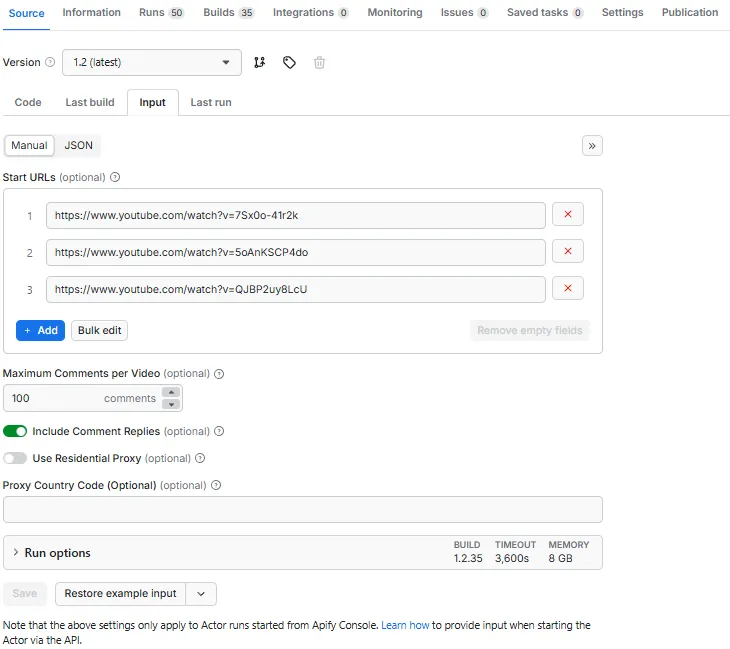
You can also start runs via the Apify API for automated workflows.
Input Parameters
| Parameter | Type | Default | Description |
|---|---|---|---|
startUrls | Array | [] | YouTube videos to scrape (max 100). Each entry is a URL (watch, youtu.be, Shorts, embed, or live) or a bare 11-character video ID (e.g. QJBP2uy8LcU) — all forms are normalized automatically. |
channelUrls | Array | [] | Scrape a whole creator. Channel ID (UC…), @handle, channel URL (/channel, /@handle, /user, /c), or a video URL/ID (channel derived from it). See Channel-wide collection. Requires the YouTube Data API. |
maxVideosPerChannel | Integer | 10 | How many of each channel's most-recent videos to discover and scrape (1–200). Each discovered video is billed once + its comments. |
maxComments | Integer | 100 | Max rows per video — counts top-level comments + replies (1–10,000) |
includeReplies | Boolean | true | Include comment replies. Replies are billable rows — bound them with maxRepliesPerComment or turn this off for top-level comments only. |
maxRepliesPerComment | Integer | 0 | Max replies collected per comment thread (0 = unlimited). Favours breadth and lowers cost on reply-heavy videos. |
maxTotalResults | Integer | 0 | Overall cap on total rows across the whole run (0 = unlimited). Bounds cost on large batches. |
searchTerms | Array | [] | Include keywords — keep only comments containing at least one (case-insensitive). Empty = keep all. See Filtering. |
excludeTerms | Array | [] | Exclude keywords — drop comments containing any of these (case-insensitive). |
minLikes | Integer | 0 | Minimum likes — keep only comments with at least this many likes (0 = no minimum). |
detectVerifiedAuthors | Boolean | false | Paid add-on. Off (default): IsAuthorVerified is null and there's no extra charge. On: a secondary source populates the blue-check flag, billed per enriched comment (and only for comments it actually returns); timestamps become estimated. |
commentSortAndFilter | String | "top" | Sorting order: "top" (Top comments) or "newest" (Newest first) |
newestDateFilter | String | "" | Date filter for Newest first mode. See options below. |
commentsPublishedAfter | String | "" | Custom date (YYYY-MM-DD). Only used when date filter is "custom". |
Newest first — date filter options
| Value | Description |
|---|---|
"" | None (no date filter) |
1 | Last 24 hours |
7 | Last 7 days |
30 | Last 30 days |
90 | Last 90 days |
custom | Custom date (use the commentsPublishedAfter datepicker) |
Note: Date filters only apply when "Newest first" is selected. When "Top comments" is selected, date filter settings are ignored. The scraper stops pagination early once older comments are consistently reached, saving runtime.
Filtering comments
Use searchTerms, excludeTerms, and minLikes to collect only the comments you care about:
searchTerms— keep a comment only if its text contains at least one of these keywords (case-insensitive).excludeTerms— drop a comment if its text contains any of these keywords (applied aftersearchTerms).minLikes— keep a comment only if it has at least this many likes.
Filtering is per row — each comment and each reply is matched independently (a matching reply is kept even if its parent comment was filtered out). Because matches can be sparse, filtering is scan-heavy: the actor reads deeper into a video's comments (within an internal per-video time limit) to fill your result cap with matches, so it may scan many more comments than it returns.
JSON input example
Newest comments from last 7 days
Newest comments after a custom date
Channel-wide collection
Instead of listing individual videos, point the scraper at whole channels and it will discover and scrape their recent uploads. Add channels to the channelUrls field — each entry can be:
- a channel ID —
UCBJycsmduvYEL83R_U4JriQ - an @handle —
@mkbhd(or the bare wordmkbhd) - a channel URL —
/channel/UC…,/@handle,/user/<name>, or/c/<name> - a video URL or ID — the channel is derived from that video
The actor resolves each channel and collects its most-recent uploads (regular videos, Shorts, and live replays), up to maxVideosPerChannel, then scrapes comments from each using all your other settings (limits, filters, sort). Channels and Start URLs can be combined in one run; duplicate videos are automatically de-duplicated.
Cost: each newly-discovered video is billed once, on top of the usual per-comment charge — so a channel run costs slightly more than listing the same videos by hand. Videos already in your Start URLs are never double-counted, and channels that can't be resolved aren't charged. Use
maxVideosPerChannelandmaxTotalResultsto keep large "scrape a creator" jobs bounded, and see the Pricing tab for current rates. Discovery requires the YouTube Data API — without it, channel entries are reported as errors in the status records.
Output
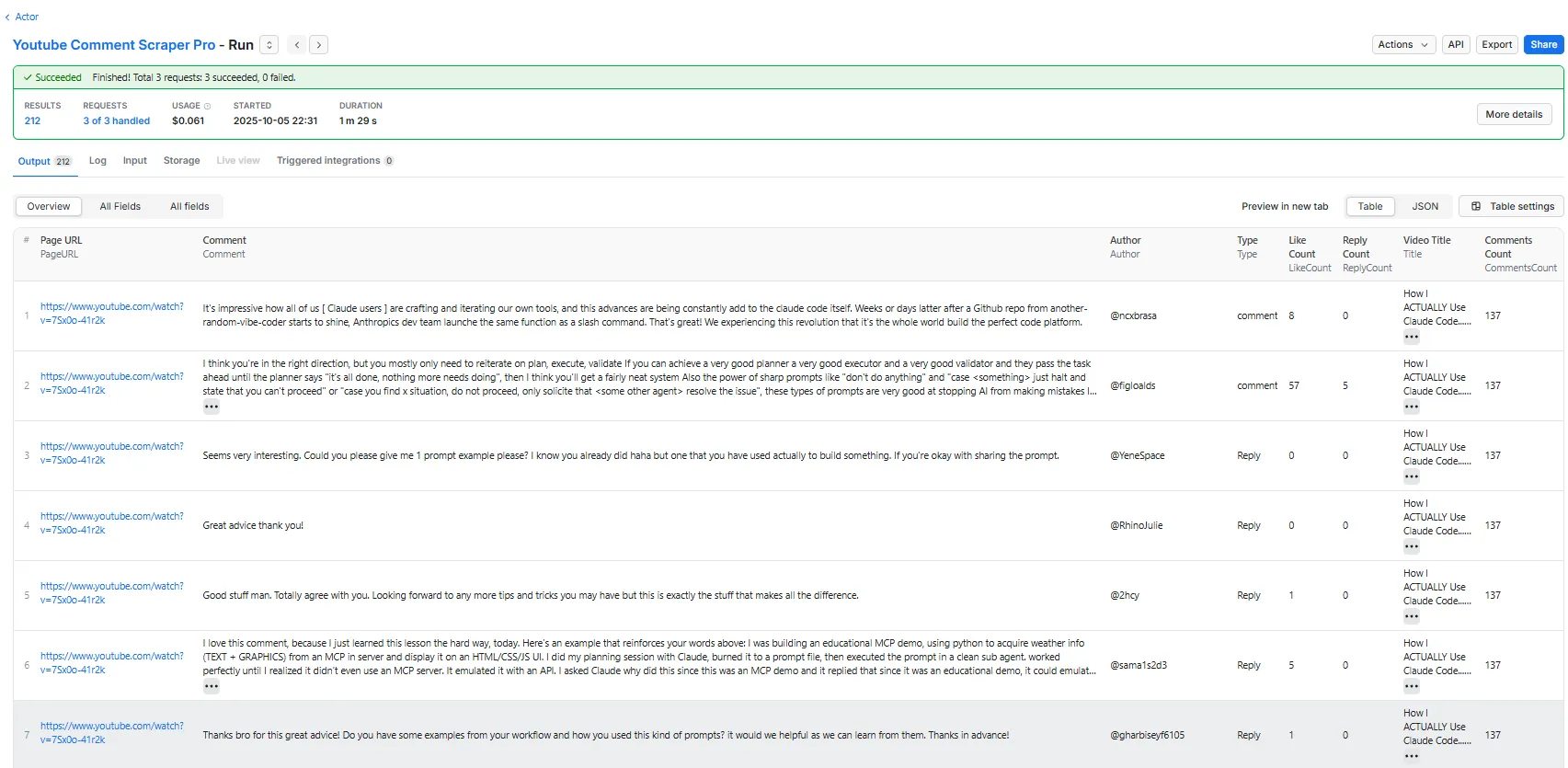
Each comment is returned with 34 fields covering the comment itself, the author, and the source video. You can view results as Overview columns (key fields), All columns (complete dataset), or Comments & Replies (threaded). Per-input run status lives in a separate dataset.
Overview columns
The 8 most important fields for quick analysis:
All columns
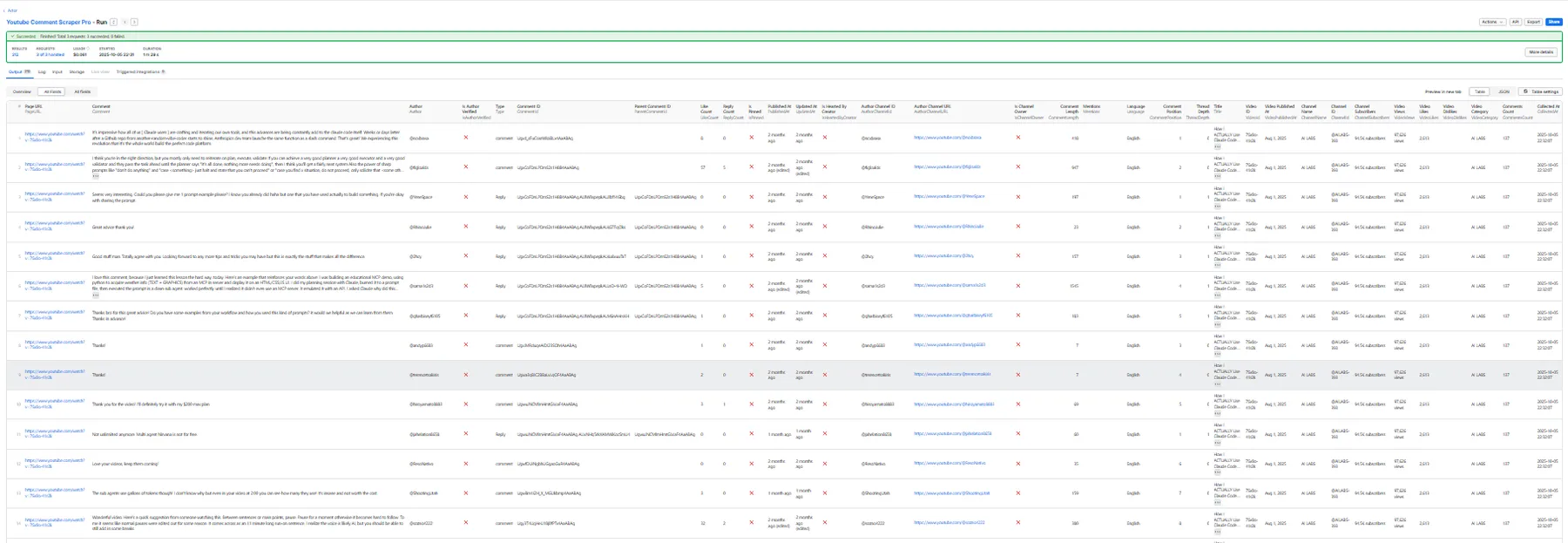
The complete dataset with all 34 fields:
InputIndexis the position (0-based) of this comment's video URL in yourstartUrlsarray — join it against theInputIndexon status records to reconcile every input in a batch, even when the same URL appears more than once.
About this sample: it comes from a real run with the
detectVerifiedAuthorsadd-on ON, which is whyIsAuthorVerifiedistrue. On a default run that field isnull— verified status is simply not determined unless you enable the add-on.nullmeans "unknown", not "unverified".
Note on types: counts (
LikeCount,ReplyCount,VideoViews,VideoLikes,ChannelSubscribers,CommentsCount) are integers,AuthorChannelId/ChannelIdare realUC…IDs, andVideoCategoryis a mapped name. Video/channel stats always come from the official API, so they're exact on every path.
Note on timestamps: on the default (official-API) path,
PublishedAt/UpdatedAtare exact ISO 8601. WithdetectVerifiedAuthorsON, comments come from a secondary source that only exposes relative times ("11 months ago"), soPublishedAtis estimated — and deliberately truncated to the precision we actually know: date-only (T00:00:00.000Z) for day/week/month/year-scale ages, the top of the hour for hour-scale, whole seconds for anything more recent. That's why the sample above ends in00:00:00.000Z: it's an honest day-level estimate, not a precise instant.VideoPublishedAtstays exact either way.
Reply threading
Replies are returned as their own rows, linked to their parent by ParentCommentId. ThreadDepth is 0 for top-level comments and 1 for replies, and CommentPosition stays the same across a whole thread — so you can rebuild the conversation without any extra requests. This reply belongs to the comment above:
Use the Comments & Replies (threaded) dataset view to see just these threading columns.
Export formats
Download results from the Apify Console in: JSON, CSV, Excel, HTML, or XML.
Run status & error records
For reliable bulk runs you need to know the outcome of every input URL, not just which comments came back. The actor emits one status record per input URL into a separate dataset named status-<runId> (find it under Storage → Datasets; the run log prints its name). Keeping status records out of the default dataset means your comment results stay clean — no extra status columns — and status rows never count toward result-based billing. Each record looks like this:
InputIndex matches the position of the URL in your startUrls array — and comment rows carry the same InputIndex — so you can join every input to its outcome (and to its comments) programmatically. Source tells you which engine served the video (apiv3, tikhub, browser, or channel).
Channel runs also get one record per channel, summarising discovery before the individual videos are reported:
(This run passed a video URL as the channel input — the actor resolved it to that video's channel and collected its 10 most-recent uploads. On a channel record VideoId is empty (it isn't about one video) and InputIndex is empty (a channel isn't a Start-URL position); the resolved channel is in ChannelId, which is also set on each video's status record so you can group a run's results by channel.)
Status values
Status | Meaning |
|---|---|
success | Comments were collected for the video. |
partial | Some comments were collected, then a cap or the per-video time limit stopped collection. |
no_comments | The source served the video but it has no comments. |
comments_disabled | Comments are turned off for the video. |
skipped | The input was not attempted (e.g. maxTotalResults was already reached). |
error | The input could not be processed — see ErrorCode and Message. |
Common error codes
ErrorCode | Attached to | Meaning |
|---|---|---|
invalid_url | error | The input was not a recognized YouTube watch or youtu.be URL. |
no_comments | no_comments | No comments returned (none exist, or comments disabled). |
partial / timeout | partial | Collection stopped early (row/reply cap or the internal per-video time limit). |
max_total_results_reached | skipped | The run-wide maxTotalResults cap was hit before this input. |
navigation_failed / browser_error | error | The browser fallback could not load or process the page. |
Tip: Your comment integration reads the default dataset (comments/replies only). To build a reliability dashboard, read the separate
status-<runId>dataset and group byStatus.InputIndexlets you join a status record back to its comment rows (which also carryInputIndex).
How It Works
YouTube Comment Scraper Pro is official-API-first and browserless:
- Channel discovery (optional) — if you provide
channelUrls, each channel/handle/URL (or video URL) is resolved to its channel and its most-recent uploads (up tomaxVideosPerChannel) are listed via the official API, then added to the scrape queue alongside your Start URLs. - Primary — official YouTube Data API v3 — for each video, comments and replies are fetched directly from Google's official API (
commentThreads.list), and video/channel metadata fromvideos.list+channels.list. No browser or page rendering is involved, so runs are fast and reliable. Comments are cursor-paginated up tomaxComments, with Top/Newest sorting and optional date filtering. - Fallback — browser (only if needed) — if the official API can't serve a video (e.g. its daily quota is exhausted), the actor lazily launches a headless browser and extracts comments from the page DOM plus YouTube's internal continuation API, with automatic retry and exponential backoff.
Videos handled by the primary path never launch a browser, keeping runs quick and consistent.
Integrations
YouTube Comment Scraper Pro connects with the broader Apify ecosystem and external tools:
- Apify API — start runs, fetch results, and manage datasets programmatically using the Apify API or JavaScript/Python clients
- Webhooks — trigger actions automatically when a scraping run finishes (webhook docs)
- Zapier — connect YouTube comment data to 5,000+ apps with the Apify Zapier integration
- Make (Integromat) — build automated workflows that process scraped comments (Make integration)
- Google Sheets — export results directly to Google Sheets for collaborative analysis (Google Sheets integration)
- Slack / Email — set up notifications when scraping runs complete via webhooks or Zapier
- Custom pipelines — use the dataset API to feed comment data into your own databases, dashboards, or ML pipelines
Troubleshooting
Missing comments
- Increase
maxCommentsif the video has more comments than your limit - Check that comments are enabled on the video
- Some comments may be filtered by YouTube (spam, deleted, or held for review)
Quota / temporary slowdowns
The primary path uses the official YouTube Data API, which has a generous daily quota. If that quota is exhausted, the actor automatically falls back to the browser method for the remaining videos (slower, but keeps the run working). Spreading very large jobs across runs avoids this entirely.
Slow performance
- Expected speed on the official-API path: a few seconds per 100 comments
- The actor caps time per video internally and returns partial results if that limit is reached
- Disable
includeRepliesif you only need top-level comments - Use
maxComments/maxTotalResultsto bound very large jobs
Partial results
If the internal per-video time limit is reached, the scraper returns whatever was collected up to that point (marked partial in the status records). Check run logs for timeout details. Total records may be less than maxComments × videoCount due to videos having fewer comments, disabled comments, or YouTube's spam filtering.
Resources and Support
Have questions or found a bug? Open an issue on GitHub or reach out through the Apify Discord community.


