

Youtube Live Chat Scraper
Pricing
from $1.00 / 1,000 chat events
Youtube Live Chat Scraper
YouTube Live Chat Scraper extracts live chat from YouTube live streams and replays. Supports full replay chat (most reliable) and best-effort live polling. Outputs messages with timestamps, authors, badges (owner/mod/member), Super Chats/Stickers, and stream metadata for analytics and AI.
Pricing
from $1.00 / 1,000 chat events
Rating
5.0
(3)
Developer

Delowar Munna
Maintained by CommunityActor stats
3
Bookmarked
308
Total users
25
Monthly active users
4 days ago
Last modified
Categories
Share
YouTube Live Chat & Replay Scraper — Super Chats, Memberships, No API Key
Scrape YouTube live chat and full chat replays — from streams airing right now, from streams that ended months ago, or from an entire channel by handle. Messages, Super Chats, memberships, moderation events, badges and timestamps, as a clean one-row-per-event dataset.
No API key. No login. No browser.
⚡ Quick start
- Paste a YouTube live stream or replay URL into Video URLs or IDs.
- Leave Extraction mode on
Replay. - Click Start.
That's it — every chat message from that stream lands in your dataset, ready to export as CSV, JSON or Excel.
Why not just use the official YouTube API?
This is the core reason this Actor exists.
| Official YouTube Data API v3 | This Actor | |
|---|---|---|
| Chat from a stream that already ended | ❌ Not possible at all | ✅ Full replay, first message to last |
| Chat from a live stream | 🟡 Yes, but needs OAuth + a liveChatId you must find yourself | ✅ Paste the watch URL |
| Your own API key required | ✅ Required | ❌ Not needed |
| Daily quota limits | ✅ 10,000 units/day | ❌ None |
| Super Chat amounts & currency | 🟡 Limited | ✅ Amount, currency and tier colour |
| Moderation & deleted-message events | ❌ | ✅ |
| Find streams from just a channel handle | ❌ | ✅ Channel discovery |
The official API genuinely cannot return chat from an ended broadcast — the endpoint only serves currently-active chats. That is the gap this Actor fills.
Live vs Replay — which mode do I want?
| Replay mode (default) | Live mode | |
|---|---|---|
| Use it for | Streams that have ended | Streams airing right now |
| What you get | The complete chat history | Only messages posted while the run is active |
| Completeness | Everything, first to last | Whatever arrives during your capture window |
| Reliability | Highest — recommended | Best-effort polling |
| Typical use | Analytics, revenue reports, research, ML datasets | Live monitoring, event dashboards |
| Requirement | Chat replay must still be enabled on the video | Stream must be live now |
💡 If in doubt, use Replay. Live mode on an ended stream returns nothing.
What you can do with it
- Find the moments that mattered — every event carries
videoOffsetText, its exact position in the recording. Sort by it, spot where chat spiked, and jump straight to1:23:45in the video. This is what turns a chat log into highlight detection. - Revenue tracking — every Super Chat with amount, currency and the message that came with it, plus a numeric
superChatAmountValueyou can sum directly. - Moderation auditing — deleted messages, banned users and auto-mod actions. No other Actor surfaces these.
- Audience research — find the moments a chat exploded, and what people were saying.
- Community monitoring — hand it a channel
@handleand it tracks that creator's streams for you. - AI / NLP datasets — clean, structured conversational data with emoji runs preserved.
- Campaign measurement — capture audience reaction during a sponsored stream or product launch.
Input
Provide videos, channels, or both. At least one is required.
Example 1 — a single replay
Example 2 — Super Chats only (cheapest monetization export)
Turn off normal messages and you are charged only for the paid events, not the thousands of ordinary ones scraped along the way.
Example 3 — track a whole channel, with a hard spend ceiling
💡 Match the discovery mode to the channel. current_live_then_replays suits channels that are often live; use latest_replays_only for channels whose streams have ended.
Key input fields
| Field | Default | What it does |
|---|---|---|
videoRefs | [] | Watch URLs, short URLs, or bare 11-character video IDs |
channelRefs | [] | Channel @handle, channel URL or UC… ID — the Actor finds the streams |
mode | replay | replay (ended streams) or live (airing now) |
maxMessagesPerVideo | 5000 | Per-video cap. 0 = the entire chat replay |
maxTotalItems | 0 | Hard ceiling for the whole run. 0 = no limit |
maxTimePerVideoSecs | 600 | Give up on one video after this long |
includeNormalMessages | true | Turn off for a monetization-only export |
includeSuperChats | true | Super Chats and Super Stickers, with amounts |
includeMembershipEvents | true | Joins, renewals and gifted memberships |
includeModerationEvents | true | Deletions, bans, auto-mod and system notices |
Channel discovery, live-mode timing, localization and reliability tuning have their own sections in the input form — every field there carries an inline explanation and example.
Output
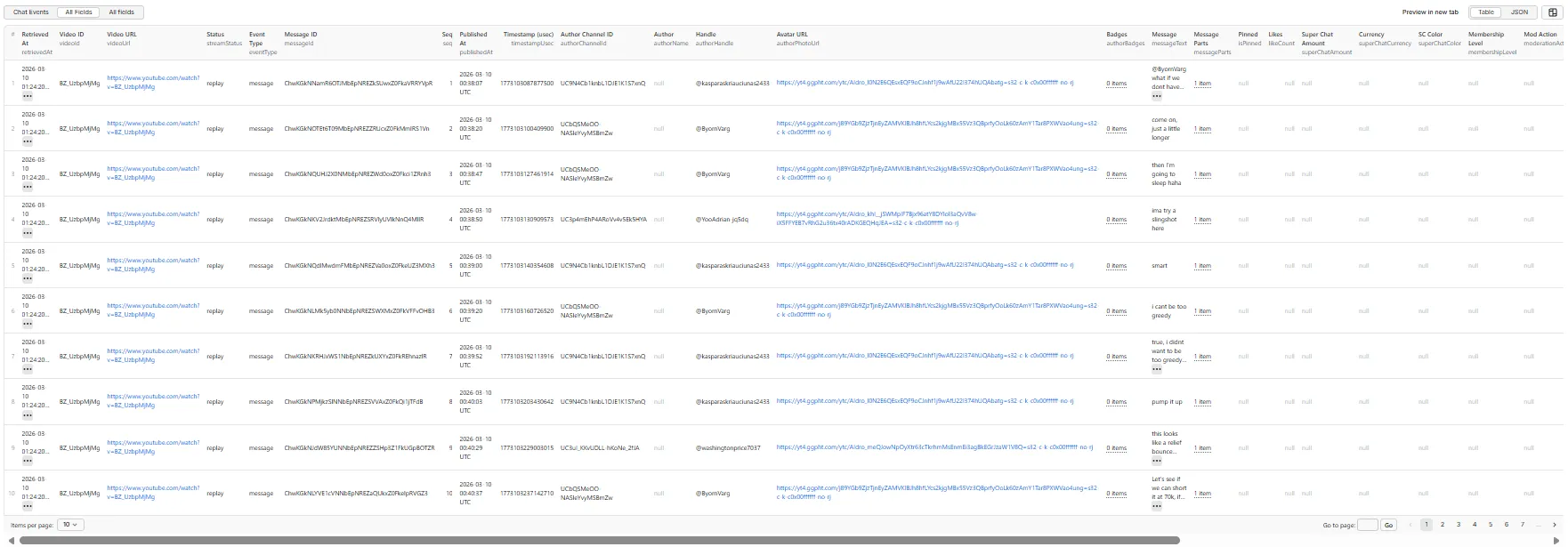
One dataset row per chat event. Flat and spreadsheet-safe — export straight to CSV, JSON, Excel or pull it from the API.
Event types: message, super_chat, super_sticker, membership, moderation, system, error
Dataset views
The dataset ships with three ready-made table views you can switch between in the Apify console or the API:
- Chat Events — the everyday view: who said what, when, and how far into the stream.
- Super Chats & Memberships — a monetization view with numeric amounts, currencies and membership tiers.
- All Fields — every column.
Output example — a chat message
A real record from a replay run (the channel owner posting three custom channel emotes — note isOwner: true, and messageParts preserving each emote as a structured run with its image URL rather than flattening to text):
Output example — a Super Chat
The same run also captured this $5 Super Chat. Note superChatAmountValue: 5 (a number you can SUM()), the split currency, and videoOffsetText: "2:10:19" — jump straight to 2:10:19 in the video to see the moment it was sent:
(Some always-null fields trimmed from the Super Chat example for brevity — the full row carries every column shown in the message example above.)
Output screenshot — All fields table view
Output fields
Stream context — so a multi-video export is readable without a join:
| Field | Type | Description |
|---|---|---|
videoId | string | YouTube video ID |
videoUrl | string | Canonical watch URL |
videoTitle | string | Title of the stream |
channelId | string | Channel that owns the stream |
channelTitle | string | Channel display name |
channelUrl | string | Canonical channel URL |
streamStatus | string | live, replay, ended, or unknown |
streamStartedAt | string (ISO) | When the broadcast started |
streamEndedAt | string (ISO) | When the broadcast ended |
Event & timing — including the replay position:
| Field | Type | Description |
|---|---|---|
eventType | string | message, super_chat, super_sticker, membership, moderation, system, error |
messageId | string | Stable message ID |
seq | integer | Sequential index per video (1..N) |
publishedAt | string (ISO) | Wall-clock time the message was posted |
timestampUsec | integer | Raw microsecond timestamp |
videoOffsetMsec | integer | How far into the recording the message appeared, in ms. Replay only |
videoOffsetText | string | Readable form of the above, e.g. "1:23:45" |
retrievedAt | string (ISO) | When this Actor captured the event |
Author:
| Field | Type | Description |
|---|---|---|
authorChannelId | string | Author's channel ID |
authorName | string | Visible author name — an @handle on most modern streams |
authorHandle | string | The @handle, when the author name is one |
authorProfileUrl | string | Clickable channel URL for the author |
authorPhotoUrl | string | Avatar URL |
authorBadges | string[] | e.g. ["OWNER", "MODERATOR", "MEMBER"] |
isOwner / isModerator / isMember / isVerified | boolean | Filterable flags derived from the badges — you can't filter an array in Sheets, but you can filter a boolean |
Content, money & moderation:
| Field | Type | Description |
|---|---|---|
messageText | string | Chat message text |
messageParts | object[] | Structured runs (text + emojis, with emote image URLs) |
superChatAmount | string | As displayed, e.g. "$5.00" |
superChatAmountValue | number | Numeric value, e.g. 5 — use this to SUM() revenue |
superChatCurrency | string | e.g. "USD" |
superChatColor | string | Tier colour |
membershipLevel | string | e.g. "Silver Member", when YouTube exposes it |
moderationAction | string | e.g. "AUTO_MOD" |
language / regionCode | string | Locale used for the request |
runId | string | Apify run ID |
discoverySource | string | direct_videoRef, channel_discovery_api, or channel_discovery_html |
channelRef | string|null | Channel input that produced this video; null for direct videos |
discoveredAt | string (ISO)|null | When the video was discovered; null for direct videos |
isDiscoveredLive | boolean|null | Whether the video was live when discovered; null for direct videos |
isDiscoveredUpcoming | boolean|null | Whether the video was upcoming when discovered; null for direct videos |
Why some fields are
nullon system events.systemrows are YouTube's own notices (for example "Live chat replay is on"). They have no author, so the author fields are legitimately empty. Similarly, the four discovery fields are only populated for videos found via channel discovery — for videos you pass directly,discoverySourceisdirect_videoRefand those four arenull. That is expected, not missing data.
Run summary
The Actor writes RUN_SUMMARY.json to the key-value store with per-video totals, errors, channel discovery results, and a truncation block telling you plainly whether a cap cut the run short.
💰 Pricing
Pay-per-event: one chat-event per dataset row, plus a small per-run start fee. You are charged for chat events actually returned — filtered-out and error rows are free.
Live mode is priced exactly like replay — per chat event, with no charge for capture time. To keep that sustainable, a live capture stops early if a stream stays too quiet for 10 minutes; the run log and RUN_SUMMARY.truncation.videosStoppedByQuietStreamGuard name any stream it stopped.
💡 Keep memory at the 512 MB default for live capture. Raising it doesn't make capture faster, and the bar a stream must clear to keep being captured rises with memory — at 512 MB it is only a few messages a minute.
Worked examples:
| Run | Events | What you pay |
|---|---|---|
| A 1,000-message replay | 1,000 | 1,000 × the per-event rate |
| A 10,000-message replay | 10,000 | 10× the above |
| Super-Chat-only export of a 50,000-message stream | ~200 | You pay for ~200 events, not 50,000 |
| A stream with chat replay disabled | 0 | Only the small Actor-start fee |
What is never charged:
- Failed or empty runs return no chat events, so no per-event charge applies.
errorrows are pushed to your dataset so you can see what went wrong — they are not billed.- Messages filtered out by your own toggles are never charged, because they are filtered before billing.
💡 Controlling spend: set Max total chat events (maxTotalItems) for one hard ceiling across the whole run. This matters most with channel discovery, where a handful of channels can expand into far more videos than you expected.
Live rates are on the Actor's Pricing tab — this README deliberately doesn't quote figures, so they can never go stale here.
Free plan limitations
One limit applies on the Apify Free plan, and only to live capture:
| Free plan | Any paid plan | |
|---|---|---|
| Replay chat (ended streams, the default mode) | ✅ Unrestricted | ✅ Unrestricted |
| Live capture duration | Capped at 60 seconds per video | Up to 24 hours |
| Messages per video, channels, filters, Super Chats | ✅ Unrestricted | ✅ Unrestricted |
Why. Live capture holds a connection open for the whole capture, so its cost is driven by time, not by how many messages arrive — a quiet stream costs the same to capture as a busy one and can return almost nothing. Replay is cheap and stays unrestricted for everyone. The cap keeps the free tier genuinely usable rather than removing the feature.
You are never charged for capture time the cap removed. If the cap applies, the run says so and finishes normally — it does not fail.
How it works
- Channel discovery (when
channelRefsis given) — resolves handles/URLs to channel IDs and finds live streams and replays, with an HTML fallback if the API path is unavailable. - Token extraction — fetches the watch page and reads YouTube's innertube API key, context and chat continuation token.
- Chat pagination — walks the chat using continuation tokens (replay), or polls at your chosen interval (live).
- Normalization — maps YouTube's renderer types into a stable event schema.
- Output — pushes clean rows and writes
RUN_SUMMARY.json.
Performance
- Replay — around 5,000 messages in 1–5 minutes
- Live — near real time, 1–10 second latency
- Channel discovery — adds roughly 2–5 seconds per channel
- Concurrency — up to 10 videos in parallel
- HTTP-only — no browser overhead
FAQ
Can I get chat from a stream that already ended?
Yes — that is the primary use case, and it is the thing the official YouTube API cannot do. Use replay mode. Chat replay must still be enabled on the video.
Do I need a YouTube API key? No. No API key, no OAuth, no login, no cookies.
Does it work on premieres? Yes, when the premiere had chat and chat replay is still enabled.
Why did my run return zero messages? Almost always because chat replay is turned off for that video, or the video never had a live chat (an ordinary upload). Check that the chat replay panel appears next to the video on YouTube. Age-restricted and private videos are also inaccessible.
Can I scrape a whole channel?
Yes. Put a @handle or channel URL in Channel URLs or handles and the Actor discovers the streams itself — no need to know any video IDs.
How do I get only Super Chats?
Set Include normal chat messages to false and leave Super Chats on. You are charged only for the paid events returned.
How do I stop a run getting expensive?
Set Max total chat events (maxTotalItems). It is a hard ceiling for the entire run, across every video and channel.
Do failed or empty runs cost me anything? No per-event charge — you are only billed for chat events actually returned. Error rows are free.
How is live mode different from replay mode? Replay gives you the complete history of a finished stream. Live captures only what is posted while your run is active. See the comparison table above.
Does it work on members-only streams? Best-effort at most. Members-only chat sits behind a login this Actor does not have.
What formats can I export? JSON, CSV, Excel, XML, and RSS via the Apify dataset, or straight from the API. The schema is flat, so it opens cleanly in Google Sheets and Excel.
Can I run it on a schedule? Yes — use Apify Scheduler to re-run it, for example to check a channel for new streams each day.
Limitations
- Chat replay must be enabled on the video.
- Members-only chat behind authentication is best-effort.
- Live mode is best-effort polling, not a websocket feed.
- Age-gated, private or region-blocked content may be inaccessible.
- Channel discovery depends on YouTube Data API quota and/or the channel's streams tab being available; it falls back to HTML automatically.
- Live mode polls a genuinely-live stream for new messages over
liveCaptureDurationSecs, capturing the current chat buffer plus messages as they arrive. If the stream has already ended, it automatically falls back to full replay extraction (so you always get data).replaymode remains the core of this Actor for complete historical chat. A never-ending stream (24/7 cam, lofi radio) has no complete history until it ends; to keep monitoring one, use a longliveCaptureDurationSecsor re-run on a schedule. streamStartedAt/streamEndedAtare best-effort. When YouTube omits them from the page they are reconstructed from chat timing (accurate to a few seconds);streamEndedAtis only available when a replay is read to the end, not when a run is capped. For a replay of more than 5,000 events whose end time had to be reconstructed, it is reported per video inRUN_SUMMARY(derivedStreamEndedAt) rather than on each row, because those rows are saved as the replay is read.- Chat is read from YouTube's full Live chat view, not the filtered Top chat view, so you get every message, including those YouTube's Top chat filter hides.
Support & feedback
Found a bug or need a field that isn't here? Open an issue on the Actor's Issues tab — feature requests genuinely do get built.
⭐ If this Actor saved you time, please leave a rating — it's the main way other people find it.


