

Youtube Search Rank Tracker
Pricing
from $0.80 / 1,000 rank results
Youtube Search Rank Tracker
YouTube Search Results Scraper (Rank Tracker) captures YouTube SERP rankings for keywords and outputs rank (1..N) with video/channel metadata. Supports pagination, region + language + device mode, optional Shorts inclusion, and stable snapshots for daily/weekly SEO + competitor tracking.
Pricing
from $0.80 / 1,000 rank results
Rating
0.0
(0)
Developer

Delowar Munna
Maintained by CommunityActor stats
0
Bookmarked
7
Total users
2
Monthly active users
3 months ago
Last modified
Categories
Share
YouTube Search Results Scraper (Rank Tracker)
Capture YouTube search rankings for keywords — rank positions, video metadata, region + language. Repeatable snapshots for YouTube SEO, competitor tracking, and brand monitoring.
Key Features
- Rank-First Schema: Accurate rank order (1..N) per query with page + section tagging
- Localization: 50 regions + 22 languages for geo-specific rank tracking
- True In-Country Rankings: Residential proxy support with verified exit IP + country reported in the run summary
- Bring Your Own Proxies: Use your own HTTP/HTTPS proxy provider instead of Apify Proxy
- Consistent Pagination: All pages of a keyword share one exit IP, so paginated snapshots stay internally consistent
- Pagination: Up to 10 pages per query with stable rank continuation
- Shorts Detection: Heuristic identification of YouTube Shorts in search results
- HTTP-First: Fast, lightweight extraction — no browser overhead
- Fails Loudly: If a proxy is requested but unavailable, the run aborts rather than quietly returning data from the wrong country
- Partial Failure Handling: Individual query failures don't abort the entire run
- Run Summary: Per-query stats stored in key-value store for monitoring
- Pay-Per-Result: Only pay for rank results you get — proxy usage included at no extra charge
Best for: YouTube creators, SEO agencies, brands, tool builders, and researchers tracking search rankings
At a Glance
| Feature | Value |
|---|---|
| Architecture | HTTP extraction (ytInitialData parsing) |
| Speed | ~1-2s per query page |
| Output Fields | 23 structured fields per result |
| Docker Image | apify/actor-node:22 (lightweight) |
| Proxy Required | Optional — but required for country-accurate rankings |
How It Works
- Enter Keywords — Provide search queries (e.g., "AI automation tools", "Claude Code")
- Fetch Search Pages — HTTP request to YouTube with region/language params
- Parse Results — Extract ytInitialData JSON embedded in HTML
- Preserve Rank Order — Number results sequentially across pages
- Detect Shorts — Heuristic tagging of Shorts results
- Export Dataset — Structured ranked results ready for analysis
Output
Table View
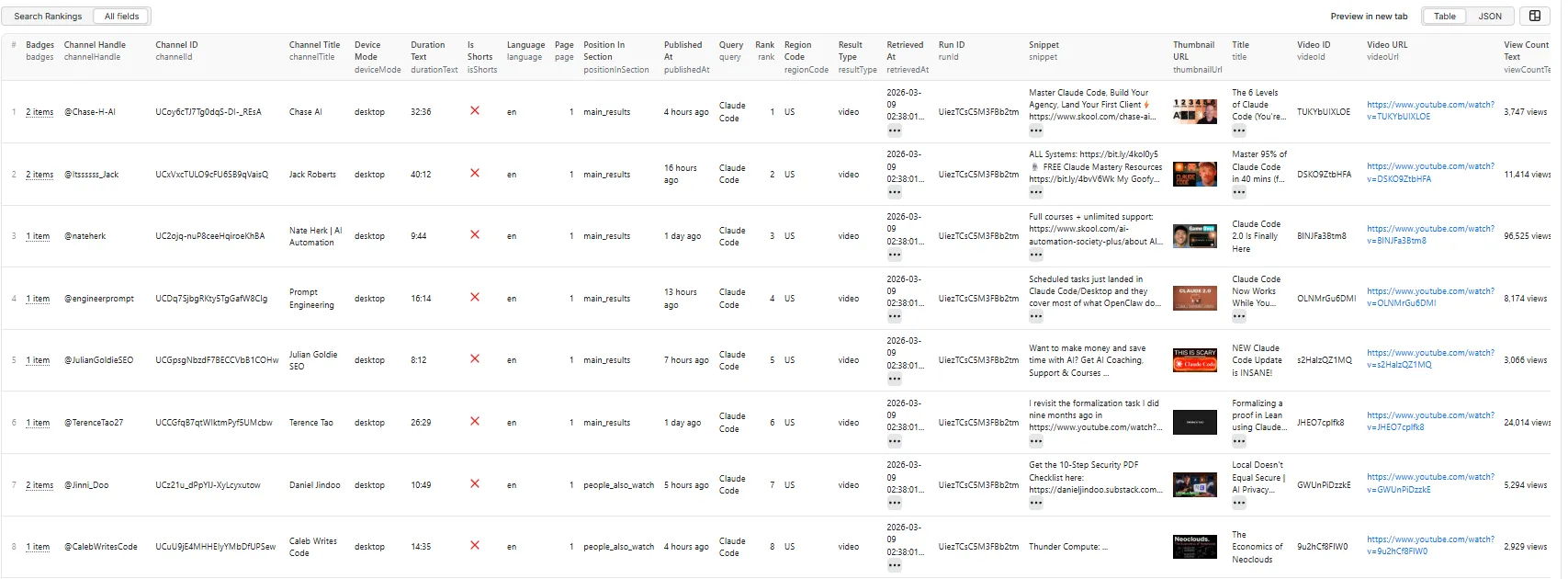
JSON View
Output Schema (23 Fields)
| Field | Type | Description |
|---|---|---|
| retrievedAt | String | ISO 8601 timestamp of extraction |
| query | String | Original search query |
| regionCode | String | Region code used for this search |
| language | String | Language code used for this search |
| deviceMode | String | Device surface used for the search (always desktop) |
| page | Integer | Page number (1-based) |
| rank | Integer | Rank position (1-based, sequential across pages) |
| resultType | String | Result type: video, channel, or error |
| videoId | String | YouTube video ID |
| videoUrl | String | Full YouTube video URL |
| title | String | Title of the result |
| channelId | String | Channel ID |
| channelTitle | String | Channel display name |
| channelHandle | String | Channel @handle |
| publishedAt | String | Relative publish time (e.g., "4 hours ago") |
| durationText | String | Human readable duration (e.g., "32:36") |
| viewCountText | String | Human readable view count (e.g., "3,747 views") |
| isShorts | Boolean | Whether this is a YouTube Shorts video |
| badges | Array | Badges like New, 4K, LIVE |
| snippet | String | Short description snippet |
| thumbnailUrl | String | Best available thumbnail URL |
| positionInSection | String | Section: main_results, shorts_shelf, people_also_watch |
| isTarget | Boolean | Whether this row is one of your tracked Target Videos |
| runId | String | Apify run ID for lineage tracking |
Input Parameters
| Parameter | Type | Default | Description |
|---|---|---|---|
| queries | Array | [] | Keywords to track rankings for (required) |
| maxResultsPerQuery | Integer | 50 | Max results per query (1-500) |
| maxPages | Integer | 1 | Pages to paginate per query (1-10) |
| regionCode | String | "US" | ISO-3166-1 country code (50 countries) |
| language | String | "en" | UI language code (22 languages) |
| includeShorts | Boolean | true | Include Shorts results when present |
| targetVideoIds | Array | [] | Videos you track (max 50) — IDs or URLs. Flags matching rows, reports rank per query, and emits an uncharged target_not_found row on drop-out |
| sortBy | String | "relevance" | Sort: relevance, view_count, rating (see note below) |
| uploadDate | String | "any" | Upload period: any, hour, today, week, month, year |
| proxyConfiguration | Object | { "useApifyProxy": false } | Standard Apify proxy block — Apify Proxy (residential/datacenter + country) or your own proxy URLs |
Note on
sortBy:relevance,view_count, andratingare applied by YouTube.upload_dateis accepted but YouTube currently ignores it and returns relevance order — use the Upload Date filter instead to constrain results by recency.
Note on
uploadDate: YouTube supports only these fixed periods. Arbitrary date ranges (e.g. "between 1 March and 15 May") are not available in YouTube search. The filter is applied by YouTube itself, so rank positions remain true SERP positions.
Tuning parameters such as concurrency, retries, timeouts, request delay and device mode are set internally to sensible values and are not exposed as inputs.
Proxy & Geographic Accuracy
This is the single most important setting for rank tracking.
regionCode and language only set YouTube's gl/hl localization parameters. They change the
language and locale of the response — but the request still originates from wherever the Actor runs.
Only a proxy makes the request genuinely originate in-country.
For a true in-country rank snapshot:
Set regionCode and apifyProxyCountry to the same country. The Actor warns you if they differ,
if residential is selected without a country, or if you enable Apify Proxy without the RESIDENTIAL
group (datacenter IPs are frequently blocked by YouTube and are not country-specific).
Using your own proxies — supply them as Custom proxy URLs in the proxy block. HTTP and HTTPS proxies are supported; SOCKS is not. Malformed or unsupported URLs abort the run rather than silently falling back.
Verification — every proxied run records the observed exit IP and its country in
RUN_SUMMARY.json under proxy, so you can confirm the country environment from the output itself:
Consistency — all pages of a single keyword are pinned to one exit IP, so a paginated snapshot is not stitched together from different vantage points.
If a proxy is requested but cannot be established, the run aborts. Rank data that looks valid but came from the wrong country is worse than no data.
Multi-market tracking
Each run targets one country. To track several markets, run the Actor once per country — ideally as
separate scheduled tasks, one per market. Every result row is stamped with regionCode, language,
retrievedAt, runId, page and rank, so snapshots line up cleanly across weeks and markets.
Sessions are always anonymous (never signed in), so there is no watch-history personalization. For rank monitoring this is what you want — personalization would make snapshots non-comparable.
Quick Start
Example 1: Simple Rank Snapshot
Track rankings for a single keyword in the US. No proxy — fast, but results reflect the datacenter IP the Actor runs on rather than a US visitor.
Example 2: True In-Country Rank Snapshot
The recommended setup for SEO rank tracking — regionCode and proxy country matched.
Example 3: Recent Uploads Only
Find which recently published videos are already ranking — useful for spotting fast-rising competitors.
Example 4: Bring Your Own Proxies
Use your own proxy provider instead of Apify Proxy. HTTP/HTTPS only.
Performance
| Workload | Estimated Time |
|---|---|
| 5 queries x 1 page | under 1 minute |
| 25 queries x 1 page | 2-5 minutes |
| 10 queries x 3 pages | 3-8 minutes |
Architecture
- HTTP-First: Parses
ytInitialDataembedded in YouTube search page HTML — no headless browser needed - Continuation API: Pagination via YouTube InnerTube API with continuation tokens
- Exponential Backoff: Smart retry on 429 / 5xx / transient errors (2s -> 4s -> 8s -> 16s -> 30s max)
- Resource Efficient: Lightweight Node.js 22 image, no Chrome/Puppeteer overhead
- Consent Handling: Automatic cookie-based bypass for YouTube consent pages
Pricing
Pay-per-result model — you only pay for results extracted.
| Event | Trigger | Count |
|---|---|---|
rank-result | Each ranked result in dataset | 1 per result |
Proxy usage is included — platform usage (compute, data transfer, and Apify Proxy) is covered by the per-result price. Enabling the residential proxy costs you nothing extra.
If you supply your own Custom proxy URLs, that traffic is billed by your own proxy provider.
Use Cases
YouTube SEO
Track where your videos rank for target keywords. Monitor rank changes after publishing new content or optimizing metadata.
Competitor Tracking
Identify which competitors dominate search for key terms. Build weekly rank snapshots for client reporting and benchmarking.
Brand Monitoring
Monitor brand visibility across YouTube search. Detect when new competitors appear in your keyword space.
Tool Builders / SaaS
Build rank tracking dashboards and alerting systems. Integrate via Apify API for automated daily/weekly workflows.
Research
Study YouTube SERP composition, content clustering by query, and algorithm shifts across regions and languages.
Best Practices
- Match proxy country to region code — The most important setting. Without it you are not measuring the market you think you are. See Proxy & Geographic Accuracy
- Check
proxy.exitCountryinRUN_SUMMARY.json— Confirm the run really came from the intended country before trusting a snapshot, especially the first run of a new schedule - Start small — Test with 1-2 queries and
maxResultsPerQuery: 20to verify results before scaling up - Use specific keywords — "AI automation tools 2026" gives more targeted results than "AI"
- One scheduled task per market — Each run targets one country; keep markets in separate tasks
- Keep the schedule fixed — Run at the same time each week so week-over-week comparisons are not distorted by time-of-day ranking variation
- Use pagination wisely — Each page adds ~20 results; 3 pages gives ~60 results per query
- Export strategically — CSV for spreadsheets, JSON for programmatic access, Excel for reporting
Finding your video's rank
Set Target Videos (targetVideoIds) to the videos you track — video IDs or full URLs, both accepted:
You then get the rank three ways:
- Flagged rows — matching results carry
isTarget: true - Run summary —
RUN_SUMMARY.jsonreports each target's rank per query:"targets": [{ "videoId": "e6hlNfSl7HQ", "found": true, "rank": 7, "page": 1, "notFoundConfirmed": false }] - Drop-out rows — if a target does not appear, a
target_not_foundrow is written so the drop-out is visible rather than being a silently missing row. These rows are never charged.
notFoundConfirmed distinguishes two very different situations:
| Value | Meaning |
|---|---|
false | Target was found — see rank |
true | Target genuinely did not rank within the results scraped |
null | Unknown — the query did not scrape completely, so absence proves nothing |
When a query fails partway, no target_not_found rows are emitted. A missing video and a failed
fetch are not the same thing, and a rank tracker should never conflate them.
Data Export
Supported formats (via Apify platform):
- JSON
- CSV
- Excel
- HTML
Compliance
- Extracts only publicly available YouTube search result data
- HTTP-first approach — no login or CAPTCHA bypass
- Respects rate limits with exponential backoff
- Intended for legitimate SEO research, competitive analysis, and rank monitoring
- Users are responsible for compliance with applicable laws in their jurisdiction
Support
- Issues: Report via GitHub or Apify support
- Feature requests: Open an issue with your use case
Built by Coregent Digital Studio — Production-ready YouTube rank tracking


