

Google Maps Rank Tracker (Geo-Grid Local SEO)
Pricing
from $14.00 / 1,000 grid point scanneds
Google Maps Rank Tracker (Geo-Grid Local SEO)
Track where a business ranks in the Google Maps local pack across a geo-grid of points around its location. Enter a business name, keyword, and city to get per-point ranks, average rank, share of local voice, and top competitors per area. A pay-per-scan LocalFalcon alternative.
Pricing
from $14.00 / 1,000 grid point scanneds
Rating
0.0
(0)
Developer

MooreIQ
Maintained by CommunityActor stats
0
Bookmarked
110
Total users
32
Monthly active users
a month ago
Last modified
Categories
Share
This is a Google Maps rank tracker that shows where a business ranks in the local pack from dozens of points across a city, not just one. You type a business name, a keyword, and a city. It finds the business on Google Maps for you, lays a grid of points over the area, runs the search from each point, and reports the map rank at every point. The result is a geo-grid heatmap of local rankings, plus average rank and share of local voice for each keyword.
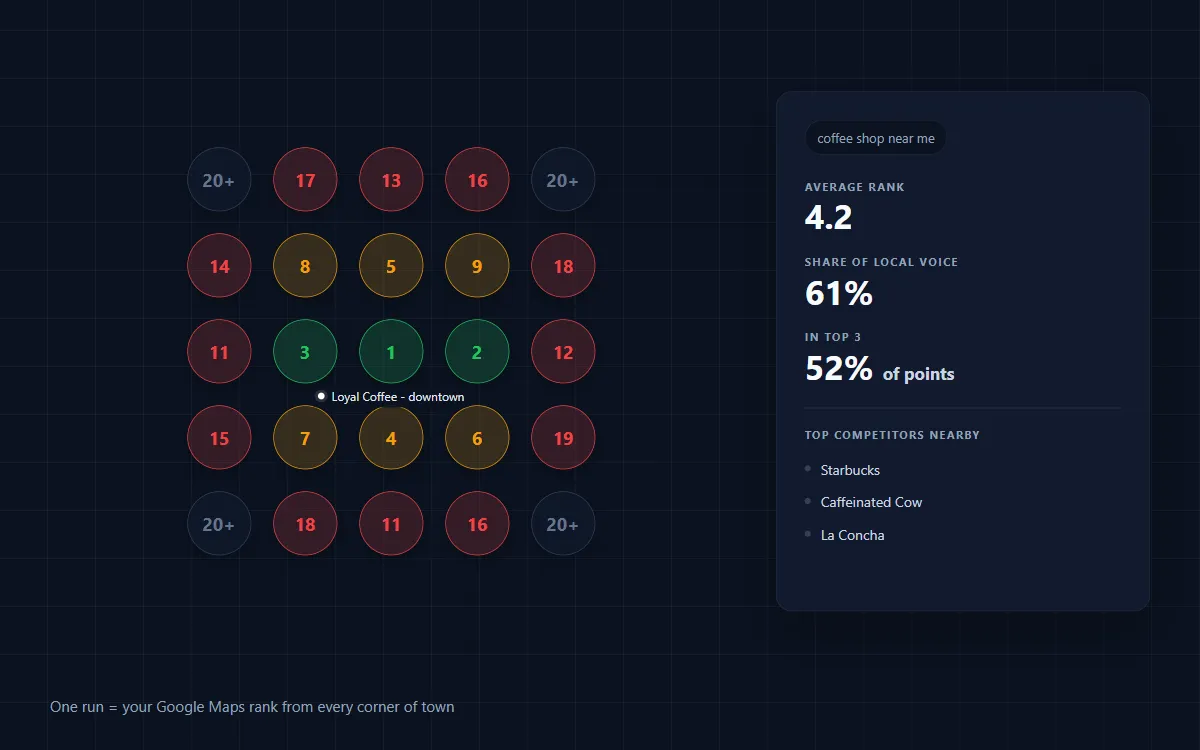
It is the same kind of geo-grid local rank tracking that agencies pay a monthly subscription for. Here you pay per scan, with nothing to install.
Type three things and run
No coordinates. No setup. No CRM connection.
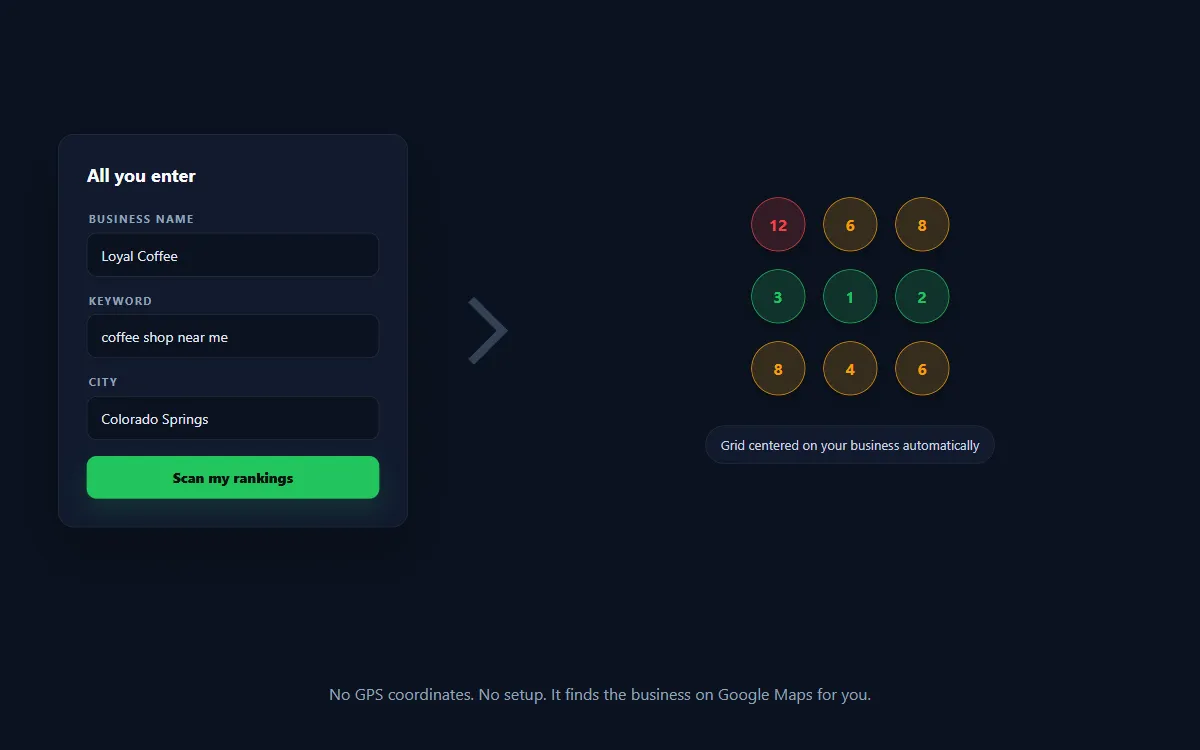
- Business name, for example
Loyal Coffee - Keyword, for example
coffee shop near me - City or area, for example
Colorado Springs, CO
The actor looks the business up on Google Maps, reads its real location, and centers the scan there. Everything else has a working default. Advanced settings like grid size and radius are optional and tucked out of the way.
What it does
- Track Google Maps rankings for any business across a geographic grid
- Find local pack rankings for a keyword at every point in a city
- See a map pack rank tracker heatmap of where a business shows up and where it does not
- Measure average rank position (ARP) for each keyword
- Measure share of local voice (SoLV), the percent of the map a business owns
- Auto-locate a Google Business Profile by name, no coordinates needed
- Capture the top three competitors ranking at each point
- Export results to JSON, CSV, or Excel
Who uses it
- Local SEO agencies reporting rank progress to clients with a real map, not a single number
- Multi-location businesses checking coverage across a whole metro
- Google Business Profile owners who want to see how far their ranking reaches
- Freelancers and consultants who need geo-grid reports without a monthly tool subscription
How geo-grid rank tracking works
A single rank check tells you one number from one spot. Real customers search from all over town, and Google Maps ranks a business differently depending on where the searcher is standing.
This actor divides the area around a business into a grid of points, usually 5 by 5 (25 points) or larger. At each point it searches your keyword as if a customer were standing there, then records where the business lands in the results. Points near the business usually rank well. Points on the edge of town often drop off. Plotting all of them shows the true reach of a listing.
Input
The only required fields are the business name and at least one keyword. Add a city so the lookup is accurate.
| Field | Required | What it is |
|---|---|---|
businessName | Yes | The business to track, as it appears on Google Maps. |
keywords | Yes | What customers search. One per line, up to 10. |
location | Recommended | City, state, or neighborhood. Finds the business and sets the area. |
gridSize | No | Rows by columns. 5 means a 5 by 5 grid of 25 points. Default 5. |
radiusMiles | No | How far out from the business to scan, in miles. Default 2. |
centerLat, centerLng | No | Power-user override. Set both to skip the auto lookup. |
zoom, maxRank, placeId | No | Fine-tuning. Safe to ignore. |
Example input
What you get
Two kinds of records in the dataset.
One row per grid point, so you can build a heatmap:
One summary row per keyword:
- arp, average rank position across points where the business ranked
- solv, share of local voice, how much of the map the business owns from 0 to 100
- pctTop3, percent of points ranking in the top three
- found / total, how many of the grid points ranked the business at all
Pricing
You pay per grid point scanned. The size of a scan is grid points times keywords.
- A 5 by 5 grid for one keyword is 25 points
- A 5 by 5 grid for three keywords is 75 points
- A 9 by 9 grid for five keywords is 405 points
The current per-point price is shown at the top of this page. There is no subscription and no minimum. Run one scan or a thousand.
Geo-grid vs a single rank check
A single rank check tells you where a business sits from one location on one day. It hides the fact that the same business can be number one downtown and invisible five miles away. A geo-grid scan shows the whole picture on a map, which is what wins clients and what proves that local SEO work is moving rankings.
FAQ
Do I need latitude and longitude? No. Type the business name and a city and the actor finds the exact location for you. Coordinates are an optional override for power users.
What is share of local voice? It is how much of the local map a business owns for a keyword, from 0 to 100. A business ranking first at every point has a high share. One ranking on the edges has a low share.
How many points should I scan? 5 by 5 (25 points) is a good default for a single business in one town. Use a larger grid or a bigger radius in miles to cover a full metro.
Can I track more than one keyword? Yes. Add up to 10 keywords and each one is scanned across the whole grid and summarized on its own.
Does it work outside the United States? The default proxy is United States residential. Change the proxy country in the advanced settings for other regions.
How do I build a heatmap? Each point row includes its row, column, latitude, longitude, and rank. Color each point by rank (green for 1 to 3, yellow for 4 to 10, red beyond) and plot it on a map.


