

Taobao Scraper - Search, Item Details & Shops | 淘宝
Pricing
from $1.12 / 1,000 products
Taobao Scraper - Search, Item Details & Shops | 淘宝
Taobao and Tmall products by search word, category, shop or item id: full title, price in yuan, promotion label, shop and its scores, category. Add the item page for ship-from city, shop age and credit level, and review counts.
Pricing
from $1.12 / 1,000 products
Rating
0.0
(0)
Developer

Dami's Studio
Maintained by CommunityActor stats
0
Bookmarked
2
Total users
1
Monthly active users
11 hours ago
Last modified
Categories
Share
Taobao scraper (淘宝) for search words, categories, shops and item ids, one row per product: the full Chinese title, the price in yuan with its promotion label, the same price in Hong Kong, Taiwan and US dollars, the photo, the shop and its score, and the category. Switch on the item pages and each row also gets Tmall or Taobao, where it ships from, the shop's age, size and credit level, and the review counts.
The awkward part first. Taobao keeps public pages only for words people search often. A search word gives you up to 200 products: its 40 best sellers, then the best sellers in nine price bands. Not thousands, and a long or very specific search may find nothing at all. SKUs, stock and sales counts are not on those pages, so they are not in the rows either.
| Input | Search words (Chinese finds the most), category ids, shop ids, or item ids and links |
| Output | One row per product: full title, price in yuan, promotion label, HKD, TWD and USD prices, photo, shop, category. With item pages: Tmall or Taobao, ships from, shop age and credit level, three shop scores, review counts |
| Ceiling | 200 products per search word, 60 per shop, 20 per category; 10,000 products per run |
| Speed | 987 products from five search words took 3 minutes; about 150 from search words, a shop and a category about 30 seconds; 50 to 60 products with their item pages 2.5 to 3 minutes |
| Account needed | None |
| Price | $1.12 per 1,000 products, the same on every plan; $3.25 per 1,000 when the item page is read; $1.40 per 1,000 shops. The free plan's $5 a month covers about 4,400 products |
| Using an AI agent? | |
|---|---|
| Actor | dami_studio/taobao-scraper |
| Set one field | keywords, labelled "Search words" in the Console |
| Cap the bill | maxTotalChargeUsd on the run, for example 0.10: it never charges past that |
| MCP, one link | https://mcp.apify.com/?tools=fetch-actor-details,dami_studio/taobao-scraper |
| How often | Weekly, to follow what sells under a search word and at what price |
🌏 中文说明
按搜索词、类目、店铺或商品编号读取淘宝和天猫的公开页面,每个商品一行:完整中文标题、人民币价格和促销标签、港币、新台币和美元价格、图片、店铺和类目。打开商品页后还有天猫或淘宝、发货地、开店时间、店铺规模、信用等级、三项店铺评分和评价数量。没有SKU、库存和销量。
在keywords(Search words)里填搜索词,点Start就行,不需要账号。按商品条数收费,价格见上方表格。本工具不是淘宝的官方产品,与淘宝没有关联。
🔍 What Taobao Scraper does
You give it any mix of four things. A search word returns the best sellers Taobao lists for it, in Taobao's order, with titles in simplified Chinese: the first 40, then the best sellers in nine price bands from the cheapest up, then by seller rating, until it reaches your number. Each product comes once per word. You can sort by price or seller rating instead, keep one brand, use Taobao's free-shipping filter, add the words Taobao suggests, or leave out what an earlier run already returned. A category id returns that category's top 20. A shop id returns one row for the shop (its name, seller id and three scores) and the products its page lists. An item id or link returns that one product with everything its item page shows.
"Open each product's page" adds the item page to the products from searches, categories and shops. It is slower, about three seconds a product, because the pages are read one after another.
📋 What data you get from each Taobao product
| What you want | Fields |
|---|---|
| The product | itemId, title, titleCutShort, url, imageUrl |
| Price | price, priceLabel, currency, priceHkd, priceTwd, priceUsd, usdRate, usdRateDate |
| Shop | shopId, shopName, shopDescriptionScore |
| Category | categoryId, rootCategoryId |
| Where it was found | keyword, position, source, priceBand, brand, relatedTo, scrapedAt |
| From the item page (optional) | platform, originalPrice, hasPriceRange, shipsFrom, categoryPath, sellerId, sellerType, shopOpenedAt, shopItemCount, shopCreditLevel, shopServiceScore, shopDeliveryScore, paymentMethods |
| Reviews, from the item page (optional) | goodReviews, badReviews, goodPercent, neutralPercent, badPercent |
| Shop rows | shopId, shopName, sellerId, descriptionScore, serviceScore, deliveryScore, logoUrl, shopUrl, productCount |
▶️ How to scrape Taobao products
- Open Taobao Scraper on Apify and click Try for free.
- In Search words, add one per line, for example
保温杯or手机壳. Or fill Item ids or links, Shop ids or links or Category ids or links instead. - Set Products per search word, up to 200.
- Optionally switch on Open each product's page, and set a price range in yuan.
- Click Start, then open the Output tab or export to CSV, Excel or JSON.
💰 How much does it cost to scrape Taobao products?
$1.12 per 1,000 products, the same on every plan, so 100 products cost $0.11. A product whose item page was read costs $3.25 per 1,000 instead, never both. A shop row costs $1.40 per 1,000, and its products are charged as products. The free plan's $5 a month covers about 4,400 products.
Not charged: products outside your price range, a product listed twice on one page, and the note rows that say something has no public page, was not served or stopped early.
📥 What you give it
| Field | What it does | Default |
|---|---|---|
keywords | Search words, up to 50 a run | none |
itemIds | Item ids, or links with id= in them, up to 1,000 | none |
shopIds | Shop ids or shop links, up to 100 | none |
categoryIds | Category ids or category links, up to 50 | none |
maxItemsPerKeyword | Products per search word, 1 to 200 | 100 |
maxItems | Most products in the run, up to 10,000 | 1000 |
sort | sales, price-asc, price-desc or seller-credit | sales |
brand | One brand by name or id, as Taobao lists it for the word | none |
freeShippingOnly | Taobao's own free-shipping filter | false |
relatedKeywords | Also search up to this many of Taobao's suggested words per word, 0 to 10 | 0 |
onlyNew | Leave out products an earlier run with the same stateKey returned | false |
stateKey | The name of that list | default |
includeShopProducts | With shops, also return the shop's products | true |
includeDetails | Read each product's item page as well | false |
minPrice | Minimum price in yuan | none |
maxPrice | Maximum price in yuan | none |
Fill at least one of the first four. A price range narrows the price bands too, and every product outside it is left out, so a narrow range gives fewer products than a wide one.
📤 What you get back
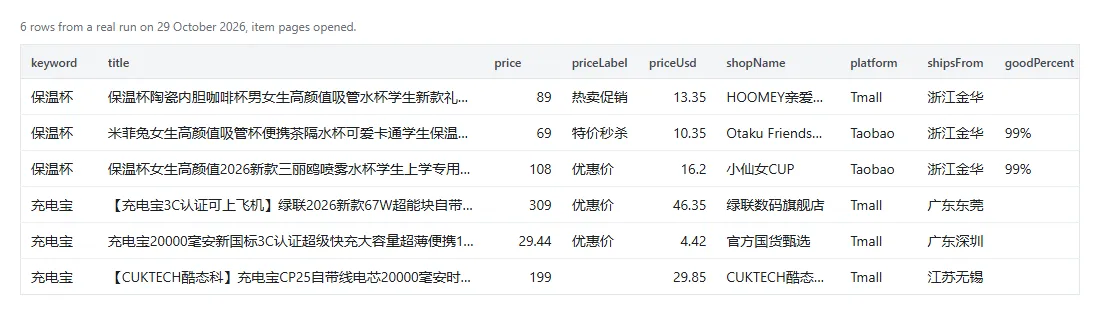
A real row with the item page read, trimmed:
| Field | How to read it |
|---|---|
price | The price Taobao shows a visitor, in yuan, promotion included. originalPrice is the item page's price before it |
priceUsd | Worked out from the European Central Bank's reference rates of usdRateDate (free on ecb.europa.eu): the ECB's USD rate divided by its CNY rate. For information, not for paying |
title | The full title from a search, category or shop page. Item pages often cut theirs short with "...", and a row for an item id carries that one; titleCutShort tells you |
goodReviews | Rounded the way Taobao shows it ("1万+", "4000+"). Tmall items show no review split, so these stay empty there |
source | For a search word: top-rated or search (the first 40), sales, price-low, price-high, price-band or seller-credit (the deeper or sorted pages); otherwise category, shop or item |
relatedTo | On rows from a suggested word, the search word it came from |
priceBand | The yuan band a price-band row was listed under, for example 20-30. Taobao's bands are loose, so about half the rows of a band are priced outside it; price is the real price |
shopDescriptionScore | The shop's "item as described" score, 1 to 5 |
🧾 Reading the output
Product rows carry recordType: "product" and shop rows recordType: "shop". Note rows carry _diagnostic: true,
ok: false and a status, and are never charged:
status | Meaning |
|---|---|
NO_RESULTS | Taobao has no public page for that search word (try a shorter or more common word), your price range left out every product, the brand is not listed for it (brandsListed names those that are), or nothing is new since your last run with that key |
NOT_FOUND | No public page for that item, shop or category id |
NOT_SERVED | That page was not served this run. Re-run it later |
TIME_LIMIT | The run stopped before its time limit with inputs left, listed in notRead |
COST_LIMIT | The run reached the maximum cost you set |
BAD_INPUT | Something in the input could not be used, said in plain words |
To keep only products, filter on recordType being product.
💡 What people use it for
- Sourcing for a shop abroad: up to 200 best sellers for a product word, across price bands, with yuan and dollar prices side by side.
- Checking a supplier before ordering: an item id with its page read gives the shop's age, size, credit level, scores and the share of bad reviews.
- Keeping an eye on a shop you sell against: its first 60 products and their prices, week after week.
- Price research for a category: one search word a run, sorted afterwards by
pricein your sheet.
A simple recipe: get the words Chinese shoppers type from Taobao Keyword Suggestions Scraper, run them here with
maxPrice set, then put the itemIds you like back in with includeDetails on to check the shops.
🚧 What it does not do
- No SKUs, stock or sales counts. Taobao's public pages don't show them.
- 200 products per search word at most, and some words have fewer. Past the first 40 they come from price bands, so the deeper rows lean to the cheaper bands unless you ask for all 200.
- Long-tail words often have no public page: you get a free
NO_RESULTSrow. - Free shipping can't be checked product by product. The filter is Taobao's own; the rows carry no shipping cost.
- No review texts and no reviewer names. Only the counts and the good, neutral and bad shares, on Taobao shops.
- Shops: the first 60 products their page lists. Categories: the top 20.
- Prices are what a signed-out visitor sees. Coupons and member prices are not in them.
- It is not an official Taobao tool. Dami's Studio is independent and is not affiliated with or endorsed by Taobao, Tmall or Alibaba, or by any other company named on this page.
🧭 Which Taobao scraper do you need?
| If you want | Use |
|---|---|
| Products by search word, category, shop or item id | This one |
| All products in Taobao's 20 top-level category feeds | Taobao Category Products Scraper |
| What Taobao's homepage feed is recommending now | Taobao Product Feed Scraper |
| The words Chinese shoppers type into Taobao | Taobao Keyword Suggestions Scraper |
| Wholesale offers with MOQ and price ladders | 1688 Wholesale Scraper |
| Second-hand Xianyu listings | Goofish Scraper |
❓ Questions people ask
Do I need a Taobao account?
No. You don't need a Taobao account or cookies.
Why is the price different from what I see in the Taobao app?
The app shows coupons, member prices and your delivery region, and promotions change during the day. Open the product link in a private browser window to see what a signed-out visitor sees.
How do I get more than 200 products for a product type?
Set relatedKeywords to 3 or 5: the run also searches the words Taobao suggests (保温杯 brings 保温杯女, 儿童保温杯 and
so on) and returns each product once across them. Words you list yourself are separate searches, and a product found
under two of them comes back, and is charged, once for each.
Can I call it from code or connect it to an AI assistant?
The API tab has code for Python, JavaScript and the CLI.
MCP clients like Claude and ChatGPT use https://mcp.apify.com/?tools=fetch-actor-details,dami_studio/taobao-scraper.
Both bill your Apify account at the same price.
Is scraping Taobao legal?
These are public product and shop pages, read the way a signed-out visitor sees them, with no account and nothing private. Some shops trade under a person's name, which GDPR and similar laws treat as personal data, so keep only what you need. Taobao's own terms still apply to what you do with the data. Apify's write-up on the legality of web scraping is a good starting point, and we are not lawyers.
🆘 If something breaks
Open the Issues tab on the actor page. Send the input you used and the run ID; the status on a note row usually
names the problem on its own.


