

YouTube Transcript Extractor - Bulk, Channels & Playlists
Pricing
from $0.38 / 1,000 transcripts
YouTube Transcript Extractor - Bulk, Channels & Playlists
YouTube transcript extractor and scraper: transcripts in bulk from video links, a whole channel or a playlist. Each row has the full text, timed cues, language and auto-generated flag, plus title, channel, duration and views. You pay for transcripts, not videos listed. $0.40 per 1,000 transcripts.
Pricing
from $0.38 / 1,000 transcripts
Rating
0.0
(0)
Developer

Dami's Studio
Maintained by CommunityActor stats
0
Bookmarked
405
Total users
366
Monthly active users
17 hours ago
Last modified
Categories
Security
Limited permissionsShare
YouTube transcript extractor for a list of videos, a whole channel or a playlist, in bulk: get one row per video with the whole transcript as plain text, the per-cue timings, the language, and the video's own details next to it. Channels and playlists are expanded into their videos for you, and that expansion costs nothing.
It reads the caption tracks YouTube already holds. There is no speech recognition here, so a video that was uploaded without captions has nothing to return and comes back as an uncharged diagnostic row instead. You pay for transcripts, not for the videos a channel turned out to have.
| Input | Video links, bare 11-character ids, a channel URL, @handle or UC... id, or a playlist link or id |
| Output | One row per transcript: full text, timed cues, language and auto-generated flag, title, description, channel, duration and view count. Upload date and SRT or VTT files when you ask |
| Ceiling | 500 entries in, up to 5,000 transcripts out |
| Account needed | None |
| Price | $0.40 per 1,000 transcripts on the Free plan, a little less on paid plans. The free plan's $5 a month covers about 12,500 |
| Using an AI agent? | |
|---|---|
| Actor | dami_studio/youtube-transcript-bulk-scraper |
| Set one field | videoUrls, labelled "Videos, channels or playlists" in the Console |
| Cap the bill | maxTotalChargeUsd on the run, for example 0.10: it never charges past that |
| MCP, one link | https://mcp.apify.com/?tools=fetch-actor-details,dami_studio/youtube-transcript-bulk-scraper |
| How often | Weekly for a channel, or when a new video comes out |
🔍 What YouTube Transcript Extractor does
Mix whatever you have in one list. Watch links, Shorts links, youtu.be links, embed links, bare
video ids, a channel URL, an @handle, a playlist link. Channels are read newest first, playlists
in their own order, and a video that shows up twice across two sources is fetched once.
You get the transcript two ways on the same row. text is the whole thing as one readable string,
already joined up, which is what you want if it is going into a model or a search index. segments
keeps every cue with its start, duration and end, which is what you want for jumping to a
moment in the video or building captions.
Language is a preference list, not a filter. Put en, es, pt-BR in and the first one the video
actually has is used; pt matches pt-BR. A human-written track wins over the machine one unless
you say otherwise, because it has punctuation and speaker turns. Whichever track was used is named
on the row, and availableLanguages lists everything the video offered.
📋 What data you get from each YouTube transcript
| What you get | Field |
|---|---|
| The transcript as one string, with its word and character counts | text, wordCount, characterCount |
| Every cue with start, duration and end in seconds, when segments are on | segments, segmentCount |
| The track used: language, its name, machine-made or not | language, languageName, isAutoGenerated |
| Every track the video offered | availableLanguages |
| The video: id, link, title, length, views and thumbnail | videoId, url, title, durationSeconds, viewCount, thumbnailUrl |
| Its description, and whether it was a live stream | description, wasLive |
| When it went up and its category, when you ask | publishedAt, category |
| Ready subtitle files, when you ask | srt, vtt |
| The channel: name, id and link | channelName, channelId, channelUrl |
| Which of your entries produced the row | sourceType, sourceUrl, playlistId |
▶️ How to scrape YouTube transcripts in bulk
- Open YouTube Transcript Extractor and click Try for free.
- Paste links into Videos, channels or playlists, one per line.
- Set Maximum transcripts low for the first run, since that is what you pay for.
- Put your language codes into Preferred languages in the order you want them tried.
- Click Start, then download the dataset as JSON, CSV or Excel, or pull it from the Apify API.
Run it with the input empty and you get one labelled sample row, uncharged, so you can look at the shape before you queue a real list.
💰 How much does it cost to scrape YouTube transcripts in bulk?
$0.40 per 1,000 transcripts on the Free plan. Paid plans pay a little less: $0.395 on Starter, $0.39 on Scale and $0.385 on Business. On the free plan, the $5 Apify gives you each month covers about 12,500 transcripts.
Only a delivered transcript counts. Expanding a channel or a playlist into its videos adds nothing, however many it finds. A video with no captions, a rejected entry, a video that would not open and the sample row are all uncharged rows. A video your caption type or date window leaves out is not charged either, and neither is the upload-date lookup.
A video that appears in two of your sources is fetched once and counted once.
📥 What you give it
| Field | Default | What it is |
|---|---|---|
videoUrls | none | Up to 500 entries, in any of the forms above, mixed freely. Bare channel ids (UC...) and playlist ids (PL...) work too. |
maxItems | none (the form starts at 10) | Hard ceiling on transcripts returned by the whole run. This is what you pay for, so keep it small while testing. A video your date window or caption type leaves out does not use up one of them, until the run has looked through four times this number of left-out videos (at least 100, at most 2,000). After that they count like any other video. |
maxVideosPerSource | none (the form starts at 25) | How deep to go into each channel or playlist before moving on. Videos your date window or caption type leaves out do not count toward it. Ignored for links that already point at one video. |
languages | none (the form starts at en) | Language codes in priority order. Leave it empty to take whatever track the video ships with. |
preferAutoGenerated | false | Turn it on when you specifically want the machine transcript even though a written one exists. |
captionType | any | human keeps only human-written tracks, auto only auto-generated ones. A video without that kind gets a free row and is not charged. |
publishedAfter | none | Only videos that went up on or after this day, as 2026-09-01 (UTC) or 30 days. A channel stops at its first older video. Skipped videos are not charged. A channel or playlist stops after 200 videos outside the window, and its free DATE_WINDOW_LIMIT row says so. Adds the upload date to each row. |
publishedBefore | none | Only videos that went up before this day, in the same formats, with the same 200-video stop. |
includeSegments | true | Keeps the per-cue array on each row. Turn it off for plain text and much smaller rows. |
subtitleFormat | none | srt, vtt or both: the transcript as subtitle-file text on the row. Same price. |
includePublishDate | false | Adds publishedAt and category. One more lookup per video, so a little slower, same price. |
concurrency | none (the form starts at 6) | How many videos are read at once, 1 to 10. |
proxyUrls | none | Optional. Your own servers, as http://user:pass@host:port. Leave it empty otherwise. |
📤 What you get back
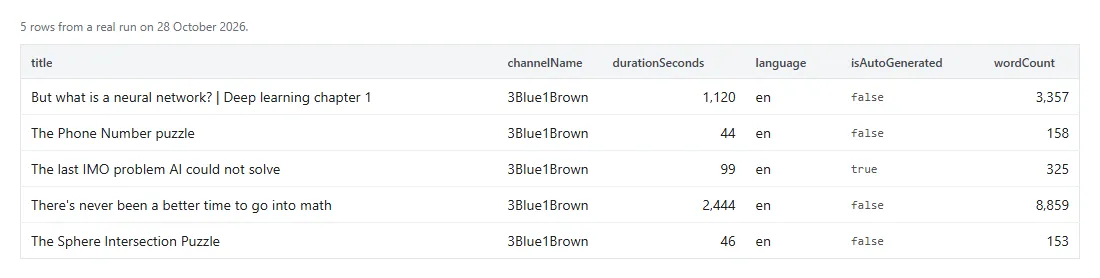
A real row from a real run. text and segments are cut short here; on the real row text runs to
822 characters and segments has all 13 cues:
| Field | How to read it |
|---|---|
text | wordCount and characterCount measure this field. |
segments | Present only while includeSegments is on. |
isAutoGenerated | Whether the track actually used was the machine one. Worth keeping, since punctuation and accuracy differ a lot. |
sourceType, sourceUrl | video, channel or playlist, and which of your entries it was. Useful when you pasted a mixed list. |
viewCount, durationSeconds | Read off the video itself at the time of the run. |
description | As YouTube shows it under the video, up to 5,000 characters. |
wasLive | true for a live stream or its replay. |
publishedAt | UTC time the video went up. Only there when you asked for the date or set a date window; null when YouTube did not give it. |
srt, vtt | Only there when you asked. Save the text as a .srt or .vtt file as it is. |
🧾 Reading the output
Three kinds of row land in your dataset, and recordType separates them.
| Row | How to spot it | Billed |
|---|---|---|
| A real transcript | recordType: "transcript", ok: true | yes |
| The sample row | recordType: "sample", _sample: true | no |
| A diagnostic | recordType: "diagnostic", ok: false, an errorCode | no |
Filter on recordType == "transcript" and you have your transcripts. The charged flag is written
onto the row as it is built, so treat it as the marker that tells a real row from a sample or a
diagnostic, not as a receipt for what was billed.
| Code | What it means |
|---|---|
BAD_INPUT | That entry was not a video, channel or playlist link. Only the first 25 rejects get a row. |
NOT_FOUND | The handle, channel or video does not exist any more. |
NO_RESULTS | Nothing to return: a video with no captions or none of the caption type you asked for, a channel with no uploads, a private playlist, a source with nothing in your date window. |
AGE_RESTRICTED | YouTube shows that video only to signed-in viewers who confirm their age, so its captions can't be read. |
DATE_UNKNOWN | YouTube did not give that video's upload date, so it could not be checked against your date window. |
DATE_WINDOW_LIMIT | That channel or playlist stopped after 200 videos outside your date window. Narrow the window or lower Videos per channel or playlist. |
FILTER_LIMIT | That channel or playlist was cut short because the run had already looked through as many left-out videos as it gives places back for: four times Maximum transcripts, at least 100 and at most 2,000. After that, left-out videos count toward Maximum transcripts again. Narrow the window or the caption type, or split the list over more runs. |
NOT_REACHED | The run ended before it got to that entry, so it was not read. Usually Maximum transcripts was already used up. Run that entry again on its own. |
RATE_LIMITED, SERVER_ERROR | That video would not answer this run. Re-running usually clears it. |
NOT_SERVED | This transcript was not served this run. Re-run it later. Runs before 13 October 2026 wrote BLOCKED here. |
NETWORK | The connection failed, or the video would not open for a reason it did not name. |
TIMEOUT | YouTube did not answer in time for that video, channel or playlist. Re-running usually clears it. |
TIME_BUDGET | The run ran out of time before reaching that video. One row per video left over. The run still ends as succeeded, with an amber status message, even when the time limit stopped it before any transcript came back. |
PROXY_INPUT_ADJUSTED | A setting you gave in proxyUrls could not be used and was replaced. |
CHARGE_ERROR | Billing failed on a row that was already delivered. Tell us if you see it. |
UNEXPECTED_ERROR | Something broke that the run did not classify. Send the run ID. |
💡 What people use it for
- Making a video searchable. Keep
segmentsand a hit gives you the second to jump to. - Keeping up with a channel. Set Published on or after to
7 daysand a weekly run picks up only what is new.
From a channel to the reaction to what it said, in two runs:
- Paste a channel here with Videos per channel or playlist at 50 and keep the
textcolumn. - Filter the rows on a phrase in
textto find the videos that mention it. - Paste their
urlinto the Video URLs box of YouTube Comments Scraper to read how viewers took it.
🚧 What it does not do
- Captions only. There is no speech recognition. If the uploader published no caption track, no amount of retrying will produce text.
- No translation. You get the tracks the video already carries. Asking for
fron a video with only English gets you the English track, not a translation. - Channels come from the uploads list, newest first. That misses unlisted videos and sometimes misses Shorts. A date window stops a source after 200 videos outside it.
- A watch link carrying
list=is treated as one video, not as the playlist. Paste the playlist link itself if you want the playlist. - The 5,000 ceiling is the setting's maximum, not a measured promise. Long videos make big rows: a 3 hour 13 minute podcast came back as a single 160 KB row.
- Only the first 25 rejected entries get a
BAD_INPUTrow. Beyond that they are dropped quietly, so check your list if the count looks short. - Private videos are reported as a failure to open, not as a reason of their own. Age-restricted
videos get their own
AGE_RESTRICTEDrow. - It is not an official YouTube tool. Dami's Studio is independent and is not affiliated with or endorsed by YouTube or Google, or by any other company named on this page.
🧭 Which YouTube scraper do you need?
| If you want | Use |
|---|---|
| Transcripts for a whole channel or playlist in one run | This one |
| What a single video says, as text, SRT and VTT | YouTube Transcript Scraper |
| A channel's uploads as rows, up to 2,000 per run | YouTube Channel Scraper |
| Videos in a playlist | YouTube Playlist Scraper |
| Shorts from a channel or a keyword, with exact view and like counts | YouTube Shorts Scraper |
| Only the new uploads since your last check | YouTube Upload Monitor |
| The video, its audio or its subtitles as a file | YouTube Downloader Pro |
❓ Questions people ask
Do I need a YouTube API key?
No. No key, no OAuth, no quota to manage.
What if the video has no captions?
You get a NO_RESULTS row naming that video and the run moves on. That row is not charged.
Auto-generated or written captions, which do I get?
The written one when the video has it, because it is punctuated. Tick Prefer auto-generated captions to flip that. To get only one kind and skip videos without it, set Caption type.
Can I get the timings?
Yes, that is segments, and it is on by default. Turn it off when you want smaller rows and only
the plain text.
Can I call it from code or connect it to an AI assistant?
The API tab has code for Python,
JavaScript and the CLI. MCP clients like Claude and ChatGPT use
https://mcp.apify.com/?tools=fetch-actor-details,dami_studio/youtube-transcript-bulk-scraper; coding assistants can
load our skill file. All
three bill your Apify account at the same price.
Is scraping YouTube transcripts legal?
This reads publicly available caption tracks. Transcripts are somebody's work, so what you may do with them afterwards is a copyright question rather than a scraping one. Apify's write-up on the legality of web scraping is a reasonable starting point, and we are not lawyers.
🆘 If something breaks
Open the Issues tab on the actor page. Include the links you used and the run ID. The diagnostic rows in your dataset usually name the reason already.


