

Amazon Bestsellers
Pricing
from $0.50 / 1,000 results
Amazon Bestsellers
🏆 Scrape the Amazon Best Sellers top 100 of any category, plus New Releases, Movers & Shakers, Most Wished For and Gift Ideas, across 20 Amazon stores. Get rank, ASIN, title, price, rating, reviews and image for every product. Fast, complete and in Amazon's order. Export to JSON, CSV or Excel.
Pricing
from $0.50 / 1,000 results
Rating
5.0
(1)
Developer

Data Xplorer
Maintained by CommunityActor stats
0
Bookmarked
5
Total users
3
Monthly active users
11 days ago
Last modified
Categories
Share
🏆 Amazon Best Sellers Scraper
🛒 Scrape the Amazon Best Sellers top 100 of any category, plus New Releases, Movers & Shakers, Most Wished For and Gift Ideas, across 20 Amazon marketplaces. Get rank, ASIN, title, price, currency, rating, reviews, image and category for every product, in seconds, ready to export as JSON, CSV or Excel.
💎 Why choose our Amazon Best Sellers Scraper?
- 💯 The complete top 100: Amazon only shows ~30 products per page until you scroll. We fetch the rest the way Amazon's own page does, so all 100 products come with title, price, rating, reviews and image
- ⚡ Fast: plain HTTP requests, no headless browser. The amazon.com Electronics top 100 takes about 12 seconds
- 🌍 20 Amazon stores: amazon.com, .co.uk, .de, .fr, .it, .es, .ca, .co.jp, .in, .com.au, .com.br, .com.mx and more
- 🏅 5 Amazon rankings: Best Sellers, New Releases, Movers & Shakers, Most Wished For and Gift Ideas
- 🧭 Results in Amazon's order: departments and subcategories exactly as listed on Amazon, each followed by its products from rank 1 to 100
- 🌳 Whole category trees: one department, its subcategories, or every department of a store in one run
- 💶 Local prices: residential proxies included, exiting in each store's own country, so amazon.de returns EUR and amazon.co.jp returns JPY. No proxy setup on your side
- 🗣️ Any language: category names come from Amazon itself ("Küche, Haushalt & Wohnen" on amazon.de, "High-Tech" on amazon.fr)
- 🧹 Clean data: one row per product, only the fields that apply, no empty columns
- 📜 Readable progress logs: see which department is being scraped and how many products are saved, in real time
🛒 What is Amazon Best Sellers Scraper?
Amazon Best Sellers Scraper is a web scraper that extracts the top-selling products of Amazon's ranking pages and turns them into structured data. Amazon publishes five rankings, refreshed around the clock, for every category and every country:
| Ranking | Amazon page | What it tells you |
|---|---|---|
| 🥇 Best Sellers | /gp/bestsellers/ | The most popular products by sales, category leaders |
| 🆕 New Releases | /gp/new-releases/ | New products gaining traction fast |
| 🚀 Movers & Shakers | /gp/movers-and-shakers/ | Biggest sales-rank gainers of the last 24 hours, with % change |
| 💝 Most Wished For | /gp/most-wished-for/ | Products most added to wish lists: demand before purchase |
| 🎁 Gift Ideas | /gp/most-gifted/ | Products most bought as gifts |
🌍 Supported marketplaces: 🇺🇸 amazon.com · 🇬🇧 amazon.co.uk · 🇩🇪 amazon.de · 🇫🇷 amazon.fr · 🇮🇹 amazon.it · 🇪🇸 amazon.es · 🇳🇱 amazon.nl · 🇧🇪 amazon.com.be · 🇸🇪 amazon.se · 🇵🇱 amazon.pl · 🇹🇷 amazon.com.tr · 🇨🇦 amazon.ca · 🇲🇽 amazon.com.mx · 🇧🇷 amazon.com.br · 🇯🇵 amazon.co.jp · 🇮🇳 amazon.in · 🇦🇺 amazon.com.au · 🇸🇬 amazon.sg · 🇦🇪 amazon.ae · 🇸🇦 amazon.sa
🔮 How do I scrape Amazon Best Sellers?
1. 🧭 Choose your scraping mode
Two ways to tell the scraper what to collect. Pick one at the top of the input, then open the matching option.
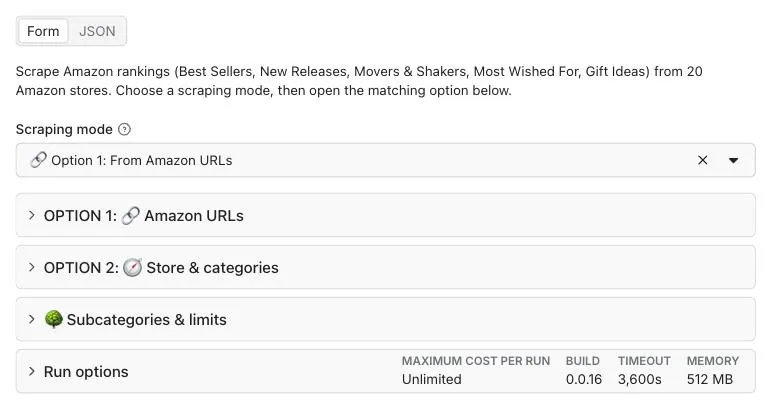
2. 🔗 Option 1: paste Amazon URLs (easiest)
Open any ranking on Amazon, in any category and any country, and paste its URL. One URL = one list of up to 100 products. Mix stores and rankings freely.
3. 🧭 Option 2: pick a store, rankings and categories
No URLs to collect: choose the Amazon store, one or more rankings and the categories. Every ranking is scraped for every category (2 rankings × 3 categories = 6 lists). Tick Every department to scrape the whole store.
4. 🌳 Go deeper with subcategories, set your limits
Include subcategories 1, 2 or 3 levels down, or the whole category tree. Keep the top N of each list and cap the total number of products: the first ones in Amazon's order are kept, and the scraper only opens the departments it needs.
5. ▶️ Run and download
Click Start. Follow the progress in the log, then export the results as JSON, CSV, Excel, XML or HTML, or read them through the Apify API.
📊 How many results can you scrape?
Amazon publishes up to 100 products per ranking list. How many products you get depends on how many lists you scrape:
- 🔗 One URL: up to 100 products
- 🏬 Every department of a store: about 30 to 40 lists, so 3,000 to 4,000 products per ranking
- 🌳 With subcategories: thousands of lists and hundreds of thousands of products for a whole category tree
Some lists have fewer than 100 products (Amazon leaves a rank empty when a product is unavailable), and Movers & Shakers lists are sometimes empty on Amazon itself.
📋 Input parameters
| Parameter | Type | Default | Description |
|---|---|---|---|
mode | string | "urls" | "urls" (Option 1: from Amazon URLs) or "categories" (Option 2: by store & categories) |
| Option 1: Amazon URLs | |||
startUrls | array | – | Amazon ranking URLs, e.g. https://www.amazon.com/gp/bestsellers/electronics/ |
| Option 2: Store & categories | |||
marketplace | string | "com" | Amazon store: com, co.uk, de, fr, it, es, ca, co.jp, … |
listTypes | array | ["bestsellers"] | bestsellers, new-releases, movers-and-shakers, most-wished-for, most-gifted |
categories | array | – | Category names from Amazon URLs (electronics, kitchen), optionally with a node id (electronics/172541) |
allDepartments | boolean | false | Scrape every top-level department of the store |
| Subcategories & limits | |||
subcategories | string | "0" | "0" only your lists · "1", "2", "3" levels down · "all" the whole tree |
maxItemsPerCategory | number | 100 | Top N per list (max 100). 50 or less is twice as fast |
maxCategories | number | 1000 | Max number of lists in the run (yours + subcategories) |
maxItems | number | 0 | Stop after N products in total (0 = no limit). The first products in Amazon's order are kept |
🔗 Input example: Option 1, Amazon URLs
🏬 Input example: Option 2, a whole store
This returns the full top 100 of the first 10 departments of amazon.com, in Amazon's order.
✨ What you'll get
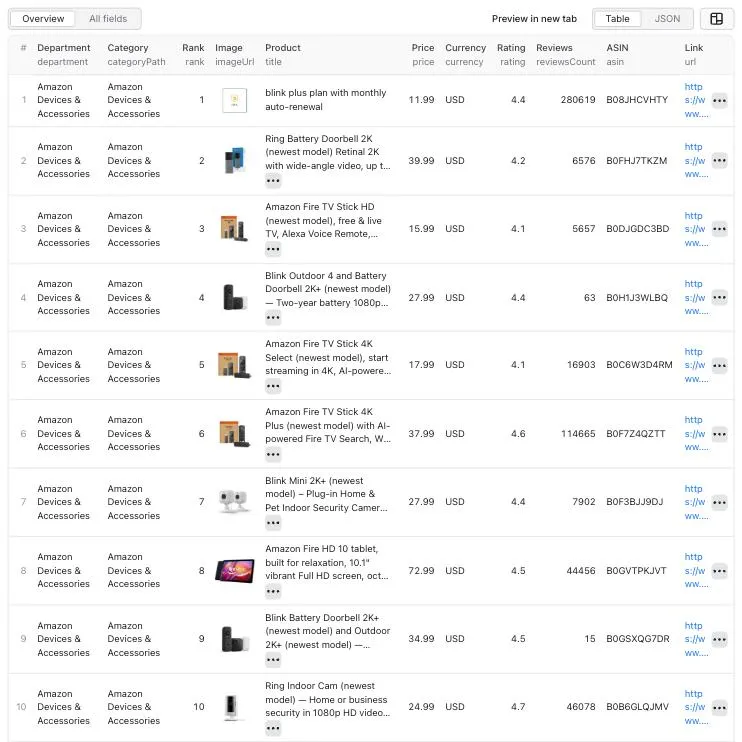
🏷️ Product data structure
| Field | Description |
|---|---|
rank | Position in the Amazon ranking (1 to 100) |
asin | Amazon product ID |
title | Product name |
url | Product page on Amazon |
imageUrl | Product image (900 px) |
price | Price as a number (null when Amazon shows none) |
currency | ISO currency code: USD, EUR, GBP, JPY, … |
rating | Average star rating |
reviewsCount | Number of ratings |
listType | Ranking: bestsellers, new-releases, movers-and-shakers, most-wished-for, most-gifted |
marketplace | Amazon store, e.g. amazon.com |
department | Top-level department, e.g. Electronics (also for its subcategories) |
categoryName | Category of the list, e.g. Headphones |
categoryPath | Full path, e.g. Electronics > Headphones |
categoryUrl | Amazon ranking page the product comes from |
scrapedAt | Date and time of the scrape (ISO 8601) |
Added only when they apply:
| Field | When |
|---|---|
currentSalesRank, previousSalesRank, salesRankChangePercent | Movers & Shakers: sales rank now, 24 hours ago, and % change |
maxPrice | Products sold at a price range ($19.99 - $49.99) |
isLowestOfferPrice | true when Amazon shows "N offers from $X" instead of a buy-box price |
brand | Products whose details were completed from their product page |
📦 Output example
📜 Clear progress logs
🔗 Integrations
Connect Amazon Best Sellers Scraper to your favorite tools or LLM and automate your product research:
- 🔄 N8N: Apify + N8N Integration Guide
- ⚡ Make (Integromat): Apify + Make Integration Guide
- 🤖 MCP (AI Agents): Apify MCP Server
- 📊 Google Sheets, Slack, Zapier, webhooks: Apify integrations
🎯 Use cases
🛍️ Amazon sellers & FBA
- Find winning products and profitable niches before you source
- Track the category leaders you compete with, rank by rank
- Spot rising products early with New Releases and Movers & Shakers
🏢 Brands & e-commerce teams
- Monitor your products' Best Seller rank every day
- Benchmark prices, ratings and reviews against the top 100
- Compare the same category across countries
📊 Market researchers & analysts
- Build datasets of category leaders across 20 marketplaces
- Analyze price levels and review counts by department
- Export to CSV or Excel for dashboards and reports
🎁 Affiliates & content creators
- Build always-fresh "best products" and gift guides from Gift Ideas and Most Wished For
- Find trending products to feature before they peak
💡 Pro tips
📅 Track rankings over time
Schedule the scraper daily (or hourly for Movers & Shakers) and compare rank per asin between runs.
⚡ Go faster
Set maxItemsPerCategory to 50 or less: one page per list instead of two.
🎯 Target a precise subcategory
Open the subcategory on Amazon and paste its URL (Option 1), or add its node id to the category name in Option 2 (electronics/172541 for Headphones).
🌍 Compare countries
In Option 1, paste the same ranking from several stores (amazon.com, amazon.de, amazon.co.jp…). Each row carries its marketplace and local currency.
❓ FAQ
🛡️ Do I need proxies to scrape Amazon Best Sellers? No. Residential proxies are included and automatically exit in the country of each Amazon store, so you get local prices and currencies with nothing to configure.
💻 Can I use Amazon Best Sellers Scraper with the API? Yes. Start runs and fetch results with the Apify API or the JavaScript and Python clients.
🔌 Can I integrate it with other apps? Yes: n8n, Make, Zapier, Google Sheets, Slack, webhooks and AI agents through MCP. See Integrations.
🔄 How often does Amazon update its Best Sellers? Amazon refreshes its rankings throughout the day. Schedule the scraper as often as you need fresh data.
🤔 Why does a product have no price or rating? The scraper returns what Amazon displays. Some products show no price (unavailable, offer-only) or have no ratings yet. Prices also change between runs as Amazon updates offers and deals.
📭 A Movers & Shakers list came back empty. Why? Amazon sometimes publishes no Movers & Shakers for a category, even to regular visitors. The scraper recognizes these pages in every language and reports them as empty lists, without wasting retries.
⚖️ Is it legal to scrape Amazon Best Sellers? The scraper only collects publicly visible ranking data, without logging in. You are responsible for how you use the data; check the regulations that apply to your use case.
🤝 Support & feedback
Need help, found an issue or want a feature? Open an issue on the Issues tab, we answer quickly.
❤️ Love our scraper? Please leave a review, it helps a lot! here
Built with ❤️ for Amazon sellers, brands and data enthusiasts


![Amazon Bestsellers Scraper [💰$2.5/1K] | Prices | Rankings avatar](https://images.apifyusercontent.com/TS4hpxVjr3wUGIU441mmF_CaJ2Nim6hWSuCyyAdAZOQ/rs:fill:76:76/cb:1/aHR0cHM6Ly9hcGlmeS1pbWFnZS11cGxvYWRzLXByb2QuczMudXMtZWFzdC0xLmFtYXpvbmF3cy5jb20vZHRSN3FuVGJRck5pU0NtajctYWN0b3ItRG80NTNXZWxUMlFUckM1YU8tbkpYODAxeHkyYy1pbWFnZXNfJTI4NSUyOS5wbmc.webp)


