

Kroger Store Details Scraper - Address & Hours
DeprecatedPricing
Pay per usage
Kroger Store Details Scraper - Address & Hours
DeprecatedExtracts Kroger store details from store page URLs — address, phone, GPS coordinates, timezone, open status, fulfillment modalities, and hours. Pairs with the Kroger Store Links Actor.
Pricing
Pay per usage
Rating
0.0
(0)
Developer

DataCach
Maintained by CommunityActor stats
0
Bookmarked
2
Total users
1
Monthly active users
19 days ago
Last modified
Categories
Share
Kroger Store Details Scraper
Extract full store details for any Kroger-family store — Kroger, Ralphs, Fred Meyer, King Soopers, Smith's, QFC, Harris Teeter, and more — straight from the same public API that powers the Kroger store locator. Feed it store URLs and get back structured address, phone, GPS, hours, and fulfillment data in seconds. No coding, CSS selectors, or browser automation required.
What is Kroger Store Details Scraper?
Kroger Store Details Scraper is an Apify Actor that turns a list of Kroger store page URLs into a clean, structured JSON dataset of everything the store locator API knows about each location: store ID, banner/chain name, full address, phone number, GPS coordinates, timezone, live open/closed status, fulfillment modalities (pickup, delivery, in-store), e-commerce capabilities, department listing, and raw opening hours.
It's built to pair with the Kroger Store Locator Scraper - All Store URLs Actor: run that one first to discover every store URL for a city, state, or ZIP code, then feed the URLs into this Actor to get full store-level data for each one.
What can Kroger Store Details Scraper do?
- 🏬 Extract full store metadata — address, phone, GPS coordinates, timezone, and legal/vanity names for any Kroger-family store
- 🕒 Pull opening hours and live status — including whether the store is currently open and department-level hours (e.g. pharmacy)
- 🚚 Report fulfillment modalities — pickup, delivery, in-store, and e-commerce capability flags (hot, ambient, refrigerated, frozen)
- 🏷️ Resolve the correct banner/chain name — Kroger, Ralphs, Fred Meyer, King Soopers, City Market, Dillons, Smith's, Baker's, Gerbes, Harris Teeter, Mariano's, Metro Market, Pick 'n Save, QFC, Food 4 Less, Foods Co, JayC — from a single unified input
- 🗂️ List store departments — pharmacy, deli, bakery, gas station, Starbucks, and dozens more, with their own hours and phone numbers where available
- 📤 Export to JSON, CSV, Excel, HTML, or XML — download directly from the Apify Console or pull via API
- ⏱️ Schedule recurring runs — keep store data fresh with Apify's built-in Scheduler
- 🔌 Automate with the Apify API and integrations — trigger runs and pull results via API, or connect to Zapier, Make, and other tools
- 📊 Monitor every run — logs, stats, and alerts through the Apify Console
What data does Kroger Store Details Scraper extract?
| Field | Description |
|---|---|
name | Human-readable chain/banner name (e.g. Kroger, Ralphs, Fred Meyer) |
banner | Raw banner slug as returned by the API (e.g. kroger, ralphs) |
locationId | Unique store ID (division + store number, e.g. 01400375) |
storeNumber / divisionNumber | Store number and the Kroger division/region it belongs to |
vanityName / legalName | Store's display nickname and the legal entity operating it |
street, city, state, zipcode | Full store address |
phone | Store phone number |
latitude, longitude | GPS coordinates |
timezone | IANA timezone for interpreting store hours |
isOpen, openText | Live open/closed status and human-readable status text |
allowedModalities | Fulfillment types the store supports (e.g. PICKUP, IN_STORE) |
capabilities | E-commerce fulfillment capabilities (hot/ambient/refrigerated/frozen) with enabled flags |
departments | Full department list (pharmacy, deli, bakery, gas station, etc.) with their own hours/phone where applicable |
hours_raw | Raw opening-hours object as returned by the API |
extraction_datetime / extraction_date | UTC timestamp of when the record was extracted |
How do I scrape Kroger store details?
- (Optional) Run the Kroger Store Locator Scraper - All Store URLs Actor to get a list of store page URLs for your target city, state, or ZIP code.
- Open Kroger Store Details Scraper's Input tab and paste the URLs into Store URLs.
- Adjust Max concurrent stores if you want faster or more conservative throughput (default: 5).
- Click Start.
- When the run finishes, open the Output tab and download your data as JSON, CSV, or Excel — or pull it programmatically via the Apify API.
Input
Kroger Store Details Scraper takes just two inputs:
- Store URLs (
links, required) — a list of Kroger store page URLs, e.g.https://www.kroger.com/stores/grocery/al/auburn/corner-village/011/00260. Typically the output of the Kroger Store Locator Scraper. Free-plan accounts process only the first 5 links per run. - Max concurrent stores (
maxConcurrency, optional, default5) — how many stores to fetch in parallel. Higher values finish faster but increase the chance of hitting anti-bot rate limits.
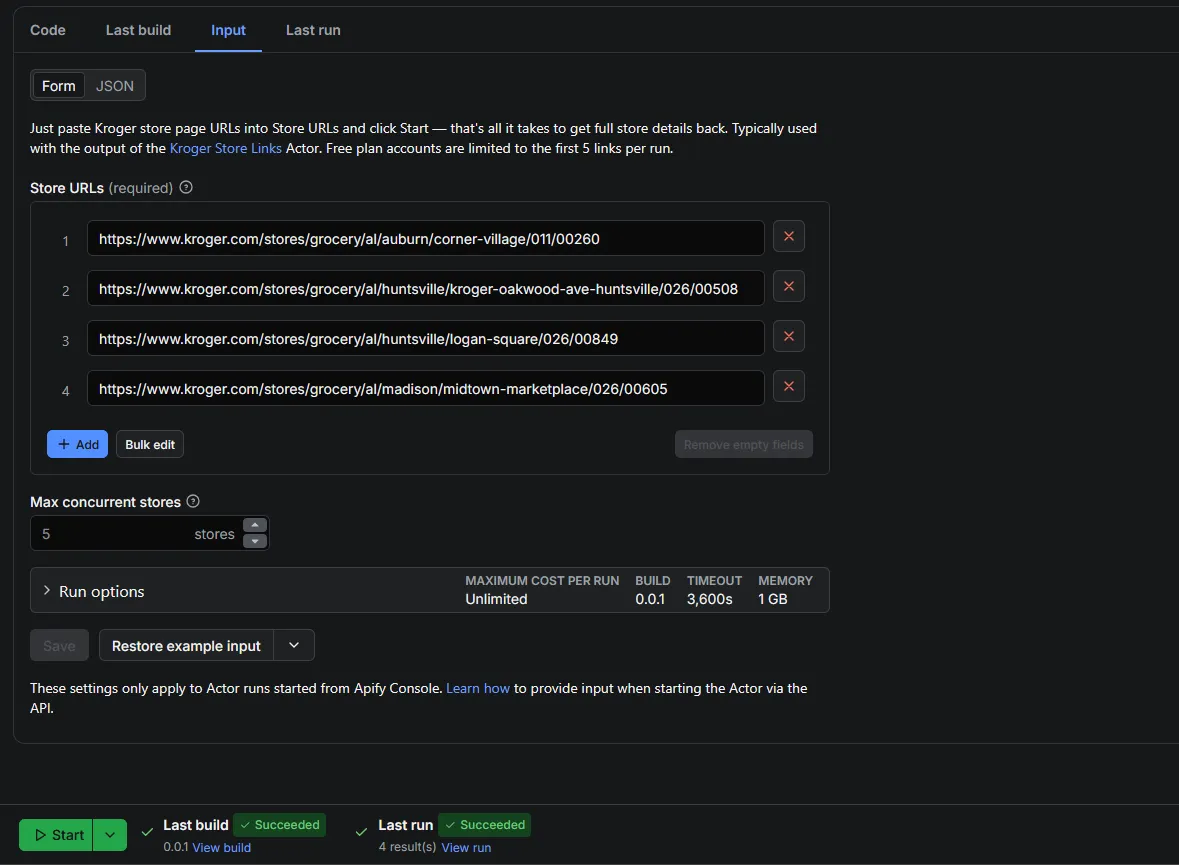
Full technical details are always available in the Input tab and its tooltips.
Output example
You can download the dataset in various formats such as JSON, HTML, CSV, or Excel.
Use cases
- 📍 Store locator apps — power an in-app or on-site "find a Kroger near you" feature with fresh address, hours, and GPS data
- 🛒 Grocery delivery & pickup platforms — check which fulfillment modalities (pickup, delivery, in-store) a store supports before routing orders
- 📈 Market research & competitive analysis — map Kroger-family store density, banners, and department offerings across a region
- 🗃️ Data enrichment — attach verified store hours, timezone, and geolocation to an existing store database or CRM
- 🤖 Automation pipelines — feed store data into downstream tools via Zapier, Make, or the Apify API for alerts, dashboards, or reporting
Kroger-related Actors you might like
| Actor | What it does |
|---|---|
| Kroger Store Locator Scraper - All Store URLs | Discovers every Kroger-family store URL for a city, state, or ZIP code — the ideal input source for this Actor |
| Kroger Store Details Scraper (this Actor) | Extracts full store details — address, hours, GPS, fulfillment — from store URLs |
FAQ
Is it legal to scrape Kroger store data?
This Actor only collects publicly available data from the same anonymous API the Kroger website itself uses to power its store locator — no login, personal data, or private information is accessed. That said, scraping is subject to the target site's Terms of Service, and you're responsible for how you use the extracted data. Always review Kroger's ToS before large-scale or commercial use.
Which Kroger banners/chains does this Actor support?
Any store on a Kroger-family banner works, since they all share the same locator API: Kroger, Ralphs, Fred Meyer, King Soopers, City Market, Dillons, Smith's, Baker's, Gerbes, Harris Teeter, Mariano's, Metro Market, Pick 'n Save, QFC, Food 4 Less, Foods Co, and JayC Food Stores.
Do I need a Kroger API key?
No. This Actor calls the same public, unauthenticated API that the Kroger.com store locator page uses in the browser — no API key or account is required.
Can I run this on a schedule?
Yes. Use Apify's built-in Scheduler to run this Actor daily, weekly, or on any cron interval, and pull fresh store data automatically via API or integrations.
What happens if a store URL fails or is blocked?
Failed or blocked links are skipped and logged; the run only fails if no link succeeds, so a handful of bad URLs won't stop the rest of your batch from completing.
Can I access the results via API?
Yes. Every Actor run and its dataset are accessible through the Apify API, so you can integrate store data directly into your own app, pipeline, or BI tool.
Support
Found a bug or have a feature request? Open an issue on this Actor's Issues tab in Apify Console. Need a custom scraper or a modified version of this one? Reach out — custom development is available.


