
McDonald's Store Locator Scraper
DeprecatedPricing
Pay per usage
McDonald's Store Locator Scraper
DeprecatedExtracts McDonald's US restaurant locations by coordinates, returning store page URLs, addresses, and city/state data.
Pricing
Pay per usage
Rating
0.0
(0)
Developer

DataCach
Maintained by CommunityActor stats
0
Bookmarked
1
Total users
0
Monthly active users
20 days ago
Last modified
Categories
Share
Extract McDonald's store locations in bulk — no CAPTCHA-solving, no manual searching, just clean store page URLs ready to export as JSON, CSV, or Excel.
What is McDonald's Store Locator Scraper?
McDonald's Store Locator Scraper is an Apify Actor that extracts McDonald's US restaurant locations by searching around any set of geographic coordinates. Give it one or more { latitude, longitude } points and it returns every restaurant's store page URL within a 100-mile radius of each point — sourced directly from McDonald's own systems and deduplicated across all your search points.
It's built for anyone who needs a bulk, structured list of McDonald's store links — market researchers, competitor-location analysts, local-SEO tools, or data pipelines that feed a follow-up scraper (see McDonald's-related Actors below for pairing it with a store-detail extractor).
What can McDonald's Store Locator Scraper do?
- 📍 Search by coordinates — pass any number of
{ name, latitude, longitude }points; each returns every McDonald's within a 100-mile radius - 🔗 Collect store page URLs — the exact link McDonald's uses for each restaurant's location page
- 🧹 Automatic deduplication — the same store found near two different coordinates is only saved once
- ⏱️ Extraction timestamps — every result is stamped with the UTC datetime it was collected
- ⏸️ Resumable runs — if a run is migrated or restarted mid-crawl, already-collected links are never re-saved or double-charged
- ⏭️ Pagination controls —
Start indexandExclude already-collected linkslet you continue a previous run without re-paying for results you already have - 🚦 Result limits — cap the total number of links collected with
Max results - 🌐 Full Apify platform integration — run on a schedule, trigger via API or webhooks, connect to Zapier, Make, and other integrations, monitor runs from the Apify Console, and export results in JSON, CSV, Excel, HTML, or XML
What data does McDonald's Store Locator Scraper extract?
| Field | Description | Example |
|---|---|---|
url | McDonald's store page URL | https://www.mcdonalds.com/us/en-us/location/ny/new-york/160-broadway/10528.html |
coordinate | The search coordinate this store was found near | New York, NY |
extraction_datetime | UTC timestamp when the link was extracted (ISO 8601) | 2026-07-23T23:31:22.514887+00:00 |
extraction_date | Extraction date in mm-dd-yyyy format | 07-23-2026 |
How do I use McDonald's Store Locator Scraper to find McDonald's locations?
- Click Try for free or open the Actor's Input tab in Apify Console.
- Keep the default sample coordinates (New York, Los Angeles, Chicago) to try it instantly, or replace
coordinateswith the points you want to search — city centers, zip-code centroids, or a grid across a region. - Optionally set
Max resultsto cap how many links are collected. - Click Start and wait for the run to finish.
- Open the Output tab and download your results as JSON, CSV, Excel, or another supported format.
Free vs Premium: what's the difference?
McDonald's Store Locator Scraper works out of the box on Apify's free usage tier, with a few limits designed to let you try it before scaling up. Upgrade to a paid Apify plan to remove them:
| Feature | Free plan | Premium (paid plan) |
|---|---|---|
| Coordinates per run | 1 | Unlimited |
| Store links per run | Up to 10 | Unlimited (set your own Max results) |
Start index (skip-ahead pagination) | Not available — always starts from result 1 | Full support |
Exclude already-collected links | Up to 1 URL | Unlimited |
In short: the free plan is great for testing the Actor and pulling a handful of links; a paid plan is what you need for full-city, multi-state, or nationwide coverage and for reliably paginating large result sets across multiple runs.
Input
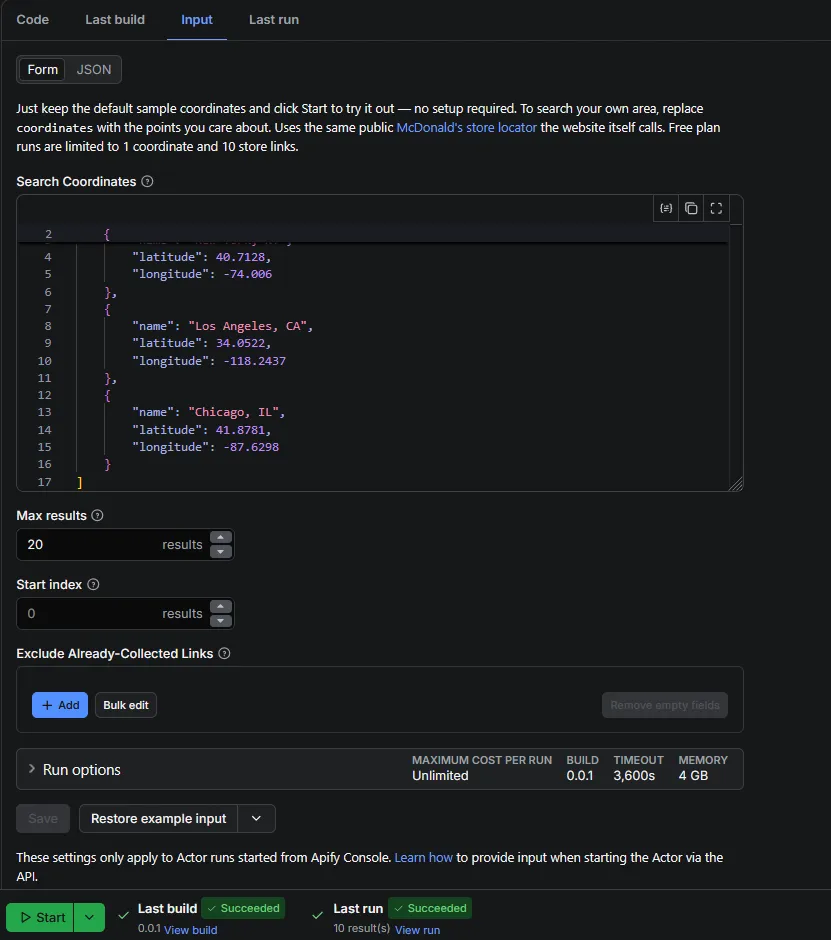
McDonald's Store Locator Scraper accepts a simple JSON input with four optional fields:
- Search Coordinates (
coordinates) — an array of{ name, latitude, longitude }points to search around. Defaults to three sample US cities if left empty. - Max results (
maxResults) — the maximum number of unique store links to collect across all coordinates combined.0means unlimited. - Start index (
startIndex) — skip this many results from the start before saving, useful for continuing a previous run without paying for links you already have. Does not speed up the run — it only changes what gets saved. - Exclude Already-Collected Links (
excludeUrls) — a list of store URLs you already have; they're never saved again regardless of discovery order.
Output example
Each dataset item is one store link:
You can download the dataset in various formats such as JSON, HTML, CSV, or Excel — directly from the Apify Console, or via the Dataset API.
Use cases
- Competitor location mapping — build a list of every McDonald's in a metro area or state for retail site-selection analysis.
- Local SEO and directory tools — feed a directory site or map overlay with up-to-date McDonald's store pages.
- Lead lists for franchise/vendor outreach — generate a bulk list of store URLs to cross-reference against other datasets.
- Data pipeline input — pair the URLs with a store-detail scraper to build a full database of addresses, phone numbers, and hours (see below).
- Market research — measure McDonald's restaurant density around specific coordinates, such as competitor locations or demographic centers.
McDonald's-related Actors
| Actor | What it does |
|---|---|
| McDonald's Store Details Scraper (companion Actor) | Takes the store page links from this Actor and extracts full details — address, phone number, geolocation, and hours |
FAQ
Is it legal to scrape McDonald's store locations?
This Actor only collects publicly available data — the same store location information anyone can find on McDonald's own website, no login and no private data involved. Scraping publicly accessible data is generally permissible, but you're responsible for complying with McDonald's Terms of Service and any applicable laws in your jurisdiction. Consult a legal professional if you plan to use the data commercially.
What happens if the run gets blocked or interrupted?
If McDonald's anti-bot protection blocks a request for a given coordinate, that coordinate is logged and skipped so the run continues with the rest. If the run itself is migrated or restarted by the Apify platform mid-crawl, already-collected links are never re-saved — the Actor resumes exactly where it left off.
How do I avoid re-collecting links I already have?
Use Start index to skip a fixed number of results from the start (fastest to set up, order-dependent), or Exclude already-collected links to list specific URLs that should never be saved again regardless of order (more robust across runs).
Can I run this on a schedule or trigger it from my own app?
Yes — like any Apify Actor, you can run it on a recurring schedule, trigger it via the Apify API, or connect it to Zapier, Make, and other integrations.
Support
Found a bug or have a feature request? Open an issue on the Actor's Issues tab in Apify Console. Need a custom scraping solution or a modified version of this Actor? Reach out — custom development is available.


