

Youtube Channel Email Scraper
Pricing
from $120.00 / 1,000 emails
Youtube Channel Email Scraper
🚀🔒 Extract real YouTube channel emails at scale with logged-in accounts & CAPTCHA solving — No BS, Real Emails ✉️✨
Pricing
from $120.00 / 1,000 emails
Rating
4.4
(30)
Developer

Data Over Coffee
Maintained by CommunityActor stats
101
Bookmarked
5.1K
Total users
287
Monthly active users
3 days ago
Last modified
Categories
Share
Extract real YouTube creator business emails in bulk from channel IDs, handles, or URLs.
Most YouTube email scrapers only read public metadata; we click the "View email address" button with logged-in Google accounts to get the real business email creators publish for inquiries.
Built for influencer outreach, sponsorship prospecting, and bulk YouTube lead generation, whether you need a YouTube influencer contact scraper for one campaign or bulk YouTube email extraction for ongoing prospecting.
🎯 Best For
- Influencer outreach: find creator emails for direct contact
- Sponsorship prospecting: build targeted YouTube influencer email lists for brand deal pitches
- Creator partnerships: source YouTube business inquiry emails for collaborations
- Agency lead generation: extract YouTube emails in bulk for client lead lists
- Media buying outreach: find YouTube channel contact emails for ad placement
- Sales prospecting: build YouTube creator contact lists at scale
Need more channels to scrape?
Already know a few channels like the ones you want? Seed them into YouTube Channel Lookalike Finder to find up to 25,000 similar creators across 200M+ channels.
Know the niche but not the channels? Describe it in plain English, like "US channels reviewing budget espresso machines", in YouTube Channel Finder by Topic or Niche and get creators ranked by how well their content matches, then feed the results into this actor to get their business emails.
📊 Reliability & Speed
- 100% extraction rate: if a channel lists a business email, we extract it.
- 99.9% uptime SLA: the DataOverCoffee backend runs around the clock on dedicated infrastructure with automated failover.
- 50,000+ channels processed daily for agencies and platforms running continuous outreach pipelines.
Delivery speed (last 30 days of production data)
| Milestone | Channels delivered |
|---|---|
| Under 10 minutes | 80%+ |
| Under 30 minutes | 93% |
| Under 1 hour | 97% |
⚙️ How It Works
YouTube hides creator business emails behind a "View email address" button that needs a logged-in Google account and a CAPTCHA solve. This actor is backed by the DataOverCoffee extraction engine, a managed fleet of authenticated Google accounts that visits each channel, clicks the button, solves the CAPTCHA and extracts the email.
Two extraction modes:
- Standard ($0.12 per email): returns the email instantly if we've already extracted it, and scrapes the channel live if we haven't. Same price either way. Subject to a daily limit (see below).
- Force Fresh ($0.40 per email): scrapes each channel live for its current address, including ones we've already extracted. Currently no daily limit.
Step 1: Submit your channels. Run the actor with your YouTube channel URLs, handles (e.g. @ChannelName) or channel IDs.
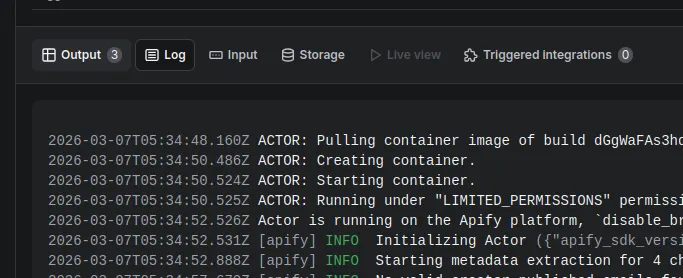
Step 2: Wait for results. The actor checks for results for up to 2 hours and adds them to your dataset as they arrive. Open the Run Log tab (next to Output) for live progress, including how many channels were delivered and any left over.
📝 Inputs
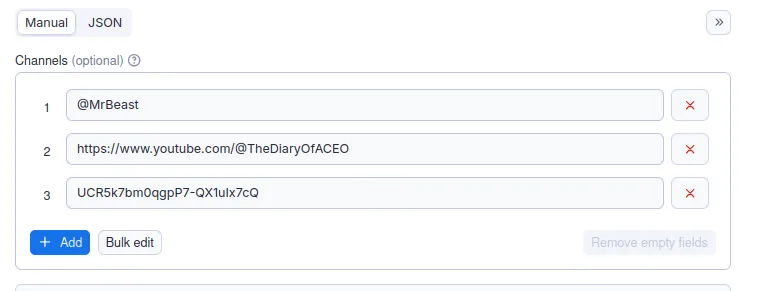
Submit up to 1,000 channels per run. Channel IDs are the recommended input because they avoid URL redirects and handle changes.
- Channel IDs (recommended), e.g.
UCBcRF18a7Qf58cCRy5xuWwQ,UCXU7XVK_2Wd6tAHYO8g9vAA,UCq-Fj5jknLsUf-MWSy4_brA - Channel URLs, e.g.
https://youtube.com/@MrBeast,https://www.youtube.com/channel/UCBcRF18a7Qf58cCRy5xuWwQ - Channel handles, e.g.
@MrBeast,@mkbhd,@veritasium
Tip: find a channel's ID on its YouTube page under "More" > "Share channel" > "Copy channel ID".
Force Fresh Email Scrape re-scrapes each channel live, even ones we've already extracted ($0.40 per email instead of $0.12). Use it when you need the latest email or when you've hit the daily Standard limit.
Important: set "Maximum cost per run" high enough for the results you expect, or leave it empty for no limit. If the budget is too low, the actor processes as many channels as it allows and skips the rest.
📤 Outputs
One row per channel with an email, added as results come in:
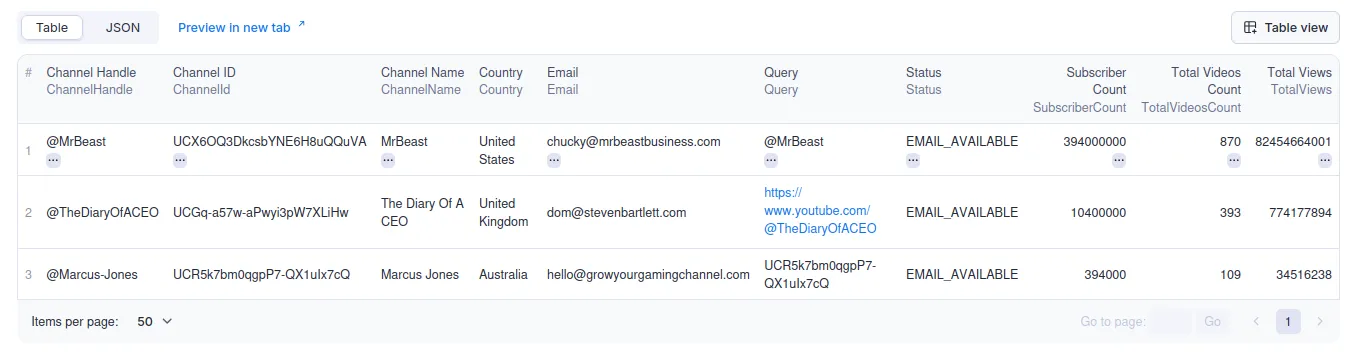
| Field | What it is |
|---|---|
| Query | The channel ID, handle or URL you entered |
| ChannelId | The channel's YouTube ID |
| The business email | |
| Status | Extraction status |
| ChannelName | Display name |
| ChannelHandle | Handle, e.g. @channelname |
| SubscriberCount | Subscribers |
| Country | Channel country |
| TotalViews | Total views across all videos |
| TotalVideosCount | Number of videos |
💰 Pricing
- Standard: $0.12 per email ($12 per 100). Covers emails we've already extracted and live scrapes of new channels, at the same price.
- Force Fresh: $0.40 per email. Each channel scraped live for its current address.
- No email found = no charge
- Pay per result, with no subscriptions or per-seat fees
- Apify Free plan: 10 channels per run and 10 emails for the lifetime of your account. Force Fresh needs a paid plan, which also unlocks up to 1,000 channels per run.
Daily limit on Standard extraction
Standard extraction has a daily limit per Apify account, set dynamically based on current volume and your Apify pricing tier. Force Fresh is currently unrestricted.
When you reach the limit, the Run Log tells you and lists the channels left. You can:
- Run them again the next day (the limit resets at midnight UTC)
- Turn on Force Fresh to get them right away
- Email support@dataovercoffee.com if you need a higher daily limit
Using an AI agent or the API? The channels a run didn't get to are listed under TO_PROCESS in the run's key-value store record STATE (https://api.apify.com/v2/actor-runs/<run id>/key-value-store/records/STATE), so an agent can send exactly those in its next run.
🏢 Built for Agencies & High-Volume Teams
- Scheduling: set up Apify schedules to extract emails daily or weekly from your CRM, spreadsheet or upstream scraper, and turn on Force Fresh on re-runs to catch creators who changed their email.
- API integration: trigger runs through the Apify API and pull results straight into your pipeline.
- Higher limits: running into the daily limit? Email support@dataovercoffee.com and we can raise it for your account.
❓ FAQ
Do I pay for channels that don't have a business email?
No. Channels without a business email are skipped and not charged.
Actor not returning results for all inputs?
Check the Run Log tab first. It shows how many channels were delivered and why any were left over (for example, the daily Standard limit). Start a new run with only the missing channels, or turn on Force Fresh to get them now. Also check that your URLs, handles and IDs are valid; invalid entries are skipped.
Can I test with a small list first?
Yes. Try 5 to 10 channels to see how this YouTube email finder works before scaling up to bulk YouTube email extraction.
How can I get the most emails per run?
Submit channels likely to list a business email, such as channels that already do sponsorships or brand deals.
What is Force Fresh Email Scrape?
It re-scrapes each channel live, including ones we've already extracted, so you get the creator's current email. Standard ($0.12) returns emails we've already extracted and scrapes new channels live, with a daily limit. Force Fresh ($0.40) scrapes everything live and currently has no daily limit. Use Force Fresh when you need the latest email or when you've hit the daily Standard limit.
Need higher limits?
If you run into the daily limit, email support@dataovercoffee.com and we can raise it for your account.
Still having issues?
Open an issue on this actor's Issues tab with your Run ID, or email support@dataovercoffee.com.
How Does This Compare to Other YouTube Email Scrapers?
vs PhantomBuster
PhantomBuster's YouTube scraper reads publicly visible channel metadata but doesn't use logged-in Google accounts, so it can't reach the "View email address" button where creators publish their business email. DataOverCoffee extracts that email with authenticated Google accounts and automated CAPTCHA solving.
vs Browse AI
Browse AI's YouTube extractor scrapes page-level data without signing in, so like other unauthenticated YouTube email scrapers it can't reach business emails that YouTube keeps behind login and CAPTCHA.
vs Bright Data
Bright Data's YouTube collector offers proxies and public data scraping, but the "View email address" button still needs a logged-in Google session and a CAPTCHA solve, which DataOverCoffee handles automatically at scale.
vs Thunderbit
Thunderbit's YouTube scraper extracts visible page content, and business inquiry emails aren't visible page content: they need an authenticated click and a CAPTCHA solve.
Why DataOverCoffee gets the emails others can't
YouTube doesn't show business emails publicly; they sit behind an authenticated button and a CAPTCHA, which page scrapers such as PhantomBuster, Browse AI, Thunderbit, Bright Data and other Apify actors don't get past. DataOverCoffee has:
- Authenticated extraction with a managed fleet of Google accounts that click "View email address"
- Automated CAPTCHA solving at any volume
- 100% extraction rate: if the email exists on YouTube, we get it
- Pay-per-result pricing with no subscriptions, no per-seat fees and no charge when no email is found


