

Youtube Channel Email Scraper
Pricing
from $120.00 / 1,000 emails
Youtube Channel Email Scraper
🚀🔒 Extract real YouTube channel emails at scale with logged-in accounts & CAPTCHA solving — No BS, Real Emails ✉️✨
Pricing
from $120.00 / 1,000 emails
Rating
4.4
(30)
Developer

Data Over Coffee
Maintained by CommunityActor stats
101
Bookmarked
4.9K
Total users
296
Monthly active users
0.51 hours
Issues response
10 days ago
Last modified
Categories
Share
YouTube Creator Business Email Scraper & Contact Extractor
Extract real YouTube creator business emails in bulk from channel IDs, handles, or URLs.
Every other YouTube email scraper only gets public metadata — we actually click the "View email address" button with logged-in Google accounts to get the real business email that creators publish for inquiries.
Built for influencer outreach, sponsorship prospecting, and bulk YouTube lead generation at scale. Whether you need a YouTube influencer contact scraper for a single campaign or a bulk YouTube email extraction tool for ongoing prospecting, this actor has you covered.
🎯 Best For
- Influencer outreach — use this YouTube outreach tool to find creator emails for direct contact
- Sponsorship prospecting — build targeted YouTube influencer email lists for brand deal pitches
- Creator partnerships — source YouTube business inquiry emails for collaboration
- Agency lead generation — extract YouTube emails in bulk for client lead lists
- Media buying outreach — find YouTube channel contact emails for ad placement
- Sales prospecting — build YouTube creator contact lists at scale
Need more channels to scrape?
Already know a few channels like the ones you want? Seed them into YouTube Channel Lookalike Finder to find up to 25,000 similar creators across 200M+ channels.
Know the niche but not the channels? Describe it in plain English — like "US channels reviewing budget espresso machines" — in YouTube Channel Finder by Topic or Niche and get creators ranked by how well their content matches.
Either way, feed the results into this actor to get their business emails.
📊 Reliability & Speed
- 100% extraction rate — if a YouTube channel has a business email listed, we extract it. Every time.
- 99.9% uptime SLA — the DataOverCoffee backend runs 24/7 on dedicated infrastructure with automated failover.
- 50,000+ channels processed daily — built for agencies and platforms running continuous outreach pipelines.
Delivery speed (based on last 30 days of production data)
| Milestone | Channels delivered |
|---|---|
| Under 10 minutes | 80%+ |
| Under 30 minutes | 93% |
| Under 1 hour | 97% |
Most runs complete in a single 45-minute polling window. For high-volume submissions (30,000+ channels/day), full delivery is within 48 hours — just Resurrect your run to pick up the remaining results.
⚙️ How It Works
YouTube hides creator business emails behind a "View email address" button that requires a logged-in Google account and a CAPTCHA solve. This actor is backed by the DataOverCoffee extraction engine — a managed fleet of authenticated Google accounts that visits each channel, clicks the button, solves the CAPTCHA, and extracts the email automatically.
The infrastructure handles 100% of channels that have a business email listed — if the email exists on YouTube, we extract it. The actor polls the backend for up to 45 minutes, delivering results to your dataset as they become available.
We cache every email we extract, so repeat channels return instantly — or flip on Force Fresh to re-scrape any channel live for its current address.
Step 1 — Submit your channels
Run the actor with your list of YouTube channel URLs, handles (e.g. @ChannelName), or channel IDs. The actor will submit your channels to our backend and begin polling for results.
Step 2 — Wait for results
The actor polls our backend for up to 45 minutes, pushing results to your dataset as they become available. Based on production data, 80% of results arrive within 10 minutes and 93% within 30 minutes — most batches complete in a single run. For high-volume pipelines (30,000+ channels/day), all results are delivered within 48 hours.
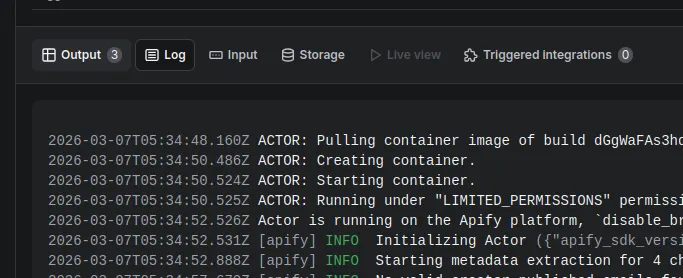
Check the Run Log tab (next to the Output tab) to see real-time progress and status updates.
Step 3 — Collect remaining results (if needed)
For high-volume pipelines (30,000+ channels/day), the backend may still be processing channels after the 45-minute polling window. All results are delivered within 48 hours. Track progress at dataovercoffee.com. Once processing is complete:
- Resurrect the run (recommended) — click
Resurrecton the completed run's page in Apify. This picks up where the previous run left off and only fetches results that haven't been delivered yet — no duplicate charges. Important: Use Resurrect, not "Re-run from start," which would resubmit all channels. - New run with remaining channels — for programmatic workflows, start a fresh run with only the channels not yet in your dataset.
The Run Log tab shows exactly how many channels were delivered, how many are pending, and what to do next.
📝 Inputs
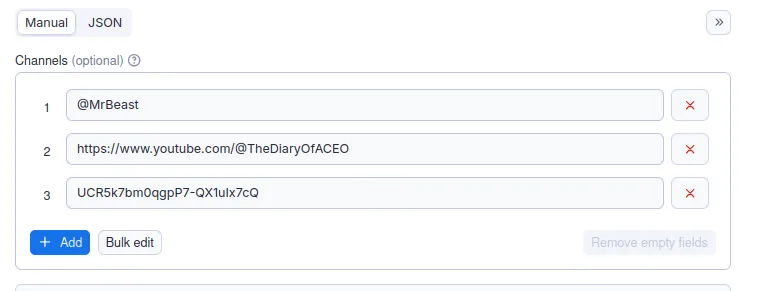
Submit up to 1,000 channels per run and run as many concurrent runs as you need — agencies routinely process tens of thousands of channels per day through parallel runs. The actor accepts channel URLs, handles, and channel IDs — channel IDs are the recommended input because they're the most reliable and avoid issues with URL redirects or handle changes.
Input: YouTube channel IDs, channel handles (@name), or full channel URLs
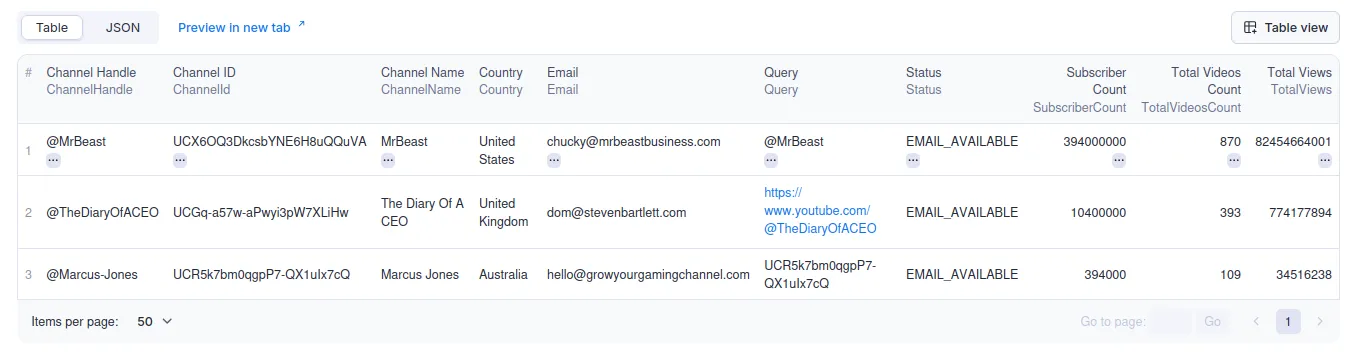
Output: Business email, channel name, channel ID, and extraction status per channel
Accepted formats:
- Channel IDs (recommended) — e.g.
UCBcRF18a7Qf58cCRy5xuWwQ,UCXU7XVK_2Wd6tAHYO8g9vAA,UCq-Fj5jknLsUf-MWSy4_brA - Channel URLs — e.g.
https://youtube.com/@MrBeast,https://www.youtube.com/channel/UCBcRF18a7Qf58cCRy5xuWwQ - Channel handles — e.g.
@MrBeast,@mkbhd,@veritasium
Tip: You can find a channel's ID by going to their YouTube page, clicking "More" > "Share channel" > "Copy channel ID". Or use a free online tool to convert channel URLs to IDs in bulk.
Force Fresh Email Scrape — Re-scrape every channel live for its current email, even ones already on file. $0.40/result vs $0.12. Best right before you send.
Important: Make sure the "Maximum cost per run" setting is high enough to cover your expected results, or leave it empty for unlimited. You are only charged for channels where an email is actually found ($0.12 per email, or $0.40 with Force Fresh Email Scrape enabled). If the budget is too low, the actor will process only as many channels as the budget allows and skip the rest.
📤 Outputs
Your dataset will show one row per channel as results come in:
💰 Pricing
- $0.12 per email ($12 per 100)
- No email found = no charge
- Pay-per-result — no subscriptions, no per-seat fees
- Apify Free tier — 10 inputs per run, 10 email results lifetime limit. Upgrade to a paid plan for unlimited results and up to 1,000 channels per run.
Force Fresh Email Scrape — $0.40/email (optional). Standard returns on-file emails (and scrapes new channels live); Force Fresh re-scrapes everything live so every address is current — worth it right before you send. See What is Force Fresh Email Scrape? in the FAQ.
🏢 Built for Agencies & High-Volume Teams
Running influencer outreach at scale? This actor is designed for teams processing thousands of channels daily.
- Parallel runs — submit up to 1,000 channels per run and launch as many concurrent runs as you need. Agencies routinely process 30,000–50,000+ channels per day this way.
- Scheduling — set up recurring Apify schedules to automatically extract emails on a daily or weekly cadence. Feed channel lists from your CRM, spreadsheet, or upstream scraper. Re-running lists on a schedule? Turn on Force Fresh to catch creators who've changed their email.
- API integration — trigger runs programmatically via the Apify API and pull results directly into your pipeline.
- Resurrect workflow — for very large batches, just Resurrect completed runs to collect remaining results. No re-processing, no double charges.
❓ FAQ
Do I pay for channels that don't have a business email?
No. If a channel doesn't have a business email, we skip it and you won't be charged.
Actor not returning results for all inputs?
Check the Run Log tab first. The actor runs for up to 45 minutes and delivers as many results as it can — 80% of results arrive within 10 minutes, 93% within 30 minutes. For high-volume pipelines (30,000+ channels/day), all results are delivered within 48 hours.
The Run Log tells you exactly how many channels were delivered, how many are still pending, and what to do next. If channels are still processing, resurrect the same run (recommended — handles deduplication automatically) or start a new run with only the missing channels. Also check that all your input URLs, handles, or channel IDs are valid — invalid entries are skipped.
Can I test with a small list before doing bulk extraction?
Absolutely. Try 5–10 channels to see how this YouTube email finder works before scaling up to bulk YouTube email extraction.
How can I optimize runs and maximize my hit rate?
Submit only channels that are likely to have a business email listed (e.g. channels that actively do sponsorships or brand deals).
What is Force Fresh Email Scrape?
Re-scrapes every channel live, even ones we already have on file, so you get the creator's current email. (New channels are scraped live anyway — this refreshes ones we've seen before.) Creators change their contact email over time, so use Standard ($0.12) to build lists and Force Fresh ($0.40) when you're about to send.
Still having issues?
Open an issue on this actor's Apify page with your Run ID, or reach out at support@dataovercoffee.com and we'll look into it.
How Does This Compare to Other YouTube Email Scrapers?
YouTube Creator Business Email Scraper vs PhantomBuster
PhantomBuster's YouTube scraper extracts publicly visible channel metadata but cannot access business inquiry emails. PhantomBuster does not use logged-in Google accounts, so the "View email address" button — where creators publish their real contact email — is inaccessible. DataOverCoffee extracts the actual business email using authenticated Google accounts and automated CAPTCHA solving.
YouTube Creator Business Email Scraper vs Browse AI
Browse AI's YouTube extractor scrapes page-level data without authentication. Like other unauthenticated YouTube email scrapers, Browse AI cannot reach creator business emails that YouTube gates behind login and CAPTCHA. DataOverCoffee's managed fleet of Google accounts bypasses this limitation entirely.
YouTube Creator Business Email Scraper vs Bright Data
Bright Data's YouTube collector provides proxy infrastructure and public data scraping but does not offer authenticated access to YouTube's business email layer. Even with Bright Data's proxy network, the "View email address" button requires a logged-in Google session and CAPTCHA solve — which DataOverCoffee handles automatically at scale.
YouTube Creator Business Email Scraper vs Thunderbit
Thunderbit's YouTube scraper extracts visible page content without Google account authentication. Business inquiry emails on YouTube are not visible page content — they require clicking an authenticated button and solving a CAPTCHA. DataOverCoffee is the only YouTube creator email extraction tool that handles this end-to-end.
Why DataOverCoffee is the only YouTube business email scraper that works
Every other YouTube email extraction tool — whether it's PhantomBuster, Browse AI, Thunderbit, Bright Data, or other Apify actors — scrapes what's publicly visible on a channel page. But YouTube does not display business emails publicly. The email is behind an authenticated button + CAPTCHA wall. DataOverCoffee is the only tool with:
- Authenticated extraction — a managed fleet of Google accounts that can click "View email address"
- Automated CAPTCHA solving — no manual intervention, works at any volume
- 100% extraction rate — if the email exists on YouTube, we get it
- Pay-per-result pricing — no subscriptions, no per-seat fees, no charge when no email is found


