

Search Similar YouTube Channels by Content, Not Keywords
Pricing
$120.00 / 1,000 channels
Search Similar YouTube Channels by Content, Not Keywords
☕ Search similar YouTube channels by content — 200M+ creators, ranked, with stats + emails ✨
Pricing
$120.00 / 1,000 channels
Rating
5.0
(4)
Developer

Data Over Coffee
Maintained by CommunityActor stats
18
Bookmarked
512
Total users
56
Monthly active users
a day ago
Last modified
Categories
Share
🔍 Search Similar YouTube Channels by Content, Not Keywords
Think of it as a search engine for creators. Give it a channel you like, it searches 200M+ creators and returns the ones that publish similar content. Ranked, filtered, and ready to export. It's how you find YouTube creators by example.
🧠 How It Works
- We index 200M+ YouTube channels into one of the largest searchable YouTube channel databases.
- You give us a channel. Paste one or more YouTube channel URLs, @handles, or channel IDs as seeds.
- We find the closest matches based on what they publish.
- We score and rank them by how closely their content matches your seed — each result carries a 0-1 lookalike score.
- We apply your filters — subscribers, avg views, country, email availability.
- You get the results. Ranked list with full metadata, ready to export. A search usually takes 2-5 minutes.
💡 Use Cases
| Who | Problem | How |
|---|---|---|
| Brand marketer | Sponsored one creator, need 200 more like them | Seed the channel, get lookalikes with view + subscriber stats |
| Agency manager | Creator dropped out, need a replacement fast | Seed the dropped creator, filter by only_has_email |
| Marketing director | Agency pitched 15 creators, are they the best? | Seed a few pitched channels, see who else exists |
| International marketer | Need the Brazilian equivalent of a US creator | Seed US channels, filter by country |
| Affiliate manager | Need partners who drive sales | Seed top earners, filter by avg views per video |
| Ecommerce brand | Need 50 micro-creators under 20k subs for UGC | Seed known micro-creators, filter max subs |
⚡ How To Use It
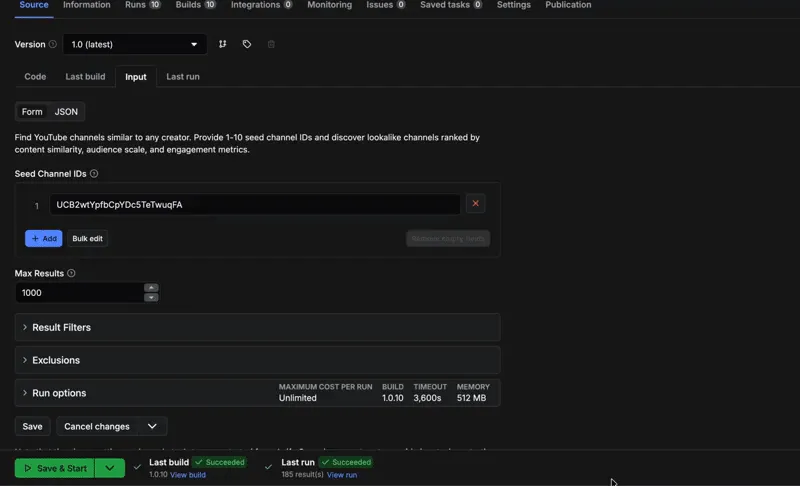
- Paste
seed_channel_ids(1-10 seeds). A channel URL, an@handle, or aUC...channel ID all work, and you can mix them. - Set
limit(default 10, max 25,000). Free Apify accounts get at most 10 results per run. - Optional filters: subscribers, avg views, total views, total videos, country (include or exclude), verified-only, family-friendly, and public-email-only.
- Optional creator filters: person vs brand/organisation, gender, main language, whether the creator earns outside YouTube ads, and whether they have run sponsorships.
- Run (a search usually takes 2-5 minutes), then download results (CSV/JSON/Excel).
How do I point at a channel? Open the creator's channel page and copy the URL straight from your browser. An @handle or a UC... channel ID works too — you don't need to pull the ID out of the URL yourself. A link to one of their videos identifies the video, not the channel, so paste the channel page instead — if you do paste a video link, the run tells you so and keeps going with your other seeds.
📦 What You Get
Each result is one channel, with:
- Identity — name, handle, URL, description, avatar, country, join date, tags
- Audience & reach — subscriber count, total views, total videos, avg views on recent videos, avg views on recent shorts
- Flags — verified badge, family-friendly, public email available
- Creator signals — person vs brand/organisation, gender, main language and every language spoken, whether they earn outside YouTube ads, and whether they have run brand deals or affiliate promotions.
- Match score — a single 0-1 lookalike score on every result, so you can rank and threshold by how close each match is
Export as CSV, JSON, or Excel.
💰 Pricing
- $0.12 per channel — pay per result
- Up to 25,000 results per search
- Apify free tier includes $5 — about 41 results to try it first
🔗 Full Outreach Pipeline
Seed a channel, get lookalikes, extract emails, start outreach. One pipeline, no spreadsheet cleanup.
- Pick a seed channel
- Run this actor with
only_has_email— get email-ready lookalikes - Run YouTube Channel Business Email Scraper on results to get actual addresses
- Export to Google Sheets, CSV, JSON, or Excel via Apify integrations
🏆 Tips
- Multiple seeds = sharper results. One seed is broad. Three seeds is a niche.
- Keep all seeds in the same niche. Multi-seed finds channels similar to all seeds at once. If your seeds span multiple niches, run a separate search per niche.
- Filter by avg views. Millions of subscribers mean nothing if nobody watches.
- Videos vs shorts. Filter
min_avg_views_videosandmin_avg_views_shortsseparately. - Email flag for outreach.
only_has_email= only channels with a public email. Run them through the Email Scraper for actual addresses. - Dedup across runs. Paste up to 500K channel IDs into
exclude_channel_ids.
🔀 No channel to start from?
This actor starts from a channel you can name. If you can describe the creators you want but cannot name one, use YouTube Channel Finder by Topic — same catalog, same filters, same output, but it starts from a written brief instead of a seed.
Have a channel you like? Use this one. Only have a description? Use that one.
🌐 Need creators on other platforms?
Same lookalike engine, every major catalog — seed a creator, get the ones who post similar content plus profile stats, ranked and filtered.
- Instagram Lookalike Search — 150M+ Instagram creators
- TikTok Lookalike Search — 300M+ TikTok creators
❓ FAQ
What's the difference between this and YouTube's "related channels"?
YouTube removed that feature for most creators. This searches the full index with stats, filters, and up to 25,000 results.
How do I find YouTube channels similar to a competitor?
Paste your competitors' channel URLs as seeds. The results are your YouTube competitors and the channels most similar to them. Add your own top creators as seeds too and the overlap gets even more specific.
Can I use this for YouTube influencer discovery and search?
Yes. Seed creators you already work with and the actor searches 200M+ channels for the closest matches — a YouTube influencer database you can filter into a shortlist for outreach or influencer marketing.
Does it return email addresses?
It flags which channels have a public email (HasPublicEmail). To get actual addresses, run those channels through YouTube Channel Business Email Scraper.
How do I find YouTubers for sponsorship?
Add seed channels, set filters (subs, avg views, country, only_has_email), run, export. Best matches are at the top.
What's the best way to find YouTube influencers in a specific niche?
Use multiple seeds. One seed gives you broad results. Three seeds that all represent your niche give you the intersection — channels similar to all of them. The more seeds, the tighter the niche.
If you cannot name a channel in the niche yet, YouTube Channel Finder by Topic takes a written description of it instead.
How is this different from the Channel Finder by Topic?
Different starting point, same catalog. This one starts from a channel you already know and finds more like it. Channel Finder by Topic starts from a description, so you can search for creators you have never seen and cannot name. If you have a good seed channel, use this; if you only have a brief, use that.
Can I find YouTube channels by location or subscriber count?
Yes. Seeding a channel matches by topic automatically; then filter by country and subscriber range to reach a target market or a specific subscriber band.
How fresh is the data?
We refresh channel stats on a rolling basis from our own crawl, so figures are recent estimates rather than live counts.
How long does a search take?
Usually 2-5 minutes. The engine reads content across our full channel index, ranks the matches, and runs your filters during the search — so results take a few minutes, not seconds. Bigger limit values and more seeds take a little longer.
I got fewer results than my limit. Is something wrong?
No. We filter out inactive, spammy, and low-quality channels before returning results. If your filters are tight or the niche is small, there may not be enough channels that pass. The warning is normal — it means the filter is working, not that something broke.
If you need more, take your best results, use them as seeds for a new run, and keep going until you have as many creators as you need. Paste the ChannelId column from your previous results into exclude_channel_ids so you don't get charged for duplicates. That field takes channel IDs only — unlike the seed field, a URL or an @handle there stops the run rather than quietly searching without an exclusion you asked for.
Need help?
Email support@dataovercoffee.com with your Run ID — we'll take a look. You can also open an issue on the actor page.


