
Coupang Category Products Scraper
Pricing
from $1.30 / 1,000 results
Coupang Category Products Scraper
Scrape every product in a Coupang category by page URL or category ID: sale and original price, discount, unit price, rating, review count, brand, delivery type, badges, ad and sold-out flags. Sort and filter by price, rating and delivery.
Pricing
from $1.30 / 1,000 results
Rating
0.0
(0)
Developer

Zebu Data
Maintained by CommunityActor stats
3
Bookmarked
13
Total users
3
Monthly active users
7 days ago
Last modified
Categories
Security
Limited permissionsShare
What does Coupang Category Products Scraper do?
Coupang Category Products Scraper extracts every product from any category page on Coupang, Korea's largest online marketplace. Give it a category page URL (or just a category ID) and it returns clean, structured JSON for each product — title, sale and original price, discount, rating, delivery type, cashback, and more.
It is a fast, no-code API alternative for pulling Coupang catalog data at scale. Because it talks to Coupang's own list endpoint over plain HTTP (no headless browser), it is quick and cheap to run, which makes it a good fit for price monitoring, catalog research, and competitive analysis.
Why use Coupang Category Products Scraper?
- Two ways to input a category — paste the full category URL (
https://www.coupang.com/np/categories/498704) or just the ID (498704). Mix and match as many as you like. - Coupang's own filters, built in — sort, minimum rating, price range, and delivery type (로켓배송 / 로켓직구 / 무료배송 / 탑 브랜드), named exactly as they appear on Coupang.
- Page control — set how many pages to scrape per category (up to ~120 products per page).
- Rich, clean fields — 27 fields per product, ready to use with no post-processing.
- Efficient — pure HTTP, no browser, so runs are fast and low-cost.
| This actor | Typical Coupang scrapers | |
|---|---|---|
| Input by category URL and ID | ✅ | Sometimes |
| Coupang-matched delivery filter | ✅ | Rarely |
| Sort + rating + price filters | ✅ | Sometimes |
| Pure HTTP (no browser) | ✅ | Often browser-based |
What data can you extract?
Each product is returned with these fields:
| Field | Type | Description |
|---|---|---|
title | text | Product title |
url | link | Product detail page URL |
image_url | image | Main product image |
sale_price | number | Current price (₩) |
origin_price | number | Original price before discount (₩) |
discount_rate | number | Discount percentage |
discount_type | text | Discount label (할인 / 쿠폰할인 / R.LUX혜택) |
currency | text | Currency code (KRW) |
unit_price | number | Price per unit, when shown |
unit | text | Unit for the unit price (e.g. 100g, 1개) |
rating | number | Average rating (0–5) |
rating_count | number | Number of reviews |
brand | text | Brand name (luxury / R.LUX items) |
delivery | text | Delivery promise text (e.g. 내일(일) 도착 보장) |
badges | array | Delivery badges (ROCKET_MERCHANT, TOMORROW, …) |
is_free_shipping | boolean | Whether shipping is free |
free_ship_over | number | Free-shipping threshold (₩) |
cashback | text | Cashback reward text |
condition | text | Item condition (새 상품 / 반품 …), for resale items |
is_global | boolean | Overseas direct purchase (해외직구 / Rocket Direct) |
is_ad | boolean | Sponsored ad slot |
is_soldout | boolean | Sold out |
rank | number | Position within the category list |
category_id | text | Source category ID |
product_id | text | Coupang product ID |
item_id | text | Item ID |
vendor_item_id | text | Vendor item ID |
How to scrape Coupang categories
Every Coupang category has its own page, and the number in that page's URL is the category ID. Here is how to grab one:
- On Coupang, hover over 카테고리 (Categories) at the top-left and pick a category — for example 패션의류/잡화 › 여성패션. Coupang opens that category's product list page.
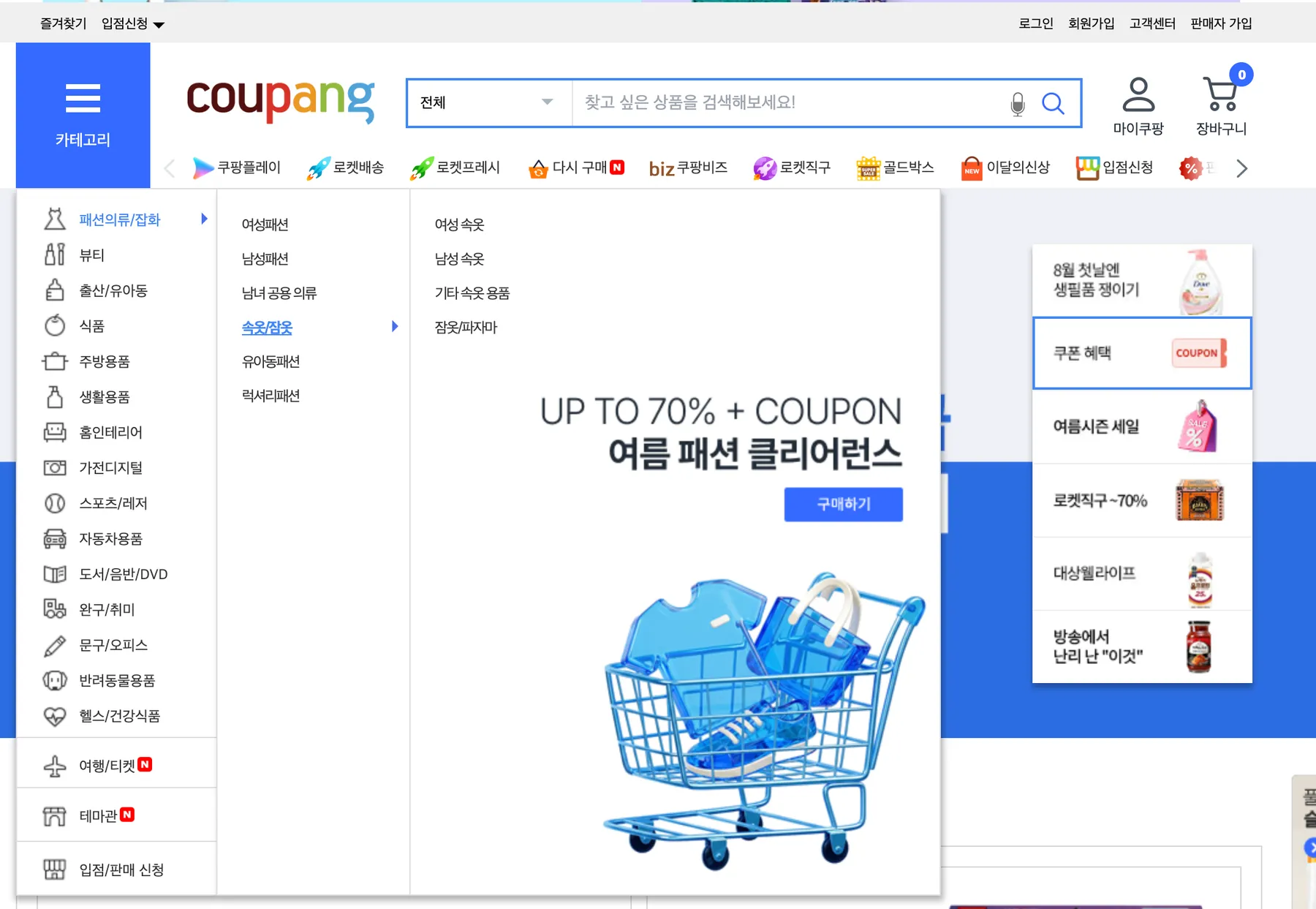
- Copy the page URL from your browser, e.g.
https://www.coupang.com/np/categories/498704. The number at the end (498704) is the category ID — you can paste either the full URL or just that number into the actor. - Paste one or more categories into Coupang categories, one per line.
- Set Max pages per category (default 5) to control how many products you collect.
- Optionally pick a Sort by order and add rating, price, or delivery filters — they mirror Coupang's own list-page controls.
- Click Start and download the results as JSON, CSV, or Excel when the run finishes.
How much does it cost?
The actor uses plain HTTP requests instead of a headless browser, so it consumes very little compute. That keeps runs fast and the per-1,000-product cost low compared with browser-based scrapers. You only pay for what you run, and you can cap usage with Max pages per category. New Apify accounts include free monthly usage credits to try it out.
Input
Configure the run from the Input tab (or via the API). Fields:
- Coupang categories (
categories) — category page URLs or IDs, one per line. Required. - Max pages per category (
maxPages) — pages to scrape per category (default 5). - Sort by (
sortBy) — 랭킹순 / 낮은가격순 / 높은가격순 / 판매량순 / 최신순. - Minimum rating (
minRating) — 전체 / 4·3·2·1 stars & up. - Delivery filter (
deliveryFilter) — All / 로켓배송 / 로켓직구 / 무료배송 / 탑 브랜드. - Min price / Max price (
minPrice/maxPrice) — price range in Korean won (₩).
Output
Each item is one product. Example (real data, some fields shortened):
Tips
- Category IDs are stable — the number in a category URL rarely changes, so you can save IDs and reuse them for scheduled runs.
- Filters mirror Coupang — sorting and filters map 1:1 to the controls on Coupang's list page, so results match what you'd see in the browser.
- Delivery filter + sort — when a delivery filter like 로켓직구 is applied, Coupang keeps the sort direction (low vs high price) but may not order items strictly; sort the dataset yourself if you need exact ordering.
- Some fields are context-specific —
brandappears mainly on luxury (R.LUX) items, andconditionis filled only when a product has resale/used offers, so they are often empty. This is expected. - Schedule runs or integrate with your stack via the Apify API, scheduler, and integrations.
FAQ and support
Is scraping Coupang legal? This actor collects only publicly available product listing data. You are responsible for how you use the data. Do not collect personal data, and comply with Coupang's terms and applicable laws (including GDPR where relevant). It does not collect any personal information.
Which countries' prices does it show? Coupang is a Korean marketplace; prices are in Korean won (₩) and reflect the Korean storefront.
Can I scrape a search or brand page? This actor targets category pages (/np/categories/{id}). For keyword search or other page types, let us know.
Something's wrong or missing a field? Open an issue on the actor's Issues tab and we'll take a look.


