

Naver Shopping Product Scraper
Pricing
from $4.00 / 1,000 results
Naver Shopping Product Scraper
Scrape Naver Shopping search results by keyword: product name, price and discount, seller and brand-store flag, shipping fee, rating, review count, stock and ad flags. Search several keywords at once and choose how many pages to crawl.
Pricing
from $4.00 / 1,000 results
Rating
5.0
(40)
Developer

Zebu Data
Maintained by CommunityActor stats
47
Bookmarked
491
Total users
39
Monthly active users
4.7 hours
Issues response
16 days ago
Last modified
Categories
Share
Naver Shopping Product Scraper collects product listings from Naver Shopping, Korea's leading shopping search platform. Enter one or more keywords and get every product in the search results. Each product comes with its price and discount, shipping fee, rating, review count, stock, and seller and store details. You can collect up to 200 result pages per keyword.
What does Naver Shopping Product Scraper do?
Naver Shopping Product Scraper works like a Naver Shopping search API. It runs a Naver Shopping search for each of your keywords and pages through the results. It saves one record per product with 27 fields, covering the product, its price, the seller and the listing, and tags each record with the keyword that found it.
Keywords can be in Korean or English, for example 나이키 운동화 or Nike running shoes. Naver returns the matching Korean listings either way. Korean keywords usually return the most complete results.
Why use this Naver Shopping scraper?
- 💰 The full price picture. Get the original price, discounted price, discount rate and shipping fee for every product, which is ideal for price monitoring and promotion tracking.
- 🏪 Seller intelligence. See which store sells each product. Every record includes the seller name, seller ID, store URL, Naver Pay seller ID and whether it is an official brand store.
- ⭐ Demand signals. Average rating, review count and stock level show which products actually sell.
- 🏷️ Organic vs sponsored. Sponsored listings are flagged, so you can analyze organic rankings separately from ads.
- 🔎 Many keywords per run. Run a whole list of keywords in one go. Each record keeps its
searchKeyword. - 🧩 No setup. You don't need a Naver account, API key or Korean phone number. Export to JSON, CSV or Excel, or use the Apify API.
- 🤖 Works with AI agents. Assistants that support MCP can run it through the Apify MCP server.
Popular use cases
- Price monitoring. Track prices and discounts for your products or a competitor's, and spot unauthorized resellers of your brand.
- Competitor and seller research. Find out who sells a brand or category on Naver, and which stores are official brand stores.
- Market research for Korea. Size a category by counting products and sellers for a keyword, and compare price ranges and ratings.
- Cross-border e-commerce. Research demand, pricing and competition before selling in the Korean market.
- Product feeds and catalogs. Pull product names, images, prices and links into dashboards, spreadsheets or internal tools.
What data can you extract from Naver Shopping?
| Field | Type | Description |
|---|---|---|
productName | string | Product title as shown on Naver Shopping |
productId | string | Naver product ID |
productPageUrl | string | Link to the product page, usually a SmartStore page |
productImageUrl | string | Main product image |
originalPrice | number | Original price in KRW |
discountedPrice | number | Current price after discount, in KRW |
discountRate | number | Discount in percent |
shippingFee | number | Shipping fee in KRW (0 = free shipping) |
averageRating | number | Average review score |
totalReviews | number | Number of reviews |
stock | number | Stock quantity reported by the listing |
orderCutoffTime | string | Order cut-off time for same-day dispatch, when shown |
sellerName | string | Store name |
sellerId | string | Seller ID |
sellerPageUrl | string | Link to the seller's store |
naverPaySellerId | number | Seller ID in Naver Pay |
isBrandStore | boolean | true for official brand stores |
authenticationType | string | Listing verification type reported by Naver |
isAd | string | AD for sponsored listings, Not Ad for organic ones |
isNewProduct / isGroupProduct / isFreshProduct / isOverseaProduct | boolean | Listing flags: new, group listing, fresh food, overseas item |
hasGift / isSuperPointProduct | boolean | Gift with purchase and extra-points promotions |
searchKeyword | string | The keyword that found the product |
crawledAt | string | When the record was scraped |
How to scrape Naver Shopping
- Open the Actor and click Try for free.
- Enter your keywords. Use one keyword per line, in Korean or English.
- Choose how many pages. Set Maximum Crawl Pages for each keyword. It's 2 by default and up to 200, and each page returns at least 50 products.
- Click Start. Products appear in the Output tab while the run is going.
- Export or connect. Download JSON, CSV or Excel, or send the data to your tools through the API and integrations.
How much does it cost?
This Actor uses pay-per-result pricing, and Apify platform usage is included.
- What you pay for: each product record counts as one result, so the cost grows with the number of pages you collect.
- Capping your spend: you can set a maximum cost for a run, and the Actor stops as soon as it's reached.
- Current price: see the Pricing tab. You can try the Actor on the free Apify plan.
Input
| Field | Key | Type | Description |
|---|---|---|---|
| Search keywords | keywords | array of strings | What to search for, in Korean or English, e.g. 나이키 운동화 or Nike running shoes |
| Maximum crawl pages | maxCrawlPages | integer | Result pages to collect per keyword (default 2, maximum 200) |
Output
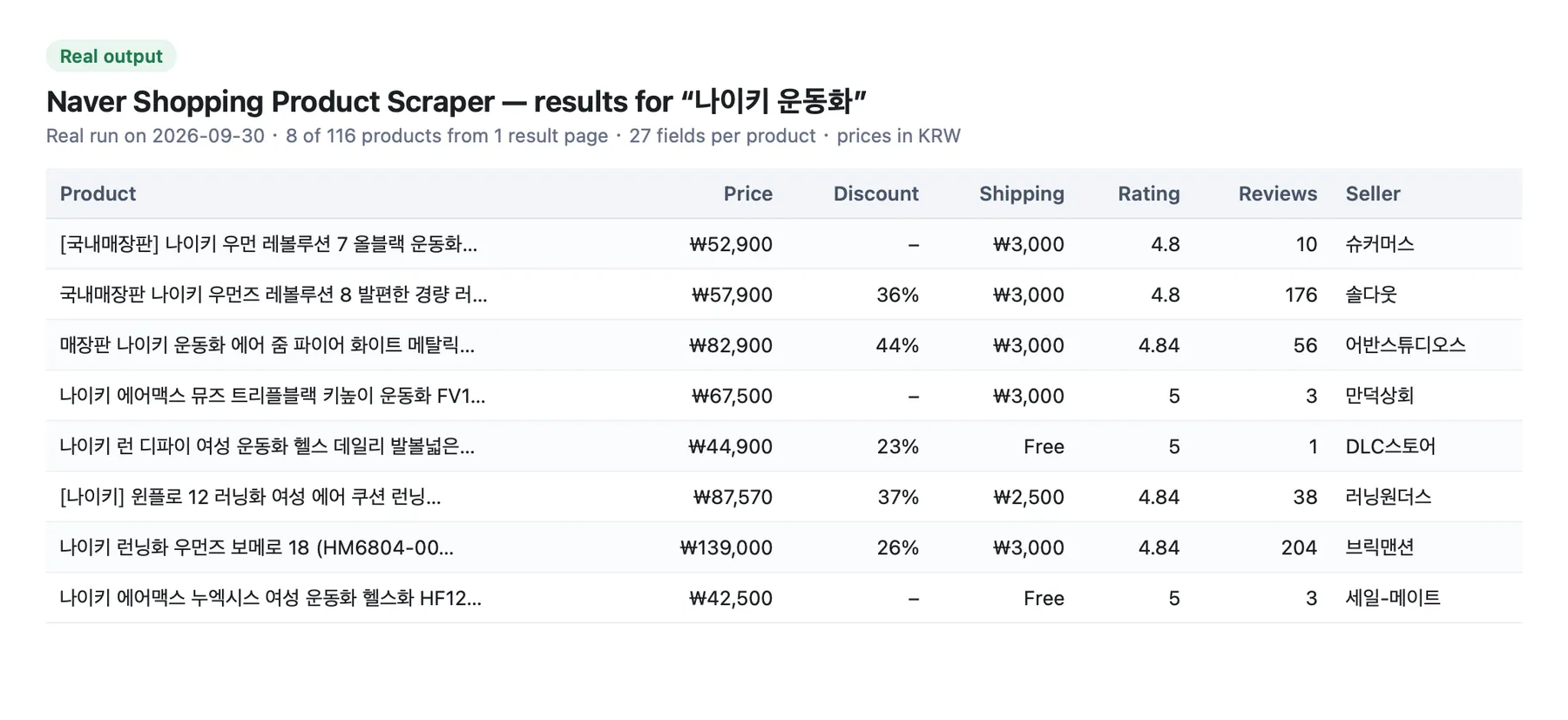
Each product is saved as one dataset record. Here is an example from a real run:
Tips
- Start small. Run 1–2 keywords with 1–2 pages first, then scale up.
- Be specific. A brand plus a product type, such as
나이키 러닝화, gives more focused results than a single broad word. - Remove duplicates across keywords. The same product can appear for several keywords. Use
productIdto deduplicate. - Separate ads from organic results. Filter on
isAdwhen you study organic rankings. - Track prices over time. Schedule daily or weekly runs and compare
discountedPricebyproductId. - Go deeper on a product. Send
productPageUrlvalues to the Naver Product Detail Scraper to get per-option stock, images and the full seller profile.
Related Actors
- Naver Product Detail Scraper: get the full record for a SmartStore or Brand Store product: price, stock for each option, images, review stats, delivery and the seller's business profile.
- Naver Shopping Reviews Scraper: collect customer reviews for any product, with rating, text, photos and videos, the option bought, seller replies and an AI review summary.
- Naver Map Search Results Scraper: collect business listings from Naver Map with names, addresses, phone numbers and ratings.
- Naver Search Scraper: collect Naver search results from the 통합, blog, cafe, news, 지식iN and video tabs, with the same filters as the website.
- Naver Blog Scraper: collect Naver Blog posts with full text, likes and comments, and bloggers' neighbors, visitors and contacts.
FAQ and support
Can I search in Korean?
Yes. Korean and English keywords both work. Korean keywords usually match the most listings, because product titles on Naver Shopping are mostly in Korean.
Is it legal to scrape Naver Shopping?
This Actor collects only publicly available product and store information. It doesn't extract private user data. If you use the data, follow the laws that apply to you, such as data protection rules. If you're unsure, consult a lawyer.
Do I need a Naver account or API key?
No. Just enter your keywords and start the run.
Why are some fields empty?
Not every listing shows every detail. For example, orderCutoffTime appears only when the seller offers same-day dispatch. Fields that aren't shown on a listing stay empty.
Something not working?
Open an issue from the Actor's Issues tab and I'll take a look.


