
Audio to Text, Translation & Subtitles + Speaker Diarization
Pricing
from $8.00 / 1,000 speech minutes
Audio to Text, Translation & Subtitles + Speaker Diarization
Speech to text with Whisper: transcribe audio and video (MP3, MP4 and more) with timestamps and speaker labels for meetings, interviews and podcasts. Translate into English, Spanish, Portuguese, French, German or Italian and get SRT/VTT subtitles. Pay only for speech.
Pricing
from $8.00 / 1,000 speech minutes
Rating
0.0
(0)
Developer

Devarq
Maintained by CommunityActor stats
1
Bookmarked
2
Total users
1
Monthly active users
9 days ago
Last modified
Categories
Features
Share
What is Audio to Text, Translation & Subtitles + Speaker Diarization?
Audio to Text, Translation & Subtitles + Speaker Diarization is a speech to text tool: it transcribes audio and video files (MP3, MP4, WAV, M4A and more) into text with timestamps, can label who said what (speaker diarization) in meetings, interviews and podcasts, translates the transcript into English, Spanish, Portuguese, French, German or Italian, and generates SRT and VTT subtitles, all in one run. It runs OpenAI's open-source Whisper model, for $0.01 per minute of speech. Silence is free.
Paste direct file links, Google Drive or Dropbox share links, and get one clean row per file as JSON, CSV or Excel, plus ready-to-upload subtitle files. You don't need an OpenAI key or any other account, and there's nothing to install.
The easiest way to try it: click Try for free, then Start with the prefilled 25-second sample recording, which also gets translated into Spanish. Apify's free plan includes $5 of credit every month, which covers about 500 minutes of speech (over 8 hours).
What do you get for each file?
- Transcript: the full text, plus segments with start and end times in seconds
- Detected language, with the model's confidence
- Speaker labels (optional):
Speaker 1,Speaker 2… on every segment, the speaker count, and a transcript with one paragraph per speaker turn - Subtitles: SRT and WebVTT files, each with a download link
- Translations into any of 6 languages, several at once, each with its own subtitles that keep the original timings (and the speaker labels)
- File details: file name, total duration and detected speech time, which is what you pay for
Why run it on Apify?
- Call it as an API from any language, or let AI agents use it through MCP.
- Process up to 100 files per run, or schedule runs for new recordings.
- Connect it to Google Sheets, Zapier, Make, n8n or a webhook, or download any run as CSV or Excel.
Why use this audio to text and translation Actor?
Transcript, translation and subtitles in one run. Translate one recording into several languages at once, and get translated subtitles you can upload straight to YouTube, Vimeo or your video editor.
You pay for speech, not silence. Voice detection measures how much of the file is actually speech. Silence and long pauses aren't charged. In our test, a 3-minute file with 2 minutes of silence was charged as 1 minute.
Know who said what. Turn on speaker labels and every segment gets Speaker 1, Speaker 2 and so on. The same person keeps the same number for the whole file, even in an hour-long meeting, and the labels carry over into every translation and subtitle file. Diarization runs inside the Actor with the open pyannote model, so there's no extra service to sign up for.
Translation costs almost nothing. Each translation language adds only $0.001 per minute of speech.
Fair billing.
- Minutes are rounded up once per run, not per file, so 10 short clips of 6 seconds each cost 1 minute, not 10.
- Broken links, unsupported links, files without audio, and files longer than your limit are not charged. They appear in the results with the reason.
- Set a maximum cost per run in Apify, and the Actor stops cleanly before a file that wouldn't fit.
No third-party AI service. Whisper and the translation models (Helsinki-NLP OPUS-MT) run inside the Actor, so your audio isn't sent to OpenAI, Google or any other AI provider.
Built for automation and AI agents. Every run ends with a one-line status message, failed files never stop the run, and loose input such as {"url": "...", "translate": "Spanish"} works too.
How to transcribe and translate audio to text
- Click Try for free and sign in to Apify (the free plan is enough).
- Paste your audio or video links, one per line.
- Leave Spoken language on Detect automatically, or pick the language.
- Optional: pick one or more languages under Translate to.
- Optional: tick Label who said what for meetings, interviews and podcasts.
- Click Start. A 10-minute recording takes about 2–4 minutes, or about 6–10 minutes with speaker labels.
- Open the Output tab: read the transcript, download the subtitle files, or export everything as JSON, CSV or Excel. You can also fetch the results through the API.
Use cases
Copy an input into the JSON tab, or send it through the API.
Generate SRT subtitles from a video, in several languages
You get English subtitles plus Spanish, Portuguese and German subtitles with the same timings, ready to upload.
Transcribe a meeting or interview with speaker labels
Each segment gets Speaker 1 or Speaker 2, and text has one paragraph per turn, ready for meeting notes or quotes. Leave out numSpeakers if you don't know the count.
Transcribe Google Drive videos to text, in bulk
Translate audio to English
Works for Spanish, Portuguese, French, German and Italian audio. The original-language transcript and the English translation arrive side by side.
Podcast and MP3 to text for search, notes or an AI model
Send the episode MP3 links (most podcast RSS feeds include them), then feed text or segments into your search index, CMS or language model.
Zoom, Google Meet or Teams recordings to meeting notes
Download the recording (Zoom can save an audio-only M4A file; MP4 works too), share it from Drive or Dropbox, and run it with speaker labels. text comes back as one paragraph per speaker turn, ready to paste into your notes or to give to an AI model for a summary and action items.
Sales and support call review
Two-speaker labels split the agent from the customer, so you can search what customers asked for or check scripts across up to 100 calls per run. Pauses and silence on the line aren't charged.
Translate course videos and webinars for new markets
One run gives the English transcript plus subtitles in five more languages, all with the original timings, for YouTube, Vimeo, Udemy, Teachable or your video player.
Voice notes and short clips in bulk
Send up to 100 links per run. Minutes are rounded up once for the whole run, so 100 voice notes of 20 seconds cost 34 minutes, not 100.
Input
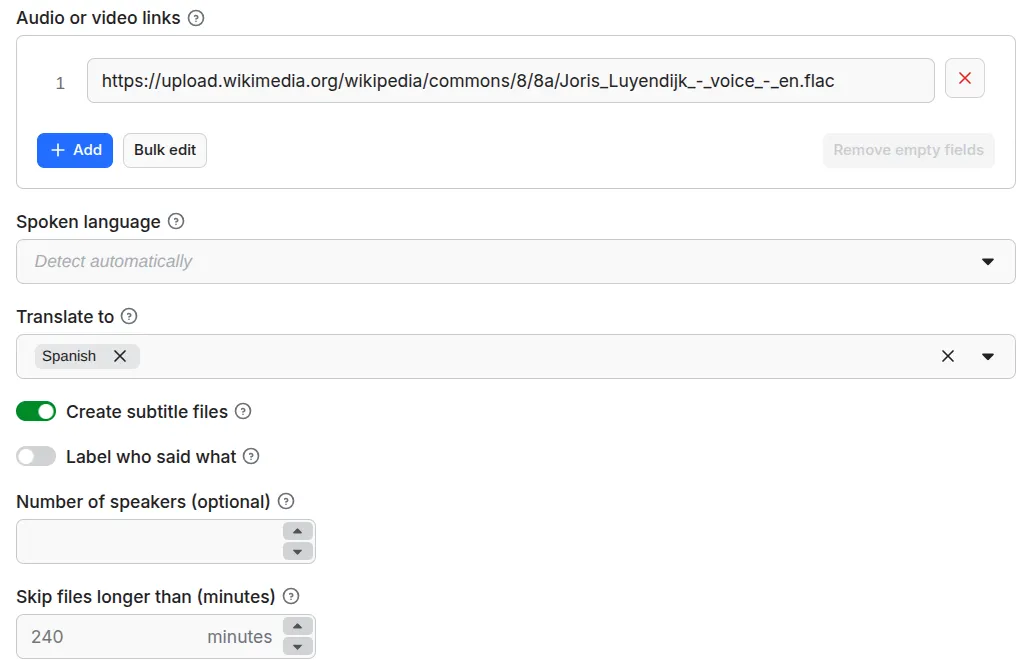
| Field | What it does | Default |
|---|---|---|
urls | Links to audio or video files, up to 100 per run | a 25-second sample, used only when the input is empty |
language | auto, en, es, pt, fr, de or it | auto |
translateTo | Any of en, es, pt, fr, de, it; several at once | none |
subtitles | Save SRT and VTT files | true |
speakerLabels | Add Speaker 1, Speaker 2, and so on to turns and subtitles | false |
numSpeakers | Speaker count from 1–10 (also turns labels on); leave empty for automatic detection | automatic |
maxMinutesPerFile | Skip longer files without charging | 240 |
Supported links:
- Direct file links: MP3, M4A, WAV, OGG, OPUS, FLAC, AAC, MP4, MOV, WEBM, MKV.
- Google Drive share links. The file must be shared as "Anyone with the link".
- Dropbox share links.
- Apify key-value store records, for example files saved by another Actor.
Not supported: YouTube, TikTok, Instagram, Facebook and X page links. Use a direct link to the media file instead.
Limits: 100 links per run and 2 GB per file. Files can be up to 600 minutes long (set by maxMinutesPerFile), at the default memory: long files are processed in 10-minute pieces, so they don't need more memory.
Output
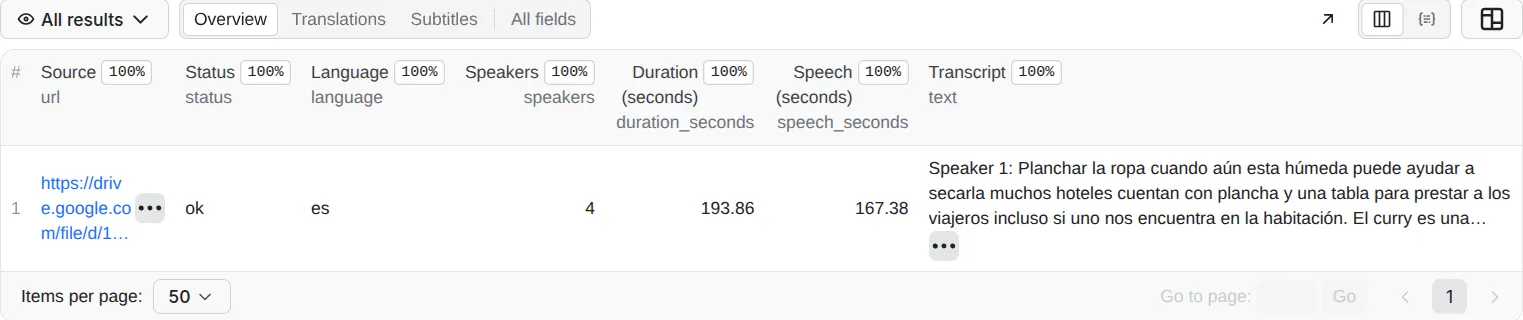
One row per link. Here's a shortened real row from a 3-minute Spanish recording on Google Drive, with speaker labels and an English translation:
| Field | Meaning |
|---|---|
url, file_name | The link you sent, and the file name the host reported |
status | ok, failed (for example, a download error) or skipped (for example, an unsupported link or a file over your limit). error says why |
language, language_probability | The spoken language Whisper detected, and its confidence from 0 to 1 |
duration_seconds, speech_seconds | The file length, and the detected speech you're charged for |
text, segments | The transcript, as one text and as timed segments |
speakers, segment speaker | Detected count and the stable speaker label for each segment when requested |
speaker_labels_error | Why labels could not be added; the unlabelled transcript is still delivered |
srt, vtt, srt_url, vtt_url | The subtitles, as text and as download links |
translations | One entry per language, with the same fields as the transcript |
translations_skipped | Languages that were skipped, and why (for example, the same as the spoken language) |
model, processed_at | The Whisper model used and when the file was processed (UTC) |
The Output tab has three views: Overview, Translations and Subtitles.
How much does it cost?
You pay per minute of detected speech, rounded up once per run:
| What | Price |
|---|---|
| Transcription | $0.01 per minute of speech |
| Translation | $0.001 per minute of speech, per language |
| Speaker labels (optional) | $0.015 per minute of speech, only when labels are delivered |
| Subtitles, failed files, skipped files, silence | free |
Examples:
- A 30-minute podcast with 27 minutes of speech: $0.27.
- The same podcast translated into 3 languages: $0.27 + 3 × $0.027 = $0.35.
- 100 voice notes of 20 seconds each (33.3 minutes of speech, rounded up to 34): $0.34.
- A 45-minute interview with 40 minutes of speech and speaker labels: $0.40 + $0.60 = $1.00.
How accurate is it?
Word error rate of the Whisper model this Actor runs, measured on public test recordings (LibriSpeech for English, Google FLEURS for the other languages; lower is better):
| English | Spanish | Portuguese | German | French | Italian |
|---|---|---|---|---|---|
| 1.0% | 6.5% | 7.5% | 9.9% | 13.9% | 14.3% |
Clear recordings with one speaker at a time come out best. Background music, crosstalk and phone-quality audio lower the accuracy. Names and rare terms are sometimes misspelled.
Speaker labels, measured as diarization error rate (the share of speech time given the wrong speaker, overlapping speech included; lower is better):
| Recording | Speakers found | Error rate |
|---|---|---|
| 2-person support interview, 2.4 min | 2 of 2 | 10.2% |
| 4-person meeting (AMI), 7.5 min | 4 of 4 | 16.0% |
| 4-person meeting (AMI), 57 min | 4 of 4 | 23.0% |
Interviews and podcasts with 2–3 clear voices work best. In meetings where people talk over each other, short interjections can get the wrong label.
Use with AI agents (MCP)
Add this Actor to your agent through the Apify MCP server, then ask, for example:
- "Transcribe this recording and give me a summary: https://example.com/call.mp3"
- "Create Spanish and German subtitles for this video:
- "Translate this French podcast episode into English:
- "Transcribe this interview and tell me who said what:
The smallest input is {"urls": ["<link>"]}. Agents can also use url, audioUrl, links or startUrls for the links, and translate or targetLanguages for the languages, with codes (es) or names (Spanish, español). For speaker labels, speakerLabels: true, diarization: true or a count such as speakers: 2 all work.
FAQ
Can I transcribe a YouTube video? Not with a YouTube link. Use a direct link to the video or audio file (for example from Google Drive, Dropbox or your own server).
Which languages are supported? English, Spanish, Portuguese, French, German and Italian, for both transcription and translation. Recordings in other languages are still transcribed if Whisper recognizes them, but accuracy isn't guaranteed and they can't be translated yet.
My Google Drive link failed. Why? The file must be shared as "Anyone with the link". Private files and folder links don't work. Share each file and use the file's own link.
Does it label who is speaking?
Yes. Turn on Label who said what to add stable Speaker 1, Speaker 2, and so on to transcript turns, translations and subtitles. Leave the optional speaker count empty unless you know it. Labels are numbers, not names: rename them in your own tool once you know who Speaker 1 is.
How long can a file with speaker labels be?
With the default 80-minute timeout, up to about 70 minutes. For a longer file, set Timeout in the run options to at least 1.2 times the file length (for example 2½ hours for a 2-hour recording). If a file wouldn't finish in time, you still get the transcript, without labels and without the label charge, and speaker_labels_error tells you to raise the timeout.
What happens to my files? Each file is downloaded into the run, processed, and deleted when it's done. Transcripts and subtitles stay in your Apify storage, under your account's data retention settings. Audio isn't sent to any third-party AI service.
How long can a file be?
Up to 600 minutes, and 240 by default (maxMinutesPerFile). Processing takes about a quarter of the file's length. The default run timeout (80 minutes) fits files up to about 4 hours; for longer files, raise Timeout in the run options, for example to 3 hours for a 10-hour file.
Is this affiliated with OpenAI? No. This Actor runs Whisper, the open-source speech recognition model OpenAI released under the MIT license. It doesn't use the OpenAI API, and it isn't affiliated with or endorsed by OpenAI.
Model attribution: translation uses Helsinki-NLP OPUS-MT models (Apache-2.0 and CC BY 4.0). Speaker labels use pyannote/speaker-diarization-community-1 by Hervé Bredin and the pyannote.audio team, revision 3533c8cf8e369892e6b79ff1bf80f7b0286a54ee, licensed under CC BY 4.0.
Changelog
- 1.0: first release. Transcription in 6 languages, translation between them, SRT/VTT subtitles, speaker labels (diarization), Google Drive and Dropbox links, and speech-only billing.


