
Audio & Video to Text Transcription (Whisper): Speech to Text
Pricing
from $4.80 / 1,000 audio minutes
Audio & Video to Text Transcription (Whisper): Speech to Text
Speech to text for audio and video files, TikTok and Instagram links and podcast feeds: MP3, MP4, WAV, M4A and more to text, timestamps and SRT/VTT subtitles in 99 languages. Open-source Whisper, no API key. Optional AI summary and chapters. Pay per audio minute.
Pricing
from $4.80 / 1,000 audio minutes
Rating
0.0
(0)
Developer

Fernando Guiraud
Maintained by CommunityActor stats
0
Bookmarked
91
Total users
60
Monthly active users
11 days ago
Last modified
Categories
Share
What does Audio & Video to Text Transcription (Whisper) do?
Audio & Video Transcriber converts speech in audio and video files (MP3, MP4, WAV, M4A, OGG, FLAC, WEBM, MOV and more) and in TikTok, Instagram Reels, X and Facebook video links, and in pages with their own player (SoundCloud, Apple Podcasts episodes, Dailymotion, Loom, archive.org) into text, timestamped segments and ready-to-use SRT / WebVTT subtitles. It supports 99 languages, detects the language automatically, and can also translate speech to English.
Use it as a speech to text API, audio to text converter, video to text transcriber, podcast transcript generator or SRT subtitle generator: no OpenAI key required.
It runs open-source Whisper (faster-whisper) directly on Apify, so there is no OpenAI key, no per-request API fee and no data sent to third parties. You pay per minute of audio, and failed or silent files are never billed.
Use it from the Apify Console, the API, schedules and integrations (Make, Zapier, n8n), or let AI agents call it through the Apify MCP server ("transcribe this podcast episode and summarize it").
Why use it?
- 🎙️ Podcasts: type a podcast name, or paste an Apple Podcasts link or RSS feed, and get the latest episodes transcribed, with podcast name, episode title and date. Schedule it to transcribe every new episode automatically.
- 🧑💼 Meetings and calls: turn recordings into text, and optionally get an AI summary, chapters and action items (Claude, with your own Anthropic key).
- 🎯 Custom vocabulary: give names, brands and jargon so they are spelled right.
- 🎬 Videos and courses: generate SRT/VTT subtitles with accurate timestamps.
- 🤖 RAG and AI pipelines: get timestamped chunks with token counts, ready for LLMs and vector databases.
- 🔗 Paste any link: direct file URLs, Google Drive, Dropbox, OneDrive and GitHub share links, social video links, or a SoundCloud, Apple Podcasts, Dailymotion or Loom page.
- 🌍 Multilingual content: transcribe in the original language or translate to English in one step.
How to transcribe an audio or video file
- Click Try for free.
- Paste links to your media: a file (
.mp3,.mp4...), a Google Drive or Dropbox share link, a TikTok or Instagram video, or a SoundCloud or Apple Podcasts episode page. - Pick a model: base (fast, recommended) or small (most accurate).
- Click Start. Download the transcripts as JSON, CSV, Excel or HTML, or fetch them via API.
Input
| Field | Description | Default |
|---|---|---|
sources | Links to audio/video files, cloud-drive share links, TikTok / Instagram / X / Facebook videos or player pages (SoundCloud, Apple Podcasts, Dailymotion, Loom, archive.org) | — |
base64Files | Short files without a URL: [{"fileName": "memo.m4a", "content": "<base64>"}] | — |
podcastFeeds / maxEpisodesPerFeed | Podcast names, Apple Podcasts links or RSS feeds; the newest N episodes of each are transcribed | — / 3 |
onlyNewEpisodes | Skip episodes already transcribed in earlier runs (for schedules) | true |
model | base, small or tiny | base |
language | ISO code (en, es, de…) or auto | auto |
task | transcribe or translate (to English) | transcribe |
outputs | Any of text, markdown (paragraphs with [HH:MM:SS] times), segments, srt, vtt, chunks, docx (Word), pdf | text, segments |
vocabulary | Names and terms to favour, e.g. ["Apify", "Dr. Nguyen"] | — |
speakerLabels | Label who said each sentence (Speaker 1, Speaker 2...), +$0.003/min | off |
numSpeakers | How many people speak, if you know it (0 = detect) | 0 |
aiInsights + anthropicApiKey | AI title, summary, key points, chapters, action items and topics | false |
saveFiles | Also save .txt, .srt and .vtt files with download links (in files) | false |
wordTimestamps | Start/end time for every word | false |
skipSilence | Skip silent parts (faster, fewer hallucinations) | true |
maxDurationMinutes | Only transcribe (and bill) the first N minutes of each file | 240 |
subtitleMaxChars | Re-cut SRT/VTT into broadcast-style subtitles of N characters per line (0 = one subtitle per sentence) | 0 |
chunkSize | Target size of each RAG chunk in chunks, in characters | 1000 |
maxFileSizeMb | Skip files larger than this | 1000 |
failOnError | Mark the run as failed when any file fails (for monitoring) | false |
Output
One record per file. You can download the dataset in various formats such as JSON, HTML, CSV, or Excel.
Real result (October 2026, a public-domain recording of the Gettysburg Address, base model; text, segments and subtitles shortened):
Segments and subtitles follow the sentences of the speech, with start and end times in seconds, and the text is split into paragraphs at pauses. With aiInsights, each record also gets insights (title, summary, key points, chapters, action items and topics).
Data fields
| Field | What it holds |
|---|---|
source | The file, link or podcast episode that was transcribed |
status | ok, error (with error, not billed) or skipped (run timeout close, not billed) |
model, task | Whisper model used and transcribe or translate (to English) |
language, languageProbability | Detected (or given) language code and how sure the detection is (0–1) |
durationSeconds, transcribedSeconds | Length of the media and how much of it was transcribed (less with maxDurationMinutes, a spending limit or an aborted run) |
billedMinutes | Minutes charged for this file (rounded up per file; 0 for errors and files without speech) |
text | Plain text in paragraphs |
segments | Sentences with start/end in seconds (and words with wordTimestamps, speaker with speakerLabels) |
srt, vtt, markdown | Subtitle files and Markdown with a timestamp per paragraph, when requested in outputs |
chunks | Pieces of about chunkSize characters with start/end times, for RAG and embeddings |
speakers | Number of speakers found (with speakerLabels) |
episode | Podcast episode details: podcast, title, published date and feed (for podcast feeds) |
video, hook | Social video details (platform, title, author, uploadDate, views, likes, comments, url) and what is said in the first 3 seconds |
transcriptSource | whisper, or tiktok-captions when TikTok's own subtitles were used |
files | Download links of the docx/pdf documents and, with saveFiles, the text and subtitle files |
insights, insightsUsage, insightsError | AI summary, chapters and action items (with aiInsights) and their token usage |
stats | Processing time, speed (times faster than real time), number of segments and words |
warnings | Anything to know about the result (truncated, no speech, labels not added...) |
Word and PDF transcripts
Add docx and/or pdf to outputs and each file also comes as a Word document and a PDF, ready to read, share or print: the title (episode, video or file name), source, language and duration, then paragraphs with their start time, and with speakerLabels the speaker in bold ([00:04:12] Speaker 2: ...). The download links are in files.docx and files.pdf of each result. The PDF covers Latin, Greek and Cyrillic alphabets; for Chinese, Japanese, Korean or Thai use the Word file. No extra charge.
Who said what: speaker labels
Turn on speakerLabels and every sentence gets its speaker (Speaker 1, Speaker 2...), for interviews, podcasts, meetings and panels. The text, segments, SRT/VTT subtitles, Markdown and RAG chunks all show who speaks; the result also says how many speakers were found (speakers). It adds $0.003 per minute.
Real result on a podcast interview (SRT output: the host's question, then the guest's answer):
SRT and VTT mark the speaker on each subtitle ([Speaker 2] ... and the standard WebVTT voice tag <v Speaker 2>), and a subtitle never mixes two voices.
- Speakers are detected automatically. If you know how many people talk, set
numSpeakersfor more exact labels. - Works best when each person talks for a while. Someone who only says a word or two in the whole file can be counted as the closest other voice. Overlapping speech goes to the main voice.
- Speaker labels are names in order of appearance, not real names: Speaker 1 is whoever talks first.
- Voice fingerprints: NVIDIA NeMo TitaNet small (CC-BY-4.0), run on Apify; no audio leaves the run.
How much does transcription cost?
Pay per event, with no subscription:
| Event | Price |
|---|---|
| Run start (per GB of memory, default 4 GB) | $0.0005 |
| Audio minute, base or tiny model | $0.006 ($0.36 per hour) |
| Audio minute, small model | $0.012 ($0.72 per hour) |
Speaker labels per minute (optional, speakerLabels) | $0.003 |
AI insights per file (only with aiInsights; Claude usage is billed to your own key) | $0.01 |
A 30-minute podcast with the base model costs about $0.18. Each started minute is billed; failed files and files with no speech are free. Higher Apify plans pay less per minute (SILVER −10%, GOLD −20%). Set Max cost per run and the Actor stops cleanly at that limit.
How accurate is it? Whisper tiny vs base vs small
We measured the three models ourselves, with the same code this Actor runs:
| Model | Word error rate (lower is better) | Speed on Apify (default 4 GB) | Price per minute |
|---|---|---|---|
tiny | 11.3% | about 20–30× faster than real time | $0.006 |
base (default) | 8.2% | about 11× faster than real time | $0.006 |
small | 5.4% | about 4× faster than real time | $0.012 |
Word error rate was measured on 73 clean English recordings from the LibriSpeech test set (8.6 minutes of audio). Speed was measured on a 2.6-minute speech recording in Apify runs (tiny: scheduled test runs). Accents, background noise and other languages give higher error rates, so choose small for those. A 60-minute file takes about 5–6 minutes with base and about 15 minutes with small.
Run it from Python or the API
Install the client with pip install apify-client and use your API token from Apify Console → Settings → API & Integrations:
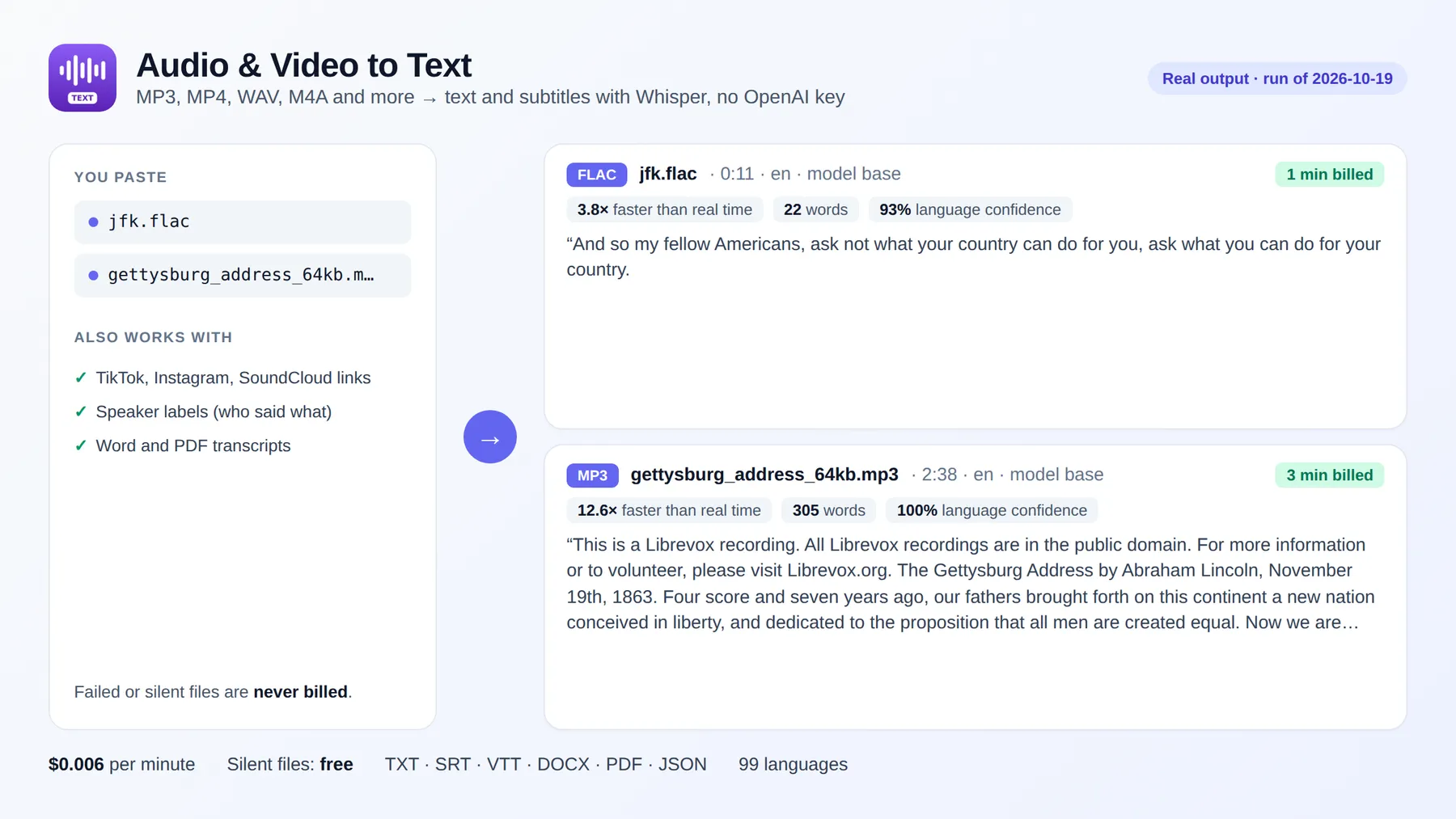
Real output of this script (October 2026): ok 3 This is a Librevox recording. All Librevox recordings are in the public domain. For more information or to volunteer, pl
For short files, one HTTP request returns the results directly (it waits up to 5 minutes; use the client above for longer files):
It returns the records as JSON, for this clip "text": "And so my fellow Americans, ask not what your country can do for you, ask what you can do for your country." and "billedMinutes": 1.
Use it with AI agents (MCP): Claude, ChatGPT, Cursor
This Actor works as a tool for AI agents through the Apify MCP server. Add it to Claude Desktop, Claude Code, Cursor, VS Code or any MCP client with this server URL:
Then just ask in plain language, for example:
- "Transcribe this podcast episode and summarise it: https://example.com/episode.mp3"
- "Transcribe the 3 newest episodes of this podcast feed and list the main topics"
- "Make Spanish SRT subtitles for this video: https://example.com/talk.mp4"
Smallest useful input for an agent:
- Asking only for
textkeeps the answer short; addsegmentsorsrtwhen timestamps are needed. maxDurationMinutescaps the length (and cost) of each file.- Set
languagewhen you know it: it avoids misdetection on short clips.
Agents pay per result like everyone else (Apify also supports agentic payments), so there is no subscription to set up.
Agent-friendly input: common field names such as url, urls, startUrls, query or keywords are accepted, and an empty input runs a small sample from the input form (with a note in the results) instead of failing.
Tips
- Long batches are safe: if the platform restarts or migrates the run, files already transcribed are skipped, so no minute is charged twice.
- Long files show their progress: the run status and log say how far the current file is every 20 seconds (
Transcribing talk.mp3: 00:05:00 of 00:10:00 (50%)), so a long file never looks stuck. A 60-minute file takes about 5–6 minutes withbase. - Stopping a run early: abort it gracefully with the API (
POST https://api.apify.com/v2/actor-runs/<runId>/abort?gracefully=true). The part of the current file already transcribed is then delivered and billed, with a warning saying where it stopped. An immediate abort stops the run at once and that file is lost (and not billed). - Speed: see the table above. More memory gives the run more CPU cores, so results arrive sooner at the same cost per minute.
- Accuracy: use
smallfor accents, noisy recordings, music in the background and most non-English languages. - Set
languagewhen you know it; auto-detection can be wrong on very short or noisy clips. - For subtitles, add
srtorvtttooutputsand enablewordTimestampsif you need per-word timing.
Related tools
- Whole TikTok or Instagram accounts? Video to Text Transcriber takes the account and returns every video's transcript with views and likes. For many short videos, Instagram Reels Transcript Scraper and TikTok Transcript Scraper are priced per video.
- Transcribing podcasts? Podcast Transcript Scraper takes just the podcast name or its Apple Podcasts link and returns a table of episodes with their transcripts.
- Transcribing YouTube videos? YouTube Transcript Scraper returns the captions of any video or Short as text, SRT or Markdown in seconds, for a fraction of the cost of transcribing the audio.
FAQ and limitations
-
Readable subtitles: set
subtitleMaxChars(e.g. 42) to re-cut SRT/VTT into broadcast-style subtitles (2 lines, max 6 s per subtitle). For subtitle-only jobs see SRT Subtitle Generator. -
Pages with a player: SoundCloud tracks, Apple Podcasts episodes, Dailymotion, Loom and archive.org pages work in
sources; the audio is found on the page. Spotify and other sites with DRM cannot be downloaded: for a podcast, use its name, RSS feed or Apple Podcasts link inpodcastFeeds. If a link does not work, the result says why (private file, page without audio, file too large...) and it is not billed. -
TikTok, Instagram, X and Facebook links work in
sourceslike any file link, at the same price per minute. Their records add the video details and ahook(what is said in the first 3 seconds). YouTube links are not transcribed here (not billed): YouTube Transcript Scraper returns their captions for $0.003 per video, and transcribes videos without captions with AI. -
Transcribe every new episode automatically: create an Apify schedule with your podcast feed. With
onlyNewEpisodes(on by default) episodes transcribed in earlier runs are skipped, so you only pay for new ones. -
Privacy: files are processed inside your own Apify run and deleted when it ends. Nothing is sent to external AI APIs, unless you turn on
aiInsights(then the transcript goes to Anthropic with your own key). -
Accuracy depends on audio quality. Whisper can occasionally produce wrong words in silence or music;
skipSilencereduces this. -
Found a problem or need a feature? Open an issue on the Issues tab. Replies within 48 hours.
-
Did it save you time? A short review on the Reviews tab helps other people find this Actor.


