

Google Hotels Scraper: Price Tracker & OTA Comparison
Pricing
from $1.75 / 1,000 hotel results
Google Hotels Scraper: Price Tracker & OTA Comparison
Compare Google Hotels prices and OTA offers by destination or exact hotel. Export CSV, inspect scan coverage and track fixed-stay price changes with saved watchlists.
Pricing
from $1.75 / 1,000 hotel results
Rating
0.0
(0)
Developer

Chris Hopkin
Maintained by CommunityActor stats
0
Bookmarked
2
Total users
1
Monthly active users
8 days ago
Last modified
Categories
Share
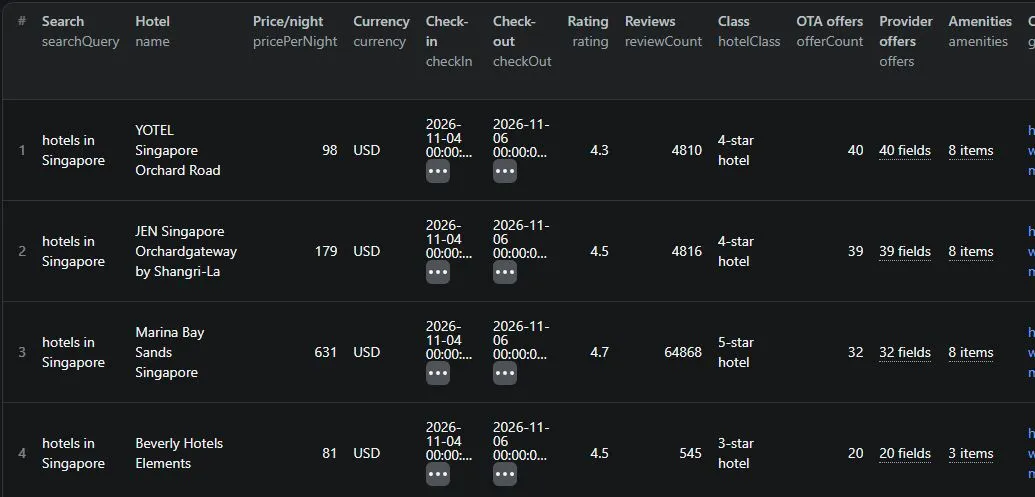
Live example collected on 5 October 2026 for a 4–6 November 2026 stay. Prices and availability change.
Get a useful result in your first run
Compare the hotel prices and booking providers Google displays for one destination. Start small, then save exact hotel URLs for recurring price checks.
- Click Try for free and keep the Singapore example, or enter your destination.
- Use the rolling dates for a quick sample. Start the Actor, then open Hotel rates, Provider offers CSV, and Scan health and next steps.
- For repeat price checks, choose fixed stay dates and exact properties. Enable automatic history and save a task; recurring checks need an Apify schedule.
Example price: 10 saved hotel results cost approximately $0.02505 at the Free-tier rate and default 512 MB, including the start fee. This is an Actor-charge example, not a guarantee of account credit or results. Offers and CSV exports do not add a separate result fee.
The output contains hotel name, dates, actual currency, nightly price, provider offers and source links. Scan health makes partial coverage, failed enrichment and the next action visible. Displayed offers may have different room or tax terms; they are not verified checkout prices.
Open the Singapore example task · Set up competitor monitoring
Scrape Google Hotels prices worldwide, compare OTA and official-site offers, and automatically track price changes for a saved hotel watchlist. Set adults and child ages, check up to 10 stays, collect room details and flag quotes that meet your nightly budget. Export hotel rates, qualifying change events and accommodation audit evidence as JSON or CSV.
Use it to answer: Which providers are showing rates for this hotel and stay, and what is the lowest price we actually collected? Results distinguish Google's search headline from provider offers and report currency mismatches and incomplete enrichment explicitly.
Automatic price tracking and budget monitoring
Enable monitorHistory to remember observations between runs in your account. You no longer need to download and paste a baseline. Use hotelUrls for a stable property watchlist, choose fixed stay dates, save a task and attach a schedule in Apify when you want recurring checks.
Start with the hotel competitor monitoring template. Replace the sample properties and enter exact dates to track the same trip over time. Its rolling-date default is useful for exploration and checks different stays on different days.
Replace example dates with your future trip. EVENTS and EVENTS.csv contain qualifying price_drop, price_rise, budget_match and budget_exceeded events. A price-change event must pass both thresholds: in this example, at least 5% and USD 10 per night. CHANGES.csv still includes all observations, including unchanged ones. A zero-row event list is a normal result when nothing qualifies.
The first run establishes history and can flag initial budget matches. Sequential unchanged runs do not repeat the same budget match. After a price leaves and re-enters budget, a new match is emitted. Budget checks require verified dates and guests, a numeric rate and the requested currency. Missing quotes remain unknown; the Actor never interprets a vanished search result as sold out.
History is isolated by account and watchlist. If no name is supplied, a saved task has its own history; direct Actor runs use a default watchlist. Supply different names for independent projects. Reusing a name deliberately shares history across your tasks. Up to 30 run snapshots are retained in a named key-value store, with up to 2,200 most recent comparison identities loaded. Delete that store in Apify Storage to reset history. Storage is subject to your platform retention/access settings and applicable storage charges. Failed jobs do not replace earlier observations.
Run one instance of a watchlist at a time. Concurrent runs preserve separate snapshots but can generate duplicate notifications because both may read the same previous state. Events carry deterministic IDs for retry deduplication; they are output records, not automatically sent emails or messages. Connect an Apify run-success webhook or your existing integration, fetch EVENTS, and notify only when its count is greater than zero. Check RUN_SUMMARY for partial coverage.
Comparisons require the same exact stay, guests, market, currency and price metric. Rolling dates are useful for lead-time research but usually represent a different trip each day, so they do not create fixed-trip price-drop events. Use fixed dates or overlapping explicit stays to track a booking opportunity. Rates from different providers can refer to different rooms and terms; a change in the lowest displayed quote is not certified same-room repricing.
Accommodation audit export
AUDIT contains one observation per hotel/stay/party with entityId, referenceId, dates, guests, coordinates when available, source evidence and a price_check block (attempted, method, outcome, live_price, note). Use auditReferences to map Google entity IDs to spreadsheet row IDs. A valid observed quote uses outcome observed_quote; missing or unsuitable quotes use unknown and a null price. Failed jobs are listed separately. Check this outcome vocabulary against your consuming code before integration; this is not a guaranteed drop-in replacement for every audit pipeline.
live_price is a nightly single-room quote, not a guaranteed tax-inclusive trip total. available: true means a displayed quote was found; it does not verify checkout inventory. Google hotel entity IDs cannot be used as Airbnb room IDs. No commute time is invented; pass available coordinates to your preferred routing service.
Quick start
- Enter a destination such as
hotels in Singapore,hotels near JFK Airport, orhotels in London. - Set check-in/check-out, or leave the rolling-date defaults: 30 days ahead for 2 nights.
- Run the Actor. Open Hotel rates or Provider price comparison in the output dataset.
- Download the Provider offers CSV for one row per offer. Check Run health and coverage for any incomplete searches or currency mismatches.
The default search returns up to 20 hotels and enriches the first 5 with provider offers. Raise maxOfferHotelsPerQuery to enrich more results. Set maxPages above 1 and maxResultsPerQuery above 20 for deeper destination coverage. Direct hotel URLs always collect offers.
Who is this useful for?
| Workflow | What you get | How to use it repeatedly |
|---|---|---|
| Hotel competitor monitoring | Headline rates, named providers, lowest collected rates and official-site offers | Save exact competitor URLs and run for upcoming stays |
| Travel and accommodation audits | Property IDs, dates, currency, coordinates and rate evidence | Join by entityId; use coordinates in a separate mapping service |
| OTA price research | Organic and sponsored offers from available providers | Compare displayed prices across Booking.com, Expedia, Agoda, Hotels.com and others |
| Destination benchmarking | Ratings, review counts, class, amenities and prices from search cards | Search specific districts, landmarks or airports to sample a market |
| Automated dashboards | Stable entity IDs, timestamps, explicit error statuses, JSON and flat offers CSV | Use the Apify API, schedules, webhooks or your existing integration |
Coverage depends on what Google returns. US, Singapore and UK examples are provided; searches are not restricted to those countries. This Actor reads Google Hotels. It does not scrape Airbnb or Booking.com directly, and it does not collect guest-review text.
Example: compare Singapore hotel prices
For US market research, try hotels near JFK Airport, hotels in Miami Beach or hotels in Manhattan. For more targeted coverage in Asia, try hotels in Orchard Road Singapore or hotels near Changi Airport. Search ordering changes; it is not a complete hotel census.
Example: monitor the same hotels every week
Copy each hotel's googleHotelsUrl from a search result into hotelUrls. This avoids relying on its position in the next destination search. Set searchQueries to an empty list for URL-only monitoring.
Save the input as a task and attach an Apify Schedule if you want recurring checks. Rolling dates keep a consistent booking lead time. For changes to the price of one particular trip, use fixed checkIn and checkOut dates instead and enable monitorHistory. Alternatively, pass the previous run’s SNAPSHOT JSON as baseline with history disabled. Comparisons require the same property, exact stay dates, party, market, currency and price metric.
Direct URL mode returns identity and offer data. Search-card fields such as amenities and review count may be empty in URL-only results. Google Maps short links and arbitrary hotel websites are not accepted.
Example: family rates across several stays
This checks the same property 7, 30 and 90 days ahead for two adults and a seven-year-old. It can save three billable hotel/stay results. Dates and party are verified on the returned pages.
For fixed stays, replace checkInOffsets with stays, an array of up to 10 objects containing checkIn and checkOut in YYYY-MM-DD format. Choose future dates. Do not combine date grids with the single exact-date inputs. Large grids need a longer timeout or smaller batches; RUN_SUMMARY records unfinished work.
Example: track changes for a fixed trip
After a successful run, download Snapshot for the next comparison. On the next check of the same hotels and fixed dates, paste that complete JSON into baseline. With the JavaScript client, load a record from a previous run you own:
changeStatus is new, not_comparable, unchanged, decreased or increased. Only older, matching observations with known prices/currency are compared. A zero previous price has no percentage change. The metric is lowest collected provider offer when available, otherwise search headline. A provider or room mix can change, so this measures the displayed-price signal, not identical-room price movement.
Deeper destination coverage
Set maxPages to 3 and maxResultsPerQuery to 50 to collect up to 50 unique hotels across three pages. The default remains one page and 20 hotels. Raise maxOfferHotelsPerQuery separately if you need detail on more than the first five hotels. Increase maxResults and the run timeout for larger batches.
Each result carries searchPage and searchCoverage. Coverage reports fetched pages, duplicate count, next-page availability and the stop reason: result limit, page limit, source exhausted, time limit, missing token, stalled pagination or page failure. Already-collected results survive a later-page error. Source ranking can move between requests; deduplication prevents repeated billing within the run, but cannot prove complete market coverage.
Multiple rooms: planning estimates
Use exact property URLs for reliable intersections across room requirements. This example requests two adult-only rooms and one parent-and-child room. It fetches two distinct configurations and creates two billable hotel results per stay, not three. Top-level adult/child inputs are ignored when roomRequests is supplied.
The Multi-room estimates output sums independently quoted rooms. It also lists estimates from providers appearing in every configuration. All estimates have jointAvailabilityVerified:false: multiplying a single-room price does not prove that several rooms are available at that rate. Missing configurations or missing provider prices produce an incomplete plan with a null total. For destination searches, enable provider enrichment and collect enough results to find properties common to every configuration.
Comparing room offers responsibly
roomComparisons groups matching room names, bed descriptions, guest capacity, displayed cancellation wording, meal text and currency across providers. Only groups with all those attributes have a numerical comparison spread. Groups with missing terms are labelled incomplete_attributes, with null comparison totals. Matching text is evidence for review, not a shared supplier room ID; verifiedSameRoom, checkoutVerified and taxBasisVerified remain false. Hidden member conditions, different tax treatment or live inventory changes still need checking on the booking site.
What the output means
| Field | Meaning |
|---|---|
entityId, name, googleHotelsUrl | Property identity and reproducible source link |
pricePerNight, priceSource | Search headline in search mode; lowest collected provider price in URL mode |
currency, requestedCurrency, currencyMatched | Actual parsed currency versus the requested currency; no automatic conversion |
checkIn, checkOut, nights | Requested stay dates; mismatched returned dates cause an error |
datesVerified, dateVerificationMethod | Returned English date controls match requested month, day and weekday; year is encoded in the request but not separately visible in those controls |
adults, childrenAges, occupancyVerified | Verified one-room party; requested adult count and child ages must match Google’s controls |
rooms[], roomCount, roomsStatus | Source room names, beds, capacity, cancellation wording, meal text, provider rates and redirects where exposed |
address, website | Google’s directions destination text (may include the hotel name) and official website when exposed |
changeStatus, previousPrice, priceChange, priceChangePercent | Change against the supplied snapshot; new or incompatible observations are not assigned invented changes |
available, availabilitySource | true means a price was displayed; null means unknown. It is not a booking guarantee or a complete availability calendar |
rating, reviewCount, hotelClass, amenities | Property metadata available on destination search cards |
latitude, longitude | Coordinates when found; these may be null and are not independently geocoded |
offers[] | Provider, nightly rate, displayed stay total, currency, sponsored flag, official-site flag and booking redirect |
providerCount, organicOfferCount | Distinct provider names and number of collected organic offers |
lowestOfferProvider, lowestOfferPricePerNight | Lowest collected nightly offer in comparisonCurrency |
lowestOfferStayTotal | Total attached to that same offer, if displayed; never invented by multiplying the nightly rate |
officialSitePricePerNight | Lowest collected offer explicitly labelled Official Site |
offerPriceSpread | Highest minus lowest collected nightly rate in the same currency |
offersStatus, offersError, warnings | Whether enrichment succeeded, failed, was not requested, found no offers, or was skipped because of the enrichment limit |
scrapedAt, offersScrapedAt | UTC collection timestamps |
These are displayed-price comparisons, not verified room-rate parity. Providers can quote different room types, refund rules, meal plans, member deals and tax treatments. comparisonBasis is displayed_offers_not_room_matched. A lower displayed rate is a lead for investigation, not proof that the hotel is being undercut for the identical product.
offerCount can exceed providerCount: sponsored and organic placements or different prices from one provider are retained. Exact repeated offer cards are removed. Duplicate hotels across input searches/URLs are saved and charged once per property, stay and actual currency within the run; the first result is retained.
Sample result
Abbreviated real test output, collected on 25 September 2026. Prices are historical examples, not current quotes. The full JSON also includes provider offers, room details, timestamps and warnings.
Export and API
- Dataset: one row per hotel, with nested
offersandroomsfor JSON consumers. Use the comparison table for quick review. - OFFERS.csv: one row per collected provider offer, including hotel ID, dates, adults, child ages, prices, currency and links. No extra charge for this export.
- ROOMS.csv: one row per exposed room offer. Cancellation wording and meal text are preserved; null means not exposed.
- CHANGES.csv: one row per hotel/stay, with previous price and delta when a compatible baseline exists.
- SNAPSHOT: portable JSON for a manual
baseline, also stored automatically whenmonitorHistoryis enabled. Watchlist history is separated by account. - EVENTS / EVENTS.csv: qualifying price changes and budget transitions. Connect your own integration for notifications.
- AUDIT: accommodation audit observations, your optional row references, price-check evidence and failed jobs.
- ROOM_COMPARISONS: room-offer groups with matching visible labels, matched/missing fields and explicit unverified checkout/tax flags. Unknown terms never establish equality.
- ROOM_PLANS: independent room quotes, quantities, combined estimates and same-provider alternatives; incomplete plans do not receive a total.
- RUN_SUMMARY: saved counts, duplicate count, failed inputs, currency mismatches, offer failures and early-stop warnings. A partially successful run may have Apify status SUCCEEDED; inspect the summary's
statustoo.
JavaScript example using the official Apify client:
Use Apify's API tab for your own authenticated endpoint. Keep API tokens private.
Pricing and cost examples
| Apify subscription tier | Price per 1,000 hotel results |
|---|---|
| Free | $2.50 |
| Bronze | $2.25 |
| Silver | $2.00 |
| Gold, Platinum, Diamond | $1.75 |
Platform usage is included in this Actor's event pricing. Provider-offer enrichment, room details, change calculations and CSV exports do not add a separate result fee. One hotel on three stay dates counts as three hotel results. Two different room configurations on those dates count as six. Quantity within an identical room configuration reuses the quote and does not multiply result charges. There is also an Actor-start fee of $0.00005 at the default 512 MB memory; Apify scales that event with memory, with a minimum of one event.
At the Free-tier rate, 20 saved hotels cost approximately $0.05005, including the default start fee. Checking 20 exact properties once daily for 30 days is approximately $1.5015, assuming one run each day, all 20 results returned and default memory. These are Actor charges, not a promise of available account credit.
Failed or empty searches do not incur hotel-result events, but the start fee still applies. Use maxResults and Apify's maximum charge setting to bound spending. A hotel with successful base data and failed optional offer enrichment still counts as one result; check offersStatus.
Limits and troubleshooting
- Coverage: up to 10 pages and 200 unique hotels per query, 10 queries and up to 20 direct hotel URLs, evaluated across up to 10 stays and 5 room configurations per run. The total default cap is 200 hotel/stay results; the configurable maximum is 2,200. Pagination follows Google’s returned next-page tokens and removes overlapping properties. It is not an exhaustive city census: ranking changes, page/result caps, source failures and time limits can truncate coverage. Inspect searchCoverage and RUN_SUMMARY.
- Currency: Currency is encoded in Google’s travel state as well as the request URL. Google may still return a different currency or omit prices. Always use the actual
currencyand checkcurrencyMatchedbefore arithmetic. Never relabel a returned price. ChangingcountryCodeis a preference, not a guarantee of geographic serving location. - Language: pages are requested and parsed in English for consistency. Destination names may use local text. The legacy
languagefield is normalized toen. - Occupancy: 1–6 adults, up to 4 children aged 0–17, and no more than 6 guests in one room. Ages 0–1 share Google’s age band and are reported as 1. For multiple rooms, roomRequests collects separate single-room quotes and produces planning estimates. Google’s guest picker does not confirm a combined multi-room booking; joint availability and checkout totals remain unverified. Requested guests must be confirmed by the returned page.
- Offers: source coverage varies, may include membership conditions, and is not guaranteed to include every provider. Redirect links can expire. Room offers are collected when exposed in the initial page, not guaranteed for every property/provider. No final checkout validation, complete room inventory, cross-provider room matching or tax normalization. A breakfast label does not necessarily mean breakfast is included.
- Dates: use real future dates and stays of 1–30 nights. The visible date controls must match before rates are saved. A request is not treated as confirmation on its own.
- Errors: transient network/HTTP failures are retried with a timeout. Blocks and missing source structures are reported. If every search fails, the run fails instead of reporting a misleading success.
- Large jobs: the Actor stops before its time or charge budget is exhausted and reports unfinished work in
RUN_SUMMARY. Split larger batches or increase the run timeout.
Support and feedback
Open an issue on this Actor with the input, run ID, expected result and affected output fields. Remove tokens and private information before posting. Reports with a reproducible hotel URL and stay dates are particularly useful for investigating source changes.
Changelog
- 1.5: optional automatic watchlist history; price thresholds and budget transitions; JSON/CSV events; accommodation audit export with user references and explicit evidence. History remains isolated by account and watchlist.
- 1.3: token-based pagination with coverage reporting and partial recovery; independent multi-room planning estimates; room comparison evidence with missing-field safeguards.
- 1.2: verified adult/child occupancy; currency state encoding; multi-stay date grids; room names and displayed cancellation/meal terms; portable snapshots and historical price deltas; room/change CSV exports.
- 1.1: organic booking offers; official-site flags; exact-property URL monitoring; same-currency comparison fields; flat offers CSV; date checks; explicit enrichment errors; retries and request timeouts; duplicate and charge-limit handling; accurate fatal-run status.
- 1.0: destination search with stay dates, headline rates and sponsored offer extraction.


