

Tiktok Creative Center Scraper
Pricing
from $1.40 / 1,000 fetches
Tiktok Creative Center Scraper
Scrape TikTok Creative Center Top Ads and trends in one Actor. Search ads by brand or product keyword, extract ad analytics, keyframes, percentile benchmarks, and recommendations, or collect trending hashtags, hashtag analytics, and trending videos for creative and competitor research.
Pricing
from $1.40 / 1,000 fetches
Rating
5.0
(1)
Developer

doliz
Maintained by CommunityActor stats
16
Bookmarked
1.5K
Total users
138
Monthly active users
8.8 hours
Issues response
2 months ago
Last modified
Categories
Share
TikTok Creative Center Scraper extracts official Top Ads and TikTok trends as structured JSON. Search ads by brand or product keyword, analyze ad performance and creative keyframes, or collect trending hashtags, hashtag analytics, and trending videos for creative and competitor research.
What can you scrape from TikTok Creative Center?
- TikTok Top Ads: search ads by brand or product keyword, filter by region, industry, objective, period, language, format, and likes, and sort by a performance metric.
- Ad analytics: retrieve ad detail analytics, keyframe performance, percentile benchmarks, and related ad recommendations.
- TikTok trends: collect ranked trending hashtags, hashtag analytics, popularity curves, and trending videos with region, period, and content-tag filters plus performance sorting.
- Automation-ready output: export official responses as structured Dataset items for dashboards, creative intelligence, competitive monitoring, and scheduled market research.
The Actor calls TikTok Creative Center backend APIs directly instead of automating the browser UI. One Actor covers Top Ads Dashboard, Top Ads Spotlight, Ad Analytics, Ad Keyframe, Ad Percentile, Ad Recommend, Trending Hashtags, Hashtag Analytics, and Trending Videos.
How to scrape TikTok Creative Center data
- Open the Actor on Apify and choose a Top Ads or trends
target. - Add cookies from an account that can access TikTok Creative Center.
- Set the target-specific filters. For Top Ads Dashboard,
dashboard_searchaccepts a brand or product keyword. - Run the Actor and export the Dataset as JSON, CSV, Excel, XML, or through the Apify API.
TikTok Creative Center scraper use cases
- Find high-performing TikTok ads by market, industry, objective, language, or keyword.
- Benchmark ad creative performance with CTR, keyframe, and percentile data.
- Track trending hashtags and trending videos for content and campaign planning.
- Build recurring creative-intelligence and competitor-research datasets without manual UI work.
TikTok Creative Center scraper FAQ
Can I search TikTok Creative Center with a keyword?
Yes. The Top Ads Dashboard dashboard_search input accepts a brand or product keyword. Trending Hashtags follows the current official page filters and does not expose a free-text hashtag search.
Which TikTok trends are supported?
The Actor supports the current official Trending Hashtags, Hashtag Analytics, and Trending Videos surfaces. It does not claim support for discontinued Creative Center song or creator rankings.
Does the Actor require login cookies?
Yes. The supported official endpoints currently require TikTok Creative Center cookies. Cookies are marked as a secret in the Actor input, so Apify stores them encrypted and masks them in the Console.
📝 Creative Center Update & Migration Notes
TikTok has refocused and reworked parts of Creative Center. This Actor follows the current official scope and supports the Top Ads workflow plus the current Creative Center Hashtag trends page.
First, review the target-level changes:
| Status | Target | Current user impact |
|---|---|---|
| Changed | top_ads_dashboard | dashboard_region now exposes the 28 regions currently shown by Top Ads Dashboard. The existing array input and multi-region behavior are unchanged. Saved values outside the current list must be replaced. |
| Supported | top_ads_spotlight, ad_analytics, ad_keyframe, ad_percentile, ad_recommend | These Top Ads targets remain selectable and keep their existing usage flow. |
| Restored / Changed | trending_hashtags, hashtag_analytics | These target names are selectable again, but they now follow the current official Hashtag trends page instead of the old 0.1.0 hashtag pages. |
| Restored / Changed | trending_videos | The familiar target and videos_* inputs are restored on TikTok's current CreativeOne/Report protocol. Current filters and output replace the removed legacy protocol. |
| Removed | keyword_insights, keyword_insights_videos, keyword_insights_examples, keyword_insights_related, creative_insights, top_products, trending_songs_popular, trending_songs_breakout, song_analytics, trending_creators | These former Creative Center targets are no longer selectable. Saved/API inputs using them are rejected before any upstream request or charge. |
For hashtag users upgrading from Actor 0.1.0, review the target-specific input and output changes below. The goal is to match only the controls visible on the current official Hashtag trends page, so some old inputs were removed rather than kept as hidden/internal options.
| Status | Target | 0.1.0 input or behavior | Current behavior |
|---|---|---|---|
| Removed | trending_hashtags | hashtags_search searched by hashtag text. | Removed because the current official page does not expose a hashtag search filter. |
| Removed | trending_hashtags | hashtags_new_to_top_100 filtered newly ranked hashtags. | Removed because the current official page does not expose this filter. |
| Changed | trending_hashtags | hashtags_period accepted 7, 30, 120. | Now accepts 7, 30, 90, shown as Last 7 days, Last 30 days, Last 90 days. |
| Changed | trending_hashtags | hashtags_limit allowed up to 60. | Now allows up to 20, matching the current official page request size. |
| Changed | trending_hashtags | The old list output used code / msg / data.list. | The list output follows the current official API response, with fields such as BaseResp, items, pagination, hashtagID, and popularityCurve. |
| Renamed | hashtag_analytics | hashtag_analytics_hashtag_name used a hashtag name such as hoco. | Replaced by hashtag_analytics_hashtag_id, obtained from a Trending Hashtags result or the official analytics page URL. |
| Changed | hashtag_analytics | hashtag_analytics_country could be empty for All regions. | Now uses a specific country or region, defaulting to United States. |
| Changed | hashtag_analytics | hashtag_analytics_period accepted 7, 30, 120, 365, 1095. | Now accepts 7, 30, 90, matching the current official page. |
| Changed | hashtag_analytics | The old detail output used code / msg / data.info. | The detail output follows the current official API response, with fields such as BaseResp, hashtagID, popularityCurve, profile data, and video detail fields. |
| Unchanged | trending_hashtags, hashtag_analytics | Pricing was 0.002$ / item for Trending Hashtags and 0.002$ / time for Hashtag Analytics. | Pricing is unchanged. |
| Changed | trending_videos | The old target used /creative_radar_api/v1/popular_trend/list, 25 countries, and vv / like / comment / repost sorting. | The revived target uses the current CreativeOne/Report protocol, US/JP/VN/TH/ID, current content tags, and views/engagement/6-second-view sorting. vv remains the views value; old saved sort/country values outside the current options must be updated. |
💡 Best practices
This Actor operates by directly accessing TikTok's backend API. Please be aware that TikTok imposes undisclosed rate limits on its API. To ensure stable operation and avoid your requests being throttled, we strongly recommend following these best practices:
💡 Utilize Multiple Accounts (Cookies):
By providing a pool of account cookies, and rotate through them for different requests. This effectively distributes the request load and significantly reduces the risk of any single account being rate-limited due to high traffic.
💡 Limit the number of concurrent requests
For time-synchronized data, if a large number of API interfaces are called at the same time, the request may be throttled.
In this case, you can implement Rate Limiting on the client side, to control the number of concurrent requests. An example is the Token Bucket Algorithm. Tokens are issued according to the rate limit rules (for example, 10 tokens are issued per second). Before making a request, try to obtain the token, if there are no token currently available, wait for a period of time, then try again.
A more robust implementation is to use Message Queuing. The timing script is not directly responsible for requesting the API, but uses a producer-consumer Model. Push the requested task to the message queue, and a dedicated consumer takes the task from the queue for consumption (through an API request). You can limit the number of concurrent users by limiting the number of concurrent consumers for a certain type of task or using a rate limit. Tasks that fail to execute, can be pushed back into the queue (and set a certain delay) to retry.
⚙️ Input Configuration
⚙️ Main
-
Target
target: (Required) Select the data source. Your choice determines which settings below are used.One of
Top Ads Dashboard,Top Ads Spotlight,Ad Analytics,Ad Keyframe,Ad Percentile,Ad Recommend,Trending Hashtags,Hashtag Analytics,Trending Videos. -
Cookies
cookies: (Required) Your authentication cookie after logging into the TikTok Creative Center platform. Way to obtain: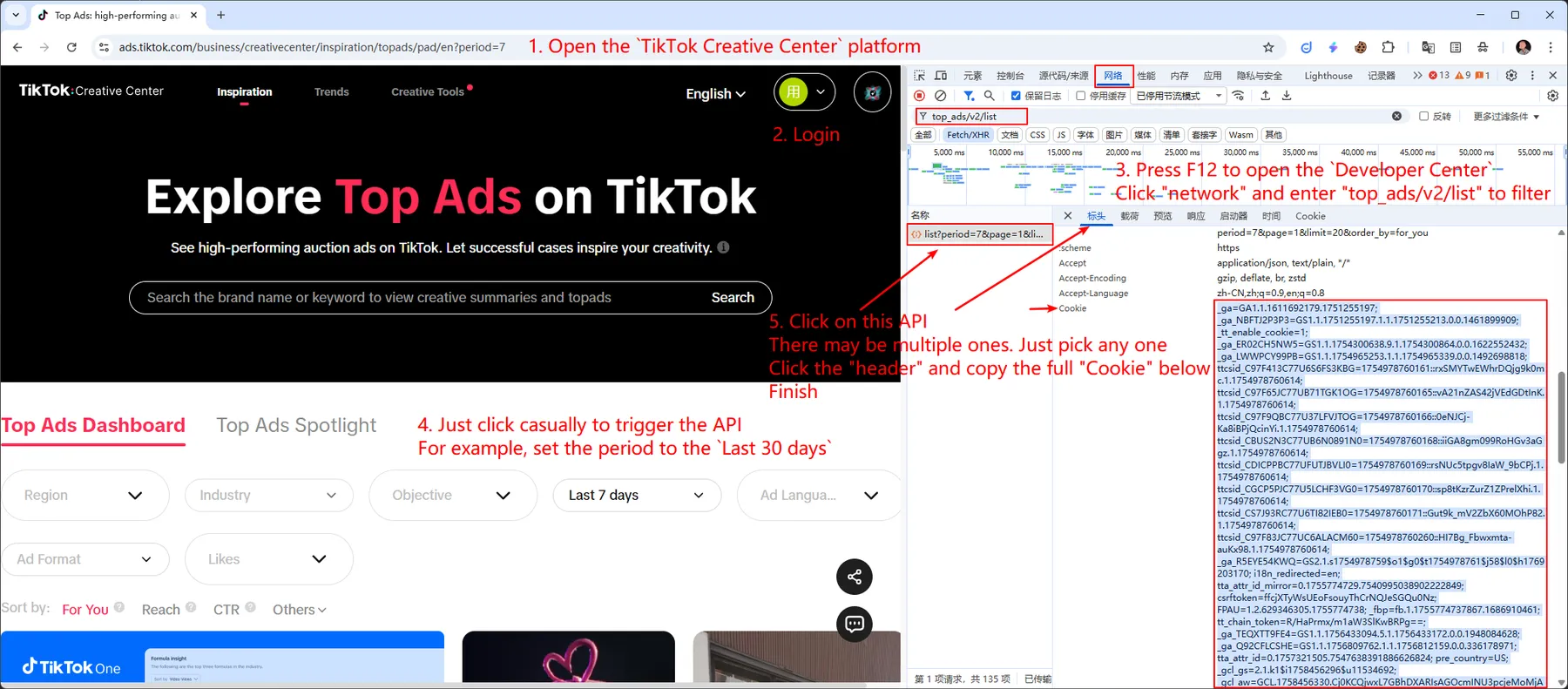
For most targets, after a successful request returns one to three usable results, the Actor performs one non-billable Cookie check after charging and before writing the Dataset item. Trending Videos uses a four-item threshold because TikTok's public preview contains four items; that exact preview is checked before charging so confirmed invalid-Cookie preview data is not billed. A definitive result is attached to the item; an inconclusive check is silent and never changes valid business data, its charge, or a successful Run. Results above the target-specific threshold skip the check.
⚙️ Top Ads Dashboard Settings
These settings are only used when the Target is set to Top Ads Dashboard.
- Keyword
dashboard_search: (Optional) Search by brand or product keywords. - Region
dashboard_region: (Optional) Filter by one or more of the 28 regions currently shown in Top Ads Dashboard. The array input preserves the selected order. Options - Industry
dashboard_industry: (Optional) Filter ads by one or more industries. Options - Objective
dashboard_objective: (Optional) Filter ads by their campaign marketing objective. Options - Period
dashboard_period: (Required) Filter ads by their publication period. Options - Ad language
dashboard_ad_language: (Optional) Filter ads by the language used in the creative. Options - Ad format
dashboard_ad_format: (Optional) Filter by ad format. 'Spark ads' use organic posts; 'Non-Spark ads' are traditional. - Likes
dashboard_likes: (Optional) Filter ads by the percentile range of likes received. Options - Sort by
dashboard_sort_by: (Required) Select the metric for sorting the ad results. - Page
dashboard_page: (Required) Page number. - Limit
dashboard_limit: (Required) Page size.
⚙️ Top Ads Spotlight Settings
These settings are only used when the Target is set to Top Ads Spotlight.
- Industry
spotlight_industry: (Optional) Filter ads by one or more industries for Spotlight. Options - Page
spotlight_page: (Required) Page number. - Limit
spotlight_limit: (Required) Page size.
⚙️ Ad Analytics Settings
These settings are only used when the Target is set to Ad Analytics.
- Material id
ad_analytics_material_id: (Required) Obtain from the result ofTop Ads DashboardorTop Ads Spotlight.
⚙️ Ad Keyframe Settings
These settings are only used when the Target is set to Ad Keyframe.
- Material id
ad_keyframe_material_id: (Required) Obtain from the result ofTop Ads DashboardorTop Ads Spotlight. - Metric
ad_keyframe_metric: (Required) Select specific keyframe metric to retrieve. Options.
⚙️ Ad Percentile Settings
These settings are only used when the Target is set to Ad Percentile.
- Material id
ad_percentile_material_id: (Required) Obtain from the result ofTop Ads DashboardorTop Ads Spotlight. - Metric
ad_percentile_metric: (Required) Select specific percentile metric to retrieve. Options. - Period
ad_percentile_period: (Required) Define the time frame for the percentile data.
⚙️ Ad Recommend Settings
These settings are only used when the Target is set to Ad Recommend.
- Material id
ad_recommend_material_id: (Required) Obtain from the result ofTop Ads DashboardorTop Ads Spotlight. - Industry
ad_recommend_industry: (Required) Industry for recommend ads. Options - Country
ad_recommend_country: (Required) Country for recommend ads. Options
⚙️ Trending Hashtags Settings
These settings are only used when the Target is set to Trending Hashtags.
- Country
hashtags_country: (Required) Filter by country or region. Options - Time period
hashtags_period: (Required) Filter by the website time range:Last 7 days,Last 30 days, orLast 90 days. - Industry
hashtags_industry: (Optional) Filter by one official website industry. ChooseAll Industriesto omit the industry filter. Options - Page
hashtags_page: (Required) Page number. - Limit
hashtags_limit: (Required) Page size.
⚙️ Hashtag Analytics Settings
These settings are only used when the Target is set to Hashtag Analytics.
- Hashtag ID
hashtag_analytics_hashtag_id: (Required) Obtain from aTrending Hashtagsresult or from the official hashtag analytics page URL. - Country
hashtag_analytics_country: (Required) Filter by country or region. Options - Time period
hashtag_analytics_period: (Required) Filter by the website time range:Last 7 days,Last 30 days, orLast 90 days.
⚙️ Trending Videos Settings
These settings are only used when the Target is set to Trending Videos.
- Country
videos_country: (Required)US,JP,VN,TH, orID. - Period
videos_period: (Required)Last 7 daysorLast 30 days. - Video content tags
videos_content_tags: (Optional) Select one or more of the current Beauty & Care, Fashion, Food & Beverage, Lifestyle & Leisure, and Technology & Finance tags. - Sort by
videos_sort_by: (Required)vv,engagement, orsix_seconds_vtr. - Page
videos_page: (Required) The one page to fetch. The Actor does not paginate automatically. - Limit
videos_limit: (Required) Page size from 1 to 100; the default is the verified API maximum of 100.
The Actor first obtains TikTok's latest daily reporting cutoff and then requests the selected page. Successful items
are billed at 0.002$ / item. A four-item public preview returned for a Cookie that TikTok confirms is invalid is not
billed.
📊 Output Structure
The Actor returns a dataset of items. The structure of each item depends on the target you selected.
NOTE: The following are sample structures. The actual output may contain more fields. Please refer to the output of a sample run for the exact schema.
Successful data and user-actionable warnings/errors both return Dataset output. Recognized TikTok outcomes such as
rate limiting, invalid login, permission rejection, or an explicit network failure return one sanitized, non-chargeable
item so API clients and downstream Actors can react automatically. Only successful responses containing usable data
trigger fetch charges.
A post-success Cookie check never changes the successful business data or its charge. When TikTok definitively confirms
the Cookie as valid or invalid, the existing Dataset item also includes machine-readable _actor.cookie_status and a
sanitized _actor.message; inconclusive checks and results larger than the target's small-result threshold omit
_actor. No extra Dataset item is created, and the check itself is not billed. The default threshold is three;
Trending Videos uses four because TikTok's verified public preview contains four items.
📊 Top Ads Dashboard & Top Ads Spotlight
Industry identifiers are returned exactly as TikTok provides them. A response can therefore contain an
industry_key such as label_14110000000 even when that identifier is not present in the current input options.
📊 Ad Analytics
📊 Ad Keyframe
📊 Ad Percentile
📊 Ad Recommend
💰 Cost of Use & Pricing
Pricing model: Pay per event
The trigger logic of the event is the number of items that return the result.
| Target | Cost |
|---|---|
| Top Ads Dashboard | 0.002$ / item |
| Top Ads Spotlight | 0.002$ / item |
| Ad Analytics | 0.002$ / time |
| Ad Keyframe | 0.002$ / time |
| Ad Percentile | 0.002$ / time |
| Ad Recommend | 0.002$ / time |
| Trending Hashtags | 0.002$ / item |
| Hashtag Analytics | 0.002$ / time |
Deprecated targets are rejected before any upstream request or charge.
📞 Support
If you encounter any issues or have feature requests, please use the Issues tab on the Actor's page in the Apify Console. Please provide a detailed description of the problem and the Run ID.
⚠️ Limitations and Disclaimers
- This Actor is not an official TikTok product and is not affiliated with or endorsed by TikTok, Inc.
- The structure of the TikTok Creative Center website and its internal APIs may change at any time.
- Please use this Actor responsibly and in accordance with the Apify Terms of Service.


