

Meta Ad Library Scraper — Resume, Media & $0-on-Block
Pricing
from $0.80 / 1,000 ad scraped (1 result)s
Meta Ad Library Scraper — Resume, Media & $0-on-Block
Search the Meta Ad Library by keyword and country. Returns ad copy, landing URL, CTA type, days running, placement mix, the country each ad was found in, and creative image/video URLs. Never charged for blocked runs.
Pricing
from $0.80 / 1,000 ad scraped (1 result)s
Rating
0.0
(0)
Developer

Sumitsubo
Maintained by CommunityActor stats
0
Bookmarked
2
Total users
1
Monthly active users
a month ago
Last modified
Categories
Share
Meta Ad Library Scraper — Facebook & Instagram Ads, Resume & $0-on-Block
Introduction
Search the Meta Ad Library by brand or keyword and country and get the matching Facebook, Instagram and Messenger ads as clean, flat rows: ad copy, landing URL, call to action, start date, how many days it has been running, and the creative's image and video URLs.
It is built for the jobs where other Ad Library scrapers get frustrating — large pulls that crash half way, and runs that bill you even though Meta blocked them:
- a killed or timed-out run continues where it stopped instead of starting over,
- every failure is written to the dataset, never silently dropped,
- a blocked or rate-limited request is not billed.
This is an independent tool. It is not affiliated with, endorsed by, or sponsored by Meta. Meta, Facebook and Instagram are trademarks of Meta Platforms, Inc., used here only to say which public service this Actor reads.
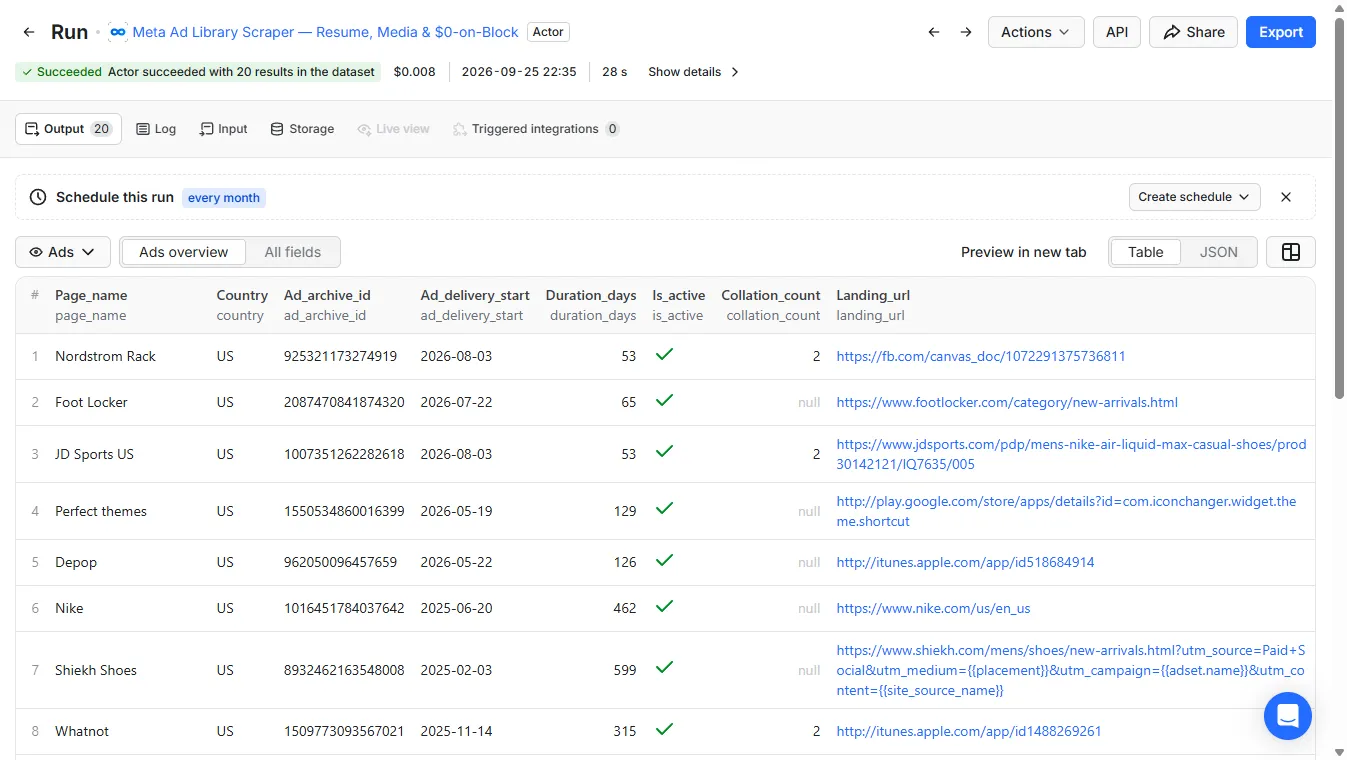
A 20-ad search for Nike in the US. The keyword matches Nike's own page and also other advertisers whose ads mention Nike — in this run JD Sports, Foot Locker, Depop, Whatnot, Walmart and others — which is why the advertiser name is on every row.
What you get for every ad
| Field | Example |
|---|---|
page_name / page_id | Nordstrom Rack / 89516513179 — the advertiser's Facebook page |
ad_archive_id | 925321173274919 — the Ad Library ID of the ad |
country | US — the country library the ad was found in (the Ad Library is per-country) |
ad_delivery_start / ad_delivery_stop | 2026-08-03 / null (still running) |
duration_days | 53 — how long the ad has been running — a common signal of which ads are working |
is_active | true |
publisher_platforms | ["FACEBOOK", "INSTAGRAM", "MESSENGER"] |
ad_creative_bodies | the ad's text: body, headline and caption (and each carousel card's body and headline), duplicates removed |
collation_count | 2 — passed through as the Ad Library reports it |
landing_url / cta_type | where the ad sends people, and the button (SHOP_NOW, LEARN_MORE, …) |
image_urls / video_urls | all creative URLs found, full resolution. For reference only — never downloaded, never billed |
media | the creative files that are downloaded to key-value storage in snapshot_with_media mode; stored_key tells you where each one was saved |
_meta | when and from which URL the row was collected, plus the Actor and schema version |
Export to JSON, CSV or Excel, or read it from the API.
One note on spreadsheets. Page names and ad copy are written by the advertiser, not by us, and a value starting with
=,+,-or@is treated as a formula by Excel and Sheets. If you open exports directly, import them as text rather than double-clicking the file.
Why this scraper
- Resume. A killed or timed-out run continues exactly where it stopped — no re-fetching, no double charges. That is what makes a 5,000+ ad pull across several advertisers practical: it doesn't have to finish in one sitting.
- No silent loss. Every work unit is checkpointed. A failure is written to the dataset as an
{_error, _reason}record so you can see what is missing — never just dropped. - Not billed when blocked. A blocked or rate-limited request is detected and not billed. You pay for ads actually delivered.
- Real media files. Optionally download the creative videos and images into key-value storage, not just links, so you keep your own copy.
- Hard cost ceilings.
maxItemsandmaxBudgetUsdare enforced across resumes, so a large pull never runs past the number you set. - A stable schema. Flat, null-safe
snake_casewithduration_daysand_metaon every row, so it drops straight into a pipeline.
Pricing
Pay per event — no subscription, no charge for data you didn't ask for.
| Event | Price |
|---|---|
actor-start | $0.01 per run |
ad-scraped | $0.001 per ad |
media-downloaded | $0.01 per file (only in snapshot_with_media) |
actor-start is charged once per run, when the first search completes — whether or not it finds any ads. A run in which every request is blocked or rate-limited costs nothing, the start included. You are never charged per blocked request, or for ads beyond maxItems / maxBudgetUsd.
Apify Store discounts lower the per-ad price on higher plans: $0.0009 at the Silver discount tier, $0.0008 at Gold and above.
Typical cost
| What you're doing | Typical cost |
|---|---|
| Trying it out — 200 ads from one keyword | about $0.21 |
| A full competitive pull — 5,000 ads across several advertisers/countries | about $5.01 |
With media downloads (snapshot_with_media) | add $0.01 per file archived |
Use cases
- Competitor ad research — see every ad a brand and its resellers are running, with start dates and days running as a signal of what's working.
- Creative swipe files — pull ad copy and creatives, and archive the files into your own storage.
- Market mapping — search a category keyword across several countries and see who is advertising where.
- Agency reporting — schedule a run and send the results to Sheets, Slack or a webhook with Apify integrations.
- AI agents — connect through the Apify MCP server and let your agent look up live ads.
Tutorial
- Open the Input tab and enter a brand or keyword in Search terms — or keep the prefilled
Nike. - Set Countries (two-letter codes; the default is
US). Each country is searched separately. - Set Max ads to what you want to pay for at most. For a first try, 20–200 is plenty.
- Choose Mode:
Snapshotfor ad data only, orSnapshot + download media filesto also keep the creatives. - Click Start, then open the Output tab, or read the dataset from the API.
To keep an eye on a competitor, save the input as a task and put it on a schedule.
Input reference
| Field | Meaning |
|---|---|
advertisers | Required. Keywords to search the Ad Library for. This is a keyword search, not an exact advertiser filter — Nike also returns retailers and resellers whose ads mention Nike. Page IDs are not supported |
countries | ISO country codes. The Ad Library is per-country; default US |
mode | snapshot (ads only) or snapshot_with_media (also download creative files) |
maxItems | Hard cap on billable ads — you are never charged beyond this, across resumes included |
maxBudgetUsd | Optional hard USD ceiling; the run stops before exceeding it. 0 charges nothing |
This Actor uses Apify's residential proxy, which Meta's Ad Library requires. You don't need to configure it; if your account can't use residential proxy, the run stops at the start with a clear message instead of failing half way.
Input and output examples
Input example
Output example
A real row from the run in the screenshot above (media URLs shortened):
stored_key is null in snapshot mode. In snapshot_with_media it is filled once the file is saved, so every file you are charged for can be found in the run's key-value store. Downloads are limited to Meta's fbcdn.net hosts and capped per ad.
A blocked or failed unit appears as:
FAQ and support
Can I get spend, impressions, reach or targeting? No. Meta does not publish spend, impressions, reach, CTR, ROAS or targeting for commercial ads — only for political/issue ads, or EU reach under the DSA. This Actor does not invent those numbers, and no scraper can get them for commercial ads.
Why does searching Nike return other advertisers?
The Ad Library search is a keyword search. It returns every ad that matches the word, including retailers and resellers. Filter on page_name or page_id if you only want one advertiser's own ads. Searching by page ID is not supported.
My run was stopped or timed out. Do I lose what it collected? No. What was collected stays in the dataset, and progress is checkpointed. Resurrect the run from the Console — it restarts with the same storage and continues where it stopped, without charging again for the run start or for ads already delivered.
How do I stop a large run from costing more than I planned?
Set maxItems, maxBudgetUsd, or both. Both are enforced across resumes.
Does it log in to Facebook? No. It reads the public, logged-out Ad Library only.
Something doesn't work. Open an issue on the Issues tab with the run ID, and I'll look at it.
Found this useful? A rating on this page helps other people evaluating it decide faster — it takes a few seconds and means a lot for a small, actively maintained Actor.


