

Facebook & Instagram Ad Library Scraper (Meta)
Pricing
from $2.99 / 1,000 results
Facebook & Instagram Ad Library Scraper (Meta)
Facebook & Instagram Ad Library Scraper for commercial & e-commerce ads. Extract ad copy, videos, images, CTA & landing pages. Export to CSV or JSON. No token needed.
Pricing
from $2.99 / 1,000 results
Rating
0.0
(0)
Developer

Thodor
Maintained by CommunityActor stats
1
Bookmarked
88
Total users
15
Monthly active users
2 months ago
Last modified
Categories
Share
A Facebook & Instagram Ad Library scraper tool for every ad category, commercial ads included. Find and export ads by keyword, advertiser, or Ad Library URL, and load them into a spreadsheet as CSV, Excel, or JSON. Running and ended ads, with images and videos.
Outside the EU, Meta's official Facebook Ad Library API returns only political and social issue ads. This scraper reads Meta's public web endpoint instead: ad copy, CTA, landing page, and creative files for every ad, across Facebook, Instagram, Messenger, WhatsApp, Audience Network, and Threads. No Meta developer account, no access token.
📋 How to export Facebook ads to a spreadsheet
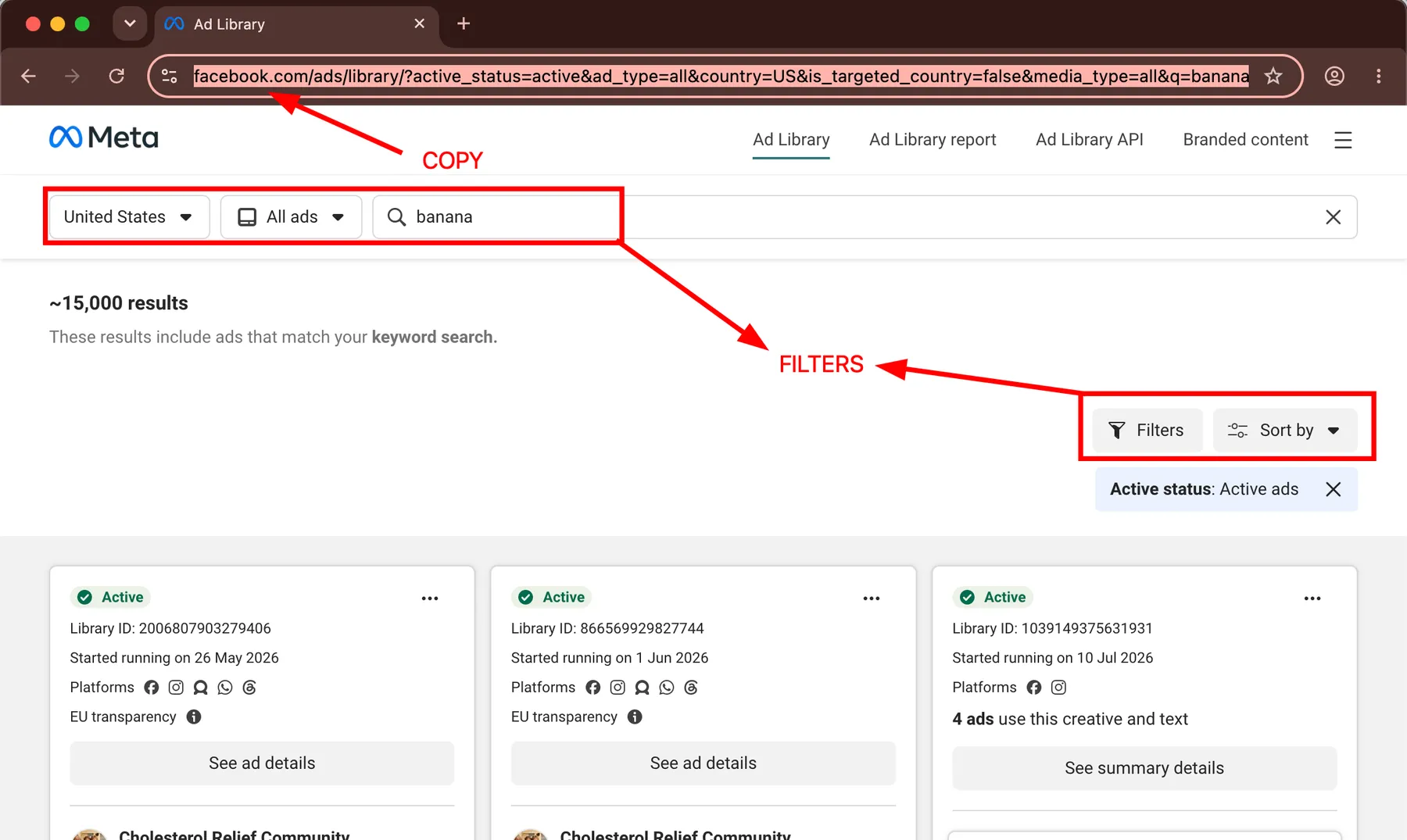
- Open the Facebook Ad Library and search any keyword, e.g.
banana. - Copy the URL from the address bar after applying desired filters.
- Paste it into Ad Library search URLs, replacing the prefilled example.
- Click Start.
- Open the Output tab and click Export for CSV, Excel, JSON, or HTML.
🕵️ Looking for a specific advertiser?
Search the brand name and a dropdown with Advertisers will appear. Select the advertiser you want.
⚖️ Compared to Meta's official Ad Library API
| Meta's official API | This actor | |
|---|---|---|
| 🛍️ Commercial ads | ⚠️ Only ads that reached the EU | ✅ Worldwide |
| 🗳️ Political ads | ✅ | ✅ |
| 🖼️ Creative files | ❌ Snapshot page only | ✅ image_urls, video_urls |
| 🔑 Access | ❌ Gov-ID check + app review, 1 to 3 days | ✅ Register on Apify, $5 free monthly credit |
| ⏱️ Rate limits | ❌ Graph API throttling per hour | ✅ Searches run in parallel |
| 💰 Spend and reach | ⚠️ Ranges, political and EU ads | ⚠️ Ranges, political and regulated ads |
Most other scrapers only return Facebook and Instagram ads. Here every row shows which platforms the ad ran on, and you can filter to any of the six.
🎯 Three things people run this for
| How | |
|---|---|
| 🚀 Catch competitor launches | Weekly run on a Schedule, diff ad_archive_id between runs. New IDs are new creatives |
| 🔗 Find their landing pages | Export the link_url column, UTM parameters included. Feed it into the Email Extractor for a contact list |
| 🗳️ Track political spend | Ad category political, Active status both. Spend, reach, and targeting, seven years back |
📥 Input
A pasted URL is the whole input. Set up any search at the Facebook Ad Library, copy the URL from the address bar, and every filter you picked comes baked in. In the Console that's the entire form, paste and press Start. An example:
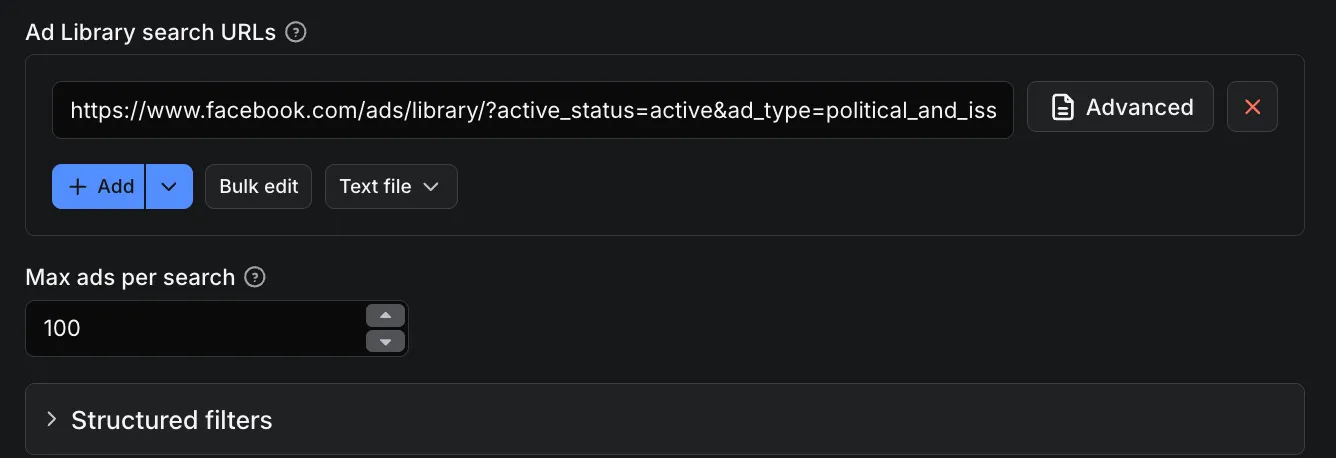
The same input as JSON, for API calls:
A URL isn't mandatory: every filter also exists as a plain input field, documented under Setting filters from code below. Three ready-to-paste inputs:
🕵️ One competitor's entire ad history
Search the brand at the Ad Library, pick it under Advertisers, copy the URL. active_status=all includes ended ads, maxAdsPerSearch: 0 removes the cap.
🌍 One keyword across several countries
Three countries make three searches, and searches run in parallel.
🗳️ Political ads with spend and reach
The regulated categories are the only ones where Meta discloses money, see the Output section.
📤 Output
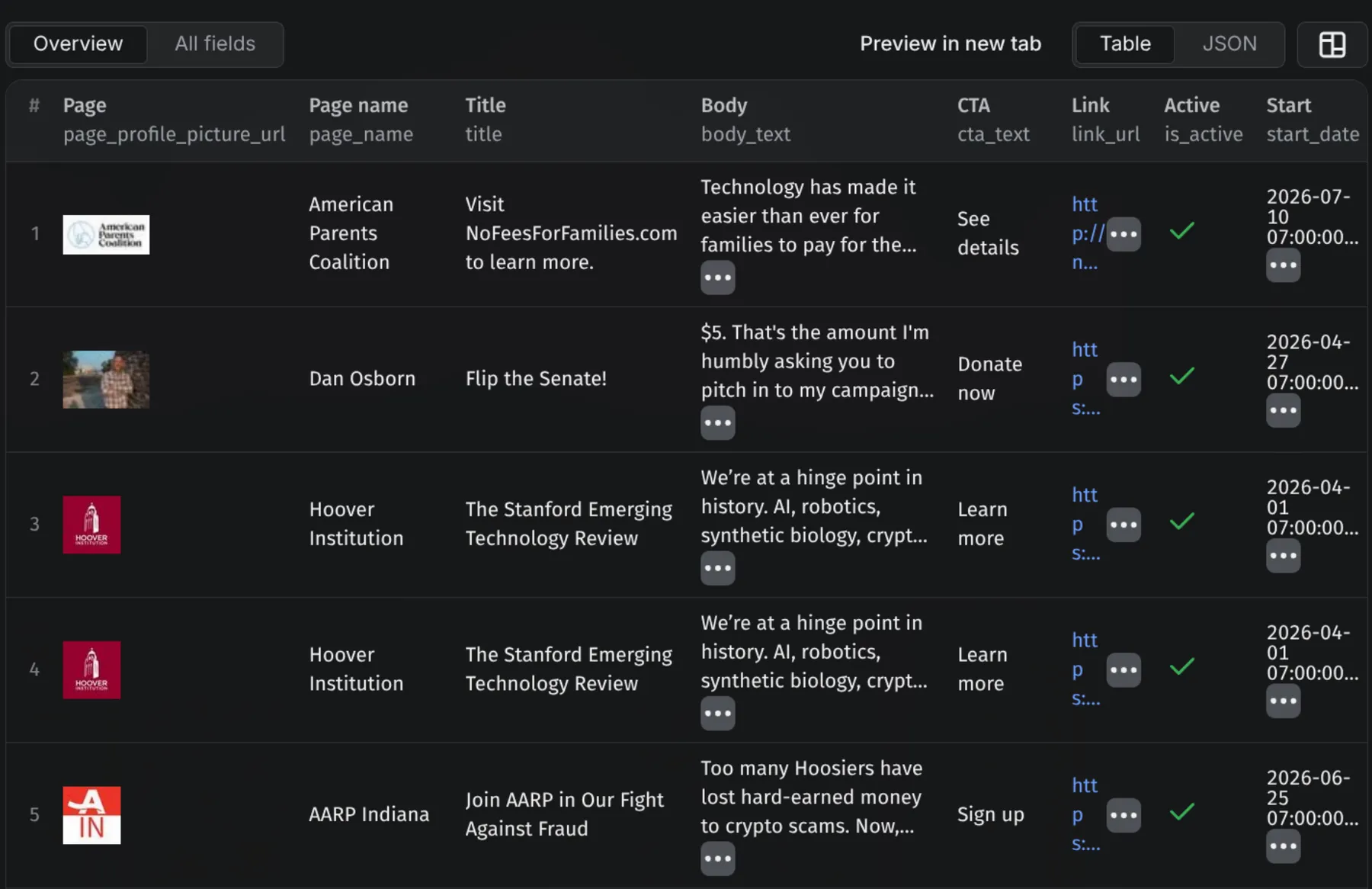
One flat row per ad, duplicates dropped. Results stream into the dataset while the run is going, so partial exports work immediately.
⚠️ Media links expire in about four days.
oe=6A17B41Bat the end of the video URL above is the expiry as hex Unix time: 2026-05-28. Download the files the day you scrape; permanent links don't exist.
⚠️ Spend is null for commercial ads. Meta only discloses finances for political and regulated ads. To find winners, sort by
start_date: the ad above has run since 2023, and losing ads get turned off.
For a political ad, the same row carries the money fields. Trimmed to what the commercial ad above has as null:
Fields
| Field | Description |
|---|---|
ad_archive_id | Meta's stable ID for this ad |
collation_id, collation_count | Groups near-identical variants of one ad |
is_active | Whether the ad is currently running |
page_id, page_name, page_profile_uri, page_profile_picture_url | The page running the ad |
page_categories, page_like_count, page_is_deleted | Page metadata |
display_format | IMAGE, VIDEO, CAROUSEL, DCO, DPA |
is_dynamic_creative | true when the copy holds template placeholders. Filter these out in one click |
title, body_text, caption, byline | Ad copy |
cta_text, cta_type | Button label and type, e.g. SHOP_NOW |
link_url, link_description | Where the ad sends traffic |
image_urls, video_urls | Signed CDN links to the creatives, see the expiry note above |
cards | Per-card creative for carousel and DPA ads |
publisher_platform | FACEBOOK, INSTAGRAM, MESSENGER, WHATSAPP, AUDIENCE_NETWORK, THREADS |
start_date, end_date | ISO 8601 UTC. end_date is null while the ad is active |
total_active_time | Seconds the ad has been running |
categories | Policy categories: political, housing, credit, employment |
contains_sensitive_content, contains_digital_created_media | Policy flags |
currency, spend, reach_estimate, impressions_text, impressions_index | Regulated categories only. spend is a range string like "$600K - $700K"; impressions_index is the only numeric one, so sort on that |
targeted_or_reached_countries | Regulated categories only, cross-border campaigns |
search_url | Which input search produced this row |
⚙️ Setting filters from code
Every filter also exists as a plain input field under Structured filters. Results are identical to pasting a URL; this route saves code and automations from building URL strings. Each search term × country pair becomes one search, so 3 terms × 5 countries is 15 searches in one run.
searchTerms: keywords to search instead of URLscountries: ISO codes, default["US"].["ALL"]searches globallyadType: defaultall. The regulated categories arepolitical_and_issue_ads,housing_ads,employment_ads,credit_adsactiveStatus: defaultactive, orinactive, orallmediaType: defaultall, orimage,video,meme,image_and_meme,nonesearchType: defaultkeyword_unordered, orkeyword_exact_phrasesortBy: defaulttotal_impressions, biggest spenders first.relevancy_monthly_groupedis newest firstpublisherPlatforms: default all six, or any offacebook,instagram,messenger,whatsapp,audience_network,threads. Set["instagram"]for Instagram-only ads, or["threads"]to isolate Meta's newest placementstartDateFrom,startDateTo:YYYY-MM-DD
⚠️ Meta only supports two sorts: biggest spenders (the default) and newest. Any other sort in a pasted URL falls back to newest, and the biggest-spenders sort ignores Start date from. Filtering by date? Sort by newest.
💡 Tip: no need to write the JSON by hand. Configure Structured filters visually on the Input tab, switch the editor from Form to JSON, and copy the result into your code.
Python
Node.js
curl
Swap run-sync-get-dataset-items for runs to fire async and collect results by webhook; large scrapes outlive the 5-minute sync window. The apify-client SDK works too, in Python and JavaScript.
❓ FAQ
Why does Meta's official API hide commercial ads? The law forces Meta to publish political ads everywhere, and all ads that ran in the EU. Nothing forces them to publish the rest, so those only show up on the public website. This actor reads the same endpoint the website does.
Is there a free Facebook Ad Library API? Meta's official API is free, but outside the EU it returns only political and social issue ads, access takes a government-ID check plus app review, and Graph API rate limits throttle bulk pulls. This actor is the alternative: call it over the Apify REST API with the same input as the form and every ad category comes back as JSON.
Can I export Facebook ads to Excel or CSV? Yes. Open the Output tab of a run and click Export. CSV, Excel, JSON, JSONL, XML, and HTML, or pull the dataset over the API. Partial exports work while the run is still going.
Can I scrape Instagram ads with this?
Yes. Instagram ads live in the same Ad Library. Set publisherPlatforms to ["instagram"] for Instagram-only results, or leave it open and filter the publisher_platform column afterwards. Threads works the same way.
Can I use this Facebook Ad Library scraper for free? Yes. Registering on Apify comes with $5 of free platform credit every month, no credit card needed, and it runs this actor.
Why do image and video URLs stop working?
Every fbcdn.net link is signed: oh is the signature, oe the expiry, the date decoded in the Output note above. After that moment the CDN stops serving the file. An expired link can't be refreshed; scraping the ad again returns freshly signed URLs.
Why does some ad copy read {{product.name}}?
That ad is a template. Meta fills in a different product from the advertiser's catalog for every viewer, so there's no finished version to store, and every scraper gets the template. Filter them out with is_dynamic_creative.
Do I need a Meta access token?
No. Anonymous requests only. The actor handles residential proxy rotation, Chrome TLS impersonation, and Facebook's rd_challenge gate on its own.
How do I make a large run faster? Add more searches, not a bigger one. One search stops scaling around five parallel workers because they start fetching the same ads twice; ten searches run ten times as fast.
Is scraping the Ad Library legal? The Ad Library is a public transparency tool and this actor only retrieves what any logged-out visitor sees at the same URLs. Respect Meta's terms and your local law when using the data.
🛟 Support
Something not working, or a field missing? Message me in the Issues tab and I'll look into it quickly. I'm a solo dev, so don't hesitate.
Pairs well with the Reverse Image Search API for finding where a creative appears elsewhere, and the CMS Detector for profiling the landing pages you find.
- Thodor


