
Google Ads Transparency Scraper – Ad Library by Brand & ID
Pricing
from $1.50 / 1,000 ads
Google Ads Transparency Scraper – Ad Library by Brand & ID
[$1.50/1K ads] Scrape the Google Ads Transparency Center by brand name or advertiser ID: ad creatives, text, images, first/last shown dates. No login.
Pricing
from $1.50 / 1,000 ads
Rating
0.0
(0)
Developer

Douglas Gouvea Manoel
Maintained by CommunityActor stats
0
Bookmarked
1
Total users
1
Monthly active users
12 days ago
Last modified
Categories
Features
Share
Google Ads Transparency Scraper
Watch the demo: https://youtu.be/2H0nwwXRDOk
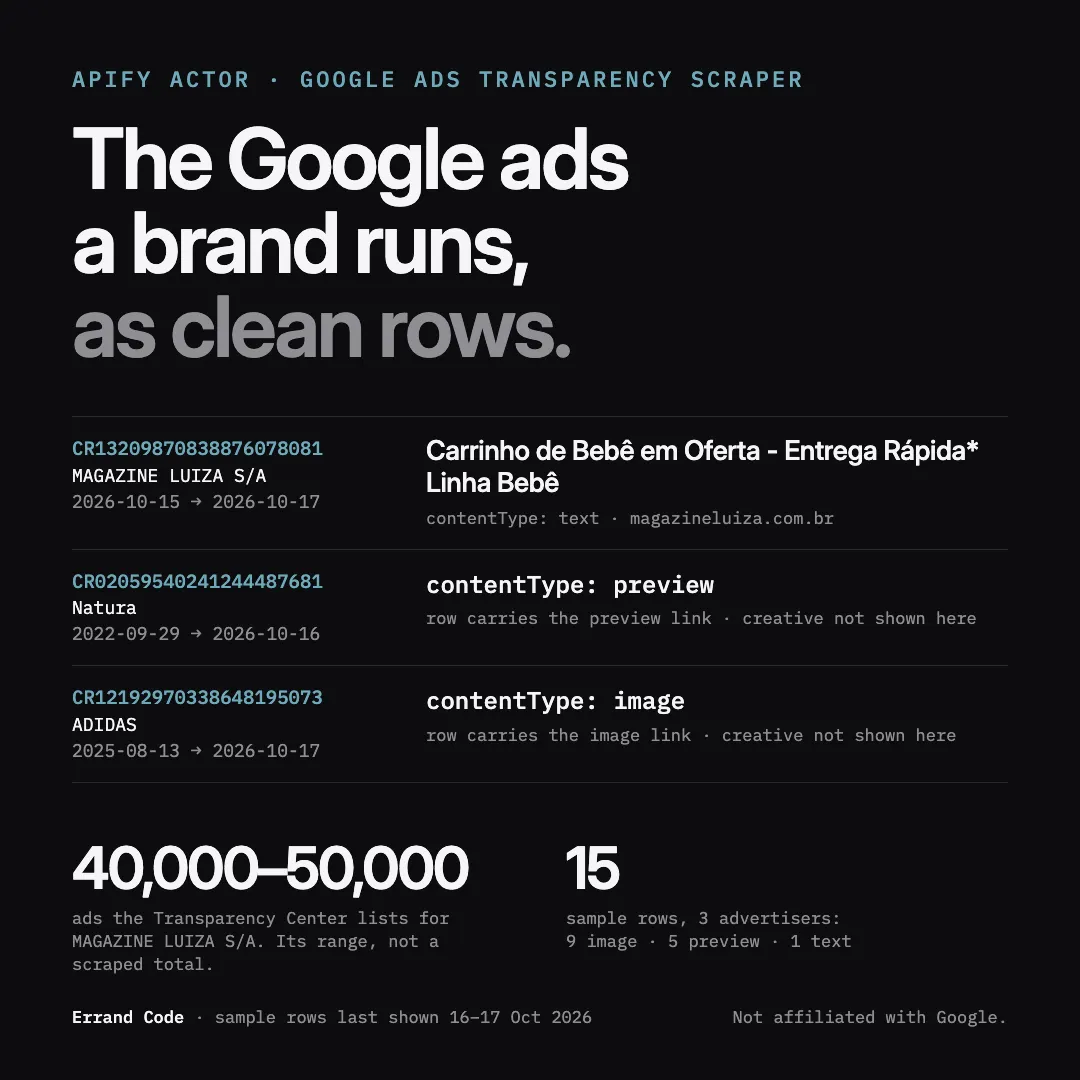
Get the ads a brand runs on Google from the public Google Ads Transparency Center, as clean rows: advertiser, creative ID, first and last date shown, a link to the ad page, and the ad content (image URL, search-ad text, or a preview link). No login, no browser clicking ad by ad.
Price: $1.50 per 1,000 ads ($0.0015 per ad), plus $0.00005 per Actor start. Searches that find nothing are free.
Part of Errand Code: https://errandcode.com/google-ads-transparency-scraper
Use cases
- Competitor ad monitoring: see which creatives a competitor is running on Google and since when, and get only the new ones on a schedule.
- Agency pitches: show a prospect their competitors' current Google ads in a spreadsheet.
- Creative research: collect search-ad headlines and descriptions in a niche to study messaging.
- Brand protection: check what ads appear under an advertiser account.
- Market research datasets: feed ad copy and run dates into BI tools, Google Sheets or an LLM.
How it works
- Enter brand names (e.g.
amazon,apple) or advertiser IDs (AR...). - The Actor finds the advertiser in the Transparency Center and pulls up to
maxAdsPerAdvertiserads. - You get one dataset row per ad. Export as JSON, CSV, Excel, or call it by API, schedule it, or connect Make, Zapier or Google Sheets.
Input
| Field | Type | What it does |
|---|---|---|
queries | list of strings | Brand or advertiser names to search |
advertiserIds | list of strings | Exact advertiser IDs (AR + digits); skips the name search |
maxAdsPerAdvertiser | integer 1–400, default 40 | Max ads per advertiser; each ad is one billable result |
advertiserMatching | first (default) or all | first uses the top suggested advertiser; all uses up to 5 |
onlyNewAds | boolean, default false | Deliver only creatives not seen in a previous run |
monitorStoreName | string, default google-ads-monitor | Key-value store that remembers seen creative IDs (used only with onlyNewAds) |
Example input:
Output
| Field | Meaning |
|---|---|
query | What you searched |
advertiserName, advertiserId | Who runs the ad |
creativeId, adUrl | The ad and its Transparency Center page |
firstShown, lastShown | First and last date shown (UTC) |
contentType | image, text or preview |
imageUrl | Direct image link (image ads) |
text | headline, description, displayUrl (search ads) |
previewUrl | Link Google uses to render the ad (preview ads) |
status, reason | Status rows such as no_results (incl. no_new_ads), source_unavailable, skipped (free) |
Example row (real run, November 2026, shortened):
Monitor only new ads
Turn on Only new ads (onlyNewAds) to deliver an ad only the first time this task sees its creativeId. The Actor keeps those IDs in a named Apify key-value store (monitorStoreName, default google-ads-monitor), with a separate set for each query and advertiser. The store is created if it is missing. An empty store behaves like a first run: every ad is delivered and then recorded. Later runs push only new creatives, so a schedule does not charge you again for the same ad. Ads already seen are not pushed.
With the flag off, the store is not opened and every ad is returned, exactly as a normal run.
Each query and advertiser remembers up to 50,000 creative IDs (the newest). Older IDs drop out of the set and can be delivered again if they are still in the results. Use the same query text, advertiser IDs and store name on every run. Overlapping runs against the same store are merged, but two runs that finish at the same moment can rarely deliver one new ad twice — pick a schedule that does not overlap.
Save the input as a task and schedule it in the Apify Console (Schedules), or call the schedule API. Example, every day at 12:00 UTC (0 12 * * *):
How to scrape Google ads for a specific company
- Run once with the brand name in
queriesandadvertiserMatching: "all"to see up to 5 matching advertiser accounts. - Copy the right
advertiserId(AR...) from the output. - Run again with that ID in
advertiserIdsand a highermaxAdsPerAdvertiser(up to 400). Tip: a name search can match a small account first (searchingnikemay return a single ad, whileamazonandapplereturn the main advertiser). Advertiser IDs give exact results.
FAQ
Do I need a Google account or API key? No. The Actor reads the public Transparency Center.
Why do some ads only have a previewUrl? In our tests about 57% of ads came back as an image or decoded text and about 43% only as a preview link. That link returns Google's rendering script, not an image. Open the row's adUrl to see the ad.
Can I filter by country or search by website domain? Not in this version. Search by brand name or advertiser ID.
What am I charged for? $0.0015 per ad returned. Status rows for empty or failed searches are free, and an advertiser reached twice in one run is charged once.
Can I schedule it? Yes, with Apify Schedules, and send results to Google Sheets, Make, Zapier or a webhook. Turn on onlyNewAds so each scheduled run delivers (and charges) only new creatives.
Is this official? No. It is an independent tool, not affiliated with or endorsed by Google. If Google changes the site, the Actor may need an update.
Personal data? Political ads may contain names of individuals. Use the data in line with the privacy rules that apply to you.
Pairs with the Meta Ad Library Scraper
The Meta Ad Library Scraper does the same job for Facebook and Instagram ads. Run both for one brand to see its ads on Google and on Meta side by side: this Actor returns the advertiser name and, for search ads, the display URL; the Meta one returns pageName and linkDomain.
More from Errand Code
This Actor is built and maintained by Errand Code. See the other tools: an AI visibility check (GEO audit), a Google Sheets add-on, MCP servers for AI agents, and more Apify scrapers.


