
Google Ads Transparency Scraper — Fast, Reliable, Watch Mode
Pricing
from $0.80 / 1,000 ad scraped (1 result)s
Google Ads Transparency Scraper — Fast, Reliable, Watch Mode
Get an advertiser's Google ads by domain, advertiser ID, or Transparency Center URL. Returns creative images, OCR'd headline/body text, format, and shown dates. Watch mode returns only new ads.

Google Ads Transparency Scraper — Competitor Ads Monitoring & API
Introduction
Extract any advertiser's Google ads — Search, YouTube, Maps, Shopping, and Play — straight from the Google Ads Transparency Center. Built API-first with no headless browser, so it's fast, cheap, and doesn't time out even on advertisers with 100,000+ creatives.
Put it on a schedule and the built-in watch mode returns only the creatives a competitor launched since the last run — a competitor-ad alert feed that costs almost nothing on a quiet day, because you are charged for the ads a run returns. The same Actor also pulls an advertiser's entire ad history in one go when what you need is a one-off research dataset rather than a feed.
This is an independent tool. It is not affiliated with, endorsed by, or sponsored by Google. Google and Google Ads are trademarks of Google LLC, used here only to say which public service this Actor reads.
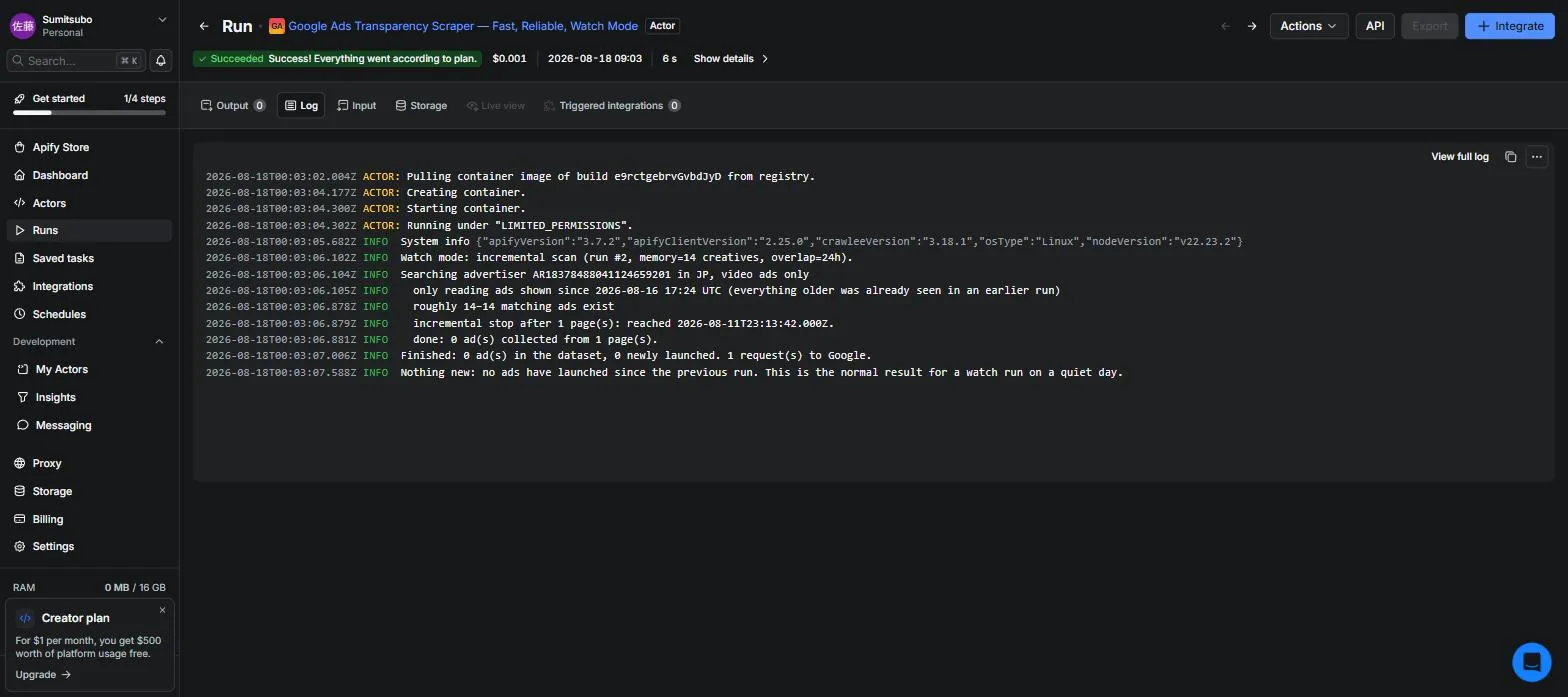
A watch run on a quiet day. The first run seeded the memory with 14 ads; this one made one request to Google and returned 0 ads — so you pay the $0.01 run start and nothing else, no matter how big the advertiser's back catalogue is. (The $0.001 on screen is the platform compute for that run, which we absorb — it is not your charge.)
What you get for every ad
| Field | Example |
|---|---|
advertiserName / legalName / advertiserCountry | Nike Retail BV / NL (verified identity) |
advertiserId / creativeId | AR18378… / CR00754… |
format | TEXT, IMAGE, VIDEO |
firstShownAt / lastShownAt | 2025-10-24T… / 2026-08-16T… — how long the ad has been running |
previewImageUrls | the creative's own image URLs. Image and shopping ads have no direct URL in search results — Google serves them through a renderer — so for those formats this fills in when Archive creative images is on |
previewImageUrl | one URL for a thumbnail. Same as the first entry above, except for video ads with no still image, where it is a YouTube thumbnail derived from youtubeVideoId — that one is not a creative image, so it is deliberately not added to previewImageUrls |
youtubeVideoId / youtubeUrl | for video ads: the video the ad plays. Read out of the creative renderer, so it appears when Archive creative images is on |
externalImageUrls | image URLs the ad points at on non-Google hosts. Never fetched by this Actor — advertiser-controlled, so treat as untrusted |
previewHtml / previewRenderUrls | raw preview markup and render endpoints for video/rich ads (markup is written by the advertiser — treat it as untrusted and do not inject it into a page unsanitised) |
creativeText / creativeTextSource | what the ad actually says — headline and body — read out of the creative image by OCR when Read the ad text out of the creative is on. Google publishes no text for a search ad, so this is a reading rather than a field; creativeTextSource says so explicitly |
transparencyUrl | deep link to the ad's Transparency Center page |
isNew / isUpdated | change-detection flags (watch mode) |
storedAssetUrls | your own copies of the creatives, kept in this run's key-value store (optional — Google's URLs expire) |
formatCode | the raw numeric format enum behind format, for anyone matching against Google's own values |
searchQuery | the domain/brand you searched that matched this creative (empty when the task was an advertiser ID or URL) |
detailFetchedAt / variantCount / variants | present when Fetch creative details is on: when the extra lookup ran, how many render variants it found, and their image/render URLs |
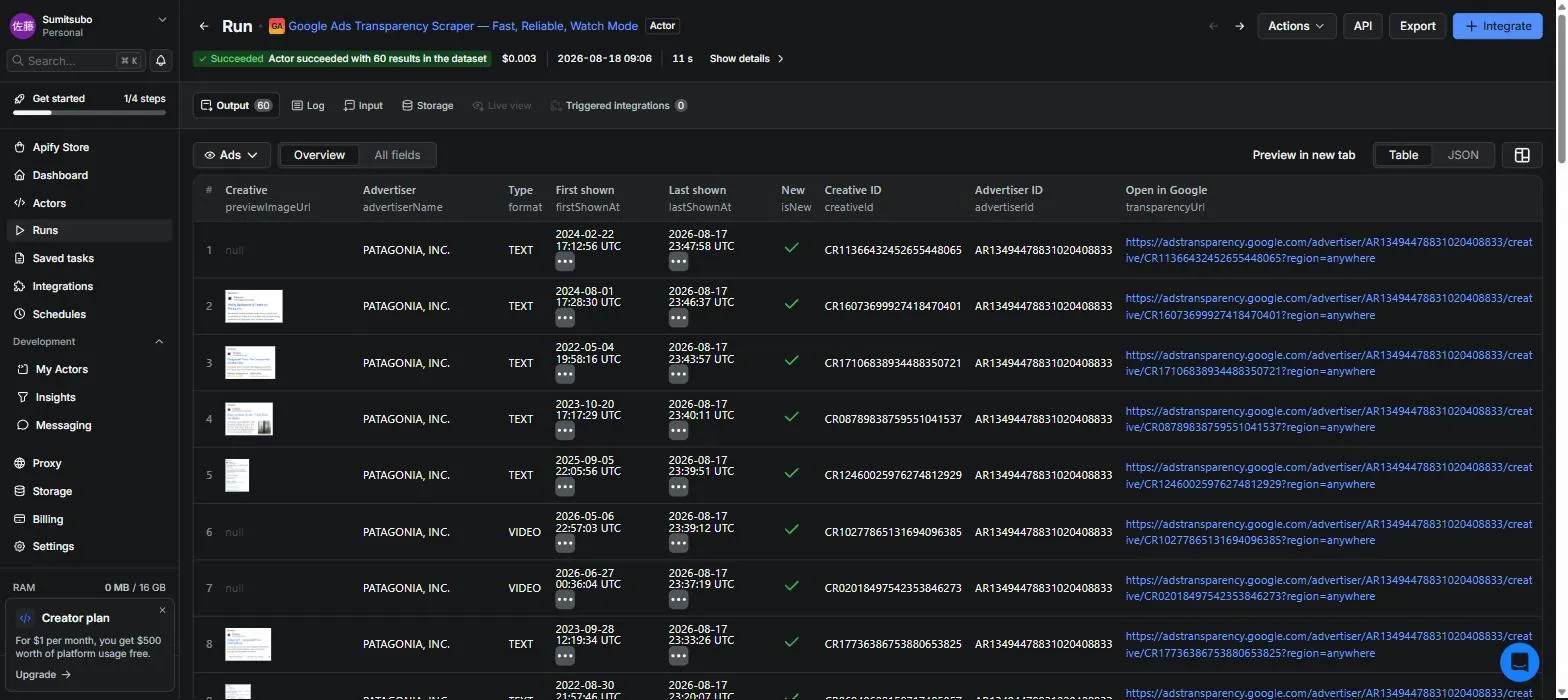
The results as they arrive — thumbnail, advertiser, format, how long the ad has been running, and a deep link back to Google. Export to JSON, CSV, or Excel, or pull it from the API.
One note on spreadsheets. Advertiser and legal names — and
creativeText, which is the advertiser's own ad copy — are written by the advertiser, not by us, and a value starting with=,+,-or@is treated as a formula by Excel and Sheets. That is true of any ad dataset; if you open exports directly, import them as text rather than double-clicking the file.
Why this scraper
- No browser, no timeouts. Talks to the Transparency Center's own data API over plain HTTPS. A 1,000-ad run takes about two minutes — measured twice on 2026-08-18 at 144s and 119s, including the pauses Google's rate limiting forces — and it doesn't die on "Actor timed out" like browser-based scrapers. If a search does get cut short, the run keeps everything it already collected instead of failing. (That figure is for a plain search. The two opt-in extras below are far slower per ad — see How long the extras take.)
- Watch mode (competitor launch alerts). Enable Output only new ads, put the Actor on a daily schedule, and every run returns only the creatives your competitor launched since last time — not their whole live inventory. State is kept per project via State key.
- Watch runs are cheap by design. You are charged for the ads a run returns, and a watch run returns only launches — so a quiet day costs almost nothing however big the advertiser's back catalogue is. Because the Transparency Center returns ads newest-first, the run also stops reading once it is past everything the previous run saw. To be precise about where that shortcut ends: Google refreshes the last-shown date of every ad that is still running, so the run reads past the advertiser's live ads before it can stop. Your bill does not change — those ads are not returned again — but for an advertiser with thousands of live ads a watch run takes minutes rather than seconds.
- Full-catalogue research pulls, when you need one instead. Large advertisers expose 100,000+ creatives in the Transparency Center — this Actor can pull all of it in one run (raise Max ads and the run timeout to match), which is the shape of job a one-off market-research or competitive-audit request usually needs.
- Creative archiving. Ad image URLs from Google expire. Turn on Archive creative images to keep your own copies in the run's key-value store (subject to your account's storage retention — copy them out for long-term keeping). Up to 10 images per ad.
- Input styles. Search by domain (
nike.com), advertiser ID (AR…), or paste a Transparency Center URL. Search matches the advertiser behind a domain, so use the registrable domain rather than a brand name. - Honest pricing. Pay per ad scraped. Details and assets are separate opt-in events, so you never pay for data you didn't ask for.
How long the extras take
Fetch creative details and Archive creative images each add per-ad requests to Google, and Google rate-limits those far harder than it rate-limits search. The run backs off and keeps going, but the throughput difference is large enough that it changes how you should set Max ads:
| What you run | Measured throughput |
|---|---|
| Plain search | ~1,000 ads in about 2 minutes (144s / 119s, 2026-08-18) |
| Details + archive images together | ~2.9 ads per minute — 88 ads in 30m36s, measured 2026-08-21 |
| Read the ad text out of the creative alone | ~2.0 ads per minute — 10 ads in 294.7s, measured 2026-08-29 |
Those two rows are one measurement each, and the exact rate moves with how hard Google is throttling at the time — treat it as the right order of magnitude rather than a guarantee. What does not move is the shape of it: any one of these options is slower per ad by roughly two orders of magnitude, because each ad costs its own rate-limited request (or, for the OCR option, a CPU-bound read) instead of riding along in a page of 100.
This matters because runs stop at the Apify run timeout (1 hour by default). At the slower measured rate, an hour gets through roughly 120 ads — so leaving Max ads at its default of 500 with any of these options on will hit the timeout long before it finishes. Either raise the run's timeout, or lower Max ads to what an hour can actually cover, or turn the extras on only for a narrowed search. The plain search path is unaffected.
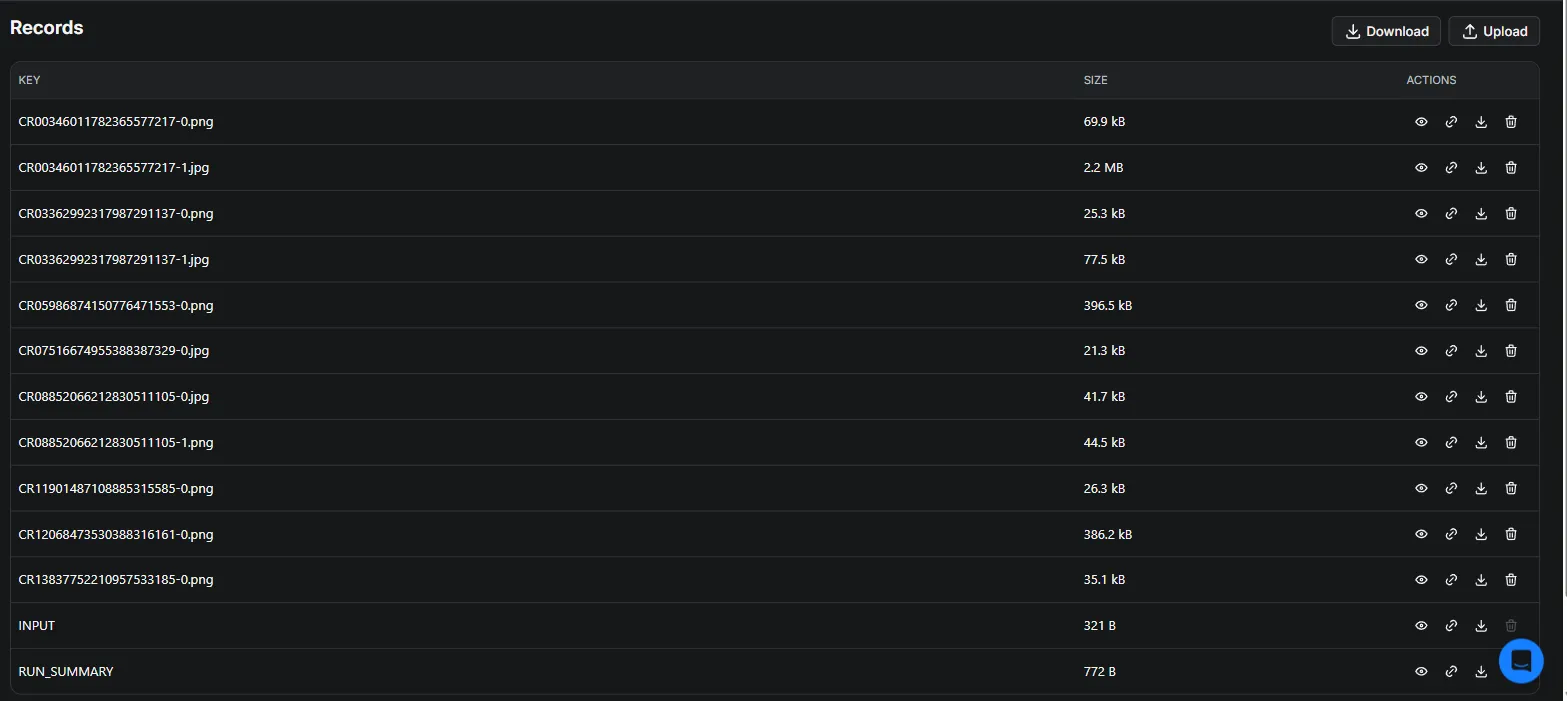
With Archive creative images on, every creative is copied into the run's key-value store under its creative ID — your own copy, kept after Google's URL expires. RUN_SUMMARY in the same store tells you what the run did.
Pricing
$1 per 1,000 ads. You pay per ad returned, so the price scales with what you actually get.
| What you're doing | Typical cost |
|---|---|
| Trying it out — 500 ads from one domain | about $0.51 |
| Watching 20 competitors, every day | about $0.01–0.08 per day |
| A full research pull — 10,000+ ads from one or more advertisers | about $10+ |
Two very different jobs at two very different price points. A daily watch is deliberately cheap because it returns almost nothing on a quiet day: after the first run it returns only what launched, so a quiet day costs little more than the run itself no matter how large the advertiser is. A one-off competitive audit or dataset build is the other shape — priced like any bulk export, you pay for what you pull, with no subscription either way.
Priced events
Pay-per-event, billed exactly as named in Console → Monetization — no other event charges you.
| Event | What triggers it | Price |
|---|---|---|
actor-start | Once per run, charged only once the run reaches Google — a run that is blocked before its first response costs you nothing | $0.01 |
ad-scraped | Per ad in the dataset | $0.001 |
creative-detail | Per ad, only when Fetch creative details is on | $0.002 |
asset-downloaded | Per image archived, only when Archive creative images is on | $0.004 |
ad-text-extracted | Per ad whose creative produced readable text, only when Read the ad text out of the creative is on — a wordless or video creative is free | $0.002 |
Two things to know before you rely on that. The first run of each advertiser is a normal-sized pull — it has to read the catalogue before it can tell you what is new in it — so budget for one full pull per advertiser up front. And Max ads is a per-run cap on ads returned, not a total bill: Fetch creative details, Archive creative images and the run start are charged as separate events on top. Use the run's own Max total charge (USD) setting if you want one hard number.
Use cases
- Competitor ad monitoring — see every ad a competitor runs on Google Search, YouTube, Maps, Shopping, and Play, with first/last shown dates as a proxy for what's working (long-running ads = winners).
- Creative research & swipe files — pull a competitor's image and video creatives and archive them before they disappear.
- Agency reporting — feed new-creative alerts into Slack/Sheets via Apify integrations.
- AI agents & RAG — connect through the Apify MCP server and let your agent query live competitor ads.
- Ad-tech data pipelines — advertiser verification data (legal name, country) for compliance and sales intelligence.
Tutorial
- Open the Input tab and enter a domain, advertiser ID, or Transparency Center URL — or use the prefilled example.
- Set optional filters: Region, Creative format, Platforms — narrowing here is the cheapest way to control cost.
- To track a competitor's launches over time, turn on Watch mode (
onlyNewCreatives), give it a State key, and put the Actor on a daily schedule. The first run seeds memory; every run after that returns only what's new. - Click Start, then open the Output tab or pull results from the Dataset via API.
Returns Nike's video ads currently or recently shown on YouTube in the US.
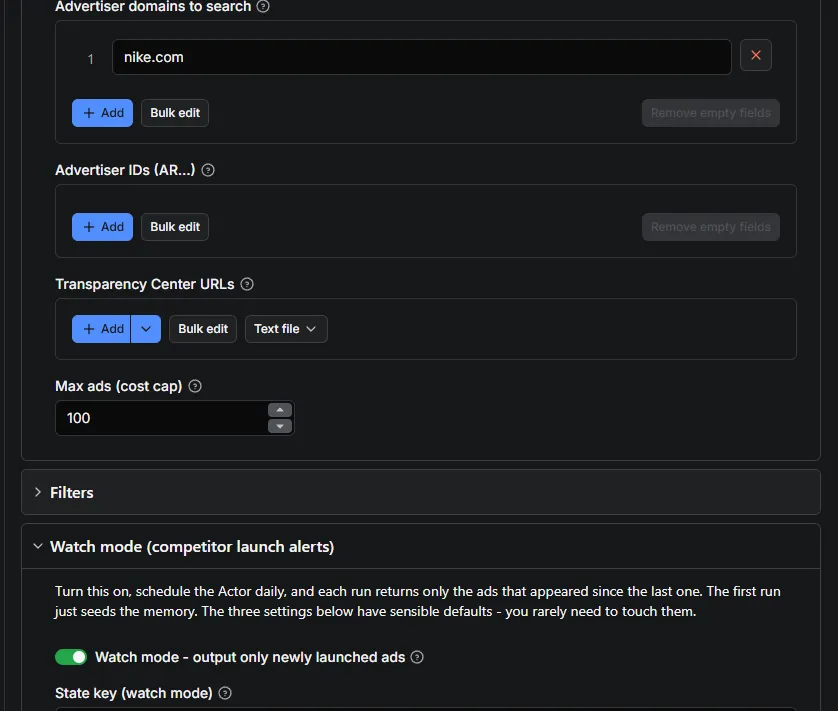
Type a domain, flip Watch mode on, and schedule it. Everything else has a working default.
Competitor watch feed (recommended setup)
- Input:
advertiserIdsorqueriesfor the brands you track,onlyNewCreatives: true,stateKey: "my-project". - Create a daily schedule for this Actor.
- Add an integration (Slack, email, webhook, Google Sheets) on new dataset items.
First run seeds the memory (all ads are isNew); from the second run on, you only get launches.
Why "new" and not "changed": Google refreshes the last-shown date of every ad that is still running, so "changed since yesterday" would return the advertiser's entire active inventory every single day. That is activity data, not an alert — so it is opt-in via Also output ads that are still running (includeUpdated). Every record still carries isNew / isUpdated so you can tell the two apart.
Two safety settings you normally leave alone: Watch overlap window (how far past the last-seen point to keep reading, default 24h) and Full rescan every N runs (default 7 — a periodic complete pass that catches anything the shortcut missed and forgets ads Google has dropped).
Input reference
See the Input tab. Key options: queries, advertiserIds, startUrls, region (ISO code or anywhere), creativeFormat (ALL/TEXT/IMAGE/VIDEO), platforms (SEARCH, YOUTUBE, MAPS, SHOPPING, PLAY), maxItems, onlyNewCreatives + stateKey, fetchCreativeDetails, downloadAssets, extractAdText, resolveAdvertiserInfo, firstShownAfter / lastShownAfter (ISO dates).
Proxy: use Residential
Leave Proxy configuration on its default, Residential. Google's Ads Transparency Center
rate-limits datacenter IPs on every request, so a run on the automatic/datacenter pool returns
nothing and ends with an HTTP 429 message. Measured on 2026-08-22, same search one minute apart:
residential returned 10/10 ads in 10 seconds; datacenter returned 0 ads with 6 of 6 requests
rate-limited. Proxy traffic is included in the per-event price — you are not billed separately for it.
Input and output examples
Input example
Output example
Captured live with Read the ad text out of the creative on, so this is a real run's output, not a constructed one:
That last field is a German-language search ad — this advertiser runs in more than one market, the OCR
reads whatever language the creative was rendered in, and this is the raw reading, misreads included
(Ausriistung for Ausrüstung) — exactly what the FAQ above means by "expect the occasional misread."
FAQ and support
Is it legal to scrape the Google Ads Transparency Center? The Transparency Center is a public disclosure surface that Google operates so anyone can inspect who runs which ads. This Actor collects only what that surface publishes: advertisers and their creatives. Note that advertisers are not always companies — sole traders and individuals advertise too, and for them the verified-name fields can amount to personal data. Handle the output under your own compliance requirements.
How many ads can I get?
Whatever the Transparency Center holds for your query — large advertisers expose 100,000+ creatives. Use maxItems to cap cost, and filters (region/format/platform) to narrow.
How is lastShownAt useful?
Ads that keep their lastShownAt fresh for months are the advertiser's proven performers. Sort by firstShownAt descending for launches, by longevity for winners.
Does it support Google Search text ads / YouTube video ads / Shopping ads? Yes — all formats and all five Google surfaces, with per-surface filtering. Google itself only applies the surface filter to ads shown since 4 September 2023, so older ads drop out when you use it.
Do I get the headline and description text of a search ad?
Yes, with Read the ad text out of the creative switched on — but it is worth knowing where it
comes from. Google archives text ads as images, so the Transparency Center payload contains no
headline or description string at all: the words exist only as pixels. This Actor runs OCR over the
creative and returns what it reads in creativeText, with creativeTextSource set to ocr so
nothing downstream mistakes a reading for a published field.
Expect the occasional misread, and expect nothing at all from a creative with no words in it — a video ad, or a banner that is pure artwork. Those cost you nothing: the charge only lands when legible text actually comes out.
An advertiser I know runs ads returns nothing. Why?
Three usual causes: the ads ran in a different country than the Region you set (try
anywhere); the advertiser trades under a different legal entity than the domain you searched
(search the domain, not the brand name); or you filtered by a platform they don't use.
Why did my watch-mode first run return everything?
The first run seeds the state. Subsequent runs with the same stateKey return only newly launched creatives.
What happens with a really large advertiser? Watch mode calls an ad new when it is not in its memory, so the memory has to cover the advertiser before "new" reliably means "just launched". Some advertisers have six figures of creatives and Google rate-limits a single deep read, so a first run capped by Max ads — or cut short by Google — can end up holding only part of the catalogue. Until it is complete, later runs report ads they had simply not read yet as launches, and charge for them. The Actor checks for this on every run and warns in the log rather than quietly running up a bill.
The fix is either to raise Max ads until a run finishes without hitting the cap, or to narrow the search with Region, Creative format or Platforms so the feed covers a slice that fits. Narrowing is usually cheaper and more useful than watching an entire global catalogue.
Could watch mode miss an ad?
It stops reading once it is 24 hours past everything the previous run saw, and every 7th run re-reads the advertiser in full as a backstop. Both are configurable, and a run that gets cut short by maxItems forces a full rescan next time. If those rescans repeatedly cannot finish — which means the advertiser is bigger than one run can read — the Actor stops paying for a rescan that cannot succeed, keeps reporting launches from the top of the stream, and says in the log that coverage is partial so you can widen the budget or narrow the search.
Something's not working — how do I get help? Open an issue from this Actor's page (the Issues tab) and paste the run's URL (not just the ID) plus what you expected. Attaching the URL is what lets the developer actually see that run's log and input — without it, a failure on someone else's account is invisible on this end by design, so "it failed" alone can't be diagnosed. If you'd rather not file an issue every time, turn on Settings → Login & Privacy → Share run data with developers once, and your runs become visible automatically going forward.
Found this useful? A rating on this page (top left, next to Pricing) helps other people evaluating it decide faster — it takes a few seconds and means a lot for a small, actively maintained Actor.
Related searches this Actor answers
Google Ads Transparency Center scraper · Google ads library API · competitor Google Ads monitoring · YouTube ads spy tool · scrape Google search ads · Google ads checker by domain · ad intelligence API
Not affiliated with Google. Data comes from the public Google Ads Transparency Center.


