

Bikroy Product Search Scraper
DeprecatedPricing
$15.00/month + usage
Bikroy Product Search Scraper
DeprecatedAutomate product data extraction from Bikroy.com, Bangladesh's leading online marketplace. Collect comprehensive product listings with prices, seller details, locations, and verification status for market research, price monitoring, and competitive analysis.
Pricing
$15.00/month + usage
Rating
0.0
(0)
Developer

ecomscrape
Maintained by CommunityActor stats
0
Bookmarked
2
Total users
0
Monthly active users
6 months ago
Last modified
Categories
Share
Contact
If you encounter any issues or need to exchange information, please feel free to contact us through the following link: My profile
Bikroy.com Products Scraper: Extract Bangladesh's Largest Marketplace Data for E-commerce Intelligence
Introduction
Bikroy.com stands as Bangladesh's largest online classifieds and marketplace platform, connecting millions of buyers and sellers across the country. With extensive listings spanning electronics, vehicles, property, jobs, and consumer goods, Bikroy has become the primary destination for both individual sellers and businesses to reach Bangladesh's growing digital consumer base.
For businesses conducting market research, competitive analysis, price monitoring, or lead generation in the Bangladesh market, Bikroy.com contains invaluable product and seller data. However, manually collecting information from thousands of listings is impractical and time-consuming, especially when tracking market trends or analyzing competitor pricing strategies.
The Bikroy.com Products Scraper automates this data extraction process, enabling systematic collection of product listings, pricing information, seller details, and marketplace metrics. Whether you're monitoring electronics prices, analyzing vehicle market trends, or researching property listings across Bangladesh, this scraper provides the structured data needed for informed business decisions.
Scraper Overview
The Bikroy.com Products Scraper is a specialized data extraction tool designed to systematically collect product listing information from Bangladesh's premier online marketplace. This scraper employs advanced web automation to navigate search results and extract detailed product profiles efficiently.
Key advantages include configurable retry mechanisms for reliable data collection, flexible pagination controls for managing large datasets, and proxy support for avoiding detection. The tool is particularly valuable for e-commerce analysts, market researchers, pricing specialists, competitive intelligence teams, and businesses seeking to understand Bangladesh's online marketplace dynamics.
The scraper handles various search parameters including keyword queries, category-specific searches, sorting options (by date, price), and pagination controls. It maintains high data accuracy while implementing ethical scraping practices. Users can customize extraction parameters to focus on specific product categories, price ranges, seller types, or geographic locations relevant to their research objectives.
Input and Output Details
Example url 1: https://bikroy.com/en/ads/bangladesh?sort=date&order=desc&buy_now=0&urgent=0&page=1
Example url 2: https://bikroy.com/en/ads/bangladesh?sort=relevance&buy_now=0&urgent=0&query=suv&page=1
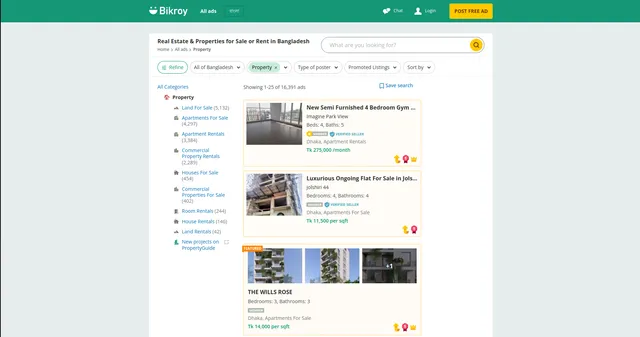
Example url 3: https://bikroy.com/en/ads/bangladesh/property
Example Screenshot of product information page:
Input Format
The scraper accepts JSON configuration allowing precise control over data extraction from Bikroy.com. The input structure includes critical parameters determining scraping execution.
Scrape with URLs:
The urls parameter: Add product search page URLs you want to scrape. Paste URLs individually or use Bulk edit for prepared lists. Ideal for targeting specific product categories, locations, or pre-filtered search results.
The ignore_url_failures parameter: If true, scraping continues even if some URLs fail after maximum retries. Ensures single problematic URL doesn't halt entire job—critical when scraping multiple diverse product categories.
When providing URLs, all "Scrape with search filters" options are disabled. System collects data only from specified URLs.
Scrape with Search Filters:
The keyword parameter: Enter search keyword for products (e.g., "laptop", "motorcycle", "apartment", "furniture"). Use English or Bangla terms matching Bikroy's product categories.
The sort_by parameter: Filter and organize results:
""(empty) - Relevance (default sorting)"date-desc"- Date (newest first) - for tracking new listings"date-asc"- Date (oldest first) - for historical analysis"price-desc"- Price (high to low) - for premium product analysis"price-asc"- Price (low to high) - for budget product research
The page parameter: Specify starting page number for scraping. Useful for resuming interrupted scrapes or targeting specific result ranges.
When using search filters, leave urls field empty in "Scrape with URLs" configuration.
General Options:
The max_items_per_url parameter: Limit items per URL or search query. Default is 20, balancing batch size with comprehensive collection.
The max_retries_per_url parameter: Retry limit for failed requests. Default is 2, balancing thoroughness with efficiency.
The proxy parameter: Proxy configuration for maintaining anonymity and avoiding detection. Essential for large-scale or frequent scraping operations.
Output Format
The scraper returns structured product data with each field serving specific business intelligence purposes:
-
ID: Unique product listing identifier. Critical for tracking listings over time, database management, duplicate prevention, and cross-referencing data.
-
Slug: URL-friendly product identifier. Used for generating direct links to listings and tracking specific products across time periods.
-
Title: Product listing title. Primary identifier for product type, key for categorization, search matching, and initial filtering.
-
Description: Detailed product description. Provides comprehensive product information, condition details, seller notes—essential for quality assessment and lead qualification.
-
Details: Structured product specifications. Contains technical details, features, specifications—valuable for product comparison and detailed analysis.
-
Subtitle: Additional product information or tagline. Supplementary details about condition, urgency, special features—helps with detailed filtering.
-
Image URL: Primary product image link. Main visual representation for product identification and quality assessment.
-
Images: Array of all product image URLs. Complete visual documentation for thorough product evaluation and enriched databases.
-
Price: Listed product price in BDT. Core data point for pricing analysis, competitive intelligence, market trends, and price monitoring.
-
Discount: Discount amount or percentage if applicable. Identifies promotional pricing, helps track seller strategies and seasonal trends.
-
MRP: Maximum Retail Price. Original price before discount—useful for calculating actual savings and understanding pricing strategies.
-
Is Member: Boolean indicating seller membership status. Identifies professional sellers vs. individuals—important for seller credibility assessment.
-
Is Auth Dealer: Boolean showing authorized dealer status. Indicates official brand representatives—critical for authenticity verification and premium listing identification.
-
Is Featured Member: Boolean for premium member status. Identifies sellers investing in platform visibility—suggests active, serious sellers.
-
Is Featured Ad: Boolean indicating featured listing status. Shows listings with premium placement—useful for understanding competitive advertising strategies.
-
Show Featured Ad UI: UI display indicator for featured ads. Technical metadata for understanding listing presentation types.
-
Membership Level: Seller's membership tier. Indicates seller investment in platform and potential business size—valuable for B2B lead qualification.
-
Shop Name: Business or shop name if applicable. Identifies commercial sellers for B2B research and franchise/dealer network analysis.
-
Shop Logo URL: Business logo image link. Brand identification for commercial sellers—useful for competitive brand presence analysis.
-
Is Doorstep Delivery: Boolean for delivery availability. Indicates seller's logistics capabilities—important for e-commerce readiness assessment.
-
Is Extra Images: Boolean indicating additional images. Shows seller's effort in listing quality—correlates with seller professionalism.
-
Is Delivery Free: Boolean for free delivery offering. Identifies competitive shipping strategies—key for marketplace positioning analysis.
-
Is Top Ad: Boolean for premium placement. Indicates paid promotion—useful for competitive advertising intelligence.
-
Is Urgent Ad: Boolean showing urgent sale marking. Suggests motivated sellers or time-sensitive deals—valuable for negotiation opportunities.
-
Timestamp: Listing creation date/time. Essential for trend analysis, market velocity tracking, and identifying stale inventory.
-
Last Bump Up Date: Most recent listing refresh date. Shows seller activity level and listing management—indicates active sellers.
-
Category: Product category classification. Primary segmentation for market analysis, competitive research, and organized data management.
-
Is Verified: Listing verification status. Quality and authenticity indicator—critical for filtering trustworthy listings.
-
Is Job Ad: Boolean indicating job posting. Distinguishes job listings from product listings—essential for data categorization.
-
Location: Geographic location in Bangladesh. Crucial for regional market analysis, logistics planning, and location-based targeting.
-
Ad Type: Listing type classification. Differentiates between regular sales, services, jobs—important for proper data categorization.
-
Is Local Job: Boolean for local job postings. Specific identifier for employment listings—helps separate job from product data.
Each field supports specific use cases in market research, competitive analysis, price monitoring, seller intelligence, and business development strategies for Bangladesh's marketplace.
Example Output:
Usage Guide
Option 1: Scraping with URLs
To use the scraper with URLs, navigate to Bikroy.com and construct targeted searches using the platform's filters. Search by category (electronics, vehicles, property), apply location filters, set price ranges, and choose sorting options. Copy resulting URLs into the urls array.
Configure JSON input with appropriate retry limits and proxy settings. Set reasonable max_items_per_url values balancing speed with system stability. Enable ignore_url_failures to ensure problematic URLs don't stop entire jobs.
Best practices:
- Test URLs individually before batch processing
- Monitor for blocked requests or rate limiting
- Use delays between large extraction batches
- Keep backup lists of working URLs
- Verify URL parameters match Bikroy's current structure
Common troubleshooting:
- Adjust proxy settings if encountering access blocks
- Reduce retry counts for timeout issues
- Verify URL formats and query parameters
- Check for platform structure changes affecting URLs
Option 2: Scraping with Search Filters
Setting Up Search Criteria
Use search filters for automated product searches across Bikroy.com—ideal for systematic market monitoring and price tracking.
Step 1: Define Search Keyword
Enter keyword parameter for target products:
- Electronics: "laptop", "iPhone", "Samsung TV", "camera", "headphones"
- Vehicles: "motorcycle", "car", "bicycle", "auto rickshaw"
- Property: "apartment", "house", "land", "office space"
- Home & Living: "furniture", "refrigerator", "air conditioner"
- Fashion: "clothing", "shoes", "watches", "jewelry"
Step 2: Configure Sorting Strategy
Select sort_by parameter based on research goals:
- Relevance (empty): Best for broad category research
- Date (newest first): Track new market entrants, fresh listings
- Date (oldest first): Identify stale inventory, slow-moving products
- Price (high to low): Analyze premium segment, luxury products
- Price (low to high): Research budget segment, entry-level pricing
Step 3: Set Pagination
Use page parameter for systematic coverage:
- Start at page 1 for complete datasets
- Use specific pages to resume interrupted scrapes
- Plan page ranges based on total available results
- Combine with
max_items_per_urlfor controlled extraction
Best Practices for Filter-Based Scraping
Keyword Strategy:
- Use specific product terms for targeted results
- Try both English and Bangla keywords when applicable
- Include brand names for brand-specific research
- Use category terms for broader market analysis
Sorting for Different Objectives:
- Price monitoring: Use price sorting for competitive analysis
- Trend analysis: Use date sorting for market velocity tracking
- Inventory research: Use oldest-first for slow-moving stock identification
- New product tracking: Use newest-first for market entry monitoring
Systematic Coverage:
- Start with single category validation
- Expand to related categories systematically
- Track extracted listings to avoid duplicates
- Schedule regular scrapes for time-series data
Data Validation and Quality Control
Post-extraction verification:
- Confirm prices are in BDT and reasonable ranges
- Verify categories match search criteria
- Check location data for target geographic areas
- Validate seller information completeness
- Identify and filter duplicate listings
- Ensure timestamps reflect actual listing dates
Common Issue Resolution
Empty Results:
- Try broader keywords if specific terms yield nothing
- Verify keyword spelling and language
- Check category availability on Bikroy.com
- Test keywords directly on platform first
Sorting Issues:
- Confirm sort_by values match available options
- Verify sorting reflects in actual results
- Check if specific categories support all sort types
Pagination Problems:
- Track total pages available for searches
- Handle end-of-results gracefully
- Adjust max_items_per_url if hitting limits
- Use consistent page increments
Advanced Techniques
Price Monitoring System:
- Schedule regular scrapes with date sorting
- Track price changes over time for specific products
- Identify pricing patterns and seasonal trends
- Monitor competitor pricing strategies
Market Analysis:
- Scrape multiple categories for comprehensive market view
- Compare pricing across categories and locations
- Track seller types (individuals vs. businesses)
- Analyze listing velocity by category
Seller Intelligence:
- Filter by membership levels for business identification
- Track featured/premium ads for competitive intelligence
- Monitor authorized dealers for brand presence
- Analyze shop listings for franchise/dealer networks
Geographic Segmentation:
- Combine location filters with product searches
- Compare pricing across Bangladesh regions
- Identify location-specific demand patterns
- Track regional market differences
Proxy Configuration
For Bangladesh Access:
- Use proxies supporting South Asian access
- Consider Bangladesh-based proxies for optimal performance
- Rotate proxies for large-scale operations
- Monitor proxy performance for blocked requests
Best Practices:
- Test proxy configurations before large scrapes
- Use residential proxies for higher success rates
- Implement rotation for extended sessions
- Monitor for rate limiting indicators
Benefits and Applications
The Bikroy.com Products Scraper transforms manual marketplace research into automated intelligence gathering. Tasks requiring days of manual work are completed in hours, enabling focus on analysis rather than data collection.
Primary Applications:
Competitive Price Intelligence: Monitor competitor pricing strategies, track price trends over time, identify pricing opportunities, and optimize pricing strategies based on market data.
Market Research: Analyze product availability across categories, assess market demand through listing volumes, identify emerging product trends, and understand consumer preferences in Bangladesh.
Seller Analysis: Research seller types and business models, identify authorized dealers and premium sellers, analyze seller activity patterns, and discover B2B partnership opportunities.
Inventory Intelligence: Track product availability and stock levels, identify fast-moving vs. slow-moving products, monitor listing refresh patterns, and understand inventory cycles.
Geographic Market Analysis: Compare pricing across Bangladesh regions, identify location-specific demand, assess market penetration by area, and plan geographic expansion strategies.
E-commerce Strategy: Benchmark against marketplace pricing, identify product gaps and opportunities, analyze promotional strategies, and optimize listing strategies based on successful patterns.
Advantages:
- Comprehensive data from Bangladesh's largest marketplace
- Detailed seller information including verification status
- Price tracking with discount and MRP data
- Membership and feature indicators for seller intelligence
- Location-based segmentation for regional analysis
- Timestamp data for trend analysis and market velocity tracking
Structured output integrates with business intelligence tools, pricing software, CRM systems, and market analysis platforms for immediate actionable insights.
Conclusion
The Bikroy.com Products Scraper transforms marketplace intelligence gathering for Bangladesh's digital economy. By automating data extraction from the country's premier online marketplace, it empowers businesses with the structured data needed for competitive pricing, market analysis, and strategic decision-making.
Whether monitoring electronics prices, researching vehicle markets, analyzing property listings, or conducting comprehensive marketplace intelligence, this scraper provides systematic data extraction capabilities essential for understanding Bangladesh's rapidly evolving online commerce landscape.
Ready to gain marketplace intelligence advantages? Start extracting valuable insights from Bikroy.com today and transform your Bangladesh market research capabilities.
Related Actors
- Bikroy.com Product Details Scraper: A specialized data extraction solution engineered to harvest comprehensive product information from Bikroy.com's.
Your feedback
We are always working to improve Actors' performance. So, if you have any technical feedback about Bikroy.com Product Search Scraper or simply found a bug, please create an issue on the Actor's Issues tab in Apify Console.


