

Check24 Flight Search Scraper
Pricing
$20.00/month + usage
Check24 Flight Search Scraper
Automate flight data extraction from Check24.de, Germany's largest comparison portal. Extract comprehensive flight information including prices, schedules, luggage details, and booking options from over 1 million flight offers for market analysis and competitive intelligence.
Pricing
$20.00/month + usage
Rating
0.0
(0)
Developer

ecomscrape
Maintained by CommunityActor stats
0
Bookmarked
2
Total users
0
Monthly active users
10 months ago
Last modified
Categories
Share
Contact
If you encounter any issues or need to exchange information, please feel free to contact us through the following link: My profile
Guide (English version)
Check24 Flight Scraper: Extract Flight Data & Prices Efficiently
Introduction
Check24.de stands as Germany's most prominent comparison portal, serving over 16 million users and maintaining over 90% brand awareness in the German market. CHECK24 is Germany's largest comparison portal with over 16 million users, making it a crucial data source for anyone involved in the aviation industry, travel market analysis, or competitive pricing research.
The Check24 Flight Scraper addresses the critical need for automated flight data collection from this massive marketplace. With the travel industry's dynamic pricing models and constantly changing flight schedules, manual data collection becomes impractical and inefficient. This scraper enables businesses, researchers, and developers to extract comprehensive flight information systematically, providing insights into pricing trends, route availability, and market dynamics that would otherwise require extensive manual research.
Overview of Check24 Flight Scraper
The Check24 Flight Scraper is a robust data extraction tool designed specifically for Check24's flight comparison platform. This automated solution navigates through flight search results, extracting detailed information about flight options, pricing structures, airline offerings, and booking conditions across multiple routes and dates.
The scraper excels in handling Check24's complex search interface, which aggregates flight data from numerous airlines and booking platforms. It captures not only basic flight information but also nuanced details like luggage policies, rebooking options, and promotional offers that are crucial for comprehensive market analysis.
Target users include travel agencies seeking competitive intelligence, price comparison platforms building their databases, market researchers analyzing aviation trends, business travelers optimizing corporate travel policies, and developers creating travel-related applications that require accurate, up-to-date flight information from the German market.
Detailed Input and Output Specifications
Example url 1: https://flug.check24.de/search?from_0=FRA-A&to_0=AYT-A&date_0=2025-08-30&from_1=AYT-A&to_1=FRA-A&date_1=2025-09-06&adt=1&class=EPBF
Example url 2: https://flug.check24.de/search?from_0=DUS-C&to_0=MUC-A&date_0=2025-08-30&from_1=MUC-A&to_1=DUS-C&date_1=2025-09-06&adt=1&class=EPBF
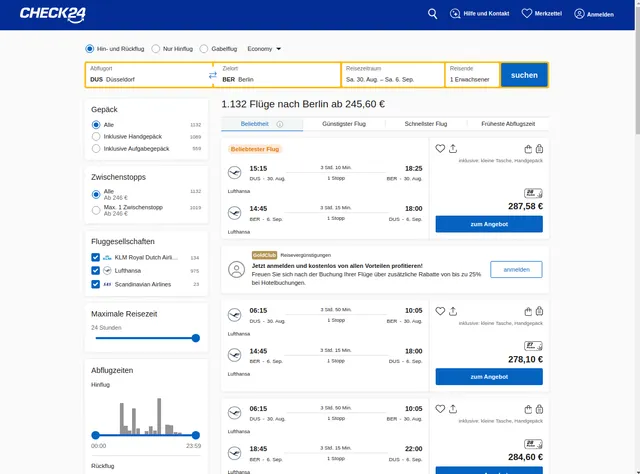
Example url 3: https://flug.check24.de/search?from_0=DUS-C&to_0=BER-C&date_0=2025-08-30&from_1=BER-C&to_1=DUS-C&date_1=2025-09-06&adt=1&class=EPBF
Example Screenshot of Flight list by query page:
Input Format
The scraper accepts configuration through a JSON object with several key parameters:
Scrape with URLs:
The urls parameter: Add the URLs of the flight list pages you want to scrape. You can paste URLs one by one, or use the Bulk edit section to add a prepared list.
The ignore_url_failures parameter: If set to true, the scraper will continue running even if some URLs fail to be scraped after the maximum number of retries is reached. This ensures that one problematic URL doesn't stop your entire scraping job.
When you provide a list of URLs for scraping, all options in the "Scrape with search filters" section will be disabled. The system will only collect data from the URLs you specified.
Scrape with Search Filters:
The from_location_code parameter: Enter the departure airport location code (e.g., "FRA" for Frankfurt, "MUC" for Munich, "LHR" for London Heathrow).
The to_location_code parameter: Enter the arrival airport location code (e.g., "AYT" for Antalya, "BER" for Berlin, "DUS" for Düsseldorf).
The booking_type parameter: Select the type of booking:
"oneway"- One way"roundtrip"- Round trip
The booking_class parameter: Select the flight class:
"EPBF"- Economy"PBF"- Premium Economy"BF"- Business"F"- First Class
The start_date parameter: Select the departure date in format YYYY-MM-DD (e.g., "2025-08-30").
The return_date parameter: Select the return date in format YYYY-MM-DD (e.g., "2025-09-06"). This is required for round trip bookings.
The adults parameter: Number of adult passengers (e.g., 1, 2, 3...).
The children parameter: Number of child passengers (e.g., 0, 1, 2...).
The infants parameter: Number of infant passengers (e.g., 0, 1, 2...).
The sort_by parameter: Sort flights by specific criteria:
"pdi"- Best (recommended by platform)"price"- Cheapest (lowest price first)"time"- Fastest (shortest duration first)
When using search filters for scraping, you need to leave the urls field empty in the "Scrape with URLs" configuration.
General Options:
The max_items_per_url parameter: Limit the number of items per URL or search filters you want to scrape. The default value is 20, providing a manageable batch size while allowing for comprehensive data collection.
The max_retries_per_url parameter: Limit the number of retries for each URL or search filters if the scrape is detected as a bot or the page fails to load. The default value is 2, providing a good balance between thoroughness and efficiency.
The proxy parameter: Proxy configuration is essential for maintaining anonymity and avoiding detection. The residential proxy option ensures that your scraping activities appear as legitimate browsing, reducing the risk of being blocked or rate-limited. You should choose a country that matches the location of the website you're scraping (e.g., US or DE for flug.check24.de).
Output Format
The scraper generates comprehensive flight data with 31 distinct fields, each serving specific analytical purposes:
Pricing Information: The output includes multiple price-related fields that provide deep insights into Check24's pricing structure. Net Total represents the final booking price, while Strike Price and Strike Price Total indicate original prices before discounts, allowing calculation of promotional savings through Strike Percent. The Voucher Amount field captures any available discount coupons or promotional credits.
Flight Details: Core flight information encompasses Destinations, Travel Time (sec), Average Travel Time (sec), and Stay Time (sec) for layovers. The Flights field contains detailed flight segments, while Stay Nights indicates the duration of stay for round-trip bookings. These fields enable comprehensive trip planning and duration analysis.
Booking Conditions: Critical booking-related data includes Available Seats for inventory management, Flex Rebooking Enabled and Rebooking fields that indicate change policies, and Offer Ticket Reservation showing reservation requirements. The Is VCC field likely indicates virtual credit card payment options, while Ticket Count shows the number of tickets in the offer.
Luggage Policies: Multiple luggage-related fields provide detailed baggage information: Included Luggage, Luggage Included, Included Luggage Equal, Total Luggage, and Total Luggage Text. These fields help travelers understand baggage allowances and additional costs, crucial for budget-conscious travel planning.
Technical Identifiers: System-level fields like ID, Canonical, Offer Impression ID, and Source enable tracking, deduplication, and integration with other systems. The Points field may relate to loyalty program benefits or booking rewards.
User Preferences: Fields like Is On Wishlist indicate user engagement metrics, while Paxes contains passenger information and Type categorizes the offer type (likely differentiating between various fare categories or booking types).
Usage Guide
Method 1: Scrape with URLs
Step 1: Configuration Setup
Begin by customizing the input JSON configuration. Add flight search result URLs to the urls array. Adjust the proxy country setting to match your target market - for German flights on Check24, consider using "DE" or "US" as the country code. Set appropriate retry limits based on your data collection timeline and modify the maximum items per URL based on your analysis requirements. Enable ignore_url_failures to ensure the scraper continues even if some URLs fail.
Step 2: URL Preparation Generate Check24 flight search URLs by visiting flug.check24.de manually and performing your desired flight search. Copy the complete search result URLs from your browser's address bar. Ensure URLs include all necessary parameters (departure/arrival airports, dates, passenger count, class preference). Test URLs manually to verify they return expected results before adding them to the configuration. You can paste URLs one by one, or use the Bulk edit section to add a prepared list.
Step 3: Execution and Monitoring Launch the scraper with your configured parameters and monitor the extraction process. The scraper will systematically process each URL, handling pagination and extracting comprehensive flight data. Monitor for any blocked requests or rate limiting issues through the built-in logging system.
Step 4: Data Processing Review the extracted flight data for completeness and accuracy. The output includes flight details, pricing, schedules, and airline information. Export data to CSV, JSON, or integrate directly into your analysis tools or database systems for price comparison and trend analysis.
Method 2: Scrape with Search Filters
Step 1: Configuration Setup
Leave the urls field empty when using search filters. Configure your proxy settings with appropriate country code (DE or US recommended for Check24). Set retry limits and item limits based on your requirements.
Step 2: Define Search Parameters Configure your flight search criteria:
- From Location Code: Enter the departure airport code (e.g., "FRA" for Frankfurt, "MUC" for Munich, "LHR" for London)
- To Location Code: Enter the arrival airport code (e.g., "AYT" for Antalya, "BER" for Berlin, "DUS" for Düsseldorf)
- Booking Type: Select "oneway" for one-way trips or "roundtrip" for round trips
- Booking Class: Choose from Economy (EPBF), Premium Economy (PBF), Business (BF), or First Class (F)
- Start Date: Enter departure date in YYYY-MM-DD format (e.g., "2025-08-30")
- Return Date: Enter return date in YYYY-MM-DD format for round trips (e.g., "2025-09-06")
- Passengers: Specify number of adults, children, and infants
- Sort By: Choose sorting criteria (Best/pdi, Cheapest/price, or Fastest/time)
Step 3: Execution and Monitoring Launch the scraper with your configured search filters. The scraper will automatically construct search queries, process results, and extract comprehensive flight data. Monitor the extraction process for any issues through the logging system.
Step 4: Data Processing Review the extracted flight data for completeness and accuracy. Export data to your preferred format (CSV, JSON) or integrate directly into your analysis tools for price comparison, route analysis, and booking optimization.
Best Practices:
- Reasonable Delays: Implement appropriate delays between requests to avoid overwhelming Check24's servers
- Geographic Proxies: Use geographically appropriate proxy settings (DE or US) to ensure accurate pricing and availability data
- Airport Codes: Verify airport codes are correct and valid before starting the scrape (e.g., FRA, MUC, BER, LHR)
- Date Format: Always use YYYY-MM-DD format for dates to avoid parsing errors
- Return Dates: Ensure return date is after start date when booking round trips
- Passenger Counts: Set realistic passenger numbers; excessive numbers may trigger validation errors
- Regular Updates: For URL scraping, regularly update your URL list to capture seasonal route changes and new destinations
- Data Storage: Store extracted data in structured formats (CSV, JSON, or database) for easy analysis and integration
- Test First: Start with a small number of items (10-20) to test configuration before scaling up
- URL vs Filters: Use URLs for specific, complex searches; use filters for standard route searches
Error Handling:
- Blocked IP Addresses: Switch proxy groups or rotate proxy countries if requests are blocked
- Invalid Airport Codes: Verify location codes match Check24's airport code format (usually IATA codes)
- Date Validation Errors: Ensure dates are in correct format (YYYY-MM-DD) and are valid future dates
- No Results Found: Check that your search criteria (dates, routes, class) produce valid results on Check24 website
- Changed Website Structure: If extraction fails, the website structure may have changed; contact support for scraper updates
- Temporary Server Unavailability: Increase
max_retries_per_urlto handle temporary connection issues - Rate Limiting: Reduce
max_items_per_urlor implement longer delays if experiencing rate limiting - Missing Return Date: Ensure return_date is provided when booking_type is set to "roundtrip"
- Passenger Validation: Some routes may have passenger limits; adjust numbers if encountering validation errors
Tips for Optimal Results:
- Peak vs Off-Peak: Consider scraping during off-peak hours to minimize detection risk
- Price Monitoring: For price tracking, schedule regular scrapes (daily or weekly) to capture fare fluctuations
- Route Validation: Test routes manually on Check24 before automating to ensure they're available
- Class Availability: Not all routes offer all classes; verify class availability for your target routes
- Seasonal Routes: Be aware that some routes are seasonal and may not have results year-round
Benefits and Applications
The Check24 Flight Scraper delivers significant time savings by automating what would otherwise require hundreds of hours of manual data collection. Instead of manually checking flight prices and availability across multiple dates and routes, the scraper can process extensive search parameters in minutes, providing comprehensive market coverage.
Competitive Intelligence: Travel agencies and OTAs can monitor competitor pricing strategies, identify market opportunities, and adjust their own pricing models based on real-time market data. The detailed pricing breakdown enables sophisticated competitive analysis and strategic positioning.
Market Research Applications: Aviation industry analysts can track pricing trends, seasonal variations, route popularity, and market dynamics across the German travel market. The comprehensive data set supports forecasting models, demand analysis, and strategic planning initiatives.
Business Value Creation: Corporate travel managers can optimize travel policies by analyzing cost patterns across different routes, airlines, and booking timeframes. Travel startups can build innovative applications using reliable, comprehensive flight data without investing in complex API integrations or partnerships.
Conclusion
The Check24 Flight Scraper represents a powerful solution for automated flight data extraction from Germany's premier travel comparison platform. By providing access to comprehensive flight information, pricing intelligence, and market insights, this tool enables data-driven decision making in the competitive travel industry.
Whether you're conducting market research, building travel applications, or optimizing corporate travel strategies, this scraper delivers the reliable, detailed data necessary for success in today's dynamic aviation marketplace. Start leveraging Check24's extensive flight database today to gain competitive advantages and deeper market insights.
Anleitung (deutsche Version)
Check24 Flugscraper: Flugdaten & Preise effizient extrahieren
Einführung
Check24.de gilt als Deutschlands führendes Vergleichsportal, das über 16 Millionen Nutzer betreut und einen Bekanntheitsgrad von über 90 % in Deutschland aufweist. CHECK24 ist das größte Vergleichsportal Deutschlands mit mehr als 16 Millionen Nutzern und stellt somit eine zentrale Datenquelle für Akteure in der Luftfahrtbranche, Reiseanalyse oder Wettbewerbspreisforschung dar.
Der Check24 Flight Scraper adressiert den essenziellen Bedarf, automatisiert Flugdaten aus diesem riesigen Marktplatz zu erfassen. Da die Preisgestaltung im Reiseverkehr dynamisch ist und Flugpläne ständig variieren, wird manuelle Datensammlung schnell unpraktisch und ineffizient. Mit diesem Scraper können Unternehmen, Forscher und Entwickler umfassende Fluginformationen systematisch extrahieren und so Einblicke in Preistrends, Routenverfügbarkeiten und Marktdynamik gewinnen, die sonst einen erheblichen manuellen Aufwand bedeuten würden.
Übersicht des Check24 Flight Scraper
Der Check24 Flight Scraper ist ein leistungsfähiges Tool zur Datenerfassung, speziell für die Flugvergleichsplattform von Check24. Diese automatisierte Lösung navigiert durch die Suchergebnisse, extrahiert detaillierte Informationen zu Flugoptionen, Tarifstrukturen, Airline-Angeboten und Buchungsbedingungen über mehrere Routen und Daten hinweg.
Der Scraper bewältigt die komplexe Suchoberfläche von Check24, die Flugdaten verschiedener Airlines und Buchungsplattformen aggregiert. Neben Basisinformationen erfasst er auch detaillierte Angaben wie Gepäckrichtlinien, Umbuchungsmöglichkeiten und Sonderangebote – entscheidend für eine fundierte Marktanalyse.
Zielgruppen sind unter anderem Reisebüros, die Wettbewerbsinformationen sammeln, Preisvergleichsportale, die ihre Datenbanken erweitern, Marktforscher, die aviation-Trends analysieren, Geschäftsreisende, die Unternehmensreise-Richtlinien optimieren, sowie Entwickler von travel-Apps, die stets aktuelle Flugdaten aus dem deutschen Markt benötigen.
Detaillierte Eingabe- und Ausgabeparameter
Eingabeformat
Beispiel URL 1: https://flug.check24.de/search?from_0=FRA-A&to_0=AYT-A&date_0=2025-08-30&from_1=AYT-A&to_1=FRA-A&date_1=2025-09-06&adt=1&class=EPBF
Beispiel URL 2: https://flug.check24.de/search?from_0=DUS-C&to_0=MUC-A&date_0=2025-08-30&from_1=MUC-A&to_1=DUS-C&date_1=2025-09-06&adt=1&class=EPBF
Beispiel URL 3: https://flug.check24.de/search?from_0=DUS-C&to_0=BER-C&date_0=2025-08-30&from_1=BER-C&to_1=DUS-C&date_1=2025-09-06&adt=1&class=EPBF
Beispiel eines Screenshots der Flugdatenliste durch die Suchanfrage:
Der Scraper akzeptiert eine JSON-Konfiguration mit spezifischen Parametern:
Erforderliche Parameter:
urls: Array mit Check24-Flugsuch-URLs (flug.check24.de)max_items_per_url: Maximale Anzahl an Flügen, die pro URL extrahiert werden sollenmax_retries_per_url: Anzahl der Wiederholungsversuche bei fehlgeschlagenen Requests (Standard: 2)
Ausgabeformat
Der Scraper generiert umfassende Flugdaten mit 31 verschiedenen Feldern, die für spezifische Analysen nutzbar sind:
Preisinformationen:
In der Ausgabe finden Sie mehrere preisbezogene Felder, die Einblicke in das Preismodell von Check24 bieten. Net Total zeigt den endgültigen Buchungspreis, während Strike Price und Strike Price Total die Originalpreise vor Rabatten darstellen, sodass sich die Ersparnis durch Strike Percent berechnen lässt. Das Feld Voucher Amount erfasst verfügbare Rabatt- oder Promotion-Credits.
Flugdaten:
Zentrale Fluginformationen umfassen Destinations, Travel Time (sec) (Reisezeit in Sekunden), Average Travel Time (sec) (Durchschnittliche Reisezeit), sowie Stay Time (sec) (Verweildauer bei Zwischenstopps). Das Feld Flights enthält detaillierte Segmente aller Flüge, während Stay Nights die Nächteanzahl bei Hin- und Rückflug angibt. Damit sind umfassende Reiseplanung und Daueranalysen möglich.
Buchungsbedingungen:
Kritische Daten zu Buchungsrichtlinien umfassen Available Seats (Verfügbare Plätze), Flex Rebooking Enabled sowie Rebooking (Änderungsoptionen), sowie Offer Ticket Reservation (Reservierungsanforderungen). Das Feld Is VCC weist vermutlich auf virtuelle Kreditkartenzahlungen hin, und Ticket Count zeigt, wie viele Tickets im Angebot enthalten sind.
Gepäckregelungen:
Mehrere Gepäckfelder liefern detaillierte Informationen: Included Luggage, Luggage Included, Included Luggage Equal, Total Luggage und Total Luggage Text. Diese helfen Nutzern, die Gepäckbestimmungen inklusive etwaiger Zusatzkosten zu verstehen – vor allem für budgetbewusste Reisende.
System- und Identifikationsfelder:
System-bezogene Felder wie ID, Canonical, Offer Impression ID und Source ermöglichen Nachverfolgung, Duplizierungserkennung und Systemintegration. Das Points-Feld könnte Bonus- oder Treueprogramm-Benefits betreffen.
Benutzerpräferenzen:
Felder wie Is On Wishlist deuten auf Nutzerinteraktionen hin, Paxes enthält Passagierinformationen, und Type kategorisiert das Angebot – vermutlich nach Tarifklasse oder Buchungstyp.
Anwendungsempfehlung
Schritt 1: Konfiguration anpassen:
Beginnen Sie mit der Anpassung der Eingabedaten im JSON-Format. Passen Sie die Proxy-Ländereinstellung an die Zielregion an – für Flüge innerhalb Deutschlands könnte DE sinnvoll sein. Stellen Sie die maximale Anzahl der Wiederholungen (max_retries_per_url) entsprechend Ihrer Datenbelieferungsstrategie ein. Variieren Sie max_items_per_url, um den Erfassungsumfang zu steuern.
Schritt 2: URLs vorbereiten:
Erstellen Sie Ihre Check24-Flugsuch-URLs manuell durch Besuch der Plattform. Kopieren Sie die Suchergebnisse-URLs mit allen nötigen Parametern (Abflughafen, Ziel, Datum, Passagieranzahl, Klasse). Testen Sie diese URLs vor der Automatisierung, um sicherzustellen, dass sie erwartete Ergebnisse liefern.
Schritt 3: Ausführung & Monitoring:
Starten Sie den Scraper mit Ihren Konfigurationen. Überwachen Sie den Fortschritt, insbesondere auf blockierte Requests oder Rate-Limiting. Passen Sie bei Bedarf Proxy-Regionen und Wartzeiten an.
Beste Praktiken:
- Setzen Sie angemessene Pausen zwischen Requests, um Serverbelastung zu vermeiden.
- Nutzen Sie geografisch geeignete Proxy-Server.
- Aktualisieren Sie regelmäßig Ihre URL-Liste, um saisonale Routen und neue Destinationen zu erfassen.
- Speichern Sie die extrahierten Daten strukturiert (CSV, JSON, Datenbank), um sie effizient zu analysieren.
Fehlerbehandlung:
- Blockaden durch IP-Sperren können durch Proxy-Rotation gemindert werden.
- Webseiten-Änderungen erfordern mindestens Anpassungen am Scraper-Code.
- Für temporäre Serverprobleme ist eine Retry-Logik hilfreich. Überwachen Sie die Logs, um Muster zu erkennen und Einstellungen anzupassen.
Vorteile & Anwendungsbereiche
Das Automatisieren mit dem Check24 Flight Scraper spart enorm Zeit: Statt tagelanger manueller Recherche kann in Minuten eine große Menge an Flugdaten erfasst werden. Für Marktforschung, Wettbewerbsbeobachtung und Preisanalysen bietet es einen entscheidenden Wettbewerbsvorteil.
Wettbewerbsintelligenz:
Reisebüros und OTA können dynamisch Preise, Angebote und Routen ihrer Mitbewerber überwachen, um die eigene Strategie zu optimieren.
Marktanalyse:
Aviation-Analysten erhalten mit den umfangreichen Daten Einblicke in Preisentwicklung, Saisonalitäten und Trends im deutschen Flugmarkt.
Geschäftswert:
Unternehmen im Travel-Bereich können auf zuverlässige, aktuelle Flugdaten zugreifen, um eigene Produkte, Preise und Angebote zu verbessern, ohne auf API-Partnerschaften angewiesen zu sein.
Fazit
Der Check24 Flight Scraper ist eine leistungsstarke Lösung für die automatisierte Erfassung umfassender Flugdaten aus Deutschlands führender Reisevergleichsplattform. Mit detaillierten Preis- und Reisedetails sowie Marktinformationen ermöglicht er datengestützte Entscheidungen im wettbewerbsintensiven Luftfahrtmarkt. Nutzen Sie jetzt die Chancen, um Ihren Wettbewerbsvorteil zu sichern und tiefere Einblicke in den deutschen Flugmarkt zu gewinnen.
Your feedback
We are always working to improve Actors' performance. So, if you have any technical feedback about Flight.check24.de Flight Search Scraper or simply found a bug, please create an issue on the Actor's Issues tab in Apify Console.


