

Kiwi Flight Search Scraper avatar
Kiwi Flight Search Scraper

Pricing

$20.00/month + usage

Go to Apify Store
Kiwi Flight Search Scraper

Kiwi Flight Search Scraper

Extract comprehensive flight data from Kiwi.com's virtual interlining platform. Access prices, routes, airlines, and booking options from 750+ carriers worldwide. Perfect for travel businesses, price comparison, and market research with detailed output including price, duration, and booking data.

Pricing

$20.00/month + usage

Rating

0.0

(0)

Developer

ecomscrape

ecomscrape

Maintained by Community

Actor stats

0

Bookmarked

10

Total users

0

Monthly active users

6 days ago

Last modified

Share

Contact

If you encounter any issues or need to exchange information, please feel free to contact us through the following link: My profile

Kiwi Flight Scraper: Extract Flight Data & Prices Efficiently

Introduction

Kiwi.com has revolutionized the travel industry with its innovative virtual interlining technology, connecting over 750 carriers that traditionally don't cooperate in online bookings. As an international online travel agency founded in 2012, Kiwi.com provides a fare aggregator and metasearch engine that combines itineraries from carriers using their unique "virtual interlining" concept. For businesses, researchers, and travel professionals who need to analyze flight data systematically, manual searching through Kiwi.com's extensive database becomes time-consuming and inefficient.

The Kiwi.com Flight Scraper addresses this challenge by automating the extraction of comprehensive flight information from search results. Whether you're conducting market research, building travel applications, or analyzing pricing trends across multiple routes, this scraper provides structured access to Kiwi.com's vast flight inventory, including low-cost carriers and unique route combinations that other platforms may not offer.

Scraper Overview

The Kiwi.com Flight Scraper is designed to extract detailed flight information from Kiwi.com search result pages efficiently. This powerful tool captures not only basic flight details like prices and schedules but also advanced metadata that makes Kiwi.com unique, such as virtual interlining options, travel hacks, and multi-carrier combinations.

Key advantages of this scraper include its ability to handle Kiwi.com's dynamic content loading, extract complex multi-leg journeys, and capture the platform's specialized data fields like "Travel Hack" indicators and "Vanilla" flight classifications. The scraper is particularly valuable for travel industry professionals who need to monitor pricing across unconventional routes that combine different carriers.

Target users include travel agencies looking to compare competitive pricing, researchers analyzing flight market trends, price monitoring services, and developers building travel applications. The scraper's comprehensive data extraction capabilities make it suitable for both commercial use and academic research in transportation and tourism sectors.

Detailed Input and Output Specifications

Input Format

Example url 1: https://www.kiwi.com/en/search/results/london-united-kingdom/manchester-united-kingdom

Example url 2: https://www.kiwi.com/en/search/results/london-united-kingdom/mexico-city-mexico

Example url 3: https://www.kiwi.com/en/search/results/london-united-kingdom/berlin-germany

Example Screenshot of Flight list by query page:
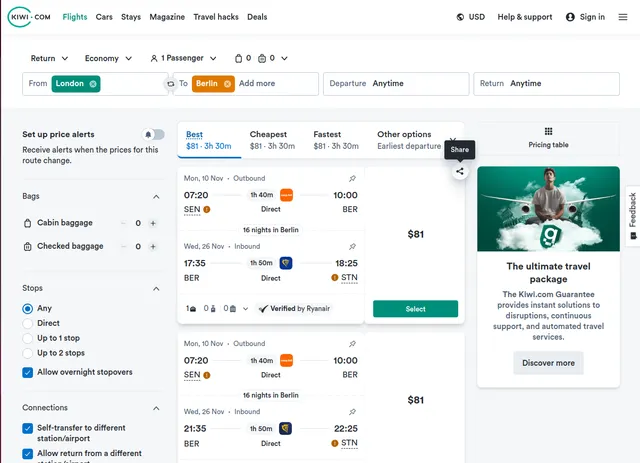
Input Format

The scraper accepts configuration through a JSON object with several key parameters:

Scrape with URLs:

{
"max_retries_per_url": 2, // Maximum number of retry attempts for each URL if scraping fails
"proxy": { // Proxy configuration to avoid bot detection
"useApifyProxy": false
},
"max_items_per_url": 20, // Limit the number of items to scrape per URL
"urls": [
"https://www.kiwi.com/en/search/results/london-united-kingdom/manchester-united-kingdom"
// Add URLs of flight list pages you want to scrape
],
"ignore_url_failures": true // Continue scraping even if some URLs fail
}

The urls parameter: Add the URLs of the flight list pages you want to scrape. You can paste URLs one by one, or use the Bulk edit section to add a prepared list.

The ignore_url_failures parameter: If set to true, the scraper will continue running even if some URLs fail to be scraped after the maximum number of retries is reached. This ensures that one problematic URL doesn't stop your entire scraping job.

When you provide a list of URLs for scraping, all options in the "Scrape with search filters" section will be disabled. The system will only collect data from the URLs you specified.

Scrape with Search Filters:

{
"max_retries_per_url": 2, // Maximum number of retry attempts for each search request
"proxy": { // Proxy configuration to avoid bot detection
"useApifyProxy": false
},
"max_items_per_url": 20, // Total number of items you want to scrape
"from_to": "london-united-kingdom/manchester-united-kingdom", // From and to locations
"departure_date": "2025-11-27", // Departure date in YYYY-MM-DD format
"return_date": "2025-12-03", // Return date in YYYY-MM-DD format
"stop_num": "1", // Number of stops
"adult_num": 1, // Number of adults
"child_num": 0, // Number of children
"infant_num": 0, // Number of infants
"sort_by": "price" // Sort flights by specific criteria
}

The from_to parameter: Enter the location to search for items. Make sure the location is accurate by selecting a from location and to location on the website and then searching. Copy the location value directly from the URL. For example, for the URL https://www.kiwi.com/en/search/results/london-united-kingdom/manchester-united-kingdom/2025-11-27/2025-12-03/, the correct location is london-united-kingdom/manchester-united-kingdom.

The departure_date parameter: Select departure date in format YYYY-MM-DD (e.g., "2025-11-27").

The return_date parameter: Select return date in format YYYY-MM-DD (e.g., "2025-12-03").

The stop_num parameter: Select the number of stops:

  • "" - Any
  • "0" - Direct
  • "1" - Up to 1 stop
  • "2" - Up to 2 stops

The adult_num parameter: Number of adults for the flight search.

The child_num parameter: Number of children for the flight search.

The infant_num parameter: Number of infants for the flight search.

The sort_by parameter: Select the sorting option:

  • "" - Best
  • "price" - Cheapest
  • "duration" - Fastest
  • "sourceTakeoffAsc" - Other

When using search filters for scraping, you need to leave the urls field empty in the "Scrape with URLs" configuration.

General Options:

The max_items_per_url parameter: Limit the number of items per URL or search filters you want to scrape. The default value is 20, providing a manageable batch size while allowing for comprehensive data collection.

The max_retries_per_url parameter: Limit the number of retries for each URL or search filters if the scrape is detected as a bot or the page fails to load. The default value is 2, providing a good balance between thoroughness and efficiency.

The proxy parameter: Proxy configuration is essential for maintaining anonymity and avoiding detection. Select proxies to be used by your scraper.

Output Format

[ // List of Flight information
{
"outbound": {
"sector_segments": [
{
"segment": {
"source": {
"station": {
"code": "LHR",
"type": "AIRPORT",
"city": {
"name": "London",
"id": "City:london_gb",
"legacy_id": "london_gb"
},
"id": "Station:airport:LHR",
"legacy_id": "LHR",
"name": "Heathrow",
"gps": {
"lat": 51.4775,
"lng": -0.4613889
},
"country": {
"code": "GB",
"id": "Country:GB"
}
},
"local_time": "2025-12-15T19:05:00",
"utc_time_iso": "2025-12-15T19:05:00Z"
},
"destination": {
"station": {
"code": "MAN",
"type": "AIRPORT",
"city": {
"name": "Manchester",
"id": "City:manchester_gb",
"legacy_id": "manchester_gb"
},
"id": "Station:airport:MAN",
"legacy_id": "MAN",
"name": "Manchester",
"gps": {
"lat": 53.3536111,
"lng": -2.275
},
"country": {
"code": "GB",
"id": "Country:GB"
}
},
"local_time": "2025-12-15T20:10:00",
"utc_time_iso": "2025-12-15T20:10:00Z"
},
"id": "Segment:6bcf2535bfa74605b976d2cf1c0f7e1aa2d6bbb2",
"duration": 3900,
"type": "FLIGHT",
"code": "1380",
"carrier": {
"id": "Carrier:207",
"name": "British Airways",
"code": "BA"
},
"operating_carrier": {
"id": "Carrier:207",
"name": "British Airways",
"code": "BA"
},
"cabin_class": "ECONOMY",
"hidden_destination": null,
"throwaway_destination": null
},
"guarantee": null,
"layover": null
}
],
"id": "Sector:6bcf2535bfa74605b976d2cf1c0f7e1aa2d6bbb2~6bcf2535bfa74605b976d2cf1c0f7e1aa2d6bbb2",
"duration": 3900
},
"inbound": {
"sector_segments": [
{
"segment": {
"destination": {
"station": {
"code": "LHR",
"type": "AIRPORT",
"city": {
"name": "London",
"id": "City:london_gb",
"legacy_id": "london_gb"
},
"id": "Station:airport:LHR",
"legacy_id": "LHR",
"name": "Heathrow",
"gps": {
"lat": 51.4775,
"lng": -0.4613889
},
"country": {
"code": "GB",
"id": "Country:GB"
}
},
"local_time": "2025-12-22T17:30:00",
"utc_time_iso": "2025-12-22T17:30:00Z"
},
"id": "Segment:71636e85e7dc022082765f18b97015b6be62cd83",
"source": {
"local_time": "2025-12-22T16:20:00",
"utc_time_iso": "2025-12-22T16:20:00Z",
"station": {
"id": "Station:airport:MAN",
"legacy_id": "MAN",
"name": "Manchester",
"code": "MAN",
"type": "AIRPORT",
"gps": {
"lat": 53.3536111,
"lng": -2.275
},
"city": {
"legacy_id": "manchester_gb",
"name": "Manchester",
"id": "City:manchester_gb"
},
"country": {
"code": "GB",
"id": "Country:GB"
}
}
},
"duration": 4200,
"type": "FLIGHT",
"code": "1371",
"carrier": {
"id": "Carrier:207",
"name": "British Airways",
"code": "BA"
},
"operating_carrier": {
"id": "Carrier:207",
"name": "British Airways",
"code": "BA"
},
"cabin_class": "ECONOMY",
"hidden_destination": null,
"throwaway_destination": null
},
"guarantee": null,
"layover": null
}
],
"id": "Sector:71636e85e7dc022082765f18b97015b6be62cd83~71636e85e7dc022082765f18b97015b6be62cd83",
"duration": 4200
},
"id": "ItineraryReturn:eyJwcm92aWRlcnMiOiJLSVdJLUJBU0lDOktJV0kiLCJyb3V0ZV9kYXRhIjoiQkE6MTM4MDpMSFI6MTc2NTgyNTUwMDpNQU46MTc2NTgyOTQwMDplY29ub215OkZhbHNlOjo6QkF8QkE6MTM3MTpNQU46MTc2NjQyMDQwMDpMSFI6MTc2NjQyNDYwMDplY29ub215OkZhbHNlOjo6QkEiLCJwcmljZSI6IjEyNSJ9",
"share_id": "eyJyIjoiQkE6MTM4MDpMSFI6MTc2NTgyNTUwMDpNQU46MTc2NTgyOTQwMDplY29ub215OkZhbHNlOjo6QkF8QkE6MTM3MTpNQU46MTc2NjQyMDQwMDpMSFI6MTc2NjQyNDYwMDplY29ub215OkZhbHNlOjo6QkEiLCJpIjpbIjBmNjQwYTJiNGZkNTRmZGMxYTNiZWFmY18wIiwiMGY2NDBhMmI0ZmQ1NGZkYzFhM2JlYWZjXzEiXSwidGhjIjowLCJ0YXQiOjAsInZpIjowLCJ0IjoiUlQifQ==",
"price": {
"amount": "125",
"price_before_discount": "125"
},
"price_eur": {
"amount": "106.883284"
},
"provider": {
"name": "Kiwi.com",
"code": "KIWI-BASIC",
"has_high_probability_of_price_change": false,
"content_provider": null,
"id": "ItineraryProvider:KIWI-BASIC"
},
"bags_info": {
"included_checked_bags": 0,
"included_hand_bags": 1,
"has_no_baggage_supported": false,
"has_no_checked_baggage": false,
"checked_bag_tiers": [
{
"tier_price": {
"amount": "105.76"
},
"bags": [
{
"weight": {
"value": 23
}
}
]
}
],
"hand_bag_tiers": [
{
"tier_price": {
"amount": "0"
},
"bags": [
{
"weight": {
"value": 23
}
}
]
}
],
"included_personal_item": 1,
"personal_item_tiers": [
{
"tier_price": {
"amount": "0"
},
"bags": [
{
"weight": {
"value": 23
},
"height": {
"value": 30
},
"width": {
"value": 15
},
"length": {
"value": 40
}
}
]
}
]
},
"booking_options": {
"edges": [
{
"node": {
"token": "HkiXZt_XIBQ-Vdh-9xXtismLvFG8-YohIQ3TsGY9GYG2rr8Rt0i2kLSdnL_wbnkbOTuSH-tlRg5wQNzKEJTucjKRUQiDx4VPHku7GBi5Fpvc_jXQKBaVQoCimOZLyYzTRf9j8HgOd9ctZiYRuT54yb9TM9VXSPktr-E-rDAHI3fHEgP1mCsPkB8pwQS0Sp2ZU7cxlWjTF5jslQfiotlWYutMiXR1VnRvH3xMeJzlqxlt2GIaltp884xDlIwgZLoIhpi4e9JXCOeig7l-ku1ozpGyDASL7W-aWb-Gm9Ydyr3gzQpy5lOTSm0s-iaxCRRHAi5bzCXxKJrbfHeB0cDYMPswI1vrTSR9MIkzwoZtkPd1yKjLofaOzYOM1FG-DsqRts8jGb0QjbgfpqU-iHX9OQRmbc43Bi2pxAGOtbUunOAOp9aF7jCgvM_jJxXTiYkc0FdqpIZkCvatDduuQwsompSsa5S0NN0TpUpcErIO9-FBuzvQanpzexQZfMDjhWsYLfbuU9UYh9X6ZNzawkEOoGZgJA6aaSp-lCVTT5HiwcNBMF2FlRXoOgg9AUpOUAr-vCyFvbC1ILHIZFhIh7-cAfxth6b1jYJM2aVBg5EDA9h39WJ_CseJYGMei-ZqFs1djX4akZXfPVOBUrfUAsDg5h70NoUhniV11TH45lzFjZvnFU0NM15A672sG4yj0i_mH3iam7oGnd8K-ju180EFop3Rv9dAIF2jh5H9A-0s1-2A-FTvu1OvifA2zLQyNfTTGVkaZMzjoTufbLQU2p1ZWtm7nkeVfv6kVg2LiBbWUckZ82-OZae-hl1wh4Ds_q85eUU960vyKRU_shAgYiseNBQsHFtRxO1p-L1H0--nK3j2lE0CCj07mXikG_mLsXPa6pK7e4wL5rRuIbRocz90Px7_QwijvN-NIe3wFQ_kufXrxAY47pDx8Dlcl2YSpdfih6Xg17I4SwHfWLIzjpgvje3kHQzXoivXcGuSXbCMarw3hO2k7uCqPGOhsQSLXx11MpPRankPcuo4PdxK6cn0TCUDULe77KhrlubqAZRCTHXrOGTV24Z71duJGb6Hg3Fbe1CVs9f0D7Mv8OMP-QzZDmJo-KEZAlQBbyIP5gEOxysVR4peVmCuYvaM9mD0onEeOAj64eRXykg0bLEMs-KvlRxxnKEllQjEk7tYdvApjjFQ=",
"booking_url": "/en/booking/?direct=true&locale=en&currency=usd&passengers=1-0-0&token=HkiXZt_XIBQ-Vdh-9xXtismLvFG8-YohIQ3TsGY9GYG2rr8Rt0i2kLSdnL_wbnkbOTuSH-tlRg5wQNzKEJTucjKRUQiDx4VPHku7GBi5Fpvc_jXQKBaVQoCimOZLyYzTRf9j8HgOd9ctZiYRuT54yb9TM9VXSPktr-E-rDAHI3fHEgP1mCsPkB8pwQS0Sp2ZU7cxlWjTF5jslQfiotlWYutMiXR1VnRvH3xMeJzlqxlt2GIaltp884xDlIwgZLoIhpi4e9JXCOeig7l-ku1ozpGyDASL7W-aWb-Gm9Ydyr3gzQpy5lOTSm0s-iaxCRRHAi5bzCXxKJrbfHeB0cDYMPswI1vrTSR9MIkzwoZtkPd1yKjLofaOzYOM1FG-DsqRts8jGb0QjbgfpqU-iHX9OQRmbc43Bi2pxAGOtbUunOAOp9aF7jCgvM_jJxXTiYkc0FdqpIZkCvatDduuQwsompSsa5S0NN0TpUpcErIO9-FBuzvQanpzexQZfMDjhWsYLfbuU9UYh9X6ZNzawkEOoGZgJA6aaSp-lCVTT5HiwcNBMF2FlRXoOgg9AUpOUAr-vCyFvbC1ILHIZFhIh7-cAfxth6b1jYJM2aVBg5EDA9h39WJ_CseJYGMei-ZqFs1djX4akZXfPVOBUrfUAsDg5h70NoUhniV11TH45lzFjZvnFU0NM15A672sG4yj0i_mH3iam7oGnd8K-ju180EFop3Rv9dAIF2jh5H9A-0s1-2A-FTvu1OvifA2zLQyNfTTGVkaZMzjoTufbLQU2p1ZWtm7nkeVfv6kVg2LiBbWUckZ82-OZae-hl1wh4Ds_q85eUU960vyKRU_shAgYiseNBQsHFtRxO1p-L1H0--nK3j2lE0CCj07mXikG_mLsXPa6pK7e4wL5rRuIbRocz90Px7_QwijvN-NIe3wFQ_kufXrxAY47pDx8Dlcl2YSpdfih6Xg17I4SwHfWLIzjpgvje3kHQzXoivXcGuSXbCMarw3hO2k7uCqPGOhsQSLXx11MpPRankPcuo4PdxK6cn0TCUDULe77KhrlubqAZRCTHXrOGTV24Z71duJGb6Hg3Fbe1CVs9f0D7Mv8OMP-QzZDmJo-KEZAlQBbyIP5gEOxysVR4peVmCuYvaM9mD0onEeOAj64eRXykg0bLEMs-KvlRxxnKEllQjEk7tYdvApjjFQ%3D&searchType=return&searchBags=0.0",
"tracking_pixel": "https://www.kiwi.com/pixel?affilid=skypicker&currency=USD&flightsId=0f640a2b4fd54fdc1a3beafc_0%7C0f640a2b4fd54fdc1a3beafc_1&from=LHR&lang=en&passengers=1&searchBags=0.0&to=MAN&booking_token=HkiXZt_XIBQ-Vdh-9xXtismLvFG8-YohIQ3TsGY9GYG2rr8Rt0i2kLSdnL_wbnkbOTuSH-tlRg5wQNzKEJTucjKRUQiDx4VPHku7GBi5Fpvc_jXQKBaVQoCimOZLyYzTRf9j8HgOd9ctZiYRuT54yb9TM9VXSPktr-E-rDAHI3fHEgP1mCsPkB8pwQS0Sp2ZU7cxlWjTF5jslQfiotlWYutMiXR1VnRvH3xMeJzlqxlt2GIaltp884xDlIwgZLoIhpi4e9JXCOeig7l-ku1ozpGyDASL7W-aWb-Gm9Ydyr3gzQpy5lOTSm0s-iaxCRRHAi5bzCXxKJrbfHeB0cDYMPswI1vrTSR9MIkzwoZtkPd1yKjLofaOzYOM1FG-DsqRts8jGb0QjbgfpqU-iHX9OQRmbc43Bi2pxAGOtbUunOAOp9aF7jCgvM_jJxXTiYkc0FdqpIZkCvatDduuQwsompSsa5S0NN0TpUpcErIO9-FBuzvQanpzexQZfMDjhWsYLfbuU9UYh9X6ZNzawkEOoGZgJA6aaSp-lCVTT5HiwcNBMF2FlRXoOgg9AUpOUAr-vCyFvbC1ILHIZFhIh7-cAfxth6b1jYJM2aVBg5EDA9h39WJ_CseJYGMei-ZqFs1djX4akZXfPVOBUrfUAsDg5h70NoUhniV11TH45lzFjZvnFU0NM15A672sG4yj0i_mH3iam7oGnd8K-ju180EFop3Rv9dAIF2jh5H9A-0s1-2A-FTvu1OvifA2zLQyNfTTGVkaZMzjoTufbLQU2p1ZWtm7nkeVfv6kVg2LiBbWUckZ82-OZae-hl1wh4Ds_q85eUU960vyKRU_shAgYiseNBQsHFtRxO1p-L1H0--nK3j2lE0CCj07mXikG_mLsXPa6pK7e4wL5rRuIbRocz90Px7_QwijvN-NIe3wFQ_kufXrxAY47pDx8Dlcl2YSpdfih6Xg17I4SwHfWLIzjpgvje3kHQzXoivXcGuSXbCMarw3hO2k7uCqPGOhsQSLXx11MpPRankPcuo4PdxK6cn0TCUDULe77KhrlubqAZRCTHXrOGTV24Z71duJGb6Hg3Fbe1CVs9f0D7Mv8OMP-QzZDmJo-KEZAlQBbyIP5gEOxysVR4peVmCuYvaM9mD0onEeOAj64eRXykg0bLEMs-KvlRxxnKEllQjEk7tYdvApjjFQ=",
"itinerary_provider": {
"code": "KIWI-BASIC",
"name": "Kiwi.com",
"subprovider": null,
"has_high_probability_of_price_change": false,
"content_provider": null,
"provider_category": null,
"id": "ItineraryProvider:KIWI-BASIC"
},
"price": {
"amount": "125"
},
"price_eur": {
"amount": "106.88"
},
"price_locks": {
"price_locks_curr": [
{
"default": false,
"price": {
"amount": "6.25",
"rounded_formatted_value": "$6"
}
},
{
"default": true,
"price": {
"amount": "12.5",
"rounded_formatted_value": "$13"
}
},
{
"default": false,
"price": {
"amount": "31.25",
"rounded_formatted_value": "$31"
}
}
],
"price_locks_eur": [
{
"default": false,
"price": {
"amount": "5.34",
"rounded_formatted_value": "5 €"
}
},
{
"default": true,
"price": {
"amount": "10.69",
"rounded_formatted_value": "11 €"
}
},
{
"default": false,
"price": {
"amount": "26.72",
"rounded_formatted_value": "27 €"
}
}
]
},
"kiwi_product": "KIWI_BASIC",
"disruption_treatment": "NO_PROTECTION",
"us_rules_apply": false
}
},
{
"node": {
"token": "HD4_wbzR8oVG76Bgka71v3vpzQ1aSLQjSPzDpmE6KwIIJ1h7XP5APOqYSDeF0-9X0x0PyOoQN4T7xeqoz7CldYSucyEO1iz6L2ldJi4a2Hj_fI22IXgsX57FMwDDc3sU8ote6QKxRQCaz-1Wr5IClqIiot5eh4zGvzUojY9F7S7o1r9CE5-ls_CivAOE-nWYSp-eKdy7fE9hTkApuqVborXv3uz7gn5r-0vsIo9tp3T0xNvr2bjREpMUUHIEckHHxeUn8-b4USsW_P-o1a6aiMhSZwKWEGHkTBNuri5munjP86RB2O7MvpRdBuUOHU-Th3dV-c4MP-6hPfwnUfJp_o1eZXB6AGQeVvVCcbMjyH47glpKsJ1NYU2fSssmj9tLefLw6JQVosMMaal69EDe3A335ME1NB4a2DxuarurJMYM83JYVn8Q8KjvxveD2J5ZPFS9g1hVR_wtzRZoiMqtxAExU00LLXTdozOzAKsjRosAGpJm2syvdQ6Kg_yae4D2M6zKjLX0uJNAjkhw8KiriJxWqbfACmMMZdebHUYQDrtvDNxWGmNWfd9WYaFkbmt6rOk14B4-bW6gagjw-MsvOCZNoSO9CZn4fXt8FGA_is9jtwit4h1GPM1j5FdhAamFnBMrYBlJO0afHxJRqD3a07IbvGjUK3T20DT-1284rfszoxWFSZAbP4m2NNZ0AowHmO8cozi0kgkyyxKnjpz4qDlg2OCICoSlDeJQhw7SI9DYPq9UPOKJDqMJoAk7O5va-J5o3JD1VlJGB8pHHnRP9IRIc25nQFAn9a4sN5FyffpG4ip5VcEFd42H5j5P_4UCYYyoOdpum8zIk008hLHHsR6aHqeouD8dVJxzNJF9-aXSzP_BkU2M3t6SbpqYUrrSUXz9gt2NJljnrabHkP_3yKbNcfQjNiwL3YkzHnykUho6b0WACHXm1-61X6JouTCTS6HkNg9ehzPk9-D7zcfLg8gOAu_qwbdQCNvuTq-v2fKwQbQ5TNVSht1wZfUSMTC_Axo9ydkO_oD15EIGJkCQiW5KGrtfinWLdFVNpZYcgoMRzqWDeiazByc52L4AUk50G6fHRaoyUUY6MWgOZAIvlJGStrkXB8JuWRVHXNsqOt_iaSCTotH67k37D7xrdeUSsDE3xV9fJHs8eZM5cFZITA8ERXssocE7qbhR3EYjVwajXErqXFDM8yNmrCKEExUgc_ezgMoTov1CIfpwcqZ--3abe9jU64T_d_X3d6AiwPXel7oFCWIS_kKxO0mDTy2BbtzvW4XJjHIZgPaYkxHjm-dZSqdXSNxgpLuP5KghNHjN11ABX07uvSXqkTGG2DWYHOTZm9u6dvezoHzPf_I6tl6YLyLHdSa5N8k8YLawkMOVfAYU4PflWjuLNYC74plsu1xqNuzp1xH1yUsUgji6IiqCG-XDZuF3yPw3L6KBnrPI=",
"booking_url": "/en/booking/?direct=true&locale=en&currency=usd&passengers=1-0-0&token=HD4_wbzR8oVG76Bgka71v3vpzQ1aSLQjSPzDpmE6KwIIJ1h7XP5APOqYSDeF0-9X0x0PyOoQN4T7xeqoz7CldYSucyEO1iz6L2ldJi4a2Hj_fI22IXgsX57FMwDDc3sU8ote6QKxRQCaz-1Wr5IClqIiot5eh4zGvzUojY9F7S7o1r9CE5-ls_CivAOE-nWYSp-eKdy7fE9hTkApuqVborXv3uz7gn5r-0vsIo9tp3T0xNvr2bjREpMUUHIEckHHxeUn8-b4USsW_P-o1a6aiMhSZwKWEGHkTBNuri5munjP86RB2O7MvpRdBuUOHU-Th3dV-c4MP-6hPfwnUfJp_o1eZXB6AGQeVvVCcbMjyH47glpKsJ1NYU2fSssmj9tLefLw6JQVosMMaal69EDe3A335ME1NB4a2DxuarurJMYM83JYVn8Q8KjvxveD2J5ZPFS9g1hVR_wtzRZoiMqtxAExU00LLXTdozOzAKsjRosAGpJm2syvdQ6Kg_yae4D2M6zKjLX0uJNAjkhw8KiriJxWqbfACmMMZdebHUYQDrtvDNxWGmNWfd9WYaFkbmt6rOk14B4-bW6gagjw-MsvOCZNoSO9CZn4fXt8FGA_is9jtwit4h1GPM1j5FdhAamFnBMrYBlJO0afHxJRqD3a07IbvGjUK3T20DT-1284rfszoxWFSZAbP4m2NNZ0AowHmO8cozi0kgkyyxKnjpz4qDlg2OCICoSlDeJQhw7SI9DYPq9UPOKJDqMJoAk7O5va-J5o3JD1VlJGB8pHHnRP9IRIc25nQFAn9a4sN5FyffpG4ip5VcEFd42H5j5P_4UCYYyoOdpum8zIk008hLHHsR6aHqeouD8dVJxzNJF9-aXSzP_BkU2M3t6SbpqYUrrSUXz9gt2NJljnrabHkP_3yKbNcfQjNiwL3YkzHnykUho6b0WACHXm1-61X6JouTCTS6HkNg9ehzPk9-D7zcfLg8gOAu_qwbdQCNvuTq-v2fKwQbQ5TNVSht1wZfUSMTC_Axo9ydkO_oD15EIGJkCQiW5KGrtfinWLdFVNpZYcgoMRzqWDeiazByc52L4AUk50G6fHRaoyUUY6MWgOZAIvlJGStrkXB8JuWRVHXNsqOt_iaSCTotH67k37D7xrdeUSsDE3xV9fJHs8eZM5cFZITA8ERXssocE7qbhR3EYjVwajXErqXFDM8yNmrCKEExUgc_ezgMoTov1CIfpwcqZ--3abe9jU64T_d_X3d6AiwPXel7oFCWIS_kKxO0mDTy2BbtzvW4XJjHIZgPaYkxHjm-dZSqdXSNxgpLuP5KghNHjN11ABX07uvSXqkTGG2DWYHOTZm9u6dvezoHzPf_I6tl6YLyLHdSa5N8k8YLawkMOVfAYU4PflWjuLNYC74plsu1xqNuzp1xH1yUsUgji6IiqCG-XDZuF3yPw3L6KBnrPI%3D&searchType=return&searchBags=0.0",
"tracking_pixel": "https://www.kiwi.com/pixel?affilid=skypicker&currency=USD&flightsId=0f640a2b4fd54fdc1a3beafc_0%7C0f640a2b4fd54fdc1a3beafc_1&from=LHR&lang=en&passengers=1&searchBags=0.0&to=MAN&booking_token=HD4_wbzR8oVG76Bgka71v3vpzQ1aSLQjSPzDpmE6KwIIJ1h7XP5APOqYSDeF0-9X0x0PyOoQN4T7xeqoz7CldYSucyEO1iz6L2ldJi4a2Hj_fI22IXgsX57FMwDDc3sU8ote6QKxRQCaz-1Wr5IClqIiot5eh4zGvzUojY9F7S7o1r9CE5-ls_CivAOE-nWYSp-eKdy7fE9hTkApuqVborXv3uz7gn5r-0vsIo9tp3T0xNvr2bjREpMUUHIEckHHxeUn8-b4USsW_P-o1a6aiMhSZwKWEGHkTBNuri5munjP86RB2O7MvpRdBuUOHU-Th3dV-c4MP-6hPfwnUfJp_o1eZXB6AGQeVvVCcbMjyH47glpKsJ1NYU2fSssmj9tLefLw6JQVosMMaal69EDe3A335ME1NB4a2DxuarurJMYM83JYVn8Q8KjvxveD2J5ZPFS9g1hVR_wtzRZoiMqtxAExU00LLXTdozOzAKsjRosAGpJm2syvdQ6Kg_yae4D2M6zKjLX0uJNAjkhw8KiriJxWqbfACmMMZdebHUYQDrtvDNxWGmNWfd9WYaFkbmt6rOk14B4-bW6gagjw-MsvOCZNoSO9CZn4fXt8FGA_is9jtwit4h1GPM1j5FdhAamFnBMrYBlJO0afHxJRqD3a07IbvGjUK3T20DT-1284rfszoxWFSZAbP4m2NNZ0AowHmO8cozi0kgkyyxKnjpz4qDlg2OCICoSlDeJQhw7SI9DYPq9UPOKJDqMJoAk7O5va-J5o3JD1VlJGB8pHHnRP9IRIc25nQFAn9a4sN5FyffpG4ip5VcEFd42H5j5P_4UCYYyoOdpum8zIk008hLHHsR6aHqeouD8dVJxzNJF9-aXSzP_BkU2M3t6SbpqYUrrSUXz9gt2NJljnrabHkP_3yKbNcfQjNiwL3YkzHnykUho6b0WACHXm1-61X6JouTCTS6HkNg9ehzPk9-D7zcfLg8gOAu_qwbdQCNvuTq-v2fKwQbQ5TNVSht1wZfUSMTC_Axo9ydkO_oD15EIGJkCQiW5KGrtfinWLdFVNpZYcgoMRzqWDeiazByc52L4AUk50G6fHRaoyUUY6MWgOZAIvlJGStrkXB8JuWRVHXNsqOt_iaSCTotH67k37D7xrdeUSsDE3xV9fJHs8eZM5cFZITA8ERXssocE7qbhR3EYjVwajXErqXFDM8yNmrCKEExUgc_ezgMoTov1CIfpwcqZ--3abe9jU64T_d_X3d6AiwPXel7oFCWIS_kKxO0mDTy2BbtzvW4XJjHIZgPaYkxHjm-dZSqdXSNxgpLuP5KghNHjN11ABX07uvSXqkTGG2DWYHOTZm9u6dvezoHzPf_I6tl6YLyLHdSa5N8k8YLawkMOVfAYU4PflWjuLNYC74plsu1xqNuzp1xH1yUsUgji6IiqCG-XDZuF3yPw3L6KBnrPI=",
"itinerary_provider": {
"code": "KIWI",
"name": "Kiwi.com",
"subprovider": null,
"has_high_probability_of_price_change": false,
"content_provider": {
"code": "KIWI"
},
"provider_category": null,
"id": "ItineraryProvider:KIWI"
},
"price": {
"amount": "143"
},
"price_eur": {
"amount": "122.27"
},
"price_locks": {
"price_locks_curr": [
{
"default": false,
"price": {
"amount": "7.15",
"rounded_formatted_value": "$7"
}
},
{
"default": true,
"price": {
"amount": "14.3",
"rounded_formatted_value": "$14"
}
},
{
"default": false,
"price": {
"amount": "35.75",
"rounded_formatted_value": "$36"
}
}
],
"price_locks_eur": [
{
"default": false,
"price": {
"amount": "6.11",
"rounded_formatted_value": "6 €"
}
},
{
"default": true,
"price": {
"amount": "12.23",
"rounded_formatted_value": "12 €"
}
},
{
"default": false,
"price": {
"amount": "30.57",
"rounded_formatted_value": "31 €"
}
}
]
},
"kiwi_product": "KIWI_GUARANTEE",
"disruption_treatment": "DISRUPTION_PROTECTION",
"us_rules_apply": null
}
}
]
},
"travel_hack": {
"is_true_hidden_city": false,
"is_virtual_interlining": false,
"is_throwaway_ticket": false
},
"is_vanilla": true,
"duration": 8100,
"pnr_count": 1,
"legacy_id": "0f640a2b4fd54fdc1a3beafc_0-0f640a2b4fd54fdc1a3beafc_1",
"stopover": {
"nights_count": 7,
"arrival": {
"type": "AIRPORT",
"city": {
"name": "Manchester",
"id": "City:manchester_gb"
},
"id": "Station:airport:MAN"
},
"departure": {
"type": "AIRPORT",
"city": {
"name": "Manchester",
"id": "City:manchester_gb"
},
"id": "Station:airport:MAN"
},
"duration": 9850
},
"last_available": {
"seats_left": 9
},
"is_ryanair": false,
"benefits_data": {
"automatic_checkin_available": true,
"instant_chat_support_available": true,
"disruption_protection_available": true,
"guarantee_available": true,
"guarantee_fee": {
"rounded_amount": "18"
},
"guarantee_fee_eur": {
"amount": "15.391192"
},
"search_reference_price": {
"rounded_amount": "125"
}
},
"is_air_baggage_bundle_eligible": null,
"from_url": "https://www.kiwi.com/en/search/results/london-united-kingdom/manchester-united-kingdom"
}, // ... Many other Flight details
]

The scraper returns structured flight data with the following comprehensive fields:

Outbound/Inbound: Flight direction indicators crucial for understanding round-trip vs one-way journeys. Outbound refers to the departure flight, while Inbound indicates return flights in round-trip bookings.

ID & Share ID: Unique identifiers for each flight option. The ID serves as the primary identifier for the specific flight combination, while Share ID enables sharing or referencing the flight option within Kiwi.com's system.

Price & Price EUR: Original currency price and standardized Euro equivalent. This dual pricing format allows for easy comparison across different markets and currencies, essential for international travel analysis.

Provider: Indicates the booking source or airline provider. This field helps identify whether the flight is bookable directly through the carrier or requires Kiwi.com's virtual interlining service.

Bags Info: Detailed baggage allowance and pricing information. Given that many low-cost carriers have complex baggage policies, this field provides crucial cost transparency for complete trip pricing analysis.

Booking Options: Available booking channels and methods. This indicates whether the flight can be booked instantly online, requires phone confirmation, or has other booking restrictions.

Travel Hack: Identifies special booking techniques like hidden city ticketing or throwaway ticketing. Kiwi.com offers unique search options and travel hacks including self-transfer, hidden cities ticketing, and throwaway ticketing, making this field valuable for understanding unconventional booking strategies.

Is Vanilla: Boolean indicator for straightforward, traditional flight bookings versus complex multi-carrier combinations. Vanilla flights are typically easier to manage and have fewer connection risks.

Duration: Total journey time including layovers. Critical for evaluating flight convenience and planning connection times, especially important for virtual interlining connections.

PNR Count: Number of separate booking records required. Multiple PNRs indicate separate tickets that passengers must manage independently, affecting rebooking and refund policies.

Stopover: Information about intermediate airports and layover duration. Essential for understanding journey complexity and connection feasibility.

Last Available: Timestamp indicating when the fare was last confirmed available. Important for dynamic pricing analysis and booking urgency assessment.

Is Ryanair: Specific flag for Ryanair flights. Given Ryanair's 2024 partnership with Kiwi.com, this field helps identify flights from this major European low-cost carrier with its specific terms and conditions.

Benefits Data: Additional perks or services included with the booking. This might include priority boarding, seat selection, or other value-added services that affect total trip value.

Is Air Baggage Bundle Eligible: Indicates if bundled baggage options are available. This field helps identify cost-saving opportunities for travelers with luggage needs.

Usage Guidelines

Option 1: Scraping with URLs

To effectively use the Kiwi.com Flight Scraper with URLs, start by constructing proper search URLs. Visit Kiwi.com manually and perform your desired searches, then copy the resulting URLs into the urls array in your input configuration. Ensure your URLs include specific origin-destination pairs rather than generic search pages.

Configure proxy settings appropriately for your target market. Using proxies helps ensure accurate local pricing and availability. Set reasonable retry limits and item counts to balance data completeness with scraping efficiency. Enable ignore_url_failures to ensure one problematic URL doesn't stop your entire scraping job.

Monitor output quality by checking for consistent data across similar routes. If certain fields frequently return empty values, consider adjusting the max_retries_per_url parameter or implementing delays between requests. For large-scale operations, implement rate limiting to avoid overwhelming Kiwi.com's servers.

Option 2: Scraping with Search Filters

Setting Up Your Search Criteria

Instead of manually creating URLs, use search filters to automatically generate flight searches. This method is ideal for systematic flight data collection across multiple routes and dates.

Step 1: Define Route and Dates

  • Configure from_to parameter by copying the location path from Kiwi.com URL (e.g., london-united-kingdom/manchester-united-kingdom)
  • Set departure_date and return_date in YYYY-MM-DD format
  • Ensure dates are valid and in the future

Step 2: Configure Passenger Details

  • Set adult_num for the number of adult passengers
  • Add child_num if traveling with children
  • Include infant_num for infants (typically under 2 years old)

Step 3: Apply Flight Preferences

  • Use stop_num to filter by number of stops ("0" for direct flights, "1" for up to 1 stop, "2" for up to 2 stops)
  • Configure sort_by to prioritize results by price, duration, or departure time

Best Practices for Filter-Based Scraping

Route Planning: Start with popular routes to test your configuration before expanding to less common destinations. Verify that your from_to location codes are correct by checking them on Kiwi.com first.

Date Selection: When scraping multiple date combinations, run separate sessions for each date pair rather than trying to scrape all dates in one run. This improves data accuracy and makes it easier to track which searches completed successfully.

Passenger Configuration: Be aware that passenger numbers significantly affect pricing. If you need data for different passenger configurations (solo travelers vs. families), run separate scraping sessions for each configuration.

Sorting Strategy: Use sort_by parameter strategically:

  • "price" (Cheapest) for budget analysis
  • "duration" (Fastest) for time-sensitive travel planning
  • Leave empty for Kiwi.com's recommended results

Pagination Handling: The scraper automatically handles pagination up to your max_items_per_url limit. For comprehensive market analysis, set this higher (50-100), but be mindful of scraping time and server load.

Data Validation and Quality Control

After extraction, verify that:

  • Flight routes match your from_to configuration
  • Departure and return dates align with your specified dates
  • Passenger counts in results match your adult_num, child_num, and infant_num settings
  • Stop counts correspond to your stop_num filter
  • Prices are reasonable and consistent with market expectations

Common Troubleshooting

Dynamic Content Issues: If flight data isn't loading properly, increase max_retries_per_url to allow more time for dynamic content to load.

Invalid Date Combinations: Ensure return_date is after departure_date and both dates are in the future. Invalid dates will cause the scraper to fail.

Location Code Errors: If searches return no results, verify your from_to parameter by manually searching on Kiwi.com and copying the exact location format from the URL.

Proxy Configuration: Configure proxy settings to match your target market for accurate pricing. Different regions may show different prices for the same flights.

Rate Limiting: For large-scale operations searching multiple routes or dates, implement delays between scraping sessions to avoid overwhelming Kiwi.com's servers.

General Best Practices

Always respect Kiwi.com's terms of service and consider reaching out for API access if your usage volume is substantial. Monitor your scraping jobs regularly and adjust parameters based on success rates and data quality. Store extracted data systematically with clear timestamps and search parameters for future reference and analysis.

Benefits and Applications

The Kiwi.com Flight Scraper delivers significant time savings by automating what would otherwise require manual checking of hundreds of flight combinations. For travel agencies, this enables rapid competitive analysis and dynamic pricing strategies. Market researchers gain access to comprehensive data about route availability, pricing trends, and carrier competition across unconventional flight paths.

Real-world applications include building automated price monitoring systems, conducting academic research on aviation markets, developing travel recommendation engines, and analyzing the impact of virtual interlining on flight accessibility. The detailed baggage and booking information enables total cost of ownership analysis, while travel hack indicators provide insights into alternative booking strategies.

The business value extends to revenue optimization for travel companies, cost savings for corporate travel managers, and enhanced customer service through better flight option awareness. The comprehensive metadata captured by this scraper provides competitive intelligence that manual research cannot efficiently achieve.

Conclusion

The Kiwi.com Flight Scraper transforms manual flight research into automated, comprehensive data collection. By extracting detailed information from one of the world's most innovative flight booking platforms, it provides valuable insights into modern aviation pricing and availability. Whether you're building travel applications, conducting market research, or optimizing business travel costs, this scraper delivers the structured data needed for informed decision-making in today's complex flight booking landscape.

Your feedback

We are always working to improve Actors' performance. So, if you have any technical feedback about kiwi.com Flight Search Scraper or simply found a bug, please create an issue on the Actor's Issues tab in Apify Console.