

MediaMarkt Product Search Scraper
Pricing
Pay per usage
MediaMarkt Product Search Scraper
The MediaMarkt Product Search Scraper extracts detailed product data from Mediamarkt, including name, price, brand, etc., using search query URLs. It's perfect for market research, trend analysis, lead generation, and campaign planning.
Pricing
Pay per usage
Rating
0.0
(0)
Developer

ecomscrape
Maintained by CommunityActor stats
1
Bookmarked
33
Total users
0
Monthly active users
22 days ago
Last modified
Categories
Share
Contact
If you encounter any issues or need to exchange information, please feel free to contact us through the following link: My profile
What does Mediamarkt Product Search Scraper do?
Introduction
MediaMarkt stands as Germany's largest electronics retailer and one of Europe's leading consumer electronics chains with over 1,000 retail locations across ten countries. The platform hosts an extensive catalog of consumer electronics, appliances, gaming products, smartphones, and technology accessories, making it a goldmine of market intelligence for businesses, researchers, and competitors.
With Europe's largest electronics marketplace offering massive brand selection at competitive prices, MediaMarkt.de contains valuable pricing data, product specifications, customer reviews, and inventory information that can drive strategic business decisions. However, manually collecting this data across thousands of products is time-consuming and inefficient, creating a clear need for automated data extraction solutions.
MediaMarkt Product Search Scraper Overview
The MediaMarkt Product Search Scraper is a specialized data extraction tool designed to automatically collect comprehensive product information from MediaMarkt.de category and search result pages. This powerful scraper navigates through product listings, extracting detailed information including pricing, specifications, customer ratings, and product metadata.
Built for reliability and efficiency, the scraper handles large-scale data collection tasks while respecting website performance through configurable request limits and retry mechanisms. The tool utilizes proxy rotation to ensure consistent access and avoid detection, making it suitable for continuous monitoring and large dataset compilation.
Target users include e-commerce businesses conducting competitor analysis, market researchers tracking pricing trends, inventory managers monitoring product availability, and data analysts requiring comprehensive electronics market data. The scraper serves various use cases from price comparison platforms to market intelligence dashboards.
Input and Output Specifications
Example url 1: https://www.mediamarkt.de/de/category/playstation-635.html?page=2
Example url 2: https://www.mediamarkt.de/de/category/gaming-pcs-367.html
Example url 3: https://www.mediamarkt.de/de/category/microsoft-xbox-918.html
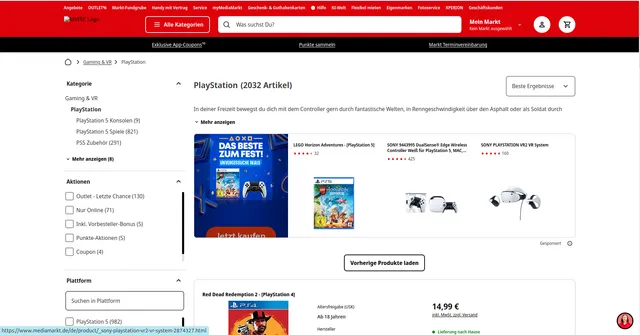
Example Screenshot of product list by query page:
Input Format
The scraper accepts configuration through a JSON object with several key parameters:
Scrape with URLs:
The urls parameter: List of product list page URLs that you want to scrape. You can add URLs one by one, or use the Bulk edit section to add a prepared list.
The ignore_url_failures parameter: If set to true, the scraper will continue running even if some URLs fail to be scraped after reaching the maximum number of retries. This ensures that one problematic URL doesn't stop your entire scraping job.
When you provide a list of URLs for scraping, all options in the "Scrape with search filters" section will be disabled. The system will only collect data from the URLs you specified.
Scrape with Search Filters:
The keyword parameter: The search keyword to find products (e.g., "laptop", "smartphone", "fernseher", "kopfhörer").
The country_code parameter: Select the MediaMarkt country site you want to scrape:
"de"- Germany (mediamarkt.de)"at"- Austria (mediamarkt.at)"nl"- Netherlands (mediamarkt.nl)"be"- Belgium (mediamarkt.be)"ch"- Switzerland (mediamarkt.ch)"pl"- Poland (mediamarkt.pl)
The sort_by parameter: Sort products by various criteria:
""- Best results (default relevance)"currentprice+asc"- Price (low to high)"currentprice+desc"- Price (high to low)"customerrating+desc"- Reviews (highest rated first)"salescount+desc"- New (best sellers)"release_date+desc"- Release date (newest first)"availability+asc"- Availability"available_price+asc"- Available price (low to high, in-stock items)"available_price+desc"- Available price (high to low, in-stock items)
The page parameter: Starting page number for scraping, useful for continuing interrupted scrapes or targeting specific result ranges.
When using search filters for scraping, you need to leave the urls field empty (or set it to null) in the "Scrape with URLs" configuration.
General Options:
The max_items_per_url parameter: Limits the number of products extracted from each product list page or search results page. The default value is 20, providing a manageable batch size while allowing for comprehensive data collection.
The max_retries_per_url parameter: Sets the maximum number of retry attempts for each URL or search filters if the scrape is detected as a bot or the page fails to load. The default value is 2, providing a good balance between thoroughness and efficiency.
The proxy parameter: Proxy configuration is essential for maintaining anonymity and avoiding detection. The residential proxy option ensures that your scraping activities appear as legitimate browsing, reducing the risk of being blocked or rate-limited. You should choose a country that matches the MediaMarkt site you're scraping (e.g., DE for Germany, AT for Austria, NL for Netherlands, etc.).
Output Format
You get the output from the Mediamarkt Product Search Scraper stored in a tab. The following is an example of the Information Fields collected after running the Actor.
The scraper returns structured product data in JSON format with the following fields:
- ID: Unique product identifier from MediaMarkt's database system
- URL: Direct product page link for accessing detailed information
- Name: Complete product title as displayed on the website
- Brand: Manufacturer or brand name for product categorization
- Category: Product category classification within MediaMarkt's taxonomy
- Description: Detailed product description including key features and specifications
- Details: Additional technical specifications and product attributes
- Locale: Language and regional settings (typically 'de' for German market)
- Feature Name: Highlighted product features and selling points
- Kind of Product: Product type classification for inventory management
- Image URL: Primary product image link for visual representation
- Released At: Product launch or availability date information
- Rating Count: Number of customer reviews and ratings received
- Rating Value: Average customer rating score (typically 1-5 scale)
- Price: Current product price in euros
- Currency: Price currency designation (EUR for European market)
Each field serves specific business intelligence purposes: pricing data enables competitive analysis, ratings provide quality insights, descriptions support product matching, and technical specifications facilitate comparison across similar products.
Usage Instructions
Step 1: Choose Your Scraping Approach
Option A - Prepare Target URLs: Collect MediaMarkt category page URLs or search result pages containing your target products. Navigate to the appropriate MediaMarkt country site (de, at, nl, be, ch, or pl) and use the website's category navigation and filtering features. Copy the complete URLs ensuring they include proper pagination parameters if extracting from multiple pages.
Option B - Use Search Filters: Define your search criteria using the built-in filters:
- Set
keywordfor specific products (e.g., "laptop", "smartphone", "fernseher") - Select
country_codeto choose which MediaMarkt country site to scrape (de, at, nl, be, ch, pl) - Choose
sort_byto organize results (price, reviews, availability, release date) - Set
pageto start from a specific results page
Step 2: Configure Input Parameters
Set maximum retries (max_retries_per_url) based on your reliability requirements. For large-scale operations, use 3-5 retries. Configure proxy settings matching your target geographic region - use German (DE) proxies for mediamarkt.de, Austrian (AT) for mediamarkt.at, etc. Enable ignore_url_failures for robust scraping.
Step 3: Set Data Limits
Adjust max_items_per_url based on your needs. Higher values (50-100) work well for comprehensive category analysis, while lower values (10-20) suit targeted product monitoring.
Step 4: Execute and Monitor Launch the scraper and monitor execution logs for any blocked requests or errors. The tool provides real-time feedback on extraction progress and any encountered issues.
Step 5: Data Processing Review extracted data for completeness and accuracy. Implement data validation checks for critical fields like pricing and product IDs to ensure data quality.
Best Practices:
Method Selection:
- Use URL-based scraping for specific category pages or complex filtered searches
- Use filter-based scraping for keyword searches across different MediaMarkt country sites
- Combine both approaches: use filters for product discovery, then URLs for detailed category extraction
Scraping Strategy:
- Rotate proxy locations regularly for consistent access - match proxy country to target site (DE for Germany, AT for Austria, etc.)
- Schedule scraping during off-peak hours to minimize server load
- Implement data caching to avoid unnecessary repeat requests
- Handle rate limiting gracefully by increasing delays between requests if needed
Country-Specific Strategy:
- Use
country_codeto target specific markets:"de"for German market (largest selection)"at"for Austrian market"nl"for Dutch market"be"for Belgian market"ch"for Swiss market"pl"for Polish market
- Match proxy country to
country_codefor best results
Sorting Strategy:
- Use
"currentprice+asc"(price low to high) for budget-focused research or finding deals - Use
"customerrating+desc"(reviews) to identify top-rated products - Use
"salescount+desc"(new/best sellers) for trending products - Use
"release_date+desc"for latest product releases - Use
"availability+asc"or"available_price+asc"to prioritize in-stock items
Filter Optimization:
- Price Comparison: Use
sort_by: "currentprice+asc"to compare prices across products - Quality Research: Use
sort_by: "customerrating+desc"to find best-reviewed items - Stock Monitoring: Use
sort_by: "availability+asc"or"available_price+asc"to track in-stock availability - New Products: Use
sort_by: "release_date+desc"to monitor latest releases - Multi-Market Analysis: Run same keyword across different
country_codevalues to compare markets
Advanced Filter Combinations:
- Budget laptops in Germany:
keyword: "laptop", country_code: "de", sort_by: "currentprice+asc" - Top-rated smartphones in Austria:
keyword: "smartphone", country_code: "at", sort_by: "customerrating+desc" - Latest TVs in Netherlands:
keyword: "fernseher", country_code: "nl", sort_by: "release_date+desc" - In-stock headphones in Switzerland:
keyword: "kopfhörer", country_code: "ch", sort_by: "available_price+asc"
Common Issues:
Empty Results:
- For filter-based: Verify keyword is appropriate for the selected country (use German keywords for DE/AT/CH, Dutch for NL, etc.)
- Try broader keywords or different
country_codeif results are limited - Ensure product category exists in the selected country site
Country-Specific Issues:
- Match proxy country to
country_code(use DE proxies for "de", AT for "at", etc.) - Some products may only be available in specific countries
- Pricing and availability vary by country site
Availability Filtering:
- Use
"availability+asc"to prioritize available items - Use
"available_price+asc"or"available_price+desc"to sort only in-stock items by price - Regular
"currentprice+asc"includes out-of-stock items
Proxy Configuration:
- Always match proxy country to target MediaMarkt site
- Enable
ignore_url_failuresto handle temporary connection issues - Increase
max_retries_per_urlto 3-5 for better reliability
Use Cases:
- Price Monitoring: Track prices across multiple countries using different
country_codevalues - Product Research: Use
sort_by: "customerrating+desc"to identify best products - Stock Tracking: Use availability sorting to monitor product availability
- Market Comparison: Compare product selection and pricing across different European markets
- Release Monitoring: Use
sort_by: "release_date+desc"to track new product launches
Benefits and Applications
The MediaMarkt scraper delivers significant time savings by automating manual data collection processes that would otherwise require hours of manual browsing and copying. Businesses can monitor competitor pricing in real-time, track product availability changes, and identify market trends across electronics categories.
Practical applications include building price comparison platforms, conducting market research for product launches, monitoring competitor inventory levels, and creating automated alerts for price changes or new product releases. E-commerce businesses can benchmark their pricing against MediaMarkt's extensive catalog, while market analysts can track consumer electronics trends across various product categories.
The extracted data provides valuable business intelligence for strategic decision-making, enabling companies to optimize their product offerings, adjust pricing strategies, and identify market opportunities in the competitive electronics retail landscape.
Conclusion
The MediaMarkt Product Search Scraper provides comprehensive access to Germany's largest electronics retailer's product data, enabling businesses to make informed decisions based on real-time market intelligence. With detailed product specifications, pricing information, and customer insights, this tool transforms manual research into automated, scalable data collection.
Ready to streamline your market research and competitive analysis? Deploy the MediaMarkt scraper today to unlock valuable insights from Europe's leading electronics marketplace.
Related Actors
- Mediamarkt Product Details Scraper: A specialized data extraction solution designed to harvest detailed product information from MediaMarkt's extensive electronics marketplace across Europe.
Your feedback
We are always working to improve Actors' performance. So, if you have any technical feedback about Mediamarkt Product Search Scraper or simply found a bug, please create an issue on the Actor's Issues tab in Apify Console.


