

Portal Inmobiliario Property Search Scraper
Pricing
Pay per usage
Portal Inmobiliario Property Search Scraper
Advanced Portal Inmobiliario Property Search Scraper - Extract comprehensive real estate data automatically. Intelligent web scraping tool for property listings, pricing, locations & market analysis. Perfect for real estate professionals, investors & market researchers.
Pricing
Pay per usage
Rating
1.0
(1)
Developer

ecomscrape
Maintained by CommunityActor stats
4
Bookmarked
99
Total users
2
Monthly active users
17 days ago
Last modified
Categories
Share
Contact
If you encounter any issues or need to exchange information, please feel free to contact us through the following link: My profile
Guide (English version)
Portalinmobiliario Property Search Scraper - Advanced Real Estate Data Extraction Tool
Introduction
Portalinmobiliario.com stands as Chile's premier real estate portal, serving as the primary marketplace for houses, apartments, and commercial properties across the country. For real estate professionals, investors, and market analysts, accessing comprehensive property data from this platform can provide invaluable insights into Chilean real estate trends, pricing patterns, and market opportunities.
Manual data collection from thousands of property listings is time-consuming and impractical, especially when trying to analyze market positions and historical pricing patterns. The Portalinmobiliario Property Search Scraper addresses this challenge by automating the extraction of detailed property information, enabling users to gather large-scale datasets efficiently and accurately.
Scraper Overview
The Portalinmobiliario Property Search Scraper is a sophisticated web automation tool designed specifically for extracting comprehensive property data from Chile's most popular real estate platform. This scraper goes beyond basic listing information, capturing detailed property attributes, seller information, and market positioning data that would typically require hours of manual collection.
Built with advanced anti-detection capabilities and proxy rotation features, this scraper ensures reliable data extraction while respecting website policies and maintaining consistent performance. The tool is particularly valuable for real estate professionals conducting market research, property investors analyzing investment opportunities, and data analysts tracking Chilean real estate trends.
The scraper is designed for various user types including real estate agencies, property investment firms, market research companies, and individual investors who need access to large-scale, structured property data for decision-making purposes.
Input and Output Details
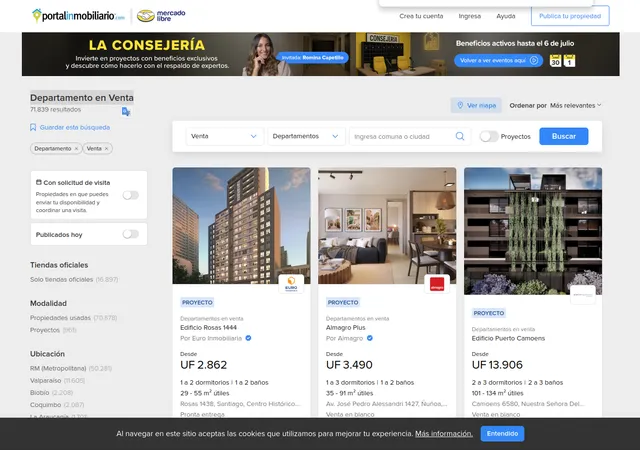
Example url 1 : https://www.portalinmobiliario.com/venta/departamento/_Desde_97_NoIndex_True
Example url 2 : https://www.portalinmobiliario.com/arriendo/terreno-en-construccion
Example Screenshot of property list by query page:
Input Format
The scraper accepts configuration through a JSON object with several key parameters:
Scrape with URLs:
The urls parameter: Add the URLs of the property list pages you want to scrape. You can paste URLs one by one, or use the Bulk edit section to add a prepared list.
The ignore_url_failures parameter: If set to true, the scraper will continue running even if some URLs fail to be scraped after the maximum number of retries is reached. This ensures that one problematic URL doesn't stop your entire scraping job.
When you provide a list of URLs for scraping, all options in the "Scrape with search filters" section will be disabled. The system will only collect data from the URLs you specified.
Scrape with Search Filters:
The location parameter: Enter the location to search for items. Make sure the location is accurate by selecting a location on the website and then searching. Copy the location value directly from the URL. For example, for the URL https://www.portalinmobiliario.com/venta/departamento/san-vicentetumbes-talcahuano-concepcion-biobio/_OrderId_PRICE_NoIndex_True, the correct location is "san-vicentetumbes-talcahuano-concepcion-biobio".
The property_type parameter: Filter properties by type:
"departamento"- Departamentos (Apartments)"casa"- Casas (Houses)"oficina"- Oficinas (Offices)"parcela"- Parcelas (Plots)"comercial"- Locales (Commercial spaces)"terreno-en-construccion"- Terrenos (Land)"sitio"- Sitios (Sites)"bodega"- Bodegas (Warehouses)"industrial"- Industriales (Industrial)"agricola"- Agrícolas (Agricultural)"otros"- Otros Inmuebles (Other properties)"estacionamiento"- Estacionamientos (Parking spaces)"loteo"- Loteos (Subdivisions)"lote-cementerio"- Lotes de Cementerio (Cemetery plots)
The operation_type parameter: Filter properties by operation type:
"venta"- Buy"arriendo"- Rent"arriendo-de-temporada"- Temporary Rent
The sort_by parameter: Sort properties by various criteria:
""- Relevance (most relevant results)"PRICE"- Price (low to high)"PRICE*DESC"- Price (high to low)
The offset parameter: Offset to start scraping from. This is useful for continuing interrupted scrapes or targeting specific result ranges. For example, set to 0 to start from the beginning, or 50 to skip the first 50 results.
When using search filters for scraping, you need to leave the urls field empty in the "Scrape with URLs" configuration.
General Options:
The max_items_per_url parameter: Limit the number of items per URL or search filters you want to scrape. The default value is 20, providing a manageable batch size while allowing for comprehensive data collection.
The max_retries_per_url parameter: Limit the number of retries for each URL or search filters if the scrape is detected as a bot or the page fails to load. The default value is 2, providing a good balance between thoroughness and efficiency.
The proxy parameter: Proxy configuration is essential for maintaining anonymity and avoiding detection. Select proxies to be used by your scraper.
Output Format
You get the output from the Portalinmobiliario Property Search Scraper stored in a tab. The following is an example of the Information Fields collected after running the Actor.
The scraper generates structured data with the following comprehensive fields:
Core Property Identifiers:
- ID: Unique property identifier from Portalinmobiliario's database system
- URL: Direct link to the specific property listing for reference and validation
- URL Fragments: Additional URL components containing search parameters and filters
Technical and Classification Data:
- Tracks: Internal tracking codes used by the platform for analytics purposes
- Is Pad: Boolean indicator for tablet/mobile optimized listings
- Domain ID: Identifier linking properties to specific domain categories or regions
- Category ID: Numerical classification for property types (apartment, house, commercial)
- Vertical ID: Market segment classification for specialized property categories
Commercial Information:
- Bulk Sale: Indicator for properties sold as part of larger portfolio transactions
- Item Position: Ranking position within search results, valuable for SEO analysis
- Price Per Quantity: Standardized pricing metrics for comparative analysis
- PXU B2B: Business-to-business pricing indicators for commercial transactions
Visual and Contact Data:
- Pictures: Array of property image URLs for visual analysis and presentation
- Seller: Comprehensive seller information including contact details and agency data
- Details: Extended property description, features, and specification data
This structured output enables immediate integration into databases, spreadsheet applications, or analytical tools for further processing and analysis.
Usage Instructions
Step-by-Step Implementation
Option 1: Scraping with URLs
Step 1: Prepare Target URLs
- Navigate to Portalinmobiliario.com and perform searches matching your research criteria
- Apply filters for location, property type, price range, and operation type
- Copy the resulting search result page URLs from your browser
- Compile multiple URLs if you want to scrape different searches or regions
Step 2: Configure Input Parameters
- Add your collected URLs to the
urlsarray in the configuration - Set appropriate retry limits (2-3 recommended) using
max_retries_per_url - Enable
ignore_url_failuresto ensure partial success even if some URLs fail - Configure
max_items_per_urlbased on your data volume needs (start with 20)
Step 3: Configure Proxy Settings
- Enable proxy usage with residential IPs matching your target geographic region
- For Chilean real estate data, consider using South American proxy locations to minimize detection risks and ensure optimal access speeds
- Configure the proxy settings in your JSON configuration
Step 4: Execute and Monitor
- Launch the scraper and monitor progress through provided logging interfaces
- The tool will automatically handle pagination, retries, and data formatting during extraction
- Monitor logs for any errors or warnings
Step 5: Validate Output
- Review extracted data for completeness and accuracy
- Check critical fields like price, location, and property specifications
- Handle any missing or incomplete data appropriately in your analysis
Option 2: Scraping with Search Filters
Step 1: Identify Target Location
- Visit Portalinmobiliario.com and search for your desired location
- From the search result URL, copy the location value
- Example: From
https://www.portalinmobiliario.com/venta/departamento/san-vicentetumbes-talcahuano-concepcion-biobio/_OrderId_PRICE_NoIndex_True, the location is"san-vicentetumbes-talcahuano-concepcion-biobio" - Ensure the location is valid by verifying it works on the Portalinmobiliario website
Step 2: Configure Search Filters
- Set location: Add the
locationparameter with the copied value from the URL - Define property type: Choose
property_type(e.g.,"departamento"for apartments,"casa"for houses) - Set operation type: Configure
operation_type("venta"for buy,"arriendo"for rent,"arriendo-de-temporada"for temporary rent) - Configure sorting: Use
sort_byto order results (e.g.,"PRICE"for lowest price first,"PRICE*DESC"for highest price first) - Set offset: Use
offsetparameter to start from a specific position in results (e.g., 0 to start from beginning, 50 to skip first 50 results)
Step 3: Configure General Settings
- Set
max_items_per_urlto control the number of properties to scrape (start with 20) - Configure proxy settings with South American location for optimal access
- Set
max_retries_per_url(2-3 is typically sufficient) - Leave the
urlsfield empty when using search filters
Step 4: Execute and Monitor
- Submit your filter configuration to the scraping platform
- The scraper will automatically construct search URLs based on your filters
- Monitor the execution progress and review logs for any issues
- The tool will handle pagination, retries, and data formatting automatically
Step 5: Validate and Process Output
- Export the resulting data in your preferred format (JSON, CSV, Excel)
- Validate that scraped properties match your filter criteria
- Regularly verify output data quality and adjust parameters as needed
- Check for completeness in price, location, and property specification fields
- Integrate into your analysis pipeline or database
Best Practices
General Optimization:
- Start Small: Test with small batches (5-10 URLs or narrow filters with low item limits) to test output quality before large-scale extraction
- Use Residential Proxies: Maintain consistent access and avoid IP blocking with residential proxies from South American regions
- Configure Delays: Configure appropriate delays between requests to respect server resources and avoid detection
- Monitor Regularly: Regularly verify output data quality and adjust parameters as needed
- Handle Errors: Monitor for connection timeouts, blocked requests, or data format changes. The scraper includes built-in retry mechanisms, but manual intervention may be required for persistent issues or website structural changes
URL Strategy:
- Use URLs when you need to scrape specific, predefined searches with complex filter combinations
- Focus on specific property types, price ranges, or geographic areas relevant to your analysis needs
- Test with smaller URL sets before scaling to larger datasets
- Verify URLs are accessible and return results before adding to configuration
- Collect URLs from different Chilean regions for comprehensive market analysis
Filter Strategy:
- For location-specific searches: Use the
locationparameter with property_type and operation_type - For market research: Start with broader filters (location + operation_type only), then progressively narrow down based on results
- For budget analysis: Use sorting (
"PRICE"or"PRICE*DESC") to understand pricing patterns in specific locations - For property type comparison: Use consistent location and operation_type across different property_types
- For pagination: Use the
offsetparameter to scrape results in batches (e.g., 0-50, 50-100, 100-150)
Location Parameter Tips:
- Always copy the exact location value from the Portalinmobiliario website URL
- Location format typically includes hierarchical structure: neighborhood-district-city-region
- Chilean locations use Spanish formatting with hyphens separating location levels
- Verify location values on the website first to ensure they return results
- Use specific neighborhood names for targeted searches, city/region names for broader coverage
Offset Strategy:
- Use offset to scrape large datasets in manageable chunks
- Set offset to 0 for the first batch, then increment by max_items_per_url for subsequent batches
- Example: First run with offset=0 and max_items=50, second run with offset=50 and max_items=50
- This approach helps avoid timeouts and makes it easier to resume interrupted scrapes
- Track your offset values to avoid missing or duplicating data
Sorting Strategy:
- Use
""(empty) for relevance-based results, showing most important listings first - Use
"PRICE"to identify budget-friendly options and understand entry-level pricing - Use
"PRICE*DESC"to find luxury properties and understand premium market segments - Combine sorting with offset to systematically explore different price segments
Common Issues and Solutions
General Issues:
- Connection Timeouts: Reduce
max_items_per_urlor increase retry limits. Check proxy configuration - Blocked Requests: Switch to different proxy locations or reduce request frequency. Use residential proxies
- Data Format Changes: Monitor for website structural changes that may require scraper updates
- Incomplete Data: Some listings may have missing information; implement null value handling
- Slow Performance: Reduce batch sizes or check proxy performance. Consider spreading requests over time
URL-Specific Issues:
- Invalid URLs: Ensure URLs are from Portalinmobiliario.com and properly formatted
- Outdated URLs: Portalinmobiliario may change their URL structure; verify URLs still work
- Duplicate Results: Different URLs may return overlapping properties; deduplicate using property IDs
- Empty Results: Verify the URL still contains active listings and hasn't expired
Filter-Specific Issues:
- No results from filters: Verify location parameter is correctly copied from website URL. Try broadening criteria
- Location not found: Ensure the location value matches Portalinmobiliario's exact format with proper hyphenation
- Invalid location format: Chilean locations should follow the pattern: neighborhood-district-city-region
- Too few results: Try using broader location values (e.g., city only instead of specific neighborhood)
- Offset issues: Ensure offset value doesn't exceed total available results. Start with offset=0 for testing
Chilean Market Specifics:
- Language barriers: Property descriptions are in Spanish; consider translation tools for analysis
- Regional variations: Property types and naming conventions may vary across Chilean regions
- Currency: All prices are in Chilean Peso (CLP); implement proper currency handling
- Property types: "Departamento" (apartment) is most common in cities; "Casa" (house) more common in suburbs
- Operation types: "Venta" (buy) and "Arriendo" (rent) are most common; "Arriendo-de-temporada" (temporary rent) is for vacation properties
Data Validation Tips:
- Check for missing critical fields (price, location, property type)
- Validate that prices are within expected ranges for Chilean market (typically millions of CLP)
- Verify property types match the filter criteria
- Handle properties with "Precio a convenir" (price on request) appropriately
- Cross-reference locations with known Chilean cities and regions
- Implement retry logic for failed extractions with offset tracking to resume where you left off
Benefits and Applications
The Portalinmobiliario Property Search Scraper delivers significant time savings by automating data collection that would otherwise require days or weeks of manual effort. Real estate professionals can access comprehensive property data in bulk, making it practical to analyze market trends, pricing patterns, and investment opportunities that would be impossible to gather manually.
Practical Applications: Market research firms can track pricing trends across different neighborhoods and property types, enabling predictive analysis and market forecasting. Property investment companies can identify undervalued properties by comparing extracted data against market benchmarks and historical trends.
Real estate agencies benefit from competitive intelligence, understanding pricing strategies and market positioning of competing properties. The structured data format enables integration with existing CRM systems and analytical tools, streamlining workflow processes and improving decision-making capabilities.
Business Value: The scraper transforms unstructured web data into actionable business intelligence, supporting data-driven investment strategies and market analysis. Users gain competitive advantages through access to comprehensive, real-time market data that informs pricing strategies and investment timing.
Conclusion
The Portalinmobiliario Property Search Scraper represents a powerful solution for accessing Chilean real estate market data at scale. By automating complex data extraction processes, it enables real estate professionals to focus on analysis and decision-making rather than manual data collection.
Whether you're conducting market research, evaluating investment opportunities, or analyzing competitive landscapes, this scraper provides the comprehensive, structured data needed for informed real estate decisions in the Chilean market.
Guide (Versión en Español)
Portalinmobiliario Property Search Scraper - Herramienta Avanzada de Extracción de Datos Inmobiliarios
Introducción
Portalinmobiliario.com se posiciona como el principal portal inmobiliario de Chile, siendo el mercado primario para casas, departamentos y propiedades comerciales en todo el país. Para los profesionales del sector inmobiliario, inversores y analistas de mercado, acceder a datos completos de propiedades en esta plataforma puede proporcionar conocimientos invaluables sobre tendencias inmobiliarias chilenas, patrones de precios y oportunidades de mercado.
La recolección manual de datos de miles de anuncios de propiedades es un proceso que consume mucho tiempo y resulta poco práctico, especialmente al intentar analizar posiciones de mercado y patrones históricos de precios. El Portalinmobiliario Property Search Scraper aborda este desafío automatizando la extracción de información detallada de las propiedades, permitiendo a los usuarios recopilar grandes volúmenes de datos de manera eficiente y precisa.
Resumen del Scraper
El Portalinmobiliario Property Search Scraper es una sofisticada herramienta de automatización web diseñada específicamente para extraer datos integrales de propiedades del portal inmobiliario más popular de Chile. Este scraper va más allá de la información básica de los anuncios, capturando atributos detallados de las propiedades, información del vendedor y datos sobre la posición en el mercado que normalmente requerirían horas de recolección manual.
Construido con capacidades avanzadas anti-detección y funciones de rotación de proxies, este scraper asegura una extracción de datos confiable, respetando las políticas del sitio web y manteniendo un rendimiento constante. La herramienta es especialmente valiosa para profesionales inmobiliarios que realizan estudios de mercado, inversores que analizan oportunidades de inversión y analistas que monitorean tendencias del sector inmobiliario chileno.
El scraper está diseñado para diversos tipos de usuarios, incluidos agencias inmobiliarias, firmas de inversión en bienes raíces, empresas de investigación de mercado e inversores individuales que necesitan acceso a grandes volúmenes de datos estructurados de propiedades para la toma de decisiones.
Detalles de Entrada y Salida
Ejemplo de url 1: https://www.portalinmobiliario.com/venta/departamento/_Desde_97_NoIndex_True
Ejemplo de url 3: https://www.portalinmobiliario.com/arriendo/terreno-en-construccion
Ejemplo de captura de pantalla de la lista de propiedades por página de consulta:
Formato de Entrada
El scraper acepta configuración mediante un formato de entrada JSON que proporciona control flexible sobre los parámetros de extracción de datos:
Parámetros de Entrada Explicados:
- max_retries_per_url: Controla los intentos de reintento para solicitudes fallidas, asegurando la confiabilidad de los datos.
- proxy configuration: Permite el uso de proxies residenciales para evitar la detección como bot.
- apifyProxyCountry: Especifica la ubicación del proxy (debe coincidir con la geografía del mercado objetivo).
- max_items_per_url: Limita el volumen de extracción por URL para gestionar el tiempo de procesamiento.
- urls: Arreglo de páginas de resultados de búsqueda de Portalinmobiliario o URLs de anuncios de propiedades.
Formato de Salida
Recibes la salida del Portalinmobiliario Property Search Scraper almacenada en una pestaña. El siguiente es un ejemplo de los campos de información recopilados después de ejecutar el Actor.
The scraper generates structured data with the following comprehensive fields:
Core Property Identifiers:
- ID: Unique property identifier from Portalinmobiliario's database system
- URL: Direct link to the specific property listing for reference and validation
- URL Fragments: Additional URL components containing search parameters and filters
Technical and Classification Data:
- Tracks: Internal tracking codes used by the platform for analytics purposes
- Is Pad: Boolean indicator for tablet/mobile optimized listings
- Domain ID: Identifier linking properties to specific domain categories or regions
- Category ID: Numerical classification for property types (apartment, house, commercial)
- Vertical ID: Market segment classification for specialized property categories
Commercial Information:
- Bulk Sale: Indicator for properties sold as part of larger portfolio transactions
- Item Position: Ranking position within search results, valuable for SEO analysis
- Price Per Quantity: Standardized pricing metrics for comparative analysis
- PXU B2B: Business-to-business pricing indicators for commercial transactions
Visual and Contact Data:
- Pictures: Array of property image URLs for visual analysis and presentation
- Seller: Comprehensive seller information including contact details and agency data
- Details: Extended property description, features, and specification data
This structured output enables immediate integration into databases, spreadsheet applications, or analytical tools for further processing and analysis.
Usage Instructions
Step 1: Configuration Setup Begin by configuring your input parameters according to your data requirements. Set appropriate retry limits and item counts based on your processing capacity and timeline needs.
Step 2: Proxy Configuration Enable proxy usage with residential IPs matching your target geographic region. For Chilean real estate data, consider using South American proxy locations to minimize detection risks and ensure optimal access speeds.
Step 3: URL Preparation Prepare your target URLs from Portalinmobiliario search results. Focus on specific property types, price ranges, or geographic areas relevant to your analysis needs. Test with smaller URL sets before scaling to larger datasets.
Step 4: Execution and Monitoring Launch the scraper and monitor progress through provided logging interfaces. The tool will automatically handle pagination, retries, and data formatting during extraction.
Best Practices:
- Start with small batches to test output quality before large-scale extraction
- Use residential proxies to maintain consistent access and avoid IP blocking
- Configure appropriate delays between requests to respect server resources
- Regularly verify output data quality and adjust parameters as needed
Common Error Handling: Monitor for connection timeouts, blocked requests, or data format changes. The scraper includes built-in retry mechanisms, but manual intervention may be required for persistent issues or website structural changes.
Benefits and Applications
The Portalinmobiliario Property Search Scraper delivers significant time savings by automating data collection that would otherwise require days or weeks of manual effort. Real estate professionals can access comprehensive property data in bulk, making it practical to analyze market trends, pricing patterns, and investment opportunities that would be impossible to gather manually.
Practical Applications: Market research firms can track pricing trends across different neighborhoods and property types, enabling predictive analysis and market forecasting. Property investment companies can identify undervalued properties by comparing extracted data against market benchmarks and historical trends.
Real estate agencies benefit from competitive intelligence, understanding pricing strategies and market positioning of competing properties. The structured data format enables integration with existing CRM systems and analytical tools, streamlining workflow processes and improving decision-making capabilities.
Business Value: The scraper transforms unstructured web data into actionable business intelligence, supporting data-driven investment strategies and market analysis. Users gain competitive advantages through access to comprehensive, real-time market data that informs pricing strategies and investment timing.
El scraper genera datos estructurados con los siguientes campos integrales:
Identificadores Principales de la Propiedad:
- ID: Identificador único de la propiedad proveniente del sistema de base de datos de Portalinmobiliario
- URL: Enlace directo al anuncio específico de la propiedad para referencia y validación
- Fragmentos de URL: Componentes adicionales de la URL que contienen parámetros y filtros de búsqueda
Datos Técnicos y de Clasificación:
- Tracks: Códigos internos de seguimiento utilizados por la plataforma para fines analíticos
- Is Pad: Indicador booleano para anuncios optimizados para tablet/móvil
- Domain ID: Identificador que vincula propiedades a categorías de dominio o regiones específicas
- Category ID: Clasificación numérica para tipos de propiedad (departamento, casa, comercial)
- Vertical ID: Clasificación por segmento de mercado para categorías especializadas de propiedades
Información Comercial:
- Bulk Sale: Indicador para propiedades vendidas como parte de transacciones de portafolio más grandes
- Item Position: Posición de ranking dentro de los resultados de búsqueda, valiosa para análisis SEO
- Price Per Quantity: Métricas de precios estandarizadas para análisis comparativo
- PXU B2B: Indicadores de precios business-to-business para transacciones comerciales
Datos Visuales y de Contacto:
- Pictures: Arreglo de URLs de imágenes de la propiedad para análisis visual y presentación
- Seller: Información completa del vendedor, incluyendo datos de contacto y agencia
- Details: Descripción extendida de la propiedad, características y especificaciones
Esta salida estructurada permite la integración inmediata en bases de datos, aplicaciones de hoja de cálculo o herramientas analíticas para procesamiento y análisis adicionales.
Instrucciones de Uso
Paso 1: Configuración Inicial Comienza configurando tus parámetros de entrada de acuerdo a tus necesidades de datos. Establece límites de reintentos e ítems apropiados según tu capacidad de procesamiento y necesidades de tiempo.
Paso 2: Configuración de Proxy Habilita el uso de proxies con IPs residenciales que coincidan con tu región geográfica objetivo. Para datos inmobiliarios en Chile, considera usar ubicaciones proxy en Sudamérica para minimizar riesgos de detección y asegurar velocidades de acceso óptimas.
Paso 3: Preparación de URLs Prepara tus URLs objetivo desde los resultados de búsqueda de Portalinmobiliario. Concéntrate en tipos de propiedades, rangos de precios o zonas geográficas específicas relevantes para tu análisis. Realiza pruebas con conjuntos de URLs pequeños antes de escalar a conjuntos de datos más grandes.
Paso 4: Ejecución y Monitoreo Lanza el scraper y monitorea el progreso a través de las interfaces de registro proporcionadas. La herramienta manejará automáticamente la paginación, los reintentos y el formateo de datos durante la extracción.
Mejores Prácticas:
- Comienza con lotes pequeños para probar la calidad del resultado antes de una extracción a gran escala
- Usa proxies residenciales para mantener acceso consistente y evitar el bloqueo de IP
- Configura retrasos apropiados entre solicitudes para respetar los recursos del servidor
- Verifica regularmente la calidad de los datos de salida y ajusta los parámetros según sea necesario
Manejo Común de Errores: Monitorea casos de tiempo de espera, solicitudes bloqueadas o cambios en el formato de datos. El scraper incluye mecanismos automáticos de reintento, pero puede ser necesaria la intervención manual si los problemas persisten o hay cambios estructurales en el sitio web.
Beneficios y Aplicaciones
El Portalinmobiliario Property Search Scraper ofrece ahorros significativos de tiempo al automatizar la recolección de datos que, de otra manera, tomaría días o semanas realizando el proceso manualmente. Los profesionales del sector inmobiliario pueden acceder a datos completos de propiedades en grandes volúmenes, lo que hace posible analizar tendencias de mercado, patrones de precios y oportunidades de inversión que serían imposibles de recopilar manualmente.
Aplicaciones Prácticas: Las firmas de investigación de mercado pueden rastrear tendencias de precios en diferentes barrios y tipos de propiedad, permitiendo un análisis predictivo y proyecciones de mercado. Las compañías de inversión en propiedades pueden identificar propiedades subvaloradas comparando los datos extraídos con referencias del mercado y tendencias históricas.
Las agencias inmobiliarias se benefician de la inteligencia competitiva, comprendiendo estrategias de precios y posicionamiento de mercado de propiedades competidoras. El formato de datos estructurado permite la integración con sistemas CRM existentes y herramientas analíticas, optimizando procesos y mejorando la toma de decisiones.
Valor Empresarial: El scraper transforma datos web no estructurados en inteligencia empresarial accionable, respaldando estrategias de inversión y análisis de mercado basados en datos. Los usuarios obtienen ventajas competitivas al acceder a información de mercado completa y en tiempo real que orienta decisiones sobre precios y tiempos de inversión.
Related Actors
- Portalinmobiliario Property Details Scraper: Your comprehensive tool for extracting valuable property information from Portalinmobiliario extensive directory platform.
Your feedback
We are always working to improve Actors' performance. So, if you have any technical feedback about Portalinmobiliario Property Search Scraper or simply found a bug, please create an issue on the Actor's Issues tab in Apify Console.


