

Skool Posts Listing Scraper avatar

Skool Posts Listing Scraper

Pricing

from $1.50 / 1,000 results

Go to Apify Store
Skool Posts Listing Scraper

Skool Posts Listing Scraper

Skool.com Posts Listings Scraper automates extraction of community posts, discussions, and engagement data from Skool groups. Efficiently collect content metadata, user activity, and post analytics for community management, content strategy, and market research.

Pricing

from $1.50 / 1,000 results

Rating

0.0

(0)

Developer

ecomscrape

ecomscrape

Maintained by Community

Actor stats

0

Bookmarked

2

Total users

1

Monthly active users

3 days ago

Last modified

Share

Contact

If you encounter any issues or need to exchange information, please feel free to contact us through the following link: My posts

Skool.com Posts Listings Scraper: Extract Community Content & Engagement Data

Introduction

Skool.com is a rapidly growing community platform that combines course hosting, community discussions, and gamification features. It hosts thousands of communities across niches including entrepreneurship, AI/automation, marketing, personal development, and specialized skill-building groups. Each Skool group generates continuous streams of posts, discussions, and user-generated content that provide valuable insights into community engagement, trending topics, and member activity patterns.

For community managers, content strategists, market researchers, and course creators, accessing this structured post data is invaluable for understanding engagement trends, identifying popular topics, monitoring competitor communities, and analyzing content performance. However, manually tracking posts across multiple Skool groups or analyzing large volumes of community content is extremely time-consuming.

The Skool.com Posts Listings Scraper automates this extraction process, enabling systematic collection of post metadata, user activity, and engagement patterns from any Skool community.

Scraper Overview

The Skool.com Posts Listings Scraper is designed to extract post listing data from Skool community pages. It collects comprehensive metadata including post IDs, timestamps, user information, post types, and organizational data that reveals community dynamics and content patterns.

The tool handles pagination automatically, processes multiple community pages simultaneously, and includes configurable retry mechanisms for reliable data collection. It's valuable for community managers analyzing engagement trends, content creators researching successful post formats, market researchers studying niche communities, competitors monitoring similar groups, and educators tracking course discussion activity.

The scraper maintains data quality while respecting platform guidelines and implementing best practices for ethical data collection.

Input and Output Details

Example url 1: https://www.skool.com/ai-automation-society?c=&fl=&p=2

Example url 2: https://www.skool.com/goosify

Example url 3: https://www.skool.com/goosify?c=88c760eb0f454be6abddb9e2160cd8c8&s=newest-cm&fl=

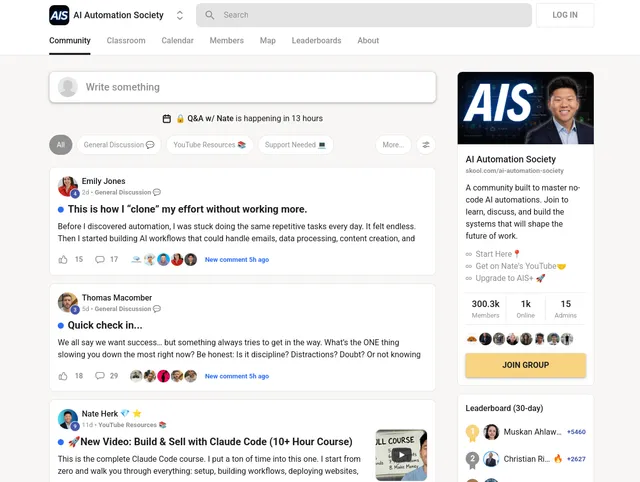
Example Screenshot of posts list page:
Input Format

{
"urls": [
"https://www.skool.com/ai-automation-society?c=&fl=&p=2"
],
"ignore_url_failures": true,
"max_items_per_url": 20,
"max_retries_per_url": 2
}

The urls parameter: Add URLs of Skool posts list pages you want to scrape. You can paste URLs one by one or use bulk edit for prepared lists. These should be community post listing pages, which can include pagination parameters (p=2), category filters (c=), or other query strings.

The ignore_url_failures parameter: If true, the scraper continues running even if some URLs fail after maximum retries. Essential for large-scale scraping across multiple communities.

The max_items_per_url parameter: Limits the number of posts extracted per URL. Default is 20. Adjust based on your analysis needs and available resources.

The max_retries_per_url parameter: Sets retry attempts for failed requests. Default is 2, balancing thoroughness with efficiency.

Output Format

The scraper returns structured post data with fields providing specific analytical value:

[
{
"id": "6130a765c89449858bfcadc1184a675e",
"name": "how-to-learn-claude-everything-you-need-to-know-about-working-with-claude-effectively",
"metadata": {
"action": 0,
"attachments": "d9e505321d1944f889b45047efd353ce",
"comments": 11,
"content": "Claude is not a single product. It is a growing ecosystem of tools, interfaces, and capabilities. Understanding which surface to use, and when, is the difference between a casual experiment and a genuine productivity transformation.\nHere is a breakdown of every major surface, and who it is built for.\n\n[Claude.ai](http://Claude.ai) \\(Chat\\) The starting point. Ask anything, write anything, analyse anything: drafts, research, strategy, legal review, thinking out loud. If you use the internet, you should be using this.\n\nExtended Thinking \\(Reasoning\\) Claude works through a problem step by step before answering. Use it for complex decisions where a quick answer is not good enough. Best for founders and analysts stress-testing a big decision, a deal, or a financial model.\n\nAPI \\(Developer\\) Access Claude directly to build products, automate workflows, and run Claude inside your own tools. The foundation layer for every team that wants to move beyond the interface. Built for developers and technical teams creating AI-powered products or internal tools.\n\nArtifacts \\(Build\\) Claude builds interactive files, dashboards, trackers, and tools directly in the chat. Live outputs you can use, edit, and download immediately. Perfect for anyone who needs a working deliverable: a budget calculator, a tracker, a planner, anything non-text based.\n\nCowork \\(Automation\\) A desktop tool that reads your actual files and creates real documents: Excel, Word, PDF, delivered directly into your folder. Built for ops managers and executive assistants handling high volumes of documents daily.\n\nClaude Code \\(Coding\\) A command line tool for agentic coding. Claude reads your codebase, writes code, runs tests, and ships changes autonomously. Built for developers and technical founders who want to move faster without sacrificing quality.\n\nClaude in Chrome \\(Browser\\) A browsing agent that operates inside Chrome. Claude searches, reads pages, and completes web tasks on your behalf. Ideal for researchers and strategists who spend hours manually pulling information from the web.",
"content_limit": 2000,
"contributors": "[{\"id\":\"5b265f64a7874cafaaa02b715551af2f\",\"name\":\"muskan-ahlawat-4812\",\"metadata\":{\"picture_bubble\":\"https://assets.skool.com/f/5b265f64a7874cafaaa02b715551af2f/29280e4280dc4163be632c655fb5169a898c0e63b0a540cbb737fd4bada7e458-sm.jpg\",\"picture_profile\":\"https://assets.skool.com/f/5b265f64a7874cafaaa02b715551af2f/29280e4280dc4163be632c655fb5169a898c0e63b0a540cbb737fd4bada7e458-md.jpg\"},\"created_at\":\"2025-09-09T08:41:56.977248Z\",\"updated_at\":\"2026-03-23T05:46:47.300637Z\",\"email\":\"\",\"first_name\":\"Muskan\",\"last_name\":\"Ahlawat\"},{\"id\":\"d400d16b18c348de8ae28ea6c73eceb5\",\"name\":\"frank-van-bokhorst-8391\",\"metadata\":{\"picture_bubble\":\"https://assets.skool.com/f/d400d16b18c348de8ae28ea6c73eceb5/3b21fad9f4d24300b1efb3b4037dec8ccc57ee550231406a88ed25c80cf8b08d-sm.jpg\",\"picture_profile\":\"https://assets.skool.com/f/d400d16b18c348de8ae28ea6c73eceb5/3b21fad9f4d24300b1efb3b4037dec8ccc57ee550231406a88ed25c80cf8b08d-md.jpg\"},\"created_at\":\"2025-09-16T07:06:48.170583Z\",\"updated_at\":\"2026-03-23T05:46:58.078366Z\",\"email\":\"\",\"first_name\":\"Frank\",\"last_name\":\"van Bokhorst\"},{\"id\":\"517cb7fbe61d450a894fd22029cbd8c2\",\"name\":\"sam-alder-7095\",\"metadata\":{\"picture_bubble\":\"https://assets.skool.com/f/517cb7fbe61d450a894fd22029cbd8c2/6bef437005094582846fd780454b3944cbde1fcd64b140b5947771f10193cb9a-sm.jpg\",\"picture_profile\":\"https://assets.skool.com/f/517cb7fbe61d450a894fd22029cbd8c2/6bef437005094582846fd780454b3944cbde1fcd64b140b5947771f10193cb9a.jpg\"},\"created_at\":\"2026-02-20T11:45:40.037274Z\",\"updated_at\":\"2026-03-23T05:45:04.696548Z\",\"email\":\"\",\"first_name\":\"Sam\",\"last_name\":\"Alder\"},{\"id\":\"05f343cb4de44639860cd04742c8ab34\",\"name\":\"dorothy-lam-sam-9058\",\"metadata\":{\"picture_bubble\":\"https://assets.skool.com/f/05f343cb4de44639860cd04742c8ab34/5c9410939f6f4862b72b19c1cffefdda599a3e89e34f4af9a224cba45653d4df-sm.jpg\",\"picture_profile\":\"https://assets.skool.com/f/05f343cb4de44639860cd04742c8ab34/5c9410939f6f4862b72b19c1cffefdda599a3e89e34f4af9a224cba45653d4df-md.jpg\"},\"created_at\":\"2025-09-22T05:48:53.948876Z\",\"updated_at\":\"2026-03-23T05:45:26.202743Z\",\"email\":\"\",\"first_name\":\"Dorothy\",\"last_name\":\"Lam Sam\"},{\"id\":\"72200e8a4ff444a78562ac5c2a25a8b1\",\"name\":\"muskan-sharma-6297\",\"metadata\":{\"picture_bubble\":\"https://assets.skool.com/f/72200e8a4ff444a78562ac5c2a25a8b1/a4c3c86e6f8e474da2c643348698a833c073b008106e4aa4827141e01e8ad65c\",\"picture_profile\":\"https://assets.skool.com/f/72200e8a4ff444a78562ac5c2a25a8b1/a4c3c86e6f8e474da2c643348698a833c073b008106e4aa4827141e01e8ad65c\"},\"created_at\":\"2025-03-21T05:52:37.502501Z\",\"updated_at\":\"2026-03-23T05:54:24.818548Z\",\"email\":\"\",\"first_name\":\"Muskan\",\"last_name\":\"Sharma\"}]",
"image_preview": "https://assets.skool.com/f/b51c57150c70495899bf4bc8aaee8166/b4d9f9c8f85043bc8adaf46a65237074febd625f47084969910c84fa7ef48dd9.jpg",
"image_preview_small": "https://assets.skool.com/f/b51c57150c70495899bf4bc8aaee8166/b4d9f9c8f85043bc8adaf46a65237074febd625f47084969910c84fa7ef48dd9-md.jpg",
"labels": "0464a29d2fe74f38ab0aeca1d04a1e86",
"last_comment": 1774245334561589000,
"last_comment_id": "1248b1ec2e084207b2609ee38bd690c2",
"rca": "2|1774245334561589000",
"title": "How To Learn Claude Everything you need to know about working with Claude effectively.",
"upvotes": 16,
"video_ids": ""
},
"created_at": "2026-03-22T01:58:09.890649Z",
"updated_at": "2026-03-23T05:55:34.619055Z",
"group_id": "b51c57150c70495899bf4bc8aaee8166",
"user_id": "d400d16b18c348de8ae28ea6c73eceb5",
"post_type": "generic",
"root_id": "6130a765c89449858bfcadc1184a675e",
"label_id": "0464a29d2fe74f38ab0aeca1d04a1e86",
"user": {
"id": "d400d16b18c348de8ae28ea6c73eceb5",
"name": "frank-van-bokhorst-8391",
"metadata": {
"bio": "Food & AI - VR Entrepreneur. ",
"last_offline": 1774259171136466000,
"link_facebook": "",
"link_instagram": "",
"link_linkedin": "",
"link_twitter": "",
"link_website": "",
"link_youtube": "",
"location": "",
"online": 1,
"picture_bubble": "https://assets.skool.com/f/d400d16b18c348de8ae28ea6c73eceb5/3b21fad9f4d24300b1efb3b4037dec8ccc57ee550231406a88ed25c80cf8b08d-sm.jpg",
"picture_profile": "https://assets.skool.com/f/d400d16b18c348de8ae28ea6c73eceb5/3b21fad9f4d24300b1efb3b4037dec8ccc57ee550231406a88ed25c80cf8b08d-md.jpg",
"sp_data": "{\"pts\":12501,\"lv\":8,\"pcl\":8015,\"pnl\":33015,\"role\":4}"
},
"created_at": "2025-09-16T07:06:48.170583Z",
"updated_at": "2026-03-23T09:47:39.858601Z",
"email": "",
"first_name": "Frank",
"last_name": "van Bokhorst"
},
"from_url": "https://www.skool.com/ai-automation-society?c=&fl=&p=2"
}
]
```json
- **ID**: Unique post identifier. *Critical for tracking individual posts, preventing duplicates, building post databases, and linking related data.*
- **Name**: Post title or headline. *Essential for content analysis, topic identification, keyword extraction, and understanding discussion subjects.*
- **Metadata**: Additional post information and attributes. *Contains rich data about post content, formatting, attachments, or other post-specific details for comprehensive analysis.*
- **Created At**: Post creation timestamp. *Enables temporal analysis, engagement velocity tracking, activity pattern identification, and posting frequency studies.*
- **Updated At**: Last modification timestamp. *Tracks content updates, identifies active discussions, measures ongoing engagement, and detects edited or evolving content.*
- **Group ID**: Skool community identifier. *Links posts to specific communities, enables cross-community analysis, and organizes multi-group datasets.*
- **User ID**: Post author identifier. *Tracks user activity patterns, identifies top contributors, analyzes member engagement levels, and builds user behavior postss.*
- **Post Type**: Classification of post format or category. *Distinguishes discussion posts, announcements, questions, resources, etc., enabling type-specific analysis and content strategy insights.*
- **Root ID**: Parent post identifier for threaded discussions. *Maps conversation threads, identifies original posts vs. replies, enables thread analysis, and tracks discussion depth.*
- **Label ID**: Category or tag identifier. *Organizes posts by topics, enables category-based filtering, reveals content distribution patterns, and supports topical analysis.*
- **User**: Detailed user information object. *Provides author metadata including name, posts data, and potentially engagement metrics for user-level analysis.*
Each field supports community analytics, content strategy development, engagement measurement, and competitive intelligence gathering.
## Usage Guide
### Setting Up Post Extraction
**Step 1: Locate Target Community Pages**
Navigate to Skool.com and identify the communities you want to analyze:
- Join or access the target Skool groups
- Browse to the posts listing page
- Note the URL structure including any filters or pagination
- Copy complete URLs including query parameters
**Step 2: Build Your URL Collection**
Strategies for URL collection:
- **Single community analysis**: Copy the main posts page URL
- **Historical data**: Add paginated URLs (`?p=1`, `?p=2`, etc.)
- **Category-specific**: Include filtered URLs (`?c=category-name`)
- **Multi-community research**: Compile URLs from multiple groups
**Step 3: Configure Extraction Parameters**
- Set `max_items_per_url` based on your data needs (20 is typical)
- Enable `ignore_url_failures` for robust multi-URL scraping
- Adjust `max_retries_per_url` if experiencing connectivity issues
### Best Practices
**URL Management:**
- Test individual URLs before batch processing
- Organize URLs by community or category
- Document URL parameters for reproducibility
- Verify access permissions to communities before scraping
**Data Collection Strategy:**
- Start with recent posts pages for current trends
- Add paginated URLs for historical analysis
- Scrape regularly to track engagement over time
- Combine with user and engagement data for comprehensive insights
**Analysis Applications:**
**Community Health Monitoring:**
- Track posting frequency via created_at timestamps
- Identify most active contributors through user_id
- Monitor content diversity using post_type and label_id
- Detect engagement patterns in updated_at data
**Content Strategy Research:**
- Analyze successful post formats through metadata
- Identify trending topics from post names and labels
- Study posting schedules of high-engagement content
- Compare content strategies across communities
**Competitive Intelligence:**
- Monitor competitor community activity levels
- Identify their most engaging content types
- Track their community growth through user activity
- Analyze their content categorization strategies
### Common Troubleshooting
**Access Issues:**
- Ensure you're logged into Skool and have community access
- Verify URLs point to accessible communities
- Check for private/gated communities requiring membership
- Confirm authentication persists during scraping
**Data Quality:**
- Validate extracted data against source pages
- Check for missing fields indicating scraping issues
- Verify timestamps are correctly formatted
- Cross-reference user_id and group_id consistency
**Performance Optimization:**
- Process communities in manageable batches
- Implement delays between requests for large volumes
- Monitor rate limiting or access restrictions
- Consider scheduling scraping during off-peak hours
## Benefits and Applications
**Community Management:** Track member engagement patterns, identify top contributors, monitor posting frequency trends, detect declining activity early, and measure community health metrics over time.
**Content Strategy Development:** Analyze high-performing post formats, identify optimal posting times, discover trending topics and discussions, understand content preferences by category, and optimize community content calendars.
**Market Research:** Study niche community dynamics, identify emerging trends in specific industries, analyze competitor community engagement, understand audience interests and pain points, and discover content gaps and opportunities.
**Competitive Analysis:** Monitor competitor Skool communities, track their posting strategies and content types, analyze their engagement rates and active users, identify their most successful discussion topics, and benchmark against industry communities.
**Educational Insights:** Track course discussion participation, identify commonly asked questions, monitor student engagement with content, analyze learning community dynamics, and optimize educational community structure.
**Advantages:**
- Systematic post data collection across multiple communities
- Temporal tracking enables trend analysis and pattern recognition
- User-level data reveals contributor patterns and community dynamics
- Post type classification supports content strategy optimization
- Threaded discussion mapping through root_id relationships
- Category organization via label_id for topical analysis
The structured output integrates with analytics platforms, community management tools, and business intelligence systems for actionable insights.
## Conclusion
The Skool.com Posts Listings Scraper transforms manual community monitoring into automated data collection. By providing structured access to post metadata and engagement patterns, it enables data-driven community management and content strategy decisions.
Whether you're managing Skool communities, researching content strategies, analyzing competitor groups, or studying niche markets, this scraper provides the systematic data extraction needed to accelerate your analysis.
Ready to unlock insights from Skool communities? Start extracting post data today and transform your community intelligence capabilities.
# Your feedback
We are always working to improve Actors' performance. So, if you have any technical feedback about Skool Posts Listings Scraper or simply found a bug, please create an issue on the Actor's Issues tab in Apify Console.